

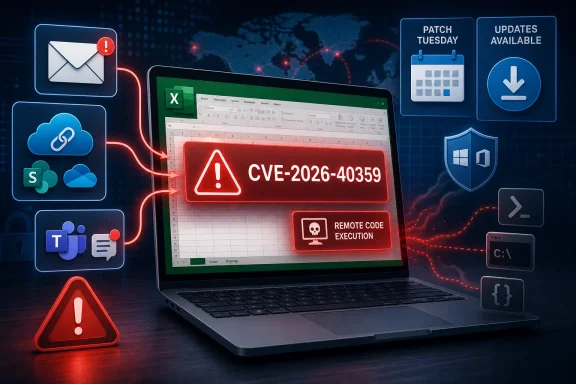
That gap is the story. Excel vulnerabilities are not exotic in the way kernel escapes or hypervisor bugs can be, but they are dangerous precisely because they sit in the daily workflow of finance teams, analysts, operations staff, and executives. A spreadsheet is one of the few executable-adjacent objects that still moves through an organization with the social legitimacy of an invoice, a forecast, or a quarterly model.
Microsoft Gives Defenders a Patch, Not a Crime Scene
CVE-2026-40359 lands in familiar Microsoft territory: a remote code execution flaw in a productivity application that attackers can package as ordinary business content. The user-supplied advisory context emphasizes report confidence, a metric that measures how certain the industry should be that a vulnerability exists and how credible the known technical details are. In plain language, it asks whether defenders are looking at a confirmed flaw, a rumor with a CVE number, or something in between.
For this case, the important practical fact is that Microsoft has acknowledged the vulnerability in its own Security Update Guide. That matters because vendor acknowledgement moves the issue out of the realm of speculative scanner noise. Even when Microsoft withholds deep root-cause detail, the presence of an MSRC entry is enough for enterprise patch teams to treat the vulnerability as real.
But acknowledgement is not the same thing as transparency. The public advisory model often gives administrators just enough to prioritize remediation: product, impact, severity, affected versions, and update availability. It rarely gives enough to explain exactly how a malformed workbook reaches a vulnerable parsing path, how reliable exploitation is, or what telemetry defenders should hunt for after the fact.
That is not merely a complaint from curious security researchers. It changes how defenders behave. When the technical detail is thin, organizations cannot build precise detections; they fall back to broad controls such as blocking suspicious attachments, hardening macro policy, restricting file preview behavior, and accelerating Office updates.
Excel Remains the Perfectly Boring Attack Surface
Excel is an ideal target not because users think of it as dangerous, but because they do not. A spreadsheet can contain formulas, links, external data references, embedded objects, legacy features, and complex file structures accumulated across decades of compatibility decisions. The product’s power is inseparable from its attack surface.
Remote code execution in Excel usually does not mean an attacker can reach across the internet and compromise a machine that has never touched attacker-controlled content. In Office advisories, “remote” often means the attacker is remote from the victim and can trigger exploitation through a crafted file, provided the target opens or previews it. That distinction matters, but it should not lull anyone into comfort.
User interaction is a weaker barrier than it sounds. Organizations train employees to open spreadsheets every day. Finance teams expect spreadsheets from vendors, HR expects them from candidates or benefits providers, sales teams expect them from customers, and executives expect them from consultants. Attackers do not need to invent an unnatural behavior; they only need to counterfeit a routine one.
Excel also travels through channels that security teams already struggle to police. Email gateways, Teams chats, SharePoint libraries, OneDrive links, ticketing systems, and customer portals all become potential file-delivery paths. Once a malicious workbook is inside a collaboration ecosystem, the line between “external attachment” and “trusted business document” begins to blur.
Report Confidence Is the Quiet Metric That Decides Urgency
The user-provided definition of report confidence is more than a CVSS footnote. It captures a recurring problem in vulnerability management: defenders are constantly asked to prioritize issues whose details are unevenly disclosed. A high-confidence vulnerability with sparse public detail can be more urgent than a richly described but unconfirmed claim.
In this case, Microsoft’s acknowledgement is the anchor. The vendor of the affected software has published an advisory for CVE-2026-40359, so security teams should not treat the issue as a third-party rumor waiting for validation. The absence of public exploit code or a widely circulated technical teardown would reduce some forms of short-term attacker enablement, but it does not reduce the obligation to patch.
The metric also has a second edge. The more precise the public technical information becomes, the more useful it becomes to both defenders and attackers. A complete root-cause analysis can help detection engineers, but it can also shorten the path from advisory to weaponized document. Microsoft’s sparse advisory style is partly a risk-management choice, not simply bureaucratic minimalism.
That leaves administrators in an awkward middle. They must act as though the vulnerability is real, because the vendor says it is. They must not act as though they fully understand exploitation, because the public record does not support that confidence. Mature vulnerability response lives in that uncomfortable distinction.
Patch Tuesday Turns Office Into an Enterprise Dependency Problem
Office patching is often treated as less dramatic than Windows patching, but in enterprise terms it can be harder. Windows cumulative updates follow well-worn rings and maintenance windows. Office updates are entangled with Microsoft 365 Apps channels, device management platforms, add-in compatibility, line-of-business workflows, VDI images, and users who may not restart applications when IT wants them to.
That operational sprawl is why Excel RCE vulnerabilities deserve attention even when they do not arrive with a headline-grabbing zero-day label. The vulnerable software is not confined to a server role or a narrow application pool. It may be present on nearly every managed desktop, many unmanaged endpoints, and a long tail of shared workstations or jump boxes where productivity software was installed years ago and forgotten.
Microsoft 365 Apps has improved the default update story for many organizations, but “auto-updating” is not the same as “updated everywhere.” Devices can be offline, update channels can lag, policies can defer builds, and application sessions can remain open long enough to delay replacement of vulnerable binaries. The gap between published fix and deployed fix is still where attackers live.
The situation is worse in environments that freeze Office builds for compatibility. Some organizations have legitimate reasons to slow updates: complex Excel add-ins, legacy financial models, macros, ODBC integrations, or regulatory validation cycles. But every deferral needs an owner and an expiration date. “We cannot update Excel this week” is a risk decision; “we forgot which machines are still on the old build” is negligence.
The Real Exposure Is the Document Pipeline
The obvious mitigation is to install Microsoft’s update. The less obvious work is to examine the document pipeline that allows suspicious spreadsheets to reach high-value users in the first place. CVE-2026-40359 should push administrators to think about Office as an ingestion surface, not merely as a desktop application.
Protected View, Mark of the Web handling, attachment sandboxing, macro restrictions, and file-block policies all matter because they create friction between a malicious document and code execution. None of these controls is perfect, and some are routinely weakened for business convenience. But layered friction is valuable precisely because Office exploitation often depends on chaining user trust with parser behavior and legacy compatibility.
Email remains the first place to look. Security teams should review whether Excel attachments from external senders are being scanned, detonated, rewritten, or blocked based on file type and sender reputation. They should also pay attention to compressed archives and cloud-sharing links, which attackers use to move payloads around attachment controls.
Collaboration platforms deserve equal scrutiny. A workbook uploaded into Teams or SharePoint can inherit the trust of the workspace around it. If a compromised partner account or guest user plants a malicious file in a shared project area, the delivery mechanism looks less like phishing and more like normal collaboration. That is a much harder story for user awareness training to defeat.
Macros Are Not the Whole Story Anymore
For years, Office security conversations revolved around macros. That made sense: malicious VBA was a durable and wildly successful intrusion technique. Microsoft’s decision to block internet-sourced macros by default changed attacker economics, but it did not make Office documents safe.
Remote code execution vulnerabilities like CVE-2026-40359 are a reminder that the risk can sit below the macro layer. If a parser, rendering engine, embedded object handler, or file-format component mishandles crafted content, the user may not need to enable macros at all. The exploit may live in the document structure rather than in visible automation logic.
This is why “we block macros” is an incomplete answer to Office risk. It is a good answer to one class of attack, not to every class of attack. File parsing vulnerabilities care less about user intent and more about whether vulnerable code is reached while opening, previewing, indexing, or converting a document.
Administrators should therefore resist the temptation to reduce Excel security to a single toggle. Macro policy, Protected View, application control, endpoint detection, attachment detonation, and rapid patching all play different roles. A good Office hardening posture assumes one layer will fail and asks what remains.
Security Teams Need to Watch the Preview Pane and the Edge Cases
The phrase “user interaction required” can conceal operational nuance. In some Office and Windows scenarios, preview handlers, indexing components, or automated workflows may touch document content before a user intentionally opens a file. Not every Excel vulnerability is exploitable through preview, and defenders should not assume that CVE-2026-40359 is unless Microsoft says so. But the category is important enough to review.
High-risk organizations often disable preview behavior for Office documents in email clients or enforce safer handling for attachments from untrusted sources. That can be unpopular with users, because previewing is convenient. Security controls that remove convenience tend to get challenged unless administrators can tie them to concrete threat models.
This vulnerability provides that tie. The business case is straightforward: if crafted spreadsheet content can trigger code execution in Excel, then every automatic or semi-automatic path that processes spreadsheets deserves a second look. The goal is not panic; it is inventory.
That inventory should include endpoint search tools, DLP systems, document conversion services, automated reporting workflows, and any service account that opens Excel files as part of a business process. The desktop is not always the only place where Excel content gets parsed.
Detection Is Hard When the Advisory Is Thin
A sparse advisory leaves defenders with a detection problem. Without a detailed root cause, file structure indicator, exploit primitive, or known attack chain, security teams cannot reliably write a precise rule for CVE-2026-40359 exploitation. They can still hunt around the behavior that successful exploitation would likely produce.
That means looking for Office child processes that should not exist, such as command shells, scripting hosts, LOLBin usage, unusual network connections, or payload staging from temporary directories. Excel spawning PowerShell, wscript, mshta, rundll32, regsvr32, or cmd should already be high-signal in most environments. The challenge is not inventing those detections; it is tuning them so analysts do not drown in legitimate automation noise.
Endpoint detection platforms are generally better positioned than network tools for this class of vulnerability. The malicious document may arrive over encrypted channels, cloud links, or collaboration tools that obscure content from perimeter devices. Once the exploit runs, however, the endpoint still has to create processes, touch memory, write files, or establish persistence.
Organizations with mature logging should also correlate suspicious Excel activity with file provenance. Did the workbook come from an external email? Was it downloaded from a newly seen domain? Did it originate in a Teams chat with a guest account? Did multiple users open the same file within a short window? Those contextual details can turn weak behavioral signals into a coherent incident.
The Patch Is Necessary, but It Is Not the Whole Response
The cleanest response to CVE-2026-40359 is to deploy the applicable Microsoft update across affected Office installations. That should be noncontroversial. The harder part is deciding what to do during the days or weeks before deployment reaches the stubborn corners of the estate.
For most organizations, the interim answer is layered reduction of document risk. Block or quarantine unexpected Excel files from external senders where business process allows it. Enforce Protected View for internet-sourced documents. Limit Office child process creation through attack surface reduction rules where compatible. Make sure macro restrictions are not being bypassed by trusted locations that have become dumping grounds.
The trusted-location problem is especially common. Over time, administrators create exceptions for shared folders, departmental templates, or legacy workflows. Those exceptions can become quiet bypasses around controls that otherwise look strong on paper. A vulnerability like this is a useful excuse to audit them.
There is also a communications task. Users do not need a lecture on CVSS scoring, but they do need timely guidance when attackers are likely to exploit business documents. A short warning to be cautious with unexpected spreadsheets, especially those urging immediate action, is not a substitute for patching. It is a temporary guardrail while patching catches up.
Attackers Still Love the Spreadsheet Because Business Still Does
Excel’s endurance as an attack target says something uncomfortable about enterprise computing. The most important business logic in many organizations is not in a modern application with code review, CI/CD, and centralized access control. It is in workbooks maintained by departments, traded over email, and trusted because they are familiar.
That familiarity is why Office vulnerabilities keep paying off. Attackers understand that a spreadsheet can be socially engineered with almost no imagination. A budget revision, remittance notice, supplier quote, shipping list, payroll adjustment, or audit request all provide plausible pretexts. The more ordinary the lure, the less it looks like a lure.
Microsoft has spent years tightening Office defaults, and those changes matter. Blocking internet macros by default was a meaningful shift. Protected View and cloud-based detonation have raised the cost of commodity attacks. But Excel’s compatibility burden is enormous, and any product that must open decades of real-world documents will continue to carry parser risk.
This is not a reason to abandon Excel. It is a reason to stop pretending spreadsheets are inert documents. In a modern enterprise, Excel is a programmable, networked, extensible runtime wrapped in a grid that everyone recognizes.
The Practical Reading for WindowsForum Readers
For Windows enthusiasts and home users, the lesson is simple: update Office promptly and treat unexpected spreadsheets like executable content. The risk is not limited to enterprises, though enterprises are the richer target. A malicious workbook can be aimed at anyone who handles invoices, taxes, investments, school forms, or small-business records.
For sysadmins, the issue is more strategic. CVE-2026-40359 should go into the same operational bucket as other Office RCEs: patch quickly, validate update coverage, harden document handling, and monitor for Office behaving like a launcher. The advisory may not offer satisfying technical detail, but it offers enough to justify action.
For security teams, the report-confidence angle is the key. A confirmed vendor advisory with limited details should not be ignored because the exploit story is incomplete. It should be handled as a real vulnerability whose public opacity increases the need for compensating controls.
For developers and power users who build Excel-heavy workflows, this is also a nudge to reduce unnecessary trust in complex workbooks. Signed macros, controlled template locations, least-privilege access to shared file repositories, and migration of critical logic into managed systems can reduce the blast radius when the next Office parsing bug appears.
The Spreadsheet Patch Should Trigger More Than a Ticket
CVE-2026-40359 is not just another row in a vulnerability dashboard if Excel is everywhere in your environment. The immediate job is patching, but the durable value is using the advisory to tighten the systems that move documents around your organization.
- Microsoft’s acknowledgement in the Security Update Guide is enough to treat CVE-2026-40359 as a real Excel remote code execution issue, even if public technical detail remains limited.
- The most likely enterprise risk path is a crafted spreadsheet delivered through email, cloud sharing, collaboration platforms, or another ordinary business document workflow.
- Macro blocking remains important, but it does not fully address file parsing vulnerabilities that may trigger before any macro decision is relevant.
- Administrators should verify Office update coverage across Microsoft 365 Apps channels, frozen builds, VDI images, and unmanaged or lightly managed endpoints.
- Detection should focus on suspicious Excel behavior, especially child processes, unusual network activity, payload staging, and documents with external or newly seen provenance.
- The advisory is a useful moment to audit Protected View, trusted locations, preview behavior, attachment handling, and attack surface reduction policies.
The larger pattern is not going away. Microsoft can keep hardening Office, and defenders can keep shrinking the attack surface, but Excel will remain a high-value target because business still runs through spreadsheets. CVE-2026-40359 is therefore best read as both a patching event and a reminder: the documents users trust most are often the ones security teams must distrust first.