

Microsoft has listed CVE-2026-40362 as a Microsoft Excel remote code execution vulnerability in its Security Update Guide, with the public record emphasizing confidence in the vulnerability’s existence and the credibility of available technical details rather than disclosing a full exploit narrative. That distinction matters because Excel vulnerabilities live in one of the most abused attack surfaces in enterprise computing: the document. The immediate lesson is not that every spreadsheet is a shell waiting to happen, but that Office file handling remains a durable bridge between social engineering and code execution. For administrators, the practical question is less “how dramatic is the CVE title?” and more “how quickly can we make malicious workbook handling boring again?”
Microsoft’s Security Update Guide entries often read like haiku for incident responders: a product, an impact, a severity model, and just enough detail to tell patch teams where to look. CVE-2026-40362 appears in that tradition. The user-facing headline is plain enough — Microsoft Excel remote code execution — but the surrounding language focuses on the confidence and maturity of the vulnerability information rather than a public walk-through of the bug.
That is not an accident. Vendors have to balance three audiences at once: defenders who need operational detail, customers who need prioritization, and attackers who would happily accept a free parser map. The result is a disclosure format that can feel frustratingly thin, especially when the affected product is as ubiquitous as Excel.
But sparse does not mean meaningless. When Microsoft acknowledges an Excel RCE in the Security Update Guide, the defensive posture should shift from curiosity to execution. The advisory may not describe the root cause in a way that satisfies reverse engineers, but it is enough to move the issue into patch management, exposure reduction, and user-risk territory.
The phrase remote code execution also needs careful reading in Office-land. In many Microsoft Office advisories, “remote” refers to the attacker’s location, not necessarily to a wormable network service that can be popped from across the internet without user involvement. The attack frequently becomes “local” at the moment a victim previews or opens a crafted document.
That nuance is not comforting. It is the exact reason Office vulnerabilities remain useful to attackers. A spreadsheet does not need to be a network daemon to be dangerous; it only needs to be persuasive enough to reach a user, an inbox, a shared drive, a Teams chat, or a procurement workflow.
The paradox is familiar: the more useful Excel becomes, the more dangerous it is as an input surface. It must parse ancient file formats, modern workbook structures, embedded content, external links, calculation chains, charts, metadata, and interoperability baggage from older Office generations. Every one of those features represents a place where malformed content can force the application down a rarely traveled path.
Attackers do not need Excel to be broadly broken. They need one document format edge case that turns controlled bytes into controlled behavior. They need one parsing defect, one memory-management mistake, one trust-boundary failure, or one feature interaction that security testing failed to catch before release.
The average user still sees a spreadsheet as a business object, not executable material. Security professionals know better, but the cultural trust around Office documents remains powerful. “Invoice,” “forecast,” “pricing,” “reconciliation,” “payroll,” and “shipping manifest” are not just filenames; they are social engineering payloads with a file extension attached.
That is why Excel RCE advisories deserve more attention than their CVSS shorthand sometimes receives. A vulnerability that requires user interaction can still be highly exploitable when the interaction is indistinguishable from ordinary work.
A vulnerability can exist in several public states. At the weakest end, there is only a rumor or a vague impact claim. In the middle, researchers may have enough evidence to identify a likely component or class of bug, but not a complete root-cause account. At the strongest end, the vendor confirms the issue, ships a fix, and effectively acknowledges that the vulnerability is real.
CVE-2026-40362 sits in the category defenders should take seriously because Microsoft’s own advisory establishes the vulnerability as a vendor-tracked issue. Even if exploit details are not public, a patch itself can become a roadmap. Attackers routinely diff patched and unpatched binaries, inspect changed code paths, and look for the smallest reproducible case that demonstrates the flaw.
That is the uncomfortable truth behind modern Patch Tuesday operations. The day a fix lands is also the day exploit-development clocks start ticking. Security teams are not just racing known exploit code; they are racing the conversion of vendor acknowledgement into attacker understanding.
The metric also reminds us that exploitability is not binary. A bug can be confirmed but technically hard. It can be technically simple but operationally awkward. It can require user interaction but be easy to deliver at scale. Excel vulnerabilities often land in that last category, where the exploit chain depends less on network reachability and more on the attacker’s ability to get a crafted file in front of a human or an automated processing system.
That difference matters for triage, but it should not become an excuse for delay. Phishing, business email compromise, compromised file shares, cloud storage links, and third-party portals are all remote delivery mechanisms. The victim’s machine may do the actual parsing, but the attack still begins outside the organization.
Preview surfaces complicate this further. In some Office vulnerability classes, previewing a document can be enough to trigger the vulnerable parsing path, depending on the affected component and configuration. Defenders should not assume that “do not open suspicious files” is a sufficient mitigation, because modern productivity software is designed to inspect, index, thumbnail, preview, and synchronize files before a user makes an explicit trust decision.
This is where Excel’s business importance becomes a liability. Blocking all spreadsheets at the mail gateway may be possible for a narrow set of users, but it is usually unrealistic across finance, sales, logistics, HR, education, and operations. The answer is layered friction: patch the app, harden document handling, restrict risky content, and reduce the number of places where untrusted spreadsheets can be automatically processed.
The real-world exploit chain may look mundane. A crafted workbook arrives as an attachment or download. A user opens it because the pretext is plausible. Excel processes malformed content. Code runs in the context of the user. The attacker then pivots through credential theft, persistence, lateral movement, or data staging.
Nothing about that chain requires cinematic hacking. It requires an ordinary document workflow, which is exactly why the risk persists.
Microsoft 365 Apps generally gives administrators better servicing options than the old MSI-era Office world, but it also introduces channel complexity. Current Channel, Monthly Enterprise Channel, Semi-Annual Enterprise Channel, LTSC builds, retail installs, and older perpetual versions can coexist in the same estate. The result is that “we patched Office” is not a single fact; it is a fleet-management claim that needs evidence.
Admins should verify build numbers, update channels, and inventory coverage. They should know which devices are excluded from normal update rings, which departments resist Office updates because of line-of-business add-ins, and which servers or virtual desktops have Office installed for reporting, automation, or document conversion.
The riskiest systems are often not the obvious laptops. They are shared workstations, kiosk-like desktops, jump boxes with Office installed “temporarily,” old VDI images, lab machines, and servers used to process documents in ways no one documented. If Excel exists on a system that can touch sensitive data, it belongs in the vulnerability-management scope.
There is also a long tail of older Office versions in the wild. Unsupported or barely supported Office deployments turn every new Excel advisory into a governance problem. If a product is too old to receive the relevant fix, the mitigation conversation changes from patch timing to isolation, removal, or upgrade.
But macros were never the whole Office threat model. Parser bugs, memory corruption, embedded object abuse, template injection, external relationship tricks, add-in abuse, and preview-handler issues all sit outside the simple “never enable macros” lesson. CVE-2026-40362 is a useful reminder that a document can be dangerous even when the user never agrees to run a macro.
That distinction matters for helpdesk scripts and awareness training. If the advice is only “don’t enable macros,” users may think a non-macro workbook is safe. If the advice is “be careful with attachments,” users may still assume internal-looking business documents are trustworthy. The better message is that files from untrusted or unexpected sources should be treated as active content, especially when they arrive with urgency, secrecy, money, or credentials attached.
Security teams should avoid turning every advisory into user blame. Users are asked to process documents all day. The system is built around that behavior. The better defense is to make the dangerous path less available and the safe path more automatic.
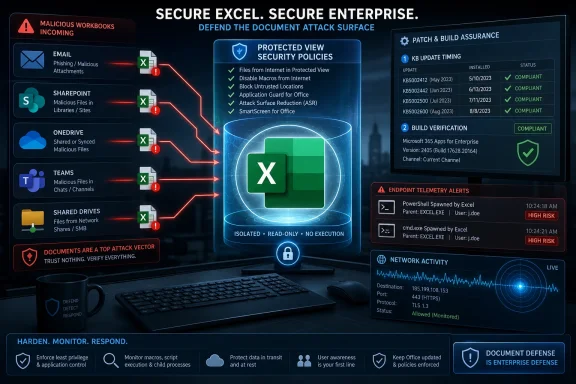
That means Protected View, Attack Surface Reduction rules, controlled folder access where appropriate, hardened Office policies, safe attachment detonation, mail filtering, endpoint detection, and fast Office servicing. User caution helps, but it should be the last layer, not the architecture.
Each handoff can blur the original trust boundary. A workbook uploaded by an external partner may later appear in an internal SharePoint library. A file downloaded from a vendor portal may be forwarded by a trusted colleague. A spreadsheet generated by a compromised third-party system may carry the reputation of a legitimate business relationship.
This is where file-origin metadata and policy enforcement matter. Mark-of-the-Web protections, Protected View, and cloud attachment scanning only help if the file’s journey preserves enough context for security controls to make the right decision. Once files are unzipped, re-saved, copied across systems, or passed through legacy tools, that context can disappear.
Document-processing automation adds another layer of concern. Some organizations use Office components, third-party libraries, or desktop automation to parse spreadsheets for reporting and ingestion. If those workflows run with service-account privileges or broad data access, a document parser vulnerability becomes more than a user workstation problem.
Administrators should ask uncomfortable questions. Where do untrusted spreadsheets enter the organization? Which systems open or transform them automatically? Are any Office applications installed on servers despite Microsoft’s long-standing cautions around unattended Office automation? Do service accounts have more access than the document-processing task requires?
The answer is rarely clean. But mapping those flows is the difference between treating CVE-2026-40362 as “just another Office patch” and understanding where the organization actually consumes risky content.
That is why Office RCE prioritization should include business plausibility. A vulnerability with user interaction can be more urgent in an organization where users are expected to open external files constantly. A technically “local” attack can be practically remote when the file-delivery pipeline is email, chat, and cloud sync.
The vulnerability-confidence metric also plays into prioritization. If a vendor-confirmed issue has credible technical details, the question is no longer whether the bug is real. The question becomes how quickly attackers can operationalize it and how exposed the organization is during that window.
There is a temptation to wait for signs of exploitation before accelerating. That is understandable in overloaded environments, but it is dangerous with Office bugs. By the time broad exploitation is visible, phishing campaigns may already have reached the inbox, and the vulnerable population may already be partially compromised.
Risk is not just the score. Risk is the score multiplied by reach, workflow, user behavior, and patch latency. Excel has reach. It has workflow. It has user behavior. The remaining variable is latency.
Protected View remains one of the most important mitigations for documents from the internet or unsafe locations. It is not a magic shield, and vulnerabilities sometimes pierce defensive boundaries, but disabling it for convenience is a gift to attackers. If users routinely complain that Protected View slows them down, that is usually a process problem, not a reason to remove the control.
Attack Surface Reduction rules deserve more attention than they receive. In Microsoft Defender-managed environments, rules that block Office from creating child processes, injecting code, or launching executable content can disrupt many document-based intrusion chains. They may require testing, especially in macro-heavy or add-in-heavy environments, but they are among the most practical controls for reducing Office post-exploitation value.
Mail and collaboration filtering should also be tuned for workbook delivery patterns. Blocking every Excel file may be unrealistic, but higher scrutiny for external spreadsheets, password-protected archives, mismatched file types, and unusual sender-recipient relationships is achievable. Detonation systems should be evaluated not only for malware verdicts but for their ability to exercise document parsing paths.
Finally, endpoint telemetry matters. If Excel spawns PowerShell, cmd.exe, script interpreters, mshta, rundll32, regsvr32, or unusual network connections, that should not be treated as normal office productivity. Even if CVE-2026-40362 exploitation is not publicly confirmed in a given environment, those behaviors are classic enough to deserve alerting.
Security teams should be able to answer which endpoints have Excel installed, which version and channel they run, which devices are outside policy, and which users are most exposed to external spreadsheet traffic. Those answers should come from inventory and telemetry, not from a spreadsheet someone manually updates once a quarter — though the irony would be appropriate.
The challenge is that Office is everywhere by design. It travels with user licensing, device images, shared desktops, contractors, and departmental exceptions. In many environments, Office inventory is less tidy than Windows inventory because productivity software is seen as baseline furniture rather than a high-risk application stack.
That mindset needs to change. Office is a privileged parser for untrusted business content. Excel in particular can access local files, authenticate to cloud services, interact with add-ins, and become the first user-mode process in an intrusion chain. Treating it as “just an app” undersells its security significance.
Good asset intelligence also helps avoid overreaction. If a particular vulnerable build exists only on isolated lab machines with no email access, that is different from vulnerable builds in finance and procurement. Precision makes urgency smarter.
The weakness is that the same format can flatten meaning. “Microsoft Excel Remote Code Execution Vulnerability” is technically accurate, but it does not tell defenders whether the bug is a file-format parser issue, a calculation engine flaw, an embedded object problem, a preview vector, or a feature-specific defect. Sometimes Microsoft includes CWE mappings or exploitation assessments; sometimes the most useful details remain implied.
There are good reasons for restraint. Overdisclosure can arm attackers, especially in the early patch window. But underdisclosure pushes defenders toward generic prioritization, where they must infer risk from product, impact, score, and past attack patterns.
The confidence metric partially fills that gap. It tells readers that the credibility of technical knowledge matters. A confirmed issue with credible details is more urgent than a vague claim, even if the exploit code is not public. That is a mature way to think about vulnerability risk, but it requires administrators to read beyond the headline.
The ideal disclosure would give defenders enough specificity to locate exposure without giving attackers a recipe. That balance is hard. Until vendors consistently find it, security teams have to build their own context around sparse advisories.
In mature environments, Office security updates should flow through rings. Pilot devices receive the update quickly. Compatibility-sensitive departments test against critical add-ins and templates. Broad deployment follows with telemetry confirming installation, failures, and rollback events. Exceptions are documented with compensating controls and expiration dates.
In less mature environments, the process is messier. Users may have disabled updates. Devices may be off-network. Office may be installed from different channels. Line-of-business add-ins may break. The vulnerability then becomes a negotiation between security urgency and business continuity.
That negotiation should not start on disclosure day. Organizations that rely heavily on Office should maintain test suites for critical workbooks, add-ins, macros, and templates. If every Office update is a fresh compatibility mystery, patching will always lose time.
The lesson is not unique to CVE-2026-40362, but the Excel context makes it sharper. A product that underpins business workflows cannot be patched casually, yet it cannot be left exposed. The only sustainable answer is to make Office patch validation a routine operational muscle.
Compatibility is a security cost center. Every retained feature, legacy parser, and interoperability behavior adds testing burden. Microsoft can sandbox, harden, fuzz, isolate, and deprecate, but it cannot simply turn Excel into a minimalist grid without breaking the world’s business processes.
This is why document security is moving toward containment rather than trust. Cloud rendering, protected preview, application control, endpoint isolation, and policy-driven restrictions are all attempts to let users view business content without handing every file the keys to the workstation. The future of Office security is less about believing documents and more about reducing what document parsing can do.
Enterprises should follow that direction. High-risk users may need stricter policies. External workbooks may need to open in isolated environments. Sensitive departments may need stronger controls around add-ins and external links. Legacy workflows that require unsafe Office behavior should be retired rather than endlessly exempted.
The uncomfortable part is cultural. Excel is where many organizations hide complexity they never formally engineered. Securing it means confronting not only a vulnerability, but an entire shadow architecture of business logic.
Source: MSRC Security Update Guide - Microsoft Security Response Center
 Microsoft’s Sparse Advisory Still Says Plenty
Microsoft’s Security Update Guide entries often read like haiku for incident responders: a product, an impact, a severity model, and just enough detail to tell patch teams where to look. CVE-2026-40362 appears in that tradition. The user-facing headline is plain enough — Microsoft Excel remote code execution — but the surrounding language focuses on the confidence and maturity of the vulnerability information rather than a public walk-through of the bug.That is not an accident. Vendors have to balance three audiences at once: defenders who need operational detail, customers who need prioritization, and attackers who would happily accept a free parser map. The result is a disclosure format that can feel frustratingly thin, especially when the affected product is as ubiquitous as Excel.
But sparse does not mean meaningless. When Microsoft acknowledges an Excel RCE in the Security Update Guide, the defensive posture should shift from curiosity to execution. The advisory may not describe the root cause in a way that satisfies reverse engineers, but it is enough to move the issue into patch management, exposure reduction, and user-risk territory.
The phrase remote code execution also needs careful reading in Office-land. In many Microsoft Office advisories, “remote” refers to the attacker’s location, not necessarily to a wormable network service that can be popped from across the internet without user involvement. The attack frequently becomes “local” at the moment a victim previews or opens a crafted document.
That nuance is not comforting. It is the exact reason Office vulnerabilities remain useful to attackers. A spreadsheet does not need to be a network daemon to be dangerous; it only needs to be persuasive enough to reach a user, an inbox, a shared drive, a Teams chat, or a procurement workflow.
Excel Remains the Enterprise’s Most Trusted Untrusted Input
Excel is not merely an app. In many organizations, it is a workflow engine, a database substitute, a reporting layer, a finance platform, and an unofficial integration fabric held together by formulas, macros, OLE objects, Power Query, add-ins, templates, and decades of compatibility promises. That makes Excel a gift to business users and a recurring headache for security teams.The paradox is familiar: the more useful Excel becomes, the more dangerous it is as an input surface. It must parse ancient file formats, modern workbook structures, embedded content, external links, calculation chains, charts, metadata, and interoperability baggage from older Office generations. Every one of those features represents a place where malformed content can force the application down a rarely traveled path.
Attackers do not need Excel to be broadly broken. They need one document format edge case that turns controlled bytes into controlled behavior. They need one parsing defect, one memory-management mistake, one trust-boundary failure, or one feature interaction that security testing failed to catch before release.
The average user still sees a spreadsheet as a business object, not executable material. Security professionals know better, but the cultural trust around Office documents remains powerful. “Invoice,” “forecast,” “pricing,” “reconciliation,” “payroll,” and “shipping manifest” are not just filenames; they are social engineering payloads with a file extension attached.
That is why Excel RCE advisories deserve more attention than their CVSS shorthand sometimes receives. A vulnerability that requires user interaction can still be highly exploitable when the interaction is indistinguishable from ordinary work.
The Confidence Metric Is a Warning About Attacker Readiness
The metric language supplied with the advisory is not decorative. It describes the degree of confidence in the vulnerability’s existence and the credibility of known technical details. In practice, that is a signal about how much the world knows — and how much attackers may be able to infer.A vulnerability can exist in several public states. At the weakest end, there is only a rumor or a vague impact claim. In the middle, researchers may have enough evidence to identify a likely component or class of bug, but not a complete root-cause account. At the strongest end, the vendor confirms the issue, ships a fix, and effectively acknowledges that the vulnerability is real.
CVE-2026-40362 sits in the category defenders should take seriously because Microsoft’s own advisory establishes the vulnerability as a vendor-tracked issue. Even if exploit details are not public, a patch itself can become a roadmap. Attackers routinely diff patched and unpatched binaries, inspect changed code paths, and look for the smallest reproducible case that demonstrates the flaw.
That is the uncomfortable truth behind modern Patch Tuesday operations. The day a fix lands is also the day exploit-development clocks start ticking. Security teams are not just racing known exploit code; they are racing the conversion of vendor acknowledgement into attacker understanding.
The metric also reminds us that exploitability is not binary. A bug can be confirmed but technically hard. It can be technically simple but operationally awkward. It can require user interaction but be easy to deliver at scale. Excel vulnerabilities often land in that last category, where the exploit chain depends less on network reachability and more on the attacker’s ability to get a crafted file in front of a human or an automated processing system.
“Remote Code Execution” Is Not Always the Same Kind of Remote
For Windows administrators, the most common misunderstanding around Office RCE is semantic. A remote code execution vulnerability in Excel does not necessarily mean an attacker can send packets to port 443 and seize a workstation. It often means the attacker can cause code execution by delivering a malicious document from somewhere else and convincing the target environment to process it.That difference matters for triage, but it should not become an excuse for delay. Phishing, business email compromise, compromised file shares, cloud storage links, and third-party portals are all remote delivery mechanisms. The victim’s machine may do the actual parsing, but the attack still begins outside the organization.
Preview surfaces complicate this further. In some Office vulnerability classes, previewing a document can be enough to trigger the vulnerable parsing path, depending on the affected component and configuration. Defenders should not assume that “do not open suspicious files” is a sufficient mitigation, because modern productivity software is designed to inspect, index, thumbnail, preview, and synchronize files before a user makes an explicit trust decision.
This is where Excel’s business importance becomes a liability. Blocking all spreadsheets at the mail gateway may be possible for a narrow set of users, but it is usually unrealistic across finance, sales, logistics, HR, education, and operations. The answer is layered friction: patch the app, harden document handling, restrict risky content, and reduce the number of places where untrusted spreadsheets can be automatically processed.
The real-world exploit chain may look mundane. A crafted workbook arrives as an attachment or download. A user opens it because the pretext is plausible. Excel processes malformed content. Code runs in the context of the user. The attacker then pivots through credential theft, persistence, lateral movement, or data staging.
Nothing about that chain requires cinematic hacking. It requires an ordinary document workflow, which is exactly why the risk persists.
Patch Management Has to Include Office, Not Just Windows
Many organizations still treat Windows patching as the center of gravity and Office patching as something that happens somewhere nearby. That was always a mistake, but Excel RCEs make it especially visible. The operating system can be current while the productivity layer remains a soft target.Microsoft 365 Apps generally gives administrators better servicing options than the old MSI-era Office world, but it also introduces channel complexity. Current Channel, Monthly Enterprise Channel, Semi-Annual Enterprise Channel, LTSC builds, retail installs, and older perpetual versions can coexist in the same estate. The result is that “we patched Office” is not a single fact; it is a fleet-management claim that needs evidence.
Admins should verify build numbers, update channels, and inventory coverage. They should know which devices are excluded from normal update rings, which departments resist Office updates because of line-of-business add-ins, and which servers or virtual desktops have Office installed for reporting, automation, or document conversion.
The riskiest systems are often not the obvious laptops. They are shared workstations, kiosk-like desktops, jump boxes with Office installed “temporarily,” old VDI images, lab machines, and servers used to process documents in ways no one documented. If Excel exists on a system that can touch sensitive data, it belongs in the vulnerability-management scope.
There is also a long tail of older Office versions in the wild. Unsupported or barely supported Office deployments turn every new Excel advisory into a governance problem. If a product is too old to receive the relevant fix, the mitigation conversation changes from patch timing to isolation, removal, or upgrade.
The Macro Era Taught the Wrong Lesson
For years, Office security training revolved around macros. That emphasis was justified. Malicious VBA, weaponized documents, and “Enable Content” lures were staples of commodity malware and targeted intrusion alike. Microsoft’s later restrictions on internet-delivered macros changed attacker economics in a meaningful way.But macros were never the whole Office threat model. Parser bugs, memory corruption, embedded object abuse, template injection, external relationship tricks, add-in abuse, and preview-handler issues all sit outside the simple “never enable macros” lesson. CVE-2026-40362 is a useful reminder that a document can be dangerous even when the user never agrees to run a macro.
That distinction matters for helpdesk scripts and awareness training. If the advice is only “don’t enable macros,” users may think a non-macro workbook is safe. If the advice is “be careful with attachments,” users may still assume internal-looking business documents are trustworthy. The better message is that files from untrusted or unexpected sources should be treated as active content, especially when they arrive with urgency, secrecy, money, or credentials attached.
Security teams should avoid turning every advisory into user blame. Users are asked to process documents all day. The system is built around that behavior. The better defense is to make the dangerous path less available and the safe path more automatic.
That means Protected View, Attack Surface Reduction rules, controlled folder access where appropriate, hardened Office policies, safe attachment detonation, mail filtering, endpoint detection, and fast Office servicing. User caution helps, but it should be the last layer, not the architecture.
The Real Exposure Is in the Document Supply Chain
The most interesting risk around an Excel RCE is not a single attachment. It is the document supply chain that now defines corporate life. Spreadsheets move through email, SharePoint, OneDrive, Teams, Slack, ticketing systems, CRM exports, ERP imports, procurement portals, partner extranets, and managed file-transfer systems.Each handoff can blur the original trust boundary. A workbook uploaded by an external partner may later appear in an internal SharePoint library. A file downloaded from a vendor portal may be forwarded by a trusted colleague. A spreadsheet generated by a compromised third-party system may carry the reputation of a legitimate business relationship.
This is where file-origin metadata and policy enforcement matter. Mark-of-the-Web protections, Protected View, and cloud attachment scanning only help if the file’s journey preserves enough context for security controls to make the right decision. Once files are unzipped, re-saved, copied across systems, or passed through legacy tools, that context can disappear.
Document-processing automation adds another layer of concern. Some organizations use Office components, third-party libraries, or desktop automation to parse spreadsheets for reporting and ingestion. If those workflows run with service-account privileges or broad data access, a document parser vulnerability becomes more than a user workstation problem.
Administrators should ask uncomfortable questions. Where do untrusted spreadsheets enter the organization? Which systems open or transform them automatically? Are any Office applications installed on servers despite Microsoft’s long-standing cautions around unattended Office automation? Do service accounts have more access than the document-processing task requires?
The answer is rarely clean. But mapping those flows is the difference between treating CVE-2026-40362 as “just another Office patch” and understanding where the organization actually consumes risky content.
Severity Scores Do Not Capture Business Plausibility
CVSS is useful, but it is not a substitute for judgment. It encodes technical properties: attack vector, complexity, privileges, user interaction, scope, and impact. It does not know that your accounts-payable team opens hundreds of external spreadsheets every week, or that your engineering group exchanges Excel-based BOMs with suppliers, or that your finance close process depends on workbook templates from half the company.That is why Office RCE prioritization should include business plausibility. A vulnerability with user interaction can be more urgent in an organization where users are expected to open external files constantly. A technically “local” attack can be practically remote when the file-delivery pipeline is email, chat, and cloud sync.
The vulnerability-confidence metric also plays into prioritization. If a vendor-confirmed issue has credible technical details, the question is no longer whether the bug is real. The question becomes how quickly attackers can operationalize it and how exposed the organization is during that window.
There is a temptation to wait for signs of exploitation before accelerating. That is understandable in overloaded environments, but it is dangerous with Office bugs. By the time broad exploitation is visible, phishing campaigns may already have reached the inbox, and the vulnerable population may already be partially compromised.
Risk is not just the score. Risk is the score multiplied by reach, workflow, user behavior, and patch latency. Excel has reach. It has workflow. It has user behavior. The remaining variable is latency.
Defenders Should Harden the Boring Paths First
The best response to an Excel RCE advisory is not panic; it is disciplined reduction of the obvious paths. Patch the affected Office builds first, then validate that the patch actually landed. Office update failures can hide behind user sessions, channel deferrals, network controls, and devices that rarely connect long enough to service.Protected View remains one of the most important mitigations for documents from the internet or unsafe locations. It is not a magic shield, and vulnerabilities sometimes pierce defensive boundaries, but disabling it for convenience is a gift to attackers. If users routinely complain that Protected View slows them down, that is usually a process problem, not a reason to remove the control.
Attack Surface Reduction rules deserve more attention than they receive. In Microsoft Defender-managed environments, rules that block Office from creating child processes, injecting code, or launching executable content can disrupt many document-based intrusion chains. They may require testing, especially in macro-heavy or add-in-heavy environments, but they are among the most practical controls for reducing Office post-exploitation value.
Mail and collaboration filtering should also be tuned for workbook delivery patterns. Blocking every Excel file may be unrealistic, but higher scrutiny for external spreadsheets, password-protected archives, mismatched file types, and unusual sender-recipient relationships is achievable. Detonation systems should be evaluated not only for malware verdicts but for their ability to exercise document parsing paths.
Finally, endpoint telemetry matters. If Excel spawns PowerShell, cmd.exe, script interpreters, mshta, rundll32, regsvr32, or unusual network connections, that should not be treated as normal office productivity. Even if CVE-2026-40362 exploitation is not publicly confirmed in a given environment, those behaviors are classic enough to deserve alerting.
The Advisory Is Also a Test of Asset Intelligence
Every vulnerability story eventually becomes an asset-management story. CVE-2026-40362 is no different. You cannot patch what you cannot see, and you cannot prioritize what you cannot classify.Security teams should be able to answer which endpoints have Excel installed, which version and channel they run, which devices are outside policy, and which users are most exposed to external spreadsheet traffic. Those answers should come from inventory and telemetry, not from a spreadsheet someone manually updates once a quarter — though the irony would be appropriate.
The challenge is that Office is everywhere by design. It travels with user licensing, device images, shared desktops, contractors, and departmental exceptions. In many environments, Office inventory is less tidy than Windows inventory because productivity software is seen as baseline furniture rather than a high-risk application stack.
That mindset needs to change. Office is a privileged parser for untrusted business content. Excel in particular can access local files, authenticate to cloud services, interact with add-ins, and become the first user-mode process in an intrusion chain. Treating it as “just an app” undersells its security significance.
Good asset intelligence also helps avoid overreaction. If a particular vulnerable build exists only on isolated lab machines with no email access, that is different from vulnerable builds in finance and procurement. Precision makes urgency smarter.
Where Microsoft’s Disclosure Model Helps and Hurts
Microsoft’s modern Security Update Guide is built for scale. It lets administrators filter by product, severity, impact, CVE, release date, and remediation status. For organizations managing thousands of Microsoft advisories over time, that structure is indispensable.The weakness is that the same format can flatten meaning. “Microsoft Excel Remote Code Execution Vulnerability” is technically accurate, but it does not tell defenders whether the bug is a file-format parser issue, a calculation engine flaw, an embedded object problem, a preview vector, or a feature-specific defect. Sometimes Microsoft includes CWE mappings or exploitation assessments; sometimes the most useful details remain implied.
There are good reasons for restraint. Overdisclosure can arm attackers, especially in the early patch window. But underdisclosure pushes defenders toward generic prioritization, where they must infer risk from product, impact, score, and past attack patterns.
The confidence metric partially fills that gap. It tells readers that the credibility of technical knowledge matters. A confirmed issue with credible details is more urgent than a vague claim, even if the exploit code is not public. That is a mature way to think about vulnerability risk, but it requires administrators to read beyond the headline.
The ideal disclosure would give defenders enough specificity to locate exposure without giving attackers a recipe. That balance is hard. Until vendors consistently find it, security teams have to build their own context around sparse advisories.
The Patch Window Is Where Theory Becomes Operations
The first 72 hours after an Office RCE fix are operationally important. Not because every attacker instantly has a working exploit, but because defenders finally have something concrete to deploy while attackers finally have something concrete to study. Both sides move from speculation to implementation.In mature environments, Office security updates should flow through rings. Pilot devices receive the update quickly. Compatibility-sensitive departments test against critical add-ins and templates. Broad deployment follows with telemetry confirming installation, failures, and rollback events. Exceptions are documented with compensating controls and expiration dates.
In less mature environments, the process is messier. Users may have disabled updates. Devices may be off-network. Office may be installed from different channels. Line-of-business add-ins may break. The vulnerability then becomes a negotiation between security urgency and business continuity.
That negotiation should not start on disclosure day. Organizations that rely heavily on Office should maintain test suites for critical workbooks, add-ins, macros, and templates. If every Office update is a fresh compatibility mystery, patching will always lose time.
The lesson is not unique to CVE-2026-40362, but the Excel context makes it sharper. A product that underpins business workflows cannot be patched casually, yet it cannot be left exposed. The only sustainable answer is to make Office patch validation a routine operational muscle.
The Spreadsheet Attack Surface Will Not Shrink on Its Own
Excel’s security problem is inseparable from its success. Microsoft has spent decades preserving compatibility because customers demand it. Old files must open. Complex workbooks must calculate the same way. Add-ins must keep working. Enterprise templates must survive upgrades.Compatibility is a security cost center. Every retained feature, legacy parser, and interoperability behavior adds testing burden. Microsoft can sandbox, harden, fuzz, isolate, and deprecate, but it cannot simply turn Excel into a minimalist grid without breaking the world’s business processes.
This is why document security is moving toward containment rather than trust. Cloud rendering, protected preview, application control, endpoint isolation, and policy-driven restrictions are all attempts to let users view business content without handing every file the keys to the workstation. The future of Office security is less about believing documents and more about reducing what document parsing can do.
Enterprises should follow that direction. High-risk users may need stricter policies. External workbooks may need to open in isolated environments. Sensitive departments may need stronger controls around add-ins and external links. Legacy workflows that require unsafe Office behavior should be retired rather than endlessly exempted.
The uncomfortable part is cultural. Excel is where many organizations hide complexity they never formally engineered. Securing it means confronting not only a vulnerability, but an entire shadow architecture of business logic.
The Spreadsheet Patch That Should Change the Next Meeting
CVE-2026-40362 should be handled as an Excel RCE with practical phishing and document-processing implications, not as an abstract database entry. The safest reading is that Microsoft has confirmed enough for defenders to act, while withholding enough detail that public exploitability should not be assumed in either direction.- Organizations should verify Office and Excel build levels directly rather than assuming Windows Update compliance proves Office compliance.
- Security teams should prioritize users and systems that routinely receive spreadsheets from outside the organization.
- Administrators should keep Protected View and internet-origin document protections enabled unless there is a documented, temporary exception.
- Defender policies should watch for Excel launching child processes, scripting tools, or unusual network activity.
- Unsupported Office versions should be treated as a business-risk exception, not a harmless productivity preference.
- Document-processing services and shared workflows should be reviewed for places where spreadsheets are opened automatically or with excessive privileges.
Source: MSRC Security Update Guide - Microsoft Security Response Center
