

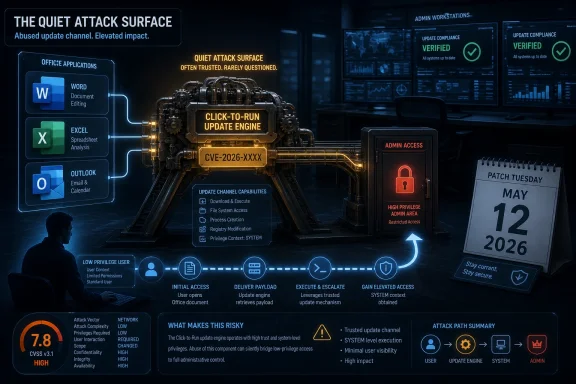
Office’s Installer Is Now Part of the Security Perimeter
Click-to-Run began life as a delivery and virtualization technology, a way to stream Office into place, keep it updated, and reduce the old MSI-era friction that made productivity-suite servicing feel like a monthly archaeology dig. In the Microsoft 365 era, it is less a convenience feature than an operating assumption. If Word, Excel, Outlook, and the rest of Office are going to patch continuously, something on the endpoint must have enough authority to fetch, stage, apply, and reconcile those updates.
That “something” is exactly why an elevation-of-privilege bug in Click-to-Run matters. The component sits in the unglamorous zone between user applications and privileged system maintenance. Attackers love that zone because it is full of brokers, services, caches, scheduled tasks, file permissions, and transition points where low-privilege activity can sometimes be laundered into higher-privilege execution.
Microsoft’s advisory does not publicly spell out a root cause for CVE-2026-40418, and that absence matters. We have a confirmed vendor entry, a severity rating, affected Office servicing context, and a score. We do not have a technical narrative that says whether the weakness lives in path handling, permission boundaries, service impersonation, update staging, symbolic-link abuse, configuration trust, or some other class of local privilege escalation.
That lack of detail should not be confused with lack of substance. Microsoft’s own acknowledgement is the key credibility marker. The vulnerability exists, the patch train includes it, and defenders should treat it as real even if the exploit mechanics remain intentionally sparse.
The CVSS Number Says “Important,” but the Deployment Model Says “Everywhere”
A 7.8 CVSS score lands squarely in the familiar territory of local privilege escalation: not remote worm fuel, not a one-click document catastrophe by itself, but serious once an attacker already has a foothold. That is the important distinction. CVE-2026-40418 is not being presented as a bug that lets an unauthenticated internet attacker take over a machine from across the network.
Instead, it belongs to the second stage of compromise. A phishing attachment, stolen credentials, malicious browser payload, rogue helpdesk tool, or abused user session gets the attacker onto the box. A local elevation bug then turns that foothold into something more durable and dangerous.
This is why security teams should resist the temptation to rank it below louder remote-code-execution issues and move on. Ransomware crews and hands-on-keyboard intruders do not need every vulnerability to be an initial access vector. They need chains. A local Office servicing flaw can be useful precisely because Office is common, trusted, and present on the workstations where users handle documents, email, browser sessions, and credentials.
The “Important” label is accurate in Microsoft’s taxonomy. It is also a reminder that enterprise risk is not just a function of exploit distance. Breadth of deployment can make a less dramatic bug operationally significant.
Click-to-Run Is a Trust Machine, and Trust Machines Fail Awkwardly
Modern Office updates involve more than copying a few binaries into a folder. Click-to-Run manages channels, versions, rollback behavior, background updates, installation state, shared components, and policy-driven configuration. In enterprise environments, it may also intersect with update deferral, content delivery optimization, management agents, and user-session timing.
That makes it a trust machine. It decides what code belongs on the system, where it should live, which process should apply it, and under what context changes should occur. Any weakness in those decisions can become a privilege boundary problem.
The irony is that the better Microsoft gets at invisible updating, the less visible this machinery becomes to users. A classic Office exploit announces itself through a document, a macro prompt, or a crash. A servicing flaw is more bureaucratic. It hides in the administrative plumbing, where success may look like nothing more than the right file being touched by the wrong identity at the wrong time.
That is why defenders should care about the category even when the individual advisory is thin. Attackers often do not need a spectacular memory-corruption primitive if a maintenance service can be convinced to perform a privileged action on their behalf. The most boring component in the room is sometimes the one with the keys.
Microsoft’s Sparse Disclosure Is a Feature and a Frustration
The user-facing advisory language around CVE-2026-40418 is restrained. It gives administrators enough to classify, prioritize, and patch, but not enough to model exploitation in detail. For exploit developers, that restraint slows the copy-and-paste race. For defenders, it creates the familiar Patch Tuesday fog.
This is the trade Microsoft has made for years. The Security Update Guide is designed to move large numbers of customers toward remediation without publishing a blueprint. That approach is defensible, especially for local privilege-escalation bugs where a patch diff can already become a research roadmap.
But it also means enterprise teams must make decisions from metadata. They look at severity, CVSS, exploitation status, disclosure status, affected products, and deployment prevalence. For CVE-2026-40418, those signals point to a vulnerability that deserves normal Patch Tuesday urgency, not panic.
The key phrase is “normal Patch Tuesday urgency.” In mature environments, that still means disciplined rollout, validation, and compliance tracking within defined maintenance windows. It does not mean waiting until proof-of-concept code appears on GitHub or a threat-intelligence vendor gives the bug a catchy name.
No Known Exploitation Is Not a Free Pass
Microsoft’s May 2026 release data indicated that CVE-2026-40418 was not publicly disclosed and not known to be exploited when released. That is good news, but it is not a reason to ignore the update. It is a reason to patch before the advisory becomes more interesting.
The patch-diff window is the uncomfortable middle period after a fix ships but before every endpoint receives it. Researchers, criminals, and brokers can compare old and new code, inspect changed permissions, monitor altered service behavior, and infer what Microsoft repaired. The less technical detail an advisory includes, the more attractive the binary diff becomes.
Local privilege escalation vulnerabilities often become more valuable after initial-access exploits circulate. A bug like this may not headline an intrusion report, but it can turn up as the glue between the first compromise and full endpoint control. That is especially true on managed workstations where users do not normally have administrative rights.
In other words, “not exploited” is a timestamp, not a destiny. The practical goal is to keep it that way inside your estate.
The Office Patch Story Is Bigger Than Office
The May 2026 Patch Tuesday release was broad, touching Office, Windows, Edge, developer tools, cloud-connected services, and enterprise infrastructure. Within that list, CVE-2026-40418 sits among other Office and Office-adjacent vulnerabilities, including remote-code-execution and spoofing issues. That clustering matters because Office remains one of the most heavily defended and heavily attacked user-facing platforms in Windows environments.
Office is no longer just a desktop suite. It is a client for cloud storage, identity, collaboration, email, automation, add-ins, macros, web content, protected view decisions, and document rendering. Every one of those integrations expands the security model.
Click-to-Run is the servicing backbone underneath that sprawl. It is supposed to reduce exposure by getting fixes out quickly and consistently. When the servicing layer itself receives an elevation-of-privilege fix, the story becomes recursive: you need the updater to patch the updater.
That does not make Microsoft’s model wrong. In fact, continuous servicing is one of the reasons Office vulnerabilities are survivable at enterprise scale. But it does mean administrators must verify that the channel is working, not merely assume it is.
The Consumer Advice Is Simple; the Enterprise Advice Is Not
For home users and small offices, the answer is blunt: let Office update, restart Office apps, and do not try to outsmart the servicing channel. The machines most likely to remain exposed are often the ones where updates have been paused, Office apps stay open for weeks, or a broken install quietly stopped receiving current builds.
For enterprise IT, the work is more layered. Admins need to know which update channel their Microsoft 365 Apps deployments use, whether the affected builds are present, how update deadlines are enforced, and whether users can defer restarts indefinitely. Inventory is not a luxury here; it is the difference between patched and presumed patched.
The awkward cases will be shared workstations, VDI images, semi-disconnected devices, kiosk-like deployments, and machines managed by overlapping tools. Office can be updated through Microsoft’s cloud-driven mechanisms, enterprise content distribution, Configuration Manager, Intune, or scripted approaches. The more bespoke the environment, the more likely it is that a subset of machines will fall out of rhythm.
This is where Click-to-Run bugs punish complacency. If your Office update process is healthy, CVE-2026-40418 is a routine patching event. If your process is half-documented folklore, the vulnerability becomes a spotlight.
Least Privilege Still Needs Patch Discipline
Because this is an elevation-of-privilege vulnerability, least privilege remains relevant. Standard users are less dangerous than local administrators, and application control can limit what an attacker runs before they attempt escalation. But least privilege is not a substitute for patching because elevation bugs exist to defeat precisely those boundaries.
The strongest defensive posture is layered. Keep users standard where possible, limit local admin sprawl, enforce tamper-resistant endpoint protection, monitor suspicious child processes and service interactions, and keep Office current. None of those controls is glamorous, but local privilege escalation is a game of small edges.
Security teams should also watch for exploit-chain thinking in their own risk models. A workstation with no local admin rights but stale Office servicing may still be a viable target if an attacker can land code under the user context. A patched Office estate with users running as administrators has a different but equally ugly failure mode.
CVE-2026-40418 is therefore a reminder that endpoint hardening is not one control. It is an ecosystem of assumptions, and attackers only need one assumption to be wrong.
The Real Signal Is the Confidence Metric
The text supplied with the advisory points to a vulnerability-confidence concept: how certain the industry is that a vulnerability exists and how credible the known technical details are. That metric is useful because not all CVEs are born equal. Some begin as vague reports, some as disputed research, and some as vendor-confirmed defects with patches.
CVE-2026-40418 belongs in the vendor-confirmed category. Microsoft has published the CVE entry through its own update guide and assigned it a place in the May security release. That is a higher-confidence signal than a rumor, a scanner guess, or a third-party write-up extrapolating from symptoms.
The flip side is that confidence in existence is not the same as confidence in exploit mechanics. We know enough to act; we do not know enough to write a forensic profile. That distinction is important for incident responders who may be tempted to hunt for a specific technique that has not been publicly described.
A mature response separates the two. Patch because the vulnerability is real. Hunt broadly for suspicious local privilege-escalation behavior because the public details are limited. Do not pretend the advisory says more than it says.
Administrators Should Treat This as a Servicing Health Check
The best response to CVE-2026-40418 is not a one-off scramble. It is a check on whether Office servicing is measurable, enforceable, and recoverable. If you cannot answer which Office builds are installed across your environment today, this vulnerability is doing you a favor by revealing a management gap.
Admins should verify update channel configuration, confirm build compliance after the May 2026 release, and identify endpoints where Click-to-Run is disabled, broken, or pinned to old versions. They should also check whether security baselines and update policies differ between Microsoft 365 Apps for enterprise, perpetual Office installations, LTSC deployments, and legacy systems that may have separate servicing behavior.
The operational challenge is not merely installing a patch. It is proving the patch arrived. In a world where Office is updated continuously and often silently, proof matters more than reassurance.
This is also a good moment to revisit restart culture. Office updates can stage successfully but still require applications to close before the final replacement is effective. Users who live inside Outlook and Excel all week can unintentionally become patch deferral mechanisms with keyboards.
The May Patch Tuesday Crowd Makes Prioritization Harder
CVE-2026-40418 arrived in a release with many competing priorities, including critical remote-code-execution issues and high-scoring enterprise product flaws. That creates a familiar triage problem. Security teams are asked to fix everything quickly, but operations teams need to avoid breaking the productivity layer every employee uses.
The right answer is not to elevate this bug above every remote-code-execution flaw. It is to avoid letting it disappear behind them. Office Click-to-Run has massive deployment reach, and local privilege escalation becomes more relevant in environments that are already exposed to phishing, browser exploitation, malicious attachments, and credential theft.
The practical priority is medium-high: patch in the normal expedited Office window, validate that updates apply, and pay extra attention to machines used by high-risk roles. Helpdesk staff, finance teams, executives, developers, and administrators often handle sensitive data or possess access that makes privilege escalation more valuable.
Risk is not evenly distributed across an estate. The same CVE on a locked-down lab machine and on a domain admin’s daily driver are not the same operational problem.
The May Office Servicing Bug Leaves a Short Checklist
CVE-2026-40418 is not a five-alarm Office crisis, but it is a useful forcing function. It asks whether organizations really trust their Office update pipeline because they have verified it, or because it usually works quietly enough to be forgotten.
- Microsoft disclosed CVE-2026-40418 on May 12, 2026, as an Important Microsoft Office Click-to-Run elevation-of-privilege vulnerability.
- The vulnerability was listed with a CVSS base score of 7.8 and was not marked as publicly disclosed or exploited at release time.
- The likely risk is post-compromise privilege escalation, not unauthenticated remote takeover from the internet.
- Administrators should verify Office build compliance rather than assuming Click-to-Run has updated every endpoint.
- Standard-user enforcement, application control, and endpoint monitoring reduce risk, but they do not replace patching.
- The sparse public detail makes broad behavioral monitoring more realistic than hunting for a single known exploit pattern.
The broader story is that Windows security now depends as much on servicing systems as on the applications they maintain. CVE-2026-40418 will probably not be remembered as the defining vulnerability of 2026, and that is fine. Its value is in the reminder: the quiet updater is part of the attack surface, and the organizations that can prove it is current will sleep better than those merely hoping it is.