

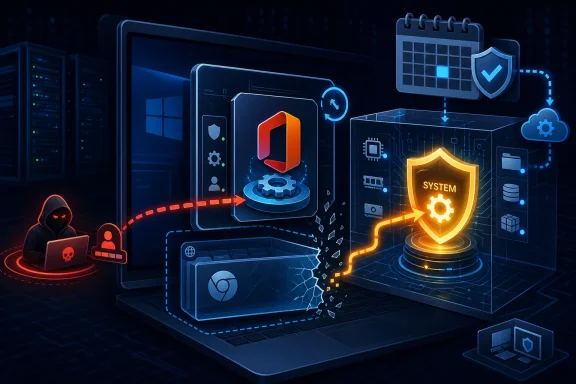
Microsoft disclosed CVE-2026-40420 on May 12, 2026, as an Important-rated elevation-of-privilege vulnerability in Microsoft Office Click-To-Run affecting Microsoft 365 Apps for Enterprise and supported Office 2019, Office LTSC 2021, and Office LTSC 2024 installations. The bug is not a remote-code-execution headline grabber, and Microsoft says exploitation is less likely. But the uncomfortable part is buried in the scoring: a low-privileged local attacker could gain SYSTEM privileges, and the scope change points to a possible browser sandbox escape. That makes this the sort of Office flaw administrators should treat less like “just Office” and more like a post-compromise accelerator sitting on millions of Windows endpoints.
Click-To-Run is often treated as plumbing. It installs Office, updates Office, repairs Office, and mostly stays out of view unless something breaks in the update channel. CVE-2026-40420 is a reminder that plumbing is still part of the house, and in enterprise Windows estates it frequently runs with trust that ordinary user processes do not have.
Microsoft’s summary is terse: improper access control in Microsoft Office Click-To-Run allows an authorized attacker to elevate privileges locally. That phrasing matters. This is not described as a drive-by document preview issue, nor does Microsoft say the Outlook or Explorer preview pane is an attack vector. The attacker needs some foothold as an authorized user, but no additional user interaction is required once the attacker is in position.
That distinction is easy to underplay. In real intrusions, local elevation-of-privilege bugs rarely start the fire; they make the fire spread. A phished user session, a malicious browser payload, a rogue macro chain, or a compromised help-desk tool becomes much more consequential if it can be turned into SYSTEM on the endpoint.
The Office branding also risks making the issue feel narrower than it is. Office Click-To-Run is not simply Word, Excel, and PowerPoint. It is the service and virtualization/update machinery that keeps modern Office deployments current, and that means it often sits at the intersection of user productivity software, background services, update policy, and enterprise management.
In plain English, Microsoft is saying this is not remotely reachable over the network by itself, but it is expected to be reliable under the right local conditions. The attacker already needs basic access. Once there, however, the flaw is scored as capable of breaking out of the security scope managed by the vulnerable component.
That is why the note about a browser sandbox escape is more important than the severity label. Browser sandboxes are designed on the assumption that code may run in a constrained context and still must not be able to take over the machine. A local privilege escalation that can participate in escaping that boundary is exactly the kind of vulnerability that becomes more dangerous when paired with another bug.
Microsoft says the vulnerability was not publicly disclosed and had not been exploited at the time of publication. That is useful, but it is not a permission slip to wait indefinitely. The exploitability assessment of “less likely” means Microsoft is not currently signaling imminent mass exploitation, not that defenders can safely ignore the patch.
The CVSS language around report confidence is often overlooked because it reads like scoring boilerplate. But it tells defenders how much uncertainty remains in the advisory. A confirmed vulnerability means the vendor has acknowledged the presence of the flaw or there are detailed reports sufficient to reproduce or verify the issue.
That confirmation cuts both ways. It gives administrators confidence that patching addresses a real defect rather than a theoretical class of bugs. It also tells offensive researchers that the bug is worth studying because Microsoft has already validated the condition and shipped a fix.
The patch itself can become a map. Once an update is available, skilled researchers and attackers can compare changed components, inspect behavioral differences, and work backward toward the bug. That is one reason “not exploited yet” is a temporary state, especially for privilege-escalation flaws in broadly deployed Windows software.
In an enterprise environment, that changes the incident response equation. A compromised standard user account may be contained by application control, endpoint detection, browser isolation, least privilege, and profile cleanup. A compromised endpoint running attacker code as SYSTEM can attempt credential theft, disable controls, move laterally, and bury itself in scheduled tasks, services, drivers, or management tooling.
The vulnerability’s local nature therefore should not be confused with low impact. Most serious Windows intrusions become local at some point. The question is what the attacker can do after landing, and local elevation is the bridge between initial execution and durable control.
For home users, the risk is less about domain compromise and more about malware becoming harder to remove. For small businesses, the risk is ransomware pre-positioning. For larger environments, the concern is that a commodity Office or browser foothold could become a privileged endpoint foothold before security tooling has enough time to react.
The update path is Click-To-Run, not a traditional one-off MSI patch in the old Office sense. For many Microsoft 365 Apps environments, the relevant operational task is ensuring devices actually receive the current security build through the configured update channel. That means update rings, content distribution, network reachability, device check-in health, and restart behavior all matter.
Click-To-Run has made Office servicing smoother for most organizations, but it also creates a management blind spot. Administrators may assume Office is updating because Microsoft 365 Apps is set to update automatically. In practice, devices can lag because they are offline, pinned to older channels, constrained by policy, blocked by third-party security products, or simply waiting for apps to close.
The affected LTSC products deserve special attention. LTSC deployments often live on regulated, kiosk-like, industrial, lab, or high-control systems where patch windows are intentionally conservative. Those are exactly the places where “we will catch it next month” can turn into a durable exposure if the system is also used for browsing, email, document processing, or line-of-business workflows.
Here, the advisory points elsewhere. The vulnerability is local, requires an authorized attacker, and does not require user interaction. That combination suggests the exploitation scenario is more likely to involve code already running on the machine rather than a victim simply viewing a malicious file in a preview interface.
The browser sandbox note is the more interesting clue. Microsoft says the scope change means the vulnerability could lead to a browser sandbox escape. That does not mean a browser bug is included in this CVE. It means this vulnerability may be useful as the second stage in a chain where a browser renderer compromise or similarly constrained process needs a way out.
That is a modern Windows security pattern. Browsers, Office, PDF readers, Teams, and other high-risk user-facing applications increasingly rely on sandboxing and privilege separation. Attackers respond by looking for local privilege-escalation bugs that can be paired with a memory corruption, logic bug, or content-handling flaw in a sandboxed application.
Security teams sometimes misread exploitability guidance as a binary instruction: patch now if exploited, defer if not. That is a mistake for privilege escalation. Attackers prize these bugs because they are reusable across campaigns once an initial foothold is established. They do not need to be flashy to be valuable.
The official fix is available, which also changes the calculus. Once a vendor has shipped remediation, the risk of patch regression must be balanced against the risk of reverse engineering. For a widely installed component like Office Click-To-Run, that window deserves active management rather than passive acceptance.
There is also a communication problem. Users and even some IT staff understand “remote code execution” and “zero-day” as danger words. “Elevation of privilege in Click-To-Run” sounds bureaucratic by comparison. Yet privilege escalation is what turns a blocked attack into a successful compromise chain.
The next step is verification. For Click-To-Run Office, the fact that Windows Update ran successfully is not always enough evidence that Office is current. Administrators need to check Office build levels, update channel state, and whether Click-To-Run itself completed the security update.
This is especially important for endpoints that rarely reboot or rarely close Office applications. Office updates can download in the background but still require application restarts or a maintenance window to fully apply. On shared devices, VDI pools, lab machines, and remote laptops, “pending” can become the default state.
Security teams should also look at endpoint detection coverage around Office Click-To-Run components. Attempts to abuse service permissions, spawn unexpected child processes, tamper with update directories, or interact suspiciously with Office servicing binaries are worth hunting for, even if Microsoft says there is no known exploitation at publication.
Office is a particularly attractive place for that fight because it is ubiquitous and trusted. It touches documents, cloud storage, identity, collaboration workflows, add-ins, templates, scripting history, and enterprise policy. Click-To-Run adds update and servicing privileges to that mix.
Microsoft has done a great deal to modernize Office security, from Protected View and macro hardening to cloud attachment scanning and safer defaults. But modern security controls also create new seams. When components mediate between user space and privileged maintenance operations, access-control mistakes become especially consequential.
That is the real lesson here. The flaw is not dramatic because it lets strangers on the Internet directly pop a server. It is dramatic because it sits in software that nearly every organization already trusts, and it can potentially convert limited local access into machine-level control.
The right response is fast validation in a pilot ring, followed by accelerated deployment to ordinary user endpoints, especially those exposed to web browsing, email, external documents, and unmanaged content. High-value administrative workstations should be patched with particular urgency because SYSTEM on an admin workstation is a short path to much bigger trouble.
For environments with strict change control, the argument for speed is not that exploitation is already happening. Microsoft says it is not. The argument is that the update is official, the vulnerability is confirmed, the impact includes SYSTEM privileges, and the affected product family is broadly deployed.
Compatibility testing should focus on the usual Office-sensitive areas: add-ins, macros, document management integrations, virtualized app layers, RDS or VDI images, and line-of-business workflows that depend on a specific Office channel. But testing should be bounded. An unpatched Office servicing component should not linger for weeks simply because the bug lacks a scarier name.
Source: MSRC Security Update Guide - Microsoft Security Response Center
 Microsoft’s Office Updater Is Again Part of the Security Boundary
Click-To-Run is often treated as plumbing. It installs Office, updates Office, repairs Office, and mostly stays out of view unless something breaks in the update channel. CVE-2026-40420 is a reminder that plumbing is still part of the house, and in enterprise Windows estates it frequently runs with trust that ordinary user processes do not have.Microsoft’s summary is terse: improper access control in Microsoft Office Click-To-Run allows an authorized attacker to elevate privileges locally. That phrasing matters. This is not described as a drive-by document preview issue, nor does Microsoft say the Outlook or Explorer preview pane is an attack vector. The attacker needs some foothold as an authorized user, but no additional user interaction is required once the attacker is in position.
That distinction is easy to underplay. In real intrusions, local elevation-of-privilege bugs rarely start the fire; they make the fire spread. A phished user session, a malicious browser payload, a rogue macro chain, or a compromised help-desk tool becomes much more consequential if it can be turned into SYSTEM on the endpoint.
The Office branding also risks making the issue feel narrower than it is. Office Click-To-Run is not simply Word, Excel, and PowerPoint. It is the service and virtualization/update machinery that keeps modern Office deployments current, and that means it often sits at the intersection of user productivity software, background services, update policy, and enterprise management.
The Score Says “Important,” but the Shape Says “Chain Me”
Microsoft rates the vulnerability Important, yet the CVSS base score is 8.8, with a temporal score of 7.7 after accounting for the availability of an official fix and Microsoft’s assessment that exploit code maturity remains unproven. The vector is the story: local attack vector, low attack complexity, low privileges required, no user interaction, changed scope, and high impact to confidentiality, integrity, and availability.In plain English, Microsoft is saying this is not remotely reachable over the network by itself, but it is expected to be reliable under the right local conditions. The attacker already needs basic access. Once there, however, the flaw is scored as capable of breaking out of the security scope managed by the vulnerable component.
That is why the note about a browser sandbox escape is more important than the severity label. Browser sandboxes are designed on the assumption that code may run in a constrained context and still must not be able to take over the machine. A local privilege escalation that can participate in escaping that boundary is exactly the kind of vulnerability that becomes more dangerous when paired with another bug.
Microsoft says the vulnerability was not publicly disclosed and had not been exploited at the time of publication. That is useful, but it is not a permission slip to wait indefinitely. The exploitability assessment of “less likely” means Microsoft is not currently signaling imminent mass exploitation, not that defenders can safely ignore the patch.
Report Confidence Is the Quiet Metric Doing the Loudest Work
The user-facing snippet about Report Confidence gets at a subtle but important point: security teams are not only judging severity; they are judging how real the thing is. In this case, Microsoft marks report confidence as confirmed. That means this is not merely a speculative advisory or a vague impact report awaiting validation.The CVSS language around report confidence is often overlooked because it reads like scoring boilerplate. But it tells defenders how much uncertainty remains in the advisory. A confirmed vulnerability means the vendor has acknowledged the presence of the flaw or there are detailed reports sufficient to reproduce or verify the issue.
That confirmation cuts both ways. It gives administrators confidence that patching addresses a real defect rather than a theoretical class of bugs. It also tells offensive researchers that the bug is worth studying because Microsoft has already validated the condition and shipped a fix.
The patch itself can become a map. Once an update is available, skilled researchers and attackers can compare changed components, inspect behavioral differences, and work backward toward the bug. That is one reason “not exploited yet” is a temporary state, especially for privilege-escalation flaws in broadly deployed Windows software.
SYSTEM Is the Difference Between a Bad User Session and a Bad Day
The most operationally important sentence in Microsoft’s advisory is the one that says successful exploitation could grant SYSTEM privileges. SYSTEM is not a slightly better user account. It is the identity under which core Windows services run, and it gives an attacker the ability to tamper with security tools, access protected areas of the machine, and establish persistence that survives ordinary cleanup.In an enterprise environment, that changes the incident response equation. A compromised standard user account may be contained by application control, endpoint detection, browser isolation, least privilege, and profile cleanup. A compromised endpoint running attacker code as SYSTEM can attempt credential theft, disable controls, move laterally, and bury itself in scheduled tasks, services, drivers, or management tooling.
The vulnerability’s local nature therefore should not be confused with low impact. Most serious Windows intrusions become local at some point. The question is what the attacker can do after landing, and local elevation is the bridge between initial execution and durable control.
For home users, the risk is less about domain compromise and more about malware becoming harder to remove. For small businesses, the risk is ransomware pre-positioning. For larger environments, the concern is that a commodity Office or browser foothold could become a privileged endpoint foothold before security tooling has enough time to react.
The Affected List Is a Tour of Modern Office Deployment
Microsoft lists affected products across Microsoft 365 Apps for Enterprise, Office 2019, Office LTSC 2021, and Office LTSC 2024, in both 32-bit and 64-bit editions where applicable. That spread matters because it covers both subscription-driven evergreen deployments and the long-term servicing builds favored by organizations that prize stability over feature churn.The update path is Click-To-Run, not a traditional one-off MSI patch in the old Office sense. For many Microsoft 365 Apps environments, the relevant operational task is ensuring devices actually receive the current security build through the configured update channel. That means update rings, content distribution, network reachability, device check-in health, and restart behavior all matter.
Click-To-Run has made Office servicing smoother for most organizations, but it also creates a management blind spot. Administrators may assume Office is updating because Microsoft 365 Apps is set to update automatically. In practice, devices can lag because they are offline, pinned to older channels, constrained by policy, blocked by third-party security products, or simply waiting for apps to close.
The affected LTSC products deserve special attention. LTSC deployments often live on regulated, kiosk-like, industrial, lab, or high-control systems where patch windows are intentionally conservative. Those are exactly the places where “we will catch it next month” can turn into a durable exposure if the system is also used for browsing, email, document processing, or line-of-business workflows.
The Preview Pane Escape Hatch Is Closed, but the Browser Angle Opens Another Door
Microsoft explicitly says the Preview Pane is not an attack vector for this vulnerability. That is a useful clarification because Office vulnerabilities often trigger memories of malicious documents, Explorer previews, Outlook previews, and files that execute too much before a user has really “opened” them.Here, the advisory points elsewhere. The vulnerability is local, requires an authorized attacker, and does not require user interaction. That combination suggests the exploitation scenario is more likely to involve code already running on the machine rather than a victim simply viewing a malicious file in a preview interface.
The browser sandbox note is the more interesting clue. Microsoft says the scope change means the vulnerability could lead to a browser sandbox escape. That does not mean a browser bug is included in this CVE. It means this vulnerability may be useful as the second stage in a chain where a browser renderer compromise or similarly constrained process needs a way out.
That is a modern Windows security pattern. Browsers, Office, PDF readers, Teams, and other high-risk user-facing applications increasingly rely on sandboxing and privilege separation. Attackers respond by looking for local privilege-escalation bugs that can be paired with a memory corruption, logic bug, or content-handling flaw in a sandboxed application.
“Exploitation Less Likely” Is a Forecast, Not a Warranty
Microsoft’s exploitability assessment says exploitation is less likely, and the temporal metric marks exploit code maturity as unproven. That lowers immediate alarm but does not erase the underlying risk. The difference between an unproven bug and an exploited bug can be one public proof of concept, one patch diff, or one motivated actor with time.Security teams sometimes misread exploitability guidance as a binary instruction: patch now if exploited, defer if not. That is a mistake for privilege escalation. Attackers prize these bugs because they are reusable across campaigns once an initial foothold is established. They do not need to be flashy to be valuable.
The official fix is available, which also changes the calculus. Once a vendor has shipped remediation, the risk of patch regression must be balanced against the risk of reverse engineering. For a widely installed component like Office Click-To-Run, that window deserves active management rather than passive acceptance.
There is also a communication problem. Users and even some IT staff understand “remote code execution” and “zero-day” as danger words. “Elevation of privilege in Click-To-Run” sounds bureaucratic by comparison. Yet privilege escalation is what turns a blocked attack into a successful compromise chain.
Patch Management Has to Prove Office Actually Moved
The administrative response should start with inventory, not assumptions. Which endpoints have Microsoft 365 Apps for Enterprise? Which still run Office 2019? Which use Office LTSC 2021 or LTSC 2024? Which are 32-bit for compatibility reasons? Which are stuck on a deferred update channel or a frozen build?The next step is verification. For Click-To-Run Office, the fact that Windows Update ran successfully is not always enough evidence that Office is current. Administrators need to check Office build levels, update channel state, and whether Click-To-Run itself completed the security update.
This is especially important for endpoints that rarely reboot or rarely close Office applications. Office updates can download in the background but still require application restarts or a maintenance window to fully apply. On shared devices, VDI pools, lab machines, and remote laptops, “pending” can become the default state.
Security teams should also look at endpoint detection coverage around Office Click-To-Run components. Attempts to abuse service permissions, spawn unexpected child processes, tamper with update directories, or interact suspiciously with Office servicing binaries are worth hunting for, even if Microsoft says there is no known exploitation at publication.
The Bigger Pattern Is Microsoft’s Expanding Local Attack Surface
CVE-2026-40420 lands in a Windows world where local privilege escalation has become a standard part of intrusion playbooks. The perimeter has not disappeared, but endpoint identity, browser isolation, application sandboxes, and cloud tokens have made the local machine a richer battleground. Attackers increasingly need to win locally before they can win broadly.Office is a particularly attractive place for that fight because it is ubiquitous and trusted. It touches documents, cloud storage, identity, collaboration workflows, add-ins, templates, scripting history, and enterprise policy. Click-To-Run adds update and servicing privileges to that mix.
Microsoft has done a great deal to modernize Office security, from Protected View and macro hardening to cloud attachment scanning and safer defaults. But modern security controls also create new seams. When components mediate between user space and privileged maintenance operations, access-control mistakes become especially consequential.
That is the real lesson here. The flaw is not dramatic because it lets strangers on the Internet directly pop a server. It is dramatic because it sits in software that nearly every organization already trusts, and it can potentially convert limited local access into machine-level control.
The May 12 Office Fix Belongs in the First Patch Ring
There is a practical middle ground between panic and complacency. Organizations do not need to treat CVE-2026-40420 like an actively exploited wormable vulnerability. They also should not bury it under routine Office hygiene and wait for the next quarterly maintenance cycle.The right response is fast validation in a pilot ring, followed by accelerated deployment to ordinary user endpoints, especially those exposed to web browsing, email, external documents, and unmanaged content. High-value administrative workstations should be patched with particular urgency because SYSTEM on an admin workstation is a short path to much bigger trouble.
For environments with strict change control, the argument for speed is not that exploitation is already happening. Microsoft says it is not. The argument is that the update is official, the vulnerability is confirmed, the impact includes SYSTEM privileges, and the affected product family is broadly deployed.
Compatibility testing should focus on the usual Office-sensitive areas: add-ins, macros, document management integrations, virtualized app layers, RDS or VDI images, and line-of-business workflows that depend on a specific Office channel. But testing should be bounded. An unpatched Office servicing component should not linger for weeks simply because the bug lacks a scarier name.
The Patch Tuesday Signal Hidden in One Office CVE
The concrete readout from CVE-2026-40420 is narrower than the anxiety it creates, but it is still sharp enough to act on. Treat this as a confirmed privilege-escalation fix in a trusted servicing component, not as an abstract CVSS exercise.- Microsoft released CVE-2026-40420 on May 12, 2026, for Microsoft Office Click-To-Run with an Important severity rating and an 8.8 CVSS base score.
- The vulnerability is caused by improper access control and can allow a local authorized attacker with low privileges to elevate privileges without user interaction.
- Microsoft says the Preview Pane is not an attack vector, and the vulnerability was neither publicly disclosed nor exploited at the time of publication.
- Successful exploitation could grant SYSTEM privileges, and Microsoft’s scope-change explanation says the bug could contribute to a browser sandbox escape.
- Affected products include Microsoft 365 Apps for Enterprise and supported 32-bit and 64-bit editions of Office 2019, Office LTSC 2021, and Office LTSC 2024.
- Administrators should verify actual Click-To-Run build deployment rather than assuming Office is patched because endpoint update policy appears healthy.
Source: MSRC Security Update Guide - Microsoft Security Response Center
