

CVE-2026-40421 is a Microsoft Word information disclosure vulnerability listed in Microsoft’s Security Update Guide as of May 12, 2026, affecting the Office document-processing stack where a crafted Word file or related content can expose data that should remain unavailable to an attacker. The important part is not that Word has another CVE; Word has been a high-value target for decades. The important part is that Microsoft’s own language around confidence and technical detail tells administrators how much they should trust the signal before the exploit story is fully public. In 2026, that distinction matters because patch prioritization is no longer just a severity-score exercise — it is a race to separate real exposure from vulnerability-feed noise.
The supplied MSRC description points to a metric that often gets less attention than CVSS base score, product name, or the phrase “actively exploited.” It measures confidence in the vulnerability’s existence and in the credibility of the known technical details. That sounds procedural, but for anyone running Windows fleets, it is operationally central.
A vulnerability can be real before it is well understood. It can also be described in public before defenders know whether the root cause is understood, whether proof-of-concept code exists, or whether attacker folklore is outpacing vendor confirmation. Microsoft’s Security Update Guide tries to encode that uncertainty, but the industry still tends to flatten every CVE into a ticket, a score, and a deadline.
CVE-2026-40421 lands in one of the most awkward categories for enterprise defenders: an information disclosure issue in Microsoft Word. It is not automatically the nightmare scenario of remote code execution. It is also not harmless. Word is still one of the most trusted bridges between the internet, email, collaboration platforms, and local enterprise data.
The confidence metric is Microsoft’s way of saying: do not just ask whether the bug exists; ask how much is known about it, who has validated it, and how much usable technical information may already be available to attackers. That is a more mature reading of risk than simply ranking CVEs from “medium” to “critical” and moving on.
That is why Word bugs deserve a different kind of scrutiny than the same label in a low-value desktop utility. Word sits in a data-rich context. It opens documents from email, cloud shares, Teams chats, SharePoint libraries, downloads folders, legal archives, finance workflows, HR pipelines, and vendor portals. Even in organizations that have moved to browser-first productivity, Word remains a local parser for untrusted content.
The phrase information disclosure also masks the attacker’s workflow. A leak may help bypass address-space protections. It may expose sensitive document content. It may provide intelligence about a machine, user, path, or application state. It may be paired with another vulnerability that needs exactly that kind of knowledge to become reliable.
This is why Microsoft’s confidence wording matters. If only the existence of the issue is public, the near-term risk may be mostly about patch hygiene. If credible technical details are circulating, the risk changes. If the vendor has confirmed the root cause and the conditions are easy to trigger, the bug becomes far more useful to both exploit developers and defensive scanners.
That is why Word vulnerabilities now often matter less as standalone “open this file and get owned” events and more as components in a broader chain. A document parser bug can become useful when paired with social engineering, a preview handler, a cloud sync path, a sandbox escape, or a separate privilege problem. In a mature attack chain, the quiet leak is sometimes what makes the loud exploit dependable.
For Windows administrators, this means Word should be treated as part of the endpoint attack surface, not as a productivity afterthought. The relevant question is not merely whether users open strange attachments. It is whether Office is patched consistently, whether risky file types are constrained, whether preview behavior is controlled, and whether telemetry can distinguish normal document handling from suspicious content-triggered behavior.
The uncomfortable truth is that many organizations still patch Office with less discipline than Windows itself. Windows Update for Business, Intune, Configuration Manager, and Microsoft 365 Apps update channels have improved the picture, but version sprawl persists. Semi-annual enterprise channels, isolated networks, VDI images, legacy Office installations, and line-of-business add-ins all create pockets where “patched” means something different from team to team.
A CVE entry can be sparse because the vendor is withholding details to protect customers. It can be sparse because the underlying issue is still under analysis. It can be sparse because third-party reporting is incomplete, contested, or derived from partial reverse engineering. Those are very different situations, but in dashboards they can look deceptively similar.
For CVE-2026-40421, the responsible reading is to separate what is known from what is inferred. The known public framing is that Microsoft is tracking a Word information disclosure vulnerability. The broader inference, based on Word’s role and Office’s history as a document attack surface, is that administrators should not dismiss it simply because the impact category is not remote code execution.
That is the difference between security reporting and vulnerability theater. Theater treats every new CVE as either panic or nothing. Security work lives in the middle, where defenders ask whether the affected software is deployed, whether the attack path is plausible, whether mitigations already reduce exposure, and whether the vendor’s confidence level suggests that attackers could reconstruct the issue.
That does not mean every Word information disclosure bug will be weaponized. Most will not become headline events. But Office patches are attractive targets for reverse engineering because the installed base is huge, the document format surface is complex, and the potential delivery mechanism is familiar to both criminals and state-backed operators.
The confidence metric therefore has a second audience. It signals whether the vulnerability is merely suspected, corroborated by credible research, or confirmed by the vendor. The more confidence exists in the technical details, the more defenders should assume that skilled attackers can move from advisory to reproduction.
This is especially true when the vulnerability touches a parser, converter, embedded object path, preview mechanism, or compatibility layer. Word’s long history is not just a history of a word processor. It is the history of decades of backward compatibility, document formats, automation features, and integrations that remain valuable precisely because businesses cannot simply turn them off.
This is where CVSS can mislead. A medium-severity Word information disclosure issue on a high-exposure workstation population may deserve faster action than a higher-scored issue in a component the organization does not use. Conversely, a well-managed Microsoft 365 Apps deployment on a current channel may already be moving toward remediation while the security team is still triaging the advisory.
Administrators should start with inventory. Which endpoints have Microsoft Word installed? Which channel are Microsoft 365 Apps using? Are Office 2016, Office 2019, LTSC editions, or isolated builds still present? Are VDI gold images updated, or do they lag behind physical endpoints? Are users allowed to open Office documents from the internet, email, and external collaboration tenants without additional controls?
The next step is policy. Attack Surface Reduction rules that block Office from creating child processes, prevent executable content from email and webmail, and constrain abuse of Office apps remain relevant even when the vulnerability is not a code execution bug. Information disclosure and execution are different impacts, but attackers rarely respect the neat boundaries of advisory taxonomy.
CVE-2026-40421 should be read in that context. A Word vulnerability does not need a macro prompt to matter. If the issue is triggered by document parsing, file handling, embedded data, or a preview flow, the social-engineering burden may be lower than defenders expect. The difference between opening a document and previewing one has often been more important in practice than policy documents admit.
This is also why training alone cannot solve the problem. Users cannot inspect the internal structure of a crafted document. They cannot know whether a file that looks like a contract, résumé, invoice, procurement response, or classroom assignment contains content designed to tickle a parser edge case. The security model has to assume that some untrusted documents will be opened because business requires it.
The better approach is layered. Keep Office updated. Harden Office behavior. Restrict high-risk file flows. Monitor document-origin signals. Use cloud detonation where available. Reduce local administrative rights. Treat document-based alerts as potentially meaningful even when the first observed behavior is only a read, crash, or unusual access pattern.
The exceptions are where incidents tend to grow. A finance department may rely on an old add-in. A lab may run a frozen Office build for compatibility. A remote office may have update deferrals nobody has revisited. A VDI image may be rebuilt monthly while exposed users handle external documents daily. A server-side automation process may use Office components in a way the security team does not even realize.
For CVE-2026-40421, security teams should resist the urge to treat “Word” as a single deployment state. Word may exist as part of Microsoft 365 Apps for enterprise, Office LTSC, older perpetual Office, Mac installations, Remote Desktop Session Host images, or application-layer packages. Each path has different update mechanics and different visibility.
That is where vulnerability management becomes less glamorous but more effective. The teams that win are not the ones with the most dramatic Slack messages on Patch Tuesday. They are the ones that can say, by Wednesday, which devices have the relevant builds, which cannot update automatically, and which compensating controls are active until the laggards are fixed.
When an advisory says little, defenders complain — often correctly — that they cannot judge risk. When an advisory says more, attackers gain hints. When a patch ships, reverse engineers gain the richest hint of all: the before-and-after code. This is the uncomfortable bargain behind coordinated vulnerability disclosure.
For an information disclosure bug, the most useful missing details are usually practical rather than academic. Does user interaction matter? Can the issue be triggered through preview? Does Protected View help? Is exploitation local, remote, or network-adjacent in any meaningful sense? What data can leak? Is exploitation reliable? Has Microsoft seen exploitation in the wild? Is proof-of-concept code public?
If those answers are not fully public, defenders should not invent them. They should instead map the uncertainty onto their own exposure. If an organization has high volumes of inbound Word documents, uncertainty should push toward faster remediation. If Word is rare or heavily sandboxed, the same uncertainty may be manageable within the normal patch cycle.
The mistake is treating absence of detail as absence of risk. Sparse advisories are sometimes sparse because the risk is small. They are also sometimes sparse because publishing more would hand attackers a recipe.
For sysadmins, the sharper issue is telemetry. Word opening a document is normal. Word touching strange paths, spawning child processes, crashing repeatedly on a particular file, contacting unusual locations through embedded content, or appearing in an attack chain is not normal. Even when a vulnerability is labeled information disclosure, the surrounding behavior can reveal whether it is being probed.
Defender for Endpoint, Office cloud protections, email security gateways, and endpoint detection tools should be tuned to preserve document-origin context. A suspicious Word event without the file source is half an investigation. Knowing whether a document came from the internet, SharePoint, Teams, an external sender, a USB device, or a synced folder can change the response.
The most mature organizations also rehearse the boring question: what happens if we need to block a document type, disable a preview handler, or force an Office update outside the normal cadence? If the answer is “we open a change ticket and hope,” then the vulnerability is only one part of the risk.
The practical response is not complicated, but it does require discipline. Confirm affected Office deployments. Validate update channels. Prioritize users who handle untrusted documents. Check whether existing hardening policies apply to Word. Watch for advisory revisions, because Microsoft CVE pages can change as exploitability assessments, affected products, acknowledgments, and mitigations evolve.
This is also a reminder that Word’s risk is cumulative. One information disclosure issue may not terrify anyone. A steady cadence of Office parser bugs, security bypasses, and document-handling flaws should. Attackers do not need every vulnerability to be catastrophic; they need enough opportunities to find the weakly managed environments.
Security teams should therefore treat CVE-2026-40421 as a fleet hygiene test. If the organization can identify exposure, patch promptly, and explain residual risk, the bug becomes routine. If the organization cannot answer which Word builds are deployed or which users face the most hostile document streams, the problem is larger than this CVE.
Source: MSRC Security Update Guide - Microsoft Security Response Center
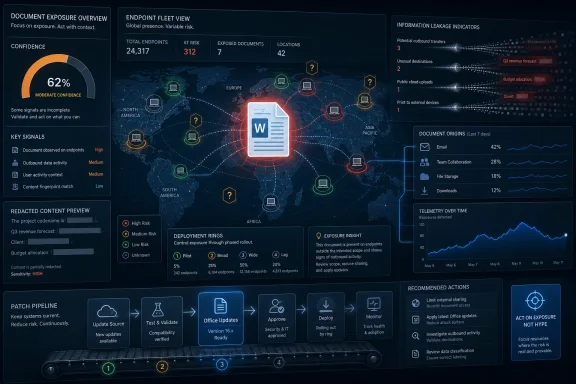 Microsoft’s Quiet Word Bug Is Really a Test of Trust
The supplied MSRC description points to a metric that often gets less attention than CVSS base score, product name, or the phrase “actively exploited.” It measures confidence in the vulnerability’s existence and in the credibility of the known technical details. That sounds procedural, but for anyone running Windows fleets, it is operationally central.A vulnerability can be real before it is well understood. It can also be described in public before defenders know whether the root cause is understood, whether proof-of-concept code exists, or whether attacker folklore is outpacing vendor confirmation. Microsoft’s Security Update Guide tries to encode that uncertainty, but the industry still tends to flatten every CVE into a ticket, a score, and a deadline.
CVE-2026-40421 lands in one of the most awkward categories for enterprise defenders: an information disclosure issue in Microsoft Word. It is not automatically the nightmare scenario of remote code execution. It is also not harmless. Word is still one of the most trusted bridges between the internet, email, collaboration platforms, and local enterprise data.
The confidence metric is Microsoft’s way of saying: do not just ask whether the bug exists; ask how much is known about it, who has validated it, and how much usable technical information may already be available to attackers. That is a more mature reading of risk than simply ranking CVEs from “medium” to “critical” and moving on.
Information Disclosure Is the Label Attackers Often Treat as a Starting Point
“Information disclosure” sounds bureaucratic because it is a consequence, not a story. The story is what information leaks, under what conditions, and whether that leakage helps an attacker do something bigger. In Office security, that can mean anything from exposing memory contents to revealing file paths, document metadata, tokens, preview data, or environmental details that support follow-on exploitation.That is why Word bugs deserve a different kind of scrutiny than the same label in a low-value desktop utility. Word sits in a data-rich context. It opens documents from email, cloud shares, Teams chats, SharePoint libraries, downloads folders, legal archives, finance workflows, HR pipelines, and vendor portals. Even in organizations that have moved to browser-first productivity, Word remains a local parser for untrusted content.
The phrase information disclosure also masks the attacker’s workflow. A leak may help bypass address-space protections. It may expose sensitive document content. It may provide intelligence about a machine, user, path, or application state. It may be paired with another vulnerability that needs exactly that kind of knowledge to become reliable.
This is why Microsoft’s confidence wording matters. If only the existence of the issue is public, the near-term risk may be mostly about patch hygiene. If credible technical details are circulating, the risk changes. If the vendor has confirmed the root cause and the conditions are easy to trigger, the bug becomes far more useful to both exploit developers and defensive scanners.
Word Remains a Security Boundary Even When Microsoft Wishes It Were Just an App
Microsoft has spent years hardening Office against the classic document attack chain. Protected View, Mark of the Web, macro blocking, Attack Surface Reduction rules, Defender integration, and cloud-delivered protections have all changed the economics of malicious documents. Those measures did not make Word irrelevant to attackers; they forced attackers to look for subtler ways around the edges.That is why Word vulnerabilities now often matter less as standalone “open this file and get owned” events and more as components in a broader chain. A document parser bug can become useful when paired with social engineering, a preview handler, a cloud sync path, a sandbox escape, or a separate privilege problem. In a mature attack chain, the quiet leak is sometimes what makes the loud exploit dependable.
For Windows administrators, this means Word should be treated as part of the endpoint attack surface, not as a productivity afterthought. The relevant question is not merely whether users open strange attachments. It is whether Office is patched consistently, whether risky file types are constrained, whether preview behavior is controlled, and whether telemetry can distinguish normal document handling from suspicious content-triggered behavior.
The uncomfortable truth is that many organizations still patch Office with less discipline than Windows itself. Windows Update for Business, Intune, Configuration Manager, and Microsoft 365 Apps update channels have improved the picture, but version sprawl persists. Semi-annual enterprise channels, isolated networks, VDI images, legacy Office installations, and line-of-business add-ins all create pockets where “patched” means something different from team to team.
The Confidence Metric Is a Warning Against CVE Theater
The user-supplied MSRC language describes a metric that measures confidence in both the existence of a vulnerability and the credibility of known technical details. That is not a decorative field. It is a warning that vulnerability management has become too dependent on labels that look precise but often hide uncertainty.A CVE entry can be sparse because the vendor is withholding details to protect customers. It can be sparse because the underlying issue is still under analysis. It can be sparse because third-party reporting is incomplete, contested, or derived from partial reverse engineering. Those are very different situations, but in dashboards they can look deceptively similar.
For CVE-2026-40421, the responsible reading is to separate what is known from what is inferred. The known public framing is that Microsoft is tracking a Word information disclosure vulnerability. The broader inference, based on Word’s role and Office’s history as a document attack surface, is that administrators should not dismiss it simply because the impact category is not remote code execution.
That is the difference between security reporting and vulnerability theater. Theater treats every new CVE as either panic or nothing. Security work lives in the middle, where defenders ask whether the affected software is deployed, whether the attack path is plausible, whether mitigations already reduce exposure, and whether the vendor’s confidence level suggests that attackers could reconstruct the issue.
Attackers Read the Same Ambiguity Defenders Do
There is a common misconception that sparse advisories help only defenders. In reality, attackers read the same vendor entries, compare them against patched binaries, and look for behavioral differences. When Microsoft ships a fix for Word, the patch itself becomes a clue.That does not mean every Word information disclosure bug will be weaponized. Most will not become headline events. But Office patches are attractive targets for reverse engineering because the installed base is huge, the document format surface is complex, and the potential delivery mechanism is familiar to both criminals and state-backed operators.
The confidence metric therefore has a second audience. It signals whether the vulnerability is merely suspected, corroborated by credible research, or confirmed by the vendor. The more confidence exists in the technical details, the more defenders should assume that skilled attackers can move from advisory to reproduction.
This is especially true when the vulnerability touches a parser, converter, embedded object path, preview mechanism, or compatibility layer. Word’s long history is not just a history of a word processor. It is the history of decades of backward compatibility, document formats, automation features, and integrations that remain valuable precisely because businesses cannot simply turn them off.
Patch Priority Should Follow Exposure, Not Ego
The correct response to CVE-2026-40421 is not to declare an emergency in every environment. It is to identify where Word is exposed to untrusted content and patch those systems with priority. A law firm, government agency, school district, insurer, newsroom, or HR-heavy enterprise may face a different risk profile than a kiosk fleet with no Office installed.This is where CVSS can mislead. A medium-severity Word information disclosure issue on a high-exposure workstation population may deserve faster action than a higher-scored issue in a component the organization does not use. Conversely, a well-managed Microsoft 365 Apps deployment on a current channel may already be moving toward remediation while the security team is still triaging the advisory.
Administrators should start with inventory. Which endpoints have Microsoft Word installed? Which channel are Microsoft 365 Apps using? Are Office 2016, Office 2019, LTSC editions, or isolated builds still present? Are VDI gold images updated, or do they lag behind physical endpoints? Are users allowed to open Office documents from the internet, email, and external collaboration tenants without additional controls?
The next step is policy. Attack Surface Reduction rules that block Office from creating child processes, prevent executable content from email and webmail, and constrain abuse of Office apps remain relevant even when the vulnerability is not a code execution bug. Information disclosure and execution are different impacts, but attackers rarely respect the neat boundaries of advisory taxonomy.
The Old Macro Story No Longer Explains the Modern Office Risk
For years, the public shorthand for Office security was “don’t enable macros.” That advice still has value, but it is no longer enough to describe the threat model. Microsoft’s macro-blocking changes raised the cost of one attack path, but Office remains a large document interpreter that handles formats, embedded content, templates, links, previews, cloud files, and legacy compatibility behaviors.CVE-2026-40421 should be read in that context. A Word vulnerability does not need a macro prompt to matter. If the issue is triggered by document parsing, file handling, embedded data, or a preview flow, the social-engineering burden may be lower than defenders expect. The difference between opening a document and previewing one has often been more important in practice than policy documents admit.
This is also why training alone cannot solve the problem. Users cannot inspect the internal structure of a crafted document. They cannot know whether a file that looks like a contract, résumé, invoice, procurement response, or classroom assignment contains content designed to tickle a parser edge case. The security model has to assume that some untrusted documents will be opened because business requires it.
The better approach is layered. Keep Office updated. Harden Office behavior. Restrict high-risk file flows. Monitor document-origin signals. Use cloud detonation where available. Reduce local administrative rights. Treat document-based alerts as potentially meaningful even when the first observed behavior is only a read, crash, or unusual access pattern.
The Patch Pipeline Is Now Part of the Attack Surface
Microsoft’s modern servicing model has made Office patching less theatrical than the old boxed-software era. Click-to-Run updates, Microsoft 365 Apps channels, Intune policies, and cloud-managed deployments can move fixes rapidly across a fleet. But that convenience can also hide the exceptions.The exceptions are where incidents tend to grow. A finance department may rely on an old add-in. A lab may run a frozen Office build for compatibility. A remote office may have update deferrals nobody has revisited. A VDI image may be rebuilt monthly while exposed users handle external documents daily. A server-side automation process may use Office components in a way the security team does not even realize.
For CVE-2026-40421, security teams should resist the urge to treat “Word” as a single deployment state. Word may exist as part of Microsoft 365 Apps for enterprise, Office LTSC, older perpetual Office, Mac installations, Remote Desktop Session Host images, or application-layer packages. Each path has different update mechanics and different visibility.
That is where vulnerability management becomes less glamorous but more effective. The teams that win are not the ones with the most dramatic Slack messages on Patch Tuesday. They are the ones that can say, by Wednesday, which devices have the relevant builds, which cannot update automatically, and which compensating controls are active until the laggards are fixed.
Public Detail Is Both a Defensive Aid and an Exploit Accelerator
The MSRC confidence language captures an old disclosure paradox. Defenders need enough detail to prioritize and verify. Attackers need enough detail to reproduce. Vendors therefore publish in a narrow band between usefulness and danger.When an advisory says little, defenders complain — often correctly — that they cannot judge risk. When an advisory says more, attackers gain hints. When a patch ships, reverse engineers gain the richest hint of all: the before-and-after code. This is the uncomfortable bargain behind coordinated vulnerability disclosure.
For an information disclosure bug, the most useful missing details are usually practical rather than academic. Does user interaction matter? Can the issue be triggered through preview? Does Protected View help? Is exploitation local, remote, or network-adjacent in any meaningful sense? What data can leak? Is exploitation reliable? Has Microsoft seen exploitation in the wild? Is proof-of-concept code public?
If those answers are not fully public, defenders should not invent them. They should instead map the uncertainty onto their own exposure. If an organization has high volumes of inbound Word documents, uncertainty should push toward faster remediation. If Word is rare or heavily sandboxed, the same uncertainty may be manageable within the normal patch cycle.
The mistake is treating absence of detail as absence of risk. Sparse advisories are sometimes sparse because the risk is small. They are also sometimes sparse because publishing more would hand attackers a recipe.
WindowsForum Readers Should Watch the Edges, Not Just the Center
For enthusiasts and home users, the advice is simpler but still not trivial. Keep Office updated, avoid opening unexpected documents, and be wary of files delivered through email, messaging apps, or download links even when they appear to be routine. The old “it came from someone I know” test is no longer reliable, because compromised accounts and forwarded business documents are common delivery routes.For sysadmins, the sharper issue is telemetry. Word opening a document is normal. Word touching strange paths, spawning child processes, crashing repeatedly on a particular file, contacting unusual locations through embedded content, or appearing in an attack chain is not normal. Even when a vulnerability is labeled information disclosure, the surrounding behavior can reveal whether it is being probed.
Defender for Endpoint, Office cloud protections, email security gateways, and endpoint detection tools should be tuned to preserve document-origin context. A suspicious Word event without the file source is half an investigation. Knowing whether a document came from the internet, SharePoint, Teams, an external sender, a USB device, or a synced folder can change the response.
The most mature organizations also rehearse the boring question: what happens if we need to block a document type, disable a preview handler, or force an Office update outside the normal cadence? If the answer is “we open a change ticket and hope,” then the vulnerability is only one part of the risk.
The Real Signal in CVE-2026-40421 Is the Gap Between Knowing and Acting
CVE-2026-40421 is not yet useful as a public technical deep dive, and that is precisely the point. The advisory language tells us that vulnerability confidence and technical maturity are part of the risk model. Defenders should read that as a signal to move from passive scoring to active judgment.The practical response is not complicated, but it does require discipline. Confirm affected Office deployments. Validate update channels. Prioritize users who handle untrusted documents. Check whether existing hardening policies apply to Word. Watch for advisory revisions, because Microsoft CVE pages can change as exploitability assessments, affected products, acknowledgments, and mitigations evolve.
This is also a reminder that Word’s risk is cumulative. One information disclosure issue may not terrify anyone. A steady cadence of Office parser bugs, security bypasses, and document-handling flaws should. Attackers do not need every vulnerability to be catastrophic; they need enough opportunities to find the weakly managed environments.
Security teams should therefore treat CVE-2026-40421 as a fleet hygiene test. If the organization can identify exposure, patch promptly, and explain residual risk, the bug becomes routine. If the organization cannot answer which Word builds are deployed or which users face the most hostile document streams, the problem is larger than this CVE.
The Word Patch That Separates Prepared Teams From Dashboard Teams
CVE-2026-40421 is a useful case because it forces administrators to think in terms of confidence, exposure, and document flow rather than headline severity alone. The concrete lessons are narrow enough to act on and broad enough to apply to the next Office advisory.- Organizations should verify which Microsoft Word and Office builds are deployed before assuming that Microsoft 365 update automation has reached every endpoint.
- Systems that routinely receive external Word documents should be patched ahead of low-exposure machines, even if the vulnerability is categorized as information disclosure rather than code execution.
- Existing Office hardening policies should be reviewed because mitigations aimed at document abuse can reduce the usefulness of several attack chains, not just macro-based ones.
- Security teams should preserve document-origin telemetry so that suspicious Word behavior can be tied back to email, Teams, SharePoint, downloads, or external storage.
- Sparse advisory detail should be treated as uncertainty to manage, not as evidence that the vulnerability is unimportant.
Source: MSRC Security Update Guide - Microsoft Security Response Center
