

Microsoft’s Smallest Word Client Still Carries Enterprise-Scale Risk
Word for Android is easy to underestimate because it is not the canonical image of enterprise Office. The classic mental model is still a Windows desktop, a full Microsoft 365 installation, Outlook nearby, and an employee opening a document from a file share or email attachment. But the modern Office estate is not that tidy anymore.
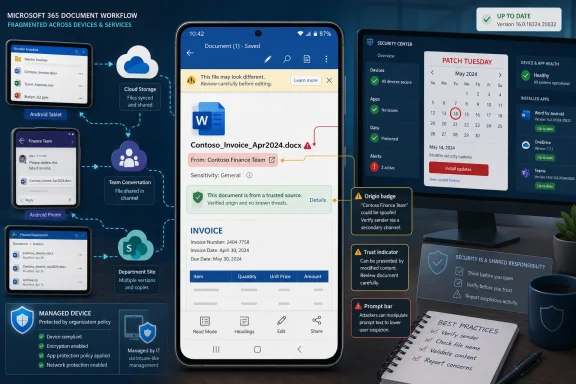
Android is now part of the business document surface. Employees review contracts on phones, approve edits on tablets, open OneDrive links in meetings, and handle files through Teams, Outlook, SharePoint, and third-party mobile device management stacks. In that world, Word for Android is not a lightweight companion app; it is a document renderer attached to identity, storage, collaboration, and user trust.
That is why CVE-2026-41101 lands in an uncomfortable category. A spoofing vulnerability does not necessarily promise code execution, data theft, or device takeover. Instead, it attacks the user’s ability to correctly understand what the app is showing them. In security terms, that sounds narrower. In workplace terms, it can be exactly where the decision happens.
The most dangerous part of a mobile document workflow is often not the parser but the moment a user believes a prompt, a filename, a sender identity, a document state, or a displayed destination. If the vulnerability enables a malicious actor to misrepresent one of those trust signals, the technical impact may be bounded while the practical impact remains serious.
“Spoofing” Is the Word Security Teams Learn to Regret
Microsoft’s impact category tells us this is not being framed as remote code execution or elevation of privilege. That distinction matters. It means defenders should avoid reflexively treating CVE-2026-41101 like a wormable Windows vulnerability or a macro-era Office disaster.
But spoofing bugs have a long history of being dismissed until someone shows how convincingly they can be used in a real attack chain. A spoofed interface can turn a malicious file into a plausible one. A spoofed origin can make a risky action look routine. A spoofed document state can make a user believe content is protected, verified, local, synced, or shared with the right party when it is not.
The broader industry has spent years hardening memory safety and execution paths while attackers have moved with equal enthusiasm toward deception. If an attacker cannot reliably make the app run their code, they may still be able to make the user run their playbook. Mobile devices are particularly exposed to that style of attack because screens are small, context is compressed, and users are conditioned to act quickly.
This is where the Android form factor matters. Desktop Office gives users more visual space, more status indicators, and often more administrative control. Mobile Office compresses the same trust problem into a few panels, icons, prompts, and share sheets. If those cues can be manipulated, the user has fewer independent signals to fall back on.
The Report Confidence Detail Is Not Bureaucratic Noise
The user-submitted source text focuses on a metric that measures confidence in the vulnerability’s existence and in the credibility of the known technical details. That is not just CVSS plumbing. It is a window into how security advisories operate when the public knows less than the vendor.
In this case, Microsoft’s acknowledgement is the most important fact. A vendor-confirmed CVE is not rumor, speculative research, or a scanner artifact waiting for clarification. It means the affected technology’s owner has accepted that a security issue exists and has placed it into the public vulnerability ecosystem.
That does not mean every operational question is answered. Public advisories often omit exploit mechanics, proof-of-concept details, root cause specifics, or realistic phishing scenarios. That omission is intentional more often than accidental. Vendors disclose enough to drive patching while avoiding a ready-made guide for attackers.
The confidence metric therefore cuts both ways. It raises confidence that the issue is real, but it does not necessarily raise confidence that defenders understand exactly how it will be abused. For administrators, that is the familiar Patch Tuesday bargain: you are expected to act before the story is complete.
Mobile Office Has Become Part of the Patch Tuesday Blast Radius
For years, Patch Tuesday muscle memory centered on Windows Update, Windows Server, Exchange, SQL Server, Edge, and the desktop Office suite. Mobile productivity apps often sat in a parallel lane, governed by app stores, MDM policies, and user update behavior. That separation is increasingly artificial.
The Microsoft 365 user experience crosses device boundaries. A document opened on Android may be stored in OneDrive, protected by sensitivity labels, shared from Teams, authenticated through Entra ID, and governed by Intune compliance policy. The app is only one layer of the decision chain, but it is the layer the user sees.
That creates a management problem for IT. Windows endpoints may be patched with WSUS, Configuration Manager, Windows Update for Business, or Autopatch. Android apps are updated through Google Play, managed Google Play, OEM channels, or enterprise mobility platforms. If the organization’s vulnerability process only watches Windows assets, mobile Office flaws can sit in a blind spot.
CVE-2026-41101 is a reminder that the Office estate is no longer defined by operating system. It is defined by identity, documents, and user workflows. If a user can make a business decision in Word for Android, then Word for Android belongs in the vulnerability management program.
The Real Exploit Path Is Probably Social, Not Spectacular
The public description does not support dramatic claims about device compromise. That restraint is important. There is no reason to describe this as a full Android takeover or a classic Office malware detonation unless Microsoft or credible researchers provide evidence for that interpretation.
The more plausible risk is social engineering with a technical assist. An attacker may craft a document or workflow that causes Word for Android to display misleading information. The goal would be to persuade the user to trust the wrong content, approve the wrong change, follow the wrong link, share the wrong file, or believe the document came from a safer context than it did.
That may sound less severe than code execution, but enterprises are breached through decisions as well as defects. Business email compromise, credential phishing, fake invoice workflows, and malicious document lures all depend on presentation. A spoofing flaw in a trusted document app can make that presentation more convincing.
The practical question is not whether CVE-2026-41101 gives an attacker total control. The practical question is whether it gives an attacker enough control over appearance to move a target one step further down the chain. In modern intrusions, one step is often enough.
Android Fragmentation Makes App Hygiene a Policy Problem
One advantage of mobile app vulnerabilities is that application updates can often move faster than full operating system updates. One disadvantage is that organizations frequently have less certainty about whether every user has actually received and launched the fixed version. Consumer update habits do not map neatly onto enterprise risk.
Managed Android fleets can do better, but only if administrators have configured them to do better. Intune and similar platforms can enforce minimum app versions, require managed app protection policies, restrict unmanaged document transfer, and separate corporate data from personal contexts. Those controls matter when the vulnerable app is part of a larger document-handling chain.
Unmanaged or bring-your-own-device environments are messier. A user may have automatic updates disabled, limited storage, an old device, multiple Office apps, or a personal Microsoft account mixed with corporate access. In those cases, the existence of a Microsoft patch does not guarantee the disappearance of organizational exposure.
This is why mobile CVEs should trigger verification, not just notification. Security teams should not merely tell users to update Word for Android. They should check app inventory, enforce version baselines where possible, and confirm that corporate documents are not routinely opened in unmanaged app contexts.
The Absence of Exploit Detail Should Not Become an Excuse
Security teams often triage advisories by exploitability, public proof-of-concept availability, and observed exploitation. That is sensible. Not every CVE deserves emergency change control, and spoofing bugs can vary wildly in real-world seriousness.
Still, sparse public detail should not be mistaken for low risk. A vendor may withhold detail because the exploit is easy to reproduce once explained. Researchers may delay publication until patches propagate. Attackers may reverse-engineer app updates faster than defenders expect, especially when the affected product is widely distributed.
For CVE-2026-41101, the responsible position is measured urgency. This is not a reason to panic. It is a reason to remove old versions of Word for Android from the environment quickly, especially for users who handle sensitive documents, legal drafts, financial approvals, executive communications, or regulated data.
The advisory’s limited detail also changes how defenders should communicate. Users do not need a dense CVSS lecture. They need to know that a mobile Word update fixes a flaw that could make malicious content look more trustworthy than it is. That is enough to justify action without overselling the threat.
Microsoft’s Advisory Style Leaves Defenders Reading Between the Lines
Microsoft’s Security Update Guide has become the canonical place for vulnerability facts, but it is also a deliberately constrained format. It is built for scale: many CVEs, many products, repeatable metadata, standardized severity language, and enough information for patch management systems to ingest. It is not built to satisfy every defender’s curiosity.
That format works well when the operational answer is obvious: install the update. It works less well when the impact category is subtle. Spoofing vulnerabilities need narrative context because their damage depends heavily on what can be spoofed, how convincing the spoof is, and where the user is in the workflow.
The result is a familiar tension. Microsoft gives customers the official record, but defenders still have to infer the attack story. Was the problem in document rendering? A prompt? A link preview? A file identity indicator? A collaboration surface? The public entry may not say, and yet policy decisions still have to be made.
That is not unique to Microsoft. It is the trade-off of coordinated disclosure at hyperscale. But it means administrators should resist the temptation to treat CVE records as complete threat models. They are starting points, not finished analysis.
The WindowsForum Angle Is Bigger Than Android
At first glance, a Word for Android CVE may seem peripheral to a Windows-focused audience. It is not. Windows administrators increasingly manage identities, files, compliance rules, and productivity experiences that roam far beyond Windows itself.
The same user who signs into a Windows 11 laptop signs into Word on Android. The same SharePoint document library feeds both clients. The same Conditional Access policy may decide whether that user can open a sensitive document on a mobile device. A weakness in one endpoint experience can influence trust in the whole Microsoft 365 environment.
This is the direction Microsoft has pushed customers for years: cloud-first documents, cross-platform Office, identity-centered security, and management through policy rather than perimeter. The upside is flexibility. The downside is that vulnerabilities now arrive through products that older enterprise patch routines barely recognized.
For Windows shops, the lesson is not to suddenly become Android specialists overnight. The lesson is to define the Microsoft estate honestly. If Word for Android can access corporate data, then it is part of the estate. If it is part of the estate, it needs inventory, version control, conditional access, and incident response assumptions.
The Patch Is Only One Control in a Trust Problem
Updating Word for Android is the obvious first move. It may also be the easiest. The harder work is reducing the number of situations in which a spoofed mobile interface can produce an irreversible business outcome.
Organizations should examine whether mobile users can approve sensitive transactions, release documents externally, or act on high-value requests based solely on what appears in a document. If the answer is yes, the problem is not only CVE-2026-41101. The problem is that the workflow places too much trust in a small-screen representation of reality.
Good controls are boring but effective. Require secondary verification for payment changes. Keep sensitive documents inside managed apps. Use sensitivity labels and data loss prevention policies. Limit copy-paste and save-as behavior between corporate and personal contexts. Train users to treat unexpected mobile document prompts with the same suspicion they would apply to email attachments.
None of that makes spoofing impossible. It makes spoofing less decisive. A deception attack is most powerful when the interface is the only authority the user consults.
The Concrete Moves Before This Becomes Yesterday’s Advisory
The most useful response to CVE-2026-41101 is not alarmism; it is disciplined cleanup. Treat the vulnerability as a test of whether your mobile Microsoft 365 controls are real or mostly aspirational.
- Confirm that Microsoft Word for Android is updated on managed devices and that stale versions are blocked from corporate data where your management stack allows it.
- Review mobile application management policies to ensure corporate documents open in managed Office apps rather than unmanaged personal contexts.
- Prioritize users who handle legal, financial, executive, healthcare, government, or regulated information, because spoofing risk rises with the value of the decision being influenced.
- Remind users that mobile document prompts, file names, sharing indicators, and apparent origins can be misleading, especially when documents arrive unexpectedly.
- Watch for follow-up updates from Microsoft or credible researchers, because spoofing advisories often become clearer after patches have had time to propagate.
This is also a good moment to audit assumptions. If your patch dashboard has beautiful Windows compliance reporting but cannot tell you which Android users are running current Office apps, the dashboard is not showing the whole risk picture.
CVE-2026-41101 is unlikely to be remembered as the loudest Microsoft vulnerability of 2026, and that is precisely why it is useful. It shows how modern enterprise risk often hides in the seams: between desktop and mobile, app and identity, document and decision, official advisory and real attack path. The organizations that handle it well will not be the ones that panic over every spoofing label, but the ones that understand that trust in Microsoft 365 is now built across every screen where work gets done.