

On May 14, 2026, Microsoft disclosed CVE-2026-42897, an Exchange Server Outlook Web Access vulnerability affecting on-premises Exchange Server 2016, Exchange Server 2019, and Exchange Server Subscription Edition, with mitigation available immediately through Exchange Emergency Mitigation Service or the Exchange On-premises Mitigation Tool. The practical answer for administrators is blunt: check for mitigation M2, not merely for the CVE string in a dashboard. This is one of those Exchange advisories where the fix path is less about installing a conventional patch today and more about proving that Microsoft’s emergency mitigation machinery actually did its job.
The vulnerability lands in a familiar but uncomfortable part of the Exchange risk model. It is not described as an unauthenticated server takeover in the ProxyLogon mold, but it does involve OWA rendering attacker-supplied mail content in a browser context, which is exactly the kind of seam enterprise defenders have learned not to dismiss. Microsoft says Exchange Online is not affected, leaving the exposure squarely with organizations still operating on-premises Exchange.
The important detail in Microsoft’s May 14 notice is that there is no permanent Exchange security update available yet for CVE-2026-42897. Microsoft says it is working on one and will release it later for affected supported paths, but today’s defensive action is mitigation. That distinction matters because Exchange administrators are conditioned to think in terms of cumulative updates, security updates, schema changes, reboot windows, and post-install health checks.
Here, Microsoft is asking admins to trust the Exchange Emergency Mitigation Service, the component introduced in 2021 after years of Exchange becoming one of the internet’s favorite enterprise targets. EM Service is designed to apply temporary protections ahead of a full update when Microsoft determines a vulnerability is serious enough to warrant immediate action. For CVE-2026-42897, Microsoft says the mitigation has already been published and is enabled automatically for customers with EM Service running.
That makes the administrative problem more subtle than “download the patch.” The question becomes whether each Exchange server can receive emergency mitigations, whether the service is enabled, whether the machine is new enough to consume current mitigation metadata, and whether the applied mitigation is visible in reporting. In other words, the first hour of response is less about patch deployment and more about inventory truth.
The mitigation name to verify is M2. If an Exchange administrator is looking at the Emergency Mitigation Service table or applied mitigation output, M2 is the marker Microsoft points to for this mitigation. In a large environment, that single label is likely to become the difference between a clean remediation report and a long night of arguing with stale server lists.
But the OWA angle should still get attention. Outlook Web Access sits at the intersection of mail content, user identity, browser trust, and enterprise session state. If malicious JavaScript can run in the OWA browser context, the risk moves beyond an ugly message rendering bug and into the realm of session manipulation, content access, phishing amplification, or user-context actions depending on the exact constraints of the vulnerability.
The “certain interaction conditions” phrase is doing real work here. It suggests exploitation requires more than passive delivery, but Microsoft’s public post does not spell out the interaction sequence. That may be because the company wants administrators to mitigate before attackers and proof-of-concept writers can refine the path. For defenders, the absence of exploit choreography is not a reason to wait; it is a reason to reduce exposure before the choreography becomes public.
This is also why Exchange Online being unaffected is not just a comfort note for Microsoft 365 tenants. It reinforces a broader pattern: Microsoft’s cloud service can be changed centrally, while on-premises Exchange remains dependent on each customer’s maintenance posture, network exposure, and willingness to let Microsoft push emergency mitigations. The same product family now lives under two very different security operating models.
The “any update level” language also cuts through one of the more common Exchange patching debates. Administrators sometimes treat a recent CU or SU as a reason to slow-roll emergency action, especially if their environment has a history of update regressions. In this case, the advisory says the vulnerable condition spans all update levels of the affected on-premises versions.
That does not make update level irrelevant. Microsoft also warns that EM Service cannot check for new mitigations if the server is running an Exchange version older than March 2023. This is the catch inside the convenience story: the emergency mitigation channel is only useful if the server is current enough to participate. Organizations that kept Exchange alive but let it drift too far behind may find that the “automatic” mitigation path is unavailable exactly when they need it.
The update story also has a lifecycle trap. Microsoft says the future permanent security update will be released for Exchange SE RTM, Exchange 2016 CU23, and Exchange 2019 CU14 and CU15. Older CU versions need to be updated now if administrators want a viable path to the eventual fix. That is not merely housekeeping; it is the dividing line between temporary risk reduction and long-term remediation.
Microsoft recommends using the standard “Viewing Applied Mitigations” process and the Exchange Health Checker script. The Health Checker report includes an EEMS check section, which can quickly show whether the Emergency Mitigation Service is functioning and what mitigations have been applied. For an incident bridge, that report is more useful than a verbal assurance that “EM Service is enabled somewhere.”
There is a cosmetic complication. Microsoft says some mitigation details may show “Mitigation invalid for this exchange version,” even when the mitigation status shows “Applied.” According to the advisory, that message is incorrect in this scenario; if the status is Applied, the mitigation has applied successfully. That is exactly the kind of UI contradiction that will cause confusion during a rushed security response, so administrators should document the Microsoft guidance before compliance teams begin screenshot-driven audits.
The better evidence trail is simple: confirm EM Service status, confirm M2 is applied, preserve the Health Checker output, and track exceptions by server name. If EM Service is disabled, disconnected, blocked, or too old to retrieve mitigation data, the environment needs the scripted path instead. The outcome should not be “we think it happened automatically”; it should be a server-by-server accounting of applied mitigation state.
That path matters because some of the most conservative Exchange deployments are also the least able to consume automatic mitigations. Disconnected networks, regulated environments, and high-control enterprises often prefer deliberate change pipelines over vendor-driven emergency action. CVE-2026-42897 shows the tradeoff: if you turn off the automatic safety net, you own the speed and accuracy of manual mitigation.
The distinction between Mailbox and Edge roles is also a reminder to avoid lazy fleet commands. Microsoft’s sample all-server command excludes Edge servers, which makes sense for an OWA-related mitigation. But every Exchange estate has its own wrinkles: hybrid remnants, decommissioned objects still in Active Directory, management servers, lab servers, and old boxes that nobody quite wants to admit are still reachable.
Manual mitigation should therefore be treated like a change with verification, not like a magic wand. Run it from the right shell, with elevation, against the right server set, and then verify applied mitigation state afterward. If the script succeeds but the environment’s authoritative inventory is wrong, the security story is still incomplete.
These are exactly the kinds of regressions that make Exchange administrators unpopular with users. Calendar printing sounds trivial until an executive assistant relies on it. Inline image rendering sounds cosmetic until a business process depends on embedded screenshots, approvals, or formatted operational messages.
Still, the tradeoff is not especially close. Broken OWA conveniences are easier to explain than unmitigated browser-context script execution in enterprise webmail. If a mitigation disrupts a workflow, the correct response is to route users temporarily to Outlook desktop or alternate handling, not to leave the vulnerability open while waiting for a cleaner patch.
The known issues also hint at what the mitigation may be doing. Microsoft has not published the full technical mechanics in the advisory, but limitations around inline images and OWA calendar printing suggest the mitigation changes how OWA handles or sanitizes certain rendered content. That may be inconvenient, but it is consistent with a defensive move designed to reduce dangerous script execution paths quickly.
This is where the advisory becomes more than a vulnerability notice. It is also a lifecycle enforcement notice. Exchange 2016 and 2019 may still be present in many production environments, but Microsoft’s support and update channels are narrowing. The message is clear: if you stayed on older Exchange without the right ESU coverage, temporary mitigation may be available, but the future permanent fix may not be.
For administrators, that creates an uncomfortable budget and governance conversation. Security teams may be able to confirm M2 today, but they still need to ask whether the organization is entitled to the eventual security update. If not, the environment is drifting into a state where each new Exchange advisory becomes a negotiation among risk acceptance, paid extended support, and migration urgency.
Exchange SE is supposed to simplify the future by moving on-premises Exchange into a subscription-era servicing model. But CVE-2026-42897 demonstrates the transitional pain. Many organizations are still straddling old versions, hybrid dependencies, compliance requirements, and cloud migration plans that never quite finish. A vulnerability in OWA can expose not only a technical flaw, but also a half-completed modernization strategy.
Microsoft’s mitigation instructions assume organizations know which servers they have and what state they are in. They assume EM Service is enabled where it should be enabled. They assume servers are updated enough to consume mitigation data. They assume administrators can distinguish a cosmetic mitigation-description bug from a failed application. In mature environments, those are reasonable assumptions; in real environments, each one can fail.
That is why the response should include more than applying M2. Administrators should check whether OWA is externally published, whether conditional access or reverse proxy controls reduce exposure, whether legacy servers remain internet-facing, and whether monitoring can detect suspicious OWA behavior. A mitigation is not a substitute for knowing the attack surface.
There is also a communications challenge. Users may experience broken inline images or calendar printing, while security teams may be asking for evidence that mitigation applied. Help desks should have a short explanation ready, because unexplained OWA regressions tend to generate workaround behavior. The last thing an organization wants during a webmail vulnerability response is users forwarding sensitive messages to personal accounts just to view an embedded image.
That lever is imperfect. Emergency mitigations can break functionality. They require trust in Microsoft’s mitigation feed. They may not work on outdated servers. They do not replace security updates. They can also create reporting oddities, as the “Mitigation invalid” cosmetic issue shows.
But for this class of issue, imperfect speed beats elegant delay. If the vulnerability is exploitable through crafted mail content in OWA, then waiting for a conventional update while users continue opening mail in the browser is not an attractive position. EM Service lets Microsoft change the defensive posture before the full engineering, packaging, release, and customer deployment cycle is complete.
The lesson for admins is not that automatic mitigation should be blindly trusted forever. It is that disabling it should be a conscious risk decision with a compensating process. If an organization turns off EM Service, it should already know how quickly it can retrieve, validate, run, and verify EOMT across the estate. Otherwise, it has traded a managed emergency channel for hope.
Source: Microsoft Exchange Team Blog Addressing Exchange Server May 2026 vulnerability CVE-2026-42897 | Microsoft Community Hub
The vulnerability lands in a familiar but uncomfortable part of the Exchange risk model. It is not described as an unauthenticated server takeover in the ProxyLogon mold, but it does involve OWA rendering attacker-supplied mail content in a browser context, which is exactly the kind of seam enterprise defenders have learned not to dismiss. Microsoft says Exchange Online is not affected, leaving the exposure squarely with organizations still operating on-premises Exchange.
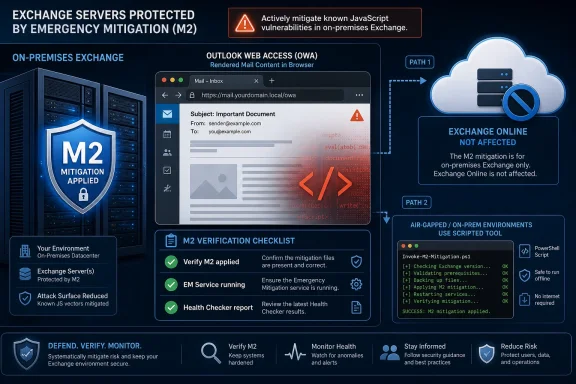 Microsoft’s Fastest Fix Is a Mitigation, Not a Patch
The important detail in Microsoft’s May 14 notice is that there is no permanent Exchange security update available yet for CVE-2026-42897. Microsoft says it is working on one and will release it later for affected supported paths, but today’s defensive action is mitigation. That distinction matters because Exchange administrators are conditioned to think in terms of cumulative updates, security updates, schema changes, reboot windows, and post-install health checks.Here, Microsoft is asking admins to trust the Exchange Emergency Mitigation Service, the component introduced in 2021 after years of Exchange becoming one of the internet’s favorite enterprise targets. EM Service is designed to apply temporary protections ahead of a full update when Microsoft determines a vulnerability is serious enough to warrant immediate action. For CVE-2026-42897, Microsoft says the mitigation has already been published and is enabled automatically for customers with EM Service running.
That makes the administrative problem more subtle than “download the patch.” The question becomes whether each Exchange server can receive emergency mitigations, whether the service is enabled, whether the machine is new enough to consume current mitigation metadata, and whether the applied mitigation is visible in reporting. In other words, the first hour of response is less about patch deployment and more about inventory truth.
The mitigation name to verify is M2. If an Exchange administrator is looking at the Emergency Mitigation Service table or applied mitigation output, M2 is the marker Microsoft points to for this mitigation. In a large environment, that single label is likely to become the difference between a clean remediation report and a long night of arguing with stale server lists.
OWA Turns a Mailbox Bug Into a Browser Problem
CVE-2026-42897 is described as an Exchange OWA issue in which a specially crafted email can lead to arbitrary JavaScript execution in the browser context when a user opens the message in Outlook Web Access and certain interaction conditions are met. That phrasing is careful, and probably intentionally so. Microsoft is not saying that merely delivering an email compromises the server, nor is it saying that all Outlook clients are equally affected.But the OWA angle should still get attention. Outlook Web Access sits at the intersection of mail content, user identity, browser trust, and enterprise session state. If malicious JavaScript can run in the OWA browser context, the risk moves beyond an ugly message rendering bug and into the realm of session manipulation, content access, phishing amplification, or user-context actions depending on the exact constraints of the vulnerability.
The “certain interaction conditions” phrase is doing real work here. It suggests exploitation requires more than passive delivery, but Microsoft’s public post does not spell out the interaction sequence. That may be because the company wants administrators to mitigate before attackers and proof-of-concept writers can refine the path. For defenders, the absence of exploit choreography is not a reason to wait; it is a reason to reduce exposure before the choreography becomes public.
This is also why Exchange Online being unaffected is not just a comfort note for Microsoft 365 tenants. It reinforces a broader pattern: Microsoft’s cloud service can be changed centrally, while on-premises Exchange remains dependent on each customer’s maintenance posture, network exposure, and willingness to let Microsoft push emergency mitigations. The same product family now lives under two very different security operating models.
The Affected List Is Broad Enough to Catch Almost Everyone On-Prem
Microsoft lists Exchange Server 2016 at any update level, Exchange Server 2019 at any update level, and Exchange Server Subscription Edition at any update level as impacted. That is unusually broad in practical terms, because it means this is not a vulnerability limited to a forgotten branch or a laggard cumulative update. If you have on-premises Exchange in those families and OWA is in the picture, you should assume you are in scope.The “any update level” language also cuts through one of the more common Exchange patching debates. Administrators sometimes treat a recent CU or SU as a reason to slow-roll emergency action, especially if their environment has a history of update regressions. In this case, the advisory says the vulnerable condition spans all update levels of the affected on-premises versions.
That does not make update level irrelevant. Microsoft also warns that EM Service cannot check for new mitigations if the server is running an Exchange version older than March 2023. This is the catch inside the convenience story: the emergency mitigation channel is only useful if the server is current enough to participate. Organizations that kept Exchange alive but let it drift too far behind may find that the “automatic” mitigation path is unavailable exactly when they need it.
The update story also has a lifecycle trap. Microsoft says the future permanent security update will be released for Exchange SE RTM, Exchange 2016 CU23, and Exchange 2019 CU14 and CU15. Older CU versions need to be updated now if administrators want a viable path to the eventual fix. That is not merely housekeeping; it is the dividing line between temporary risk reduction and long-term remediation.
The M2 Check Is the New Smoke Test
The most useful operational fact in the advisory is almost hidden in the mechanics: the mitigation name is M2. Administrators verifying remediation through Exchange Emergency Mitigation Service should look for M2 in the applied mitigation data. A CVE-aware scanner may eventually know what to report, but Exchange admins need a same-day way to prove that the Microsoft-provided mitigation is present.Microsoft recommends using the standard “Viewing Applied Mitigations” process and the Exchange Health Checker script. The Health Checker report includes an EEMS check section, which can quickly show whether the Emergency Mitigation Service is functioning and what mitigations have been applied. For an incident bridge, that report is more useful than a verbal assurance that “EM Service is enabled somewhere.”
There is a cosmetic complication. Microsoft says some mitigation details may show “Mitigation invalid for this exchange version,” even when the mitigation status shows “Applied.” According to the advisory, that message is incorrect in this scenario; if the status is Applied, the mitigation has applied successfully. That is exactly the kind of UI contradiction that will cause confusion during a rushed security response, so administrators should document the Microsoft guidance before compliance teams begin screenshot-driven audits.
The better evidence trail is simple: confirm EM Service status, confirm M2 is applied, preserve the Health Checker output, and track exceptions by server name. If EM Service is disabled, disconnected, blocked, or too old to retrieve mitigation data, the environment needs the scripted path instead. The outcome should not be “we think it happened automatically”; it should be a server-by-server accounting of applied mitigation state.
Air-Gapped Exchange Gets a Script, Not an Excuse
Microsoft’s second mitigation path is for customers who cannot use EM Service, including disconnected and air-gapped environments. Those organizations are told to use the latest Exchange On-premises Mitigation Tool and run it from an elevated Exchange Management Shell. The script can apply the mitigation to a single server or across all non-Edge Exchange servers.That path matters because some of the most conservative Exchange deployments are also the least able to consume automatic mitigations. Disconnected networks, regulated environments, and high-control enterprises often prefer deliberate change pipelines over vendor-driven emergency action. CVE-2026-42897 shows the tradeoff: if you turn off the automatic safety net, you own the speed and accuracy of manual mitigation.
The distinction between Mailbox and Edge roles is also a reminder to avoid lazy fleet commands. Microsoft’s sample all-server command excludes Edge servers, which makes sense for an OWA-related mitigation. But every Exchange estate has its own wrinkles: hybrid remnants, decommissioned objects still in Active Directory, management servers, lab servers, and old boxes that nobody quite wants to admit are still reachable.
Manual mitigation should therefore be treated like a change with verification, not like a magic wand. Run it from the right shell, with elevation, against the right server set, and then verify applied mitigation state afterward. If the script succeeds but the environment’s authoritative inventory is wrong, the security story is still incomplete.
The Side Effects Are Annoying, but the Risk Tradeoff Is Clear
Microsoft lists two user-visible issues after the mitigation is applied. OWA Print Calendar functionality may not work, and inline images may not display correctly in the recipient’s OWA reading pane. The workarounds are pedestrian: copy or screenshot calendar data, use Outlook desktop, send images as attachments, or again use Outlook desktop.These are exactly the kinds of regressions that make Exchange administrators unpopular with users. Calendar printing sounds trivial until an executive assistant relies on it. Inline image rendering sounds cosmetic until a business process depends on embedded screenshots, approvals, or formatted operational messages.
Still, the tradeoff is not especially close. Broken OWA conveniences are easier to explain than unmitigated browser-context script execution in enterprise webmail. If a mitigation disrupts a workflow, the correct response is to route users temporarily to Outlook desktop or alternate handling, not to leave the vulnerability open while waiting for a cleaner patch.
The known issues also hint at what the mitigation may be doing. Microsoft has not published the full technical mechanics in the advisory, but limitations around inline images and OWA calendar printing suggest the mitigation changes how OWA handles or sanitizes certain rendered content. That may be inconvenient, but it is consistent with a defensive move designed to reduce dangerous script execution paths quickly.
Exchange 2016 and 2019 Are Now in the ESU Maze
The permanent fix will not land equally for every on-premises Exchange customer. Microsoft says Exchange SE will receive a publicly available security update. Exchange 2016 and Exchange 2019 updates, however, will be released only to customers enrolled in the Period 2 Exchange Server Extended Security Update program. Customers covered only by Period 1 will not receive this update because that program ended in April 2026.This is where the advisory becomes more than a vulnerability notice. It is also a lifecycle enforcement notice. Exchange 2016 and 2019 may still be present in many production environments, but Microsoft’s support and update channels are narrowing. The message is clear: if you stayed on older Exchange without the right ESU coverage, temporary mitigation may be available, but the future permanent fix may not be.
For administrators, that creates an uncomfortable budget and governance conversation. Security teams may be able to confirm M2 today, but they still need to ask whether the organization is entitled to the eventual security update. If not, the environment is drifting into a state where each new Exchange advisory becomes a negotiation among risk acceptance, paid extended support, and migration urgency.
Exchange SE is supposed to simplify the future by moving on-premises Exchange into a subscription-era servicing model. But CVE-2026-42897 demonstrates the transitional pain. Many organizations are still straddling old versions, hybrid dependencies, compliance requirements, and cloud migration plans that never quite finish. A vulnerability in OWA can expose not only a technical flaw, but also a half-completed modernization strategy.
The Real Exposure Is Operational Drift
The most dangerous Exchange servers are rarely the ones administrators know are important. They are the servers that exist because of a migration that stalled, a hybrid configuration that never got cleaned up, a regional office requirement, a legacy application relay path, or a mailbox role that was supposed to be retired “next quarter.” CVE-2026-42897 is a reminder that on-premises Exchange risk is often an inventory problem wearing a vulnerability badge.Microsoft’s mitigation instructions assume organizations know which servers they have and what state they are in. They assume EM Service is enabled where it should be enabled. They assume servers are updated enough to consume mitigation data. They assume administrators can distinguish a cosmetic mitigation-description bug from a failed application. In mature environments, those are reasonable assumptions; in real environments, each one can fail.
That is why the response should include more than applying M2. Administrators should check whether OWA is externally published, whether conditional access or reverse proxy controls reduce exposure, whether legacy servers remain internet-facing, and whether monitoring can detect suspicious OWA behavior. A mitigation is not a substitute for knowing the attack surface.
There is also a communications challenge. Users may experience broken inline images or calendar printing, while security teams may be asking for evidence that mitigation applied. Help desks should have a short explanation ready, because unexplained OWA regressions tend to generate workaround behavior. The last thing an organization wants during a webmail vulnerability response is users forwarding sensitive messages to personal accounts just to view an embedded image.
The Exchange Emergency Model Is Doing What It Was Built to Do
It is easy to complain about another Exchange vulnerability, and Exchange has earned some of that fatigue. But the existence of an automatic mitigation on disclosure day is the result of a real post-ProxyLogon shift in Microsoft’s Exchange defense model. The old pattern was patch, scramble, scan, discover compromise, and rebuild trust under pressure. EM Service was designed to put at least one faster lever between disclosure and full patch deployment.That lever is imperfect. Emergency mitigations can break functionality. They require trust in Microsoft’s mitigation feed. They may not work on outdated servers. They do not replace security updates. They can also create reporting oddities, as the “Mitigation invalid” cosmetic issue shows.
But for this class of issue, imperfect speed beats elegant delay. If the vulnerability is exploitable through crafted mail content in OWA, then waiting for a conventional update while users continue opening mail in the browser is not an attractive position. EM Service lets Microsoft change the defensive posture before the full engineering, packaging, release, and customer deployment cycle is complete.
The lesson for admins is not that automatic mitigation should be blindly trusted forever. It is that disabling it should be a conscious risk decision with a compensating process. If an organization turns off EM Service, it should already know how quickly it can retrieve, validate, run, and verify EOMT across the estate. Otherwise, it has traded a managed emergency channel for hope.
The M2 Mitigation Is Only the First Checkmark
For Exchange administrators, the immediate job is concrete and measurable. The environment needs to show that M2 is applied, that exceptions are understood, and that older servers have a path either to mitigation or retirement. After that, the organization needs to prepare for the eventual security update and confirm whether its Exchange version and licensing posture will actually receive it.- The mitigation name administrators should verify for CVE-2026-42897 is M2.
- Exchange Server 2016, Exchange Server 2019, and Exchange Server Subscription Edition are affected at any update level, while Exchange Online is not affected.
- Exchange Emergency Mitigation Service is Microsoft’s recommended path, but it cannot help servers that are too old to retrieve current mitigation data.
- Disconnected or air-gapped environments should use the Exchange On-premises Mitigation Tool from an elevated Exchange Management Shell and verify results afterward.
- OWA calendar printing and inline image rendering may break after mitigation, but those regressions are preferable to leaving the vulnerability exposed.
- The future permanent update will be publicly available for Exchange SE, while Exchange 2016 and 2019 fixes are tied to Period 2 ESU eligibility.
Source: Microsoft Exchange Team Blog Addressing Exchange Server May 2026 vulnerability CVE-2026-42897 | Microsoft Community Hub
