

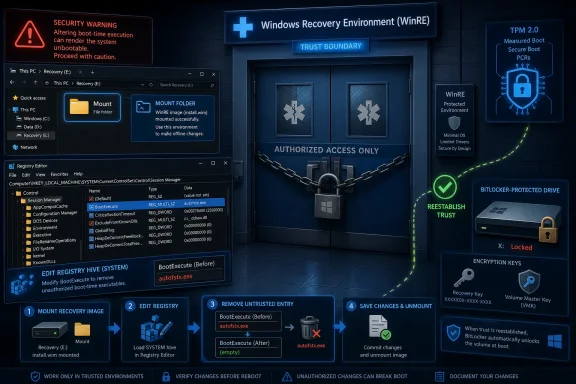
autofstx.exe entry from WinRE’s BootExecute registry value, commit the image, and reestablish BitLocker trust for WinRE. That is a strikingly specific workaround for a flaw in a security feature whose value depends on boring predictability. The practical message is not that BitLocker encryption has been mathematically broken, but that Windows’ recovery path has again become part of the BitLocker threat model. For admins, the awkward part is that the mitigation lives not in a clean policy toggle, but inside a servicing workflow that must touch the recovery image itself.
Microsoft’s Mitigation Points Straight at WinRE
The most important word in Microsoft’s guidance is not BitLocker. It is WinRE.
Windows Recovery Environment exists because real machines fail in messy ways: bad drivers, botched updates, corrupted boot files, damaged system partitions, forgotten credentials, and laptops that need repair while their owners are far from an IT desk. WinRE is supposed to be the controlled emergency room for Windows. It has enough privilege to repair the patient, but it is also supposed to respect the locked doors that BitLocker places around protected data.
CVE-2026-45585 lands precisely in that uncomfortable space. The mitigation instructs administrators to mount the local WinRE image with reagentc, load the offline SYSTEM registry hive, and remove autofstx.exe from the BootExecute value under Session Manager. That is not the shape of a generic hardening recommendation. It is the shape of a vendor telling defenders that an automatic boot-time component inside the recovery image should no longer run.
That specificity matters. In normal Windows administration, BootExecute is one of those registry values most people never touch because it runs early and can affect startup behavior before the rest of the operating system is fully available. In a recovery image, the blast radius is even stranger: the code path exists outside the daily Windows session but can still participate in whether encrypted volumes are available during repair.
Microsoft’s wording also uses the language of mitigation rather than permanent fix. In Security Update Guide terms, that means the company is describing a setting or configuration that can reduce exploitability or severity, not necessarily announcing that every supported Windows build has already received a complete patch. Administrators should read that distinction carefully. A mitigation is an operational bridge; it is not a reason to stop tracking the servicing train.
BitLocker’s Promise Depends on the Boot Story Holding Together
BitLocker is often described too simply as “disk encryption,” but the more useful description is “disk encryption bound to a boot-time trust decision.” The encrypted data is not supposed to become readable merely because someone has the device. The platform must first pass checks involving the TPM, firmware, boot manager, measured boot state, and, depending on configuration, a user-supplied PIN or startup key.
That is why attacks against BitLocker so often orbit around the pre-boot and recovery stages rather than the cipher itself. Attackers do not need to defeat AES if they can trick Windows into unlocking the volume for them. The clean cryptographic boundary becomes a systems-engineering boundary, and systems engineering is where old compatibility assumptions tend to accumulate.
Microsoft’s own BitLocker documentation has long drawn a line between TPM-only convenience and stronger pre-boot authentication. TPM-only unlock is designed to make the user experience feel seamless: if the platform measurements look right, Windows starts normally, and the user signs in as usual. TPM with PIN adds friction, but it also prevents the key from being released until the user supplies another factor before Windows can read the operating system volume.
CVE-2026-45585 appears to punish environments that treated TPM-only as a universal answer rather than a risk trade-off. That does not mean every TPM-only deployment is negligent. It does mean the defaults were optimized for adoption, help-desk sanity, and modern device-management flows, while higher-risk fleets need to keep asking whether convenience is being mistaken for assurance.
Recovery Is a Feature Until It Becomes an Attack Surface
WinRE is trusted because it has to be. A recovery environment that cannot unlock, inspect, or repair Windows is much less useful, especially on consumer devices and remote business laptops where recovery media, local administrators, and replacement hardware may not be available. Windows has spent years making that experience more automatic because automatic recovery reduces support cost and user pain.
But automatic recovery has a security cost: it creates moments when Windows is not fully running, the normal user session does not exist, and yet deeply privileged repair logic is active. If BitLocker-protected volumes are auto-unlocked in that state, the recovery environment becomes a privileged broker. Any component that can influence that environment deserves the scrutiny normally reserved for bootloaders and credential providers.
The mitigation’s target, autofstx.exe, strongly suggests that Microsoft wants administrators to disable an automatic file-system transaction-related behavior inside WinRE. The supplied steps do not ask admins to change the live Windows installation. They ask them to change the mounted recovery image’s registry hive. That distinction is not cosmetic; it tells us the risky behavior is tied to what happens when WinRE itself starts.
This is why the phrase “security feature bypass” should not be dismissed as lower drama than remote code execution. A security feature bypass can be devastating when the feature being bypassed is the one standing between a stolen laptop and a readable disk. Physical access still matters, but physical access is exactly the scenario full-volume encryption is supposed to make boring.
The USB-Stick Narrative Is Both Useful and Dangerous
Recent reporting and researcher discussion around related BitLocker bypass techniques have focused on attacks using removable media and recovery behavior. That framing is understandable. “A USB stick can bypass BitLocker” is legible in a way that “WinRE auto-unlock trust boundary confusion” is not.
But the shorthand can mislead. The lesson is not that every USB port is now a magic skeleton key, nor that BitLocker’s encryption has collapsed. The lesson is that a trusted recovery environment can become a confused deputy if it automatically processes attacker-controlled state while encrypted volumes are available. The removable device is a delivery mechanism; the recovery trust boundary is the real story.
For WindowsForum readers, that distinction matters because it changes the response. Disabling external boot alone may not be enough if the attack path can be triggered through native recovery flows. Conversely, ripping out BitLocker in panic would be absurd. The right response is to reduce the conditions under which WinRE can auto-unlock protected volumes and to remove the vulnerable recovery component where Microsoft has instructed.
This is the recurring pattern in modern endpoint security. The strongest controls are often not defeated head-on; they are routed around by abusing the plumbing that exists for supportability. Recovery, update, deployment, accessibility, and compatibility paths all exist for good reasons. They also tend to execute with trust that attackers would very much like to borrow.
The Mitigation Is Simple on One Machine and Ugly at Fleet Scale
On a single test laptop, Microsoft’s workaround is almost comforting. Create C:\mount, mount WinRE with reagentc /mountre /path C:\mount, load the offline SYSTEM hive, edit BootExecute, unload the hive, unmount and commit the image, then reestablish BitLocker trust for WinRE. An experienced Windows admin can understand the sequence immediately.
At fleet scale, the same sequence becomes a change-management problem. Every device has a local recovery image. Some machines have stale WinRE partitions. Some have recovery disabled. Some have BitLocker protectors in states that will punish sloppy sequencing. Some are remote, battery-powered, intermittently connected, or already carrying OEM customizations inside the recovery image.
The final step — reestablishing BitLocker trust for WinRE — is the part administrators should not wave away. When the recovery image changes, BitLocker and the platform measurements need to agree again about what is trusted. Microsoft’s own WinRE servicing guidance commonly points admins toward disabling and re-enabling Windows RE after updates on BitLocker-protected systems so the updated recovery image is correctly configured for the Windows installation.
The immediate operational danger is not only exploitation. It is failed remediation. A script that edits the wrong hive, fails to commit the image, leaves a mount directory dirty, or changes recovery state without validating BitLocker can create a support incident that looks a lot like a security incident. Enterprises should treat this mitigation like an offline servicing task, not a casual registry tweak.
TPM-Only Was Always a Compromise, Not a Magic Spell
This vulnerability is likely to reopen an old fight: whether TPM-only BitLocker is “good enough.” The annoying answer remains: it depends on the adversary and the device.
For commodity theft, TPM-only BitLocker is still vastly better than no encryption. A stolen laptop with a locked Windows account and an encrypted drive remains a much harder target than a machine with a plain NTFS volume. Most thieves want resale value, not forensic persistence.
For targeted attacks, especially against executives, developers, journalists, lawyers, administrators, and anyone carrying regulated or strategic data, TPM-only deserves more skepticism. A pre-boot PIN changes the economics because the TPM will not release the material needed to unlock the drive until the user supplies an additional secret. That does not solve every problem, but it removes the seamless auto-unlock behavior that recovery-path attacks try to exploit.
The trade-off is real. PINs increase help-desk calls. They complicate unattended patching, remote reboot workflows, and kiosk-like deployments. They are also unpopular on modern laptops whose users have been trained to expect biometrics and cloud-backed recovery. But security architecture is largely the art of deciding where inconvenience belongs. If a device’s loss would be a business event rather than a nuisance, some of that inconvenience belongs before the operating system starts.
Microsoft’s Pattern Is Becoming Harder to Ignore
CVE-2026-45585 does not arrive in a vacuum. Over the last year, WinRE and BitLocker interactions have received unusual scrutiny from researchers and Microsoft’s own security teams. Prior research into BitLocker bypasses through recovery behavior showed how powerful WinRE becomes when it has access to decrypted volumes during repair workflows.
That history should make defenders more, not less, cautious about treating this as a one-off. The recovery environment is not merely a tiny sidecar partition. It is a parallel Windows-based environment with drivers, registry hives, boot logic, servicing requirements, and a privileged relationship to the installed operating system. Any organization that inventories Windows builds but ignores WinRE state has an incomplete picture of endpoint security.
Microsoft is also caught between two imperatives. It must keep recovery reliable for hundreds of millions of machines, including consumer systems with no IT department. At the same time, it must preserve BitLocker’s credibility for enterprises that bought into Windows’ hardware-rooted security model. Those goals are not always aligned, and CVE-2026-45585 is the kind of bug that exposes the seam.
The charitable reading is that Microsoft is giving administrators a precise, actionable mitigation while it continues the broader servicing work. The less charitable reading is that WinRE’s trust model still contains legacy machinery that has not been threat-modeled with enough aggression. Both readings can be true at the same time.
The Real Risk Is Uneven Remediation
The machines most likely to remain exposed are not necessarily the ones owned by careless users. They are the ones that fall between management models.
Consumer Windows 11 devices may depend on automatic updates but never receive hands-on WinRE remediation unless Microsoft ships a fully automated fix. Small businesses may have BitLocker enabled through default device encryption without anyone who knows how to mount a recovery image. Enterprises may have the skill but not the confidence to run offline registry edits across remote laptops without a tested rollback plan.
There is also a documentation gap between security bulletins and operational reality. Microsoft can publish a mitigation in six steps, but those steps hide a lot of assumptions: that WinRE is enabled, that reagentc works, that the recovery partition has enough room, that the image can be mounted, that the registry value exists as expected, and that BitLocker protectors are recoverable if something goes wrong. In mature environments, those assumptions are tested. In many environments, they are merely hoped for.
This is where Windows administrators should resist both extremes. Panic-driven changes are dangerous, but waiting passively for a cumulative update may also be wrong if the device population includes high-value mobile endpoints. The sensible path is staged validation: reproduce the mitigation on sacrificial hardware, document the before-and-after state, test recovery, then deploy in rings with telemetry.
Security Teams Should Treat WinRE as Managed Infrastructure
The broader lesson is that WinRE needs to graduate from “that partition Windows uses when things go sideways” to “managed endpoint infrastructure.” That means inventorying its status, version, image health, and BitLocker relationship with the same seriousness applied to firmware, Defender state, and Windows build numbers.
For sysadmins, this is not glamorous work. It means reagentc /info in compliance scripts. It means confirming that recovery images receive relevant updates. It means understanding whether OEM tooling has modified WinRE. It means knowing where recovery keys are escrowed before touching anything that might trigger recovery. It means testing whether TPM+PIN is appropriate for at least the machines whose loss would cause real harm.
For security architects, CVE-2026-45585 is also a reminder that “physical access required” is not the dismissal it once was. Modern workforces are mobile. Laptops cross borders, sit in hotel rooms, ride in rideshares, and pass through repair shops. Physical access is not a Hollywood scenario; it is a normal failure mode for endpoint security.
And for Microsoft, this should accelerate the push to make WinRE servicing less bespoke. If the mitigation for a security feature bypass requires offline hive editing inside a mounted recovery image, the product has put too much burden on administrators. The fix may be technically appropriate, but the delivery mechanism is a warning sign.
The Autofstx Workaround Gives Admins a Narrow Window to Act
The concrete response to CVE-2026-45585 is not complicated in concept: remove the risky automatic entry from the recovery image, preserve the ability to recover systems, and avoid breaking BitLocker trust. The difficulty is doing that consistently, safely, and quickly enough to matter.
- Administrators should identify BitLocker-protected devices with enabled WinRE before assuming the mitigation has either applied or become irrelevant.
- The mitigation should be tested on representative hardware before broad deployment because WinRE layouts, OEM customizations, and BitLocker protector states vary across fleets.
- High-risk mobile systems should be evaluated for TPM+PIN or other pre-boot authentication, especially where device loss could expose privileged credentials or regulated data.
- Recovery keys should be escrowed and verified before changing WinRE or BitLocker configuration because a failed trust transition can become a self-inflicted lockout.
- Security teams should monitor for Microsoft servicing updates that supersede the manual workaround, since mitigation guidance is not the same thing as a permanent product fix.
- WinRE state should become part of normal endpoint compliance reporting rather than an emergency-only troubleshooting detail.
That list is short because the strategic lesson is simple: BitLocker’s strength depends on everything that happens before Windows is fully Windows. CVE-2026-45585 is another case where the recovery path, not the encryption algorithm, becomes the place defenders must look.
Microsoft’s mitigation gives administrators something to do now, but it also exposes the uncomfortable complexity underneath Windows’ default security story. BitLocker remains essential, and WinRE remains necessary; the problem is the trust relationship between the two has become too important to leave implicit. The next phase for Windows endpoint security should be less about reassuring users that encryption is on and more about proving that every pre-boot and recovery component that can touch decrypted data deserves to be trusted.
References
- CVE-2026-45585 Windows BitLocker Security Feature Bypass Vulnerability MSRC · 2026-05-19T07:00:00-07:00
- techcommunity.microsoft.com techcommunity.microsoft.com
- learn.microsoft.com learn.microsoft.com