

On June 9, 2026, Microsoft disclosed CVE-2026-45649, an Important-rated spoofing vulnerability in Office for Android affecting Word, PowerPoint, and Excel, caused by improper access control and requiring a user to open a malicious Office file on an Android device locally. The advisory is notable less because it describes a spectacular new exploit chain than because it exposes a familiar weak seam in enterprise security: mobile Office is now part of the document attack surface. Microsoft says exploitation is unlikely and not known to be public or active, but the vulnerability is confirmed and the updates were not immediately available at publication. That combination makes this a patch-management story, a mobile-device-management story, and a trust story all at once.
For years, mobile Office apps were treated as companions to the “real” Office stack on Windows and macOS. They were the place where executives reviewed a deck in a taxi, sales teams edited a spreadsheet between meetings, and managers approved changes from a phone. That posture is increasingly obsolete.
Word, Excel, and PowerPoint for Android now sit directly in the path of business decisions. They render documents from email, Teams chats, SharePoint links, OneDrive shares, and third-party collaboration workflows. If those apps misrepresent what a user is seeing or trusting, the result may not be code execution, but it can still shape a decision that matters.
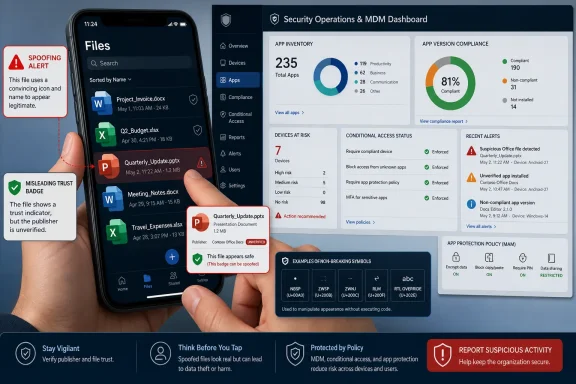
CVE-2026-45649 is classified as a spoofing vulnerability, not a remote-code-execution bug. That distinction matters, but it should not be confused with harmlessness. Spoofing flaws are about deception: the attacker’s win condition is getting a user or process to believe something false.
Microsoft’s summary is terse: improper access control in Office for Android allows an unauthorized attacker to perform spoofing locally. The CVSS vector fills in the contours. The attack vector is local, attack complexity is low, privileges are not required, user interaction is required, and confidentiality and integrity impacts are both rated high while availability is unaffected.
That is a strange-looking risk profile at first glance. A vulnerability that needs a user to open a malicious file sounds like standard phishing background noise. But in Office, “standard phishing background noise” is exactly where many enterprises still lose visibility.
Office files remain one of the most durable delivery mechanisms in enterprise security because they are culturally legitimate. A spreadsheet from finance, a PowerPoint from a partner, or a Word document from a customer does not look like an anomaly in most workflows. On mobile, that legitimacy is amplified by impatience and limited screen space.
The Android phone is not where most users do forensic inspection of document provenance. It is where they tap. The file opens, the screen renders, and the user decides whether the invoice looks right, whether the contract redline is acceptable, or whether the deck came from the expected person.
That is why spoofing in a document app deserves more attention than its category sometimes gets. The attacker may not need to own the device if the attacker can own the moment of trust. A document that convincingly misrepresents identity, origin, content state, link behavior, permission context, or other security-relevant cues can be enough to move a user into the next step of an attack.
Microsoft has not published the underlying technical mechanism, and administrators should resist the temptation to fill that gap with speculation. The public facts support a narrower but still serious conclusion: Office for Android had an access-control weakness that could let an unauthorized attacker spoof something locally after a user opened a malicious Office file.
That matters because CVE entries often arrive with uneven information. Some advisories describe a bug class and a product, but leave exploitability, affected versions, and mitigation details in the fog. Others contain enough detail to enable defenders and attackers at the same time. CVE-2026-45649 sits in the middle: confirmed existence, clear affected products, meaningful CVSS metrics, and limited technical detail.
The confirmed status increases urgency because defenders can stop debating whether the issue is real. It also tells attackers that there is a genuine bug class worth studying. The lack of public exploit code reduces immediate panic, but it does not erase the research incentive created by a vendor-confirmed advisory.
Microsoft credits Yanir Tsarimi for reporting the issue, suggesting coordinated disclosure rather than public burn-down. That is the healthy version of the vulnerability pipeline. The uncomfortable part is that the customer-facing remediation story was not complete at publication.
The advisory says updates for Word, PowerPoint, and Excel for Android were not immediately available and would be released as soon as possible, with customers notified through a revision to the CVE information. That turns the usual patch guidance on its head. Administrators cannot simply say “update now” if the vendor has disclosed the issue before the mobile app updates are available.
On Windows, many organizations have a mature rhythm for KB numbers, build numbers, cumulative updates, and reporting. On Android, the same organizations may depend on Play Store update timing, managed Google Play, Intune app protection policies, device enrollment state, and user behavior. A mobile Office vulnerability therefore becomes a test of whether the company actually manages mobile productivity apps or merely permits them.
The advisory’s remediation level is marked as Official Fix, yet the FAQ says the app updates were not immediately available. That tension is not necessarily a contradiction in Microsoft’s internal scoring model, but it is confusing for practitioners. The practical reading is simple: the fix path is vendor updates to the Android Office apps, but administrators should monitor the advisory and app store channels for the actual revised build details.
This is where mobile patching gets messy. An organization may be able to force-update managed apps on enrolled devices, but unmanaged BYOD devices often live in a softer policy zone. If users can access corporate documents through Office on Android without enrollment, app-version enforcement, or conditional access, the organization may not know who remains exposed.
Security teams should also remember that Office for Android is not always consumed as three distinct mental products. Users may think “Office” or “Microsoft 365,” while the advisory names Word, PowerPoint, and Excel. Inventory systems need to track the actual Android packages and versions, not just the licensing bundle.
They should not, however, lead to complacency. “Exploitation unlikely” is a forecast, not a guarantee. It reflects Microsoft’s assessment at publication, before the broader research community has had time to diff builds, inspect app behavior, and test attack hypotheses.
The CVSS base score of 7.1 places this in a meaningful band. The temporal score of 6.2 reflects mitigating factors such as unproven exploit maturity and remediation status. But the base metrics are still telling: no privileges required, low complexity, user interaction required, high confidentiality impact, and high integrity impact.
That is a profile familiar to anyone who has worked real-world phishing and document abuse cases. The attacker does not begin with admin rights. The attacker begins with a file and a reason for the user to open it. The technical exploit, if weaponized, becomes one component in a social workflow.
For enterprise triage, this means CVE-2026-45649 should not jump ahead of actively exploited remote-code-execution flaws or internet-facing server vulnerabilities. But it should be pulled into the mobile app patch queue, the phishing-defense conversation, and the document-handling policy review. The right response is measured urgency.
That makes mobile spoofing especially awkward. Android devices are personal, portable, notification-driven, and often used under time pressure. A desktop user may have a large screen, multiple windows, visible file paths, browser indicators, endpoint security prompts, and a habit of checking details. A phone user may have a thumb, a deadline, and six inches of glass.
If an Office document can exploit improper access control to alter or misrepresent trust cues, the risk is not merely that pixels are wrong. The risk is that a user makes a decision under false assumptions. They may open a link they would otherwise distrust, accept content they would otherwise question, or share information under a mistaken belief about the document’s state.
Microsoft has not said which trust cue or access-control boundary is involved, so defenders should avoid claiming specifics. But the broader lesson is sound: document viewers are security interfaces. They do not merely display content; they communicate what the content is, where it came from, what it can do, and whether it should be trusted.
That is why spoofing bugs keep returning. Modern security increasingly depends on small signals: badges, prompts, origin displays, permission states, account context, document labels, and protected-view-style boundaries. If an attacker can bend those signals, the user becomes the final vulnerable component.
A user opens a document on Android. Is the device enrolled? Is the app managed? Is the file corporate or personal? Is app protection applied? Is the device jailbroken or rooted? Is the Office app current? Can the user copy data into unmanaged apps? Can the organization revoke cached access? These are not abstract governance questions; they determine whether a vulnerability like CVE-2026-45649 becomes an enterprise exposure or a contained nuisance.
The challenge is that many organizations adopted mobile productivity faster than they matured mobile governance. During the bring-your-own-device era, the compromise was convenience with partial control. That bargain looks less comfortable when mobile apps are disclosed as affected products in security advisories.
The security update table’s lack of build numbers at publication adds pressure to this blind spot. If the fix arrives later through app stores, defenders need a way to verify adoption. “The phone probably auto-updated” is not a control, especially for executives, finance staff, legal teams, healthcare workers, government users, and anyone handling regulated or high-value documents.
The answer is not to ban mobile Office. That would be unrealistic and, in many organizations, counterproductive. The answer is to treat mobile Office as part of the managed endpoint estate rather than as a convenience exception.
That creates a timing problem for administrators. The CVE exists now. The advisory is public now. But the actual updates for Word, PowerPoint, and Excel for Android were not immediately available according to Microsoft’s FAQ at publication. Security teams are therefore left in a monitoring posture rather than a deployment posture.
This is not unprecedented, but it is uncomfortable. Public disclosure before universally available fixes can be justified by coordination timelines, ecosystem constraints, or advisory synchronization. Still, it places defenders in the position of explaining risk without being able to close it immediately.
The correct operational move is to build a watch process around the advisory revision and the Android app versions. When Microsoft updates the CVE with available fixes or build numbers, organizations should be ready to move quickly. That means the inventory and policy work should happen before the revised advisory lands.
It also means communications matter. Users do not need a panic bulletin about an “Office Android spoofing vulnerability” if no exploit is known and exploitation is unlikely. They do need reinforced guidance about unexpected Office files, especially on mobile devices, and about waiting for managed app updates where policy requires them.
The users worth prioritizing are those whose document interactions authorize money, disclose sensitive information, approve legal language, handle credentials, or trigger operational changes. In those contexts, spoofing can be an input to fraud, data exposure, or misdirected trust. A malicious document does not need to crash the app if it can quietly steer a human decision.
Regulated environments should pay particular attention to Android devices used for quick approvals. Healthcare, finance, legal, government, and critical infrastructure teams often treat mobile review as a productivity win. It is also a condensed attack surface where document trust, identity, and policy enforcement meet under pressure.
There is a second group to watch: users outside the core corporate device program. Contractors, partners, board members, and executives may access documents from devices that are less consistently enrolled or less frequently checked. These users are often highly valuable targets and operationally inconvenient to manage.
CVE-2026-45649 is therefore a useful forcing function. It asks whether the organization can identify who uses Word, Excel, and PowerPoint on Android, determine which versions they run, restrict access from unmanaged or outdated apps, and communicate document-handling risk without relying on desktop assumptions.
Next comes update enforcement. Managed Google Play and MDM tooling should be configured to deploy or require updated Office apps once Microsoft publishes fixed versions. Where auto-update is allowed, admins should still verify version compliance rather than assume it.
Conditional access can reduce exposure while the patch window is open. Organizations may choose to require compliant devices, approved client apps, app protection policies, or minimum app versions for Microsoft 365 access. Those controls are sometimes seen as friction until a mobile app CVE makes their value obvious.
Data-loss-prevention and sensitivity-labeling programs also matter. A spoofing vulnerability becomes more consequential when sensitive documents can be freely opened on unmanaged devices. If labels, access policies, and app restrictions limit where high-value documents can go, the blast radius shrinks.
Finally, user guidance should be specific. “Do not open suspicious attachments” is too stale to change behavior. A better message says that until updates are confirmed, users should be cautious with unexpected Word, Excel, and PowerPoint files on Android, especially when the file asks them to trust a source, follow a link, approve a change, or act on financial or sensitive information.
The concrete picture is narrow and actionable:
 Microsoft’s Android Office Apps Move From Convenience Layer to Security Boundary
For years, mobile Office apps were treated as companions to the “real” Office stack on Windows and macOS. They were the place where executives reviewed a deck in a taxi, sales teams edited a spreadsheet between meetings, and managers approved changes from a phone. That posture is increasingly obsolete.Word, Excel, and PowerPoint for Android now sit directly in the path of business decisions. They render documents from email, Teams chats, SharePoint links, OneDrive shares, and third-party collaboration workflows. If those apps misrepresent what a user is seeing or trusting, the result may not be code execution, but it can still shape a decision that matters.
CVE-2026-45649 is classified as a spoofing vulnerability, not a remote-code-execution bug. That distinction matters, but it should not be confused with harmlessness. Spoofing flaws are about deception: the attacker’s win condition is getting a user or process to believe something false.
Microsoft’s summary is terse: improper access control in Office for Android allows an unauthorized attacker to perform spoofing locally. The CVSS vector fills in the contours. The attack vector is local, attack complexity is low, privileges are not required, user interaction is required, and confidentiality and integrity impacts are both rated high while availability is unaffected.
That is a strange-looking risk profile at first glance. A vulnerability that needs a user to open a malicious file sounds like standard phishing background noise. But in Office, “standard phishing background noise” is exactly where many enterprises still lose visibility.
The Malicious Document Remains the Oldest Modern Attack
Microsoft’s own guidance says the user interaction required here is straightforward: an attacker would need to send a malicious Office file and convince the user to open it. The Preview Pane is not an attack vector, which narrows the exposure and prevents this from becoming a passive-preview scare. But it does not make the advisory irrelevant.Office files remain one of the most durable delivery mechanisms in enterprise security because they are culturally legitimate. A spreadsheet from finance, a PowerPoint from a partner, or a Word document from a customer does not look like an anomaly in most workflows. On mobile, that legitimacy is amplified by impatience and limited screen space.
The Android phone is not where most users do forensic inspection of document provenance. It is where they tap. The file opens, the screen renders, and the user decides whether the invoice looks right, whether the contract redline is acceptable, or whether the deck came from the expected person.
That is why spoofing in a document app deserves more attention than its category sometimes gets. The attacker may not need to own the device if the attacker can own the moment of trust. A document that convincingly misrepresents identity, origin, content state, link behavior, permission context, or other security-relevant cues can be enough to move a user into the next step of an attack.
Microsoft has not published the underlying technical mechanism, and administrators should resist the temptation to fill that gap with speculation. The public facts support a narrower but still serious conclusion: Office for Android had an access-control weakness that could let an unauthorized attacker spoof something locally after a user opened a malicious Office file.
“Confirmed” Is Doing More Work Than It Looks
The user-provided metric at the heart of this advisory is Report Confidence, and here Microsoft marks the vulnerability as confirmed. That means this is not a rumor, a theoretical weakness, or an unverified third-party claim floating through vulnerability feeds. Microsoft, as the assigning CNA, acknowledges the presence of the vulnerability.That matters because CVE entries often arrive with uneven information. Some advisories describe a bug class and a product, but leave exploitability, affected versions, and mitigation details in the fog. Others contain enough detail to enable defenders and attackers at the same time. CVE-2026-45649 sits in the middle: confirmed existence, clear affected products, meaningful CVSS metrics, and limited technical detail.
The confirmed status increases urgency because defenders can stop debating whether the issue is real. It also tells attackers that there is a genuine bug class worth studying. The lack of public exploit code reduces immediate panic, but it does not erase the research incentive created by a vendor-confirmed advisory.
Microsoft credits Yanir Tsarimi for reporting the issue, suggesting coordinated disclosure rather than public burn-down. That is the healthy version of the vulnerability pipeline. The uncomfortable part is that the customer-facing remediation story was not complete at publication.
The advisory says updates for Word, PowerPoint, and Excel for Android were not immediately available and would be released as soon as possible, with customers notified through a revision to the CVE information. That turns the usual patch guidance on its head. Administrators cannot simply say “update now” if the vendor has disclosed the issue before the mobile app updates are available.
The Missing Build Number Is the Operational Problem
The affected-products table lists Microsoft Word for Android, Microsoft PowerPoint for Android, and Microsoft Excel for Android. It does not provide fixed build numbers in the published table. For an enterprise vulnerability team, that absence is not a small formatting issue; it is the difference between a clean compliance query and a waiting room.On Windows, many organizations have a mature rhythm for KB numbers, build numbers, cumulative updates, and reporting. On Android, the same organizations may depend on Play Store update timing, managed Google Play, Intune app protection policies, device enrollment state, and user behavior. A mobile Office vulnerability therefore becomes a test of whether the company actually manages mobile productivity apps or merely permits them.
The advisory’s remediation level is marked as Official Fix, yet the FAQ says the app updates were not immediately available. That tension is not necessarily a contradiction in Microsoft’s internal scoring model, but it is confusing for practitioners. The practical reading is simple: the fix path is vendor updates to the Android Office apps, but administrators should monitor the advisory and app store channels for the actual revised build details.
This is where mobile patching gets messy. An organization may be able to force-update managed apps on enrolled devices, but unmanaged BYOD devices often live in a softer policy zone. If users can access corporate documents through Office on Android without enrollment, app-version enforcement, or conditional access, the organization may not know who remains exposed.
Security teams should also remember that Office for Android is not always consumed as three distinct mental products. Users may think “Office” or “Microsoft 365,” while the advisory names Word, PowerPoint, and Excel. Inventory systems need to track the actual Android packages and versions, not just the licensing bundle.
“Exploitation Unlikely” Is a Priority Signal, Not a Permission Slip
Microsoft’s exploitability assessment says exploitation is unlikely. The advisory also says the vulnerability was not publicly disclosed and not exploited at the time of publication. Those are reassuring facts, and they should prevent overreaction.They should not, however, lead to complacency. “Exploitation unlikely” is a forecast, not a guarantee. It reflects Microsoft’s assessment at publication, before the broader research community has had time to diff builds, inspect app behavior, and test attack hypotheses.
The CVSS base score of 7.1 places this in a meaningful band. The temporal score of 6.2 reflects mitigating factors such as unproven exploit maturity and remediation status. But the base metrics are still telling: no privileges required, low complexity, user interaction required, high confidentiality impact, and high integrity impact.
That is a profile familiar to anyone who has worked real-world phishing and document abuse cases. The attacker does not begin with admin rights. The attacker begins with a file and a reason for the user to open it. The technical exploit, if weaponized, becomes one component in a social workflow.
For enterprise triage, this means CVE-2026-45649 should not jump ahead of actively exploited remote-code-execution flaws or internet-facing server vulnerabilities. But it should be pulled into the mobile app patch queue, the phishing-defense conversation, and the document-handling policy review. The right response is measured urgency.
Spoofing Is Where Security Meets Human Perception
Security teams often prefer vulnerabilities that map cleanly to machines: memory corruption, privilege escalation, authentication bypass, remote code execution. Spoofing is messier because the damage frequently passes through a human. The system lies, the user believes it, and the organization pays for the resulting action.That makes mobile spoofing especially awkward. Android devices are personal, portable, notification-driven, and often used under time pressure. A desktop user may have a large screen, multiple windows, visible file paths, browser indicators, endpoint security prompts, and a habit of checking details. A phone user may have a thumb, a deadline, and six inches of glass.
If an Office document can exploit improper access control to alter or misrepresent trust cues, the risk is not merely that pixels are wrong. The risk is that a user makes a decision under false assumptions. They may open a link they would otherwise distrust, accept content they would otherwise question, or share information under a mistaken belief about the document’s state.
Microsoft has not said which trust cue or access-control boundary is involved, so defenders should avoid claiming specifics. But the broader lesson is sound: document viewers are security interfaces. They do not merely display content; they communicate what the content is, where it came from, what it can do, and whether it should be trusted.
That is why spoofing bugs keep returning. Modern security increasingly depends on small signals: badges, prompts, origin displays, permission states, account context, document labels, and protected-view-style boundaries. If an attacker can bend those signals, the user becomes the final vulnerable component.
Mobile Office Sits in the Blind Spot Between Endpoint and SaaS
The modern Microsoft estate is heavily instrumented on paper. Defender, Entra ID, Intune, Purview, Exchange Online, SharePoint, and Microsoft 365 audit logs can produce enormous amounts of security telemetry. Yet mobile Office frequently falls into a quieter zone between endpoint security and cloud access control.A user opens a document on Android. Is the device enrolled? Is the app managed? Is the file corporate or personal? Is app protection applied? Is the device jailbroken or rooted? Is the Office app current? Can the user copy data into unmanaged apps? Can the organization revoke cached access? These are not abstract governance questions; they determine whether a vulnerability like CVE-2026-45649 becomes an enterprise exposure or a contained nuisance.
The challenge is that many organizations adopted mobile productivity faster than they matured mobile governance. During the bring-your-own-device era, the compromise was convenience with partial control. That bargain looks less comfortable when mobile apps are disclosed as affected products in security advisories.
The security update table’s lack of build numbers at publication adds pressure to this blind spot. If the fix arrives later through app stores, defenders need a way to verify adoption. “The phone probably auto-updated” is not a control, especially for executives, finance staff, legal teams, healthcare workers, government users, and anyone handling regulated or high-value documents.
The answer is not to ban mobile Office. That would be unrealistic and, in many organizations, counterproductive. The answer is to treat mobile Office as part of the managed endpoint estate rather than as a convenience exception.
The Patch Tuesday Frame Does Not Fit App Store Reality
June 9, 2026, is a Patch Tuesday date, and the disclosure naturally lands in the familiar Microsoft security cadence. But Android app remediation does not behave like Windows cumulative updates. The update path runs through mobile app distribution, managed app stores, user devices, and sometimes staggered rollout behavior.That creates a timing problem for administrators. The CVE exists now. The advisory is public now. But the actual updates for Word, PowerPoint, and Excel for Android were not immediately available according to Microsoft’s FAQ at publication. Security teams are therefore left in a monitoring posture rather than a deployment posture.
This is not unprecedented, but it is uncomfortable. Public disclosure before universally available fixes can be justified by coordination timelines, ecosystem constraints, or advisory synchronization. Still, it places defenders in the position of explaining risk without being able to close it immediately.
The correct operational move is to build a watch process around the advisory revision and the Android app versions. When Microsoft updates the CVE with available fixes or build numbers, organizations should be ready to move quickly. That means the inventory and policy work should happen before the revised advisory lands.
It also means communications matter. Users do not need a panic bulletin about an “Office Android spoofing vulnerability” if no exploit is known and exploitation is unlikely. They do need reinforced guidance about unexpected Office files, especially on mobile devices, and about waiting for managed app updates where policy requires them.
The Risk Is Highest Where Documents Trigger Decisions
Not every Android Office user carries the same exposure. A student opening class notes, a hobbyist editing a household budget, and a CFO reviewing acquisition documents all face different consequences from the same bug class. CVSS gives a product-level severity; organizations must translate it into business-level risk.The users worth prioritizing are those whose document interactions authorize money, disclose sensitive information, approve legal language, handle credentials, or trigger operational changes. In those contexts, spoofing can be an input to fraud, data exposure, or misdirected trust. A malicious document does not need to crash the app if it can quietly steer a human decision.
Regulated environments should pay particular attention to Android devices used for quick approvals. Healthcare, finance, legal, government, and critical infrastructure teams often treat mobile review as a productivity win. It is also a condensed attack surface where document trust, identity, and policy enforcement meet under pressure.
There is a second group to watch: users outside the core corporate device program. Contractors, partners, board members, and executives may access documents from devices that are less consistently enrolled or less frequently checked. These users are often highly valuable targets and operationally inconvenient to manage.
CVE-2026-45649 is therefore a useful forcing function. It asks whether the organization can identify who uses Word, Excel, and PowerPoint on Android, determine which versions they run, restrict access from unmanaged or outdated apps, and communicate document-handling risk without relying on desktop assumptions.
Administrators Need a Mobile Document Control Plane
The defensive playbook begins with inventory. If an organization cannot answer which Android devices have Microsoft Word, Excel, or PowerPoint installed with corporate access, it cannot meaningfully respond to this advisory. Mobile application management should provide that view, especially for enrolled or app-protected devices.Next comes update enforcement. Managed Google Play and MDM tooling should be configured to deploy or require updated Office apps once Microsoft publishes fixed versions. Where auto-update is allowed, admins should still verify version compliance rather than assume it.
Conditional access can reduce exposure while the patch window is open. Organizations may choose to require compliant devices, approved client apps, app protection policies, or minimum app versions for Microsoft 365 access. Those controls are sometimes seen as friction until a mobile app CVE makes their value obvious.
Data-loss-prevention and sensitivity-labeling programs also matter. A spoofing vulnerability becomes more consequential when sensitive documents can be freely opened on unmanaged devices. If labels, access policies, and app restrictions limit where high-value documents can go, the blast radius shrinks.
Finally, user guidance should be specific. “Do not open suspicious attachments” is too stale to change behavior. A better message says that until updates are confirmed, users should be cautious with unexpected Word, Excel, and PowerPoint files on Android, especially when the file asks them to trust a source, follow a link, approve a change, or act on financial or sensitive information.
The Small CVE That Tests the Whole Mobile Stack
CVE-2026-45649 is not the kind of vulnerability that should empty a security operations center. It is not known to be exploited, it is not publicly disclosed beyond the advisory, and Microsoft rates exploitation as unlikely. But it is exactly the kind of vulnerability that reveals whether mobile productivity has been brought under real security management.The concrete picture is narrow and actionable:
- Microsoft disclosed CVE-2026-45649 on June 9, 2026, as an Important spoofing vulnerability affecting Word, PowerPoint, and Excel for Android.
- The flaw is tied to improper access control and requires a user to open a malicious Office file; the Preview Pane is not an attack vector.
- Microsoft lists the vulnerability as confirmed, with no public disclosure and no known exploitation at the time of publication.
- The CVSS 3.1 base score is 7.1, with low attack complexity, no privileges required, required user interaction, and high confidentiality and integrity impact.
- Microsoft said the Android app updates were not immediately available at publication and that customers would be notified through a revision when updates are released.
- Organizations should prepare app inventory, managed update enforcement, conditional access checks, and targeted user guidance before the fixed builds appear.
References
- Primary source: MSRC
Published: 2026-06-09T07:00:00-07:00
Security Update Guide - Microsoft Security Response Center
 msrc.microsoft.com
