

Organizations should immediately inventory every machine-wide and per-user Visual Studio Code installation, upgrade all releases earlier than 1.123.2, and require unfamiliar folders and workspace files to remain in Restricted Mode until both the editor and the workspace have been reviewed. That is the practical response to CVE-2026-47281.
Published on June 9, 2026, the vulnerability carries Microsoft’s 9.6 Critical CVSS 3.1 rating and concerns elevation of privilege through Visual Studio Code. The National Vulnerability Database now identifies releases before 1.123.2 as affected. The urgent enterprise problem is therefore not merely installing an update; it is finding every copy of an editor that developers can install, launch, and sometimes update outside conventional endpoint-management assumptions.
The immediate procedure has three parts. First, suspend the opening of unfamiliar
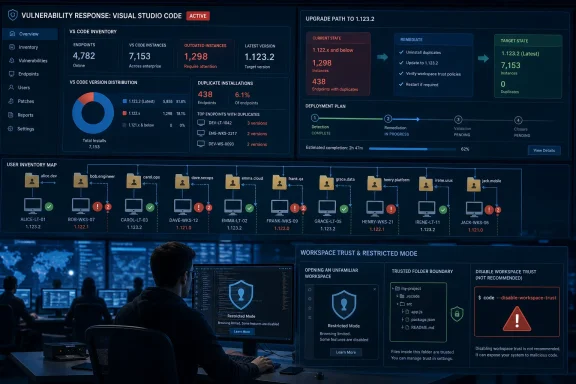
Administrators should begin by querying their software-management platform for Visual Studio Code, but that query cannot be treated as the final inventory. The results must be supplemented with searches for VS Code executables and installation directories across local disks and user profiles. That second pass is what catches installations belonging to contractors, former users, shared administrative accounts, or developers who installed the editor without using the organization’s standard deployment package.
On each discovered installation, verify that the running version is 1.123.2 or later. An endpoint should not be marked remediated merely because the deployment system reports a successful package installation. A newer machine-wide copy can coexist operationally with an older per-user copy, and a shortcut, shell association, automation script, or developer habit may continue launching the vulnerable executable.
While the inventory and update campaign is underway, developers should open unfamiliar folders only in Restricted Mode. In VS Code, press
Microsoft’s VS Code documentation recommends leaving unfamiliar folders in Restricted Mode until they have been reviewed. That mode is designed to limit automatic code execution associated with workspace features, including tasks, debugging, workspace settings, terminals, and extensions whose behavior depends on trusted content. It is a temporary exposure control, not a substitute for installing the fixed editor.
Administrators should also search scripts, shortcuts, shell profiles, remote-management actions, and developer documentation for the
That makes CVE-2026-47281 an endpoint-management test disguised as an editor vulnerability. An organization can have a perfectly healthy compliance dashboard and still leave the vulnerable application available to the exact users most likely to open repositories, sample projects, proofs of concept, vendor bundles, or workspace files obtained outside established software-distribution channels.
The first inventory query should identify devices where the management platform already recognizes VS Code. The second should identify executables that exist independently of that registration. The third should connect those findings to the users and workflows that can launch them.
This distinction matters because “installed” and “executable” are not always synonymous in enterprise records. An installation may be absent from a product table but remain launchable from a user directory. Conversely, an inventory record may show an updated product while an older executable remains reachable elsewhere on the system.
The remediation team should consequently track discovered executable paths and file versions, not only application names. It should also retain the user context associated with each path. A vulnerable binary inside a dormant profile is different from one being launched daily, but neither should disappear from the remediation scope simply because the primary device record looks compliant.
This is where ordinary patching metrics become misleading. Deployment success measures whether a package was delivered; exposure closure measures whether vulnerable code can still run. For CVE-2026-47281, only the latter answers the security question.
The enterprise unit of remediation is therefore not simply the device. It is the combination of device, executable path, version, and user context. Without those four fields, the organization cannot confidently distinguish a fully remediated workstation from a workstation that merely contains at least one fixed installation.
This is especially important for systems shared by development, support, testing, or operations teams. Jump hosts and troubleshooting workstations often accumulate tools because they exist precisely to solve unusual problems. That same flexibility makes them easy places for unmanaged software to survive.
Contractor endpoints introduce a different blind spot. A contractor may access corporate repositories from a managed virtual desktop, a company-issued system, a partner-managed laptop, or a machine outside the organization’s normal endpoint tooling. The relevant control is not employment status but whether the endpoint can receive and open corporate or unreviewed workspace content.
Organizations should treat repository access records, developer-group membership, source-control permissions, and build-system access as supporting discovery data. None of those sources proves that VS Code is installed. They can, however, identify people and systems that deserve manual verification when endpoint telemetry is incomplete.
The same reasoning applies to machines that are not categorized as developer endpoints. Security analysts open proof-of-concept repositories. Support engineers inspect customer projects. Administrators download diagnostic packages. Technical writers and product staff may use VS Code for configuration files. A software title’s official ownership category is a poor proxy for its real enterprise reach.
These systems are often excluded from ordinary developer-software campaigns because they are classified as infrastructure rather than workstations. Yet administrators may install editors on them for emergency configuration changes, log inspection, script maintenance, or pipeline troubleshooting. An old editor can remain untouched for months and then be used precisely when somebody is moving quickly and reviewing unfamiliar material.
CVE-2026-47281 should prompt a targeted search across those build-adjacent assets. The review should include systems used to prepare releases, sign artifacts, administer source-control platforms, manage automation, troubleshoot build agents, or access deployment credentials. The purpose is not to claim that every such system contains VS Code, but to reject the assumption that none of them does.
Security teams should also distinguish installed editors from remote development workflows. A developer may interact with code on one system while the VS Code client runs on another. Inventory must follow the executable and its version rather than assuming that the visible repository location reveals where the editor process resides.
This is an operationally important boundary. Repository servers and build agents may be fully patched while the workstation used to inspect their configuration remains vulnerable. Conversely, an administrator may update the workstation but leave a forgotten editor on an intermediate host used during incident response.
The enterprise playbook should therefore create a dedicated workstream for privileged and build-adjacent systems. These assets may require stricter change controls, but that is an argument for faster coordination, not slower recognition.
For users, the practical workflow is straightforward. Open the Command Palette with
That last point deserves explicit communication. Restricted Mode can feel like the editor is malfunctioning because familiar capabilities may be limited or unavailable. Under deadline pressure, developers can interpret the trust prompt as an obstacle rather than a security boundary and approve a folder simply to continue working.
The temporary policy must explain why the restriction exists and how users can obtain a review. A warning without an escalation path encourages bypasses. Organizations need a practical route for validating a repository, transferring it to an isolated review environment, or confirming that it came from an approved internal source.
Workspace Trust also has an inheritance behavior that complicates broad enterprise guidance. Microsoft’s documentation notes that trusting a parent folder automatically extends trust to its subfolders. That is convenient when a parent directory contains only approved repositories, but risky when developers use one broad directory for internal projects, external samples, customer code, experiments, and downloaded archives.
During the CVE-2026-47281 response, administrators and developers should review the Trusted Folders and Workspaces list for overly broad parent entries. A trusted development root can silently confer trust on newly created or newly cloned subfolders. The user may never receive the decision point that the temporary containment plan assumes will appear.
A safer interim pattern is to separate reviewed repositories from material awaiting evaluation. Trusted projects can remain under narrowly scoped trusted paths, while unfamiliar repositories and workspace files should be placed outside those paths and opened in Restricted Mode. The value comes from the boundary, not the folder names chosen to represent it.
There are legitimate reasons why developers or extension authors may have experimented with it. A test harness may need predictable behavior, a troubleshooting note may have recommended it, or a shortcut may have been created to avoid repeated trust handling. During this response, motive is less important than exposure.
Search managed shortcuts, desktop shortcuts, taskbar launch targets, shell aliases, wrapper scripts, test automation, documentation, and command histories where available and appropriate. The goal is to identify repeatable launch paths that suppress Workspace Trust, not to imply that every past use indicates compromise.
Any discovered use should be evaluated in context. A one-time test on an isolated system is not equivalent to a permanent shortcut on a shared jump host. A build test that intentionally exercises untrusted-workspace behavior may be defensible, while a general developer launcher that disables the protection should be removed or corrected.
This check also prevents an embarrassing failure mode: issuing a company-wide instruction to use Restricted Mode while leaving managed shortcuts that disable the feature. Security controls cannot protect users when the organization’s own launch process bypasses them before the workspace opens.
Teams reviewing VS Code settings should confirm that Workspace Trust remains enabled and that unfamiliar content is not being automatically treated as trusted through inherited folders or organizational customization. The review should focus on effective behavior, because a documented policy means little if the editor session starts without the protection.
Workspace Trust remains a compensating control rather than the fix. Once version 1.123.2 or later is deployed, the trust model still provides useful protection against broader workspace-driven risks. But no organization should treat Restricted Mode as permission to leave vulnerable releases in service indefinitely.
CISA’s SSVC enrichment, recorded on June 10, classified exploitation as “none,” automatable as “no,” and technical impact as “total.” Those fields should be read together rather than selectively.
The absence of recorded exploitation is relevant, but it is not evidence that an organization has no exposure. It describes the exploitation status reflected in the enrichment, not the completeness of an enterprise inventory. Similarly, “automatable: no” should not be translated into “low priority,” particularly when the technical-impact assessment is total and Microsoft’s CVSS rating is Critical.
User interaction is central to the scenario represented by Microsoft’s CVSS vector. That can tempt organizations to downgrade the issue because an attacker does not simply compromise every exposed editor without a user doing anything. Developer environments, however, are built around opening code obtained from other people and systems.
Repositories, workspace files, vendor samples, customer reproductions, generated projects, and security research are normal inputs to technical work. The required interaction is therefore adjacent to routine behavior rather than an exotic action. The containment strategy must target that behavior while vulnerable versions remain.
The sensible response is urgency without unsupported claims. There is no need to declare an active mass-exploitation campaign when the cited SSVC record says exploitation is none. There is also no basis for using that status as a reason to postpone inventory, because inventory is what determines whether the organization can react quickly if the exploitation picture changes.
The post-deployment discovery is essential. It detects failed upgrades, offline endpoints, reappearing per-user copies, abandoned profiles, duplicate executables, and systems that were outside the original management scope. It also tests whether the inventory method was broad enough to find more than the deployment platform already knew about.
Remediation records should preserve the path and version observed before and after the update. Where ownership is unclear, the responsible team should identify who can launch the executable and why it exists. This creates a durable result beyond the immediate CVE: a more accurate map of developer tooling across the estate.
Organizations should avoid closing devices based solely on a user’s assurance that VS Code “updated itself” or that the visible installation looks current. Those statements may be true, but the question is whether every reachable installation is fixed. Verification should come from observed versions across discovered paths.
Exceptions should be narrow, time-bound, and paired with exposure controls. If an endpoint cannot immediately move to 1.123.2 or later, it should not continue handling unfamiliar workspace files as usual. Depending on the system’s role, the organization may restrict repository intake, remove VS Code temporarily, deny interactive use, or transfer review work to an already remediated environment.
The reporting dashboard should separate “update deployed,” “fixed version verified,” and “all discovered copies remediated.” Combining those states into one green indicator conceals the exact gap that this vulnerability exposes.
CVE-2026-47281 turns that ambiguity into measurable risk. If nobody can quickly state how many VS Code installations exist, where they reside, which versions are running, and whether Workspace Trust is effective, the organization has a governance problem larger than one vulnerability.
That does not require centralizing every development decision. It requires defining minimum controls around inventory, supported versions, update deadlines, trusted distribution channels, and the handling of unreviewed workspace content. Developers can retain flexibility without making the editor invisible to security operations.
Contractor onboarding and offboarding deserve particular attention. Access reviews commonly focus on identities and repositories, while local developer tools receive less scrutiny. A contractor whose account has changed or expired may still have a managed endpoint containing code, credentials, configurations, and an outdated editor.
Privileged workstation policy should also state whether general-purpose editors are permitted, how they are updated, and where unreviewed code may be opened. A jump host should not become an informal development workstation simply because installing an editor was convenient during one incident.
WindowsForum’s earlier coverage of CVE-2025-24039 showed that VS Code privilege-escalation concerns are not an entirely new category for administrators. The current issue reinforces the need to treat editors as active components of the endpoint attack surface rather than harmless text viewers. Related WindowsForum reporting on Windows Workspace Broker and other privilege-escalation flaws similarly illustrates why product names alone should not define remediation boundaries: administrators must trace the vulnerable component to the systems and user contexts where it can actually execute.
Published on June 9, 2026, the vulnerability carries Microsoft’s 9.6 Critical CVSS 3.1 rating and concerns elevation of privilege through Visual Studio Code. The National Vulnerability Database now identifies releases before 1.123.2 as affected. The urgent enterprise problem is therefore not merely installing an update; it is finding every copy of an editor that developers can install, launch, and sometimes update outside conventional endpoint-management assumptions.
 Patch the Editor Before Reopening Unreviewed Workspaces
The immediate procedure has three parts. First, suspend the opening of unfamiliar .code-workspace files and newly obtained repositories on systems that have not been verified. Second, discover all VS Code installations, including copies installed within individual user profiles. Third, move every discovered installation to version 1.123.2 or later before normal workspace handling resumes.Administrators should begin by querying their software-management platform for Visual Studio Code, but that query cannot be treated as the final inventory. The results must be supplemented with searches for VS Code executables and installation directories across local disks and user profiles. That second pass is what catches installations belonging to contractors, former users, shared administrative accounts, or developers who installed the editor without using the organization’s standard deployment package.
On each discovered installation, verify that the running version is 1.123.2 or later. An endpoint should not be marked remediated merely because the deployment system reports a successful package installation. A newer machine-wide copy can coexist operationally with an older per-user copy, and a shortcut, shell association, automation script, or developer habit may continue launching the vulnerable executable.
While the inventory and update campaign is underway, developers should open unfamiliar folders only in Restricted Mode. In VS Code, press
Ctrl+Shift+P, run Workspaces: Manage Workspace Trust, and review the trust status of the current folder along with the Trusted Folders and Workspaces list. If the folder is unfamiliar, externally supplied, or awaiting review, leave it untrusted.Microsoft’s VS Code documentation recommends leaving unfamiliar folders in Restricted Mode until they have been reviewed. That mode is designed to limit automatic code execution associated with workspace features, including tasks, debugging, workspace settings, terminals, and extensions whose behavior depends on trusted content. It is a temporary exposure control, not a substitute for installing the fixed editor.
Administrators should also search scripts, shortcuts, shell profiles, remote-management actions, and developer documentation for the
--disable-workspace-trust command-line switch. Despite how the name may initially sound, this option disables the Workspace Trust protection for that VS Code session. Its presence is therefore a high-value finding during an exposure review, particularly on shared workstations, jump hosts, support systems, and machines used to inspect third-party code.The Inventory Report Is the Beginning, Not the Answer
Enterprise software inventory tends to work best when applications have predictable installers, stable registry footprints, centralized ownership, and one deployment context per device. Developer tools routinely violate those assumptions. They are installed for one user, carried into disposable environments, copied between systems, embedded in customized workstation images, or left behind on machines whose primary purpose is supposedly something else.That makes CVE-2026-47281 an endpoint-management test disguised as an editor vulnerability. An organization can have a perfectly healthy compliance dashboard and still leave the vulnerable application available to the exact users most likely to open repositories, sample projects, proofs of concept, vendor bundles, or workspace files obtained outside established software-distribution channels.
The first inventory query should identify devices where the management platform already recognizes VS Code. The second should identify executables that exist independently of that registration. The third should connect those findings to the users and workflows that can launch them.
This distinction matters because “installed” and “executable” are not always synonymous in enterprise records. An installation may be absent from a product table but remain launchable from a user directory. Conversely, an inventory record may show an updated product while an older executable remains reachable elsewhere on the system.
The remediation team should consequently track discovered executable paths and file versions, not only application names. It should also retain the user context associated with each path. A vulnerable binary inside a dormant profile is different from one being launched daily, but neither should disappear from the remediation scope simply because the primary device record looks compliant.
This is where ordinary patching metrics become misleading. Deployment success measures whether a package was delivered; exposure closure measures whether vulnerable code can still run. For CVE-2026-47281, only the latter answers the security question.
Per-User Deployment Turns One Device Into Several Patch Targets
A Windows workstation with five local profiles can represent several independent VS Code deployment states. One user may launch the organization-managed copy, another may have a separate per-user installation, and a service or administrative account may retain an older copy used by a script or occasional interactive session.The enterprise unit of remediation is therefore not simply the device. It is the combination of device, executable path, version, and user context. Without those four fields, the organization cannot confidently distinguish a fully remediated workstation from a workstation that merely contains at least one fixed installation.
This is especially important for systems shared by development, support, testing, or operations teams. Jump hosts and troubleshooting workstations often accumulate tools because they exist precisely to solve unusual problems. That same flexibility makes them easy places for unmanaged software to survive.
Contractor endpoints introduce a different blind spot. A contractor may access corporate repositories from a managed virtual desktop, a company-issued system, a partner-managed laptop, or a machine outside the organization’s normal endpoint tooling. The relevant control is not employment status but whether the endpoint can receive and open corporate or unreviewed workspace content.
Organizations should treat repository access records, developer-group membership, source-control permissions, and build-system access as supporting discovery data. None of those sources proves that VS Code is installed. They can, however, identify people and systems that deserve manual verification when endpoint telemetry is incomplete.
The same reasoning applies to machines that are not categorized as developer endpoints. Security analysts open proof-of-concept repositories. Support engineers inspect customer projects. Administrators download diagnostic packages. Technical writers and product staff may use VS Code for configuration files. A software title’s official ownership category is a poor proxy for its real enterprise reach.
Build-Adjacent Systems Deserve a Separate Search
The most consequential missed installation may not be on a developer’s primary laptop. It may be on a release-management workstation, a packaging system, a lab machine, or an administrative host positioned near sensitive credentials and production tooling.These systems are often excluded from ordinary developer-software campaigns because they are classified as infrastructure rather than workstations. Yet administrators may install editors on them for emergency configuration changes, log inspection, script maintenance, or pipeline troubleshooting. An old editor can remain untouched for months and then be used precisely when somebody is moving quickly and reviewing unfamiliar material.
CVE-2026-47281 should prompt a targeted search across those build-adjacent assets. The review should include systems used to prepare releases, sign artifacts, administer source-control platforms, manage automation, troubleshoot build agents, or access deployment credentials. The purpose is not to claim that every such system contains VS Code, but to reject the assumption that none of them does.
Security teams should also distinguish installed editors from remote development workflows. A developer may interact with code on one system while the VS Code client runs on another. Inventory must follow the executable and its version rather than assuming that the visible repository location reveals where the editor process resides.
This is an operationally important boundary. Repository servers and build agents may be fully patched while the workstation used to inspect their configuration remains vulnerable. Conversely, an administrator may update the workstation but leave a forgotten editor on an intermediate host used during incident response.
The enterprise playbook should therefore create a dedicated workstream for privileged and build-adjacent systems. These assets may require stricter change controls, but that is an argument for faster coordination, not slower recognition.
Workspace Trust Becomes the Temporary Containment Layer
Microsoft’s Workspace Trust model supplies the most relevant temporary control while patch coverage catches up. When an unfamiliar folder is left untrusted, VS Code operates in Restricted Mode and limits features capable of executing or invoking code based on workspace content.For users, the practical workflow is straightforward. Open the Command Palette with
Ctrl+Shift+P, select Workspaces: Manage Workspace Trust, and inspect the current folder’s status. Do not select Trust merely to restore a missing terminal, task, debugger, extension, or other convenience before the workspace has been reviewed.That last point deserves explicit communication. Restricted Mode can feel like the editor is malfunctioning because familiar capabilities may be limited or unavailable. Under deadline pressure, developers can interpret the trust prompt as an obstacle rather than a security boundary and approve a folder simply to continue working.
The temporary policy must explain why the restriction exists and how users can obtain a review. A warning without an escalation path encourages bypasses. Organizations need a practical route for validating a repository, transferring it to an isolated review environment, or confirming that it came from an approved internal source.
Workspace Trust also has an inheritance behavior that complicates broad enterprise guidance. Microsoft’s documentation notes that trusting a parent folder automatically extends trust to its subfolders. That is convenient when a parent directory contains only approved repositories, but risky when developers use one broad directory for internal projects, external samples, customer code, experiments, and downloaded archives.
During the CVE-2026-47281 response, administrators and developers should review the Trusted Folders and Workspaces list for overly broad parent entries. A trusted development root can silently confer trust on newly created or newly cloned subfolders. The user may never receive the decision point that the temporary containment plan assumes will appear.
A safer interim pattern is to separate reviewed repositories from material awaiting evaluation. Trusted projects can remain under narrowly scoped trusted paths, while unfamiliar repositories and workspace files should be placed outside those paths and opened in Restricted Mode. The value comes from the boundary, not the folder names chosen to represent it.
A Single Command-Line Flag Can Undo the Safety Story
The--disable-workspace-trust switch deserves its own investigation because it changes the session’s security posture at launch. VS Code documentation states that the switch disables Workspace Trust for the current session.There are legitimate reasons why developers or extension authors may have experimented with it. A test harness may need predictable behavior, a troubleshooting note may have recommended it, or a shortcut may have been created to avoid repeated trust handling. During this response, motive is less important than exposure.
Search managed shortcuts, desktop shortcuts, taskbar launch targets, shell aliases, wrapper scripts, test automation, documentation, and command histories where available and appropriate. The goal is to identify repeatable launch paths that suppress Workspace Trust, not to imply that every past use indicates compromise.
Any discovered use should be evaluated in context. A one-time test on an isolated system is not equivalent to a permanent shortcut on a shared jump host. A build test that intentionally exercises untrusted-workspace behavior may be defensible, while a general developer launcher that disables the protection should be removed or corrected.
This check also prevents an embarrassing failure mode: issuing a company-wide instruction to use Restricted Mode while leaving managed shortcuts that disable the feature. Security controls cannot protect users when the organization’s own launch process bypasses them before the workspace opens.
Teams reviewing VS Code settings should confirm that Workspace Trust remains enabled and that unfamiliar content is not being automatically treated as trusted through inherited folders or organizational customization. The review should focus on effective behavior, because a documented policy means little if the editor session starts without the protection.
Workspace Trust remains a compensating control rather than the fix. Once version 1.123.2 or later is deployed, the trust model still provides useful protection against broader workspace-driven risks. But no organization should treat Restricted Mode as permission to leave vulnerable releases in service indefinitely.
Severity and Exploitation Status Tell Different Stories
Microsoft assigned CVE-2026-47281 a 9.6 Critical CVSS 3.1 rating. The National Vulnerability Database lists publication on June 9, 2026 and records Visual Studio Code versions earlier than 1.123.2 as affected following Microsoft’s affected-version update.CISA’s SSVC enrichment, recorded on June 10, classified exploitation as “none,” automatable as “no,” and technical impact as “total.” Those fields should be read together rather than selectively.
The absence of recorded exploitation is relevant, but it is not evidence that an organization has no exposure. It describes the exploitation status reflected in the enrichment, not the completeness of an enterprise inventory. Similarly, “automatable: no” should not be translated into “low priority,” particularly when the technical-impact assessment is total and Microsoft’s CVSS rating is Critical.
User interaction is central to the scenario represented by Microsoft’s CVSS vector. That can tempt organizations to downgrade the issue because an attacker does not simply compromise every exposed editor without a user doing anything. Developer environments, however, are built around opening code obtained from other people and systems.
Repositories, workspace files, vendor samples, customer reproductions, generated projects, and security research are normal inputs to technical work. The required interaction is therefore adjacent to routine behavior rather than an exotic action. The containment strategy must target that behavior while vulnerable versions remain.
The sensible response is urgency without unsupported claims. There is no need to declare an active mass-exploitation campaign when the cited SSVC record says exploitation is none. There is also no basis for using that status as a reason to postpone inventory, because inventory is what determines whether the organization can react quickly if the exploitation picture changes.
Compliance Must Follow the Binary, Not the Deployment Job
A defensible closure process should begin with a baseline of discovered installations and end with a second discovery pass. Between those points, the organization can deploy the fixed release through its normal software-management channels, contact users whose installations cannot be managed automatically, and isolate exceptional systems that require manual change control.The post-deployment discovery is essential. It detects failed upgrades, offline endpoints, reappearing per-user copies, abandoned profiles, duplicate executables, and systems that were outside the original management scope. It also tests whether the inventory method was broad enough to find more than the deployment platform already knew about.
Remediation records should preserve the path and version observed before and after the update. Where ownership is unclear, the responsible team should identify who can launch the executable and why it exists. This creates a durable result beyond the immediate CVE: a more accurate map of developer tooling across the estate.
Organizations should avoid closing devices based solely on a user’s assurance that VS Code “updated itself” or that the visible installation looks current. Those statements may be true, but the question is whether every reachable installation is fixed. Verification should come from observed versions across discovered paths.
Exceptions should be narrow, time-bound, and paired with exposure controls. If an endpoint cannot immediately move to 1.123.2 or later, it should not continue handling unfamiliar workspace files as usual. Depending on the system’s role, the organization may restrict repository intake, remove VS Code temporarily, deny interactive use, or transfer review work to an already remediated environment.
The reporting dashboard should separate “update deployed,” “fixed version verified,” and “all discovered copies remediated.” Combining those states into one green indicator conceals the exact gap that this vulnerability exposes.
The Editor CVE Reveals a Governance Debt
The deeper lesson is that developer tooling often lives between end-user computing and engineering ownership. Security expects endpoint management to patch it, endpoint management expects engineering to own it, and engineering expects the editor’s updater or the individual developer to keep it current.CVE-2026-47281 turns that ambiguity into measurable risk. If nobody can quickly state how many VS Code installations exist, where they reside, which versions are running, and whether Workspace Trust is effective, the organization has a governance problem larger than one vulnerability.
That does not require centralizing every development decision. It requires defining minimum controls around inventory, supported versions, update deadlines, trusted distribution channels, and the handling of unreviewed workspace content. Developers can retain flexibility without making the editor invisible to security operations.
Contractor onboarding and offboarding deserve particular attention. Access reviews commonly focus on identities and repositories, while local developer tools receive less scrutiny. A contractor whose account has changed or expired may still have a managed endpoint containing code, credentials, configurations, and an outdated editor.
Privileged workstation policy should also state whether general-purpose editors are permitted, how they are updated, and where unreviewed code may be opened. A jump host should not become an informal development workstation simply because installing an editor was convenient during one incident.
WindowsForum’s earlier coverage of CVE-2025-24039 showed that VS Code privilege-escalation concerns are not an entirely new category for administrators. The current issue reinforces the need to treat editors as active components of the endpoint attack surface rather than harmless text viewers. Related WindowsForum reporting on Windows Workspace Broker and other privilege-escalation flaws similarly illustrates why product names alone should not define remediation boundaries: administrators must trace the vulnerable component to the systems and user contexts where it can actually execute.
The 1.123.2 Line Must Become an Estate-Wide Fact
The response can be reduced to a small number of concrete outcomes, but each one must be verified rather than assumed.- Every discovered Visual Studio Code installation must run version 1.123.2 or later.
- Inventory must cover machine-wide installations, per-user installations, duplicate executables, shared systems, contractor endpoints, jump hosts, and build-adjacent workstations.
- Unfamiliar folders and workspace files should remain in Restricted Mode until their contents and origin have been reviewed.
- Trusted parent folders must be examined because their trust automatically extends to subfolders.
- Shortcuts, scripts, and automation should be checked for
--disable-workspace-trust, which disables Workspace Trust for that session. - Remediation should close only after a second discovery pass confirms that no vulnerable executable remains reachable.