

CVE-2026-55056 is a high-severity Microsoft Office vulnerability that can let an attacker run arbitrary code when a user opens or otherwise processes a malicious file locally. Despite Microsoft’s Remote Code Execution title, its CVSS vector begins with
Published by the Microsoft Security Response Center on July 14, 2026, the flaw is rated 7.8 under CVSS 3.1. Microsoft describes it as a heap-based buffer overflow affecting multiple supported Office editions on Windows and macOS. The National Vulnerability Database lists the vector as
The apparent contradiction between remote code execution and a local attack vector is therefore mostly a matter of security terminology. “Remote” describes the attacker’s position and potential delivery route, while
A malicious Office document may arrive through email, Microsoft Teams, a browser download, a shared drive, OneDrive, or another externally controlled source. The attacker can create and send that file without having an account or an existing foothold on the victim’s PC.
The vulnerability is not triggered merely because the file reaches the computer, however. According to Microsoft’s CVSS assessment, the victim must interact with the malicious content, and Office must process it on the local machine. That is why the vector contains both
Microsoft’s explanation makes the distinction explicit: the word “remote” in the title refers to the attacker’s location, while exploitation itself is carried out locally. The company notes that this class of issue may also be described as arbitrary code execution, or ACE.
A typical attack chain could therefore look like this:
Under CVSS, the attack-vector field identifies the access path needed to reach the vulnerable component. A vulnerability receives
CVE-2026-55056 does not appear to expose such a network-reachable Office service. The vulnerable parsing or memory operation occurs inside an Office process running on the target computer. Consequently, Microsoft scores the flaw as local even though an attacker could initiate the broader campaign from another country and deliver the trigger over the internet.
The remainder of the CVSS vector describes a serious but interaction-dependent issue:
The excess data can corrupt adjacent memory structures. Depending on the affected code and available mitigations, a carefully constructed input may influence the application’s control flow and ultimately cause Office to execute instructions chosen by the attacker. Failed attempts may instead crash the application, but defenders should not treat a crash-only test result as evidence that code execution is impossible.
Microsoft has not publicly documented the low-level exploitation method in the material accompanying the July 14 disclosure. That limits defenders’ ability to build precise file-level detections from the advisory alone, and it prevents firm conclusions about which Office document formats or application components provide the most practical attack path.
The CVE record also does not establish that the vulnerability was being exploited in the wild at publication. Unless Microsoft updates its advisory or threat-intelligence providers identify active campaigns, administrators should avoid describing CVE-2026-55056 as a zero-day under active exploitation. The absence of known exploitation, however, is not a reason to postpone an available Office security update.
For Office 2016, affected installations are identified as versions earlier than
Microsoft’s July 2026 Office update index lists separate packages for components including Excel 2016, Word 2016, PowerPoint 2016, the Office shared components, and Visual Basic for Applications. Administrators running MSI-based Office 2016 should verify which individual Knowledge Base packages apply rather than assuming a Windows cumulative update has patched Office automatically.
Managed Microsoft 365 Apps environments also deserve attention. Update-channel policies, deployment rings, paused updates, and devices that have not recently checked in can leave endpoints behind even when Microsoft has published a corrected Click-to-Run build. Inventory should confirm the installed Office build, not merely whether Windows Update reports the operating system as current.
Security teams should prioritize machines whose users routinely handle documents from outside the organization, including finance, recruitment, legal, customer support, and executive staff. Email filtering, attachment sandboxing, Protected View, Microsoft Defender for Office 365, and least-privilege user accounts can reduce exposure, but they do not replace the vendor fix.
The practical reading of CVE-2026-55056 is straightforward: it is remotely initiated arbitrary code execution that triggers inside a local Office process. The attacker can remain remote, but the malicious file must reach the endpoint and be acted upon. Installing the July 14, 2026 Office updates closes the vulnerable local execution path on which that remote attack depends.
AV:L because CVSS measures where the vulnerable operation occurs—not whether the attacker can deliver the exploit from somewhere else.Published by the Microsoft Security Response Center on July 14, 2026, the flaw is rated 7.8 under CVSS 3.1. Microsoft describes it as a heap-based buffer overflow affecting multiple supported Office editions on Windows and macOS. The National Vulnerability Database lists the vector as
CVSS:3.1/AV:L/AC:L/PR:N/UI:R/S:U/C:H/I:H/A:H.The apparent contradiction between remote code execution and a local attack vector is therefore mostly a matter of security terminology. “Remote” describes the attacker’s position and potential delivery route, while
AV:L describes the step that actually triggers the vulnerable Office code.
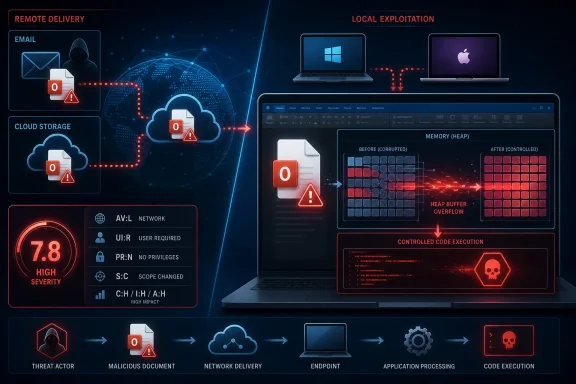 Remote Delivery Does Not Make the Attack Vector Network-Based
A malicious Office document may arrive through email, Microsoft Teams, a browser download, a shared drive, OneDrive, or another externally controlled source. The attacker can create and send that file without having an account or an existing foothold on the victim’s PC.The vulnerability is not triggered merely because the file reaches the computer, however. According to Microsoft’s CVSS assessment, the victim must interact with the malicious content, and Office must process it on the local machine. That is why the vector contains both
AV:L for local attack vector and UI:R for required user interaction.Microsoft’s explanation makes the distinction explicit: the word “remote” in the title refers to the attacker’s location, while exploitation itself is carried out locally. The company notes that this class of issue may also be described as arbitrary code execution, or ACE.
A typical attack chain could therefore look like this:
- An attacker creates a specially crafted Office file containing data designed to trigger the heap-based buffer overflow.
- The attacker delivers that file to a target through email, messaging, cloud storage, or a compromised website.
- The victim downloads or opens the file on an affected computer.
- The locally installed Office application processes the malformed content and triggers the memory corruption.
- Attacker-controlled code executes in the security context of the user running Office.
CVSS Uses a Narrow Definition of “Local”
In everyday language, a “local vulnerability” often suggests that the attacker must already have access to the device. That is not always what the CVSSAV:L metric means.Under CVSS, the attack-vector field identifies the access path needed to reach the vulnerable component. A vulnerability receives
AV:N, or network, when it can be exploited through a remotely accessible network interface or service. Examples include sending packets directly to an exposed server, making a crafted web request, or connecting to a vulnerable listening port.CVE-2026-55056 does not appear to expose such a network-reachable Office service. The vulnerable parsing or memory operation occurs inside an Office process running on the target computer. Consequently, Microsoft scores the flaw as local even though an attacker could initiate the broader campaign from another country and deliver the trigger over the internet.
The remainder of the CVSS vector describes a serious but interaction-dependent issue:
AC:Lindicates that exploitation does not require unusually complex conditions.PR:Nmeans the attacker does not need existing privileges on the target system.UI:Rrecords that a user must perform an action for exploitation to proceed.S:Umeans the exploited code remains within the same security authority or scope.C:H/I:H/A:Hreflects potentially high impact to confidentiality, integrity, and availability.
A Heap Overflow Turns Document Data Into Code Execution
Microsoft and the CVE record classify CVE-2026-55056 as CWE-122, a heap-based buffer overflow. This weakness occurs when software writes more data into a heap-allocated memory region than that region was designed to hold.The excess data can corrupt adjacent memory structures. Depending on the affected code and available mitigations, a carefully constructed input may influence the application’s control flow and ultimately cause Office to execute instructions chosen by the attacker. Failed attempts may instead crash the application, but defenders should not treat a crash-only test result as evidence that code execution is impossible.
Microsoft has not publicly documented the low-level exploitation method in the material accompanying the July 14 disclosure. That limits defenders’ ability to build precise file-level detections from the advisory alone, and it prevents firm conclusions about which Office document formats or application components provide the most practical attack path.
The CVE record also does not establish that the vulnerability was being exploited in the wild at publication. Unless Microsoft updates its advisory or threat-intelligence providers identify active campaigns, administrators should avoid describing CVE-2026-55056 as a zero-day under active exploitation. The absence of known exploitation, however, is not a reason to postpone an available Office security update.
Supported Office Releases Need the July Updates
The affected-product data covers a broad Office estate. It includes Microsoft 365 Apps for Enterprise, Office 2016, Office 2019, Office LTSC 2021, and Office LTSC 2024 on Windows. Microsoft also lists Microsoft 365 for Mac, Office LTSC for Mac 2021, and Office LTSC for Mac 2024.For Office 2016, affected installations are identified as versions earlier than
16.0.5561.1000. The listed Mac releases require version 16.111.26071215 or later. Microsoft directs Click-to-Run products such as Microsoft 365 Apps and newer perpetual Office releases to the corresponding Office security-release information rather than presenting one universal build number.Microsoft’s July 2026 Office update index lists separate packages for components including Excel 2016, Word 2016, PowerPoint 2016, the Office shared components, and Visual Basic for Applications. Administrators running MSI-based Office 2016 should verify which individual Knowledge Base packages apply rather than assuming a Windows cumulative update has patched Office automatically.
Managed Microsoft 365 Apps environments also deserve attention. Update-channel policies, deployment rings, paused updates, and devices that have not recently checked in can leave endpoints behind even when Microsoft has published a corrected Click-to-Run build. Inventory should confirm the installed Office build, not merely whether Windows Update reports the operating system as current.
Security teams should prioritize machines whose users routinely handle documents from outside the organization, including finance, recruitment, legal, customer support, and executive staff. Email filtering, attachment sandboxing, Protected View, Microsoft Defender for Office 365, and least-privilege user accounts can reduce exposure, but they do not replace the vendor fix.
The practical reading of CVE-2026-55056 is straightforward: it is remotely initiated arbitrary code execution that triggers inside a local Office process. The attacker can remain remote, but the malicious file must reach the endpoint and be acted upon. Installing the July 14, 2026 Office updates closes the vulnerable local execution path on which that remote attack depends.
References
- Primary source: MSRC
Published: 2026-07-14T07:00:00-07:00
Security Update Guide - Microsoft Security Response Center
 msrc.microsoft.com
- Official source: support.microsoft.com
July 2026 updates for Microsoft Office | Microsoft Support
July 2026 updates for Microsoft Officesupport.microsoft.com - Related coverage: techradar.com
Worrying Microsoft Office security flaw patched - update now or risk hackers accessing your files | TechRadar
Microsoft forced to issue an emergency patchwww.techradar.com
