

Microsoft has patched CVE-2026-55898, an information-disclosure vulnerability in Microsoft Excel that can expose data through an out-of-bounds memory read. The flaw affects supported Windows and macOS editions of Office, as well as Office Online Server, and requires a user to interact with malicious content.
Detailed in Microsoft’s July 14, 2026 security advisory, the vulnerability is classified as CWE-125, an out-of-bounds read. Microsoft assigned it a CVSS 3.1 score of 6.1 and an Important severity rating. The company’s assessment says exploitation is less likely, with no public disclosure or active exploitation identified when the update was released.
The practical response is straightforward: update Office through the organization’s normal deployment channel and verify that fixed builds have reached endpoints. Excel 2016 installations require KB5002886, while Office Online Server administrators need KB5002884.
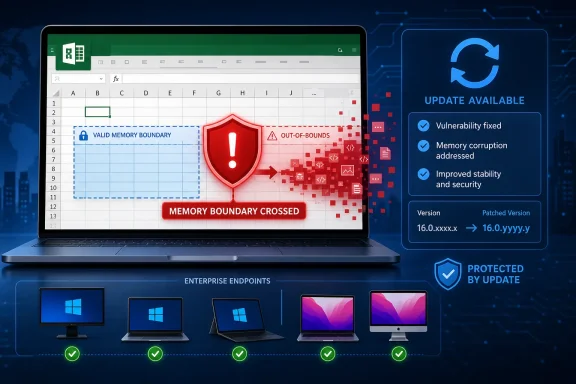
An out-of-bounds read occurs when software accesses memory beyond the boundary of the data structure it is supposed to process. Depending on what occupies the adjacent memory, the application may reveal fragments of information that should not have been available to the document or user.
Microsoft describes CVE-2026-55898 as a local information-disclosure vulnerability through which an unauthorized attacker could obtain information from Excel. The published CVSS vector says the attack requires local access and user interaction but does not require privileges. It does not provide a direct way to modify data.
The vector also assigns a high availability impact. That suggests exploitation may disrupt Excel or cause the application to terminate in addition to exposing memory, although Microsoft has not published a detailed technical explanation of the failure path.
Microsoft’s CVSS calculation gives the confidentiality impact a Low rating, producing a 6.1 score. The National Vulnerability Database initially assessed the confidentiality impact as High and calculated a 7.1 score. That difference reflects scoring interpretation rather than disagreement over whether the underlying vulnerability exists: both Microsoft and NIST identify an out-of-bounds read and the need for user interaction.
The vendor’s confirmation gives the vulnerability a high level of evidentiary confidence even though the public technical details remain limited. Microsoft has identified the weakness, affected products, attack requirements, and corrected releases. It has not published proof-of-concept code, the exact malformed Excel structure involved, or a detailed account of what memory could be recovered.
That distinction matters when assessing urgency. CVE-2026-55898 is confirmed and patched, but it is not currently presented as an exploited zero-day. Administrators should remediate it without treating the advisory as evidence of an ongoing campaign.
An attacker would therefore need a route for getting malicious content in front of the target. Email attachments, files shared through collaboration platforms, downloads, and documents placed on accessible network shares are plausible delivery mechanisms, but they remain scenarios rather than vendor-confirmed details for this CVE.
The local attack designation can also be misleading if read as “the attacker must already be sitting at the computer.” In CVSS, local describes where the vulnerable processing occurs. A malicious file can still arrive through email or a cloud-sharing service before Excel processes it on the endpoint.
The requirement for user interaction lowers the likelihood of unattended, worm-like exploitation. It does not make the flaw irrelevant in environments where spreadsheets routinely cross trust boundaries. Finance, procurement, sales, payroll, and operations teams regularly receive Excel files from outside organizations, often under circumstances where opening the document is an expected part of the job.
Information-disclosure flaws can also serve as components in longer exploit chains. Memory exposure may reveal application state or other data useful for bypassing protections, although Microsoft has not said that CVE-2026-55898 can be combined with another vulnerability. Its immediate classification remains information disclosure, not remote code execution or privilege escalation.
Affected products include:
Office LTSC 2021 Windows deployments should reach build 16.0.14334.20806, while Office LTSC 2024 should reach 16.0.17932.20884. Office 2019 systems are affected below build 16.0.10417.20176.
Microsoft 365 Apps build requirements depend on the assigned update channel. Current Channel systems should reach build 16.0.20131.20154, while Monthly Enterprise Channel and Semi-Annual Enterprise Channel installations have their own corrected baselines. Administrators should use Microsoft’s Office security release inventory rather than assuming that one build number applies across every channel.
On macOS, affected Microsoft 365 Apps and Office LTSC installations should be updated to version 16.111.26071215 or later. Office Online Server is affected below version 16.0.10417.20175 and receives its correction through KB5002884.
Those version distinctions are particularly important for inventory and vulnerability-management systems. A scanner that reports only “Microsoft Office installed” may not establish whether the relevant security release has landed. Channel, architecture, platform, and installed build all affect the result.
Users can inspect an Office installation through Excel’s File > Account page, where the product name, update channel, version, and build are displayed. Managed environments can collect the same information through Microsoft Configuration Manager, Intune, inventory scripts, or endpoint-management products.
Administrators should confirm that Office content delivery is operating normally, especially where updates are deferred, pinned to an older channel, or distributed from an internal source. Devices that spend long periods away from the corporate network may also miss the expected Click-to-Run update window.
Excel 2016 requires additional attention because the July release is delivered as a discrete security update. Organizations using WSUS, Configuration Manager, or another patch-management platform should approve KB5002886 for every applicable architecture and verify successful installation rather than relying on the presence of the July Windows cumulative update.
Office Online Server needs the usual server-side change controls. KB5002884 should be tested and deployed to each server in the farm according to Microsoft’s servicing procedure, followed by validation that document rendering and editing remain available.
Security teams should continue applying normal controls while deployment completes. Email filtering, attachment inspection, Protected View, Mark of the Web handling, and restrictions on documents from untrusted sources reduce exposure, but Microsoft has not identified a workaround that replaces the security update.
CVE-2026-55898 does not currently warrant emergency isolation measures on its own. It does warrant build-level verification across every Office servicing channel, because an apparently current Windows endpoint can still be running a vulnerable Excel release.
Detailed in Microsoft’s July 14, 2026 security advisory, the vulnerability is classified as CWE-125, an out-of-bounds read. Microsoft assigned it a CVSS 3.1 score of 6.1 and an Important severity rating. The company’s assessment says exploitation is less likely, with no public disclosure or active exploitation identified when the update was released.
The practical response is straightforward: update Office through the organization’s normal deployment channel and verify that fixed builds have reached endpoints. Excel 2016 installations require KB5002886, while Office Online Server administrators need KB5002884.
 Excel Can Read Beyond the Intended Data
An out-of-bounds read occurs when software accesses memory beyond the boundary of the data structure it is supposed to process. Depending on what occupies the adjacent memory, the application may reveal fragments of information that should not have been available to the document or user.Microsoft describes CVE-2026-55898 as a local information-disclosure vulnerability through which an unauthorized attacker could obtain information from Excel. The published CVSS vector says the attack requires local access and user interaction but does not require privileges. It does not provide a direct way to modify data.
The vector also assigns a high availability impact. That suggests exploitation may disrupt Excel or cause the application to terminate in addition to exposing memory, although Microsoft has not published a detailed technical explanation of the failure path.
Microsoft’s CVSS calculation gives the confidentiality impact a Low rating, producing a 6.1 score. The National Vulnerability Database initially assessed the confidentiality impact as High and calculated a 7.1 score. That difference reflects scoring interpretation rather than disagreement over whether the underlying vulnerability exists: both Microsoft and NIST identify an out-of-bounds read and the need for user interaction.
The vendor’s confirmation gives the vulnerability a high level of evidentiary confidence even though the public technical details remain limited. Microsoft has identified the weakness, affected products, attack requirements, and corrected releases. It has not published proof-of-concept code, the exact malformed Excel structure involved, or a detailed account of what memory could be recovered.
That distinction matters when assessing urgency. CVE-2026-55898 is confirmed and patched, but it is not currently presented as an exploited zero-day. Administrators should remediate it without treating the advisory as evidence of an ongoing campaign.
The Attack Still Needs a User in the Loop
Microsoft’s CVSS vector includes UI:R, meaning successful exploitation requires user interaction. In an Excel vulnerability, that commonly points to a specially crafted workbook or another file that Excel is induced to process, although Microsoft’s public advisory does not identify the precise delivery format for CVE-2026-55898.An attacker would therefore need a route for getting malicious content in front of the target. Email attachments, files shared through collaboration platforms, downloads, and documents placed on accessible network shares are plausible delivery mechanisms, but they remain scenarios rather than vendor-confirmed details for this CVE.
The local attack designation can also be misleading if read as “the attacker must already be sitting at the computer.” In CVSS, local describes where the vulnerable processing occurs. A malicious file can still arrive through email or a cloud-sharing service before Excel processes it on the endpoint.
The requirement for user interaction lowers the likelihood of unattended, worm-like exploitation. It does not make the flaw irrelevant in environments where spreadsheets routinely cross trust boundaries. Finance, procurement, sales, payroll, and operations teams regularly receive Excel files from outside organizations, often under circumstances where opening the document is an expected part of the job.
Information-disclosure flaws can also serve as components in longer exploit chains. Memory exposure may reveal application state or other data useful for bypassing protections, although Microsoft has not said that CVE-2026-55898 can be combined with another vulnerability. Its immediate classification remains information disclosure, not remote code execution or privilege escalation.
The Affected Office Footprint Is Broad
Microsoft identifies both perpetual Office releases and subscription-based Microsoft 365 installations as affected. The product list extends beyond Windows desktops, making this an Office deployment issue rather than a Windows Update issue alone.Affected products include:
- Microsoft 365 Apps for enterprise on 32-bit and 64-bit Windows systems.
- Microsoft Excel 2016 on 32-bit and 64-bit Windows systems.
- Microsoft Office 2019 on 32-bit and 64-bit Windows systems.
- Microsoft Office LTSC 2021 and Office LTSC 2024 for Windows.
- Microsoft 365 and supported Office LTSC editions for macOS.
- Office Online Server.
Office LTSC 2021 Windows deployments should reach build 16.0.14334.20806, while Office LTSC 2024 should reach 16.0.17932.20884. Office 2019 systems are affected below build 16.0.10417.20176.
Microsoft 365 Apps build requirements depend on the assigned update channel. Current Channel systems should reach build 16.0.20131.20154, while Monthly Enterprise Channel and Semi-Annual Enterprise Channel installations have their own corrected baselines. Administrators should use Microsoft’s Office security release inventory rather than assuming that one build number applies across every channel.
On macOS, affected Microsoft 365 Apps and Office LTSC installations should be updated to version 16.111.26071215 or later. Office Online Server is affected below version 16.0.10417.20175 and receives its correction through KB5002884.
Those version distinctions are particularly important for inventory and vulnerability-management systems. A scanner that reports only “Microsoft Office installed” may not establish whether the relevant security release has landed. Channel, architecture, platform, and installed build all affect the result.
Office Updates Need Their Own Verification
Microsoft 365 Apps normally receives fixes through the Office Click-to-Run servicing mechanism, which is separate from the monthly Windows cumulative update. Installing the July Windows update does not, by itself, prove that Excel has been updated.Users can inspect an Office installation through Excel’s File > Account page, where the product name, update channel, version, and build are displayed. Managed environments can collect the same information through Microsoft Configuration Manager, Intune, inventory scripts, or endpoint-management products.
Administrators should confirm that Office content delivery is operating normally, especially where updates are deferred, pinned to an older channel, or distributed from an internal source. Devices that spend long periods away from the corporate network may also miss the expected Click-to-Run update window.
Excel 2016 requires additional attention because the July release is delivered as a discrete security update. Organizations using WSUS, Configuration Manager, or another patch-management platform should approve KB5002886 for every applicable architecture and verify successful installation rather than relying on the presence of the July Windows cumulative update.
Office Online Server needs the usual server-side change controls. KB5002884 should be tested and deployed to each server in the farm according to Microsoft’s servicing procedure, followed by validation that document rendering and editing remain available.
Security teams should continue applying normal controls while deployment completes. Email filtering, attachment inspection, Protected View, Mark of the Web handling, and restrictions on documents from untrusted sources reduce exposure, but Microsoft has not identified a workaround that replaces the security update.
CVE-2026-55898 does not currently warrant emergency isolation measures on its own. It does warrant build-level verification across every Office servicing channel, because an apparently current Windows endpoint can still be running a vulnerable Excel release.
References
- Primary source: MSRC
Published: 2026-07-14T07:00:00-07:00
Security Update Guide - Microsoft Security Response Center
 msrc.microsoft.com
- Official source: support.microsoft.com
Description of the security update for Excel 2016: June 9, 2026 (KB5002877) | Microsoft Support
Description of the security update for Excel 2016: June 9, 2026 (KB5002877)support.microsoft.com - Related coverage: techradar.com
This 'fascinating' Microsoft Excel security flaw teams up spreadsheets and Copilot Agent to steal data | TechRadar
There's more than one way to skin an Excel tablewww.techradar.com - Related coverage: vuln.today
Information Disclosure - Attack Technique - vuln.today
Information disclosure occurs when an application unintentionally exposes sensitive data that aids attackers in reconnaissance or directly compromises security.vuln.today
