
The immediate priority is straightforward: identify every Foxit installation, update it to the fixed version for its product branch, and verify the installed build afterward. A single rule requiring version 2026.1.2 is insufficient because Foxit also issued fixes for supported Editor 14.x and 13.2 installations.
What to do now
- In Foxit PDF Reader or Foxit PDF Editor, select Help > Check for Update.
- On Windows, verify:
- Foxit PDF Reader 2026.x: 2026.1.2
- Foxit PDF Editor 2026.x: 2026.1.2
- Foxit PDF Editor 14.x: 14.0.5
- Foxit PDF Editor 13.2: 13.2.5
- On macOS, verify:
- Foxit PDF Reader 2026.x: 2026.1.2
- Foxit PDF Editor 2026.x: 2026.1.2
- Foxit PDF Editor 14.x: 14.0.5
- Foxit PDF Editor 13.2: 13.2.5
- If the in-app update cannot be used, obtain a current installer through Foxit’s official product distribution channel.
- Reopen the application and verify that the installed version matches the appropriate fixed branch.
For organizations, this is primarily an inventory and validation problem. Current Reader installations may be easy to locate, while older licensed Editor copies, user-installed applications, offline laptops, unmanaged Macs, and legacy deployments can remain outside the normal patch workflow.
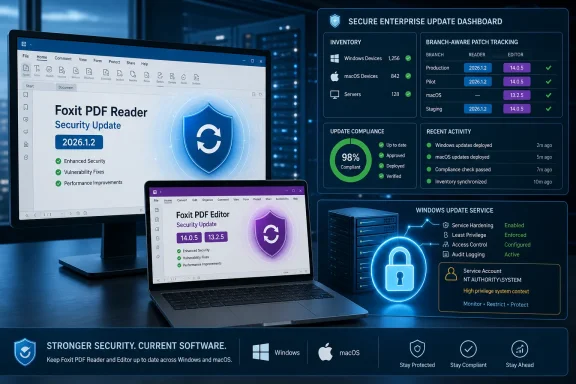 One Patch Cycle Addresses Two Different Areas of Exposure
Most of the vulnerabilities cited in the release concern the processing of PDF or related document content. The cited issues include multiple use-after-free vulnerabilities, along with other memory-handling and validation defects. Exploitation conditions and outcomes vary by vulnerability, so the group should not be presented as one uniform attack technique.
The source cites use-after-free CVEs including CVE-2026-13126 and CVE-2026-57256. Those identifiers should be treated as examples from the cited set, not as the endpoints of a continuous numerical range. Nothing in the supplied facts establishes that every CVE number between them belongs to this release.
CVE-2026-57239 is operationally different because it affects the Foxit update service on Windows rather than the application’s handling of document content. It is associated with CWE-427, Uncontrolled Search Path Element, and carries a stated CVSS score of 8.2. The supported impact statement is that successful exploitation could result in NT AUTHORITY\SYSTEM rights.
That potential outcome deserves attention without extending the facts into an unsupported exploit narrative. The supplied information does not establish a specific malicious-DLL workflow, a confirmed local privilege-escalation classification, the exact permissions required by an attacker, or a verified sequence in which an unprivileged user obtains SYSTEM. It also does not establish active exploitation.
Administrators should therefore separate the work into two tracks:
- Application remediation: Update Reader and Editor installations that process documents.
- Windows service remediation: Ensure Windows installations containing the affected Foxit update component are moved to the applicable fixed release.
The distinction matters for ownership. Desktop application teams may manage Reader and Editor packages, while endpoint engineering or security operations may oversee services that execute in highly privileged contexts. Both groups need the same reliable inventory, but they should avoid treating every vulnerability in the release as though it has the same prerequisites or effect.
Foxit’s Supported Branches Create an Inventory Challenge
The July release is not confined to Foxit PDF Reader and PDF Editor 2026.1.2. Foxit also produced PDF Editor 14.0.5 and PDF Editor 13.2.5, which means several versions can represent a successfully remediated installation.
| Platform | Product | Branch | Fixed version | Required validation |
|---|---|---|---|---|
| Windows | Foxit PDF Reader | 2026.x | 2026.1.2 | Confirm Reader reports 2026.1.2 |
| Windows | Foxit PDF Editor | 2026.x | 2026.1.2 | Confirm Editor reports 2026.1.2 |
| Windows | Foxit PDF Editor | 14.x | 14.0.5 | Confirm the retained 14.x installation reports 14.0.5 |
| Windows | Foxit PDF Editor | 13.2 | 13.2.5 | Confirm the retained 13.2 installation reports 13.2.5 |
| macOS | Foxit PDF Reader | 2026.x | 2026.1.2 | Confirm Reader reports 2026.1.2 |
| macOS | Foxit PDF Editor | 2026.x | 2026.1.2 | Confirm Editor reports 2026.1.2 |
| macOS | Foxit PDF Editor | 14.x | 14.0.5 | Confirm the retained 14.x installation reports 14.0.5 |
| macOS | Foxit PDF Editor | 13.2 | 13.2.5 | Confirm the retained 13.2 installation reports 13.2.5 |
The verified wording for the oldest fixed branch is Foxit PDF Editor 13.2.5. It should not be expanded into a claim that every legacy Foxit PhantomPDF 13.2 installation maps cleanly to PDF Editor 13.2.5. An organization that finds PhantomPDF-branded software should record the exact product name and version, then confirm the supported upgrade or replacement path for that installation.
This qualification is important because software inventory often contains historical names, inconsistent display strings, and records copied from old purchasing systems. Searching only for “Foxit PDF Editor” may miss older Foxit-branded products. Conversely, finding a PhantomPDF entry does not by itself prove which current Editor package should be deployed.
A compliance rule should evaluate the installed product, operating system, branch, and version together. A universal condition such as “Foxit version must equal 2026.1.2” would incorrectly fail supported Editor 14.0.5 and 13.2.5 installations. A rule that checks only the 2026.x family could overlook retained legacy branches entirely.
The practical challenge is not deciding whether 2026.1.2 is newer than an earlier 2026.x build. It is finding every copy that must be evaluated, including applications installed outside the organization’s standard deployment channel.
Enterprise Validation Matrix
The following compact matrix provides a deployment-neutral way to organize discovery and remediation. It intentionally avoids unverified scanner signatures, registry paths, package identifiers, service names, and deployment commands.
| Product name to search for | OS | Fixed version | Exact remediation action |
|---|---|---|---|
| Foxit PDF Reader | Windows | 2026.1.2 | Open the application, select Help > Check for Update, install the update, and verify version 2026.1.2 |
| Foxit PDF Editor | Windows | 2026.1.2 | For the 2026.x branch, select Help > Check for Update, install the update, and verify version 2026.1.2 |
| Foxit PDF Editor | Windows | 14.0.5 | For the retained 14.x branch, select Help > Check for Update, install the update, and verify version 14.0.5 |
| Foxit PDF Editor | Windows | 13.2.5 | For the retained 13.2 branch, select Help > Check for Update, install the update, and verify version 13.2.5 |
| Foxit PDF Reader | macOS | 2026.1.2 | Open the application, select Help > Check for Update, install the update, and verify version 2026.1.2 |
| Foxit PDF Editor | macOS | 2026.1.2 | For the 2026.x branch, select Help > Check for Update, install the update, and verify version 2026.1.2 |
| Foxit PDF Editor | macOS | 14.0.5 | For the retained 14.x branch, select Help > Check for Update, install the update, and verify version 14.0.5 |
| Foxit PDF Editor | macOS | 13.2.5 | For the retained 13.2 branch, select Help > Check for Update, install the update, and verify version 13.2.5 |
| Foxit PhantomPDF or another legacy Foxit product name | Windows or macOS | Do not infer | Record the exact product and version, then confirm the supported Foxit upgrade or replacement path before marking the endpoint compliant |
This matrix is deliberately based on end-state validation. A package being offered, downloaded, or assigned is not the same as confirming that the application reached the fixed version.
The Document-Processing Flaws Remain the Largest Group
CyberPress describes the coordinated release as addressing more than 30 vulnerabilities. The cited flaws include numerous use-after-free issues, but the supplied information does not establish that they are generally triggered by PDFs containing malicious JavaScript. It also does not support detailed claims about scripts modifying page or annotation state before Foxit reuses an invalid object.
The safe conclusion is narrower: Foxit corrected multiple use-after-free vulnerabilities in its document-processing software. A use-after-free occurs when software continues to reference memory after the associated object has been released. The exact trigger, exploitation requirements, and impact must be evaluated per CVE rather than inferred for the entire group.
The supplied facts also do not establish a comprehensive set of malformed document structures responsible for these flaws. Claims involving abnormal page trees, specific image objects, color spaces, annotation modifications, PRC streams, Unity 3D objects, or a “3D trust enabled” condition should not be attached to this release without primary documentation.
That does not reduce the importance of installing the update. Reader and Editor routinely process files received from outside an organization, and the release addresses a broad collection of defects in applications used for that purpose. The action remains the same even when exploit mechanics are not publicly established: update the affected software rather than relying on assumptions about which document features employees use.
The cited severity information places many of the memory-safety vulnerabilities at 7.8, with the update-service issue at 8.2. Those numbers can help organizations sort work, but they should not replace branch-aware remediation. Leaving an older Editor installation unpatched because no single issue crosses a locally defined “critical” threshold would preserve known vulnerable code on the endpoint.
Avoid Treating Every CVE as the Same Finding
The scale of the release can tempt vulnerability-management teams to combine all affected devices under one generic Foxit ticket. A single campaign is reasonable, but the underlying findings should retain enough detail to answer four questions:
- Which Foxit product is installed?
- Which operating system is it running on?
- Which release branch does it belong to?
- Which fixed version is required for that branch?
This approach avoids two common reporting failures. The first is false noncompliance, in which a properly patched Editor 14.x or 13.2 installation is rejected because it does not report 2026.1.2. The second is false confidence, in which a dashboard shows strong coverage for the current branch while older products remain undiscovered.
The same discipline applies to the vulnerabilities themselves. The release contains multiple categories of flaws, but the supplied facts do not support assigning every issue the same mechanism or impact. Unsupported outcomes such as arbitrary code execution, information disclosure, data exfiltration, or privilege escalation should not be repeated as release-wide facts.
CVE-2026-57239 is the exception for which a specific high-privilege result is supplied: potential NT AUTHORITY\SYSTEM rights. Even there, the correct wording is limited to the potential outcome. It should not be embellished with assumptions about the attacker’s starting privileges, exact loading behavior, persistence, or post-exploitation actions.
CVE-2026-57259 is identified as an XML External Entity issue associated with CWE-611 and XDP document parsing. The supplied information does not provide enough support for a detailed data-exfiltration scenario, specific outbound network behavior, or incident-detection guidance. Administrators should install the fixed version rather than substituting speculative monitoring advice for remediation.
The Update Service Raises the Priority for Windows Fleets
The presence of CVE-2026-57239 gives Windows administrators an additional reason to complete this update promptly. A component involved in software maintenance can operate in a more privileged context than the interactive application, so defects affecting that component require careful attention.
The supported facts are concise: CVE-2026-57239 affects the Foxit update service, is associated with CWE-427, has a stated CVSS score of 8.2, and has the potential to result in NT AUTHORITY\SYSTEM rights.
No broader incident claim follows automatically from those facts. The release information supplied here does not establish that the vulnerability has been exploited in the wild. It also does not provide verified detection artifacts for suspicious child processes, DLL-loading events, service activity, or other endpoint telemetry.
Security teams should not create incident-specific hunting rules from unsupported mechanics. They should first ensure that the affected software is updated and then use any subsequently published first-party technical indicators, if available, to guide additional investigation.
Patching also should not be treated as retrospective proof that an endpoint was never compromised. That is a general limitation of remediation rather than a claim that exploitation occurred in this case. If an organization has independent evidence of suspicious activity on a vulnerable endpoint, it should follow its normal incident-response process.
macOS Must Remain in Scope
CVE-2026-57239 concerns a Windows update service and NT AUTHORITY\SYSTEM, but the broader release includes fixed Foxit products for macOS. Organizations should therefore avoid turning the campaign into a Windows-only exercise.
Foxit PDF Reader on macOS should be updated to 2026.1.2. Foxit PDF Editor on macOS should be updated according to its branch: 2026.1.2, 14.0.5, or 13.2.5.
The verification objective is the same on both operating systems: confirm the product and branch, apply the update, and check the application’s reported version afterward. The supplied facts do not support prescribing exact macOS package receipts, application-bundle paths, or other platform artifacts.
That restraint does not prevent effective enterprise validation. Management platforms can report an application’s product name and version without an article asserting that every organization uses the same installation path or package metadata. Where automated inventory is unavailable, the application’s own version information provides a direct validation point.
Unmanaged or lightly managed Macs deserve particular attention because they may not appear in a Windows-centered deployment report. The same is true of temporarily offline systems on either platform. A completed campaign should account for devices that missed the original deployment window rather than measuring only machines that were online at the time.
Patching Must Begin With Discovery
Foxit’s supported user procedure is Help > Check for Update. In an enterprise, that procedure belongs inside a broader workflow:
1. Discover
Search software inventory for:
- Foxit PDF Reader
- Foxit PDF Editor
- Foxit PhantomPDF and other legacy Foxit product names that require separate review
Do not assume that a record using an older product name is equivalent to a current PDF Editor branch. Preserve the exact product and version in the inventory.
2. Classify
For each installation, record:
- Operating system
- Product name
- Installed version
- Release branch
- Whether the device is currently managed and reachable
This classification determines which fixed version applies.
3. Remediate
Use Help > Check for Update for user-driven remediation. Where centralized deployment is required, use a current installer obtained through Foxit’s official distribution channel and follow the organization’s normal software-deployment controls.
The end-state targets are:
- Reader 2026.x: 2026.1.2
- Editor 2026.x: 2026.1.2
- Editor 14.x: 14.0.5
- Editor 13.2: 13.2.5
4. Validate
Check the application after installation and confirm that it reports the required version. Do not close the remediation item solely because a deployment job was initiated or an update package was downloaded.
5. Prevent reintroduction
Review software catalogs, device images, virtual desktop templates, and other approved installation sources under the organization’s control. Replace stale Foxit packages where they are found so that newly provisioned or rebuilt systems do not return to an older release.
This step does not require assumptions about Foxit-specific deployment commands. It is a straightforward check that the organization’s own software sources provide the fixed versions.
6. Reconcile exceptions
Document devices that remain offline, installations that cannot be upgraded immediately, and legacy product names whose supported path is not yet confirmed. An unresolved exception should remain visible rather than being forced into an inaccurate compliance state.
Action checklist for administrators
- Inventory Foxit PDF Reader and Foxit PDF Editor across Windows and macOS.
- Include legacy Foxit and PhantomPDF product names in discovery searches.
- Record the exact product, platform, branch, and installed version.
- Use Help > Check for Update where in-app updating is appropriate.
- Update Reader 2026.x to 2026.1.2.
- Update Editor 2026.x to 2026.1.2.
- Update Editor 14.x to 14.0.5.
- Update Editor 13.2 to 13.2.5.
- Do not automatically map every PhantomPDF installation to PDF Editor 13.2.5.
- Verify the version from the updated application.
- Recheck devices that were offline or unreachable during deployment.
- Replace outdated packages in approved internal software sources.
- Keep unresolved legacy installations on the remediation list until their supported path is confirmed.
The Timeline Should End With Verified Compliance
| Stage | Required outcome |
|---|---|
| July 8, 2026 release | Fixed Foxit versions become available for affected Windows and macOS branches |
| Immediate response | Users run Help > Check for Update; administrators begin inventory and deployment |
| Initial validation | Managed, online systems report the correct branch-specific fixed versions |
| Exception follow-up | Offline devices, unmanaged systems, and legacy product names are reviewed |
| Campaign closure | Every discovered installation is updated, removed, or retained as a documented exception |
This timeline keeps the response tied to observable results. It does not depend on unverified scanner detections, registry values, service names, macOS package artifacts, or assumptions about how Foxit applications behave when multiple versions are installed.
The WindowsForum Takeaway: Version Context Matters More Than a Single Dashboard Number
The central administrative lesson is not that every Foxit installation must display the same version. It is that every installation must display the correct fixed version for its product branch and operating system.
That distinction gives WindowsForum readers a more useful compliance test than a generic instruction to “update Foxit.” A Windows endpoint running Foxit PDF Editor 14.0.5 may be at the correct fixed level even though it does not report 2026.1.2. A Windows endpoint running an earlier 2026.x Reader build is not remediated merely because another Foxit application on the same machine has been updated. A Mac must remain in the campaign even though the update-service issue and NT AUTHORITY\SYSTEM outcome are Windows-specific.
The release’s more than 30 vulnerabilities make complete discovery important, but unsupported technical detail does not improve that work. Administrators do not need a speculative exploit chain to act. They need an accurate product list, the correct branch targets, a supported update path, and proof that the installed applications reached those targets.
For individual users, the response begins now with Help > Check for Update. For enterprises, it ends only when the inventory can answer a complete question: which Foxit product is installed, on which operating system, on which branch, and whether it now reports 2026.1.2, 14.0.5, or 13.2.5, as applicable.
