

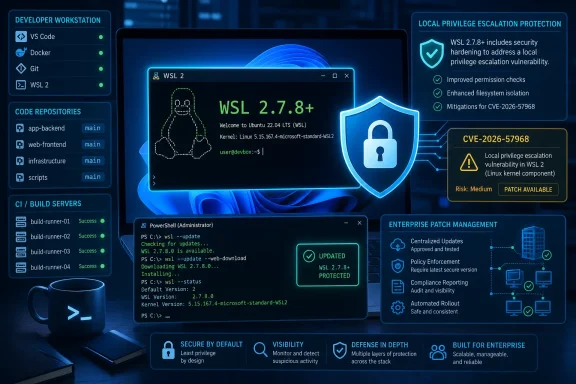
Microsoft’s Security Update Guide lists WSL2 releases from version 5.0.0.0 through versions earlier than 2.7.8 as affected. The important operational detail is that this is a WSL servicing issue: Windows administrators should verify the installed WSL package version rather than assume a current Windows cumulative update alone has remediated the problem.
The National Vulnerability Database, reflecting Microsoft’s CVE submission, assigns a CVSS 3.1 score of 7.8 out of 10. The attack is local, requires low privileges, needs no user interaction, and can affect confidentiality, integrity, and availability. That is a serious combination for developer workstations, shared engineering systems, CI runners, and any endpoint where a user can run code inside a WSL2 distribution.
The flaw is local, but WSL2 is often where untrusted code lands
CVE-2026-57968 is not a network worm issue and does not provide an unauthenticated remote path into Windows. An attacker must first be able to execute code as a valid, low-privileged user in the affected environment. In practical terms, that initial foothold might come from a malicious development dependency, a compromised source repository, a risky build script, or another local-code-execution incident.
That condition should not lead organizations to dismiss the advisory. WSL2 is specifically used to run Linux-native development tools, containers, package managers, compilers, language runtimes, and automation workloads on Windows. Those are precisely the environments where teams routinely execute code from many sources, often with broad access to source trees, credentials, SSH keys, cloud CLI sessions, and mounted Windows files.
Microsoft describes the underlying weakness as a buffer over-read, classified as CWE-126. Public technical information stops there for now: neither Microsoft’s advisory nor the current NVD entry provides a vulnerable component, proof-of-concept code, a triggering sequence, or an exploitation narrative. That absence matters because it limits outside validation of how reliably the bug can be weaponized and whether its effect is confined to the Linux guest context or can be leveraged more broadly.
CISA’s SSVC assessment currently records exploitation as “none” and automation as “no,” while noting a “total” technical impact. This should be read as a useful prioritization signal, not as evidence that exploitation is impossible. The flaw has been publicly acknowledged by Microsoft, carries a concrete fixed-version boundary, and affects a component frequently installed outside traditional Windows patch-management workflows.
Version 2.7.8 is the minimum safe line
The advisory’s version range creates an unusually clean remediation target: WSL 2.7.8 or newer. Microsoft’s WSL repository shows subsequent releases are available as well, so the sensible target is the latest stable WSL version rather than stopping at the minimum fixed build.
Administrators and individual users can inspect the installed WSL package from an elevated or standard PowerShell session with:
wsl --version
The output should show the WSL version itself. Do not confuse this with the Linux kernel version shown inside a distribution by uname -r, or with the WSL 1/WSL 2 designation displayed by wsl -l -v. Those values answer different questions. For CVE-2026-57968, the relevant check is the WSL application version and whether it is at least 2.7.8.
To update a standard WSL installation, run:
wsl --update
Microsoft’s WSL documentation also supports this alternative for environments that cannot reach or use the Microsoft Store:
wsl --update --web-download
The second command is particularly relevant in managed networks where Store access is blocked, restricted, or absent by policy. Microsoft moved much of WSL’s servicing out of the Windows image and into a separately updated package, a design that allows the subsystem to receive fixes faster but also creates a familiar enterprise problem: a Windows device can appear fully patched while its WSL package is behind.
After updating, use wsl --version again to confirm the installed version. For systems with active distributions and long-running Linux processes, wsl --shutdown can be used during a maintenance window to terminate the WSL virtual machine cleanly before workloads are restarted. Teams should schedule that carefully on developer devices or build agents that may be running containers, databases, test jobs, or persistent development services.
The inventory problem is bigger than the command
For a single workstation, updating WSL is straightforward. Fleet remediation is less so. WSL can arrive through interactive setup, developer provisioning scripts, Microsoft Store deployment, direct downloads, golden images, or developer-managed installations that IT may not consistently inventory.
The immediate task for endpoint teams is to identify Windows devices with WSL2 enabled, collect the WSL package version, and locate systems below 2.7.8. Build infrastructure deserves early attention. Self-hosted GitHub Actions runners, Azure DevOps agents, internal package-build machines, and shared engineering jump boxes tend to execute high volumes of third-party or repository-supplied code, often with access to sensitive development resources.
There is also a distinction worth preserving: the CVE is listed for Windows Subsystem for Linux (WSL2), not WSL1. Devices using only WSL1 are outside the stated affected product range. That does not make WSL1 a recommended workaround; the two architectures differ significantly in compatibility, performance characteristics, and tooling support. Converting distributions solely to avoid this specific issue can disrupt Docker workflows, systemd-dependent tools, Linux GUI applications, and other WSL2-based development practices.
For systems where WSL2 is unnecessary, disabling or uninstalling it reduces exposure, but that is a business and engineering decision rather than the primary fix. Updating the WSL package is the direct remediation Microsoft has defined.
Treat WSL as a separately patched platform
The advisory is a reminder that WSL2 should sit in the same operational category as browsers, developer runtimes, endpoint agents, and virtualization components: it needs independent version tracking, deployment controls, and verification. It is no longer safe to regard it as merely an optional Windows feature that moves in lockstep with monthly OS patching.
Security teams should also avoid overstating what the current disclosure establishes. Microsoft has confirmed the vulnerability and supplied a fixed version, but there is no public evidence at this point of active exploitation, automated exploit tooling, or a disclosed exploit chain. The correct posture is prompt remediation and targeted validation, not panic-driven changes to developer environments.
The next meaningful milestone will be whether Microsoft publishes further technical detail or whether independent researchers demonstrate practical exploitation. Until then, the action item is simple: every WSL2 deployment should be running version 2.7.8 or later, with the latest stable release preferred.
References
- CVE-2026-57968 Windows Subsystem for Linux (WSL2) Kernel Elevation of Privilege Vulnerability MSRC · 2026-07-14T07:00:00-07:00