

Microsoft published CVE-2026-57975 on July 3, 2026, describing an Important-severity remote code execution flaw in Microsoft Edge based on Chromium, fixed in Edge version 150.0.4078.48 and tied to a type-confusion weakness in Chromium-derived browser code. The advisory is not a panic bulletin, but it is also not a nothingburger. Microsoft says exploitation is unlikely and not known to be public or active, yet the vulnerability carries the uncomfortable ingredients that keep browser bugs near the top of enterprise patch queues: network reachability, no attacker privileges, high impact, and a user action that can be induced by web content.
The detail that matters most is not merely that Edge had another RCE bug. Modern browsers have become operating systems in miniature, with identity, payments, autofill, sync, files, enterprise policy, and application runtimes all converging in the same process family. CVE-2026-57975 is a reminder that when Microsoft ships Edge as part of the Windows experience, a browser fix is no longer “just” a browser fix; it is a workstation exposure-management event.
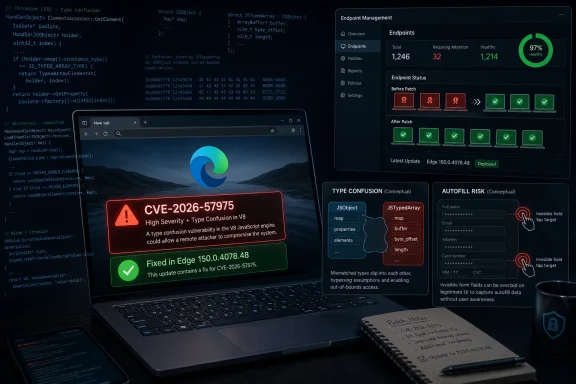
Microsoft’s Security Response Center describes CVE-2026-57975 as a remote code execution vulnerability in Microsoft Edge, Chromium-based. The executive summary says the flaw involves access to a resource using an incompatible type, the class of bug cataloged as CWE-843, better known as type confusion. In practical terms, type confusion flaws occur when software treats an object as though it were a different kind of object, opening the door to memory corruption or unsafe behavior if an attacker can steer execution through the wrong assumptions.
The CVSS vector gives the advisory its real texture. Microsoft scores the bug at 7.5 base severity, with network attack vector, high attack complexity, no privileges required, required user interaction, unchanged scope, and high impact to confidentiality, integrity, and availability. That combination explains the “Important” rating: this is not a wormable, no-click, critical browser apocalypse, but it is still a remote code execution issue with potentially severe consequences after successful exploitation.
Microsoft’s FAQ narrows the exploit story further. According to the advisory, successful exploitation requires an attacker to craft deceptive or invisible form elements and requires the user to perform two sequential taps. Microsoft also says the user must visit an attacker-controlled webpage and perform tap gestures that cause autofill to activate.
That is a strange and revealing exploit path. It places the vulnerability somewhere near the boundary between browser UI, page-controlled content, and autofill behavior — precisely the sort of boundary where browser vendors have spent years trying to separate what a site can ask for from what the browser should trust. The bug is not presented as a passive drive-by page load, but it still belongs to the class of attacks that can be dressed up as ordinary web interaction.
This is where defenders need to separate uncertainty about exploitation from uncertainty about existence. Microsoft says public disclosure is “No,” exploited is “No,” and the exploitability assessment is “Exploitation Unlikely.” Those are welcome signals. But they do not mean the underlying bug is theoretical. Microsoft has confirmed the vulnerability and shipped a fix.
That distinction matters because patch programs often stall when they hear “not exploited.” In a browser context, that is the wrong threshold. Browser exploit development can move quickly once a patch exists, because attackers can diff changed code, inspect Chromium-related fixes, and infer what class of bug was repaired. The window between “vendor patch available” and “reliable exploit understood by someone outside the vendor” is not a comfortable place for endpoints to linger.
The confidence metric also suggests that would-be attackers are not starting from zero. Even without a public proof of concept, the advisory exposes enough operational clues to attract attention: type confusion, autofill activation, deceptive or invisible form elements, two tap gestures, and a fixed Edge build. Microsoft has not handed over exploit code, but it has drawn a recognizable outline.
CVE-2026-57975 appears to sit in that uncomfortable space. Microsoft’s FAQ says exploitation requires deceptive or invisible form elements and two sequential taps that cause autofill to activate. That does not prove the vulnerability exposes saved passwords or payment details directly, and Microsoft’s advisory frames the impact as remote code execution rather than information disclosure. Still, the exploit mechanics point toward browser trust decisions around form controls and user gestures.
The “two taps” requirement is worth pausing over. On paper, it increases attack complexity; a user must do something specific, twice. In the real world, however, attackers have spent decades becoming very good at choreographing user clicks and taps. Fake captchas, misleading consent prompts, mobile overlays, invisible hit targets, and UI redressing are all familiar techniques.
That is why “user interaction required” should not be read as “safe.” In browser vulnerabilities, user interaction often means the attacker needs to persuade the victim to behave like a normal person on the web. That is not a high bar, especially on touch devices where gestures are fast, page layouts are cramped, and visual context can be manipulated.
But shared code also means shared classes of failure. A memory-safety bug in a browser engine, a UI parsing issue, or a form-handling flaw can ripple across products that package Chromium differently. Microsoft’s advisory lists this as a Microsoft Edge vulnerability, and the fixed Edge release is Microsoft’s operational answer. But the underlying product reality is that Edge’s security depends on both Microsoft-specific integration and upstream Chromium behavior.
The version information is concrete. Microsoft says Edge 150.0.4078.48, released July 3, 2026, is based on Chromium 150.0.7871.47. For admins, that is the number to verify, not the reassurance to remember. If a fleet is below the fixed build, the endpoint is still sitting on the vulnerable side of the advisory.
Edge’s integration into Windows makes this more consequential than a standalone third-party application update. Edge is used by ordinary browsing, enterprise web apps, WebView-adjacent workflows, authentication flows, and countless “open this link” actions from Teams, Outlook, helpdesks, portals, and line-of-business applications. Even organizations that tell themselves they standardize on another browser often discover Edge is still present, launchable, and sometimes default for specific workflows.
That combination argues against breathless zero-day language. There is no public signal in Microsoft’s advisory that CVE-2026-57975 is being actively used in attacks. There is also no reason to describe it as a catastrophic Edge crisis. The bug has high impacts if exploited, but Microsoft’s scoring says the path to exploitation is difficult enough to keep it below the top tier.
Yet “unlikely” does not mean “ignore until next month.” The whole point of browser auto-update is that browser vulnerabilities should be closed before they become practical tradecraft. Once the vendor has shipped a fix, defenders gain little from debating whether an attacker can exploit an old build today. The cheaper answer is to move the fleet to the fixed build.
This is especially true in managed Windows environments where delayed browser updates can create invisible drift. Edge Stable can update automatically, but enterprises often pin versions, stage rollouts, restrict update services, route traffic through proxies, or manage updates through Microsoft Intune, Configuration Manager, WSUS-adjacent workflows, or third-party patch platforms. Those controls are useful, but they also turn a one-day browser fix into a multi-week exposure if nobody is watching the build numbers.
For administrators, the job is less about finding a workaround and more about validation. Microsoft’s advisory points to an official fix, not a mitigation-only path. There is no glamorous registry key or network signature that makes a browser RCE disappear. The durable control is version compliance.
The security update also deserves attention on nontraditional Windows endpoints. Kiosks, shared workstations, conference-room PCs, VDI images, jump boxes with browsers left installed, and lab machines often fall behind because they do not behave like a normal employee laptop. Those are precisely the machines where browser use can be casual, poorly monitored, and tied to privileged portals.
The other practical lesson is that autofill policy is not just a privacy setting. Organizations that allow browser autofill for addresses, payment data, or other sensitive forms should treat this advisory as another prompt to revisit whether convenience features match the risk profile of the device population. Disabling autofill everywhere may be unrealistic, but leaving it unmanaged everywhere is not a strategy.
Microsoft’s FAQ includes two slightly different interaction descriptions: one says the user opens a specially crafted file from the attacker to initiate remote code execution, while another says the user visits an attacker-controlled webpage and performs two tap gestures that activate autofill. That tension is not unusual in advisory language, where CVSS framing, generic RCE wording, and bug-specific exploitation notes can sit awkwardly together. The safest reading is that the exploit requires attacker-controlled content and user action, rather than a purely passive network attack.
For defenders, the distinction matters less than it might appear. Whether delivered as a crafted file, a malicious webpage, or a link that opens hostile content, the attack begins where users already spend their day: in the browser. Edge’s role as both a consumer browser and an enterprise application platform means that phishing and browser exploitation increasingly collapse into the same incident path.
This is why awareness training alone is not an adequate response. Telling users not to tap deceptive elements is useful in the same limited sense that telling users not to click phishing links is useful. It may reduce noise, but it cannot carry the risk. The browser must be patched because the attacker gets unlimited chances to make the interaction look normal.
That opacity is deliberate. Vendors walk a narrow line when publishing browser RCE advisories. Too little detail and defenders cannot prioritize; too much detail and attackers get a blueprint while unpatched users remain exposed. Microsoft’s handling of CVE-2026-57975 lands in the familiar middle: enough specificity to explain the risk, not enough to reproduce it.
The acknowledgement is also notable. Microsoft credits “Kugelblitz with Microsoft,” suggesting coordinated vulnerability disclosure rather than an externally weaponized bug surfacing through incident response. That is good news. Coordinated reports tend to produce cleaner fixes and fewer surprises than bugs discovered because attackers were already using them.
Still, coordinated disclosure does not remove urgency. It merely means defenders get to move before adversaries are known to be moving. That is the best version of vulnerability management, and it only works if the fixed build actually reaches devices.
A compromised browser process may not automatically mean domain compromise, but it can put the attacker close to tokens, sessions, downloads, internal web apps, and user data. If the victim is an administrator, developer, finance user, or helpdesk operator, the browser becomes a privileged workbench. Remote code execution in that context is not merely about the browser; it is about what the browser is allowed to reach.
This is where CVE-2026-57975’s high confidentiality, integrity, and availability impacts matter. Microsoft’s scoring says a successful exploit could have serious consequences across all three classic security pillars. The unchanged scope metric prevents the score from climbing higher, but it does not make the local impact benign.
Administrators should also remember that Edge can be present even when it is not the declared default browser. Windows components, documentation links, embedded help flows, and user habits can all pull it into service. Asset inventories that track only “primary browser” miss the fact that attack surface does not care what the standard operating environment document says.
Edge’s rapid release cadence is both blessing and burden. Microsoft can ship a browser fix quickly, but enterprises need telemetry that can answer a simple question without heroics: which machines are still below 150.0.4078.48? If that answer requires a spreadsheet hunt, the patch process is not mature enough for modern browser risk.
The operational sequence should be boring. Confirm the fixed version exists in the update channel. Push or allow the update. Force browser restart where policy permits. Measure compliance. Investigate machines that fail to update. Repeat until the exception list is small and understood.
There is a temptation to wait for Patch Tuesday patterns, especially in organizations that still think in monthly Windows cumulative updates. Browser security does not always respect that calendar. Edge can and does receive security updates outside the traditional monthly rhythm, and CVE-2026-57975 is a reminder that browser patching needs its own monitoring lane.
Type confusion is also not an exotic category in browser security. It belongs to the larger memory-safety problem that has haunted C and C++ software for decades. Browser sandboxes, site isolation, control-flow protections, and exploit mitigations have made exploitation harder, but they have not eliminated the underlying economics. A reliable browser RCE remains valuable because the browser is where users authenticate, communicate, transact, and administer.
Microsoft’s classification as “Important” is defensible. The attack complexity is high, user interaction is required, and there is no known exploitation. But the advisory still sits in a category that should move quickly through patch queues: confirmed browser RCE with an official fix.
This is the security-management paradox of 2026. The industry has become better at scoring risk, but defenders can become worse at acting if they treat every qualifier as a reason to defer. “Exploitation unlikely” should shape the response tempo; it should not become a synonym for “optional.”
The detail that matters most is not merely that Edge had another RCE bug. Modern browsers have become operating systems in miniature, with identity, payments, autofill, sync, files, enterprise policy, and application runtimes all converging in the same process family. CVE-2026-57975 is a reminder that when Microsoft ships Edge as part of the Windows experience, a browser fix is no longer “just” a browser fix; it is a workstation exposure-management event.
 Microsoft’s Advisory Says “Important,” but the Shape of the Bug Says “Patch Quickly”
Microsoft’s Security Response Center describes CVE-2026-57975 as a remote code execution vulnerability in Microsoft Edge, Chromium-based. The executive summary says the flaw involves access to a resource using an incompatible type, the class of bug cataloged as CWE-843, better known as type confusion. In practical terms, type confusion flaws occur when software treats an object as though it were a different kind of object, opening the door to memory corruption or unsafe behavior if an attacker can steer execution through the wrong assumptions.The CVSS vector gives the advisory its real texture. Microsoft scores the bug at 7.5 base severity, with network attack vector, high attack complexity, no privileges required, required user interaction, unchanged scope, and high impact to confidentiality, integrity, and availability. That combination explains the “Important” rating: this is not a wormable, no-click, critical browser apocalypse, but it is still a remote code execution issue with potentially severe consequences after successful exploitation.
Microsoft’s FAQ narrows the exploit story further. According to the advisory, successful exploitation requires an attacker to craft deceptive or invisible form elements and requires the user to perform two sequential taps. Microsoft also says the user must visit an attacker-controlled webpage and perform tap gestures that cause autofill to activate.
That is a strange and revealing exploit path. It places the vulnerability somewhere near the boundary between browser UI, page-controlled content, and autofill behavior — precisely the sort of boundary where browser vendors have spent years trying to separate what a site can ask for from what the browser should trust. The bug is not presented as a passive drive-by page load, but it still belongs to the class of attacks that can be dressed up as ordinary web interaction.
Report Confidence Is the Quiet Line That Changes the Risk Conversation
The user-supplied MSRC text highlights the CVSS temporal metric called Report Confidence, and for this vulnerability Microsoft marks it as Confirmed. That is more important than it looks. A confirmed report means the vendor acknowledges that the vulnerability exists or that the technical basis is sufficiently credible; it is not merely a rumor, a suspected crash, or a speculative bug class.This is where defenders need to separate uncertainty about exploitation from uncertainty about existence. Microsoft says public disclosure is “No,” exploited is “No,” and the exploitability assessment is “Exploitation Unlikely.” Those are welcome signals. But they do not mean the underlying bug is theoretical. Microsoft has confirmed the vulnerability and shipped a fix.
That distinction matters because patch programs often stall when they hear “not exploited.” In a browser context, that is the wrong threshold. Browser exploit development can move quickly once a patch exists, because attackers can diff changed code, inspect Chromium-related fixes, and infer what class of bug was repaired. The window between “vendor patch available” and “reliable exploit understood by someone outside the vendor” is not a comfortable place for endpoints to linger.
The confidence metric also suggests that would-be attackers are not starting from zero. Even without a public proof of concept, the advisory exposes enough operational clues to attract attention: type confusion, autofill activation, deceptive or invisible form elements, two tap gestures, and a fixed Edge build. Microsoft has not handed over exploit code, but it has drawn a recognizable outline.
Autofill Turns Convenience Into Attack Surface
Autofill is one of those browser features that users experience as magic and security engineers experience as a permanent source of unease. It sits at the intersection of identity, payment data, addresses, passwords, form parsing, browser UI, and user intent. Every browser vendor wants autofill to feel frictionless, but every increment of frictionlessness creates an opportunity for a malicious page to blur the line between what the user meant and what the browser inferred.CVE-2026-57975 appears to sit in that uncomfortable space. Microsoft’s FAQ says exploitation requires deceptive or invisible form elements and two sequential taps that cause autofill to activate. That does not prove the vulnerability exposes saved passwords or payment details directly, and Microsoft’s advisory frames the impact as remote code execution rather than information disclosure. Still, the exploit mechanics point toward browser trust decisions around form controls and user gestures.
The “two taps” requirement is worth pausing over. On paper, it increases attack complexity; a user must do something specific, twice. In the real world, however, attackers have spent decades becoming very good at choreographing user clicks and taps. Fake captchas, misleading consent prompts, mobile overlays, invisible hit targets, and UI redressing are all familiar techniques.
That is why “user interaction required” should not be read as “safe.” In browser vulnerabilities, user interaction often means the attacker needs to persuade the victim to behave like a normal person on the web. That is not a high bar, especially on touch devices where gestures are fast, page layouts are cramped, and visual context can be manipulated.
Edge’s Chromium Base Is a Strength Until It Becomes a Shared Blast Radius
Microsoft Edge’s move to Chromium gave Windows users a faster, more compatible browser and gave administrators a more predictable policy surface. It also tied Edge’s security posture to the enormous, fast-moving Chromium codebase. That is mostly a good trade: Chromium receives intense scrutiny, rapid patching, and broad industry investment.But shared code also means shared classes of failure. A memory-safety bug in a browser engine, a UI parsing issue, or a form-handling flaw can ripple across products that package Chromium differently. Microsoft’s advisory lists this as a Microsoft Edge vulnerability, and the fixed Edge release is Microsoft’s operational answer. But the underlying product reality is that Edge’s security depends on both Microsoft-specific integration and upstream Chromium behavior.
The version information is concrete. Microsoft says Edge 150.0.4078.48, released July 3, 2026, is based on Chromium 150.0.7871.47. For admins, that is the number to verify, not the reassurance to remember. If a fleet is below the fixed build, the endpoint is still sitting on the vulnerable side of the advisory.
Edge’s integration into Windows makes this more consequential than a standalone third-party application update. Edge is used by ordinary browsing, enterprise web apps, WebView-adjacent workflows, authentication flows, and countless “open this link” actions from Teams, Outlook, helpdesks, portals, and line-of-business applications. Even organizations that tell themselves they standardize on another browser often discover Edge is still present, launchable, and sometimes default for specific workflows.
The Exploitability Rating Should Lower Panic, Not Priority
Microsoft’s “Exploitation Unlikely” assessment is valuable, and it should keep this vulnerability out of the emergency-war-room category unless new intelligence emerges. The advisory says the bug was not publicly disclosed and not exploited at the time of publication. The exploit code maturity metric is “Unproven,” and the remediation level is “Official Fix.”That combination argues against breathless zero-day language. There is no public signal in Microsoft’s advisory that CVE-2026-57975 is being actively used in attacks. There is also no reason to describe it as a catastrophic Edge crisis. The bug has high impacts if exploited, but Microsoft’s scoring says the path to exploitation is difficult enough to keep it below the top tier.
Yet “unlikely” does not mean “ignore until next month.” The whole point of browser auto-update is that browser vulnerabilities should be closed before they become practical tradecraft. Once the vendor has shipped a fix, defenders gain little from debating whether an attacker can exploit an old build today. The cheaper answer is to move the fleet to the fixed build.
This is especially true in managed Windows environments where delayed browser updates can create invisible drift. Edge Stable can update automatically, but enterprises often pin versions, stage rollouts, restrict update services, route traffic through proxies, or manage updates through Microsoft Intune, Configuration Manager, WSUS-adjacent workflows, or third-party patch platforms. Those controls are useful, but they also turn a one-day browser fix into a multi-week exposure if nobody is watching the build numbers.
The Patch Is Simple; Proving It Landed Is the Work
For home users, the answer is relatively straightforward: let Edge update, restart the browser, and confirm the version is at least 150.0.4078.48. Browser updates often download silently, but the fix is not fully meaningful if the old browser process keeps running for days. The modern browser’s greatest patching enemy is not always bandwidth or compatibility; it is the user who never closes the window.For administrators, the job is less about finding a workaround and more about validation. Microsoft’s advisory points to an official fix, not a mitigation-only path. There is no glamorous registry key or network signature that makes a browser RCE disappear. The durable control is version compliance.
The security update also deserves attention on nontraditional Windows endpoints. Kiosks, shared workstations, conference-room PCs, VDI images, jump boxes with browsers left installed, and lab machines often fall behind because they do not behave like a normal employee laptop. Those are precisely the machines where browser use can be casual, poorly monitored, and tied to privileged portals.
The other practical lesson is that autofill policy is not just a privacy setting. Organizations that allow browser autofill for addresses, payment data, or other sensitive forms should treat this advisory as another prompt to revisit whether convenience features match the risk profile of the device population. Disabling autofill everywhere may be unrealistic, but leaving it unmanaged everywhere is not a strategy.
User Interaction Is Not a Security Boundary
Security advisories often use “user interaction required” as a scoring category, but attackers experience it as a design challenge. If a user must open a crafted file, visit a malicious page, or tap twice, the attacker asks a familiar question: what story will make the user do that? The answer may be a fake delivery form, a payroll prompt, a mobile verification screen, a support chat, or a login lookalike.Microsoft’s FAQ includes two slightly different interaction descriptions: one says the user opens a specially crafted file from the attacker to initiate remote code execution, while another says the user visits an attacker-controlled webpage and performs two tap gestures that activate autofill. That tension is not unusual in advisory language, where CVSS framing, generic RCE wording, and bug-specific exploitation notes can sit awkwardly together. The safest reading is that the exploit requires attacker-controlled content and user action, rather than a purely passive network attack.
For defenders, the distinction matters less than it might appear. Whether delivered as a crafted file, a malicious webpage, or a link that opens hostile content, the attack begins where users already spend their day: in the browser. Edge’s role as both a consumer browser and an enterprise application platform means that phishing and browser exploitation increasingly collapse into the same incident path.
This is why awareness training alone is not an adequate response. Telling users not to tap deceptive elements is useful in the same limited sense that telling users not to click phishing links is useful. It may reduce noise, but it cannot carry the risk. The browser must be patched because the attacker gets unlimited chances to make the interaction look normal.
Microsoft’s Wording Reveals the Limits of Public Vulnerability Detail
The advisory gives enough information to act, but not enough to satisfy a researcher’s curiosity. We know the weakness class, the CVSS vector, the fixed version, the exploitability assessment, and the user-interaction outline. We do not know the exact component path, the memory layout condition, the exploit reliability, or whether the underlying Chromium change has broader implications.That opacity is deliberate. Vendors walk a narrow line when publishing browser RCE advisories. Too little detail and defenders cannot prioritize; too much detail and attackers get a blueprint while unpatched users remain exposed. Microsoft’s handling of CVE-2026-57975 lands in the familiar middle: enough specificity to explain the risk, not enough to reproduce it.
The acknowledgement is also notable. Microsoft credits “Kugelblitz with Microsoft,” suggesting coordinated vulnerability disclosure rather than an externally weaponized bug surfacing through incident response. That is good news. Coordinated reports tend to produce cleaner fixes and fewer surprises than bugs discovered because attackers were already using them.
Still, coordinated disclosure does not remove urgency. It merely means defenders get to move before adversaries are known to be moving. That is the best version of vulnerability management, and it only works if the fixed build actually reaches devices.
Enterprise IT Should Treat Edge as Infrastructure, Not an App Icon
The old mental model of browser patching was simple: browsers are user apps, and user apps update themselves. That model does not hold in enterprise Windows environments anymore. Edge is tied into identity workflows, administrative portals, SaaS control planes, web-based management consoles, and the everyday glue of corporate computing.A compromised browser process may not automatically mean domain compromise, but it can put the attacker close to tokens, sessions, downloads, internal web apps, and user data. If the victim is an administrator, developer, finance user, or helpdesk operator, the browser becomes a privileged workbench. Remote code execution in that context is not merely about the browser; it is about what the browser is allowed to reach.
This is where CVE-2026-57975’s high confidentiality, integrity, and availability impacts matter. Microsoft’s scoring says a successful exploit could have serious consequences across all three classic security pillars. The unchanged scope metric prevents the score from climbing higher, but it does not make the local impact benign.
Administrators should also remember that Edge can be present even when it is not the declared default browser. Windows components, documentation links, embedded help flows, and user habits can all pull it into service. Asset inventories that track only “primary browser” miss the fact that attack surface does not care what the standard operating environment document says.
The Browser Update Cadence Is Now Part of Incident Readiness
The release date — July 3, 2026 — creates an awkward operational reality for many U.S. organizations: this advisory landed on a Friday before the July 4 holiday weekend. That timing does not make the vulnerability more severe, but it does test whether browser patching is automated enough to survive a long weekend. The best patch programs do not depend on everyone reading an advisory at 4 p.m. before a holiday.Edge’s rapid release cadence is both blessing and burden. Microsoft can ship a browser fix quickly, but enterprises need telemetry that can answer a simple question without heroics: which machines are still below 150.0.4078.48? If that answer requires a spreadsheet hunt, the patch process is not mature enough for modern browser risk.
The operational sequence should be boring. Confirm the fixed version exists in the update channel. Push or allow the update. Force browser restart where policy permits. Measure compliance. Investigate machines that fail to update. Repeat until the exception list is small and understood.
There is a temptation to wait for Patch Tuesday patterns, especially in organizations that still think in monthly Windows cumulative updates. Browser security does not always respect that calendar. Edge can and does receive security updates outside the traditional monthly rhythm, and CVE-2026-57975 is a reminder that browser patching needs its own monitoring lane.
The Signal Beneath CVE-2026-57975 Is Bigger Than One Edge Build
The most interesting part of this advisory is the way ordinary browser features keep becoming high-value security boundaries. Autofill was designed to reduce friction. Touch gestures were designed to make interaction natural. Rich forms were designed to make the web useful. Attackers do not attack these features because they are obscure; they attack them because they are everywhere.Type confusion is also not an exotic category in browser security. It belongs to the larger memory-safety problem that has haunted C and C++ software for decades. Browser sandboxes, site isolation, control-flow protections, and exploit mitigations have made exploitation harder, but they have not eliminated the underlying economics. A reliable browser RCE remains valuable because the browser is where users authenticate, communicate, transact, and administer.
Microsoft’s classification as “Important” is defensible. The attack complexity is high, user interaction is required, and there is no known exploitation. But the advisory still sits in a category that should move quickly through patch queues: confirmed browser RCE with an official fix.
This is the security-management paradox of 2026. The industry has become better at scoring risk, but defenders can become worse at acting if they treat every qualifier as a reason to defer. “Exploitation unlikely” should shape the response tempo; it should not become a synonym for “optional.”
The Edge Fix Leaves a Short Checklist for a Long Weekend
The immediate story of CVE-2026-57975 is refreshingly concrete: Microsoft has published the advisory, identified the fixed Edge build, and says it has no evidence of public disclosure or active exploitation. The broader story is that browser attack surface now includes the small conveniences users barely notice. That makes verification more important than drama.- Organizations should verify that Microsoft Edge is updated to version 150.0.4078.48 or later across managed Windows endpoints.
- Security teams should treat the “Confirmed” report confidence as proof that the vulnerability is real, even though Microsoft assesses exploitation as unlikely.
- Administrators should not rely on “user interaction required” as a meaningful barrier, because deceptive web flows are a standard attacker technique.
- Fleets that pin or stage Edge updates should check for machines stranded below the fixed build, especially kiosks, VDI images, shared PCs, and rarely rebooted systems.
- Enterprises should revisit autofill policy on higher-risk devices, because convenience features increasingly sit on sensitive browser trust boundaries.
References
- Primary source: MSRC
Published: 2026-07-03T07:00:00-07:00
Security Update Guide - Microsoft Security Response Center
 msrc.microsoft.com
