

Microsoft published CVE-2026-58597 on July 3, 2026, describing a medium-severity spoofing vulnerability in Chromium-based Microsoft Edge that is fixed in Edge Stable version 150.0.4078.48, released July 2, 2026. The bug is not the sort of browser flaw that screams “drop everything” in the way a sandbox escape or actively exploited memory corruption issue does. But it is exactly the kind of flaw that makes modern browser security harder to reason about: a weakness not in raw code execution, but in the trust signals users and administrators rely on to decide what is safe.
The sparse public record matters here. Microsoft’s Security Update Guide identifies the issue as a spoofing vulnerability, while vulnerability aggregators including CVEfeed, Vulners, and Feedly repeat the same core description: insufficient UI warning of dangerous operations in Edge allows an unauthorized attacker to perform spoofing over a network. That is not a proof-of-concept, and it is not a detailed exploit narrative. It is, however, a vendor-confirmed vulnerability in the default browser stack for a large part of the Windows fleet.
The fixed version number is the first practical fact: Edge Stable 150.0.4078.48 is the line administrators should be looking for on managed desktops. Microsoft’s Edge security release notes say that the July 2 Stable release incorporated the latest security updates from the Chromium project, with CVEs to be added as available. By July 3, CVE-2026-58597 had surfaced in the Security Update Guide ecosystem as a Microsoft Edge-specific spoofing issue affecting versions before 150.0.4078.48.
That sequence is familiar to anyone who tracks Chromium-based browser updates. The browser ships first, the CVE metadata catches up, and the fleet-management question becomes less philosophical: are your machines actually receiving Edge updates on time? For consumer users, the answer is usually “eventually.” For enterprises with update rings, change freezes, gold images, VDI pools, kiosk systems, and application compatibility gates, “eventually” can be a risk decision masquerading as a process.
Spoofing vulnerabilities also tend to receive less attention than remote code execution flaws because they do not obviously hand an attacker a shell. That can be the wrong instinct. Browser spoofing is often about making the browser lie, or at least making the browser fail to warn clearly enough, at the precise moment a user is asked to trust a site, a prompt, a downloaded object, an authentication flow, or a security-sensitive operation.
Microsoft’s classification points to CWE-357, “Insufficient UI Warning of Dangerous Operations,” according to third-party CVE mirrors that picked up the Microsoft entry. That is a revealing weakness class. It suggests the problem is not merely that a page can look convincing, because every phishing page can do that. It suggests Edge may have failed to make a dangerous browser-mediated action sufficiently distinguishable from a safe or expected one.
A browser is not just a rendering engine. It is a security user interface. The address bar, permission prompts, certificate warnings, download warnings, identity indicators, sign-in prompts, PWA install surfaces, and cross-origin boundaries are all part of the security model. When the browser’s presentation layer becomes ambiguous, the user is pushed into making a security decision with bad information.
That is why spoofing bugs punch above their CVSS weight in targeted attacks. They are rarely the whole chain. They are the polishing step: the thing that makes credential theft more convincing, an OAuth consent trap more believable, a fake support portal more credible, or a malicious workflow harder to distinguish from a legitimate one. The exploit is not “run calc”; the exploit is “make the user do the thing.”
Microsoft’s older Edge bulletins show this pattern clearly. In past Microsoft browser spoofing vulnerabilities, the company repeatedly described attacks that required a user to click a specially crafted URL or visit a crafted website, often through email or instant messaging lures. The attacker could not force the user to visit the page, but could entice them there and then use browser parsing or presentation weaknesses to spoof content or chain into other web-service attacks. CVE-2026-58597 appears to live in that same broad family, though Microsoft has not publicly published comparable exploit details for this specific CVE.
CVE-2026-58597 sits closer to the confirmed-but-thinly-described end of that spectrum. Microsoft has acknowledged the CVE and shipped a fixed Edge build. Third-party databases have reproduced the affected-product range and the CVSS score. But the public record does not, at least as of July 4, include a detailed root-cause analysis, exploit steps, screenshots, or a public proof-of-concept.
That scarcity should temper both panic and complacency. There is no public evidence in the material reviewed here that CVE-2026-58597 is being exploited in the wild. There is also no reason to treat the lack of public exploit code as a guarantee of safety. Browser UI bugs can be rediscovered, diffed from patches, or inferred by researchers and attackers who watch Chromium and Edge changes closely.
The asymmetry is obvious. Defenders often wait for clean advisories; attackers can work from patch deltas, vague descriptions, and product behavior. A CVE that says “insufficient UI warning of dangerous operations” is not enough to build an exploit on its own, but it is enough to tell a motivated researcher where to start looking.
That hybrid model is good for users. It means the Windows browser is not waiting for monthly Patch Tuesday rituals to fix every browser-class bug. It also means Edge security advisories can be harder for ordinary administrators to parse. Some vulnerabilities are inherited from Chromium. Some are Microsoft-specific. Some apply only to Android, iOS, Stable, Extended Stable, or down-level Windows support branches. Some CVEs are added to release notes after the binary has already shipped.
CVE-2026-58597 appears to be Edge-specific in the practical sense that the affected product is Microsoft Edge Chromium-based, with affected versions below 150.0.4078.48. That does not necessarily mean the underlying concept could not exist elsewhere in the Chromium ecosystem; it means the current advisory record is about Microsoft’s browser build, integration, or UI behavior.
For IT teams, the product distinction matters less than the operational one. If you manage Chrome and Edge side by side, you cannot assume one browser’s update proves the other is fixed. Edge has its own updater, its own enterprise policies, its own release channels, and its own Microsoft-specific security fixes. “Chromium-based” is not the same as “patched because Chrome is patched.”
An attacker does not need to defeat TLS if they can make a victim trust the wrong page. They do not need to own the operating system if they can make a browser prompt look routine. They do not need to bypass every policy if the user is persuaded to authorize the dangerous action themselves. A UI warning that appears too late, too quietly, in the wrong place, or not at all can turn a technically constrained attack into a successful compromise.
This is why “insufficient warning” is a serious phrase. Security prompts already struggle against habituation. Users click through cookie banners, permission prompts, login interruptions, download warnings, SmartScreen notices, and enterprise SSO redirects all day. If the browser gives the wrong cue at the wrong moment, even a well-trained user may not have a fair chance.
For WindowsForum readers, the likely risk is not a Hollywood exploit. It is the boring version: a crafted site in a phishing email, a fake internal portal, a partner-themed lure, or a malicious page that abuses a browser workflow to make a dangerous action look more benign than it is. That is where medium-severity spoofing issues become practical security problems.
There are legitimate reasons to do so. Browser updates can break line-of-business apps, extensions, authentication plug-ins, legacy intranet portals, kiosk environments, and automation workflows. Security teams want speed; application owners want predictability. Microsoft’s Stable and Extended Stable channels exist because that tension is real.
But CVE-2026-58597 is a reminder that browser update lag is cumulative risk. Every deferred Edge update is not just one vulnerability; it is the sum of Chromium fixes, Edge-specific fixes, and security behavior changes that did not arrive. By the time an organization is several releases behind, the browser becomes a softer target even if the operating system is otherwise well patched.
Administrators should also verify the channel they are actually running. Edge Stable 150.0.4078.48 is the relevant July 2 desktop Stable release identified in Microsoft’s release notes. Mobile versions follow separate numbering and release timing. Extended Stable may have its own cadence. A single dashboard that says “Edge installed” is not enough; version and channel matter.
There is a difference between emergency patching and prompt patching. A remotely exploitable, actively exploited browser memory corruption bug deserves immediate escalation. A medium spoofing issue with no public exploit can move through a normal accelerated browser update process. But “normal” for browsers should mean days, not quarters.
Attackers are opportunistic. If a spoofing bug can improve phishing conversion rates or smooth an identity attack, it does not need to be spectacular to be useful. The more valuable the target, the more likely attackers are to combine small advantages: a convincing lure, a trusted domain lookalike, a browser UI ambiguity, and a credential capture flow.
Security teams should resist the reflex to treat anything below “high” as background noise. CVSS is a useful triage tool, but it is not a complete model of user deception. A flaw that manipulates trust can matter precisely because it attacks the decision layer rather than the kernel.
That is good engineering, but it complicates communication. The Security Update Guide is authoritative, yet its JavaScript-heavy interface is not always friendly to automated review. Microsoft Learn release notes are readable, but sometimes say CVEs will be added later. Third-party CVE mirrors fill gaps quickly, but they can lag, omit nuance, or flatten Microsoft’s advisory details into generic database fields.
For sysadmins, this means browser security cannot be tracked through one source alone. Microsoft Learn gives the release chronology. MSRC gives the vulnerability record. Endpoint management tools give the truth of deployment. Vulnerability scanners give coverage and exceptions, though often with their own delay.
The operational lesson is that Edge should be treated like a continuously updated application, not a passive Windows component. That means ring deployment, reporting, rollback planning, and extension compatibility testing need to be mature enough that security updates are not held hostage by avoidable uncertainty.
For managed fleets, administrators should check whether EdgeUpdate policies are delaying deployment beyond the organization’s stated risk tolerance. They should also confirm that security tooling recognizes Edge 150.0.4078.48 as the fixed Stable baseline for this issue. If scanners are still waiting on updated plugins, version-based validation may be faster than waiting for a vulnerability dashboard to catch up.
Defenders should also look at where spoofing attacks would hurt most. Privileged admin workstations, help desk systems, finance users, browser-based admin consoles, SaaS identity portals, and users with access to sensitive customer data are all higher-value environments. A medium browser spoofing issue on a low-risk kiosk is one thing; the same issue in the path of identity administration is another.
Enhanced browser protections, web filtering, phishing-resistant MFA, and conditional access policies all help reduce the blast radius. But they do not replace patching. A spoofing flaw is, by definition, an attempt to make a trust decision less reliable. The cleanest fix is to remove the faulty browser behavior.
The sparse public record matters here. Microsoft’s Security Update Guide identifies the issue as a spoofing vulnerability, while vulnerability aggregators including CVEfeed, Vulners, and Feedly repeat the same core description: insufficient UI warning of dangerous operations in Edge allows an unauthorized attacker to perform spoofing over a network. That is not a proof-of-concept, and it is not a detailed exploit narrative. It is, however, a vendor-confirmed vulnerability in the default browser stack for a large part of the Windows fleet.
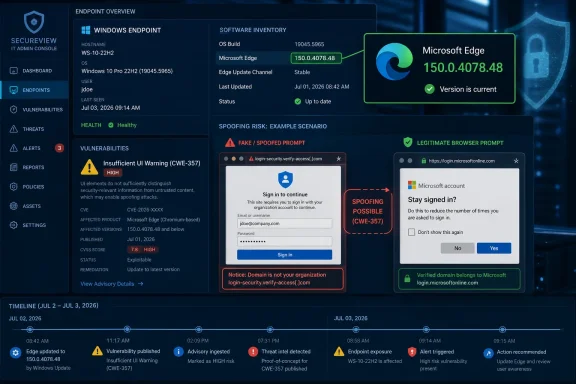 The Edge Patch Is Small, but the Trust Boundary Is Not
The fixed version number is the first practical fact: Edge Stable 150.0.4078.48 is the line administrators should be looking for on managed desktops. Microsoft’s Edge security release notes say that the July 2 Stable release incorporated the latest security updates from the Chromium project, with CVEs to be added as available. By July 3, CVE-2026-58597 had surfaced in the Security Update Guide ecosystem as a Microsoft Edge-specific spoofing issue affecting versions before 150.0.4078.48.That sequence is familiar to anyone who tracks Chromium-based browser updates. The browser ships first, the CVE metadata catches up, and the fleet-management question becomes less philosophical: are your machines actually receiving Edge updates on time? For consumer users, the answer is usually “eventually.” For enterprises with update rings, change freezes, gold images, VDI pools, kiosk systems, and application compatibility gates, “eventually” can be a risk decision masquerading as a process.
Spoofing vulnerabilities also tend to receive less attention than remote code execution flaws because they do not obviously hand an attacker a shell. That can be the wrong instinct. Browser spoofing is often about making the browser lie, or at least making the browser fail to warn clearly enough, at the precise moment a user is asked to trust a site, a prompt, a downloaded object, an authentication flow, or a security-sensitive operation.
Microsoft’s classification points to CWE-357, “Insufficient UI Warning of Dangerous Operations,” according to third-party CVE mirrors that picked up the Microsoft entry. That is a revealing weakness class. It suggests the problem is not merely that a page can look convincing, because every phishing page can do that. It suggests Edge may have failed to make a dangerous browser-mediated action sufficiently distinguishable from a safe or expected one.
Medium Severity Is Not the Same as Low Consequence
The CVSS score circulating for CVE-2026-58597 is 4.3, which lands in medium territory. On paper, that implies limited direct technical impact. In practice, medium-severity browser spoofing issues can still matter because they sit at the boundary between user intent and attacker-controlled presentation.A browser is not just a rendering engine. It is a security user interface. The address bar, permission prompts, certificate warnings, download warnings, identity indicators, sign-in prompts, PWA install surfaces, and cross-origin boundaries are all part of the security model. When the browser’s presentation layer becomes ambiguous, the user is pushed into making a security decision with bad information.
That is why spoofing bugs punch above their CVSS weight in targeted attacks. They are rarely the whole chain. They are the polishing step: the thing that makes credential theft more convincing, an OAuth consent trap more believable, a fake support portal more credible, or a malicious workflow harder to distinguish from a legitimate one. The exploit is not “run calc”; the exploit is “make the user do the thing.”
Microsoft’s older Edge bulletins show this pattern clearly. In past Microsoft browser spoofing vulnerabilities, the company repeatedly described attacks that required a user to click a specially crafted URL or visit a crafted website, often through email or instant messaging lures. The attacker could not force the user to visit the page, but could entice them there and then use browser parsing or presentation weaknesses to spoof content or chain into other web-service attacks. CVE-2026-58597 appears to live in that same broad family, though Microsoft has not publicly published comparable exploit details for this specific CVE.
The Missing Details Are Part of the Story
The user-provided MSRC text about the “confidence” metric is unusually relevant. It explains that vulnerability confidence is about how certain we are that a vulnerability exists and how credible the known technical details are. Sometimes only the existence is public. Sometimes researchers later infer the likely root cause. Sometimes the vendor itself confirms the issue.CVE-2026-58597 sits closer to the confirmed-but-thinly-described end of that spectrum. Microsoft has acknowledged the CVE and shipped a fixed Edge build. Third-party databases have reproduced the affected-product range and the CVSS score. But the public record does not, at least as of July 4, include a detailed root-cause analysis, exploit steps, screenshots, or a public proof-of-concept.
That scarcity should temper both panic and complacency. There is no public evidence in the material reviewed here that CVE-2026-58597 is being exploited in the wild. There is also no reason to treat the lack of public exploit code as a guarantee of safety. Browser UI bugs can be rediscovered, diffed from patches, or inferred by researchers and attackers who watch Chromium and Edge changes closely.
The asymmetry is obvious. Defenders often wait for clean advisories; attackers can work from patch deltas, vague descriptions, and product behavior. A CVE that says “insufficient UI warning of dangerous operations” is not enough to build an exploit on its own, but it is enough to tell a motivated researcher where to start looking.
Chromium Makes Edge Faster to Patch and Harder to Explain
Edge’s Chromium foundation gives Microsoft a powerful advantage: the company can ride the rapid security cadence of the Chromium project while adding Edge-specific fixes of its own. Microsoft’s release notes are full of this language. Edge Stable releases routinely “incorporate the latest Security Updates of the Chromium project,” and occasionally list Edge-specific CVEs separately.That hybrid model is good for users. It means the Windows browser is not waiting for monthly Patch Tuesday rituals to fix every browser-class bug. It also means Edge security advisories can be harder for ordinary administrators to parse. Some vulnerabilities are inherited from Chromium. Some are Microsoft-specific. Some apply only to Android, iOS, Stable, Extended Stable, or down-level Windows support branches. Some CVEs are added to release notes after the binary has already shipped.
CVE-2026-58597 appears to be Edge-specific in the practical sense that the affected product is Microsoft Edge Chromium-based, with affected versions below 150.0.4078.48. That does not necessarily mean the underlying concept could not exist elsewhere in the Chromium ecosystem; it means the current advisory record is about Microsoft’s browser build, integration, or UI behavior.
For IT teams, the product distinction matters less than the operational one. If you manage Chrome and Edge side by side, you cannot assume one browser’s update proves the other is fixed. Edge has its own updater, its own enterprise policies, its own release channels, and its own Microsoft-specific security fixes. “Chromium-based” is not the same as “patched because Chrome is patched.”
Spoofing Attacks Exploit the Human Part of Browser Security
The browser security model often gets discussed as though it were purely technical: site isolation, sandboxing, memory safety, origin policy, certificate validation, and exploit mitigations. But a browser also depends on a user noticing when something is off. Spoofing attacks live in the gap between formal security boundaries and human interpretation.An attacker does not need to defeat TLS if they can make a victim trust the wrong page. They do not need to own the operating system if they can make a browser prompt look routine. They do not need to bypass every policy if the user is persuaded to authorize the dangerous action themselves. A UI warning that appears too late, too quietly, in the wrong place, or not at all can turn a technically constrained attack into a successful compromise.
This is why “insufficient warning” is a serious phrase. Security prompts already struggle against habituation. Users click through cookie banners, permission prompts, login interruptions, download warnings, SmartScreen notices, and enterprise SSO redirects all day. If the browser gives the wrong cue at the wrong moment, even a well-trained user may not have a fair chance.
For WindowsForum readers, the likely risk is not a Hollywood exploit. It is the boring version: a crafted site in a phishing email, a fake internal portal, a partner-themed lure, or a malicious page that abuses a browser workflow to make a dangerous action look more benign than it is. That is where medium-severity spoofing issues become practical security problems.
Enterprise Exposure Depends on Update Discipline, Not Just Version Math
The immediate remediation is simple: update Edge to 150.0.4078.48 or later. The harder question is whether that actually happens across a real organization. Edge updates quickly on unmanaged machines, but enterprises often slow that process deliberately.There are legitimate reasons to do so. Browser updates can break line-of-business apps, extensions, authentication plug-ins, legacy intranet portals, kiosk environments, and automation workflows. Security teams want speed; application owners want predictability. Microsoft’s Stable and Extended Stable channels exist because that tension is real.
But CVE-2026-58597 is a reminder that browser update lag is cumulative risk. Every deferred Edge update is not just one vulnerability; it is the sum of Chromium fixes, Edge-specific fixes, and security behavior changes that did not arrive. By the time an organization is several releases behind, the browser becomes a softer target even if the operating system is otherwise well patched.
Administrators should also verify the channel they are actually running. Edge Stable 150.0.4078.48 is the relevant July 2 desktop Stable release identified in Microsoft’s release notes. Mobile versions follow separate numbering and release timing. Extended Stable may have its own cadence. A single dashboard that says “Edge installed” is not enough; version and channel matter.
The Absence of Known Exploitation Should Not Become an Excuse
One of the most important facts about CVE-2026-58597 is what has not been reported. The public advisory trail reviewed here does not show a known exploited-in-the-wild flag, and the aggregators do not present a public proof-of-concept. That should affect prioritization. It should not justify ignoring the update.There is a difference between emergency patching and prompt patching. A remotely exploitable, actively exploited browser memory corruption bug deserves immediate escalation. A medium spoofing issue with no public exploit can move through a normal accelerated browser update process. But “normal” for browsers should mean days, not quarters.
Attackers are opportunistic. If a spoofing bug can improve phishing conversion rates or smooth an identity attack, it does not need to be spectacular to be useful. The more valuable the target, the more likely attackers are to combine small advantages: a convincing lure, a trusted domain lookalike, a browser UI ambiguity, and a credential capture flow.
Security teams should resist the reflex to treat anything below “high” as background noise. CVSS is a useful triage tool, but it is not a complete model of user deception. A flaw that manipulates trust can matter precisely because it attacks the decision layer rather than the kernel.
Microsoft’s Browser Security Story Is Now a Release-Cadence Story
The Edge team’s modern security posture depends on fast release cadence, and the July 2 update fits that model. Microsoft did not wait for a monthly Windows rollup to move the browser. It shipped Edge 150.0.4078.48 and then the CVE metadata appeared in the advisory ecosystem.That is good engineering, but it complicates communication. The Security Update Guide is authoritative, yet its JavaScript-heavy interface is not always friendly to automated review. Microsoft Learn release notes are readable, but sometimes say CVEs will be added later. Third-party CVE mirrors fill gaps quickly, but they can lag, omit nuance, or flatten Microsoft’s advisory details into generic database fields.
For sysadmins, this means browser security cannot be tracked through one source alone. Microsoft Learn gives the release chronology. MSRC gives the vulnerability record. Endpoint management tools give the truth of deployment. Vulnerability scanners give coverage and exceptions, though often with their own delay.
The operational lesson is that Edge should be treated like a continuously updated application, not a passive Windows component. That means ring deployment, reporting, rollback planning, and extension compatibility testing need to be mature enough that security updates are not held hostage by avoidable uncertainty.
The Practical Defense Is Boring, Which Is Why It Works
There is no exotic workaround to recommend from the public record. Microsoft’s remedy is the updated Edge build. That puts the emphasis on hygiene: update the browser, verify the version, monitor exceptions, and keep users from being the only control between a spoofing flaw and a successful attack.For managed fleets, administrators should check whether EdgeUpdate policies are delaying deployment beyond the organization’s stated risk tolerance. They should also confirm that security tooling recognizes Edge 150.0.4078.48 as the fixed Stable baseline for this issue. If scanners are still waiting on updated plugins, version-based validation may be faster than waiting for a vulnerability dashboard to catch up.
Defenders should also look at where spoofing attacks would hurt most. Privileged admin workstations, help desk systems, finance users, browser-based admin consoles, SaaS identity portals, and users with access to sensitive customer data are all higher-value environments. A medium browser spoofing issue on a low-risk kiosk is one thing; the same issue in the path of identity administration is another.
Enhanced browser protections, web filtering, phishing-resistant MFA, and conditional access policies all help reduce the blast radius. But they do not replace patching. A spoofing flaw is, by definition, an attempt to make a trust decision less reliable. The cleanest fix is to remove the faulty browser behavior.
The July Edge Fix Draws a Clear Line for Admins
The concrete story of CVE-2026-58597 is narrower than the anxiety around browser security, but it gives Windows administrators a useful checklist.- Microsoft has confirmed CVE-2026-58597 as a spoofing vulnerability in Chromium-based Microsoft Edge, with public reporting appearing on July 3, 2026.
- The fixed desktop Stable release identified in Microsoft’s Edge security release notes is version 150.0.4078.48, released on July 2, 2026.
- The vulnerability is rated medium with a reported CVSS 3.1 score of 4.3, which argues for prompt patching rather than panic.
- The public description points to insufficient UI warning around dangerous operations, meaning the risk is user deception rather than direct code execution as publicly described.
- There is no public proof-of-concept or known exploited-in-the-wild signal in the advisory trail reviewed here, but sparse details should not be mistaken for non-exploitability.
- Enterprises should verify actual Edge versions and channels across managed devices instead of assuming Chromium-based browsers update uniformly.
References
- Primary source: MSRC
Published: 2026-07-03T07:00:00-07:00
Security Update Guide - Microsoft Security Response Center
 msrc.microsoft.com
- Related coverage: hkcert.org
Microsoft Edge Multiple Vulnerabilities
Multiple vulnerabilities were identified in Microsoft Edge. A remote attacker could exploit some of these vulnerabilities to trigger remote code execution, denial of service condition, security restriction bypass, data manipulation, sensitive informationwww.hkcert.org - Related coverage: www2.gov.bc.ca
- Related coverage: securityvulnerability.io
CVE-2026-57987 : Server-Side Request Forgery in Microsoft Edge by Microsoft
Learn about a server-side request forgery vulnerability affecting Microsoft Edge products, CVE-2026-57987, and its implications.securityvulnerability.io - Related coverage: rapid7.com
Rapid7 Vulnerability Database
Rapid7's VulnDB is curated repository of vetted computer software exploits and exploitable vulnerabilities.www.rapid7.com - Related coverage: thehackerwire.com
CVE-2026-45494 - Medium Vulnerability - TheHackerWire
TheHackerWire - Your daily source for cybersecurity news, CVE alerts, hacking tutorials, and security tool reviews. Stay ahead of cyber threats.www.thehackerwire.com
- Related coverage: manuals.supernaeyeglass.com
- Related coverage: hivepro.com
- Related coverage: buildings.honeywell.com
The purpose of this document is to identify the patches that have been delivered by Microsoft® which have been tested against Pro-Watch
PDF documentbuildings.honeywell.com
