

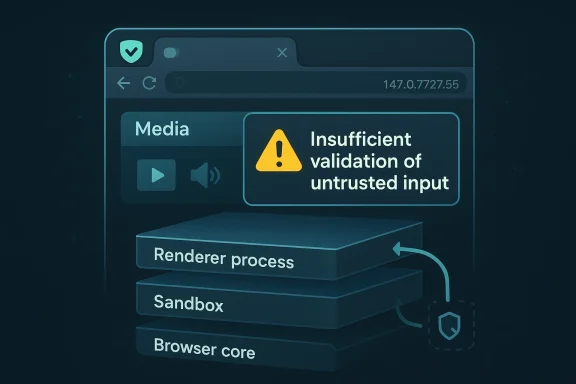
Insufficient validation bugs in browser media paths rarely make headlines the way a flashy sandbox escape does, but CVE-2026-5884 is a reminder that small-sounding validation failures can still matter a great deal in a modern Chromium-based browser. Microsoft’s Security Update Guide says the flaw affects Google Chrome prior to 147.0.7727.55 and could let a remote attacker who already compromised the renderer process execute arbitrary code inside a sandbox through a crafted HTML page. That is a narrow exploit precondition, but it is not a trivial one, because renderer compromise is exactly the sort of foothold defenders worry about when attackers chain browser bugs together.
The key detail here is not just that Chromium had a media bug, but that the issue sits in the browser’s layered trust model. Chrome’s own release cadence shows 147.0.7727.49/.50 as the early stable build in early April 2026, and the security fix trail around that branch is where downstream visibility starts to matter. In practice, the browser’s update machinery, not the abstract CVE entry alone, determines whether users and enterprises are exposed for hours, days, or longer. (chromereleases.googleblog.com)
The Microsoft entry is also a useful example of how Chromium vulnerabilities show up in the broader ecosystem. Microsoft routinely tracks Chromium-origin CVEs in its Security Update Guide because Edge inherits Chromium fixes downstream, and that same disclosure pattern helps enterprises compare their browser estate against upstream Chrome release notes. The presence of the Chromium security severity label here, even without NVD’s own scoring yet, is a sign that the bug was serious enough to merit cross-vendor visibility.
The vulnerability description itself is concise but revealing. Insufficient validation of untrusted input in Media points to a class of bugs where attacker-controlled data reaches code paths that were not hardened against malformed or adversarial content. The associated weakness tag is CWE-20 Improper Input Validation, which is exactly the sort of root cause that often serves as the first domino in a browser exploitation chain.
Just as importantly, the wording says the attacker must have already compromised the renderer process. That means CVE-2026-5884 is not a one-click, drive-by remote code execution issue in the usual sense. Instead, it appears to be a sandbox escape or sandbox-bounded code execution problem that becomes highly relevant when paired with another bug, a malicious extension, or a compromised page context. (chromereleases.googleblog.com)
The renderer-process condition changes the threat model substantially. A compromised renderer is already dangerous, but the browser sandbox is supposed to constrain what happens next. A flaw that lets code run inside that sandbox does not hand the attacker the whole machine, yet it can still materially improve post-exploitation options, especially for chaining into a second-stage bug or for stealing browser data that remains accessible to the renderer. (chromereleases.googleblog.com)
This is why Chromium bugs that look modest on paper can end up in serious incident-response playbooks. They may not be the initial infection vector, but they can convert a first-stage renderer compromise into reliable code execution in a more privileged browser context. That matters for credential theft, session hijacking, and persistence via browser-resident artifacts. (chromereleases.googleblog.com)
That’s also why browser vendors keep investing in fuzzing, sanitizer runs, and hardening around parser boundaries. Chrome’s own release notes repeatedly reference automated detection methods such as AddressSanitizer, MemorySanitizer, UndefinedBehaviorSanitizer, Control Flow Integrity, libFuzzer, and AFL, underscoring how often browser security work depends on tooling finding edge cases before attackers do. (chromereleases.googleblog.com)
Chrome’s public release stream shows an early stable update to 147.0.7727.49/.50 on April 1, 2026, which indicates the 147 branch was already in motion before the vulnerable threshold cited by Microsoft’s entry. The update mechanics matter because browser vulnerabilities often get fixed upstream first, then show up downstream in Windows enterprise environments only after the vendor’s ingestion and packaging cycle completes. (chromereleases.googleblog.com)
The same logic applies to downstream Chromium consumers, especially Microsoft Edge. Microsoft’s guidance frequently exists to help customers answer the operational question of whether the relevant Chromium fix has been ingested into the browser they actually deploy. That is a practical distinction many organizations overlook when they assume “Chrome fixed it” automatically means “our Edge estate is safe too.”
The point is not that every Chromium CVE is headline-worthy in the same way. The point is that Chromium’s attack surface is broad enough that even a medium-severity issue can have outsized operational consequences if it touches a heavily exercised subsystem like media. Browser security teams know this, which is why they often prioritize patching based on exploitability context, not just the raw severity label. (chromereleases.googleblog.com)
This is especially relevant for organizations that use Chrome in one business unit and Edge in another. A single upstream bug can create different patch states across the fleet, so “we patched the browser” is not a complete answer unless you know which browser, which channel, and which exact version were deployed.
For Windows users, this means browser patch windows are often shorter than they used to be, but not zero. Managed environments can still lag because of update deferrals, maintenance windows, and machines that are rarely rebooted. A browser exploit that depends on a specific pre-patch build can remain viable in those conditions long after the public fix exists. (chromereleases.googleblog.com)
Because Microsoft is surfacing the CVE in its Security Update Guide, the issue also has a downstream visibility function. Enterprises that standardize on Edge need to confirm the fix state in their own browser release channel rather than assuming Chromium upstream timing automatically maps to their fleet. That distinction is operationally important, especially in environments with mixed browser usage or ring-based deployment.
The likely enterprise response is straightforward: accelerate browser version validation, confirm policy enforcement on update rings, and look for any users pinned below the fixed build. If Chrome 147.0.7727.55 is the remediation line, then organizations should know exactly which endpoints are not there yet and why. (chromereleases.googleblog.com)
The consumer angle is especially important because browser updates are now one of the most common security controls people actually interact with. Unlike OS patching, which may be gated by hardware compatibility or IT policy, browser updates can often be applied quickly and silently. The challenge is not availability; it is compliance. (chromereleases.googleblog.com)
The other reason consumers should care is that browser compromise can expose far more than a tab. Sessions, autofill data, identity tokens, and account access in cloud services all become more at risk once an attacker is operating inside the browser process model. That’s the hidden cost of seemingly narrow browser flaws. (chromereleases.googleblog.com)
This also shows why the browser market is so tightly coupled. When Chromium publishes a security fix, that fix ripples into Chrome first, then into Edge and other Chromium-based products through their own release engineering cycles. Security posture in one browser therefore influences expectations across the entire Windows desktop estate. (chromereleases.googleblog.com)
That is especially useful for security operations teams, which need to reconcile vulnerability scanners, asset inventories, and product-specific update channels. A Chromium CVE in Microsoft’s guide is a patch-verification clue, not just an administrative echo of Google’s release notes.
The second thing to watch is the downstream synchronization between Chrome and Edge. If Microsoft’s guide updates to reflect a specific Edge build number or rollout state, that will clarify how quickly the fix is being absorbed into the Windows ecosystem. For enterprise administrators, that timing is often more important than the abstract CVE itself.
The third thing to watch is whether security researchers begin discussing exploit chaining around renderer compromise and media paths in the 147 branch. Even if no public exploit appears, discussions of reliability, sandbox boundaries, or browser process isolation can tell defenders a lot about how appealing the bug was to attackers in the first place. (chromereleases.googleblog.com)
Source: NVD / Chromium Security Update Guide - Microsoft Security Response Center
 Overview
The key detail here is not just that Chromium had a media bug, but that the issue sits in the browser’s layered trust model. Chrome’s own release cadence shows 147.0.7727.49/.50 as the early stable build in early April 2026, and the security fix trail around that branch is where downstream visibility starts to matter. In practice, the browser’s update machinery, not the abstract CVE entry alone, determines whether users and enterprises are exposed for hours, days, or longer. (chromereleases.googleblog.com)The Microsoft entry is also a useful example of how Chromium vulnerabilities show up in the broader ecosystem. Microsoft routinely tracks Chromium-origin CVEs in its Security Update Guide because Edge inherits Chromium fixes downstream, and that same disclosure pattern helps enterprises compare their browser estate against upstream Chrome release notes. The presence of the Chromium security severity label here, even without NVD’s own scoring yet, is a sign that the bug was serious enough to merit cross-vendor visibility.
The vulnerability description itself is concise but revealing. Insufficient validation of untrusted input in Media points to a class of bugs where attacker-controlled data reaches code paths that were not hardened against malformed or adversarial content. The associated weakness tag is CWE-20 Improper Input Validation, which is exactly the sort of root cause that often serves as the first domino in a browser exploitation chain.
Just as importantly, the wording says the attacker must have already compromised the renderer process. That means CVE-2026-5884 is not a one-click, drive-by remote code execution issue in the usual sense. Instead, it appears to be a sandbox escape or sandbox-bounded code execution problem that becomes highly relevant when paired with another bug, a malicious extension, or a compromised page context. (chromereleases.googleblog.com)
What the vulnerability actually means
At a technical level, the media subsystem in a browser is one of the most attack-rich areas in the codebase. Media parsers and decoders accept complex, adversarially controlled content, and even a minor validation gap can produce surprising control-flow behavior if the attacker can reach the right code path. In a browser context, validation failures are rarely isolated; they tend to interact with memory management, object lifetime, process boundaries, and sandbox policy.The renderer-process condition changes the threat model substantially. A compromised renderer is already dangerous, but the browser sandbox is supposed to constrain what happens next. A flaw that lets code run inside that sandbox does not hand the attacker the whole machine, yet it can still materially improve post-exploitation options, especially for chaining into a second-stage bug or for stealing browser data that remains accessible to the renderer. (chromereleases.googleblog.com)
Why “inside a sandbox” is still serious
Some readers hear “inside a sandbox” and assume the issue is limited. That is the wrong conclusion. Sandbox escapes are often the hinge point between a contained browser compromise and meaningful endpoint compromise, and even sandbox-bounded arbitrary code execution can be enough to move laterally within the browser’s own attack surface. The value is chaining; attackers rarely need a single bug to do everything. (chromereleases.googleblog.com)This is why Chromium bugs that look modest on paper can end up in serious incident-response playbooks. They may not be the initial infection vector, but they can convert a first-stage renderer compromise into reliable code execution in a more privileged browser context. That matters for credential theft, session hijacking, and persistence via browser-resident artifacts. (chromereleases.googleblog.com)
Why media bugs recur
Media code is complicated because it has to handle many formats, many edge cases, and a huge amount of malformed input from the open web. Attackers exploit exactly that complexity, especially when a browser team has to balance compatibility, performance, and security. In other words, the bug class is not accidental; it is the natural byproduct of an input-rich subsystem under constant pressure.That’s also why browser vendors keep investing in fuzzing, sanitizer runs, and hardening around parser boundaries. Chrome’s own release notes repeatedly reference automated detection methods such as AddressSanitizer, MemorySanitizer, UndefinedBehaviorSanitizer, Control Flow Integrity, libFuzzer, and AFL, underscoring how often browser security work depends on tooling finding edge cases before attackers do. (chromereleases.googleblog.com)
Patch timing and versioning
The stated remediation threshold is Google Chrome prior to 147.0.7727.55. That matters because it tells administrators the vulnerable window is version-specific, and because the browser update pipeline often rolls out in waves rather than a clean global cutover. In the real world, a “fixed” build can still leave many users exposed for some time if policies, offline devices, or delayed restarts interfere. (chromereleases.googleblog.com)Chrome’s public release stream shows an early stable update to 147.0.7727.49/.50 on April 1, 2026, which indicates the 147 branch was already in motion before the vulnerable threshold cited by Microsoft’s entry. The update mechanics matter because browser vulnerabilities often get fixed upstream first, then show up downstream in Windows enterprise environments only after the vendor’s ingestion and packaging cycle completes. (chromereleases.googleblog.com)
Why version numbers matter for defenders
For enterprise defenders, version numbers are more than housekeeping. They are the difference between a machine that is presumably patched and a machine that is verifiably protected. If your Chrome fleet is still below 147.0.7727.55, this CVE should be treated as open until inventory confirms the opposite. (chromereleases.googleblog.com)The same logic applies to downstream Chromium consumers, especially Microsoft Edge. Microsoft’s guidance frequently exists to help customers answer the operational question of whether the relevant Chromium fix has been ingested into the browser they actually deploy. That is a practical distinction many organizations overlook when they assume “Chrome fixed it” automatically means “our Edge estate is safe too.”
The role of the sandbox in the version story
The version threshold tells us the fix is in code, but the sandbox detail tells us the exploitability curve is more nuanced. A browser can patch the immediate memory-safety or validation issue while still leaving larger architectural questions unresolved about how much damage a renderer compromise can do. That is why browser security is never just about patching one CVE; it is about reducing the utility of the next chained exploit. (chromereleases.googleblog.com)How this fits the Chromium security pattern
CVE-2026-5884 is not an isolated anomaly. Chromium’s April 2026 and March 2026 release streams show the same recurring pattern: browser security advisories that mix high-severity memory issues, medium-severity logic bugs, and fixes that propagate across Chrome, Edge, and other Chromium-based products. That broader pattern is what makes a seemingly modest “media validation” bug worth tracking closely. (chromereleases.googleblog.com)The point is not that every Chromium CVE is headline-worthy in the same way. The point is that Chromium’s attack surface is broad enough that even a medium-severity issue can have outsized operational consequences if it touches a heavily exercised subsystem like media. Browser security teams know this, which is why they often prioritize patching based on exploitability context, not just the raw severity label. (chromereleases.googleblog.com)
Similar bugs reveal the same lesson
Recent Chromium issues in Microsoft’s guide have repeatedly revolved around renderer-adjacent or subsystem-specific weaknesses, and the downstream messaging tends to emphasize whether the fix has landed in the consumer browser build. That tells you something important: the browser ecosystem treats Chromium as a shared security platform, and defects in one product line quickly become operational concerns for another.This is especially relevant for organizations that use Chrome in one business unit and Edge in another. A single upstream bug can create different patch states across the fleet, so “we patched the browser” is not a complete answer unless you know which browser, which channel, and which exact version were deployed.
Why Chrome’s release process matters to Windows users
Chrome’s stable and early stable channels are not just consumer convenience features; they are part of the security distribution chain. Early stable releases push code to a small percentage of users first, then widen the rollout, while the stable desktop channel follows with the broader release cadence. That staggered process helps reduce risk, but it also means defenders need to monitor version drift carefully. (chromereleases.googleblog.com)For Windows users, this means browser patch windows are often shorter than they used to be, but not zero. Managed environments can still lag because of update deferrals, maintenance windows, and machines that are rarely rebooted. A browser exploit that depends on a specific pre-patch build can remain viable in those conditions long after the public fix exists. (chromereleases.googleblog.com)
Enterprise impact
For enterprises, the biggest issue is not whether CVE-2026-5884 can “own the box” on its own. It is whether a compromised renderer can be turned into a stepping stone inside a broader attack chain. In a browser-centric workplace, that can mean session theft, internal web app abuse, or exposure of sensitive data from corporate portals and cloud apps. (chromereleases.googleblog.com)Because Microsoft is surfacing the CVE in its Security Update Guide, the issue also has a downstream visibility function. Enterprises that standardize on Edge need to confirm the fix state in their own browser release channel rather than assuming Chromium upstream timing automatically maps to their fleet. That distinction is operationally important, especially in environments with mixed browser usage or ring-based deployment.
Practical enterprise consequences
Security teams should treat this kind of bug as a patch-management and attack-chain problem. It sits in the zone where red teams and real attackers both care, because any added execution primitive in the browser sandbox can improve the reliability of post-compromise activity. In other words, this is a risk amplifier even if it is not the initial entry point. (chromereleases.googleblog.com)The likely enterprise response is straightforward: accelerate browser version validation, confirm policy enforcement on update rings, and look for any users pinned below the fixed build. If Chrome 147.0.7727.55 is the remediation line, then organizations should know exactly which endpoints are not there yet and why. (chromereleases.googleblog.com)
What admins should check first
- Confirm Chrome versions against the 147.0.7727.55 fixed baseline.
- Check whether any browser update policies are delaying rollout.
- Audit whether Edge and Chrome are both present in the environment.
- Verify that managed devices can actually restart into the patched build.
- Prioritize exposed user populations that handle sensitive web applications.
- Review incident-response detections for renderer-compromise patterns.
Consumer impact
For consumers, the immediate message is simpler: update the browser. The exploit description does not imply that ordinary browsing alone hands an attacker this capability, but it does mean that if an attacker has found a way into the renderer, the vulnerability could deepen the compromise. That makes prompt updating a cheap and sensible defense. (chromereleases.googleblog.com)The consumer angle is especially important because browser updates are now one of the most common security controls people actually interact with. Unlike OS patching, which may be gated by hardware compatibility or IT policy, browser updates can often be applied quickly and silently. The challenge is not availability; it is compliance. (chromereleases.googleblog.com)
Why the average user should care
Even if a vulnerability requires prior renderer compromise, the browser is still a primary intake point for hostile content. Users encounter crafted pages through links, ads, embedded content, and malicious redirects, and the exploit path often starts long before they realize anything has gone wrong. That makes fast patch adoption worthwhile even when the bug description sounds conditional. (chromereleases.googleblog.com)The other reason consumers should care is that browser compromise can expose far more than a tab. Sessions, autofill data, identity tokens, and account access in cloud services all become more at risk once an attacker is operating inside the browser process model. That’s the hidden cost of seemingly narrow browser flaws. (chromereleases.googleblog.com)
The update message in plain English
If you are on Chrome, you should be on or above the fixed 147.0.7727.55 build. If you are on Edge or another Chromium-based browser, you should confirm that your vendor has incorporated the equivalent Chromium fix. Browser patching is one area where waiting for the next reboot is not a strategy; it is a delay. (chromereleases.googleblog.com)Why Microsoft is documenting a Google CVE
Microsoft’s inclusion of the CVE in its Security Update Guide is not unusual, but it is important. Microsoft uses the guide as a customer-facing bridge between upstream Chromium fixes and downstream Edge exposure, which helps enterprises map risk without having to follow every upstream release note by hand. That cross-vendor transparency is a practical necessity in the Chromium ecosystem.This also shows why the browser market is so tightly coupled. When Chromium publishes a security fix, that fix ripples into Chrome first, then into Edge and other Chromium-based products through their own release engineering cycles. Security posture in one browser therefore influences expectations across the entire Windows desktop estate. (chromereleases.googleblog.com)
The downstream visibility problem
The downside of this shared ecosystem is that users can become complacent when they see the same CVE repeated across vendors. They may assume the issue is duplicated bureaucracy rather than a real exposure signal. In practice, however, Microsoft’s entry is telling you something concrete: whether the downstream product you actually use has absorbed the upstream fix.That is especially useful for security operations teams, which need to reconcile vulnerability scanners, asset inventories, and product-specific update channels. A Chromium CVE in Microsoft’s guide is a patch-verification clue, not just an administrative echo of Google’s release notes.
What this means for Edge users
For Edge users, the practical takeaway is to check the version Microsoft has shipped rather than assuming the Chrome number alone is sufficient. Because Edge consumes Chromium code downstream, the Microsoft guide is the canonical place to confirm whether the fix has made its way into the Edge branch in use in your organization. That distinction is small on paper and huge in operations.Strengths and Opportunities
The good news is that this vulnerability is the kind of issue that browsers are now relatively well positioned to address quickly. Chromium has a mature patch pipeline, browser vendors know how to distribute security fixes fast, and enterprise management tools can usually identify lagging versions with precision. The broader security ecosystem around Chrome and Edge is also better developed than it was a few years ago. (chromereleases.googleblog.com)- Clear remediation line: the fixed baseline is explicit, which simplifies compliance work.
- Strong vendor visibility: Microsoft’s guide helps downstream users verify exposure.
- Fast browser update channels: Chromium can move fixes quickly through stable and early stable.
- Better asset inventory tools: most enterprises can map browser versions reliably.
- Reduced blast radius: the sandbox still constrains a successful exploit.
- Opportunity for hardening: teams can use the event to tighten browser update policy.
- Security awareness gain: media-path bugs are a useful reminder to treat browser content as hostile.
Strategic upside for defenders
This is also a chance to improve patch discipline. Organizations that treat browser updates as first-class security events tend to respond faster to the next Chromium issue, whether it is in media, WebView, DevTools, or the renderer itself. That habit compounds, and the payoff shows up in shorter exposure windows across the fleet. (chromereleases.googleblog.com)Risks and Concerns
The main risk is that the exploit condition sounds narrow, which could tempt some teams to underprioritize the update. That would be a mistake, because renderer compromise is common enough in browser exploitation chains that even a sandbox-bounded arbitrary code execution flaw can become useful very quickly. Security history shows that attackers happily chain “partial” bugs into full compromises. (chromereleases.googleblog.com)- Chaining risk: a renderer foothold plus this bug can unlock stronger post-exploitation options.
- Patch lag: some devices will inevitably remain below the fixed build.
- Mixed-browser confusion: Chrome and Edge fleets may not patch on the same cadence.
- User delay: consumers often postpone browser restarts, even after updates download.
- Assumed low severity: “inside a sandbox” can lead to false reassurance.
- Visibility gaps: asset inventories may miss portable, unmanaged, or secondary browser installs.
- Exploit evolution: attackers may combine this bug with newer renderer or media bugs.
Operational risk is bigger than the label
The Medium severity label should not be read as “safe to ignore.” Severity labels are helpful triage aids, but they are not a substitute for attack-path analysis. In browser security, a medium issue in the right subsystem can be more important than a higher-scored issue that is harder to chain or less reachable. (chromereleases.googleblog.com)Looking Ahead
The next thing to watch is whether Chromium issues more details about the underlying media-validation bug, including whether the flaw was found internally or reported externally. More context often arrives after the initial disclosure window, once enough users have updated and public bug details can safely be expanded. That is standard Chrome security practice, not an anomaly. (chromereleases.googleblog.com)The second thing to watch is the downstream synchronization between Chrome and Edge. If Microsoft’s guide updates to reflect a specific Edge build number or rollout state, that will clarify how quickly the fix is being absorbed into the Windows ecosystem. For enterprise administrators, that timing is often more important than the abstract CVE itself.
The third thing to watch is whether security researchers begin discussing exploit chaining around renderer compromise and media paths in the 147 branch. Even if no public exploit appears, discussions of reliability, sandbox boundaries, or browser process isolation can tell defenders a lot about how appealing the bug was to attackers in the first place. (chromereleases.googleblog.com)
- Confirm whether Google publishes additional technical details.
- Verify the exact Chrome and Edge build numbers in your fleet.
- Watch for updated Microsoft guidance on downstream exposure.
- Monitor whether other Chromium-based browsers issue parallel fixes.
- Recheck browser restart compliance after patch deployment.
Source: NVD / Chromium Security Update Guide - Microsoft Security Response Center
Last edited:
