

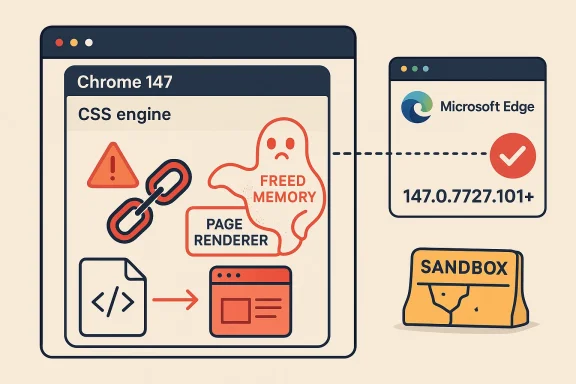
Google’s latest Chrome security cycle has landed with another high-severity memory-safety bug, and this one is especially important because it sits in CSS, one of the browser’s core layout engines. CVE-2026-6300 affects Google Chrome versions prior to 147.0.7727.101, and Google says a crafted HTML page could let a remote attacker execute code inside the browser sandbox. Microsoft is now tracking the same Chromium-origin issue in its Security Update Guide, which is a strong signal that defenders across both Chrome and Microsoft Edge (Chromium-based) should treat this as an urgent patch item. gleblog.com]
Browser vulnerabilities tend to fall into two broad camps: flaws that are noisy but low value, and flaws that are quiet but highly exploitable. Use-after-free bugs belong squarely in the second category because they can convert normal browsing behavior into memory corruption, often with enough control for code execution. In this case, Google’s public wording is blunt: the issue lives in CSS, a web-facing component that every modern site exercises constantlyh begins with a page load rather than a specialized local action.
That combination matters because Chrome’s architecture is built around the idea that a renderer compromise should still be trapped by the sandbox. But history has shown that attackers are very good at chaining sandboxed code execution with other weaknesses, especially in a browser that processes untrusted content all day, every day. A flaw in CSS is not just a rendering bug; it is a potential foothold in a process that handles huge volumes of hostile input by design. That is why “High” often behaves like “critical in practice” when the component is ubiquitous.
The timing also matters. Google promoted Chrome 147 to Stable on April 7, 2026, then pushed the follow-up security update on April 15, 2026 with the fixed desktop builds 147.0.7727.101/102 for Windows and Mac and 147.0.7727.101 for Linux. That means the vulnerable code path was present in the first stable 147 release and was then corrected in the first major security refresh of the cycle. In other words, this is not an ancient flaw lingering in an out-of-support branch; it is a fresh issue in the current release train.
Microsoft’s inclusion of the CVE in the Security Update Guide is equally significant. Microsoft has long used the guide to surface Chromium vulneraEdge’s codebase lineage, because Edge inherits upstream Chromium fixes on Google’s timetable. That makes the guide a practical downstream alerting system for enterprises that standardize on Edge but still need to watch Chromium advisories for risk exposure.
The public CVE description states that the flaw is a use after free in CSS and that it can be triggered via a crafted HTML page. That is the classic browser explos a page, the page exercises a malformed or specially structured code path, and the bug causes memory corruption. The attacker does not need physical access, and they do not need credentials; they need only a browser session and a delivery mechanism that gets the victim to render content.
Google’s description does not publicly claim observed in-the-wild exploitation in the material available here, so the most careful reading is that the bug is serious and potentially weaponizable, not necessarily already mass-exploited. That distinction matters operationally: defenders should respond as though the issue could be targeted quickly, but they should avoid overstating confirmed exploitation without evidence.
The browser also sits at the intersection of user trust and machine trust. Users often view browser updates as optional quality-of-life improvements, not securitrception is exactly what attackers rely on. When a flaw can be triggered remotely through web content, the line between “web browsing” and “security exposure” disappears. That makes fast patch deployment a security control, not a maintenance chore.
That pattern matters because it shapes how security teams should interpret severity labels. A single high-severity bug in a low-value subsystem might be tolerable for a short window, but a high-severity bug in core rendering code deserves immediate action. Chrome’s release cadence also means fix windows are short, and the gap between first stable release and patched stable release can be measured in days rather than months. In browser security, days can be a long time.
Administrators should also remember that Chrome patches rarely stay confined to Chrome. Any downstream Chromium-based product must ingest the fix, validate it, and then distribute it on its own timeline. That means the real patch window may extend beyond Google’s release date, depending on enterprise update policy and browser management tooling.
This matters especially in managed enterprise environments, where browser update controls may be decoupled from OS update controls. A fully patched Windows machine can still be exposed if Edge lags behind Chromium fixes, and the reverse is also true. Security teams need a browser-specific inventory, not just an operating-system-centric one. That is the difference between being “up to date” and being actually protected.
Chrome’s security model has improved dramatically over the years, but its complexity has also grown. More features mean more code paths, and more code paths mean more opportunity for subtle lifecycle mistakes. The browser has become a miniature operating system for the web, and the attack surface reflects sult is that “simple” memory bugs remain strategically important.*
A third lesson is that exploit chaining is the default assumption. Even if a vulnerability only grants code execution in a sandboxed renderer, attackers may still use it to reach secrets, stage payloads, or pivot through other weaknesses. In modern browser exploitation, the first bug is often only the first step.
Consumers should also keep in mind that browser updates often arrive quietly in the background. Restart prompts may be easy to dismiss, but for high-risk browser vulnerabilities, the restart is the security event. Delaying it extends the time the vulnerable code remains live in memory.
Enterprise defenders should also review browser extension posture, web filtering, and phishing controls. While those measures do not replace the patch, they can reduce the chance that a crafted page reaches the user in the first place. Think of them as delay tactics for the attacker, not substitutes for remediation.
Source: NVD / Chromium Security Update Guide - Microsoft Security Response Center
 Overview
Browser vulnerabilities tend to fall into two broad camps: flaws that are noisy but low value, and flaws that are quiet but highly exploitable. Use-after-free bugs belong squarely in the second category because they can convert normal browsing behavior into memory corruption, often with enough control for code execution. In this case, Google’s public wording is blunt: the issue lives in CSS, a web-facing component that every modern site exercises constantlyh begins with a page load rather than a specialized local action.That combination matters because Chrome’s architecture is built around the idea that a renderer compromise should still be trapped by the sandbox. But history has shown that attackers are very good at chaining sandboxed code execution with other weaknesses, especially in a browser that processes untrusted content all day, every day. A flaw in CSS is not just a rendering bug; it is a potential foothold in a process that handles huge volumes of hostile input by design. That is why “High” often behaves like “critical in practice” when the component is ubiquitous.
The timing also matters. Google promoted Chrome 147 to Stable on April 7, 2026, then pushed the follow-up security update on April 15, 2026 with the fixed desktop builds 147.0.7727.101/102 for Windows and Mac and 147.0.7727.101 for Linux. That means the vulnerable code path was present in the first stable 147 release and was then corrected in the first major security refresh of the cycle. In other words, this is not an ancient flaw lingering in an out-of-support branch; it is a fresh issue in the current release train.
Microsoft’s inclusion of the CVE in the Security Update Guide is equally significant. Microsoft has long used the guide to surface Chromium vulneraEdge’s codebase lineage, because Edge inherits upstream Chromium fixes on Google’s timetable. That makes the guide a practical downstream alerting system for enterprises that standardize on Edge but still need to watch Chromium advisories for risk exposure.
What Chromium Has Disclosed
Google’s April 15 stable-channel note says the update includes 31 security fixes and explicitly lists the Chrome versions shipped for each platform. The key point for administrators is straightforward: any Chrome build earlier than 147.0.7727.101 is now in the vulnerable set until patched. Google also keeps some bug details restricted until most users are updated, which is standard practice when the team believes disclosure could accelerate exploitation.Why the CSS detail matters
CSS is part of the browser’s rendering engine, but it is not “just styling.” It participates in layout, reflow, selector matching, and the transformation of page content into what users see. A memory bug there can be particularly dangerous because it sits in a code path that is both high-frequency and attacker-controlled through web content. That makes the surface broad even if the bug description sounds narrow.The public CVE description states that the flaw is a use after free in CSS and that it can be triggered via a crafted HTML page. That is the classic browser explos a page, the page exercises a malformed or specially structured code path, and the bug causes memory corruption. The attacker does not need physical access, and they do not need credentials; they need only a browser session and a delivery mechanism that gets the victim to render content.
- Affected products: Google Chrome before 147.0.7727.101.
- Attack vector: remote, through crafted HTML.
- Impact: arbitrary code execution inside the sandbox.
- Security class: memory corruption, specifically CWE-416.
The practical exploit model
The phrase “inside a sandbox” should never be read as reassurance. Browser sandboxes are a defense-in-depth barrier, not a guarantee of safety, and attackers routinely seek ways to turn sandboxed execution into a broader compromise. When a flaw already grants code execution in the renderer or equivalent process, the remaining steps are often about escaping isolation, reaching secrets, or chaining into the host. That is why patch urgency remains high even when the sandbox is still technically intact.Google’s description does not publicly claim observed in-the-wild exploitation in the material available here, so the most careful reading is that the bug is serious and potentially weaponizable, not necessarily already mass-exploited. That distinction matters operationally: defenders should respond as though the issue could be targeted quickly, but they should avoid overstating confirmed exploitation without evidence.
Why This Is a Browser-Scale Problem
Browser flaws are rarely isolated to a single tab or site. They matter because browsers are the front door to nternal portals, document workflows, and SaaS dashboards. A rendering-engine vulnerability therefore touches both consumer browsing and enterprise productivity, which is one reason Chromium CVEs routinely ripple across multiple products and downstream vendors.Attack surface meets trust surface
CSS is embedded in nearly every modern webpage, including content that users assume to be benign. That makes it a particularly dangerous place for an exploitable memory bug because the attacker can hide the trigger in ordinary-looking pages, advertisements, redirects, embedded content, or compromised sites. The vulnerability’s trigger language is simple, but the real-world delivery options are broad.The browser also sits at the intersection of user trust and machine trust. Users often view browser updates as optional quality-of-life improvements, not securitrception is exactly what attackers rely on. When a flaw can be triggered remotely through web content, the line between “web browsing” and “security exposure” disappears. That makes fast patch deployment a security control, not a maintenance chore.
Enterprise implications
For enterprises, the risk is not just that employees use Chrome. It is that Chrome often runs alongside mail, chat, CRM, documentation systems, and internal admin portals, all of which increase the number of tabs and page contexts a user opens each day. More page loads mean more chances for malicious content to reach a vulnerable browser instance. The fact that Microsoft is surfacing the CVE in its own guide is a reminder that browser patch management is now a cross-vendor discipline.- The flaw can be reached over the network.
- The trigger is a web page, not a local file or privileged action.
- The affected software is one of the most widely deployed browsers on Windows, Mac, and Linux.
- The downstream effect reaches Microsoft Edge because of Chromium inheritance.
How It Fits Chrome 147’s Security Picture
CVE-2026-6300 arrives in the middle of a busy Chrome 147 security cycle. Google’s April 15 update bundles multiple high-impact memory-safety fixes, which is a reminder that modern browser security is often a race against complex C++ code paths rather than one-off logic errors. The browser is effectively a huge, continuously exercised parser for attacker-controlled data, and that makes memory discipline a perpetual problem.The pattern across the release
Chrome 147’s Stable channel began on April 7, and the April 15 update introduced the first major security refresh for that branch. The presence of multiple issues in the same update suggests a broad attack surface and reinforcser maintainers are continually reacting to newly discovered weaknesses in rendering, media, graphics, and script-related subsystems. CVE-2026-6300 is therefore not an outlier; it is part of a pattern.That pattern matters because it shapes how security teams should interpret severity labels. A single high-severity bug in a low-value subsystem might be tolerable for a short window, but a high-severity bug in core rendering code deserves immediate action. Chrome’s release cadence also means fix windows are short, and the gap between first stable release and patched stable release can be measured in days rather than months. In browser security, days can be a long time.
Why this release is operationally noisy
Enterprises often get flooded with browser updates, especially when multiple CVEs land in a single patch train. That creates “update fatigue,” where security teams begin to triage by habit rather than by technical consequence. CVE-2026-6300 is a good example of why that mindset is dangerous: the label “CSS” looks mundane, but the exploit class is memory corruption with remote delivery.Administrators should also remember that Chrome patches rarely stay confined to Chrome. Any downstream Chromium-based product must ingest the fix, validate it, and then distribute it on its own timeline. That means the real patch window may extend beyond Google’s release date, depending on enterprise update policy and browser management tooling.
Microsoft Edge and the Downstream Effect
Microsoft’s Security Update Guide exists in part because Chromium vulnerabilities do not stop at Chrome. Edge is Chromium-based, so upstream browser fixes are highly relevant to Microsoft customers even when the CVE originates in Google’s codebase. Microsoft’s public guidance is therefore less about duplicating Chrome’s advisory and more about helping defenders map the exposure to their own fleet.Why Edge admins should care
From a patch-management perspective, the important point is that downstream timing may differ from upstream timing. Chrome may be fixed, but Edge still needs to ingest the corresponding Chromium changes through Microsoft’s release process. That is why Microsoft asks users to check the Security Update Guide for Microsoft Edge (Chromium-based) instead of assuming monthly Windows Patch Tuesday timing applies.This matters especially in managed enterprise environments, where browser update controls may be decoupled from OS update controls. A fully patched Windows machine can still be exposed if Edge lags behind Chromium fixes, and the reverse is also true. Security teams need a browser-specific inventory, not just an operating-system-centric one. That is the difference between being “up to date” and being actually protected.
The broader Chromium ecosystem
The Chromium ecosystem includes more than Chrome and Edge. Embedded browsers, webviews, kiosk apps, and vendor-specific Chromium forks also inherit upstream security fixes, sometimes with lag and sometimes with version pinning that complicates remediation. A browser bug that sounds desktop-only can therefore become an enterprise application issue as well.- Edge inherits the underlying Chromi- Enterprise patch policy may delay rollout after upstream release.
- WebView- or browser-embedded applications can carry the same risk profile.
- Security Update Guide monitoring is essential for downstream visibility.
Patch timing and validation
Security teams should not simply push a browser update and move on. They should validate extension compatibility, sign-in flows, SSO behavior, and internal web apps after the upgrade, because browser updates can expose latent application bugs or policy conflicts. That is especially true when the browser update also closes a memory-safety issue that could have hidden broader instability. Good patching is not just fast; it is tested.Why Memory-Safety Bugs Keep Winning
The persistence of use-after-free bugs in browsers is not because the industry ignores the problem. It is because browsers remain among the most complex consumer software stacks in existence, with enormous legacy code, multiple execution engines, and heavy pressure to ship features without breaking the web. CSS is just one example of a surface area where lifetime management can go wrong under real-world load.The engineering reality
Use-after-free flaws typically arise when software keeps using an object after it has been released, and in a browser that can mean anything from layout state to rendering artifacts to security-sensitive references. The bug can be hard to reproduce, hard to detect, and hard to fuzz into submission because the trigger may require a specific sequence of page events. That is why these issues are so prized by attackers and so frustrating for defenders.Chrome’s security model has improved dramatically over the years, but its complexity has also grown. More features mean more code paths, and more code paths mean more opportunity for subtle lifecycle mistakes. The browser has become a miniature operating system for the web, and the attack surface reflects sult is that “simple” memory bugs remain strategically important.*
What defenders can learn
One lesson is that severity scoring should be read with architectural context in mind. A browser rendering bug may not look as dramatic as a kernel bug, but if it sits in a ubiquitous remote-code-execution path, it deserves equally urgent operational treatment. Another lesson is that patch hygiene must extend to every Chromium consumer, not just the flagship browser.A third lesson is that exploit chaining is the default assumption. Even if a vulnerability only grants code execution in a sandboxed renderer, attackers may still use it to reach secrets, stage payloads, or pivot through other weaknesses. In modern browser exploitation, the first bug is often only the first step.
- Memory safety remains the dominant browser-security challenge.
- Rendering code is both complex and continuously exercised.
- Sandboxed code execution is still highly valuable to attackers.
- Downstream browsers inherit upstream risk even when they change branding.
Consumer Impact
For home users, the immediate takeaway is simple: update Chrome as soon as the patched build is available. Users who rely on automatic updates may already be protected once the rollout reaches their device, but the staged nature of Chrome’s deployment means some machines will lag behind others for a while. That lag is exactly the window attackers try to exploit.Why ordinary browsing is enough
A vulnerable browser does not require the user to visit a clearly suspicious site. A compromised ad network, a hijacked legitimate site, or a targeted phishing page could all potentially serve the crafted HTML necessary to trigger the flaw. Because the attack path is web-based, user judgment is not a sufficient control by itself. The browser must be fixed, not merely avoided.Consumers should also keep in mind that browser updates often arrive quietly in the background. Restart prompts may be easy to dismiss, but for high-risk browser vulnerabilities, the restart is the security event. Delaying it extends the time the vulnerable code remains live in memory.
Practical user advice
A few simple habits reduce exposure significantly:- Check that Chrome has moved to 147.0.7727.101 or later.
- Restart the browser after updating so the patched code is loaded.
- Be cautious with unexpected links, even if they appear to come from trusted senders.
- Avoid postponing browser restarts for long periods.
- Keep Edge, Chrome, and any Chromium-based browser updated separately.
Enterprise Impact
Enterprises face a different problem than home users: they have to secure thousands of endpoints without breaking workflows or creating support storms. Browser updates can affect line-of-business apps, extension policies, and authentication flows, so security teams sometimes hesitate. With a flaw like CVE-2026-6300, hesitation is a risk multiplier.Operational priorities
The first priority is asset visibility. IT teams need to know which devices are on Chrome, which are on Edge, and which other Chromiuare installed across the fleet. The second is deployment speed, because a vulnerable browser can often be exploited as soon as a malicious page is delivered. The third is validation, because rapid patching must still coexist with stable business operations.Enterprise defenders should also review browser extension posture, web filtering, and phishing controls. While those measures do not replace the patch, they can reduce the chance that a crafted page reaches the user in the first place. Think of them as delay tactics for the attacker, not substitutes for remediation.
Governance and policy considerations
Browser updates often fall between desktop management teams and security teams, which can create a governance gap. If Chrome is managed separately from Windows Update, then the organization needs a separate patch-owner for Chromium remediation. If the enterprise uses Edge as the default browser, then Microsoft’s downstream Security Update Guide becomes a critical part of the patch workflow.- Inventory all Chromium-based browsers and embedded webviews.
- Prioritize devices with direct internet exposure or high-risk user roles.
- Confirm the patched version across managed endpoints.
- Reassess browser restart policies so updates actually take effect.
- Coordinate help desk messaging before rolling out browser-wide updates.
Strengths and Opportunities
The good news is that this vulnerability was patched quickly, disclosed clearly enough for defenders to act, and tracked downstream by Microsoft for broader visibility. That creates a relatively clean remediation path, and it shows the value of the Chromium ecosystem’s rapid-response model when it works well. It also gives security teams an opportunity to tighten their browser patch playbooks before the next issue lands.- Google published the fix in a stable-channel update rather than burying it in a minor release.
- The affected version range is precise and easy to verify.
- Microsoft’s Security Update Guide helps downstream administrators map exposure.
- The CVE is clearly classified as CWE-416, which supports triage.
- The patch train gives defenders a concrete remediation target: 147.0.7727.101+.
- The issue reinforces the need for browser-specific inventory and patch ownership.
- The advisory timing suggests vendors are still able to react quickly to high-risk browser bugs.
Risks and Concerns
The biggest concern is that the vulnerability is remote and web-deliverable, which means any user with an unpatched browser is potentially exposed the moment they load malicious content. Another concern is that “inside the sandbox” can lull non-specialists into underestimating the severity, even though sandboxed code execution is often enough to support serious follow-on compromise. Finally, downstream browsers and embedded Chromium consumers may patch later than Chrome itself, extending the real-world exposure window.- Attackers can target users through ordinary browsing activity.
- The flaw sits in a core engine that is difficult to harden completely.
- Delay in restarts can leave patched code dormant but not active.
- Enterprises may lag because of compatibility testing and deployment controls.
- Downstream Chromium products may not fix on the same day as Google.
- Users may misread the sandbox language as reduced risk.
- Browser update fatigue can cause organizations to deprioritize urgent patches.
Looking Ahead
The next thing to watch is how quickly Chrome 147.0.7727.101 reaches the full installed base and whether Microsoft surfaces matching Edge remediation for the same Chromium line. In practice, the exposure window will depend less on the date of disclosure and more on how quickly organizations let the patched browser restart and remain updated. Security teams should also watch for any signs that attackers start chaining this flaw with other browser or sandbox escape issues.Watch list
- Chrome version adoption across Windows, Mac, and Linux.
- Microsoft Edge downstream patch status in the Security Update Guide.
- Any evidence of exploit chaining or targeted delivery.
- Enterprise restart compliance after browser updates.
- Compatibility problems that may tempt admins to defer the patch.
Source: NVD / Chromium Security Update Guide - Microsoft Security Response Center
