

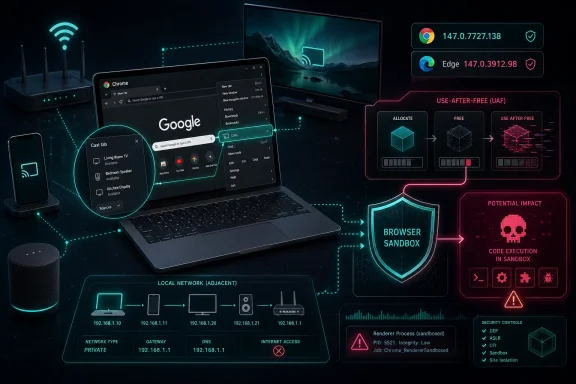
Google and Microsoft patched CVE-2026-7349 this week after Chrome’s Cast component was found vulnerable to a high-severity use-after-free flaw that could let an attacker on the same local network segment execute code inside Chrome’s sandbox through malicious network traffic. The fixed Chrome desktop build is 147.0.7727.138 on Windows and macOS, with Linux receiving 147.0.7727.137; Microsoft followed with Edge Stable 147.0.3912.98 on April 30, 2026. The bug is not the kind of browser flaw that needs a poisoned website, a fake login page, or a user clicking a link. That is why it deserves more attention than its “inside a sandbox” qualifier might suggest.
Most Chrome vulnerabilities are discussed as web bugs because the browser is still mentally filed under “things that render pages.” CVE-2026-7349 is more awkward: it sits in Cast, a subsystem designed to discover, talk to, and coordinate with nearby devices. That shifts the threat model from the internet at large to the local network, which sounds narrower until you remember how often “local” means airports, hotels, classrooms, conference centers, shared offices, guest Wi-Fi, compromised routers, unmanaged IoT gear, and flat enterprise VLANs nobody wants to admit still exist.
The official description says the flaw allowed arbitrary code execution inside a sandbox via malicious network traffic from the local network segment. That sentence is doing a lot of work. It tells us the attacker does not need credentials, does not need the victim to interact, and does not need to first convince Chrome to visit a page.
The limiting factor is adjacency. CISA’s assigned CVSS 3.1 vector uses adjacent network attack complexity high, no privileges, no user interaction, unchanged scope, and high impact across confidentiality, integrity, and availability. In plain English: exploitation is not trivial, but if an attacker can reach the same network segment and pull it off, the consequences are serious.
This is not a confirmed sandbox escape, at least not from the public description. The code execution is described as occurring inside the Chrome sandbox, which matters. But sandboxed code execution is still a meaningful beachhead, especially in a browser process with rich IPC surfaces, device discovery logic, media pathways, and a long history of chained exploitation.
Security people tend to like clean boundaries. Cast lives in the messy middle, where the browser is not merely fetching remote content over HTTPS but also listening, probing, advertising, and negotiating with devices nearby. That is not inherently reckless; it is how modern consumer and office networks work. But it does mean browser hardening has to cover more than DOM parsers, JavaScript engines, graphics pipelines, and font libraries.
A use-after-free in such a subsystem is a classic memory safety failure. One part of the program frees an object, another part later continues using it, and an attacker may be able to influence what occupies that memory slot afterward. The vulnerability class is old, but the location is what makes this case interesting: the trigger path is not necessarily a web page, but network traffic associated with Cast behavior.
That distinction matters for defenders. Web filtering, DNS controls, and user awareness training do not help much if the malicious input comes from the network beside the user. A laptop that is fully blocked from visiting phishing domains may still be exposed to a hostile peer on the same Wi-Fi if a vulnerable local-service path is reachable.
The browser has become an operating environment, and Cast is one example of why. Chrome is not just a tabbed document viewer; it is a multimedia controller, identity surface, password vault, payment front end, app runtime, and network participant. Every one of those roles brings code paths that traditional “don’t click suspicious links” advice fails to cover.
Attackers rarely ask for everything in a single bug anymore. A memory corruption bug that gives code execution in a renderer, utility, GPU, or service process can be paired with a second bug that escapes the sandbox, elevates privileges, or reaches sensitive brokered resources. The public record for Chrome and Edge over the last decade is full of chains, not miracles.
CVE-2026-7349’s public data does not say it is being exploited in the wild. It also does not say the bug provides a sandbox escape. That should keep the panic level in check. But it should not downgrade the patch priority, because Chrome’s sandbox is a boundary attackers explicitly target and repeatedly study.
The more useful framing is this: a sandboxed code execution bug is not “game over,” but it is not harmless. It may allow data exposure available to the compromised process, attacks against browser internals, process crashes, or a foothold for a second exploit. In high-value environments, that is enough to justify rapid deployment.
Google’s April 28 Chrome release was not a one-bug patch. It included 30 security fixes, with multiple critical and high-severity use-after-free issues across components including Canvas, Accessibility, Views, GPU, ANGLE, Animation, Media, WebMIDI, Cast, Codecs, WebRTC, WebView, and others. CVE-2026-7349 is part of a larger picture: the Chromium codebase is enormous, memory safety remains a stubborn source of risk, and browser updates are now a continuous security control rather than a monthly housekeeping task.
Adjacent-network vulnerabilities are easy to underrate because they do not sound internet-scale. They usually require proximity, network presence, or a compromised device on the same segment. That excludes plenty of drive-by web attacks, but it includes a long list of realistic environments where users cannot trust the network beneath them.
The enterprise version is even more uncomfortable. Many organizations still operate large broadcast domains, permissive Wi-Fi segmentation, or guest networks that are separate from the corporate LAN but not especially isolated from each other. Printers, conference room systems, TVs, casting receivers, badge systems, and unmanaged appliances often sit where convenience won over strict segmentation.
A Cast vulnerability naturally raises the question of whether casting is enabled everywhere by habit rather than need. In many organizations, Chrome and Edge are installed with default settings, while browser policies are used primarily for homepages, extensions, authentication, and update behavior. Local media routing often escapes policy review unless it breaks something or appears in an audit.
That is backwards. Device discovery features should be treated as network-facing functionality. If users do not need Cast in a managed environment, policy should reflect that. If they do need it, the network should be designed so that only appropriate devices share the relevant discovery domain.
This is one of the benefits of the Chromium ecosystem and one of its risks. A shared engine lets Microsoft, Google, Brave, Opera, Vivaldi, and others benefit from fixes discovered anywhere in the project. It also means a single class of bug can ripple across the browser fleet, and patch latency becomes the differentiator.
Microsoft’s release cadence has improved substantially since the early days of Chromium-based Edge. The company now publishes security update notes frequently, and Edge typically trails Chrome fixes by a short window rather than a full Patch Tuesday cycle. That matters because Chromium vulnerabilities do not wait politely for the second Tuesday of the month.
Administrators should still verify deployment rather than assume it. Edge auto-update works well for many consumer and small-business devices, but enterprise configurations can delay updates through management tools, maintenance windows, offline devices, VDI images, kiosk builds, and long-running sessions. The browser that claims to be up to date in inventory may not be the browser process still running on a user’s machine.
Chrome has the same practical issue. The version number on disk is not always the version currently executing in memory, especially if users keep sessions open for days. Browser relaunch compliance is now a security metric, not a cosmetic annoyance.
This is a common source of confusion in NVD data. CPE configurations can express a vulnerable application in combination with platforms on which it runs, and they are not always presented in the most human-readable way. The Chrome application CPE is the important piece; the OS CPEs describe platform applicability rather than separate OS vulnerabilities.
Could a CPE be missing? Possibly, depending on how downstream products are modeled. Chromium-based browsers other than Google Chrome may consume the same vulnerable code, but NVD entries often track the named product in the CVE description rather than every downstream application that ships derived Chromium code. Microsoft handles Edge through MSRC and its own release notes, not necessarily as an NVD CPE under the original Google Chrome entry.
That is why vulnerability management teams should not rely on one CPE field as the whole truth. For this class of issue, the practical asset question is broader: which installed browsers embed the affected Chromium code, which versions have incorporated the fix, and how quickly can the organization enforce relaunch?
The NVD page also showed no NIST CVSS score at the time of review, while CISA-ADP supplied a 7.5 high CVSS 3.1 score. That is not unusual in the early life of a CVE. NVD enrichment often lags publication, and vendor or ADP scoring may appear first.
That policy is not secrecy for secrecy’s sake. Memory corruption bugs are often easier to weaponize once a patch diff and proof path are available. The window between “patch released” and “fleet actually updated” is precisely when public exploit detail can do the most damage.
The downside is operational ambiguity. Defenders are asked to prioritize a vulnerability without a proof of concept, without packet-level indicators, and without a full exploit narrative. That is uncomfortable but familiar: browser patching has become an exercise in trusting severity signals before the evidence becomes convenient.
The better response is not to wait for exploit code. If a high-severity Chrome bug involves no privileges, no user interaction, adjacent network attack surface, and high impact, it belongs in the fast lane. The absence of public exploitation is a reason to avoid hysteria, not a reason to defer the patch.
Chrome and Edge both update aggressively by default, but enterprise reality dulls that edge. Some organizations pin versions for compatibility. Others let patch deployment tools package browsers like traditional desktop software, which can introduce days of delay. Some block auto-updaters at the firewall, then forget to maintain the replacement process.
The right operational move is boring and urgent: verify installed versions, force relaunch where necessary, and confirm that managed policies are not preventing updates. For Chrome, Windows and macOS users should be on 147.0.7727.138 or later, while Linux users should be on 147.0.7727.137 or later for this release line. For Edge Stable, Windows environments should look for 147.0.3912.98 or later.
There is also a network lesson. If Cast is not needed, disable or restrict it through browser policy. If it is needed, treat the receiving devices as part of the trusted computing environment rather than consumer gadgets sprinkled across a corporate network. A malicious or compromised local device should not have easy adjacency to every laptop in the building.
Chromium has invested heavily in fuzzing, sanitizers, control-flow protections, partitioned allocators, sandboxing, and process isolation. Those defenses matter enormously. They are why many vulnerabilities become harder to exploit, easier to catch, or less catastrophic when exploited.
But mitigations are not eradication. The April 28 Chrome release reads like a tour of memory safety’s recurring trouble spots: Canvas, GPU, ANGLE, Views, Media, WebRTC, WebView, Cast. These are precisely the browser areas where performance, hardware acceleration, multimedia, IPC, and asynchronous state collide.
The industry’s shift toward memory-safe languages will help over time, but Chromium will not be rewritten overnight. Until then, the practical defense is layered: fast updates, strict sandboxing, reduced attack surface, network segmentation, and fewer unnecessary local discovery features in managed environments.
Source: NVD / Chromium Security Update Guide - Microsoft Security Response Center
 The Browser Bug That Came From the Room, Not the Web
Most Chrome vulnerabilities are discussed as web bugs because the browser is still mentally filed under “things that render pages.” CVE-2026-7349 is more awkward: it sits in Cast, a subsystem designed to discover, talk to, and coordinate with nearby devices. That shifts the threat model from the internet at large to the local network, which sounds narrower until you remember how often “local” means airports, hotels, classrooms, conference centers, shared offices, guest Wi-Fi, compromised routers, unmanaged IoT gear, and flat enterprise VLANs nobody wants to admit still exist.The official description says the flaw allowed arbitrary code execution inside a sandbox via malicious network traffic from the local network segment. That sentence is doing a lot of work. It tells us the attacker does not need credentials, does not need the victim to interact, and does not need to first convince Chrome to visit a page.
The limiting factor is adjacency. CISA’s assigned CVSS 3.1 vector uses adjacent network attack complexity high, no privileges, no user interaction, unchanged scope, and high impact across confidentiality, integrity, and availability. In plain English: exploitation is not trivial, but if an attacker can reach the same network segment and pull it off, the consequences are serious.
This is not a confirmed sandbox escape, at least not from the public description. The code execution is described as occurring inside the Chrome sandbox, which matters. But sandboxed code execution is still a meaningful beachhead, especially in a browser process with rich IPC surfaces, device discovery logic, media pathways, and a long history of chained exploitation.
Cast Turns Convenience Into Attack Surface
The Cast feature exists to make Chrome and nearby devices feel ambient. A browser can find a display, media receiver, or speaker without the user manually typing IP addresses or configuring old-school network shares. That convenience depends on protocols and discovery behavior that are deliberately chatty on local networks.Security people tend to like clean boundaries. Cast lives in the messy middle, where the browser is not merely fetching remote content over HTTPS but also listening, probing, advertising, and negotiating with devices nearby. That is not inherently reckless; it is how modern consumer and office networks work. But it does mean browser hardening has to cover more than DOM parsers, JavaScript engines, graphics pipelines, and font libraries.
A use-after-free in such a subsystem is a classic memory safety failure. One part of the program frees an object, another part later continues using it, and an attacker may be able to influence what occupies that memory slot afterward. The vulnerability class is old, but the location is what makes this case interesting: the trigger path is not necessarily a web page, but network traffic associated with Cast behavior.
That distinction matters for defenders. Web filtering, DNS controls, and user awareness training do not help much if the malicious input comes from the network beside the user. A laptop that is fully blocked from visiting phishing domains may still be exposed to a hostile peer on the same Wi-Fi if a vulnerable local-service path is reachable.
The browser has become an operating environment, and Cast is one example of why. Chrome is not just a tabbed document viewer; it is a multimedia controller, identity surface, password vault, payment front end, app runtime, and network participant. Every one of those roles brings code paths that traditional “don’t click suspicious links” advice fails to cover.
“Inside the Sandbox” Is Not the Reassurance It Used to Be
The phrase “inside a sandbox” can make a vulnerability sound contained. For normal users, that may be partly true: Chrome’s sandbox is one of the major reasons memory corruption bugs do not automatically become full machine compromise. But for defenders, sandboxed execution is not a footnote; it is stage one.Attackers rarely ask for everything in a single bug anymore. A memory corruption bug that gives code execution in a renderer, utility, GPU, or service process can be paired with a second bug that escapes the sandbox, elevates privileges, or reaches sensitive brokered resources. The public record for Chrome and Edge over the last decade is full of chains, not miracles.
CVE-2026-7349’s public data does not say it is being exploited in the wild. It also does not say the bug provides a sandbox escape. That should keep the panic level in check. But it should not downgrade the patch priority, because Chrome’s sandbox is a boundary attackers explicitly target and repeatedly study.
The more useful framing is this: a sandboxed code execution bug is not “game over,” but it is not harmless. It may allow data exposure available to the compromised process, attacks against browser internals, process crashes, or a foothold for a second exploit. In high-value environments, that is enough to justify rapid deployment.
Google’s April 28 Chrome release was not a one-bug patch. It included 30 security fixes, with multiple critical and high-severity use-after-free issues across components including Canvas, Accessibility, Views, GPU, ANGLE, Animation, Media, WebMIDI, Cast, Codecs, WebRTC, WebView, and others. CVE-2026-7349 is part of a larger picture: the Chromium codebase is enormous, memory safety remains a stubborn source of risk, and browser updates are now a continuous security control rather than a monthly housekeeping task.
The Local Network Is Back as a Serious Browser Boundary
For years, browser security discussions centered on the hostile web. That made sense. The web is everywhere, untrusted by default, and full of attacker-controlled content. But as browsers integrated device discovery, local file handling, WebRTC, media routing, enterprise policy hooks, and richer native integrations, the local network started to matter again.Adjacent-network vulnerabilities are easy to underrate because they do not sound internet-scale. They usually require proximity, network presence, or a compromised device on the same segment. That excludes plenty of drive-by web attacks, but it includes a long list of realistic environments where users cannot trust the network beneath them.
The enterprise version is even more uncomfortable. Many organizations still operate large broadcast domains, permissive Wi-Fi segmentation, or guest networks that are separate from the corporate LAN but not especially isolated from each other. Printers, conference room systems, TVs, casting receivers, badge systems, and unmanaged appliances often sit where convenience won over strict segmentation.
A Cast vulnerability naturally raises the question of whether casting is enabled everywhere by habit rather than need. In many organizations, Chrome and Edge are installed with default settings, while browser policies are used primarily for homepages, extensions, authentication, and update behavior. Local media routing often escapes policy review unless it breaks something or appears in an audit.
That is backwards. Device discovery features should be treated as network-facing functionality. If users do not need Cast in a managed environment, policy should reflect that. If they do need it, the network should be designed so that only appropriate devices share the relevant discovery domain.
Microsoft’s Edge Patch Shows the Chromium Supply Chain at Work
For WindowsForum readers, the Microsoft angle is straightforward but important. CVE-2026-7349 is a Chromium vulnerability, which means Edge inherits the concern even when Microsoft is not the originator of the bug. Microsoft’s April 30 Edge Stable release, version 147.0.3912.98, incorporated the latest Chromium security updates.This is one of the benefits of the Chromium ecosystem and one of its risks. A shared engine lets Microsoft, Google, Brave, Opera, Vivaldi, and others benefit from fixes discovered anywhere in the project. It also means a single class of bug can ripple across the browser fleet, and patch latency becomes the differentiator.
Microsoft’s release cadence has improved substantially since the early days of Chromium-based Edge. The company now publishes security update notes frequently, and Edge typically trails Chrome fixes by a short window rather than a full Patch Tuesday cycle. That matters because Chromium vulnerabilities do not wait politely for the second Tuesday of the month.
Administrators should still verify deployment rather than assume it. Edge auto-update works well for many consumer and small-business devices, but enterprise configurations can delay updates through management tools, maintenance windows, offline devices, VDI images, kiosk builds, and long-running sessions. The browser that claims to be up to date in inventory may not be the browser process still running on a user’s machine.
Chrome has the same practical issue. The version number on disk is not always the version currently executing in memory, especially if users keep sessions open for days. Browser relaunch compliance is now a security metric, not a cosmetic annoyance.
The NVD CPE Entry Is Messy, but Not Meaningless
The user-facing question behind this CVE is whether a CPE is missing. NVD’s change history shows an initial CPE configuration listing Google Chrome versions before 147.0.7727.138 and operating-system nodes for Windows, Linux kernel, and macOS. That looks odd at first glance because the vulnerable product is Chrome, not the operating systems themselves.This is a common source of confusion in NVD data. CPE configurations can express a vulnerable application in combination with platforms on which it runs, and they are not always presented in the most human-readable way. The Chrome application CPE is the important piece; the OS CPEs describe platform applicability rather than separate OS vulnerabilities.
Could a CPE be missing? Possibly, depending on how downstream products are modeled. Chromium-based browsers other than Google Chrome may consume the same vulnerable code, but NVD entries often track the named product in the CVE description rather than every downstream application that ships derived Chromium code. Microsoft handles Edge through MSRC and its own release notes, not necessarily as an NVD CPE under the original Google Chrome entry.
That is why vulnerability management teams should not rely on one CPE field as the whole truth. For this class of issue, the practical asset question is broader: which installed browsers embed the affected Chromium code, which versions have incorporated the fix, and how quickly can the organization enforce relaunch?
The NVD page also showed no NIST CVSS score at the time of review, while CISA-ADP supplied a 7.5 high CVSS 3.1 score. That is not unusual in the early life of a CVE. NVD enrichment often lags publication, and vendor or ADP scoring may appear first.
The Public Bug Is Still Restricted, and That Is the Right Call
The Chromium issue tracker entry for CVE-2026-7349 is marked with access restrictions. That frustrates researchers, defenders, and journalists alike, but it is normal practice for Chrome security bugs. Google commonly withholds technical details until a majority of users have received the fix, and it may keep details restricted longer if the bug affects shared third-party code.That policy is not secrecy for secrecy’s sake. Memory corruption bugs are often easier to weaponize once a patch diff and proof path are available. The window between “patch released” and “fleet actually updated” is precisely when public exploit detail can do the most damage.
The downside is operational ambiguity. Defenders are asked to prioritize a vulnerability without a proof of concept, without packet-level indicators, and without a full exploit narrative. That is uncomfortable but familiar: browser patching has become an exercise in trusting severity signals before the evidence becomes convenient.
The better response is not to wait for exploit code. If a high-severity Chrome bug involves no privileges, no user interaction, adjacent network attack surface, and high impact, it belongs in the fast lane. The absence of public exploitation is a reason to avoid hysteria, not a reason to defer the patch.
Patch Management Has to Reach the Lounge, the Lab, and the Kiosk
The most exposed machines may not be the obvious office workstations. Think about devices that join many networks, sit in shared spaces, or remain logged in for long sessions. Executive laptops, developer machines, help-desk jump boxes, training-room PCs, conference-room systems, digital signage controllers, and kiosks are all worth a second look.Chrome and Edge both update aggressively by default, but enterprise reality dulls that edge. Some organizations pin versions for compatibility. Others let patch deployment tools package browsers like traditional desktop software, which can introduce days of delay. Some block auto-updaters at the firewall, then forget to maintain the replacement process.
The right operational move is boring and urgent: verify installed versions, force relaunch where necessary, and confirm that managed policies are not preventing updates. For Chrome, Windows and macOS users should be on 147.0.7727.138 or later, while Linux users should be on 147.0.7727.137 or later for this release line. For Edge Stable, Windows environments should look for 147.0.3912.98 or later.
There is also a network lesson. If Cast is not needed, disable or restrict it through browser policy. If it is needed, treat the receiving devices as part of the trusted computing environment rather than consumer gadgets sprinkled across a corporate network. A malicious or compromised local device should not have easy adjacency to every laptop in the building.
Memory Safety Remains Chromium’s Unfinished Migration
The larger story is not that Google missed another bug. It is that modern browsers are still enormous C++ systems carrying decades of memory-management risk into a world where they mediate identity, finance, communications, and local device control. Use-after-free vulnerabilities remain stubbornly common because they arise from object lifetime complexity, asynchronous event handling, and code paths that were never simple to reason about.Chromium has invested heavily in fuzzing, sanitizers, control-flow protections, partitioned allocators, sandboxing, and process isolation. Those defenses matter enormously. They are why many vulnerabilities become harder to exploit, easier to catch, or less catastrophic when exploited.
But mitigations are not eradication. The April 28 Chrome release reads like a tour of memory safety’s recurring trouble spots: Canvas, GPU, ANGLE, Views, Media, WebRTC, WebView, Cast. These are precisely the browser areas where performance, hardware acceleration, multimedia, IPC, and asynchronous state collide.
The industry’s shift toward memory-safe languages will help over time, but Chromium will not be rewritten overnight. Until then, the practical defense is layered: fast updates, strict sandboxing, reduced attack surface, network segmentation, and fewer unnecessary local discovery features in managed environments.
The Patch Is Small; the Inventory Lesson Is Not
For home users, this is mostly a reminder to let Chrome or Edge update and relaunch the browser promptly. For IT teams, it is a reminder that browser security now crosses application management, endpoint management, network design, and policy enforcement.- Chrome desktop should be updated to 147.0.7727.138 on Windows and macOS, or 147.0.7727.137 on Linux, to cover the April 28 security release that includes CVE-2026-7349.
- Microsoft Edge Stable should be updated to 147.0.3912.98 or later, because Microsoft’s April 30 release incorporated the latest Chromium security updates.
- The vulnerability is adjacent-network rather than internet-remote, but shared Wi-Fi, flat VLANs, conference networks, and compromised local devices make that boundary less reassuring than it sounds.
- Public information does not currently establish in-the-wild exploitation or a sandbox escape, so the correct response is urgency without alarmism.
- Organizations that do not need Cast should review browser policies and network segmentation instead of treating local discovery features as harmless defaults.
- Vulnerability scanners may lag or model the issue differently across Chrome, Edge, and other Chromium-based browsers, so version verification is more reliable than waiting for perfect CPE coverage.
Source: NVD / Chromium Security Update Guide - Microsoft Security Response Center
