

CVE-2026-7351 is a high-severity Chromium vulnerability disclosed on April 28, 2026, affecting Google Chrome before 147.0.7727.138, where a race condition in MHTML could let a malicious Chrome extension leak cross-origin data after persuading a user to install it. The plain-English version is less cinematic than a drive-by zero-day, but more relevant to how browsers are actually attacked in 2026. This is a bug about trust boundaries: between origins, between extensions and pages, and between users and the add-ons they have been trained to install casually. For Windows admins, the uncomfortable lesson is that browser patching and extension governance are now the same security conversation.
The oddity in CVE-2026-7351 is visible immediately: Chromium labels the issue High, while CISA’s ADP CVSS 3.1 vector lands at 3.1, or Low. That is not necessarily a contradiction. It is a reminder that CVSS is a scoring model, not a newsroom headline, and it often discounts bugs that require user interaction or a specific setup.
Here, the setup matters. The attacker must convince a user to install a malicious extension, and the resulting impact is described as limited confidentiality loss rather than code execution, persistence, or full device compromise. That makes the bug less urgent than a renderer escape or a V8 zero-day being exploited in the wild.
But “less urgent” is not “uninteresting.” Cross-origin data leakage is exactly the kind of browser failure that sounds modest until it intersects with authenticated SaaS, webmail, internal portals, admin consoles, or identity dashboards. Modern work happens inside tabs, and the browser’s same-origin model is the wall that keeps one tab’s secrets from becoming another tab’s loot.
The better way to read CVE-2026-7351 is as a constrained but meaningful breach of compartmentalization. It does not hand an attacker the machine. It potentially hands them information the browser was supposed to keep separated.
That is part of the security problem. Browsers are not just JavaScript engines and HTML parsers; they are museums of web compatibility, enterprise workflows, document handling, old formats, new APIs, and platform glue. Attackers do not need the most glamorous subsystem. They need the one where assumptions no longer line up cleanly.
A race condition in this context means timing matters. Two operations touch shared state, or rely on a sequence of events, and the browser can be pushed into an unsafe outcome if the attacker can influence the order. Race bugs are especially irritating because the vulnerable code path may look reasonable during ordinary testing and still fail under carefully arranged timing.
That is why a bug in MHTML can matter even if most users never intentionally save or open MHTML files. Browser internals are connected. A feature that looks peripheral can still touch origin handling, resource loading, navigation, serialization, or extension-accessible behavior.
Extensions sit in a privileged social and technical position. Users install them to block ads, manage passwords, clip pages, translate text, prettify dashboards, automate workflows, monitor prices, enhance meetings, summarize documents, and increasingly to bolt AI features onto every surface of the web. In return, extensions may request permissions that would look outrageous if a native application asked for them in plainer language.
The malicious-extension angle turns CVE-2026-7351 from a pure browser-engine story into a policy story. If an organization allows users to install arbitrary extensions, then it has effectively delegated a portion of its browser security model to marketplace review, user judgment, and hope. That was never a robust control plane.
For consumer users, the advice is familiar but still necessary: fewer extensions are safer than many, and known publishers are safer than lookalikes. For enterprises, the correct answer is not awareness training alone. It is allowlisting, forced installation of approved extensions, blocking unapproved extension sources, reviewing permissions, and treating browser configuration as endpoint security rather than user preference.
That context matters because browser patch management is no longer a monthly ritual. Chromium releases are a running stream of fixes, and the stable channel is the point where engineering debt, exploit research, fuzzing output, internal audits, and external reports all meet the installed base. Administrators who wait for tidy Patch Tuesday bundling are already behind the tempo of browser risk.
Chrome’s staged rollout language is also important. Updates may roll out over days or weeks, which is sensible for stability but awkward for security operations. If your organization depends only on passive auto-update behavior, the theoretical fix date and the actual fleet remediation date can differ substantially.
The version boundary is therefore the operational fact to care about. Chrome before 147.0.7727.138 is the affected line described for this CVE, and Windows endpoints should be checked accordingly. “Chrome is set to auto-update” is not the same as “Chrome has updated, restarted, and is now running the fixed build.”
This is one of the quiet consequences of Chromium’s dominance. Organizations gained a more consistent web platform across Chrome and Edge, but they also inherited a shared vulnerability cadence. A bug in a Chromium component is not automatically exploitable in every downstream browser in the same way, but it cannot be dismissed simply because the browser icon is blue rather than multicolored.
Edge’s enterprise tooling helps, but it does not remove the need for verification. Group Policy, Intune, WSUS-adjacent reporting, Defender telemetry, and browser management all need to answer a simple question: what version is actually running today? If the answer comes from inventory that updates once a week, the answer is stale for browser security.
There is also a cultural issue. Many Windows shops treat Edge as part of the operating system and Chrome as an application. Attackers do not care about that distinction. If a browser can load extensions, access authenticated sessions, and render sensitive internal applications, it belongs in the same risk tier.
A user’s browser is often signed into Microsoft 365, Google Workspace, GitHub, Jira, ServiceNow, Salesforce, Slack, internal dashboards, password vault extensions, identity portals, financial systems, and HR platforms. The old distinction between “local machine compromise” and “web compromise” has blurred because the browser is where business identity lives.
That is why cross-origin boundaries matter so much. Same-origin policy is one of the web’s load-bearing beams. It lets users be logged into a bank in one tab, read webmail in another, and browse an arbitrary site in a third without every page being able to inspect every other page’s content.
Extensions complicate this model because they can be granted permissions that ordinary pages do not have. A malicious extension is already a problem; a browser vulnerability that helps it cross boundaries it should not cross makes that problem sharper. CVE-2026-7351 sits in that seam.
This is not because users are uniquely careless. It is because the browser has normalized powerful add-ons while presenting permissions in terms that are simultaneously too broad for comfort and too abstract for judgment. “Read and change data on websites” can mean a legitimate accessibility tool, a password manager, a page clipper, a meeting assistant, or a surveillance implant.
The marketplace-review model has improved over the years, but it cannot be the only defense. Malicious extensions can impersonate popular tools, change behavior after updates, abuse legitimate permissions, or exploit the gap between what users think an extension does and what it is technically allowed to do. Even benign extensions can become risky after acquisition or compromise.
Enterprises should stop treating extension sprawl as a browser customization issue. It is third-party code execution inside the most sensitive application on the endpoint. If that sentence sounds severe, it is because the architecture is severe.
The deeper response is to align browser management with the rest of endpoint management. If an organization would not let users install arbitrary kernel drivers, remote-access tools, or unsigned desktop utilities, it should be uneasy about allowing arbitrary browser extensions that can observe web activity. The browser may be sandboxed, but the user’s authenticated work is not abstract.
Allowlisting is the strongest posture for managed environments. That does not mean freezing productivity or banning every useful tool. It means approved extensions should have a business owner, a publisher review, permission review, update monitoring, and a defined process for removal.
For smaller shops, the first step is visibility. Export extension inventories, identify high-permission add-ons, remove duplicates, look for abandoned publishers, and decide which extensions are genuinely needed. The second step is enforcement. Without enforcement, the inventory becomes a snapshot of yesterday’s risk.
A low CVSS score can reflect real constraints. User interaction matters. Attack complexity matters. Limited confidentiality impact matters. But CVSS does not know whether the affected browser profile belongs to a helpdesk technician, a domain admin, a finance executive, a developer with production credentials, or a contractor with access to a sensitive customer tenant.
That is the context Windows admins must add back into the model. A browser vulnerability involving malicious extensions is lower risk on a locked-down kiosk than on a developer workstation where users freely install tools and authenticate to cloud consoles. The CVE is the same; the blast radius is not.
Risk scoring should therefore be local. Ask whether users can install extensions, whether extension sources are restricted, whether browsers are updated automatically and restarted promptly, whether sensitive web apps are accessible from unmanaged profiles, and whether browser telemetry is visible to the security team. Those answers matter more than the difference between 3.1 and High.
The harder part is extension hygiene. Remove anything you do not use. Be especially suspicious of extensions that demand access to all sites, promise trendy AI features without a reputable publisher, or duplicate capabilities already built into the browser. If an extension’s value is occasional but its permission footprint is constant, that is a poor trade.
On managed Windows fleets, admins should pair browser version compliance with extension policy compliance. A fully patched browser with a swamp of unreviewed extensions is better than an unpatched browser, but it is not a mature posture. The goal is to reduce both exploitable code paths and attacker-supplied code sitting inside the browser.
This is also a good moment to revisit restart behavior. Browsers frequently download updates before users actually relaunch into the fixed build. A laptop that sleeps for weeks with 90 tabs open may look “updated” in inventory while still running the old process. Security policy needs to account for that human reality.
Source: NVD / Chromium Security Update Guide - Microsoft Security Response Center
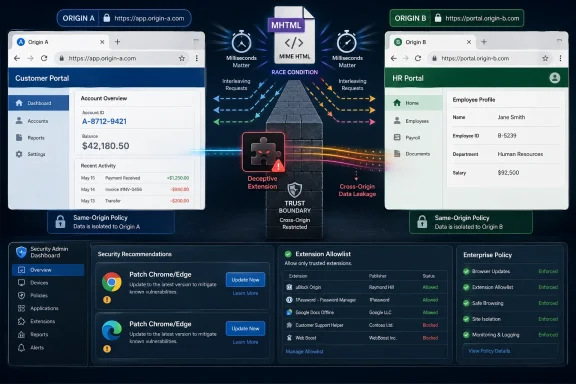 A “Low” Score Hides a High-Value Browser Boundary
The oddity in CVE-2026-7351 is visible immediately: Chromium labels the issue High, while CISA’s ADP CVSS 3.1 vector lands at 3.1, or Low. That is not necessarily a contradiction. It is a reminder that CVSS is a scoring model, not a newsroom headline, and it often discounts bugs that require user interaction or a specific setup.Here, the setup matters. The attacker must convince a user to install a malicious extension, and the resulting impact is described as limited confidentiality loss rather than code execution, persistence, or full device compromise. That makes the bug less urgent than a renderer escape or a V8 zero-day being exploited in the wild.
But “less urgent” is not “uninteresting.” Cross-origin data leakage is exactly the kind of browser failure that sounds modest until it intersects with authenticated SaaS, webmail, internal portals, admin consoles, or identity dashboards. Modern work happens inside tabs, and the browser’s same-origin model is the wall that keeps one tab’s secrets from becoming another tab’s loot.
The better way to read CVE-2026-7351 is as a constrained but meaningful breach of compartmentalization. It does not hand an attacker the machine. It potentially hands them information the browser was supposed to keep separated.
MHTML Is the Legacy Format That Keeps Finding Modern Relevance
MHTML, or MIME HTML, is a web archive format. It packages a web page and its associated resources into a single file-like representation. For many users it is obscure; for browser engineers it is one of those compatibility surfaces that cannot be treated as dead merely because it no longer feels fashionable.That is part of the security problem. Browsers are not just JavaScript engines and HTML parsers; they are museums of web compatibility, enterprise workflows, document handling, old formats, new APIs, and platform glue. Attackers do not need the most glamorous subsystem. They need the one where assumptions no longer line up cleanly.
A race condition in this context means timing matters. Two operations touch shared state, or rely on a sequence of events, and the browser can be pushed into an unsafe outcome if the attacker can influence the order. Race bugs are especially irritating because the vulnerable code path may look reasonable during ordinary testing and still fail under carefully arranged timing.
That is why a bug in MHTML can matter even if most users never intentionally save or open MHTML files. Browser internals are connected. A feature that looks peripheral can still touch origin handling, resource loading, navigation, serialization, or extension-accessible behavior.
The Extension Requirement Is a Guardrail, Not a Comfort Blanket
The most important limitation in the CVE description is also the most important warning: the attacker needs the user to install a malicious Chrome extension. That requirement narrows the exploit path. It also maps perfectly onto one of the browser ecosystem’s most persistent weak points.Extensions sit in a privileged social and technical position. Users install them to block ads, manage passwords, clip pages, translate text, prettify dashboards, automate workflows, monitor prices, enhance meetings, summarize documents, and increasingly to bolt AI features onto every surface of the web. In return, extensions may request permissions that would look outrageous if a native application asked for them in plainer language.
The malicious-extension angle turns CVE-2026-7351 from a pure browser-engine story into a policy story. If an organization allows users to install arbitrary extensions, then it has effectively delegated a portion of its browser security model to marketplace review, user judgment, and hope. That was never a robust control plane.
For consumer users, the advice is familiar but still necessary: fewer extensions are safer than many, and known publishers are safer than lookalikes. For enterprises, the correct answer is not awareness training alone. It is allowlisting, forced installation of approved extensions, blocking unapproved extension sources, reviewing permissions, and treating browser configuration as endpoint security rather than user preference.
Chrome’s April 28 Patch Was Bigger Than One CVE
Google’s April 28 desktop stable update moved Chrome to 147.0.7727.137/138 on Windows and macOS and 147.0.7727.137 on Linux. The update included 30 security fixes, with multiple Critical and High entries across Canvas, iOS, Accessibility, Views, GPU, Compositing, ANGLE, Navigation, Skia, Media, WebMIDI, Cast, Codecs, WebRTC, V8, WebView, and other components. CVE-2026-7351 was one High-severity item in a crowded patch train.That context matters because browser patch management is no longer a monthly ritual. Chromium releases are a running stream of fixes, and the stable channel is the point where engineering debt, exploit research, fuzzing output, internal audits, and external reports all meet the installed base. Administrators who wait for tidy Patch Tuesday bundling are already behind the tempo of browser risk.
Chrome’s staged rollout language is also important. Updates may roll out over days or weeks, which is sensible for stability but awkward for security operations. If your organization depends only on passive auto-update behavior, the theoretical fix date and the actual fleet remediation date can differ substantially.
The version boundary is therefore the operational fact to care about. Chrome before 147.0.7727.138 is the affected line described for this CVE, and Windows endpoints should be checked accordingly. “Chrome is set to auto-update” is not the same as “Chrome has updated, restarted, and is now running the fixed build.”
Edge Inherits the Chromium Clock
For WindowsForum readers, the Chrome number is only half the story. Microsoft Edge is Chromium-based, and Microsoft’s security release notes show Edge Stable version 147.0.3912.98 released on April 30, 2026, incorporating the latest Chromium security updates. That places Edge into the same operational rhythm: even when the CVE is branded as Chrome or Chromium, Microsoft’s browser fleet must be watched with equal urgency.This is one of the quiet consequences of Chromium’s dominance. Organizations gained a more consistent web platform across Chrome and Edge, but they also inherited a shared vulnerability cadence. A bug in a Chromium component is not automatically exploitable in every downstream browser in the same way, but it cannot be dismissed simply because the browser icon is blue rather than multicolored.
Edge’s enterprise tooling helps, but it does not remove the need for verification. Group Policy, Intune, WSUS-adjacent reporting, Defender telemetry, and browser management all need to answer a simple question: what version is actually running today? If the answer comes from inventory that updates once a week, the answer is stale for browser security.
There is also a cultural issue. Many Windows shops treat Edge as part of the operating system and Chrome as an application. Attackers do not care about that distinction. If a browser can load extensions, access authenticated sessions, and render sensitive internal applications, it belongs in the same risk tier.
The Real Attack Surface Is the Signed-In Browser
The most damaging browser bugs are not always those with the highest theatrical value. Remote code execution is dramatic because it turns a page into a foothold. Data leakage can be quieter, but in the SaaS era it can still be valuable.A user’s browser is often signed into Microsoft 365, Google Workspace, GitHub, Jira, ServiceNow, Salesforce, Slack, internal dashboards, password vault extensions, identity portals, financial systems, and HR platforms. The old distinction between “local machine compromise” and “web compromise” has blurred because the browser is where business identity lives.
That is why cross-origin boundaries matter so much. Same-origin policy is one of the web’s load-bearing beams. It lets users be logged into a bank in one tab, read webmail in another, and browse an arbitrary site in a third without every page being able to inspect every other page’s content.
Extensions complicate this model because they can be granted permissions that ordinary pages do not have. A malicious extension is already a problem; a browser vulnerability that helps it cross boundaries it should not cross makes that problem sharper. CVE-2026-7351 sits in that seam.
Permission Prompts Have Become Security Theater
The browser extension permission model depends on users and administrators understanding what an extension asks to do. In practice, permission prompts are often reduced to ritual consent. Users want the thing to work; the prompt is the tollgate they click through.This is not because users are uniquely careless. It is because the browser has normalized powerful add-ons while presenting permissions in terms that are simultaneously too broad for comfort and too abstract for judgment. “Read and change data on websites” can mean a legitimate accessibility tool, a password manager, a page clipper, a meeting assistant, or a surveillance implant.
The marketplace-review model has improved over the years, but it cannot be the only defense. Malicious extensions can impersonate popular tools, change behavior after updates, abuse legitimate permissions, or exploit the gap between what users think an extension does and what it is technically allowed to do. Even benign extensions can become risky after acquisition or compromise.
Enterprises should stop treating extension sprawl as a browser customization issue. It is third-party code execution inside the most sensitive application on the endpoint. If that sentence sounds severe, it is because the architecture is severe.
Windows Admins Need Browser Controls That Look Like App Control
The practical response to CVE-2026-7351 is not panic. It is discipline. Patch Chrome and Edge promptly, confirm the running versions, and audit extensions with more skepticism than most organizations currently apply.The deeper response is to align browser management with the rest of endpoint management. If an organization would not let users install arbitrary kernel drivers, remote-access tools, or unsigned desktop utilities, it should be uneasy about allowing arbitrary browser extensions that can observe web activity. The browser may be sandboxed, but the user’s authenticated work is not abstract.
Allowlisting is the strongest posture for managed environments. That does not mean freezing productivity or banning every useful tool. It means approved extensions should have a business owner, a publisher review, permission review, update monitoring, and a defined process for removal.
For smaller shops, the first step is visibility. Export extension inventories, identify high-permission add-ons, remove duplicates, look for abandoned publishers, and decide which extensions are genuinely needed. The second step is enforcement. Without enforcement, the inventory becomes a snapshot of yesterday’s risk.
The CVSS Debate Misses the Browser Reality
It is tempting to get stuck on the scoring mismatch: Chromium High, CISA ADP Low, NVD still without its own enriched score at the time of publication. Security teams love numerical ordering because queues need sorting. The problem is that browsers punish overreliance on neat arithmetic.A low CVSS score can reflect real constraints. User interaction matters. Attack complexity matters. Limited confidentiality impact matters. But CVSS does not know whether the affected browser profile belongs to a helpdesk technician, a domain admin, a finance executive, a developer with production credentials, or a contractor with access to a sensitive customer tenant.
That is the context Windows admins must add back into the model. A browser vulnerability involving malicious extensions is lower risk on a locked-down kiosk than on a developer workstation where users freely install tools and authenticate to cloud consoles. The CVE is the same; the blast radius is not.
Risk scoring should therefore be local. Ask whether users can install extensions, whether extension sources are restricted, whether browsers are updated automatically and restarted promptly, whether sensitive web apps are accessible from unmanaged profiles, and whether browser telemetry is visible to the security team. Those answers matter more than the difference between 3.1 and High.
The Patch Is Simple; The Habit Is Not
For individual Windows users, the immediate action is straightforward: update Chrome, restart it, and check that the version is at or beyond the fixed line. Edge users should likewise ensure they are on the latest Stable build, with Microsoft’s April 30 release carrying current Chromium security updates. Other Chromium-based browsers should be checked against their vendors’ release channels, not assumed safe by association.The harder part is extension hygiene. Remove anything you do not use. Be especially suspicious of extensions that demand access to all sites, promise trendy AI features without a reputable publisher, or duplicate capabilities already built into the browser. If an extension’s value is occasional but its permission footprint is constant, that is a poor trade.
On managed Windows fleets, admins should pair browser version compliance with extension policy compliance. A fully patched browser with a swamp of unreviewed extensions is better than an unpatched browser, but it is not a mature posture. The goal is to reduce both exploitable code paths and attacker-supplied code sitting inside the browser.
This is also a good moment to revisit restart behavior. Browsers frequently download updates before users actually relaunch into the fixed build. A laptop that sleeps for weeks with 90 tabs open may look “updated” in inventory while still running the old process. Security policy needs to account for that human reality.
The MHTML Bug Leaves a Short Checklist and a Longer Warning
CVE-2026-7351 is not the kind of vulnerability that should send every helpdesk into emergency mode by itself. It is, however, exactly the kind of browser flaw that exposes weak operational habits around update verification and extension control.- Chrome on Windows should be updated to 147.0.7727.138 or later to clear the affected version boundary described for CVE-2026-7351.
- Microsoft Edge Stable should be brought current, with version 147.0.3912.98 released on April 30, 2026, incorporating the latest Chromium security updates.
- Extension inventories should be reviewed for broad site-access permissions, abandoned publishers, duplicate tools, and add-ons installed for one-off tasks.
- Managed environments should prefer extension allowlists over user-choice models, especially on systems that access sensitive SaaS or administrative portals.
- Browser update reporting should verify the running version after restart, not merely that an update was offered or downloaded.
- CVSS should guide triage, but local exposure should decide urgency when browser profiles carry privileged sessions.
Source: NVD / Chromium Security Update Guide - Microsoft Security Response Center
