

Google and Microsoft documented CVE-2026-7906 on May 6, 2026, as a high-severity use-after-free flaw in Chromium’s SVG handling that affects Google Chrome before 148.0.7778.96 and can let a remote attacker run code inside the browser sandbox via crafted HTML. That phrasing sounds narrow, almost bureaucratic, but it describes the modern browser risk model in miniature. A single rendering bug in a mature web platform component becomes a cross-platform patch race for Chrome, Edge, embedded Chromium runtimes, and every enterprise image that assumes the browser is “just another app.” CVE-2026-7906 is not the week’s loudest vulnerability, but it is exactly the kind of flaw that keeps browser security teams employed and endpoint administrators honest.
SVG is one of those technologies that disappears into the wallpaper of the web. It draws icons, logos, charts, buttons, loading spinners, diagrams, and decorative flourishes that users never consciously identify as code. Yet SVG is not a dumb image format in the way a JPEG is a dumb image format. It is XML-based, script-aware, style-aware, animation-capable, DOM-integrated, and deeply intertwined with the same rendering machinery that turns modern pages into applications.
That is why a use-after-free vulnerability in SVG deserves more attention than its short description suggests. The phrase use after free is a memory-safety diagnosis: software releases a chunk of memory and later continues to use it as if it were still valid. In a browser renderer, that can become a path from a malicious page to controlled memory corruption, and from there to code execution within the sandboxed process.
The sandbox matters, but it is not a magic eraser. Chrome’s disclosure says this vulnerability allowed arbitrary code execution inside a sandbox, which is better than a full host compromise and worse than a harmless crash. Attackers often chain browser bugs: one flaw gets code running in the renderer, another escapes the sandbox, and a third digs into persistence or credential theft. A high-severity SVG flaw is therefore not “just” an SVG flaw; it is a potential first stage.
For Windows users, the story widens immediately because Chromium is not synonymous with Google Chrome. Microsoft Edge incorporates Chromium security updates, and Microsoft’s security release notes for May 7, 2026 list Edge Stable 148.0.3967.54 as incorporating the latest Chromium project security updates, along with separate Edge-specific fixes. That makes CVE-2026-7906 part of the shared browser substrate on Windows, not merely a Google product advisory.
The later CVE records fill in the missing security picture. CVE-2026-7906 was published by NVD on May 6, with Chrome listed as the source. CISA’s ADP scoring assigned the vulnerability a CVSS 3.1 score of 8.8, high severity, with network attack vector, low complexity, no privileges required, and user interaction required. In plain English: a user needs to load or be lured to malicious content, but the attacker does not need an account or local access.
That “user interaction required” field is sometimes misunderstood. It does not necessarily mean a user has to approve a scary prompt or run an executable. In browser vulnerability language, visiting a crafted page can be enough. The click may be in an email, a Teams message, a compromised ad slot, a poisoned search result, or a legitimate site that has been modified by an attacker.
There is no public indication in the provided advisories that CVE-2026-7906 is being exploited in the wild. That is important. The absence of known exploitation should reduce panic, not urgency. Browser bugs become more dangerous after patch release because the patch itself, the issue tracker metadata, and nearby changes can help skilled attackers understand what changed, even when bug details remain restricted.
The same flexibility that makes SVG valuable also makes it difficult to harden. Browser engines have to preserve web compatibility across millions of sites, including old enterprise portals, design systems, content management platforms, and JavaScript frameworks that rely on edge-case rendering behavior. Removing or simplifying features sounds attractive until a major site breaks or an internal corporate dashboard goes blank.
Use-after-free bugs tend to thrive in precisely this environment. Rendering engines constantly create, destroy, mutate, and reparent objects as pages load, scripts run, animations fire, styles recalculate, and frames are painted. If one object’s lifetime is misjudged by even a narrow sequence of operations, a malicious page can sometimes turn a subtle correctness bug into a security primitive.
The industry has spent years trying to reduce this class of flaw through fuzzing, code review, safer allocators, sandboxing, and increasingly through memory-safe languages. The persistence of UAF bugs in major browsers does not mean those efforts failed. It means the attack surface remains extraordinarily large and compatibility remains a tax that every browser vendor pays.
But the browser sandbox is not where defenders want attackers to be. Code execution in a renderer can still expose data reachable by that renderer, interfere with page behavior, attack browser interfaces, and serve as a beachhead for additional exploits. If the attacker has another bug available, especially a sandbox escape or a logic flaw in privileged browser services, the renderer compromise becomes step one in a larger chain.
This is why severity language can feel deceptively conservative. “High” is not “critical,” and “inside a sandbox” is not “full system compromise.” Yet in the economics of exploitation, a reliable renderer code execution bug is valuable. It can be paired, refined, weaponized, or held in reserve while defenders debate whether a browser restart is disruptive enough to wait until the weekend.
For enterprise IT, the right interpretation is neither alarmism nor complacency. CVE-2026-7906 should not trigger the same response as a confirmed zero-day with active exploitation and a public proof of concept. It should trigger the mature browser patch process organizations claim to have: inventory, staged rollout, validation, telemetry, and follow-up for machines that missed the update.
Microsoft’s May 7 Edge Stable release, version 148.0.3967.54, says it incorporates the latest Chromium security updates. That does not mean Edge uses the same version number as Chrome; it does not. Chrome’s fixed version for this CVE is described as 148.0.7778.96 or later, while Edge has its own versioning. The operational point is simpler: Edge must be brought to the relevant Microsoft-fixed build, not checked against Google’s exact Chrome number.
This distinction trips up vulnerability management dashboards more often than it should. A scanner may key off a CVE and a Chromium upstream version, while an administrator sees a different Edge version string and assumes the tool is wrong. Sometimes it is. Sometimes the endpoint is genuinely behind. The only safe path is to map the installed browser to the vendor’s own fixed release line.
Windows environments also have more Chromium than they remember. Chrome and Edge are obvious, but Chromium components appear in Electron apps, WebView2-based applications, embedded browsers, remote support tools, monitoring consoles, and third-party software that ships its own browser runtime. CVE-2026-7906 is formally about Google Chrome prior to 148.0.7778.96, but the broader lesson is that a Chromium bug can illuminate unpatched browser code hiding outside the browser icon.
CPEs are an attempt to describe affected products in a normalized way. In practice, they can lag, overgeneralize, underdescribe platform nuance, or fail to capture derivative software. A Chrome CPE tied to major desktop operating systems tells scanners where the vulnerable application is expected to run, but it does not automatically answer every question an administrator has about Edge, Chromium forks, Chromium Embedded Framework, or app-bundled runtimes.
For CVE-2026-7906, the missing-CPE question depends on what you are trying to prove. If the question is whether Google Chrome before 148.0.7778.96 is covered, the NVD entry does that. If the question is whether every Chromium-based product in your environment is represented by a neat CPE, the answer is almost certainly no. If the question is whether Microsoft Edge should be tracked through MSRC and Microsoft’s Edge release notes rather than inferred solely from Chrome CPEs, the answer is yes.
This is where security operations becomes less glamorous and more important. The CVE record gives the vulnerability a name. The vendor advisory gives the fixed release. Your inventory determines whether the risk is real on your endpoints. Confusing those three things is how organizations end up with both false reassurance and noisy dashboards.
Managed environments should not rely on passive auto-update alone for high-severity browser flaws. Chrome and Edge auto-update mechanisms are good, but they are not omnipotent. Laptops sleep. Browsers remain open for weeks. Users postpone restarts. VDI images lag. Firewall rules break update services. Golden images get refreshed monthly while browser bugs move weekly.
The practical target should be verification, not faith. Administrators need to know which endpoints have Chrome at 148.0.7778.96 or later, which have Edge at Microsoft’s May 7 fixed stable release or later, and which machines are stuck. That last group matters most. A 95 percent patch rate sounds excellent until the remaining 5 percent includes kiosks, executives, developers, jump boxes, or shared machines in exposed workflows.
There is also a communication problem. Browser updates often require a restart of the browser, not the whole operating system, but users experience both as interruption. The more tabs and cloud apps people keep open, the more they treat browser restart prompts as productivity attacks. Security teams have to make the restart feel routine and inevitable, not optional and nagging.
Browser vulnerabilities are probabilistic in a way many server vulnerabilities are not. A vulnerable server sitting on the internet is a fixed target. A browser vulnerability depends on users encountering malicious content, attackers choosing to weaponize the bug, exploit reliability, sandbox boundaries, and the availability of a chain. That makes browser risk harder to explain to executives who want binary answers.
The temptation is to rank browser CVEs mechanically: critical before high, exploited before unexploited, public proof of concept before restricted bug. Those distinctions matter, but they can produce bad instincts. A high-severity renderer bug in a globally deployed browser may deserve faster action than a critical flaw in a niche component no one runs. Exposure is not just severity; it is reach.
CVE-2026-7906 lands in the category of vulnerabilities that should move quickly through a healthy patch pipeline without causing a crisis meeting. If that sounds boring, good. The goal of browser security operations is to make high-severity browser updates boring. The danger comes when “boring” becomes “ignored.”
The lack of public technical detail should not be mistaken for lack of substance. Chrome’s security process routinely withholds exploit specifics until enough users have received patches. The CVE description, affected version, weakness class, component, and severity are the actionable pieces for most defenders. Reverse engineers will eventually learn more; enterprises do not need to wait for them.
This is another place where the browser ecosystem differs from traditional enterprise software. A database vendor might publish a detailed advisory with mitigations, affected configurations, and compensating controls. A browser vendor often publishes a terse note because the realistic mitigation is almost always the same: update the browser. There are hardening measures that reduce risk, but they rarely substitute for the patch.
That bluntness can be annoying, especially for organizations with change-control rituals built around detailed risk acceptance. But the web does not respect quarterly review boards. If a crafted HTML page can reach the vulnerable code path, the patch is the control.
That does not mean every embedded runtime is automatically vulnerable to CVE-2026-7906. The affected code path, build configuration, exposure model, and version all matter. An embedded renderer that never loads untrusted remote content is a different risk from one that displays arbitrary web pages or HTML email-like content. But defenders cannot make that distinction without inventory.
The CPE system will not solve this for you. Vendor advisories may be late or nonexistent. Application owners may not know what runtime their software uses. Procurement records rarely say “ships Chromium 146 with SVG enabled.” This is why software asset management and vulnerability management keep converging into the same discipline, whether organizations like it or not.
For Windows shops, WebView2 adds a more manageable version of this problem. Because WebView2 can use a shared runtime serviced by Microsoft, many applications benefit from centralized updates rather than shipping stale browser engines forever. But “many” is not “all,” and older embedded frameworks remain common enough that every major Chromium security release should prompt at least a quick look at the application inventory.
This is a solvable problem, but it requires treating browser state as operational telemetry. Management tooling should report installed version, running version where available, pending relaunch status, update channel, and devices that have not checked in. Security teams should know whether policies are forcing relaunch after a grace period and whether exceptions exist for sensitive workflows.
There is a cultural element too. Users have been trained to keep browsers alive indefinitely because the browser is now the desktop. Tabs are tasks, identities, drafts, dashboards, and reminders. A forced browser relaunch can feel like someone sweeping papers off a desk. That makes graceful restore, clear prompts, and predictable maintenance windows part of the security control.
The organizations that handle CVE-2026-7906 well will not be the ones with the most dramatic alerts. They will be the ones that quietly move browsers forward, confirm relaunches, and identify the weird machines that did not follow the herd. Browser patching is less about heroics than hygiene.
CVE-2026-7906 will probably not be remembered as a landmark vulnerability, and that is precisely why it is worth taking seriously. The modern web is defended less by spectacular one-off responses than by thousands of ordinary, time-sensitive updates that close small cracks before they become chains. The organizations that win this round will not be the ones that panic over SVG; they will be the ones that understand the browser is now a core operating environment and patch it with the discipline once reserved for the operating system itself.
Source: NVD / Chromium Security Update Guide - Microsoft Security Response Center
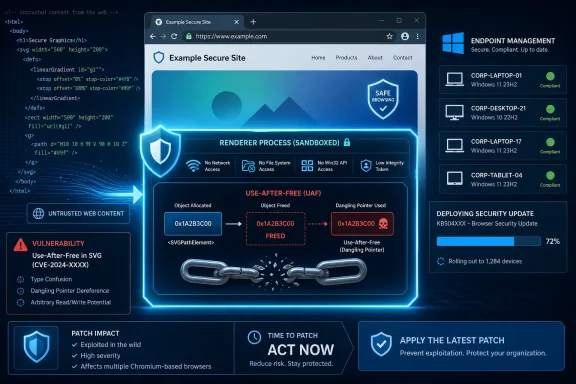 The Browser Bug That Looks Small Until It Touches Everything
SVG is one of those technologies that disappears into the wallpaper of the web. It draws icons, logos, charts, buttons, loading spinners, diagrams, and decorative flourishes that users never consciously identify as code. Yet SVG is not a dumb image format in the way a JPEG is a dumb image format. It is XML-based, script-aware, style-aware, animation-capable, DOM-integrated, and deeply intertwined with the same rendering machinery that turns modern pages into applications.That is why a use-after-free vulnerability in SVG deserves more attention than its short description suggests. The phrase use after free is a memory-safety diagnosis: software releases a chunk of memory and later continues to use it as if it were still valid. In a browser renderer, that can become a path from a malicious page to controlled memory corruption, and from there to code execution within the sandboxed process.
The sandbox matters, but it is not a magic eraser. Chrome’s disclosure says this vulnerability allowed arbitrary code execution inside a sandbox, which is better than a full host compromise and worse than a harmless crash. Attackers often chain browser bugs: one flaw gets code running in the renderer, another escapes the sandbox, and a third digs into persistence or credential theft. A high-severity SVG flaw is therefore not “just” an SVG flaw; it is a potential first stage.
For Windows users, the story widens immediately because Chromium is not synonymous with Google Chrome. Microsoft Edge incorporates Chromium security updates, and Microsoft’s security release notes for May 7, 2026 list Edge Stable 148.0.3967.54 as incorporating the latest Chromium project security updates, along with separate Edge-specific fixes. That makes CVE-2026-7906 part of the shared browser substrate on Windows, not merely a Google product advisory.
Chrome 148 Turns a Routine Stable Release Into a Security Event
Google promoted Chrome 148 to the stable channel for Windows, macOS, and Linux on May 5, 2026, with versions 148.0.7778.96 for Linux and 148.0.7778.96/97 for Windows and Mac. The first public release note initially used the familiar Chrome Releases language: fixes, improvements, rollout over days or weeks, and security details to follow. That cadence is normal, but it creates an odd tension when administrators are trying to decide whether to treat an update as routine maintenance or urgent exposure reduction.The later CVE records fill in the missing security picture. CVE-2026-7906 was published by NVD on May 6, with Chrome listed as the source. CISA’s ADP scoring assigned the vulnerability a CVSS 3.1 score of 8.8, high severity, with network attack vector, low complexity, no privileges required, and user interaction required. In plain English: a user needs to load or be lured to malicious content, but the attacker does not need an account or local access.
That “user interaction required” field is sometimes misunderstood. It does not necessarily mean a user has to approve a scary prompt or run an executable. In browser vulnerability language, visiting a crafted page can be enough. The click may be in an email, a Teams message, a compromised ad slot, a poisoned search result, or a legitimate site that has been modified by an attacker.
There is no public indication in the provided advisories that CVE-2026-7906 is being exploited in the wild. That is important. The absence of known exploitation should reduce panic, not urgency. Browser bugs become more dangerous after patch release because the patch itself, the issue tracker metadata, and nearby changes can help skilled attackers understand what changed, even when bug details remain restricted.
The SVG Attack Surface Is Old, Useful, and Hard to Retire
SVG’s security profile is uncomfortable because the format sits at the intersection of document, image, and application. It is loaded by image tags, embedded inline in HTML, manipulated through the DOM, styled by CSS, animated by SMIL or CSS, and touched by rendering code that must account for clipping, filters, transforms, fonts, paths, masks, and layout. That complexity is not accidental bloat; it is why SVG won.The same flexibility that makes SVG valuable also makes it difficult to harden. Browser engines have to preserve web compatibility across millions of sites, including old enterprise portals, design systems, content management platforms, and JavaScript frameworks that rely on edge-case rendering behavior. Removing or simplifying features sounds attractive until a major site breaks or an internal corporate dashboard goes blank.
Use-after-free bugs tend to thrive in precisely this environment. Rendering engines constantly create, destroy, mutate, and reparent objects as pages load, scripts run, animations fire, styles recalculate, and frames are painted. If one object’s lifetime is misjudged by even a narrow sequence of operations, a malicious page can sometimes turn a subtle correctness bug into a security primitive.
The industry has spent years trying to reduce this class of flaw through fuzzing, code review, safer allocators, sandboxing, and increasingly through memory-safe languages. The persistence of UAF bugs in major browsers does not mean those efforts failed. It means the attack surface remains extraordinarily large and compatibility remains a tax that every browser vendor pays.
The Sandbox Is a Boundary, Not a Comfort Blanket
The most interesting phrase in the CVE description is “inside a sandbox.” It is easy to read that as reassurance, and in one sense it is. Modern Chrome and Edge are built around process isolation and containment: the renderer that handles untrusted web content is supposed to be less powerful than the browser process and far less powerful than the operating system.But the browser sandbox is not where defenders want attackers to be. Code execution in a renderer can still expose data reachable by that renderer, interfere with page behavior, attack browser interfaces, and serve as a beachhead for additional exploits. If the attacker has another bug available, especially a sandbox escape or a logic flaw in privileged browser services, the renderer compromise becomes step one in a larger chain.
This is why severity language can feel deceptively conservative. “High” is not “critical,” and “inside a sandbox” is not “full system compromise.” Yet in the economics of exploitation, a reliable renderer code execution bug is valuable. It can be paired, refined, weaponized, or held in reserve while defenders debate whether a browser restart is disruptive enough to wait until the weekend.
For enterprise IT, the right interpretation is neither alarmism nor complacency. CVE-2026-7906 should not trigger the same response as a confirmed zero-day with active exploitation and a public proof of concept. It should trigger the mature browser patch process organizations claim to have: inventory, staged rollout, validation, telemetry, and follow-up for machines that missed the update.
Microsoft Edge Makes This a Windows Fleet Problem
The user-supplied MSRC reference matters because Edge has changed the way Windows shops consume Chromium risk. A decade ago, many administrators treated browser patching as a Google Chrome question, with Internet Explorer or legacy Edge handled through Windows Update. Today, Edge is a Chromium browser installed broadly across Windows estates, patched on its own cadence, and tied into Microsoft’s management ecosystem.Microsoft’s May 7 Edge Stable release, version 148.0.3967.54, says it incorporates the latest Chromium security updates. That does not mean Edge uses the same version number as Chrome; it does not. Chrome’s fixed version for this CVE is described as 148.0.7778.96 or later, while Edge has its own versioning. The operational point is simpler: Edge must be brought to the relevant Microsoft-fixed build, not checked against Google’s exact Chrome number.
This distinction trips up vulnerability management dashboards more often than it should. A scanner may key off a CVE and a Chromium upstream version, while an administrator sees a different Edge version string and assumes the tool is wrong. Sometimes it is. Sometimes the endpoint is genuinely behind. The only safe path is to map the installed browser to the vendor’s own fixed release line.
Windows environments also have more Chromium than they remember. Chrome and Edge are obvious, but Chromium components appear in Electron apps, WebView2-based applications, embedded browsers, remote support tools, monitoring consoles, and third-party software that ships its own browser runtime. CVE-2026-7906 is formally about Google Chrome prior to 148.0.7778.96, but the broader lesson is that a Chromium bug can illuminate unpatched browser code hiding outside the browser icon.
NVD’s CPE Entry Is Awkward, but Not Meaningless
The NVD change history for CVE-2026-7906 shows a CPE configuration that combines Google Chrome versions before 148.0.7778.96 with operating systems including Windows, Linux, and macOS. That is the source of the “Are we missing a CPE here?” anxiety in many vulnerability workflows. CPE data is useful, but it is not a perfect software bill of materials, and browser advisories often expose its limitations.CPEs are an attempt to describe affected products in a normalized way. In practice, they can lag, overgeneralize, underdescribe platform nuance, or fail to capture derivative software. A Chrome CPE tied to major desktop operating systems tells scanners where the vulnerable application is expected to run, but it does not automatically answer every question an administrator has about Edge, Chromium forks, Chromium Embedded Framework, or app-bundled runtimes.
For CVE-2026-7906, the missing-CPE question depends on what you are trying to prove. If the question is whether Google Chrome before 148.0.7778.96 is covered, the NVD entry does that. If the question is whether every Chromium-based product in your environment is represented by a neat CPE, the answer is almost certainly no. If the question is whether Microsoft Edge should be tracked through MSRC and Microsoft’s Edge release notes rather than inferred solely from Chrome CPEs, the answer is yes.
This is where security operations becomes less glamorous and more important. The CVE record gives the vulnerability a name. The vendor advisory gives the fixed release. Your inventory determines whether the risk is real on your endpoints. Confusing those three things is how organizations end up with both false reassurance and noisy dashboards.
The Patch Window Is Shorter Than the Rollout Window
Google’s Chrome release note says the stable update will roll out over the coming days and weeks. That language is reasonable for consumer reliability. It is less comforting for enterprise security. Attackers do not wait for a staged rollout to finish before reading public advisories.Managed environments should not rely on passive auto-update alone for high-severity browser flaws. Chrome and Edge auto-update mechanisms are good, but they are not omnipotent. Laptops sleep. Browsers remain open for weeks. Users postpone restarts. VDI images lag. Firewall rules break update services. Golden images get refreshed monthly while browser bugs move weekly.
The practical target should be verification, not faith. Administrators need to know which endpoints have Chrome at 148.0.7778.96 or later, which have Edge at Microsoft’s May 7 fixed stable release or later, and which machines are stuck. That last group matters most. A 95 percent patch rate sounds excellent until the remaining 5 percent includes kiosks, executives, developers, jump boxes, or shared machines in exposed workflows.
There is also a communication problem. Browser updates often require a restart of the browser, not the whole operating system, but users experience both as interruption. The more tabs and cloud apps people keep open, the more they treat browser restart prompts as productivity attacks. Security teams have to make the restart feel routine and inevitable, not optional and nagging.
Severity Scores Do Not Capture Browser Reality
CVSS gives CVE-2026-7906 a useful shape: network reachable, low complexity, no privileges, user interaction, high impact across confidentiality, integrity, and availability. That is enough to justify quick action. It is not enough to tell the whole story.Browser vulnerabilities are probabilistic in a way many server vulnerabilities are not. A vulnerable server sitting on the internet is a fixed target. A browser vulnerability depends on users encountering malicious content, attackers choosing to weaponize the bug, exploit reliability, sandbox boundaries, and the availability of a chain. That makes browser risk harder to explain to executives who want binary answers.
The temptation is to rank browser CVEs mechanically: critical before high, exploited before unexploited, public proof of concept before restricted bug. Those distinctions matter, but they can produce bad instincts. A high-severity renderer bug in a globally deployed browser may deserve faster action than a critical flaw in a niche component no one runs. Exposure is not just severity; it is reach.
CVE-2026-7906 lands in the category of vulnerabilities that should move quickly through a healthy patch pipeline without causing a crisis meeting. If that sounds boring, good. The goal of browser security operations is to make high-severity browser updates boring. The danger comes when “boring” becomes “ignored.”
The Restricted Bug Tracker Tells Its Own Story
The Chromium issue linked from the CVE is permission-restricted, which is normal for security bugs. That restriction frustrates researchers and administrators who want technical detail, but it is part of the coordinated disclosure bargain. Give defenders enough information to patch and prioritize, without handing attackers a ready-made exploitation guide during the early update window.The lack of public technical detail should not be mistaken for lack of substance. Chrome’s security process routinely withholds exploit specifics until enough users have received patches. The CVE description, affected version, weakness class, component, and severity are the actionable pieces for most defenders. Reverse engineers will eventually learn more; enterprises do not need to wait for them.
This is another place where the browser ecosystem differs from traditional enterprise software. A database vendor might publish a detailed advisory with mitigations, affected configurations, and compensating controls. A browser vendor often publishes a terse note because the realistic mitigation is almost always the same: update the browser. There are hardening measures that reduce risk, but they rarely substitute for the patch.
That bluntness can be annoying, especially for organizations with change-control rituals built around detailed risk acceptance. But the web does not respect quarterly review boards. If a crafted HTML page can reach the vulnerable code path, the patch is the control.
The Real Exposure Includes the Apps Nobody Calls Browsers
The hardest part of Chromium vulnerability management in 2026 is not Chrome or Edge. It is the long tail of applications that embed web rendering and then disappear from the patch conversation. Electron apps, CEF-based tools, helpdesk agents, collaboration clients, dashboards, password manager interfaces, and management consoles all may include Chromium-derived code, and not all of them update at Chrome speed.That does not mean every embedded runtime is automatically vulnerable to CVE-2026-7906. The affected code path, build configuration, exposure model, and version all matter. An embedded renderer that never loads untrusted remote content is a different risk from one that displays arbitrary web pages or HTML email-like content. But defenders cannot make that distinction without inventory.
The CPE system will not solve this for you. Vendor advisories may be late or nonexistent. Application owners may not know what runtime their software uses. Procurement records rarely say “ships Chromium 146 with SVG enabled.” This is why software asset management and vulnerability management keep converging into the same discipline, whether organizations like it or not.
For Windows shops, WebView2 adds a more manageable version of this problem. Because WebView2 can use a shared runtime serviced by Microsoft, many applications benefit from centralized updates rather than shipping stale browser engines forever. But “many” is not “all,” and older embedded frameworks remain common enough that every major Chromium security release should prompt at least a quick look at the application inventory.
Enterprises Should Treat Browser Restart Compliance as a Security Metric
Most organizations can deploy browser updates. Fewer can prove the browser actually restarted into the fixed version. That distinction matters because Chrome and Edge can download an update while the running browser process remains old until restart. The endpoint may look nearly compliant while the user is still browsing with vulnerable code loaded.This is a solvable problem, but it requires treating browser state as operational telemetry. Management tooling should report installed version, running version where available, pending relaunch status, update channel, and devices that have not checked in. Security teams should know whether policies are forcing relaunch after a grace period and whether exceptions exist for sensitive workflows.
There is a cultural element too. Users have been trained to keep browsers alive indefinitely because the browser is now the desktop. Tabs are tasks, identities, drafts, dashboards, and reminders. A forced browser relaunch can feel like someone sweeping papers off a desk. That makes graceful restore, clear prompts, and predictable maintenance windows part of the security control.
The organizations that handle CVE-2026-7906 well will not be the ones with the most dramatic alerts. They will be the ones that quietly move browsers forward, confirm relaunches, and identify the weird machines that did not follow the herd. Browser patching is less about heroics than hygiene.
The WindowsForum Reader’s Patch Checklist Writes Itself
CVE-2026-7906 is a useful reminder that browser security has become infrastructure security. The vulnerability is specific, but the response pattern is reusable: identify the affected browser family, map fixed versions by vendor, force the update where policy allows, and verify that the old renderer is no longer running.- Google Chrome on desktop should be updated to 148.0.7778.96 or later, with Windows and macOS systems also seeing the 148.0.7778.97 build in Google’s stable release language.
- Microsoft Edge should be updated through Microsoft’s channel to the May 7, 2026 Stable release line, version 148.0.3967.54 or later, rather than judged by Chrome’s exact version number.
- The vulnerability requires user interaction, but visiting a crafted page can satisfy that condition, so email, messaging, ads, and compromised legitimate sites remain relevant delivery paths.
- There is no public indication in the cited advisories that CVE-2026-7906 is actively exploited, but that should not justify waiting through a multi-week consumer rollout.
- Vulnerability teams should treat NVD CPE data as a starting point and verify Chromium-based browsers, Edge, and embedded runtimes through vendor-specific release information and local inventory.
- Browser update compliance should include confirmation that users have relaunched into the fixed build, not merely that an updater has staged files on disk.
CVE-2026-7906 will probably not be remembered as a landmark vulnerability, and that is precisely why it is worth taking seriously. The modern web is defended less by spectacular one-off responses than by thousands of ordinary, time-sensitive updates that close small cracks before they become chains. The organizations that win this round will not be the ones that panic over SVG; they will be the ones that understand the browser is now a core operating environment and patch it with the discipline once reserved for the operating system itself.
Source: NVD / Chromium Security Update Guide - Microsoft Security Response Center
