

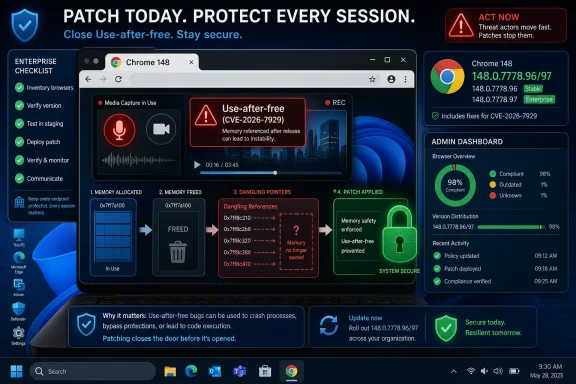
Google and Microsoft disclosed CVE-2026-7929 on May 6, 2026, a high-severity use-after-free flaw in Chromium’s MediaRecording component fixed in Google Chrome 148.0.7778.96 for Linux and 148.0.7778.96/97 for Windows and macOS. The vulnerability matters because it sits in the browser’s media capture machinery, where “just a webpage” can become a bridge between user interaction, memory corruption, and arbitrary code execution. It is not described as exploited in the wild, but it is exactly the kind of bug enterprise patch programs cannot afford to treat as background noise. The real story is not one CVE; it is the continuing compression of browser security response into a narrow window where users, admins, and downstream Chromium vendors must move almost as fast as Google does.
CVE-2026-7929 is a use-after-free vulnerability in MediaRecording, the part of Chromium’s web platform stack that supports recording audio and video streams from the browser. In plain English, use-after-free bugs happen when software keeps using a piece of memory after it has already been released. In a complex browser process, that mistake can become much more than a crash.
The public description says a remote attacker could execute arbitrary code by convincing a user to perform specific UI gestures on a crafted HTML page. That wording is important. This is not described as a one-click, drive-by exploit that fires the moment a tab opens; it requires user interaction. But modern phishing and social-engineering kits are built precisely around coaxing clicks, prompts, permissions, file drags, media controls, and browser gestures from victims.
That makes the “UI required” qualifier less comforting than it may look on a vulnerability dashboard. In consumer language, it means “the user has to do something.” In attacker language, it means “the exploit chain needs a lure.” The web has had thirty years to perfect lures.
The CVSS 3.1 vector assigned by CISA’s ADP program rates the bug 7.5, high severity, with network attack vector, high attack complexity, no privileges required, user interaction required, unchanged scope, and high impact to confidentiality, integrity, and availability. The NVD entry, as of publication, had not yet supplied its own CVSS score. That lag is routine, but it reinforces a practical point: defenders should not wait for every scoring column to fill in before treating a browser RCE-class issue as urgent.
The MediaRecorder API sits near a sensitive boundary. It deals with streams that may originate from microphones, webcams, screen captures, tabs, canvases, or generated media. It lives in the same general neighborhood as permissions prompts, device selection, codecs, buffers, and asynchronous event handling — all the ingredients that make memory lifetime bugs hard to reason about.
That does not mean CVE-2026-7929 automatically gives an attacker access to a webcam or microphone. The public description does not say that. But the component’s role should make administrators pay attention because media workflows are now normal business workflows. Remote support, browser-based conferencing, sales demos, training platforms, online exams, telehealth portals, and collaboration apps all push users into interactive media-heavy pages.
The browser security model assumes that complicated things can happen safely inside the tab. Media recording is one of those complicated things. When its memory handling fails, the failure inherits the strategic importance of the browser itself.
That restriction is normal. Google routinely withholds bug details until a majority of users have received the fix, and for good reason. Browser bugs are unusually reusable: once a patch lands, attackers can diff code, infer the vulnerable path, and begin building proof-of-concept exploit chains. The period between patch publication and mass deployment is where defenders are most exposed.
For IT teams, the lack of exploit detail should not translate into lack of urgency. The operational question is not whether every employee can explain MediaRecording internals. It is whether every managed browser reaches a safe version before exploit developers turn the patch into a map.
This is where user-interaction vulnerabilities become deceptively dangerous. They often fail to trigger the same panic as “no-click” flaws, yet they are perfectly compatible with phishing, malvertising, fake meeting invites, fake recording consent flows, and scam pages designed to manipulate browser prompts. The attacker does not need the average user to understand the UI gesture. The attacker only needs the page to make that gesture feel routine.
But the security payload was large. Reporting on the release counted 127 security fixes, including multiple critical vulnerabilities and a long tail of high-, medium-, and low-severity flaws. CVE-2026-7929 is one of the high-severity issues rather than one of the critical ones, but administrators should resist ranking patch priority solely by the label.
The critical bugs in the same release help explain why Chrome 148 deserves broad attention. They show a browser build carrying substantial security churn across core subsystems. Even if an organization is not especially worried about MediaRecording, it still has to contend with the release as a whole.
This is the uncomfortable reality of Chromium patching in 2026: individual CVEs matter, but they increasingly arrive as part of dense security batches. A single browser update can close dozens or more than a hundred separate weaknesses. The old mental model of evaluating each browser CVE as a standalone emergency does not scale; the better model is that the browser itself is a continuously serviced attack surface.
As of Microsoft’s May 6 Edge security release notes, Microsoft said it was aware of recent Chromium security fixes and was actively working on releasing a security fix. That phrasing is familiar to anyone who manages Edge in enterprise environments. Google’s Chrome patch often lands first, and downstream Chromium browsers follow on their own cadence.
This creates a short but meaningful exposure gap. It is not a scandal; it is how a multi-vendor browser ecosystem works. But for Windows shops that standardize on Edge, the distinction matters. A Chrome version number in Google’s advisory does not automatically mean every Edge channel has received the corresponding Chromium fixes at the same moment.
Edge administrators should therefore check the Microsoft Edge security release notes and their management console, not just the CVE page. Stable, Extended Stable, Beta, Dev, mobile, and platform-specific releases can have different timing. In regulated environments, recording the actual installed Edge version matters more than saying “we use auto-update.”
That can confuse readers who expect vulnerability databases to behave like precise asset inventories. CPE data is useful, but it is not the same thing as a complete vendor impact statement. A Chromium vulnerability may affect Chrome, Edge, Brave, Vivaldi, Opera, embedded Chromium runtimes, Electron applications, or Linux-distribution Chromium packages depending on code provenance, feature exposure, build flags, sandboxing, and release timing.
In this specific case, the authoritative affected product in the public record is Google Chrome prior to 148.0.7778.96, with Microsoft separately tracking the Chromium issue through MSRC for Edge. The NVD’s platform configuration reflects Chrome running on major desktop operating systems. It should not be read as saying Windows, Linux, or macOS are themselves vulnerable in the kernel sense.
This distinction matters for scanners. Vulnerability management tools that depend on CPE matching can underreport or overreport browser risk if the asset inventory does not distinguish Chrome from Edge, Chromium from Chromium-based apps, or system packages from user-installed browsers. The CPE is a starting point, not a substitute for version verification.
Chromium has made major investments in hardening, sandboxing, fuzzing, MiraclePtr-style mitigations, site isolation, and gradual migration toward memory-safe techniques. Those investments matter. They turn many bugs into crashes and many exploits into engineering projects. But they do not erase the underlying reality that huge portions of browser engines are still written in languages where memory lifetime errors are possible.
The phrase “arbitrary code execution” also needs careful handling. In Chrome and Edge, successful exploitation of a renderer or component bug does not automatically mean full system compromise. Attackers often need a second vulnerability to escape the sandbox, elevate privileges, or persist. But exploit chains are precisely what serious actors build.
That is why single-CVE complacency is dangerous. A high-severity browser memory bug may be one link in a chain rather than the whole chain. Defenders do not get to see the rest of the chain until it is used against them, sold, or disclosed.
On unmanaged machines, the update may arrive automatically, but “automatic” does not always mean immediate. A browser may need to restart. A user may keep sessions open for days. A laptop may sleep through the rollout. A managed environment may pin versions, defer updates, or route downloads through internal infrastructure.
Enterprise Chrome and Edge management policies can reduce this uncertainty, but only if they are actually configured and monitored. The browser has become too important to leave to passive hope. Admins should know which channels are deployed, what the update target is, how long restart grace periods last, and how exceptions are handled for kiosk systems, VDI images, application compatibility groups, and privileged admin workstations.
The irony is that the faster the browser vendors patch, the more visible laggards become. A vulnerability fixed upstream on Tuesday can become a compliance exception by Friday. That is not bureaucracy for its own sake; it is the predictable consequence of browsers becoming one of the most exploited pieces of enterprise software.
Microsoft Edge is deeply integrated into Windows, but Edge servicing is not identical to Windows servicing. Edge has its own update mechanisms, policies, release notes, and channels. Chrome, if installed, has its own enterprise updater and policy surface. Third-party Chromium browsers add still more variation.
The practical result is that an endpoint can be “fully patched” in the Windows sense while still running a vulnerable browser. That mismatch is not theoretical. It shows up in audits when OS patch dashboards are green but browser version reports are stale, missing, or split across user profiles.
CVE-2026-7929 is a good reminder to separate operating-system compliance from browser compliance. A workstation’s Windows build number says little about whether its Chromium engine has the relevant fix. The version string inside the browser, or the management inventory that reliably reads it, is what counts.
For enterprises, the answer is less satisfying because the right action depends on fleet design. Some organizations can force rapid browser restarts with minimal disruption. Others run line-of-business apps that panic at major-version changes. Some have separate treatment for Stable and Extended Stable. Others discover, at moments like this, that departments installed consumer Chrome outside central control years ago.
That last scenario is common enough to deserve blunt wording: if your organization cannot tell which Chromium browsers are installed, it cannot reliably respond to Chromium CVEs. Browser inventory is no longer a nice-to-have adjunct to endpoint management. It is core security telemetry.
CVE-2026-7929 also argues for treating browser permissions as part of security posture. Media capture prompts, camera and microphone permissions, and site-level exceptions should not be allowed to sprawl indefinitely. A memory corruption bug is fixed by patching, but user-prompt abuse is reduced by making the prompt environment less chaotic in the first place.
Source: NVD / Chromium Security Update Guide - Microsoft Security Response Center
 A Browser Bug With a Very Modern Attack Shape
CVE-2026-7929 is a use-after-free vulnerability in MediaRecording, the part of Chromium’s web platform stack that supports recording audio and video streams from the browser. In plain English, use-after-free bugs happen when software keeps using a piece of memory after it has already been released. In a complex browser process, that mistake can become much more than a crash.The public description says a remote attacker could execute arbitrary code by convincing a user to perform specific UI gestures on a crafted HTML page. That wording is important. This is not described as a one-click, drive-by exploit that fires the moment a tab opens; it requires user interaction. But modern phishing and social-engineering kits are built precisely around coaxing clicks, prompts, permissions, file drags, media controls, and browser gestures from victims.
That makes the “UI required” qualifier less comforting than it may look on a vulnerability dashboard. In consumer language, it means “the user has to do something.” In attacker language, it means “the exploit chain needs a lure.” The web has had thirty years to perfect lures.
The CVSS 3.1 vector assigned by CISA’s ADP program rates the bug 7.5, high severity, with network attack vector, high attack complexity, no privileges required, user interaction required, unchanged scope, and high impact to confidentiality, integrity, and availability. The NVD entry, as of publication, had not yet supplied its own CVSS score. That lag is routine, but it reinforces a practical point: defenders should not wait for every scoring column to fill in before treating a browser RCE-class issue as urgent.
MediaRecording Is Not a Niche Corner of the Web Anymore
It is tempting to see “MediaRecording” and mentally file this as a problem for video chat sites, podcast tools, or browser-based screen recorders. That would be too narrow. The media APIs in modern browsers are part of a much larger shift: Chrome, Edge, and other Chromium browsers have become full application runtimes, not just document viewers.The MediaRecorder API sits near a sensitive boundary. It deals with streams that may originate from microphones, webcams, screen captures, tabs, canvases, or generated media. It lives in the same general neighborhood as permissions prompts, device selection, codecs, buffers, and asynchronous event handling — all the ingredients that make memory lifetime bugs hard to reason about.
That does not mean CVE-2026-7929 automatically gives an attacker access to a webcam or microphone. The public description does not say that. But the component’s role should make administrators pay attention because media workflows are now normal business workflows. Remote support, browser-based conferencing, sales demos, training platforms, online exams, telehealth portals, and collaboration apps all push users into interactive media-heavy pages.
The browser security model assumes that complicated things can happen safely inside the tab. Media recording is one of those complicated things. When its memory handling fails, the failure inherits the strategic importance of the browser itself.
The “Specific UI Gestures” Caveat Is a Speed Bump, Not a Wall
Security advisories often use terse language that sounds precise but leaves plenty unsaid. “Specific UI gestures” could mean a click sequence, a permission interaction, a drag action, a media-control behavior, or some other user-driven state transition. Because the Chromium bug tracker entry is permission-restricted, we do not yet have the public technical recipe.That restriction is normal. Google routinely withholds bug details until a majority of users have received the fix, and for good reason. Browser bugs are unusually reusable: once a patch lands, attackers can diff code, infer the vulnerable path, and begin building proof-of-concept exploit chains. The period between patch publication and mass deployment is where defenders are most exposed.
For IT teams, the lack of exploit detail should not translate into lack of urgency. The operational question is not whether every employee can explain MediaRecording internals. It is whether every managed browser reaches a safe version before exploit developers turn the patch into a map.
This is where user-interaction vulnerabilities become deceptively dangerous. They often fail to trigger the same panic as “no-click” flaws, yet they are perfectly compatible with phishing, malvertising, fake meeting invites, fake recording consent flows, and scam pages designed to manipulate browser prompts. The attacker does not need the average user to understand the UI gesture. The attacker only needs the page to make that gesture feel routine.
Chrome 148 Was a Security Release Wearing a Feature Release’s Clothes
Chrome 148 arrived on the stable channel on May 5, 2026, for Windows, macOS, and Linux. The fixed versions are 148.0.7778.96 for Linux and 148.0.7778.96/97 for Windows and Mac. Google’s release notes framed the update as a standard stable-channel promotion containing fixes and improvements, with more Chrome 148 feature discussion promised separately.But the security payload was large. Reporting on the release counted 127 security fixes, including multiple critical vulnerabilities and a long tail of high-, medium-, and low-severity flaws. CVE-2026-7929 is one of the high-severity issues rather than one of the critical ones, but administrators should resist ranking patch priority solely by the label.
The critical bugs in the same release help explain why Chrome 148 deserves broad attention. They show a browser build carrying substantial security churn across core subsystems. Even if an organization is not especially worried about MediaRecording, it still has to contend with the release as a whole.
This is the uncomfortable reality of Chromium patching in 2026: individual CVEs matter, but they increasingly arrive as part of dense security batches. A single browser update can close dozens or more than a hundred separate weaknesses. The old mental model of evaluating each browser CVE as a standalone emergency does not scale; the better model is that the browser itself is a continuously serviced attack surface.
Edge Inherits the Risk, Even Before the Patch Lands
The MSRC entry for CVE-2026-7929 is the reason this issue belongs on WindowsForum.com rather than only in Chrome circles. Microsoft tracks Chromium vulnerabilities that affect Edge, and its security update guidance points Windows administrators toward the same underlying problem: Chromium code is shared infrastructure.As of Microsoft’s May 6 Edge security release notes, Microsoft said it was aware of recent Chromium security fixes and was actively working on releasing a security fix. That phrasing is familiar to anyone who manages Edge in enterprise environments. Google’s Chrome patch often lands first, and downstream Chromium browsers follow on their own cadence.
This creates a short but meaningful exposure gap. It is not a scandal; it is how a multi-vendor browser ecosystem works. But for Windows shops that standardize on Edge, the distinction matters. A Chrome version number in Google’s advisory does not automatically mean every Edge channel has received the corresponding Chromium fixes at the same moment.
Edge administrators should therefore check the Microsoft Edge security release notes and their management console, not just the CVE page. Stable, Extended Stable, Beta, Dev, mobile, and platform-specific releases can have different timing. In regulated environments, recording the actual installed Edge version matters more than saying “we use auto-update.”
CPE Confusion Is a Symptom of How Browser Vulnerabilities Are Cataloged
The NVD change history for CVE-2026-7929 added a CPE configuration that describes Google Chrome versions before 148.0.7778.96 and combines that with Windows, Linux, and macOS operating-system entries. The page also presents the familiar “are we missing a CPE?” prompt while affected software configurations load or evolve.That can confuse readers who expect vulnerability databases to behave like precise asset inventories. CPE data is useful, but it is not the same thing as a complete vendor impact statement. A Chromium vulnerability may affect Chrome, Edge, Brave, Vivaldi, Opera, embedded Chromium runtimes, Electron applications, or Linux-distribution Chromium packages depending on code provenance, feature exposure, build flags, sandboxing, and release timing.
In this specific case, the authoritative affected product in the public record is Google Chrome prior to 148.0.7778.96, with Microsoft separately tracking the Chromium issue through MSRC for Edge. The NVD’s platform configuration reflects Chrome running on major desktop operating systems. It should not be read as saying Windows, Linux, or macOS are themselves vulnerable in the kernel sense.
This distinction matters for scanners. Vulnerability management tools that depend on CPE matching can underreport or overreport browser risk if the asset inventory does not distinguish Chrome from Edge, Chromium from Chromium-based apps, or system packages from user-installed browsers. The CPE is a starting point, not a substitute for version verification.
Use-After-Free Remains the Browser Bug That Will Not Die
Memory safety has been the browser industry’s recurring nightmare for more than a decade. Use-after-free flaws are especially stubborn because browsers are asynchronous machines: pages create objects, media streams fire events, permissions change, tabs suspend, frames navigate, workers spin up, and components tear down in overlapping sequences. Somewhere in that turbulence, a reference can outlive the thing it points to.Chromium has made major investments in hardening, sandboxing, fuzzing, MiraclePtr-style mitigations, site isolation, and gradual migration toward memory-safe techniques. Those investments matter. They turn many bugs into crashes and many exploits into engineering projects. But they do not erase the underlying reality that huge portions of browser engines are still written in languages where memory lifetime errors are possible.
The phrase “arbitrary code execution” also needs careful handling. In Chrome and Edge, successful exploitation of a renderer or component bug does not automatically mean full system compromise. Attackers often need a second vulnerability to escape the sandbox, elevate privileges, or persist. But exploit chains are precisely what serious actors build.
That is why single-CVE complacency is dangerous. A high-severity browser memory bug may be one link in a chain rather than the whole chain. Defenders do not get to see the rest of the chain until it is used against them, sold, or disclosed.
The Patch Cadence Is Now Part of the Attack Surface
Chrome’s stable channel update language says rollouts occur over days or weeks. That is reasonable for a product used by billions of people across operating systems, networks, and management regimes. It is also a window attackers understand.On unmanaged machines, the update may arrive automatically, but “automatic” does not always mean immediate. A browser may need to restart. A user may keep sessions open for days. A laptop may sleep through the rollout. A managed environment may pin versions, defer updates, or route downloads through internal infrastructure.
Enterprise Chrome and Edge management policies can reduce this uncertainty, but only if they are actually configured and monitored. The browser has become too important to leave to passive hope. Admins should know which channels are deployed, what the update target is, how long restart grace periods last, and how exceptions are handled for kiosk systems, VDI images, application compatibility groups, and privileged admin workstations.
The irony is that the faster the browser vendors patch, the more visible laggards become. A vulnerability fixed upstream on Tuesday can become a compliance exception by Friday. That is not bureaucracy for its own sake; it is the predictable consequence of browsers becoming one of the most exploited pieces of enterprise software.
Windows Shops Have to Think Beyond Windows Update
For many Windows administrators, patching still revolves around the monthly rhythm of Windows Update, WSUS, Intune, Configuration Manager, and Patch Tuesday reporting. Chromium vulnerabilities do not respect that calendar. Chrome and Edge security updates ship whenever the browser vendors need them to ship.Microsoft Edge is deeply integrated into Windows, but Edge servicing is not identical to Windows servicing. Edge has its own update mechanisms, policies, release notes, and channels. Chrome, if installed, has its own enterprise updater and policy surface. Third-party Chromium browsers add still more variation.
The practical result is that an endpoint can be “fully patched” in the Windows sense while still running a vulnerable browser. That mismatch is not theoretical. It shows up in audits when OS patch dashboards are green but browser version reports are stale, missing, or split across user profiles.
CVE-2026-7929 is a good reminder to separate operating-system compliance from browser compliance. A workstation’s Windows build number says little about whether its Chromium engine has the relevant fix. The version string inside the browser, or the management inventory that reliably reads it, is what counts.
The Consumer Advice Is Simple; the Enterprise Advice Is Not
For individual users, the recommendation is straightforward: update Chrome to 148.0.7778.96 or later on Linux, or 148.0.7778.96/97 or later on Windows and macOS, then restart the browser. Edge users should apply Microsoft’s corresponding Edge security update when it becomes available and verify the installed version afterward. If the browser says it is waiting for a relaunch, the update is not fully in force.For enterprises, the answer is less satisfying because the right action depends on fleet design. Some organizations can force rapid browser restarts with minimal disruption. Others run line-of-business apps that panic at major-version changes. Some have separate treatment for Stable and Extended Stable. Others discover, at moments like this, that departments installed consumer Chrome outside central control years ago.
That last scenario is common enough to deserve blunt wording: if your organization cannot tell which Chromium browsers are installed, it cannot reliably respond to Chromium CVEs. Browser inventory is no longer a nice-to-have adjunct to endpoint management. It is core security telemetry.
CVE-2026-7929 also argues for treating browser permissions as part of security posture. Media capture prompts, camera and microphone permissions, and site-level exceptions should not be allowed to sprawl indefinitely. A memory corruption bug is fixed by patching, but user-prompt abuse is reduced by making the prompt environment less chaotic in the first place.
The Quiet Browser Fix That Should Change This Week’s Checklist
The immediate work is modest, but it should be explicit. CVE-2026-7929 is not a reason to panic; it is a reason to tighten the muscle memory around Chromium patch response.- Confirm that Google Chrome is at version 148.0.7778.96 or later on Linux and 148.0.7778.96/97 or later on Windows and macOS.
- Track Microsoft Edge’s corresponding Chromium security update separately from Windows OS patch status, especially in managed Windows environments.
- Treat “user interaction required” as a mitigation factor, not as a reason to defer patching.
- Review browser inventory for unmanaged Chromium-based browsers and embedded runtimes that may not follow Chrome’s update cadence.
- Make sure update policies include restart enforcement, because a downloaded browser update does not protect a still-running old process.
- Watch for scanner or CPE discrepancies, and verify vulnerable software by installed browser version rather than database assumptions alone.
Source: NVD / Chromium Security Update Guide - Microsoft Security Response Center
