

Google and Microsoft disclosed CVE-2026-7949 on May 6, 2026, as a medium-severity Chromium flaw in Skia that affects Google Chrome before version 148.0.7778.96 and can let an attacker with renderer compromise leak cross-origin data through a crafted Chrome extension. That is a narrow bug description, but it lands in a wide blast radius: Chrome, Edge, and every Chromium-dependent enterprise workflow that treats browser updates as background noise. The weakness is not a screaming remote-code-execution zero-day; it is the quieter kind of browser defect that turns yesterday’s sandbox boundary into today’s data exposure question. For Windows administrators, the point is not panic—it is recognizing that modern browser security now depends on extension governance, renderer isolation, and update velocity all working at once.
CVE-2026-7949 sits in Skia, the 2D graphics library Chromium uses to draw the web into pixels. That sounds comfortably low-level, the sort of rendering plumbing most users never think about unless fonts look wrong or a GPU driver misbehaves. But browser rendering code is where untrusted content meets memory, and memory-safety bugs in that layer have a long history of becoming stepping stones in larger exploit chains.
The published description is unusually specific. An attacker must already have compromised the renderer process, and the data leakage path is tied to a crafted Chrome extension. That combination explains why Chromium classified the issue as medium and why CISA’s contributed CVSS 3.1 score is low at 3.1: exploitation is not a straight “visit page, lose machine” story.
Yet that same phrasing should also make enterprise defenders pay attention. “Had compromised the renderer process” is not a comforting prerequisite in 2026; it is the working assumption behind many browser exploit chains. Chrome’s multiprocess architecture is designed around the idea that renderers are hostile, sandboxed compartments, not trusted code islands. A bug that helps a compromised renderer learn something it should not know is therefore not minor because it is post-compromise. It is interesting precisely because it erodes the containment model.
The cross-origin detail matters even more. The same-origin policy is one of the web’s oldest and most important security rules, and cross-origin data leakage is what happens when the browser’s internal separation between sites gets blurry. In a world where users live inside SaaS dashboards, identity providers, admin consoles, webmail, and internal portals all day, “confidentiality only” can still mean “the wrong token, message, file preview, or business record became visible to the wrong context.”
This is why Skia flaws tend to deserve more attention than their “graphics bug” label suggests. A memory read past a boundary may not let an attacker execute code, but it can expose data that should be outside reach. In browsers, a small information disclosure may help defeat address-space layout randomization, strengthen an exploit chain, or bypass a privacy boundary the user assumes is absolute.
CVE-2026-7949 is classified as CWE-125, the common weakness category for out-of-bounds reads. That category is broad, but the theme is simple: software reads memory it was not supposed to read. Depending on where that read occurs and what data sits nearby, the bug can range from a crashy annoyance to a serious leak of sensitive state.
The Skia angle also reinforces a recurring Chromium lesson. The browser is no longer one program so much as a federation of engines: JavaScript, layout, graphics, networking, storage, media, sandboxing, synchronization, extension APIs, and operating-system glue. Security updates arrive as version bumps, but the vulnerabilities live in subsystems with very different risk profiles.
That makes the exploit condition less exotic than it first appears. In managed environments, users may have dozens of extensions installed, some mandated by IT, some approved years ago, and some inherited through sync or loose policy. A crafted malicious extension is not the only concern; a once-legitimate extension that is sold, hijacked, over-permissioned, or poorly maintained can become the staging area for exactly the sort of browser-adjacent attack path defenders hate.
Chrome and Edge both offer enterprise controls for extension installation, allowlists, blocklists, update behavior, and permission management. The trouble is that many organizations treat those controls as deployment conveniences rather than security boundaries. They decide which extensions help users do their jobs, then rarely revisit whether those extensions still deserve access to all URLs, clipboard data, cookies, page contents, or native messaging bridges.
CVE-2026-7949 does not prove that the Chrome Web Store is unsafe or that every extension is suspect. It does, however, puncture the lazy distinction between “browser vulnerability” and “extension risk.” Modern browser compromise increasingly lives at the intersection of the two, where renderer bugs, extension permissions, and user interaction line up into a chain no single security control fully owns.
The CVSS vector attached by CISA-ADP tells a restrained story: network attack vector, high attack complexity, no privileges required, user interaction required, unchanged scope, low confidentiality impact, no integrity or availability impact. That is not the profile of an emergency all-hands incident. It is the profile of a bug that should be patched promptly in the normal browser update stream and investigated for exposure where extensions are poorly governed.
The catch is that Chrome 148 was not a one-CVE release. The stable channel update to 148.0.7778.96/97 for Windows and macOS and 148.0.7778.96 for Linux addressed a large bundle of security fixes, including critical vulnerabilities elsewhere in Chromium. That is the operational reality: administrators do not patch CVE-2026-7949 in isolation; they move the browser to a build that absorbs an entire wave of upstream Chromium fixes.
For home users, the answer is simple: let Chrome or Edge update and restart the browser. For enterprises, it is messier. Browsers are now runtime platforms for line-of-business apps, and some organizations still slow-roll browser versions out of fear that a dashboard, single sign-on flow, or extension will break. That caution is understandable, but the security model has shifted. A delayed browser update is not a cosmetic lag; it is a standing exception on one of the most attacked applications in the fleet.
This has changed the rhythm of Windows patch management. The old mental model put browser security inside Patch Tuesday or inside a monolithic OS maintenance cycle. Edge’s Chromium base moved much of that risk into a faster channel, one that can update independently and must track upstream Chromium fixes closely. That is good for security, but it complicates compliance reporting for teams still built around monthly OS patch cadences.
The NVD configuration for CVE-2026-7949 lists affected Chrome versions up to, but not including, 148.0.7778.96 across Windows, Linux, and macOS. That cross-platform shape is typical of browser-engine bugs: the operating system changes the deployment mechanics, not the underlying exposure. Windows shops should care because the vulnerable surface is present on Windows endpoints, not because Windows itself caused the flaw.
Edge adds another layer. Microsoft may ship Chromium security fixes through Edge Stable and Extended Stable channels on its own schedule, and enterprises may control Edge updates through group policy, Intune, Configuration Manager, WSUS-adjacent workflows, or third-party endpoint tools. The important question is not whether Microsoft acknowledges the CVE; it is whether every managed endpoint actually crossed the fixed version threshold in the browser channel it uses.
That architecture is why post-renderer bugs matter. A browser renderer is intentionally constrained; it should not freely inspect cross-origin data, alter browser state, or interact with privileged extension capabilities outside the rules. A vulnerability that helps a compromised renderer leak data is therefore a containment failure, even if it is not a full system compromise.
This distinction matters for incident response. If a user visits a malicious site and a renderer exploit succeeds, defenders want that event to remain trapped inside the browser sandbox as much as possible. If another bug can turn that foothold into cross-origin leakage through an extension path, the incident expands from “possible browser crash or sandboxed compromise” to “possible data exposure inside authenticated web sessions.”
Browser vendors often withhold detailed bug information until most users are updated, and that practice is especially relevant here. The public issue tracker entry requires permissions, so defenders do not have a complete technical recipe. That lack of detail should not be mistaken for lack of risk. It is the normal quiet period in which administrators are expected to patch first and reverse-engineer later, if they must.
The web’s security model rests heavily on origin isolation. Your bank, your email, your admin console, and a random blog should not be able to read one another’s data just because the same browser displays them. Site isolation, process separation, cookie controls, Content Security Policy, extension permission prompts, and sandboxing all reinforce that basic expectation.
But extensions complicate the picture because they are deliberately allowed to span sites when users or administrators grant them that authority. A password manager may need to inspect login forms. A grammar tool may need to read text fields. A security extension may monitor page content. Each permission grants convenience, and each permission becomes more consequential when a browser memory bug creates an unexpected read path.
That is why “cross-origin data via a crafted Chrome Extension” should read less like a niche exploit note and more like a reminder of how much trust is concentrated inside the browser. The browser is not merely rendering pages; it is mediating identity, business data, collaboration, device posture, cloud administration, and user secrets. When a boundary inside that mediator weakens, the effect can be subtle but significant.
A mature response starts with inventory. Administrators should be able to answer which Chromium-based browsers are installed, which channels they follow, which versions are running, and which extensions are present. That inventory should include Edge, Chrome, Brave, Opera, Vivaldi, embedded Chromium runtimes where relevant, and any application that quietly ships a browser component but falls outside standard browser management.
Next comes policy. Extension allowlisting is blunt but effective when applied thoughtfully. Organizations should prefer a smaller curated set of approved extensions, pin business-critical ones where appropriate, block unmanaged extension installs, and review requested permissions on a schedule. The security value is not in pretending extensions are bad; it is in treating them like software with privileged access to the user’s workday.
Finally, update telemetry matters. Browser auto-update is excellent when it works, but enterprise controls can break the chain: offline laptops, stale golden images, restrictive proxies, frozen VDI pools, delayed update rings, or users who never restart. A browser that has downloaded an update but not relaunched is still running old code. For this class of vulnerability, restart behavior is not an annoyance; it is part of remediation.
The harder part is extension hygiene. Users install extensions casually because the browser trains them to think of extensions as features rather than applications. That mental model is outdated. An extension can see, modify, or mediate web activity depending on the permissions it receives, and those permissions may matter more than whether the extension’s toolbar icon looks harmless.
Users should remove extensions they do not recognize, no longer use, or cannot explain. They should be especially cautious with extensions that request access to all websites, clipboard contents, downloads, browsing history, or page data across every site. This does not require paranoia; it requires treating the browser as the operating environment it has become.
The same advice applies to family machines, student laptops, and small-business PCs that have no formal IT department. In those environments, the browser is often the most important application and the least managed one. CVE-2026-7949 is a reminder that “just browsing” now includes a stack of native code, cloud identity, extension permissions, and memory-safety assumptions.
The May 2026 Chrome 148 update illustrates the point. One release carried a broad set of security fixes, including high- and critical-severity issues as well as medium defects like CVE-2026-7949. Attackers do not need every bug in the batch. They need one usable link in a chain, and they can study patches as soon as they ship.
That creates a perverse but familiar race. Vendors restrict bug details until adoption improves, defenders rush to update before exploit writers reconstruct the flaws, and organizations with brittle browser-dependent workflows become the slowest runners. The winner is often decided not by who understands the vulnerability best, but by who can deploy the fixed build with the least ceremony.
This is where Windows management has both an advantage and a burden. The tooling exists to keep Edge current, enforce extension policy, monitor browser versions, and steer update channels. But the tooling only works when browser maintenance is treated as first-class endpoint security rather than a background consumer-app feature.
Source: NVD / Chromium Security Update Guide - Microsoft Security Response Center
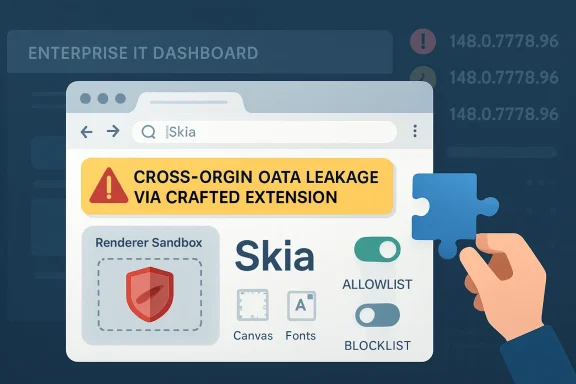 The Browser Patch Is Smaller Than the Trust Boundary It Exposes
CVE-2026-7949 sits in Skia, the 2D graphics library Chromium uses to draw the web into pixels. That sounds comfortably low-level, the sort of rendering plumbing most users never think about unless fonts look wrong or a GPU driver misbehaves. But browser rendering code is where untrusted content meets memory, and memory-safety bugs in that layer have a long history of becoming stepping stones in larger exploit chains.The published description is unusually specific. An attacker must already have compromised the renderer process, and the data leakage path is tied to a crafted Chrome extension. That combination explains why Chromium classified the issue as medium and why CISA’s contributed CVSS 3.1 score is low at 3.1: exploitation is not a straight “visit page, lose machine” story.
Yet that same phrasing should also make enterprise defenders pay attention. “Had compromised the renderer process” is not a comforting prerequisite in 2026; it is the working assumption behind many browser exploit chains. Chrome’s multiprocess architecture is designed around the idea that renderers are hostile, sandboxed compartments, not trusted code islands. A bug that helps a compromised renderer learn something it should not know is therefore not minor because it is post-compromise. It is interesting precisely because it erodes the containment model.
The cross-origin detail matters even more. The same-origin policy is one of the web’s oldest and most important security rules, and cross-origin data leakage is what happens when the browser’s internal separation between sites gets blurry. In a world where users live inside SaaS dashboards, identity providers, admin consoles, webmail, and internal portals all day, “confidentiality only” can still mean “the wrong token, message, file preview, or business record became visible to the wrong context.”
Skia Is Not Just a Graphics Library Anymore
Skia began life as graphics infrastructure, but in Chromium it has become part of the browser’s security perimeter by necessity. Anything that parses, rasterizes, caches, composites, or transforms web content can become security-sensitive once hostile input is involved. Images, fonts, canvas operations, PDFs, GPU acceleration, and UI surfaces all converge in rendering paths that are performance-critical and therefore difficult to harden perfectly.This is why Skia flaws tend to deserve more attention than their “graphics bug” label suggests. A memory read past a boundary may not let an attacker execute code, but it can expose data that should be outside reach. In browsers, a small information disclosure may help defeat address-space layout randomization, strengthen an exploit chain, or bypass a privacy boundary the user assumes is absolute.
CVE-2026-7949 is classified as CWE-125, the common weakness category for out-of-bounds reads. That category is broad, but the theme is simple: software reads memory it was not supposed to read. Depending on where that read occurs and what data sits nearby, the bug can range from a crashy annoyance to a serious leak of sensitive state.
The Skia angle also reinforces a recurring Chromium lesson. The browser is no longer one program so much as a federation of engines: JavaScript, layout, graphics, networking, storage, media, sandboxing, synchronization, extension APIs, and operating-system glue. Security updates arrive as version bumps, but the vulnerabilities live in subsystems with very different risk profiles.
The Extension Clause Is the Real Warning Label
The most revealing phrase in the CVE is “via a crafted Chrome Extension.” Extensions are supposed to be power tools: password managers, accessibility helpers, developer utilities, endpoint agents, meeting enhancers, clipping tools, and countless bits of productivity glue. They are also one of the few places where organizations routinely bolt third-party code directly into the browser and grant it persistent proximity to sensitive web sessions.That makes the exploit condition less exotic than it first appears. In managed environments, users may have dozens of extensions installed, some mandated by IT, some approved years ago, and some inherited through sync or loose policy. A crafted malicious extension is not the only concern; a once-legitimate extension that is sold, hijacked, over-permissioned, or poorly maintained can become the staging area for exactly the sort of browser-adjacent attack path defenders hate.
Chrome and Edge both offer enterprise controls for extension installation, allowlists, blocklists, update behavior, and permission management. The trouble is that many organizations treat those controls as deployment conveniences rather than security boundaries. They decide which extensions help users do their jobs, then rarely revisit whether those extensions still deserve access to all URLs, clipboard data, cookies, page contents, or native messaging bridges.
CVE-2026-7949 does not prove that the Chrome Web Store is unsafe or that every extension is suspect. It does, however, puncture the lazy distinction between “browser vulnerability” and “extension risk.” Modern browser compromise increasingly lives at the intersection of the two, where renderer bugs, extension permissions, and user interaction line up into a chain no single security control fully owns.
Medium Severity Does Not Mean Medium Priority
Security teams have learned to triage by severity because they have no other choice. There are too many CVEs, too many advisories, and too few maintenance windows. But browser vulnerabilities are poor candidates for purely score-driven patching, because the browser is exposed to untrusted content all day and because exploit chains often combine several medium or low issues into something much uglier.The CVSS vector attached by CISA-ADP tells a restrained story: network attack vector, high attack complexity, no privileges required, user interaction required, unchanged scope, low confidentiality impact, no integrity or availability impact. That is not the profile of an emergency all-hands incident. It is the profile of a bug that should be patched promptly in the normal browser update stream and investigated for exposure where extensions are poorly governed.
The catch is that Chrome 148 was not a one-CVE release. The stable channel update to 148.0.7778.96/97 for Windows and macOS and 148.0.7778.96 for Linux addressed a large bundle of security fixes, including critical vulnerabilities elsewhere in Chromium. That is the operational reality: administrators do not patch CVE-2026-7949 in isolation; they move the browser to a build that absorbs an entire wave of upstream Chromium fixes.
For home users, the answer is simple: let Chrome or Edge update and restart the browser. For enterprises, it is messier. Browsers are now runtime platforms for line-of-business apps, and some organizations still slow-roll browser versions out of fear that a dashboard, single sign-on flow, or extension will break. That caution is understandable, but the security model has shifted. A delayed browser update is not a cosmetic lag; it is a standing exception on one of the most attacked applications in the fleet.
Microsoft’s Chromium Dependence Makes This a Windows Story
The user-facing source here is an MSRC entry, and that is no accident. Microsoft Edge is a Chromium browser, which means many Chromium vulnerabilities become Microsoft vulnerabilities in practice, even when the vulnerable code originates upstream. Microsoft’s security update guide functions as the Windows administrator’s bridge between Google’s Chromium disclosures and the managed Edge estate.This has changed the rhythm of Windows patch management. The old mental model put browser security inside Patch Tuesday or inside a monolithic OS maintenance cycle. Edge’s Chromium base moved much of that risk into a faster channel, one that can update independently and must track upstream Chromium fixes closely. That is good for security, but it complicates compliance reporting for teams still built around monthly OS patch cadences.
The NVD configuration for CVE-2026-7949 lists affected Chrome versions up to, but not including, 148.0.7778.96 across Windows, Linux, and macOS. That cross-platform shape is typical of browser-engine bugs: the operating system changes the deployment mechanics, not the underlying exposure. Windows shops should care because the vulnerable surface is present on Windows endpoints, not because Windows itself caused the flaw.
Edge adds another layer. Microsoft may ship Chromium security fixes through Edge Stable and Extended Stable channels on its own schedule, and enterprises may control Edge updates through group policy, Intune, Configuration Manager, WSUS-adjacent workflows, or third-party endpoint tools. The important question is not whether Microsoft acknowledges the CVE; it is whether every managed endpoint actually crossed the fixed version threshold in the browser channel it uses.
The Renderer Compromise Assumption Is Not a Get-Out-of-Patching Card
The phrase “attacker who had compromised the renderer process” can lull readers into underrating the bug. After all, if the renderer is already compromised, haven’t we already lost? Not necessarily. Chromium’s security architecture assumes that the renderer can be compromised and still tries to prevent the attacker from escaping the sandbox, reading other sites’ data, or reaching privileged browser services.That architecture is why post-renderer bugs matter. A browser renderer is intentionally constrained; it should not freely inspect cross-origin data, alter browser state, or interact with privileged extension capabilities outside the rules. A vulnerability that helps a compromised renderer leak data is therefore a containment failure, even if it is not a full system compromise.
This distinction matters for incident response. If a user visits a malicious site and a renderer exploit succeeds, defenders want that event to remain trapped inside the browser sandbox as much as possible. If another bug can turn that foothold into cross-origin leakage through an extension path, the incident expands from “possible browser crash or sandboxed compromise” to “possible data exposure inside authenticated web sessions.”
Browser vendors often withhold detailed bug information until most users are updated, and that practice is especially relevant here. The public issue tracker entry requires permissions, so defenders do not have a complete technical recipe. That lack of detail should not be mistaken for lack of risk. It is the normal quiet period in which administrators are expected to patch first and reverse-engineer later, if they must.
Cross-Origin Leaks Are the Web’s Version of Lateral Movement
In traditional network security, lateral movement describes an attacker moving from one machine or account to another. On the web, the analogous move is often crossing origin boundaries: from one tab’s compromised context toward another site’s data, from a benign extension capability toward privileged page contents, or from an isolated renderer toward browser-managed secrets. CVE-2026-7949 belongs to that family of concerns.The web’s security model rests heavily on origin isolation. Your bank, your email, your admin console, and a random blog should not be able to read one another’s data just because the same browser displays them. Site isolation, process separation, cookie controls, Content Security Policy, extension permission prompts, and sandboxing all reinforce that basic expectation.
But extensions complicate the picture because they are deliberately allowed to span sites when users or administrators grant them that authority. A password manager may need to inspect login forms. A grammar tool may need to read text fields. A security extension may monitor page content. Each permission grants convenience, and each permission becomes more consequential when a browser memory bug creates an unexpected read path.
That is why “cross-origin data via a crafted Chrome Extension” should read less like a niche exploit note and more like a reminder of how much trust is concentrated inside the browser. The browser is not merely rendering pages; it is mediating identity, business data, collaboration, device posture, cloud administration, and user secrets. When a boundary inside that mediator weakens, the effect can be subtle but significant.
Enterprise Controls Need to Reach Past Version Numbers
Patching to Chrome 148.0.7778.96 or later is the first order of business, but it should not be the last. Version compliance tells you whether the known bug is fixed. It does not tell you whether the extension environment is clean, whether risky permissions are under control, or whether update deferrals are accumulating into a browser-security debt.A mature response starts with inventory. Administrators should be able to answer which Chromium-based browsers are installed, which channels they follow, which versions are running, and which extensions are present. That inventory should include Edge, Chrome, Brave, Opera, Vivaldi, embedded Chromium runtimes where relevant, and any application that quietly ships a browser component but falls outside standard browser management.
Next comes policy. Extension allowlisting is blunt but effective when applied thoughtfully. Organizations should prefer a smaller curated set of approved extensions, pin business-critical ones where appropriate, block unmanaged extension installs, and review requested permissions on a schedule. The security value is not in pretending extensions are bad; it is in treating them like software with privileged access to the user’s workday.
Finally, update telemetry matters. Browser auto-update is excellent when it works, but enterprise controls can break the chain: offline laptops, stale golden images, restrictive proxies, frozen VDI pools, delayed update rings, or users who never restart. A browser that has downloaded an update but not relaunched is still running old code. For this class of vulnerability, restart behavior is not an annoyance; it is part of remediation.
Home Users Are Protected by the Boring Path
For most individual Windows users, the safest response is also the least dramatic. Chrome and Edge are designed to update automatically. Opening the browser’s About page, allowing the update to install, and restarting the browser is usually enough to move past the vulnerable build.The harder part is extension hygiene. Users install extensions casually because the browser trains them to think of extensions as features rather than applications. That mental model is outdated. An extension can see, modify, or mediate web activity depending on the permissions it receives, and those permissions may matter more than whether the extension’s toolbar icon looks harmless.
Users should remove extensions they do not recognize, no longer use, or cannot explain. They should be especially cautious with extensions that request access to all websites, clipboard contents, downloads, browsing history, or page data across every site. This does not require paranoia; it requires treating the browser as the operating environment it has become.
The same advice applies to family machines, student laptops, and small-business PCs that have no formal IT department. In those environments, the browser is often the most important application and the least managed one. CVE-2026-7949 is a reminder that “just browsing” now includes a stack of native code, cloud identity, extension permissions, and memory-safety assumptions.
The Patch Cadence Is Becoming the Product
Chrome’s rapid update model used to be described as a delivery mechanism. Increasingly, it is part of the security product itself. The difference between a safe and unsafe browser is often measured in days, sometimes hours, after a stable-channel fix lands. That compresses the timeline for vendors, administrators, and attackers alike.The May 2026 Chrome 148 update illustrates the point. One release carried a broad set of security fixes, including high- and critical-severity issues as well as medium defects like CVE-2026-7949. Attackers do not need every bug in the batch. They need one usable link in a chain, and they can study patches as soon as they ship.
That creates a perverse but familiar race. Vendors restrict bug details until adoption improves, defenders rush to update before exploit writers reconstruct the flaws, and organizations with brittle browser-dependent workflows become the slowest runners. The winner is often decided not by who understands the vulnerability best, but by who can deploy the fixed build with the least ceremony.
This is where Windows management has both an advantage and a burden. The tooling exists to keep Edge current, enforce extension policy, monitor browser versions, and steer update channels. But the tooling only works when browser maintenance is treated as first-class endpoint security rather than a background consumer-app feature.
This Skia Bug Turns Extension Hygiene Into Patch Management
CVE-2026-7949 is not the headline-grabbing sort of browser flaw that should empty the building, but it is exactly the kind of bug that rewards disciplined administration. Its practical lesson is that patching Chromium and governing extensions are now inseparable tasks.- Chrome versions before 148.0.7778.96 are the affected Google Chrome builds identified in the public vulnerability record.
- The flaw is an out-of-bounds read in Skia, mapped to CWE-125, with the stated impact of leaking cross-origin data.
- The published attack path requires a compromised renderer process and a crafted Chrome extension, which lowers the score but does not eliminate operational concern.
- Microsoft’s MSRC listing matters because Chromium vulnerabilities flow into Edge security management for Windows environments.
- Administrators should verify installed browser versions, force restarts where needed, and review extension allowlists rather than treating this as a version-only cleanup.
- Users should remove unnecessary extensions and update Chrome or Edge immediately if automatic updating has not already done so.
Source: NVD / Chromium Security Update Guide - Microsoft Security Response Center
