

CVE-2026-7981 is a Chromium codecs vulnerability disclosed on May 6, 2026, affecting Google Chrome before 148.0.7778.96 and tracked by Microsoft for Chromium-based Edge because a malicious file could trigger an out-of-bounds memory read. The bug is not the scariest entry in Chrome 148’s security rollup, but it is the kind of browser flaw that keeps enterprise patch teams honest. Its real significance is not the word “medium” in Chromium’s severity field; it is the reminder that media parsing remains one of the browser’s most exposed and least forgiving attack surfaces.
On paper, CVE-2026-7981 looks almost reassuring. It is an out-of-bounds read in Codecs, not a clean remote-code-execution headline, not a sandbox escape, and not currently described as exploited in the wild. Google’s Chromium severity is Medium, and the public description says the attacker would need to persuade a user into opening or processing a malicious file.
That framing is accurate, but it is also incomplete in the way browser security advisories often are. A modern browser is not merely a web page renderer; it is a sprawling application runtime that eagerly decodes images, audio, video, documents, streams, thumbnails, previews, and embedded content from sources users barely think about. A “malicious file” is not necessarily a strange attachment in a shady email. It can be a media object delivered through a collaboration platform, a web app, a chat client, or a content-management workflow.
Out-of-bounds reads are also easy to undersell because they do not automatically imply code execution. They often disclose memory rather than corrupt it. But memory disclosure can matter deeply in chained browser attacks, where one bug leaks an address, token, pointer, heap layout, or other secret that makes the next bug reliable.
That is why CISA’s ADP score reportedly moved the vulnerability into high territory, with confidentiality and integrity impact rated high in the vector now associated with the entry. This does not mean every user should treat CVE-2026-7981 as a standalone catastrophe. It means defenders should treat it as part of the larger Chromium patch set rather than as a footnote beneath the more dramatic bugs.
Chromium is infrastructure now. Microsoft Edge, Brave, Vivaldi, Opera, Electron-based applications, embedded web views, and enterprise kiosk environments all inherit some version of the same risk calculus, even if patch timing, exposure, and product-specific mitigations differ. When a codec bug lands in upstream Chromium, the downstream question becomes less “Do we use Chrome?” and more “Where did Chromium end up in our fleet?”
For WindowsForum readers, Microsoft’s involvement is the familiar twist. MSRC tracks Chromium CVEs because Edge is Chromium-based, and Windows estates often patch browsers through separate channels from Windows Update. The result is a split-brain operational model: Patch Tuesday disciplines govern the operating system, while browsers operate on a faster, vendor-driven cadence that does not care whether the next maintenance window is convenient.
That mismatch is not a bureaucratic annoyance; it is the modern endpoint security model. The browser is both an application and a platform, and its update velocity reflects that. Waiting for the next monthly patch cycle because a flaw is “only” a browser bug increasingly looks like a legacy habit from a time before browsers became the default execution environment for work.
Media parsers are asked to accept files produced by countless encoders, devices, apps, and websites. They must handle malformed inputs without crashing, leaking, or wandering outside allocated memory. They must do it quickly enough that users do not notice, often while juggling GPU paths, sandbox boundaries, and platform-specific acceleration APIs.
That combination has made media handling a recurring source of serious browser vulnerabilities. A malformed file can exercise code paths that normal web content never touches. A single off-by-one assumption or length miscalculation can become a memory-safety issue because decoders are constantly translating attacker-controlled bytes into structured data.
CVE-2026-7981’s CWE classification, CWE-125, is the canonical “out-of-bounds read” bucket. That is a broad weakness category, but the browser version is especially consequential because the attacker does not need local access to the machine. The user interaction requirement lowers the exploitability compared with a zero-click bug, but it does not remove the risk in environments where users routinely handle external media.
That is why “via a malicious file” should not be read as “via obviously suspicious attachment.” A malicious media file can be disguised by context rather than by technical trickery. It can arrive through a legitimate upload portal, a customer ticket, a shared drive, or a messaging thread. The risk is highest where users are trained by their jobs to open unfamiliar files quickly.
The codec angle also complicates perimeter defenses. A gateway can block known malicious attachments, but it is harder to reason about a novel malformed media file that is not malware in the traditional sense. The file may not contain an executable payload at all. Its purpose may be to make the browser reveal something useful to the attacker or to prepare the ground for a second-stage exploit.
This is where the medium-severity label becomes operationally awkward. A vulnerability may be medium in isolation and still strategically useful in a chain. Browser exploit developers prize reliability, and memory disclosure can be the difference between an elegant exploit and a crashy proof of concept.
CVSS is useful, but it is not a patching strategy. It compresses a messy reality into a score that can be sorted in a dashboard. For browser bugs, that compression often hides the most important variables: whether the vulnerable component is reachable from normal browsing, whether the bug leaks data useful for exploit chaining, whether similar code paths exist in sibling components, and whether attackers can deliver the trigger through common web workflows.
NVD enrichment also lagging or changing does not mean the advisory is unreliable. It means the public vulnerability bureaucracy is catching up to the vendor disclosure. Chrome’s release channel and MSRC’s update guide are usually more actionable for administrators than waiting for every database field to settle.
The CPE note is worth reading in that light. NVD’s affected-configuration machinery may list Chrome before the fixed version and operating-system platforms such as Windows, Linux, and macOS, but browser deployment does not map cleanly to a single operating-system patch level. The vulnerability lives in the application codebase, and the fix is the browser version. If your inventory system keys only on OS patch status, it can give you a false sense of closure.
Some users see an MSRC entry and assume Windows Update will handle everything. Sometimes Edge does update through Microsoft’s channels, and enterprise policies can manage that behavior, but the lesson is broader: Chromium-based browsers are their own patch domain. Chrome, Edge, and other Chromium descendants must be inventoried and verified directly.
This matters more in mixed-browser fleets. Many enterprises standardize on Edge for policy reasons but still allow Chrome for compatibility. Developers may run multiple channels. Test machines may have Beta, Dev, or Canary builds. Kiosk machines may be frozen for application certification. VDI images may lag behind physical endpoints. Each of those exceptions becomes a place where “we patched the browser” needs evidence, not assumption.
The fix threshold for Chrome is straightforward: 148.0.7778.96 or later, with the Windows and macOS stable release also showing 148.0.7778.97 in some cases. For Edge, administrators should watch Microsoft’s Chromium CVE tracking and verify the installed Edge build against Microsoft’s published fixed version. The important point is not the branding in the icon; it is whether the Chromium code underneath has crossed the fixed build line.
The question for IT is not whether every endpoint receives Chrome 148 at the same minute. It is whether the organization has a browser patch process that can distinguish between routine feature drift and security-relevant build floors. CVE-2026-7981 may not demand panic, but it does demand proof that update plumbing works.
That proof starts with inventory. Administrators need to know which Chromium-based browsers exist, which channels they are on, which machines are pinned, and which users have local install rights. Browser sprawl is often discovered only after a security advisory forces someone to ask why a neglected copy of Chrome is sitting beside the managed default browser.
It continues with restart discipline. Browser updates are famously easy to download and surprisingly easy not to apply, because the final step often requires a restart. A user who keeps 90 tabs open for two weeks can remain exposed after the update is technically available. Enterprises that treat browser restarts as a user preference rather than a security control are accepting a delay they may not have measured.
Defenders should look closely at teams that handle external media at scale. Marketing, HR, support, legal discovery, education, newsrooms, and public-sector intake desks often receive files from unknown parties. Those teams are more likely to encounter crafted inputs than employees who live entirely inside internal SaaS tools.
Technical controls can help, but they are not magic. Attachment sandboxing, file-type restrictions, content disarm and reconstruction, safe preview systems, browser isolation, and endpoint detection all reduce different pieces of the risk. None of them replaces patching, especially when the vulnerable code is in a widely used parser that may be invoked by ordinary-looking content.
The best response is layered and boring. Patch the browser, reduce unnecessary file exposure, segment high-risk workflows, and make sure users can report strange files without being blamed for opening something their job required them to inspect. Browser security fails fastest in cultures that pretend users can simply avoid untrusted content.
That simplicity should not be wasted. Security teams should convert the advisory into a compliance query: show every endpoint running Chrome below the fixed version, show every endpoint running Edge below Microsoft’s fixed Chromium build, and show every other Chromium-based browser that is not centrally governed. If the answer is “we do not know,” the vulnerability has already found a management gap.
For home users, the advice is the usual but still correct advice: open the browser’s About page, allow the update to install, and relaunch. For administrators, the relaunch is the part worth enforcing. A downloaded update that sits idle behind a long-running browser session is not a deployed fix.
The larger lesson is that browser patching should be treated closer to endpoint detection updates than to quarterly application maintenance. Chromium’s release cadence is fast because the threat model is fast. Enterprises can slow the rollout for testing, but they should do so deliberately, with compensating controls and a short clock.
Modern exploitation is modular. Attackers chain vulnerabilities because browsers are hardened enough that a single bug often does not produce a full compromise. An information disclosure bug can weaken address-space layout randomization, expose object state, or reveal data that helps exploit a memory-corruption flaw. In that context, a medium-severity codec read can be valuable.
The timing also matters. Chrome 148’s security rollup reportedly includes critical issues alongside this one. If attackers are diffing patches, they are not necessarily choosing targets based on the same severity labels used in dashboards. They are looking for reachable code, reliable primitives, and victims who update slowly.
That is why patch prioritization should consider adjacency. A medium bug shipped in a release with multiple higher-severity browser fixes should inherit some urgency from the bundle. Security teams do not get to patch only the CVEs they find rhetorically impressive; they patch the build that removes the vulnerable code.
The irony is that automatic browser updates are one of the great security successes of the last decade. They moved huge populations of users from vulnerable to fixed builds with little friction. But that same success can lull organizations into assuming the update happened everywhere, including on managed devices, persistent VDI sessions, offline laptops, lab machines, and servers with browsers installed “just for testing.”
CVE-2026-7981 does not require a new philosophy. It requires enforcing the philosophy administrators already claim to follow. Know what is installed. Know what version is safe. Know how long it takes to get there. Know who can override it.
That last point is often uncomfortable. Browser exceptions tend to accumulate around executives, developers, legacy app owners, and special-purpose environments. Those exceptions may be justified, but they should be visible. An unmanaged browser is not merely a user preference; it is an alternate application platform with a direct line to hostile content.
A sane response should be concrete, verifiable, and proportionate:
CVE-2026-7981 will probably be remembered, if it is remembered at all, as one line in a crowded Chrome 148 security release. But that is the point: the modern browser threat model is built from crowded lines, fast releases, partial scores, and components whose names sound smaller than their blast radius. The organizations that handle this well will not be the ones that panic at every Chromium CVE; they will be the ones that can prove, quietly and quickly, that their browsers crossed the fixed-version line before attackers found a reason to care.
Source: NVD / Chromium Security Update Guide - Microsoft Security Response Center
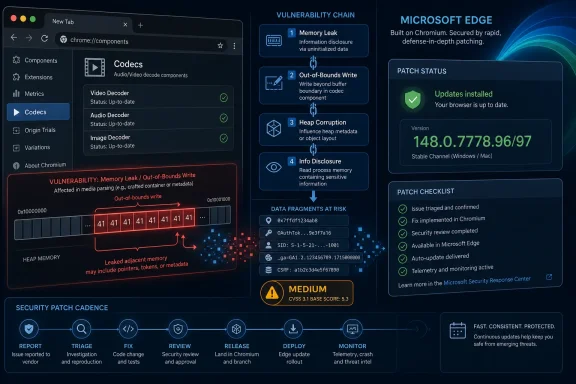 The “Medium” Label Hides a Very Browser-Shaped Risk
On paper, CVE-2026-7981 looks almost reassuring. It is an out-of-bounds read in Codecs, not a clean remote-code-execution headline, not a sandbox escape, and not currently described as exploited in the wild. Google’s Chromium severity is Medium, and the public description says the attacker would need to persuade a user into opening or processing a malicious file.That framing is accurate, but it is also incomplete in the way browser security advisories often are. A modern browser is not merely a web page renderer; it is a sprawling application runtime that eagerly decodes images, audio, video, documents, streams, thumbnails, previews, and embedded content from sources users barely think about. A “malicious file” is not necessarily a strange attachment in a shady email. It can be a media object delivered through a collaboration platform, a web app, a chat client, or a content-management workflow.
Out-of-bounds reads are also easy to undersell because they do not automatically imply code execution. They often disclose memory rather than corrupt it. But memory disclosure can matter deeply in chained browser attacks, where one bug leaks an address, token, pointer, heap layout, or other secret that makes the next bug reliable.
That is why CISA’s ADP score reportedly moved the vulnerability into high territory, with confidentiality and integrity impact rated high in the vector now associated with the entry. This does not mean every user should treat CVE-2026-7981 as a standalone catastrophe. It means defenders should treat it as part of the larger Chromium patch set rather than as a footnote beneath the more dramatic bugs.
Chrome 148 Turns a Codec Bug Into an Ecosystem Event
Google promoted Chrome 148 to the stable desktop channel on May 5, 2026, with version 148.0.7778.96 for Linux and 148.0.7778.96/97 for Windows and macOS. The release is broader than one CVE, reportedly addressing more than 100 security issues, including several more severe bugs elsewhere in the browser stack. That context matters because Chromium vulnerabilities rarely stay neatly inside “Chrome” as a product boundary.Chromium is infrastructure now. Microsoft Edge, Brave, Vivaldi, Opera, Electron-based applications, embedded web views, and enterprise kiosk environments all inherit some version of the same risk calculus, even if patch timing, exposure, and product-specific mitigations differ. When a codec bug lands in upstream Chromium, the downstream question becomes less “Do we use Chrome?” and more “Where did Chromium end up in our fleet?”
For WindowsForum readers, Microsoft’s involvement is the familiar twist. MSRC tracks Chromium CVEs because Edge is Chromium-based, and Windows estates often patch browsers through separate channels from Windows Update. The result is a split-brain operational model: Patch Tuesday disciplines govern the operating system, while browsers operate on a faster, vendor-driven cadence that does not care whether the next maintenance window is convenient.
That mismatch is not a bureaucratic annoyance; it is the modern endpoint security model. The browser is both an application and a platform, and its update velocity reflects that. Waiting for the next monthly patch cycle because a flaw is “only” a browser bug increasingly looks like a legacy habit from a time before browsers became the default execution environment for work.
Codecs Remain the Browser’s Oldest New Problem
The word codec sounds narrow, almost antique, as if this were a bug in the machinery of playing a movie file. In practice, codecs sit at the intersection of untrusted input, complex parsing, performance optimization, hardware acceleration, and decades of format compatibility. That is a dangerous neighborhood.Media parsers are asked to accept files produced by countless encoders, devices, apps, and websites. They must handle malformed inputs without crashing, leaking, or wandering outside allocated memory. They must do it quickly enough that users do not notice, often while juggling GPU paths, sandbox boundaries, and platform-specific acceleration APIs.
That combination has made media handling a recurring source of serious browser vulnerabilities. A malformed file can exercise code paths that normal web content never touches. A single off-by-one assumption or length miscalculation can become a memory-safety issue because decoders are constantly translating attacker-controlled bytes into structured data.
CVE-2026-7981’s CWE classification, CWE-125, is the canonical “out-of-bounds read” bucket. That is a broad weakness category, but the browser version is especially consequential because the attacker does not need local access to the machine. The user interaction requirement lowers the exploitability compared with a zero-click bug, but it does not remove the risk in environments where users routinely handle external media.
The Real Attack Surface Is the Workflow, Not the File
Security advisories often describe user interaction as if it were a strong defensive wall. In enterprise reality, user interaction is frequently the business process. Designers open assets. Support teams inspect screenshots and recordings. Journalists, lawyers, teachers, developers, moderators, recruiters, and procurement staff all handle files from strangers as part of their normal day.That is why “via a malicious file” should not be read as “via obviously suspicious attachment.” A malicious media file can be disguised by context rather than by technical trickery. It can arrive through a legitimate upload portal, a customer ticket, a shared drive, or a messaging thread. The risk is highest where users are trained by their jobs to open unfamiliar files quickly.
The codec angle also complicates perimeter defenses. A gateway can block known malicious attachments, but it is harder to reason about a novel malformed media file that is not malware in the traditional sense. The file may not contain an executable payload at all. Its purpose may be to make the browser reveal something useful to the attacker or to prepare the ground for a second-stage exploit.
This is where the medium-severity label becomes operationally awkward. A vulnerability may be medium in isolation and still strategically useful in a chain. Browser exploit developers prize reliability, and memory disclosure can be the difference between an elegant exploit and a crashy proof of concept.
NVD’s Moving Score Tells Its Own Story
The public record around CVE-2026-7981 changed quickly after publication. NVD initially had no NIST CVSS score available, while CISA’s ADP vector appeared, changed, and then reflected a more severe integrity impact than before. That kind of churn is not unusual in the first days of a vulnerability entry, but it exposes a problem defenders know well: the first number is rarely the final truth.CVSS is useful, but it is not a patching strategy. It compresses a messy reality into a score that can be sorted in a dashboard. For browser bugs, that compression often hides the most important variables: whether the vulnerable component is reachable from normal browsing, whether the bug leaks data useful for exploit chaining, whether similar code paths exist in sibling components, and whether attackers can deliver the trigger through common web workflows.
NVD enrichment also lagging or changing does not mean the advisory is unreliable. It means the public vulnerability bureaucracy is catching up to the vendor disclosure. Chrome’s release channel and MSRC’s update guide are usually more actionable for administrators than waiting for every database field to settle.
The CPE note is worth reading in that light. NVD’s affected-configuration machinery may list Chrome before the fixed version and operating-system platforms such as Windows, Linux, and macOS, but browser deployment does not map cleanly to a single operating-system patch level. The vulnerability lives in the application codebase, and the fix is the browser version. If your inventory system keys only on OS patch status, it can give you a false sense of closure.
Edge Makes This a Microsoft Story Whether Redmond Wrote the Bug or Not
Microsoft did not need to author the vulnerable codec code for Windows administrators to care. Edge’s Chromium foundation means that many browser vulnerabilities enter the Microsoft ecosystem through upstream Chromium and then get tracked through MSRC. That is good for visibility, but it also creates a recurring communications problem.Some users see an MSRC entry and assume Windows Update will handle everything. Sometimes Edge does update through Microsoft’s channels, and enterprise policies can manage that behavior, but the lesson is broader: Chromium-based browsers are their own patch domain. Chrome, Edge, and other Chromium descendants must be inventoried and verified directly.
This matters more in mixed-browser fleets. Many enterprises standardize on Edge for policy reasons but still allow Chrome for compatibility. Developers may run multiple channels. Test machines may have Beta, Dev, or Canary builds. Kiosk machines may be frozen for application certification. VDI images may lag behind physical endpoints. Each of those exceptions becomes a place where “we patched the browser” needs evidence, not assumption.
The fix threshold for Chrome is straightforward: 148.0.7778.96 or later, with the Windows and macOS stable release also showing 148.0.7778.97 in some cases. For Edge, administrators should watch Microsoft’s Chromium CVE tracking and verify the installed Edge build against Microsoft’s published fixed version. The important point is not the branding in the icon; it is whether the Chromium code underneath has crossed the fixed build line.
The Chrome 148 Rollout Is a Test of Enterprise Muscle Memory
Google says stable updates roll out over days and weeks. That is fine for consumers, whose machines generally update when the browser restarts. It is more complicated for enterprises, where staged rollout, compatibility testing, extension governance, and change controls can slow adoption.The question for IT is not whether every endpoint receives Chrome 148 at the same minute. It is whether the organization has a browser patch process that can distinguish between routine feature drift and security-relevant build floors. CVE-2026-7981 may not demand panic, but it does demand proof that update plumbing works.
That proof starts with inventory. Administrators need to know which Chromium-based browsers exist, which channels they are on, which machines are pinned, and which users have local install rights. Browser sprawl is often discovered only after a security advisory forces someone to ask why a neglected copy of Chrome is sitting beside the managed default browser.
It continues with restart discipline. Browser updates are famously easy to download and surprisingly easy not to apply, because the final step often requires a restart. A user who keeps 90 tabs open for two weeks can remain exposed after the update is technically available. Enterprises that treat browser restarts as a user preference rather than a security control are accepting a delay they may not have measured.
The Malicious File Clause Should Push Defenders Toward Content Hygiene
A codec bug is a reminder that browser security is not only about blocking dangerous websites. It is also about controlling how untrusted content enters the organization and which applications process it. That is a harder conversation because it touches productivity.Defenders should look closely at teams that handle external media at scale. Marketing, HR, support, legal discovery, education, newsrooms, and public-sector intake desks often receive files from unknown parties. Those teams are more likely to encounter crafted inputs than employees who live entirely inside internal SaaS tools.
Technical controls can help, but they are not magic. Attachment sandboxing, file-type restrictions, content disarm and reconstruction, safe preview systems, browser isolation, and endpoint detection all reduce different pieces of the risk. None of them replaces patching, especially when the vulnerable code is in a widely used parser that may be invoked by ordinary-looking content.
The best response is layered and boring. Patch the browser, reduce unnecessary file exposure, segment high-risk workflows, and make sure users can report strange files without being blamed for opening something their job required them to inspect. Browser security fails fastest in cultures that pretend users can simply avoid untrusted content.
Version Numbers Are the Only Comforting Part of This Story
The practical remediation for Chrome users is refreshingly concrete. If Chrome reports 148.0.7778.96 or later on Linux, or 148.0.7778.96/97 or later on Windows and macOS, the known Chrome-side issue is addressed. Anything below that threshold remains in scope for CVE-2026-7981.That simplicity should not be wasted. Security teams should convert the advisory into a compliance query: show every endpoint running Chrome below the fixed version, show every endpoint running Edge below Microsoft’s fixed Chromium build, and show every other Chromium-based browser that is not centrally governed. If the answer is “we do not know,” the vulnerability has already found a management gap.
For home users, the advice is the usual but still correct advice: open the browser’s About page, allow the update to install, and relaunch. For administrators, the relaunch is the part worth enforcing. A downloaded update that sits idle behind a long-running browser session is not a deployed fix.
The larger lesson is that browser patching should be treated closer to endpoint detection updates than to quarterly application maintenance. Chromium’s release cadence is fast because the threat model is fast. Enterprises can slow the rollout for testing, but they should do so deliberately, with compensating controls and a short clock.
Security Teams Should Read This as a Chain Component, Not a Standalone Event
CVE-2026-7981 is not described publicly as an actively exploited zero-day. That matters, and the absence of known exploitation should lower the temperature. But defenders should resist the opposite mistake of dismissing it because the bug “only” reads memory.Modern exploitation is modular. Attackers chain vulnerabilities because browsers are hardened enough that a single bug often does not produce a full compromise. An information disclosure bug can weaken address-space layout randomization, expose object state, or reveal data that helps exploit a memory-corruption flaw. In that context, a medium-severity codec read can be valuable.
The timing also matters. Chrome 148’s security rollup reportedly includes critical issues alongside this one. If attackers are diffing patches, they are not necessarily choosing targets based on the same severity labels used in dashboards. They are looking for reachable code, reliable primitives, and victims who update slowly.
That is why patch prioritization should consider adjacency. A medium bug shipped in a release with multiple higher-severity browser fixes should inherit some urgency from the bundle. Security teams do not get to patch only the CVEs they find rhetorically impressive; they patch the build that removes the vulnerable code.
The Browser Has Become the Patch Tuesday Between Patch Tuesdays
Windows administrators are accustomed to monthly rhythms. Browser security lives between those rhythms. This is one reason Chromium CVEs feel like a constant drip in Microsoft environments: they are not exceptions to the patch process anymore, but a parallel process with its own tempo.The irony is that automatic browser updates are one of the great security successes of the last decade. They moved huge populations of users from vulnerable to fixed builds with little friction. But that same success can lull organizations into assuming the update happened everywhere, including on managed devices, persistent VDI sessions, offline laptops, lab machines, and servers with browsers installed “just for testing.”
CVE-2026-7981 does not require a new philosophy. It requires enforcing the philosophy administrators already claim to follow. Know what is installed. Know what version is safe. Know how long it takes to get there. Know who can override it.
That last point is often uncomfortable. Browser exceptions tend to accumulate around executives, developers, legacy app owners, and special-purpose environments. Those exceptions may be justified, but they should be visible. An unmanaged browser is not merely a user preference; it is an alternate application platform with a direct line to hostile content.
The Fix Is Small, but the Audit Trail Should Be Big
This is the kind of advisory that rewards disciplined shops and exposes improvisational ones. The fix itself is ordinary. The audit trail around it is where mature operations separate themselves from teams that rely on hope and auto-update folklore.A sane response should be concrete, verifiable, and proportionate:
- Organizations should confirm that Chrome has reached 148.0.7778.96 or later across Windows, macOS, and Linux systems.
- Microsoft Edge deployments should be checked against Microsoft’s Chromium-based advisory rather than assumed safe because Windows is patched.
- Security teams should identify other Chromium-based browsers and embedded Chromium runtimes that may not follow Chrome or Edge update timing.
- High-risk users who routinely open external media files should receive faster browser update enforcement and tighter content-handling controls.
- Patch dashboards should treat browser build numbers as first-class endpoint data, not as incidental software inventory.
- Administrators should require browser relaunches after security updates instead of waiting indefinitely for users to close long-running sessions.
CVE-2026-7981 will probably be remembered, if it is remembered at all, as one line in a crowded Chrome 148 security release. But that is the point: the modern browser threat model is built from crowded lines, fast releases, partial scores, and components whose names sound smaller than their blast radius. The organizations that handle this well will not be the ones that panic at every Chromium CVE; they will be the ones that can prove, quietly and quickly, that their browsers crossed the fixed-version line before attackers found a reason to care.
Source: NVD / Chromium Security Update Guide - Microsoft Security Response Center
