

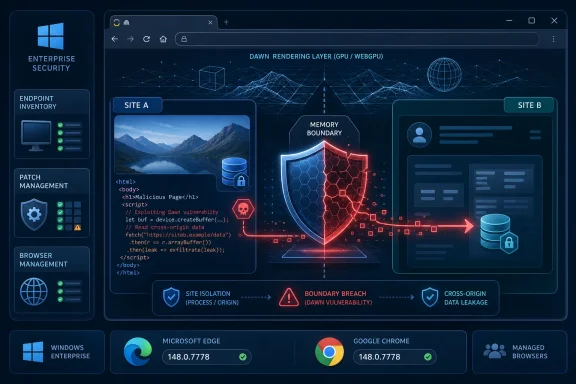
Google and Microsoft documented CVE-2026-7983 on May 6–7, 2026, as a medium-severity Chromium vulnerability in Dawn that affected Google Chrome before 148.0.7778.96 and Microsoft Edge through its Chromium codebase, allowing cross-origin data leakage through a crafted HTML page. The bug is not the loudest item in Chrome 148, but it is the kind of browser flaw that matters precisely because it sits below the user’s line of sight. It turns a modern graphics subsystem into a data-boundary problem, and that should make Windows administrators pay attention.
The temptation with CVE-2026-7983 is to file it under “routine Chromium churn” and move on. It is medium severity, not known from the public record to be exploited in the wild, and the published impact is confidentiality rather than code execution. In a month where Chrome 148 carried a large bundle of security fixes, including more dramatic critical vulnerabilities, this one can look like background radiation.
That would be the wrong reading. Browser vulnerabilities are different from ordinary application bugs because the browser is now the most exposed application on almost every managed endpoint. It parses hostile input by design, executes untrusted code constantly, and brokers access to identity, cloud dashboards, intranet applications, SaaS consoles, collaboration tools, password managers, and session cookies.
CVE-2026-7983 is described as an out-of-bounds read in Dawn, the Chromium project’s implementation layer for modern GPU-facing web graphics. The practical allegation is not that an attacker gets a shell, but that a remote attacker could leak cross-origin data if a user lands on a specially crafted page. That puts the bug squarely in the uneasy space between memory safety and web isolation, where the browser’s abstractions are supposed to make hostile pages harmless.
For WindowsForum readers, the Microsoft angle is straightforward. Microsoft did not “create” this vulnerability in the old Patch Tuesday sense; Edge consumes Chromium, and Microsoft’s Security Update Guide tracks the Chromium issue because patched Edge builds ingest the fix. That is how the browser supply chain works now: Google ships a Chromium fix, Microsoft repackages and documents it for Edge, and enterprise IT is left to make sure every channel, ring, and virtual desktop actually moves.
That ambition has a cost. GPU-adjacent code is performance-sensitive, complex, and often written close to the metal. It must translate web-facing APIs into lower-level graphics commands while preserving the browser’s security promises. If that translation layer reads past the memory it should read, the consequences may not be spectacular in the cinematic sense, but they can be deeply consequential in the browser sense.
An out-of-bounds read is a classic weakness: software reads memory outside the intended boundary of a buffer or object. Sometimes that produces a crash. Sometimes it discloses fragments of adjacent memory. In a browser, where the security model depends on one site not being able to see another site’s data, even a limited read can become an information disclosure problem.
The CVE description’s reference to cross-origin data is the key phrase. Web security is built around the same-origin policy and related isolation mechanisms that are supposed to stop one website from reaching into another. When a malicious page can pry loose information from a different origin, the exploit may not need to compromise the entire operating system to matter. It may only need to steal the right token, infer the right state, or expose data that a user thought was safely isolated in another tab or frame.
CVE-2026-7983 carries a CVSS 3.1 score of 4.3 from CISA’s ADP enrichment, with network attack vector, low complexity, no privileges required, user interaction required, unchanged scope, and low confidentiality impact. That is not a panic score. It says the attacker needs to get a user to interact with malicious web content and that the direct consequence is limited data exposure.
But CVSS is not a deployment strategy. It is a scoring framework, and the framework has always struggled with browser reality. A low-confidentiality leak on paper may be tolerable in a standalone desktop app; in a browser session connected to Microsoft 365, Google Workspace, Azure, AWS, GitHub, Okta, Salesforce, ServiceNow, and internal admin portals, “low” can become contextual very quickly.
This is why administrators should treat browser data leaks as boundary failures rather than trivia. A modern enterprise browser session is a bundle of authenticated contexts. The browser is not merely displaying information; it is holding bearer tokens, cookies, cached data, device signals, account state, and the connective tissue of the company’s cloud operating model.
No public advisory for CVE-2026-7983 says attackers are actively using it, and responsible coverage should not invent urgency where the evidence does not support it. The argument is narrower and more practical: when a browser bug is reachable through crafted HTML and affects cross-origin data boundaries, the right default is prompt update, not wait-and-see.
That version specificity is not pedantry. Browser update systems are fast, but they are not magic. Chrome and Edge rollouts can happen over days or weeks, enterprise update policies can defer them, VDI images can lag, offline devices can miss them, and some users can keep a vulnerable browser open indefinitely without completing the restart that actually swaps in the fixed binary.
The Chrome 148 security release also appears to have carried a notably large set of security fixes. That context cuts both ways. On one hand, CVE-2026-7983 was not the headline critical vulnerability of the batch. On the other, large browser security trains are exactly when medium-severity issues get lost in the noise, even though they may be the ones that matter to a particular environment.
For many Windows shops, the practical question is not “Is Chrome patched?” but “Which Chromium-based browsers are installed, managed, and actually restarted?” Chrome, Edge, Brave, Vivaldi, Opera, Electron-based apps, embedded WebView components, and vendor-controlled Chromium runtimes do not all move at the same pace or through the same channels. A CVE that begins life in Chromium rarely stays neatly inside one brand.
Microsoft’s Security Update Guide entry for CVE-2026-7983 makes the Edge relationship explicit: the vulnerability is in Chromium open source software consumed by Microsoft Edge, and the latest Edge build is no longer vulnerable. The listed Edge build family is 148.0.7778.xxx, with customer action required. That is a quiet but important message: this is not a Windows cumulative update you can assume arrived through the usual operating system path.
That model is usually efficient. Google and the Chromium community find and fix vulnerabilities in a shared codebase; Microsoft picks up the changes; Edge users benefit without Microsoft needing to maintain an entirely separate rendering engine. The browser monoculture critique is real, but the patch pipeline is one reason the modern web is not worse than it already is.
The weakness is coordination. A Chromium CVE can appear in Google’s release notes, Microsoft’s Security Update Guide, NVD enrichment, CISA scoring, Linux distribution trackers, scanner plugins, and third-party security bulletins, each at slightly different times and with different fields populated. One source may have the version threshold, another may have the CVSS vector, another may have Edge applicability, and another may not yet have CPEs or complete scoring.
That is exactly the kind of ambiguity the user’s supplied NVD-style detail hints at. The record shows change history, CPE configuration updates, a CWE-125 classification, a Chrome source, and a CISA-ADP CVSS vector, while NVD’s own assessment fields were not yet filled in. In vulnerability management systems, that kind of partial enrichment can create false negatives, duplicate records, or “informational” tickets that never get promoted to action.
Security teams should resist treating incomplete metadata as incomplete risk. If the vendor advisory says Chrome before 148.0.7778.96 is affected, and Microsoft says Edge has ingested the Chromium fix in the corresponding build family, that is enough to drive an update campaign. Waiting for every database field to become tidy is how browser flaws survive long after patches exist.
CVE-2026-7983’s description says a remote attacker could leak cross-origin data using crafted HTML. That is the kind of sentence that should make incident responders slow down. It suggests the bug is not merely “visit page, browser crashes,” but “visit page, browser may disclose information it should not disclose.”
The CVSS vector includes user interaction required, which in this case is not much comfort. Browser exploitation routinely starts with user interaction because the whole point of a browser is that users click links, open tabs, view attachments, authenticate to portals, and follow search results. A requirement that the victim load a malicious page is a speed bump, not a wall.
The risk is also unevenly distributed. A consumer checking recipes and news may have a lower practical exposure than a help desk technician with elevated cloud portals open all day. A developer with source control, CI/CD dashboards, and internal documentation in the same browser profile has a richer target surface. A privileged administrator who uses a general-purpose browser session for sensitive admin work is giving any cross-origin leak more interesting material to work with.
This is why hardened browsing practices still matter in 2026. Separate profiles, separate browsers for admin tasks, conditional access policies, session controls, phishing-resistant MFA, and browser restart enforcement are not glamorous. They are the boring compensating controls that decide whether a medium browser bug remains medium in your environment.
If a browser update fixes 127 vulnerabilities, an administrator does not need to decide whether CVE-2026-7983 is scarier than a Blink integer overflow or a use-after-free in another component before deploying it. The update is the unit of action. The question is whether the browser fleet is on the fixed channel and whether users have restarted.
This is one reason browser patching should be measured in days, not monthly maintenance windows. Chrome and Edge are built for rapid update. Enterprise controls exist to manage stability, but deferral policies should be deliberate, short, and visible. If an organization is routinely weeks behind on stable browser security updates, the issue is not one CVE; it is operational debt.
Windows admins should also distinguish between installed version and running version. A machine may have downloaded a patched browser, but the vulnerable process can remain alive until restart. Browser vendors have improved restart prompts, but enterprise environments with persistent sessions, kiosk modes, remote desktops, call-center workflows, and always-open SaaS tabs can defeat good intentions.
The cleanest answer is policy. Managed browser restart windows, update compliance reporting, and endpoint inventory should be treated as first-class security controls. If that sounds excessive for a medium CVE, remember that the same mechanism handles the critical one you learn about next week.
But CPEs are blunt instruments for modern software. Chrome on Windows is not vulnerable because Windows itself is vulnerable; it is vulnerable because a Chrome application build running on Windows contains the affected Chromium code. Edge is not identical to Chrome, but it consumes Chromium and gets its own Microsoft-documented update. Chromium-based downstream browsers and embedded runtimes complicate the picture further.
So yes, it is reasonable to ask whether metadata is complete, especially if a scanner does not flag Edge or another Chromium derivative the way an administrator expects. But the deeper answer is that CPE completeness is not the same as exposure completeness. Browser ecosystems move faster than vulnerability schemas, and a missing or delayed mapping should not be mistaken for immunity.
This matters in procurement and compliance, too. Many organizations rely on scanner output to prove they are safe. If a CVE record lacks a vendor CPE, if a plugin has not been published, or if a product uses a bundled Chromium runtime that does not advertise itself cleanly, the dashboard may look better than reality. That is not a reason to abandon vulnerability management tools; it is a reason to understand their blind spots.
The better operational model is layered. Use CPE-based scanning where it works, browser management consoles for Chrome and Edge where available, endpoint detection inventory for process and binary versions, software asset management for installed apps, and configuration management for enforced update policies. A browser CVE should not live or die on one database field.
Think about non-persistent VDI images that are patched only when the golden image is rebuilt. Think about lab machines used once a month, conference-room PCs, warehouse kiosks, shared terminals, jump boxes, developer workstations with multiple browser channels, and servers where someone installed Chrome “just to download something” two years ago. Those are the places where a stable-channel security release can miss its target.
Edge adds another wrinkle because Windows users may assume it is simply “part of Windows” and therefore covered by Windows Update. In practice, Microsoft Edge has its own update mechanism and enterprise policies. It may be healthy in most environments, but assumptions are not evidence.
Chrome’s update mechanism has its own enterprise policy surface. Administrators can pin versions, delay updates, control channels, and manage restarts. Those capabilities are useful when a new release breaks a line-of-business application, but they also create the risk of accidental indefinite deferral. The policy that saved a workflow in March can become the policy that preserves a browser vulnerability in May.
The uncomfortable truth is that browser patch compliance is often less mature than OS patch compliance, even though the browser is more exposed to hostile content. Organizations built decades of process around Windows updates. They still sometimes treat browser updates as a convenience feature.
This is not an argument against WebGPU or modern browser graphics. The web’s evolution has real benefits. Powerful browser APIs reduce the need for native app installation, improve portability, and give developers a common deployment target. For many organizations, a capable web app is easier to secure than a zoo of unmanaged desktop clients.
But the bargain only works if browsers maintain strong isolation. Every time the web platform gains a new high-performance interface, the implementation must uphold old security promises under new stress. Memory safety, bounds checking, process isolation, site isolation, GPU process hardening, and sandboxing become not academic concepts but daily defenses.
Dawn sits in that modern pressure zone. A bug there is not automatically catastrophic, but it is a reminder that graphics stacks are now part of web security. The historical mental model of browser threats as JavaScript engine bugs and phishing pages is too narrow. Rendering, compositing, media codecs, GPU command validation, font parsing, WebAssembly, extensions, password managers, and enterprise hooks all participate in the attack surface.
For defenders, that argues for humility. You do not need to understand every internal detail of Dawn to respond correctly. You do need to know that a browser update touching Dawn is not optional just because your users are not running browser games.
That is not sloppiness so much as translation. Microsoft is mapping upstream Chromium vulnerability disclosure into the Microsoft customer guidance system. It is telling enterprise customers, compliance teams, and vulnerability management programs: this Chromium issue matters to Edge, and the fixed Edge line is available.
The downside is that the documentation is not always satisfying if you want exploit mechanics. Chromium bug tracker entries are often restricted until most users are patched. Vendor advisories may intentionally withhold details to prevent exploit replication. NVD enrichment can lag. Security teams are left with enough to act but not always enough to fully explain.
That is the correct trade-off during rollout. Public exploit detail before broad patch adoption is a gift to attackers. The administrator’s job is not to reverse-engineer the bug from the advisory; it is to close the known vulnerable version window while the ecosystem catches up.
There is a cultural point here as well. The modern browser is a shared infrastructure project disguised as a consumer app. Microsoft, Google, Apple, Linux distributions, security researchers, standards bodies, and enterprise IT all touch the same chain. CVE-2026-7983 is small enough to show how that chain normally works, and important enough to show why normal still demands attention.
Source: NVD / Chromium Security Update Guide - Microsoft Security Response Center
 A Medium Bug in the Browser Is Still a Perimeter Event
The temptation with CVE-2026-7983 is to file it under “routine Chromium churn” and move on. It is medium severity, not known from the public record to be exploited in the wild, and the published impact is confidentiality rather than code execution. In a month where Chrome 148 carried a large bundle of security fixes, including more dramatic critical vulnerabilities, this one can look like background radiation.That would be the wrong reading. Browser vulnerabilities are different from ordinary application bugs because the browser is now the most exposed application on almost every managed endpoint. It parses hostile input by design, executes untrusted code constantly, and brokers access to identity, cloud dashboards, intranet applications, SaaS consoles, collaboration tools, password managers, and session cookies.
CVE-2026-7983 is described as an out-of-bounds read in Dawn, the Chromium project’s implementation layer for modern GPU-facing web graphics. The practical allegation is not that an attacker gets a shell, but that a remote attacker could leak cross-origin data if a user lands on a specially crafted page. That puts the bug squarely in the uneasy space between memory safety and web isolation, where the browser’s abstractions are supposed to make hostile pages harmless.
For WindowsForum readers, the Microsoft angle is straightforward. Microsoft did not “create” this vulnerability in the old Patch Tuesday sense; Edge consumes Chromium, and Microsoft’s Security Update Guide tracks the Chromium issue because patched Edge builds ingest the fix. That is how the browser supply chain works now: Google ships a Chromium fix, Microsoft repackages and documents it for Edge, and enterprise IT is left to make sure every channel, ring, and virtual desktop actually moves.
Dawn Is Where the Web’s Graphics Ambition Meets Its Memory-Safety Debt
Dawn is not a household name, even among many administrators who can recite Edge and Chrome version numbers from memory. It is part of the machinery that lets the web talk to modern graphics capabilities, most notably around WebGPU and related rendering paths. That machinery exists because the web is no longer a document viewer; it is a platform for 3D design tools, games, AI-assisted creative apps, videoconferencing effects, browser-based CAD, data visualization, and GPU-accelerated workloads that used to require native software.That ambition has a cost. GPU-adjacent code is performance-sensitive, complex, and often written close to the metal. It must translate web-facing APIs into lower-level graphics commands while preserving the browser’s security promises. If that translation layer reads past the memory it should read, the consequences may not be spectacular in the cinematic sense, but they can be deeply consequential in the browser sense.
An out-of-bounds read is a classic weakness: software reads memory outside the intended boundary of a buffer or object. Sometimes that produces a crash. Sometimes it discloses fragments of adjacent memory. In a browser, where the security model depends on one site not being able to see another site’s data, even a limited read can become an information disclosure problem.
The CVE description’s reference to cross-origin data is the key phrase. Web security is built around the same-origin policy and related isolation mechanisms that are supposed to stop one website from reaching into another. When a malicious page can pry loose information from a different origin, the exploit may not need to compromise the entire operating system to matter. It may only need to steal the right token, infer the right state, or expose data that a user thought was safely isolated in another tab or frame.
The Real Target Is the Boundary, Not the Buffer
The security industry often describes memory bugs in terms of impact buckets: code execution, denial of service, information disclosure. Those categories are useful, but they can flatten the way browser attacks actually work. In the browser, a confidentiality bug can be a stepping stone, a workaround, or the missing piece in an exploit chain.CVE-2026-7983 carries a CVSS 3.1 score of 4.3 from CISA’s ADP enrichment, with network attack vector, low complexity, no privileges required, user interaction required, unchanged scope, and low confidentiality impact. That is not a panic score. It says the attacker needs to get a user to interact with malicious web content and that the direct consequence is limited data exposure.
But CVSS is not a deployment strategy. It is a scoring framework, and the framework has always struggled with browser reality. A low-confidentiality leak on paper may be tolerable in a standalone desktop app; in a browser session connected to Microsoft 365, Google Workspace, Azure, AWS, GitHub, Okta, Salesforce, ServiceNow, and internal admin portals, “low” can become contextual very quickly.
This is why administrators should treat browser data leaks as boundary failures rather than trivia. A modern enterprise browser session is a bundle of authenticated contexts. The browser is not merely displaying information; it is holding bearer tokens, cookies, cached data, device signals, account state, and the connective tissue of the company’s cloud operating model.
No public advisory for CVE-2026-7983 says attackers are actively using it, and responsible coverage should not invent urgency where the evidence does not support it. The argument is narrower and more practical: when a browser bug is reachable through crafted HTML and affects cross-origin data boundaries, the right default is prompt update, not wait-and-see.
Chrome 148 Was a Big Security Train, and This Was One Car on It
The patched Chrome version line matters. Google promoted Chrome 148 to the stable channel for Windows, macOS, and Linux in early May 2026, with 148.0.7778.96 for Linux and 148.0.7778.96 or 148.0.7778.97 for Windows and macOS. CVE-2026-7983 applies to Chrome versions prior to 148.0.7778.96.That version specificity is not pedantry. Browser update systems are fast, but they are not magic. Chrome and Edge rollouts can happen over days or weeks, enterprise update policies can defer them, VDI images can lag, offline devices can miss them, and some users can keep a vulnerable browser open indefinitely without completing the restart that actually swaps in the fixed binary.
The Chrome 148 security release also appears to have carried a notably large set of security fixes. That context cuts both ways. On one hand, CVE-2026-7983 was not the headline critical vulnerability of the batch. On the other, large browser security trains are exactly when medium-severity issues get lost in the noise, even though they may be the ones that matter to a particular environment.
For many Windows shops, the practical question is not “Is Chrome patched?” but “Which Chromium-based browsers are installed, managed, and actually restarted?” Chrome, Edge, Brave, Vivaldi, Opera, Electron-based apps, embedded WebView components, and vendor-controlled Chromium runtimes do not all move at the same pace or through the same channels. A CVE that begins life in Chromium rarely stays neatly inside one brand.
Microsoft’s Security Update Guide entry for CVE-2026-7983 makes the Edge relationship explicit: the vulnerability is in Chromium open source software consumed by Microsoft Edge, and the latest Edge build is no longer vulnerable. The listed Edge build family is 148.0.7778.xxx, with customer action required. That is a quiet but important message: this is not a Windows cumulative update you can assume arrived through the usual operating system path.
Edge’s Chromium Dependency Is a Strength Until It Becomes a Coordination Problem
Microsoft’s move to Chromium gave Edge a better compatibility story and reduced the old web fragmentation problem. For users, that was a win. For administrators, it meant Edge became part of a broader Chromium security ecosystem, with Microsoft documenting and distributing fixes that often originate upstream.That model is usually efficient. Google and the Chromium community find and fix vulnerabilities in a shared codebase; Microsoft picks up the changes; Edge users benefit without Microsoft needing to maintain an entirely separate rendering engine. The browser monoculture critique is real, but the patch pipeline is one reason the modern web is not worse than it already is.
The weakness is coordination. A Chromium CVE can appear in Google’s release notes, Microsoft’s Security Update Guide, NVD enrichment, CISA scoring, Linux distribution trackers, scanner plugins, and third-party security bulletins, each at slightly different times and with different fields populated. One source may have the version threshold, another may have the CVSS vector, another may have Edge applicability, and another may not yet have CPEs or complete scoring.
That is exactly the kind of ambiguity the user’s supplied NVD-style detail hints at. The record shows change history, CPE configuration updates, a CWE-125 classification, a Chrome source, and a CISA-ADP CVSS vector, while NVD’s own assessment fields were not yet filled in. In vulnerability management systems, that kind of partial enrichment can create false negatives, duplicate records, or “informational” tickets that never get promoted to action.
Security teams should resist treating incomplete metadata as incomplete risk. If the vendor advisory says Chrome before 148.0.7778.96 is affected, and Microsoft says Edge has ingested the Chromium fix in the corresponding build family, that is enough to drive an update campaign. Waiting for every database field to become tidy is how browser flaws survive long after patches exist.
The Cross-Origin Angle Is Why This Is More Than a Crash Bug
Cross-origin isolation is one of the web’s central promises. A malicious site should not be able to read your banking tab, your admin console, your mail, your cloud storage, or the internal HR portal you opened in another tab. The same-origin policy is not the only control involved, but it is one of the conceptual pillars users and developers depend on without thinking about it.CVE-2026-7983’s description says a remote attacker could leak cross-origin data using crafted HTML. That is the kind of sentence that should make incident responders slow down. It suggests the bug is not merely “visit page, browser crashes,” but “visit page, browser may disclose information it should not disclose.”
The CVSS vector includes user interaction required, which in this case is not much comfort. Browser exploitation routinely starts with user interaction because the whole point of a browser is that users click links, open tabs, view attachments, authenticate to portals, and follow search results. A requirement that the victim load a malicious page is a speed bump, not a wall.
The risk is also unevenly distributed. A consumer checking recipes and news may have a lower practical exposure than a help desk technician with elevated cloud portals open all day. A developer with source control, CI/CD dashboards, and internal documentation in the same browser profile has a richer target surface. A privileged administrator who uses a general-purpose browser session for sensitive admin work is giving any cross-origin leak more interesting material to work with.
This is why hardened browsing practices still matter in 2026. Separate profiles, separate browsers for admin tasks, conditional access policies, session controls, phishing-resistant MFA, and browser restart enforcement are not glamorous. They are the boring compensating controls that decide whether a medium browser bug remains medium in your environment.
Patch Velocity Beats Severity Sorting in Browser Land
Traditional vulnerability management loves queues. Critical goes first, high goes next, medium waits for the normal cycle, low becomes a dashboard color nobody clicks. That model breaks down for browsers because browser updates are frequent, cumulative, and cheap compared with many server-side patches.If a browser update fixes 127 vulnerabilities, an administrator does not need to decide whether CVE-2026-7983 is scarier than a Blink integer overflow or a use-after-free in another component before deploying it. The update is the unit of action. The question is whether the browser fleet is on the fixed channel and whether users have restarted.
This is one reason browser patching should be measured in days, not monthly maintenance windows. Chrome and Edge are built for rapid update. Enterprise controls exist to manage stability, but deferral policies should be deliberate, short, and visible. If an organization is routinely weeks behind on stable browser security updates, the issue is not one CVE; it is operational debt.
Windows admins should also distinguish between installed version and running version. A machine may have downloaded a patched browser, but the vulnerable process can remain alive until restart. Browser vendors have improved restart prompts, but enterprise environments with persistent sessions, kiosk modes, remote desktops, call-center workflows, and always-open SaaS tabs can defeat good intentions.
The cleanest answer is policy. Managed browser restart windows, update compliance reporting, and endpoint inventory should be treated as first-class security controls. If that sounds excessive for a medium CVE, remember that the same mechanism handles the critical one you learn about next week.
CPE Confusion Is a Symptom of a Bigger Metadata Problem
The user’s question asks whether a CPE is missing. In vulnerability databases, CPEs are supposed to map a vulnerability to affected products and platforms. For CVE-2026-7983, NIST’s initial analysis added a Chrome application CPE with versions up to but excluding 148.0.7778.96 and combined it with operating system CPEs for Windows, Linux kernel, and macOS. That is the kind of structure scanners and asset systems use to decide whether something is vulnerable.But CPEs are blunt instruments for modern software. Chrome on Windows is not vulnerable because Windows itself is vulnerable; it is vulnerable because a Chrome application build running on Windows contains the affected Chromium code. Edge is not identical to Chrome, but it consumes Chromium and gets its own Microsoft-documented update. Chromium-based downstream browsers and embedded runtimes complicate the picture further.
So yes, it is reasonable to ask whether metadata is complete, especially if a scanner does not flag Edge or another Chromium derivative the way an administrator expects. But the deeper answer is that CPE completeness is not the same as exposure completeness. Browser ecosystems move faster than vulnerability schemas, and a missing or delayed mapping should not be mistaken for immunity.
This matters in procurement and compliance, too. Many organizations rely on scanner output to prove they are safe. If a CVE record lacks a vendor CPE, if a plugin has not been published, or if a product uses a bundled Chromium runtime that does not advertise itself cleanly, the dashboard may look better than reality. That is not a reason to abandon vulnerability management tools; it is a reason to understand their blind spots.
The better operational model is layered. Use CPE-based scanning where it works, browser management consoles for Chrome and Edge where available, endpoint detection inventory for process and binary versions, software asset management for installed apps, and configuration management for enforced update policies. A browser CVE should not live or die on one database field.
The Windows Admin’s Actual Job Is to Find the Long Tail
For managed Windows environments, the first wave of remediation is simple: get Chrome and Edge to fixed builds. The second wave is harder: find the machines and contexts that do not behave like normal laptops. That is where browser CVEs linger.Think about non-persistent VDI images that are patched only when the golden image is rebuilt. Think about lab machines used once a month, conference-room PCs, warehouse kiosks, shared terminals, jump boxes, developer workstations with multiple browser channels, and servers where someone installed Chrome “just to download something” two years ago. Those are the places where a stable-channel security release can miss its target.
Edge adds another wrinkle because Windows users may assume it is simply “part of Windows” and therefore covered by Windows Update. In practice, Microsoft Edge has its own update mechanism and enterprise policies. It may be healthy in most environments, but assumptions are not evidence.
Chrome’s update mechanism has its own enterprise policy surface. Administrators can pin versions, delay updates, control channels, and manage restarts. Those capabilities are useful when a new release breaks a line-of-business application, but they also create the risk of accidental indefinite deferral. The policy that saved a workflow in March can become the policy that preserves a browser vulnerability in May.
The uncomfortable truth is that browser patch compliance is often less mature than OS patch compliance, even though the browser is more exposed to hostile content. Organizations built decades of process around Windows updates. They still sometimes treat browser updates as a convenience feature.
WebGPU-Era Bugs Will Keep Testing Browser Sandboxes
CVE-2026-7983 also belongs to a larger story: the web platform is getting closer to hardware. WebGPU, advanced rendering APIs, media acceleration, machine-learning features, device integration, and high-performance JavaScript all expand what web apps can do. They also expand the amount of complex native code that must safely process untrusted input.This is not an argument against WebGPU or modern browser graphics. The web’s evolution has real benefits. Powerful browser APIs reduce the need for native app installation, improve portability, and give developers a common deployment target. For many organizations, a capable web app is easier to secure than a zoo of unmanaged desktop clients.
But the bargain only works if browsers maintain strong isolation. Every time the web platform gains a new high-performance interface, the implementation must uphold old security promises under new stress. Memory safety, bounds checking, process isolation, site isolation, GPU process hardening, and sandboxing become not academic concepts but daily defenses.
Dawn sits in that modern pressure zone. A bug there is not automatically catastrophic, but it is a reminder that graphics stacks are now part of web security. The historical mental model of browser threats as JavaScript engine bugs and phishing pages is too narrow. Rendering, compositing, media codecs, GPU command validation, font parsing, WebAssembly, extensions, password managers, and enterprise hooks all participate in the attack surface.
For defenders, that argues for humility. You do not need to understand every internal detail of Dawn to respond correctly. You do need to know that a browser update touching Dawn is not optional just because your users are not running browser games.
Microsoft’s Documentation Is Doing Double Duty
Microsoft’s handling of Chromium CVEs in the Security Update Guide can feel odd to administrators who grew up on Windows bulletins. The entry may be sparse, with Microsoft pointing to Google Chrome Releases for deeper upstream context. The affected product may be listed as Microsoft Edge, while the CVE title begins with Chromium. The build number may be expressed as a family rather than the exact Chrome version in Google’s release note.That is not sloppiness so much as translation. Microsoft is mapping upstream Chromium vulnerability disclosure into the Microsoft customer guidance system. It is telling enterprise customers, compliance teams, and vulnerability management programs: this Chromium issue matters to Edge, and the fixed Edge line is available.
The downside is that the documentation is not always satisfying if you want exploit mechanics. Chromium bug tracker entries are often restricted until most users are patched. Vendor advisories may intentionally withhold details to prevent exploit replication. NVD enrichment can lag. Security teams are left with enough to act but not always enough to fully explain.
That is the correct trade-off during rollout. Public exploit detail before broad patch adoption is a gift to attackers. The administrator’s job is not to reverse-engineer the bug from the advisory; it is to close the known vulnerable version window while the ecosystem catches up.
There is a cultural point here as well. The modern browser is a shared infrastructure project disguised as a consumer app. Microsoft, Google, Apple, Linux distributions, security researchers, standards bodies, and enterprise IT all touch the same chain. CVE-2026-7983 is small enough to show how that chain normally works, and important enough to show why normal still demands attention.
The Patch Is Small, the Inventory Lesson Is Not
The practical response to CVE-2026-7983 is refreshingly unsentimental. Update Chrome to 148.0.7778.96 or later, update Edge to the corresponding fixed 148.0.7778.xxx line or later, force or encourage browser restarts, and verify compliance rather than trusting automatic updates on faith. The more interesting work is using this medium-severity bug to test whether your browser governance can handle the next high-severity one.- Chrome versions earlier than 148.0.7778.96 are the affected Chrome population described in the CVE record.
- Microsoft Edge is implicated because it consumes Chromium, and Microsoft’s guidance lists customer action as required for the fixed Edge build family.
- The vulnerability is a CWE-125 out-of-bounds read in Dawn, with published impact centered on potential cross-origin data leakage through crafted HTML.
- The available CVSS 3.1 enrichment score of 4.3 should not be confused with permission to defer browser updates for weeks.
- Vulnerability scanners may depend on CPE and plugin enrichment, so browser version inventory should be verified through more than one source.
- The highest-risk machines are often the least glamorous ones: kiosks, VDI images, shared workstations, lab systems, forgotten server browsers, and users who never restart.
Source: NVD / Chromium Security Update Guide - Microsoft Security Response Center
