

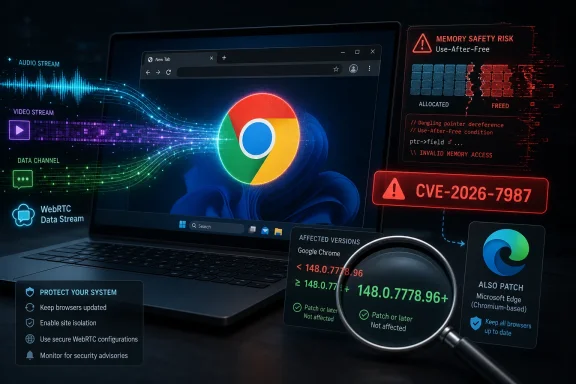
Google disclosed CVE-2026-7987 on May 6, 2026, as a WebRTC use-after-free flaw in Chrome before version 148.0.7778.96 that can let a remote attacker run code inside the browser sandbox through a crafted HTML page. That sounds narrow, almost boring, until you notice where the bug lives: WebRTC, the machinery that turns browsers into real-time communications clients. The vulnerability is rated “Medium” by Chromium but scored 8.8 “High” under CISA’s CVSS 3.1 assessment, and that mismatch is the real story. This is not just another Chrome patch; it is another reminder that the browser has become the exposed edge of the modern Windows desktop.
The phrase “execute arbitrary code inside a sandbox” has a way of lulling people into underreaction. It says, implicitly, that the attacker has not escaped the browser’s containment boundary, has not become SYSTEM, and has not necessarily touched the underlying operating system. That is all true, and it is also a dangerously incomplete way to think about browser risk in 2026.
Modern browsers are not passive document viewers. They are runtime environments with camera access, microphone access, identity tokens, enterprise cloud sessions, password managers, extension ecosystems, file-handling permissions, and persistent profiles. If an attacker can reliably execute code in the renderer or a related browser process, the sandbox may prevent immediate operating-system takeover, but it does not make the incident irrelevant.
That distinction explains the tension between Chromium’s “Medium” severity and CISA-ADP’s 8.8 “High” CVSS vector. Chromium severity often reflects exploitability in the context of Chrome’s layered defenses. CVSS, by contrast, models the attacker’s route and potential impact: network attack vector, low complexity, no privileges required, user interaction required, and high impact to confidentiality, integrity, and availability.
For Windows administrators, the practical interpretation is simple: this is a patch-now browser vulnerability, not a wait-for-Patch-Tuesday curiosity.
That is why WebRTC vulnerabilities always deserve more attention than their short CVE descriptions suggest. A crafted HTML page is not an exotic delivery mechanism. It is the web’s native transport layer for both useful applications and opportunistic exploitation.
Use-after-free bugs are especially troubling in this context because they arise from memory lifetime mistakes. A program frees an object but later continues to reference it, potentially giving an attacker a path to corrupt memory and influence execution flow. In a component like WebRTC, where asynchronous media pipelines and state changes are constant, the bug class is familiar, plausible, and hard to eliminate entirely.
The detail that CVE-2026-7987 allows arbitrary code execution inside a sandbox matters. It means this is not, by itself, a full-chain compromise. But browser exploitation has long been a chain-building business. Attackers pair renderer bugs with sandbox escapes, credential theft, extension abuse, OAuth session hijacking, or social engineering that converts browser footholds into durable access.
This is where desktop security still gets embarrassingly manual in many organizations. Chrome generally updates itself, but that sentence hides a fleet of exceptions: powered-off laptops, non-persistent VDI images, kiosk systems, developer workstations with update policies changed, servers where browsers should not be present but are, and endpoints waiting for a relaunch that users postpone indefinitely.
The browser update is not complete when the package lands on disk. It is complete when the running browser process has restarted into the fixed version. That distinction matters for a vulnerability delivered through a web page, because the exposed process is exactly the one users tend to keep open for days.
For managed Windows environments, the operational test is straightforward. Inventory the installed browser version, inventory the running browser version where tooling supports it, force or prompt relaunches where necessary, and do not assume that Microsoft Edge is out of scope just because the CVE names Google Chrome.
That does not mean every Chromium CVE affects every Chromium-derived product in precisely the same way. Vendors may compile features differently, disable components, ship patches on different schedules, or carry additional mitigations. But WebRTC is not an obscure optional curiosity in the modern browser stack. If a Chromium-based browser exposes WebRTC functionality, administrators should look for the vendor’s corresponding security update rather than treating the Chrome advisory as a Google-only event.
This is especially important on Windows, where Chrome and Edge commonly coexist. Enterprises often manage Edge through Microsoft policy and Chrome through Google policy, or manage one tightly while letting the other drift as a “secondary” browser. Attackers do not care which browser the help desk prefers. They care which vulnerable executable opens the malicious page.
The rise of embedded Chromium runtimes complicates the picture further. Electron apps, WebView2-based applications, communication clients, and vendor-bundled browsers can lag behind the stable browser channel. CVE-2026-7987 is specifically described against Google Chrome, but the lesson for IT is broader: browser-engine exposure now lives in more places than the browser icon on the taskbar.
CISA-ADP has already supplied a CVSS 3.1 vector of AV:N/AC:L/PR:N/UI:R/S:U/C:H/I:H/A:H, producing a base score of 8.8. That is a loud signal even if the NVD enrichment process is still catching up. The absence of a NIST score is not evidence of low severity; it is evidence that the public vulnerability data pipeline is still being populated.
This matters because many organizations have automated severity gates that treat “N/A” as “not urgent.” A vulnerability with no NVD score can fall through dashboards, service-level agreements, and exception workflows. The result is a policy failure masquerading as a data-quality issue.
The better model is to combine vendor severity, known affected versions, exploit prerequisites, component exposure, and third-party scoring. For CVE-2026-7987, all of those factors point toward rapid remediation. It is remotely reachable, requires only user interaction with a crafted page, affects a high-value browser component, and has a fixed Chrome version available.
That is not much of a barrier. Users visit pages constantly, including pages delivered by email links, ads, search results, compromised legitimate sites, chat messages, support portals, QR codes, and embedded SaaS workflows. A crafted HTML page does not need to arrive with a skull-and-crossbones banner. It can be part of a watering-hole compromise, a malicious redirect chain, or a lure that looks like a meeting invite.
This is why browsers remain such attractive targets even after years of sandboxing improvements. The user is already trained to feed the browser untrusted content all day. The security model assumes that hostile content will be parsed safely, not that users can reliably identify hostile content before parsing it.
For defenders, “user interaction required” should lower panic, not urgency. It means the bug is not a wormable network service vulnerability. It does not mean the bug is difficult to trigger in a real enterprise environment.
But the sandbox is not magic. It cannot make compromised browser state trustworthy. It cannot retroactively protect data the browser process is legitimately allowed to access. It cannot stop every path through extensions, tokens, cookies, local storage, clipboard interactions, download prompts, federation sessions, or chained vulnerabilities.
The language “inside a sandbox” should therefore be read as a mitigation boundary, not as a dismissal. A contained exploit still gives attackers a foothold in the application where users authenticate to Microsoft 365, Google Workspace, Salesforce, GitHub, ServiceNow, banking portals, admin consoles, and internal web apps. In some environments, that is already the crown-jewel interface.
This is where old mental models fail. Administrators once thought of browser compromise as a route to malware installation. Today it may be a route to session theft, business email compromise, cloud console access, or tampering with data through the victim’s already-authenticated browser context. The endpoint may never light up with a traditional executable payload.
That means update policy should define maximum browser age in hours or days, not merely enable automatic updates and hope for the best. It means relaunch enforcement should be a security control, not a user-experience afterthought. It also means vulnerability management teams need visibility into browser variants, channels, and embedded runtimes.
Chrome’s stable channel update reportedly addressed more than one hundred security fixes in the same release family. CVE-2026-7987 is one item in that broader patch train, not the sole reason to move. When a browser update ships with dozens of memory-safety and engine fixes, delaying it because one CVE is “only Medium” misunderstands the cumulative risk.
Enterprises should also be wary of version pinning. Holding back browser versions for compatibility may feel safe for legacy applications, but it creates an ever-widening vulnerability window in the software most exposed to untrusted content. If a business-critical web app cannot survive current browser security updates, that app has become part of the attack surface.
The same habit should apply to Edge and other Chromium-based browsers. The easiest mistake is to update the browser you use every day and forget the one you use once a month for a stubborn website, a work login, or a streaming service. Dormant browsers still become dangerous when they are invoked by links, file associations, or user habit.
Users should also remember that browser updates do not always protect already-open sessions until restart. If the update button says “Relaunch,” the machine is still in the awkward middle state: patched code may be staged, but the exposed process may still be old. Relaunching is not housekeeping; it is part of remediation.
The good news is that there is no public indication in the supplied CVE detail that CVE-2026-7987 is being actively exploited in the wild. That absence should be treated as reassuring but temporary. Once a CVE is public and a patch exists, attackers can study the fix, infer the bug, and race slow-moving fleets.
The healthiest environments will barely notice the scramble. Their browsers will update quickly, users will be prompted or forced to relaunch, dashboards will show compliance, and exception lists will be short. The weakest environments will spend days arguing over severity labels while vulnerable browser processes continue parsing arbitrary web content.
Security teams should take the opportunity to verify the boring controls. Are Chrome and Edge both inventoried? Are portable or unmanaged browser installs visible? Are VDI gold images updated? Are kiosk and shared-use systems included? Are relaunch policies actually enforced? Are WebView2 and embedded Chromium dependencies tracked through software vendors?
These questions are not glamorous, but they are the difference between a patch and a program. Browser vulnerabilities arrive too frequently for every one to become a custom incident response project. The goal is to make this category routine without making it casual.
Source: NVD / Chromium Security Update Guide - Microsoft Security Response Center
 A Medium Chrome Bug Can Still Be a High Enterprise Problem
The phrase “execute arbitrary code inside a sandbox” has a way of lulling people into underreaction. It says, implicitly, that the attacker has not escaped the browser’s containment boundary, has not become SYSTEM, and has not necessarily touched the underlying operating system. That is all true, and it is also a dangerously incomplete way to think about browser risk in 2026.Modern browsers are not passive document viewers. They are runtime environments with camera access, microphone access, identity tokens, enterprise cloud sessions, password managers, extension ecosystems, file-handling permissions, and persistent profiles. If an attacker can reliably execute code in the renderer or a related browser process, the sandbox may prevent immediate operating-system takeover, but it does not make the incident irrelevant.
That distinction explains the tension between Chromium’s “Medium” severity and CISA-ADP’s 8.8 “High” CVSS vector. Chromium severity often reflects exploitability in the context of Chrome’s layered defenses. CVSS, by contrast, models the attacker’s route and potential impact: network attack vector, low complexity, no privileges required, user interaction required, and high impact to confidentiality, integrity, and availability.
For Windows administrators, the practical interpretation is simple: this is a patch-now browser vulnerability, not a wait-for-Patch-Tuesday curiosity.
WebRTC Is the Browser Feature That Keeps Expanding the Blast Radius
WebRTC began as one of the web’s most useful technical bets: real-time audio, video, and data channels without plugins. It made browser-based conferencing, call centers, remote support tools, telehealth, live collaboration apps, and peer-to-peer data flows feel native. The cost of that convenience is a large, complicated, performance-sensitive attack surface that has to parse untrusted media and network state at internet speed.That is why WebRTC vulnerabilities always deserve more attention than their short CVE descriptions suggest. A crafted HTML page is not an exotic delivery mechanism. It is the web’s native transport layer for both useful applications and opportunistic exploitation.
Use-after-free bugs are especially troubling in this context because they arise from memory lifetime mistakes. A program frees an object but later continues to reference it, potentially giving an attacker a path to corrupt memory and influence execution flow. In a component like WebRTC, where asynchronous media pipelines and state changes are constant, the bug class is familiar, plausible, and hard to eliminate entirely.
The detail that CVE-2026-7987 allows arbitrary code execution inside a sandbox matters. It means this is not, by itself, a full-chain compromise. But browser exploitation has long been a chain-building business. Attackers pair renderer bugs with sandbox escapes, credential theft, extension abuse, OAuth session hijacking, or social engineering that converts browser footholds into durable access.
The Version Number Is the Only Mitigation That Matters
The affected boundary is refreshingly clear: Google Chrome before 148.0.7778.96 is vulnerable, according to the CVE description. Chrome 148.0.7778.96 and later contain the fix for Linux, while Windows and macOS builds in the same stable update line include 148.0.7778.96/97. The safest administrative reading is not to debate the final digit but to confirm that Chrome has crossed the fixed 148.0.7778.96 threshold or newer.This is where desktop security still gets embarrassingly manual in many organizations. Chrome generally updates itself, but that sentence hides a fleet of exceptions: powered-off laptops, non-persistent VDI images, kiosk systems, developer workstations with update policies changed, servers where browsers should not be present but are, and endpoints waiting for a relaunch that users postpone indefinitely.
The browser update is not complete when the package lands on disk. It is complete when the running browser process has restarted into the fixed version. That distinction matters for a vulnerability delivered through a web page, because the exposed process is exactly the one users tend to keep open for days.
For managed Windows environments, the operational test is straightforward. Inventory the installed browser version, inventory the running browser version where tooling supports it, force or prompt relaunches where necessary, and do not assume that Microsoft Edge is out of scope just because the CVE names Google Chrome.
Chromium’s Shared Codebase Turns One Vendor Advisory Into a Fleet Question
MSRC listing CVE-2026-7987 is not an accident. Microsoft Edge is Chromium-based, and Microsoft tracks Chromium vulnerabilities that affect Edge through its own Security Update Guide. The same underlying browser engine that simplifies web compatibility also means that a Chrome memory-safety fix can become an Edge security fix, an Electron concern, or a downstream browser concern depending on code reuse and release cadence.That does not mean every Chromium CVE affects every Chromium-derived product in precisely the same way. Vendors may compile features differently, disable components, ship patches on different schedules, or carry additional mitigations. But WebRTC is not an obscure optional curiosity in the modern browser stack. If a Chromium-based browser exposes WebRTC functionality, administrators should look for the vendor’s corresponding security update rather than treating the Chrome advisory as a Google-only event.
This is especially important on Windows, where Chrome and Edge commonly coexist. Enterprises often manage Edge through Microsoft policy and Chrome through Google policy, or manage one tightly while letting the other drift as a “secondary” browser. Attackers do not care which browser the help desk prefers. They care which vulnerable executable opens the malicious page.
The rise of embedded Chromium runtimes complicates the picture further. Electron apps, WebView2-based applications, communication clients, and vendor-bundled browsers can lag behind the stable browser channel. CVE-2026-7987 is specifically described against Google Chrome, but the lesson for IT is broader: browser-engine exposure now lives in more places than the browser icon on the taskbar.
NVD’s Empty Score Box Is Not a Reason to Wait
The NVD entry for CVE-2026-7987 was published and modified on May 6, 2026, but NIST had not yet provided its own CVSS 4.0, 3.x, or 2.0 base score in the details supplied. That gap is common in the early hours of vulnerability publication. It is also a trap for teams whose patch dashboards use NVD scoring as the primary triage trigger.CISA-ADP has already supplied a CVSS 3.1 vector of AV:N/AC:L/PR:N/UI:R/S:U/C:H/I:H/A:H, producing a base score of 8.8. That is a loud signal even if the NVD enrichment process is still catching up. The absence of a NIST score is not evidence of low severity; it is evidence that the public vulnerability data pipeline is still being populated.
This matters because many organizations have automated severity gates that treat “N/A” as “not urgent.” A vulnerability with no NVD score can fall through dashboards, service-level agreements, and exception workflows. The result is a policy failure masquerading as a data-quality issue.
The better model is to combine vendor severity, known affected versions, exploit prerequisites, component exposure, and third-party scoring. For CVE-2026-7987, all of those factors point toward rapid remediation. It is remotely reachable, requires only user interaction with a crafted page, affects a high-value browser component, and has a fixed Chrome version available.
“User Interaction Required” Is Doing Too Much Work
The CVSS vector includes UI:R, meaning user interaction is required. In ordinary language, that sounds like a meaningful barrier. In browser security, it often means “the victim has to visit a page.”That is not much of a barrier. Users visit pages constantly, including pages delivered by email links, ads, search results, compromised legitimate sites, chat messages, support portals, QR codes, and embedded SaaS workflows. A crafted HTML page does not need to arrive with a skull-and-crossbones banner. It can be part of a watering-hole compromise, a malicious redirect chain, or a lure that looks like a meeting invite.
This is why browsers remain such attractive targets even after years of sandboxing improvements. The user is already trained to feed the browser untrusted content all day. The security model assumes that hostile content will be parsed safely, not that users can reliably identify hostile content before parsing it.
For defenders, “user interaction required” should lower panic, not urgency. It means the bug is not a wormable network service vulnerability. It does not mean the bug is difficult to trigger in a real enterprise environment.
The Sandbox Is a Seat Belt, Not a Crash-Free Car
Chrome’s sandbox is one of the great security engineering successes of the modern desktop. It limits what compromised renderer code can do, isolates processes, and forces attackers to work harder. It is the reason many browser bugs end at contained code execution rather than immediate device takeover.But the sandbox is not magic. It cannot make compromised browser state trustworthy. It cannot retroactively protect data the browser process is legitimately allowed to access. It cannot stop every path through extensions, tokens, cookies, local storage, clipboard interactions, download prompts, federation sessions, or chained vulnerabilities.
The language “inside a sandbox” should therefore be read as a mitigation boundary, not as a dismissal. A contained exploit still gives attackers a foothold in the application where users authenticate to Microsoft 365, Google Workspace, Salesforce, GitHub, ServiceNow, banking portals, admin consoles, and internal web apps. In some environments, that is already the crown-jewel interface.
This is where old mental models fail. Administrators once thought of browser compromise as a route to malware installation. Today it may be a route to session theft, business email compromise, cloud console access, or tampering with data through the victim’s already-authenticated browser context. The endpoint may never light up with a traditional executable payload.
The Real Patch Boundary Runs Through Policy, Not Just Software
The technical fix is easy to describe: update Chrome to 148.0.7778.96 or later and apply corresponding updates for Chromium-based browsers as vendors publish them. The organizational fix is harder. It requires treating browsers as tier-one enterprise software, not consumer utilities that happen to be installed on managed machines.That means update policy should define maximum browser age in hours or days, not merely enable automatic updates and hope for the best. It means relaunch enforcement should be a security control, not a user-experience afterthought. It also means vulnerability management teams need visibility into browser variants, channels, and embedded runtimes.
Chrome’s stable channel update reportedly addressed more than one hundred security fixes in the same release family. CVE-2026-7987 is one item in that broader patch train, not the sole reason to move. When a browser update ships with dozens of memory-safety and engine fixes, delaying it because one CVE is “only Medium” misunderstands the cumulative risk.
Enterprises should also be wary of version pinning. Holding back browser versions for compatibility may feel safe for legacy applications, but it creates an ever-widening vulnerability window in the software most exposed to untrusted content. If a business-critical web app cannot survive current browser security updates, that app has become part of the attack surface.
Home Users Get the Same Risk With Fewer Dashboards
For individual Windows users, the advice is less elaborate but just as urgent. Open Chrome’s About page, let it check for updates, and relaunch the browser. If Chrome reports version 148.0.7778.96 or later, the specific vulnerable version boundary described by CVE-2026-7987 has been crossed.The same habit should apply to Edge and other Chromium-based browsers. The easiest mistake is to update the browser you use every day and forget the one you use once a month for a stubborn website, a work login, or a streaming service. Dormant browsers still become dangerous when they are invoked by links, file associations, or user habit.
Users should also remember that browser updates do not always protect already-open sessions until restart. If the update button says “Relaunch,” the machine is still in the awkward middle state: patched code may be staged, but the exposed process may still be old. Relaunching is not housekeeping; it is part of remediation.
The good news is that there is no public indication in the supplied CVE detail that CVE-2026-7987 is being actively exploited in the wild. That absence should be treated as reassuring but temporary. Once a CVE is public and a patch exists, attackers can study the fix, infer the bug, and race slow-moving fleets.
This Patch Is Really a Test of Browser Hygiene
CVE-2026-7987 will not be remembered as the biggest Chrome vulnerability of the year unless exploitation data changes dramatically. Its value is as a diagnostic. It reveals whether an organization can move quickly on a browser engine flaw that is serious enough to matter but not dramatic enough to trigger executive war-room theater.The healthiest environments will barely notice the scramble. Their browsers will update quickly, users will be prompted or forced to relaunch, dashboards will show compliance, and exception lists will be short. The weakest environments will spend days arguing over severity labels while vulnerable browser processes continue parsing arbitrary web content.
Security teams should take the opportunity to verify the boring controls. Are Chrome and Edge both inventoried? Are portable or unmanaged browser installs visible? Are VDI gold images updated? Are kiosk and shared-use systems included? Are relaunch policies actually enforced? Are WebView2 and embedded Chromium dependencies tracked through software vendors?
These questions are not glamorous, but they are the difference between a patch and a program. Browser vulnerabilities arrive too frequently for every one to become a custom incident response project. The goal is to make this category routine without making it casual.
The May 2026 Browser Lesson Fits in Five Sentences
CVE-2026-7987 is small enough to patch quickly and important enough to expose lazy assumptions about browser risk. The immediate job is version verification, but the larger job is discipline around Chromium-based software wherever it appears.- Chrome installations older than 148.0.7778.96 should be treated as exposed to CVE-2026-7987 and updated promptly.
- The flaw sits in WebRTC, a high-value browser component used by real-time communications and collaboration workflows.
- Chromium’s “Medium” severity does not negate CISA-ADP’s 8.8 “High” CVSS assessment or the operational need to patch.
- Browser relaunch is part of the fix, because staged updates do not protect old running processes.
- Edge and other Chromium-based software should be reviewed through their own vendor update channels rather than assumed safe.
- The lack of a NIST score at publication time should not delay remediation when vendor details and alternate scoring already establish risk.
Source: NVD / Chromium Security Update Guide - Microsoft Security Response Center
