

On April 28, 2026, Google shipped Chrome 147.0.7727.137/138 for Windows and macOS and 147.0.7727.137 for Linux, fixing CVE-2026-7336, a high-severity use-after-free flaw in WebRTC that could let a remote attacker run code inside Chrome’s sandbox through a crafted HTML page. The uncomfortable part is not that Chrome had another memory-safety bug; it is that the bug lives in the machinery browsers increasingly use for real-time communication, identity workflows, customer support, collaboration, and AI-adjacent web apps. For Windows administrators, the practical answer is blunt: any Chrome build before 147.0.7727.138 should be treated as exposed where that version line applies, and Chromium-based estate management should not stop at Google Chrome. This is one of those browser CVEs that looks narrow on paper and broad in operational reality.
CVE-2026-7336 is not described as a full system compromise, and that distinction matters. The public description says arbitrary code execution occurs inside a sandbox, which means the browser’s containment architecture is still part of the story. But security teams have learned not to read “inside a sandbox” as “safe,” because modern exploitation often chains renderer or media-process bugs with a separate sandbox escape, privilege escalation, or credential theft path.
The vulnerability is a use-after-free in WebRTC, the browser stack that enables real-time audio, video, and data communications. WebRTC is not an obscure corner of the browser. It is the plumbing under browser-based meetings, softphones, remote support sessions, telehealth portals, interview platforms, classrooms, and internal collaboration tools that many organizations now treat as ordinary web traffic.
That is why this CVE deserves more than the usual “update Chrome” shrug. A crafted HTML page is not a theoretical delivery mechanism in 2026; it is the default unit of interaction for work. If a flaw can be reached through web content and requires only user interaction, then phishing, compromised ad inventory, malicious links in messaging tools, and booby-trapped support portals all become plausible routes into the vulnerable code path.
The CVSS 3.1 vector supplied through CISA’s ADP enrichment tells the same operational story: network attack vector, low attack complexity, no privileges required, user interaction required, and high impact across confidentiality, integrity, and availability. In plain English, an attacker does not need an account on the victim’s machine, does not need local network access, and does not need a baroque precondition. They need to get a user to load the wrong thing.
In many environments, “latest Chrome” is not a state; it is a hope. Users may have Chrome open for days. Virtual desktops may refresh on a cadence that does not align with Google’s rollout. Golden images may be current on paper and stale in practice. Third-party patch tools may detect the installed version but not whether the browser has restarted into the fixed build.
That restart problem remains one of the browser’s most mundane security weaknesses. Chrome can stage an update silently, but the running process is still the thing the user is trusting with credentials, sessions, microphones, cameras, local files, and corporate SaaS access. If the browser has not relaunched, the organization may have a patched installer and an unpatched risk.
For WindowsForum readers, this is where the advice becomes less glamorous and more important. Check the actual running browser version, not just the package inventory. If you manage Chrome through enterprise policy, use your management console, endpoint tooling, or software inventory platform to distinguish devices that have installed the update from devices that have restarted into it. The difference can be the difference between compliance theater and reduced exposure.
A user does not find it suspicious when a site asks for camera or microphone access during a call. A support agent does not find it strange when a customer portal spins up a real-time session. A sales team does not think twice before joining a browser-based demo. WebRTC has normalized interaction patterns that place complex parsing, device access, media handling, and network negotiation close to untrusted content.
A use-after-free flaw is especially worrying in that context because it points to memory lifetime management: software continues to use an object after it has been freed. In a benign crash, that is instability. In an exploit, it can become control over memory in a way that lets attacker-supplied data influence execution. Browser sandboxes, compiler hardening, memory allocators, and exploit mitigations all make that harder than it used to be, but not impossible.
The public record does not say CVE-2026-7336 was exploited in the wild. That absence matters and should keep the story grounded. But Chrome’s own release note restricted bug details, as usual, until most users have been updated; that is prudent disclosure, not proof of safety. Once a patch ships, attackers can diff code, study related bugs, and look for both direct exploitability and sibling flaws.
Chrome’s security model is constantly absorbing risk from a vast feature surface. Rendering is only one part of it. Modern browsers include graphics stacks, media codecs, Bluetooth and MIDI interfaces, accessibility layers, PDF handling, identity integration, remote desktop hooks, password managers, extension APIs, and real-time communications. Calling Chrome “a browser” is now a historical courtesy.
For defenders, the density of fixes in a single release changes the patch calculus. If you are waiting for a specific CVE to become famous before accelerating deployment, you are already behind. A release like this is not merely a response to one WebRTC bug; it is a reminder that exploit developers shop the entire diff.
The notable detail for CVE-2026-7336 is that Google credited Mozilla with reporting it. That kind of cross-vendor reporting is healthy, especially in shared web platform components where one vendor’s discovery may illuminate another vendor’s exposure. It also reinforces a point enterprise buyers sometimes miss: browser security is an ecosystem discipline, not a single-vendor virtue contest.
The exact remediation path for Edge depends on Microsoft’s corresponding Edge release and channel timing, not simply Google’s Chrome version number. But the governance question is straightforward: if your vulnerability management system sees CVE-2026-7336 through MSRC, do not assume Chrome is the only asset class that matters. Inventory Chromium-based browsers, embedded browser runtimes, WebView-dependent applications, and packaged enterprise apps that may lag behind upstream Chromium.
This is where many organizations undercount browser risk. They patch Chrome because it is visible, patch Edge because it is bundled, and forget the Chromium-based wrapper app used by a line-of-business vendor. They check the browser on the physical endpoint and miss the non-persistent VDI image. They update the standard desktop image but leave kiosk systems, conference-room PCs, call-center terminals, and developer workstations drifting.
Microsoft’s presence in the disclosure chain also affects communication. Windows teams tend to triage MSRC items alongside Patch Tuesday vulnerabilities, even when the root fix arrives through an application update channel. That hybrid reality can confuse ownership. Is CVE-2026-7336 a desktop engineering issue, a security operations issue, an app packaging issue, or a browser policy issue? The answer, inconveniently, is yes.
But sandboxes are not magical containment fields. Code execution inside the browser can still matter if it gives an attacker access to same-origin data, browser process interactions, tokens exposed to the compromised context, or a foothold for a second vulnerability. Even without a clean sandbox escape, browser compromise can be damaging in workflows where the browser is the front door to everything else.
The modern enterprise has moved so much authority into the browser that “inside Chrome” may still mean inside the user’s workday. SaaS consoles, cloud dashboards, CRM systems, admin portals, password managers, SSO flows, device management portals, and internal wikis all live there. A browser exploit does not need to write a kernel driver to ruin a Tuesday.
That does not mean panic is warranted. It means severity should be interpreted in context. A high-severity WebRTC use-after-free with remote code execution potential and user interaction required should land above routine hygiene and below confirmed in-the-wild emergency response. The right posture is urgency with verification, not drama with screenshots.
The CPE configuration in the NVD change history is also revealing. It lists Google Chrome versions up to but excluding 147.0.7727.138 and associates the application with Windows, Linux, and macOS platform entries. That answers the “are we missing a CPE?” anxiety in one narrow sense: NVD did add a Chrome CPE configuration after initial publication. But it does not answer the broader asset-management question of every Chromium-derived product that might consume the same vulnerable code.
This is a recurring weakness in vulnerability data pipelines. CPEs are useful for matching known products, but they are not a complete map of software supply chains. A Chromium component can be patched upstream, carried into Chrome, incorporated into Edge, embedded in Electron applications, or forked into specialized browser shells. CPE matching will not always see that lineage quickly or cleanly.
That is why organizations that treat NVD as a complete inventory oracle tend to miss things. NVD tells you a standardized vulnerability story. Your software bill of materials, endpoint telemetry, browser management data, and vendor advisories tell you whether that story applies to the machines and applications you actually run.
WebRTC makes the compatibility argument especially awkward. Organizations may rely on it for internal communications, but the vulnerable component is precisely the one used by interaction-heavy web apps. Blocking WebRTC outright can break legitimate workflows. Leaving old builds in place preserves exploitability. The practical path is rapid patching plus targeted policy review, not broad feature panic.
Administrators should also be careful about relying on user self-service. A banner telling users to relaunch Chrome is not a patch strategy. Neither is a helpdesk article explaining how to check “About Google Chrome.” Those are useful adjuncts, but enterprise risk reduction comes from enforced update policies, restart nudges, deadline controls, and telemetry that proves completion.
There is also a home-user angle for WindowsForum’s enthusiast crowd. If you maintain family PCs, small-office machines, or gaming rigs used for work logins, check the browser version. Chrome’s update cadence is fast enough that many users assume they are current when they are not. The fix is simple: open the browser’s About page, let the update complete, and relaunch.
That persistence matters because defenders sometimes mistake patch frequency for failure. In browser security, patch frequency is partly evidence that the detection and response machine is working. The uncomfortable alternative is not fewer bugs; it is fewer bugs being found before attackers find them.
Still, the industry should not normalize this forever. WebRTC, media, graphics, and parsing-heavy components remain rich targets because they combine complex input, performance pressure, concurrency, and legacy code. The long-term fix is not better advisory prose. It is continued migration toward memory-safe implementation where feasible, stronger compartmentalization where migration is slow, and fewer privileged assumptions around complex media stacks.
For now, administrators live in the gap between architectural ambition and operational reality. The browser will remain the most aggressively attacked application on most desktops because it is exposed to the internet by design and trusted by users by habit. That makes fast browser patching one of the highest-return security controls an organization can operate.
Source: NVD / Chromium Security Update Guide - Microsoft Security Response Center
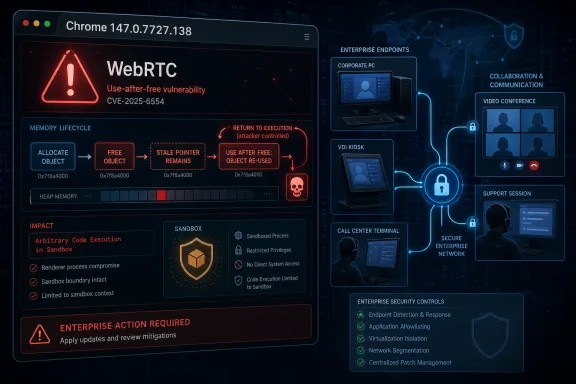 A Browser Bug Becomes an Enterprise Boundary Problem
CVE-2026-7336 is not described as a full system compromise, and that distinction matters. The public description says arbitrary code execution occurs inside a sandbox, which means the browser’s containment architecture is still part of the story. But security teams have learned not to read “inside a sandbox” as “safe,” because modern exploitation often chains renderer or media-process bugs with a separate sandbox escape, privilege escalation, or credential theft path.The vulnerability is a use-after-free in WebRTC, the browser stack that enables real-time audio, video, and data communications. WebRTC is not an obscure corner of the browser. It is the plumbing under browser-based meetings, softphones, remote support sessions, telehealth portals, interview platforms, classrooms, and internal collaboration tools that many organizations now treat as ordinary web traffic.
That is why this CVE deserves more than the usual “update Chrome” shrug. A crafted HTML page is not a theoretical delivery mechanism in 2026; it is the default unit of interaction for work. If a flaw can be reached through web content and requires only user interaction, then phishing, compromised ad inventory, malicious links in messaging tools, and booby-trapped support portals all become plausible routes into the vulnerable code path.
The CVSS 3.1 vector supplied through CISA’s ADP enrichment tells the same operational story: network attack vector, low attack complexity, no privileges required, user interaction required, and high impact across confidentiality, integrity, and availability. In plain English, an attacker does not need an account on the victim’s machine, does not need local network access, and does not need a baroque precondition. They need to get a user to load the wrong thing.
The Patch Number Is the Policy
The line administrators should care about is Chrome 147.0.7727.138, because the CVE description defines Google Chrome prior to that build as vulnerable. Google’s April 28 stable-channel post says the update moved Windows and macOS to 147.0.7727.137/138 and Linux to 147.0.7727.137, with rollout over the following days and weeks. That split is typical Chrome release-channel bookkeeping, but it is also the kind of detail that makes vulnerability dashboards noisy.In many environments, “latest Chrome” is not a state; it is a hope. Users may have Chrome open for days. Virtual desktops may refresh on a cadence that does not align with Google’s rollout. Golden images may be current on paper and stale in practice. Third-party patch tools may detect the installed version but not whether the browser has restarted into the fixed build.
That restart problem remains one of the browser’s most mundane security weaknesses. Chrome can stage an update silently, but the running process is still the thing the user is trusting with credentials, sessions, microphones, cameras, local files, and corporate SaaS access. If the browser has not relaunched, the organization may have a patched installer and an unpatched risk.
For WindowsForum readers, this is where the advice becomes less glamorous and more important. Check the actual running browser version, not just the package inventory. If you manage Chrome through enterprise policy, use your management console, endpoint tooling, or software inventory platform to distinguish devices that have installed the update from devices that have restarted into it. The difference can be the difference between compliance theater and reduced exposure.
WebRTC Is the Feature Attackers Do Not Have to Explain
WebRTC’s security problem is not that it is badly conceived. Quite the opposite: it is a powerful, standardized way to make the browser do things that once required native applications. The problem is that powerful browser subsystems have become ambient infrastructure, and ambient infrastructure is where attackers love to live.A user does not find it suspicious when a site asks for camera or microphone access during a call. A support agent does not find it strange when a customer portal spins up a real-time session. A sales team does not think twice before joining a browser-based demo. WebRTC has normalized interaction patterns that place complex parsing, device access, media handling, and network negotiation close to untrusted content.
A use-after-free flaw is especially worrying in that context because it points to memory lifetime management: software continues to use an object after it has been freed. In a benign crash, that is instability. In an exploit, it can become control over memory in a way that lets attacker-supplied data influence execution. Browser sandboxes, compiler hardening, memory allocators, and exploit mitigations all make that harder than it used to be, but not impossible.
The public record does not say CVE-2026-7336 was exploited in the wild. That absence matters and should keep the story grounded. But Chrome’s own release note restricted bug details, as usual, until most users have been updated; that is prudent disclosure, not proof of safety. Once a patch ships, attackers can diff code, study related bugs, and look for both direct exploitability and sibling flaws.
The April 28 Update Was Not a One-Bug Event
CVE-2026-7336 arrived as part of a much larger Chrome desktop security update. Google listed 30 security fixes in the April 28 release, including several critical use-after-free issues and a long list of high-severity memory and validation bugs across Canvas, Accessibility, Views, GPU, ANGLE, Media, WebMIDI, Cast, Codecs, WebRTC, WebView, and V8. That breadth is the larger story.Chrome’s security model is constantly absorbing risk from a vast feature surface. Rendering is only one part of it. Modern browsers include graphics stacks, media codecs, Bluetooth and MIDI interfaces, accessibility layers, PDF handling, identity integration, remote desktop hooks, password managers, extension APIs, and real-time communications. Calling Chrome “a browser” is now a historical courtesy.
For defenders, the density of fixes in a single release changes the patch calculus. If you are waiting for a specific CVE to become famous before accelerating deployment, you are already behind. A release like this is not merely a response to one WebRTC bug; it is a reminder that exploit developers shop the entire diff.
The notable detail for CVE-2026-7336 is that Google credited Mozilla with reporting it. That kind of cross-vendor reporting is healthy, especially in shared web platform components where one vendor’s discovery may illuminate another vendor’s exposure. It also reinforces a point enterprise buyers sometimes miss: browser security is an ecosystem discipline, not a single-vendor virtue contest.
Edge Turns a Chrome CVE Into a Windows Estate Question
The user-provided MSRC link is a clue to the real audience for this bug: Windows administrators who live in Microsoft’s security universe but run Google’s browser engine everywhere. Microsoft Edge is Chromium-based, and Microsoft’s Edge security release notes routinely state when Edge incorporates security updates from the Chromium project. That means a Chromium flaw rarely remains “just a Chrome problem” for Windows shops.The exact remediation path for Edge depends on Microsoft’s corresponding Edge release and channel timing, not simply Google’s Chrome version number. But the governance question is straightforward: if your vulnerability management system sees CVE-2026-7336 through MSRC, do not assume Chrome is the only asset class that matters. Inventory Chromium-based browsers, embedded browser runtimes, WebView-dependent applications, and packaged enterprise apps that may lag behind upstream Chromium.
This is where many organizations undercount browser risk. They patch Chrome because it is visible, patch Edge because it is bundled, and forget the Chromium-based wrapper app used by a line-of-business vendor. They check the browser on the physical endpoint and miss the non-persistent VDI image. They update the standard desktop image but leave kiosk systems, conference-room PCs, call-center terminals, and developer workstations drifting.
Microsoft’s presence in the disclosure chain also affects communication. Windows teams tend to triage MSRC items alongside Patch Tuesday vulnerabilities, even when the root fix arrives through an application update channel. That hybrid reality can confuse ownership. Is CVE-2026-7336 a desktop engineering issue, a security operations issue, an app packaging issue, or a browser policy issue? The answer, inconveniently, is yes.
The Sandbox Is a Seatbelt, Not a Permission Slip
The phrase “inside a sandbox” deserves careful treatment. Chrome’s sandbox is one of the reasons web exploitation is harder than it once was. It limits what compromised renderer or content-processing code can do directly, forcing attackers to clear additional hurdles before they can touch the broader operating system.But sandboxes are not magical containment fields. Code execution inside the browser can still matter if it gives an attacker access to same-origin data, browser process interactions, tokens exposed to the compromised context, or a foothold for a second vulnerability. Even without a clean sandbox escape, browser compromise can be damaging in workflows where the browser is the front door to everything else.
The modern enterprise has moved so much authority into the browser that “inside Chrome” may still mean inside the user’s workday. SaaS consoles, cloud dashboards, CRM systems, admin portals, password managers, SSO flows, device management portals, and internal wikis all live there. A browser exploit does not need to write a kernel driver to ruin a Tuesday.
That does not mean panic is warranted. It means severity should be interpreted in context. A high-severity WebRTC use-after-free with remote code execution potential and user interaction required should land above routine hygiene and below confirmed in-the-wild emergency response. The right posture is urgency with verification, not drama with screenshots.
The NVD Record Shows the Speed and the Gaps
The NVD entry for CVE-2026-7336 was published on April 28 and modified on April 30, with NIST enrichment still not providing its own CVSS score at the time reflected in the user’s data. CISA’s ADP enrichment supplied a CVSS 3.1 base score of 8.8, which puts the vulnerability firmly in high-severity territory. The weakness is classified as CWE-416, use after free.The CPE configuration in the NVD change history is also revealing. It lists Google Chrome versions up to but excluding 147.0.7727.138 and associates the application with Windows, Linux, and macOS platform entries. That answers the “are we missing a CPE?” anxiety in one narrow sense: NVD did add a Chrome CPE configuration after initial publication. But it does not answer the broader asset-management question of every Chromium-derived product that might consume the same vulnerable code.
This is a recurring weakness in vulnerability data pipelines. CPEs are useful for matching known products, but they are not a complete map of software supply chains. A Chromium component can be patched upstream, carried into Chrome, incorporated into Edge, embedded in Electron applications, or forked into specialized browser shells. CPE matching will not always see that lineage quickly or cleanly.
That is why organizations that treat NVD as a complete inventory oracle tend to miss things. NVD tells you a standardized vulnerability story. Your software bill of materials, endpoint telemetry, browser management data, and vendor advisories tell you whether that story applies to the machines and applications you actually run.
The Real Exposure Is in the Long Tail
Consumer Chrome users will mostly receive this update through Google’s normal automatic update flow, assuming they relaunch the browser. Managed environments are more complicated. Enterprises often delay browser updates for compatibility testing, extension validation, or change-control windows. That caution can be rational, but it becomes dangerous when it turns a high-severity browser fix into a week-long negotiation.WebRTC makes the compatibility argument especially awkward. Organizations may rely on it for internal communications, but the vulnerable component is precisely the one used by interaction-heavy web apps. Blocking WebRTC outright can break legitimate workflows. Leaving old builds in place preserves exploitability. The practical path is rapid patching plus targeted policy review, not broad feature panic.
Administrators should also be careful about relying on user self-service. A banner telling users to relaunch Chrome is not a patch strategy. Neither is a helpdesk article explaining how to check “About Google Chrome.” Those are useful adjuncts, but enterprise risk reduction comes from enforced update policies, restart nudges, deadline controls, and telemetry that proves completion.
There is also a home-user angle for WindowsForum’s enthusiast crowd. If you maintain family PCs, small-office machines, or gaming rigs used for work logins, check the browser version. Chrome’s update cadence is fast enough that many users assume they are current when they are not. The fix is simple: open the browser’s About page, let the update complete, and relaunch.
Memory Safety Is Still the Browser Industry’s Unpaid Debt
The repeated appearance of use-after-free bugs in Chrome security releases is not an indictment of one team’s competence. It is an indictment of the amount of memory-unsafe code that still underpins the web platform. Browser vendors have invested heavily in fuzzing, sanitizers, sandboxing, site isolation, MiraclePtr-style mitigations, Rust experiments, and exploit hardening. The bug class persists anyway.That persistence matters because defenders sometimes mistake patch frequency for failure. In browser security, patch frequency is partly evidence that the detection and response machine is working. The uncomfortable alternative is not fewer bugs; it is fewer bugs being found before attackers find them.
Still, the industry should not normalize this forever. WebRTC, media, graphics, and parsing-heavy components remain rich targets because they combine complex input, performance pressure, concurrency, and legacy code. The long-term fix is not better advisory prose. It is continued migration toward memory-safe implementation where feasible, stronger compartmentalization where migration is slow, and fewer privileged assumptions around complex media stacks.
For now, administrators live in the gap between architectural ambition and operational reality. The browser will remain the most aggressively attacked application on most desktops because it is exposed to the internet by design and trusted by users by habit. That makes fast browser patching one of the highest-return security controls an organization can operate.
The Version Check That Matters This Week
The concrete response to CVE-2026-7336 is refreshingly direct, even if the ecosystem around it is messy. Patch Chrome, verify the version, make users relaunch, and widen the search to Chromium-based software that may not update on Chrome’s schedule. The goal is not to memorize the CVE; it is to collapse the time between upstream fix and endpoint reality.- Chrome installations older than 147.0.7727.138 should be treated as vulnerable where that version threshold applies.
- The April 28 Chrome stable update fixed 30 security issues, so delaying deployment over a single-CVE risk debate misses the broader exposure.
- WebRTC raises the practical risk because it is widely used by normal collaboration, support, and communications workflows.
- The public description indicates code execution inside Chrome’s sandbox, which reduces but does not eliminate security concern.
- Microsoft-focused teams should check Edge and other Chromium-based components rather than treating the MSRC entry as a Google-only problem.
- Inventory data should confirm both installation and browser restart, because a staged update is not the same as a running fixed browser.
Source: NVD / Chromium Security Update Guide - Microsoft Security Response Center
