

Google and Microsoft disclosed CVE-2026-7339 on April 28, 2026, as a heap-based buffer overflow in Chromium’s WebRTC component affecting Google Chrome before 147.0.7727.138, with exploitation possible through a crafted HTML page that triggers heap corruption after user interaction. The bug is labeled “Medium” by Chromium but scored “High” by CISA’s ADP enrichment, and that mismatch is the story. In the modern browser stack, a medium-severity WebRTC memory bug is rarely just a medium operational problem. It is a reminder that the browser is now the workstation’s most exposed runtime, and Chromium’s shared plumbing turns one vendor’s patch note into a fleet-management event.
CVE-2026-7339 is not the loudest item in Google’s late-April Chrome update, which shipped with 30 security fixes and several more eye-catching memory-safety flaws. But the WebRTC location matters. WebRTC is the machinery that lets browsers do real-time audio, video, and peer-to-peer data channels without a plug-in, which means it sits close to network-facing media parsing and complex state transitions.
That complexity is why WebRTC bugs tend to make administrators uneasy even when the advisory language is measured. A crafted HTML page is a low-friction delivery vehicle, and the CVSS vector used by CISA-ADP describes a network attack with low complexity, no privileges required, and user interaction required. In ordinary English: the attacker needs the victim to load something, but does not need an account on the machine.
The Chromium severity of “Medium” should not be read as “ignore until the next maintenance window.” Browser security severity is often shaped by exploitability assumptions, sandboxing, mitigations, and whether a bug is known to chain cleanly into code execution or sandbox escape. Enterprise risk, by contrast, is shaped by exposure, fleet size, update latency, and how many Chromium-derived products share the same vulnerable code.
That is why the advisory feels more important than its label. The bug is not known, from the public record, to be exploited in the wild. It is not presented as a zero-day. But it affects a component built for rich, real-time interaction with untrusted web content, and it was fixed in a Chrome release that administrators should already be moving through their deployment rings.
That sounds pedantic until you remember how many enterprises do not actually know their browser versions with workstation-level confidence. They know what their patch tool intended to push. They know what the software catalog says. They know what the gold image contains. But browsers update fast, users keep machines asleep, VDI pools persist in unexpected ways, and line-of-business packaging sometimes lags behind Google’s release cadence.
Microsoft’s involvement through the Security Update Guide is also significant for WindowsForum readers. This is a Chromium CVE, not a Windows kernel flaw, but Microsoft tracks Chromium vulnerabilities because Edge is Chromium-based and because enterprise defenders often live inside Microsoft’s security ecosystem. When MSRC carries the CVE, it becomes part of the same vulnerability-management bloodstream as Exchange, Office, Windows, and Azure advisories.
That does not mean every Chromium CVE is automatically a Windows emergency. It means Windows administrators must stop treating browser updates as a consumer-app nuisance. Chrome and Edge are application platforms, identity brokers, PDF handlers, video clients, WebAssembly runtimes, password managers, and privileged SSO surfaces, all sitting in front of the user for most of the workday.
Modern browsers are not the soft targets they were twenty years ago. Chrome’s sandbox, site isolation, hardened allocators, control-flow defenses, and exploit mitigations all raise the cost of turning a single memory bug into a reliable compromise. That is why many browser CVEs are disclosed with cautious phrasing: “potentially exploit heap corruption” is not the same as “remote code execution observed in the wild.”
But defenders should be careful not to overcorrect. Memory corruption in a browser remains valuable because attackers do not need every bug to be perfect on its own. A renderer bug can become part of a chain. A media-processing bug can be paired with an information leak. A browser compromise can become a credential theft operation even without full device takeover if the attacker lands in the right session context.
WebRTC raises the stakes because it exists to make browsers handle interactive media and network negotiation in real time. That makes it a fertile target surface: codecs, packet timing, device permissions, ICE negotiation, STUN/TURN behavior, and JavaScript-facing APIs all converge in a part of the browser that users encounter through meetings, support portals, collaboration suites, and embedded widgets. Even if CVE-2026-7339 is narrowly scoped, its neighborhood is anything but narrow.
The attacker still needs user interaction under the published CVSS vector. That matters, because it separates this class of bug from no-click exploitation. But user interaction on the web is not a strong barrier. Most enterprise users are trained, by daily workflow, to click links to do their jobs.
This is one reason browser CVEs keep compressing the time available for security teams. The attack surface is universal, the exploit delivery model is familiar, and the remediation path often depends on software that is supposed to update itself but may be pinned, deferred, proxied, repackaged, or blocked by policy. A vulnerability can move from advisory to exploit kit faster than a cautious change-control board can convene.
The correct response is not panic. It is to treat browser patching as continuous operations rather than monthly ceremony. Chrome’s own release model assumes frequent incremental updates; enterprise defenses need to be organized around that fact instead of resenting it.
Edge does not always ship on the same visible version number as Chrome, and Microsoft’s servicing pipeline has its own release timing. That is why security teams should avoid lazy version equivalence. The right question is whether the relevant Chromium fix has landed in the product and channel actually deployed on the endpoint.
For Windows environments, that usually means checking both Chrome and Edge, then checking the management path for each. Chrome may be governed through Google Update policies, enterprise MSI deployment, third-party patch tools, or software inventory agents. Edge may be governed through Edge Update, Windows policy, Intune, Configuration Manager, or a mixture of all of them.
This is where CVE triage becomes less glamorous and more important. A vulnerability-management dashboard that shows “Chrome patched” while Edge Stable, Edge Extended Stable, or a packaged Chromium app remains stale is giving the organization false comfort. The attacker does not care which icon the user clicked.
CPEs are imperfect, often late, and sometimes maddeningly broad. Still, they are the glue between a CVE and an asset inventory. If the CPE mapping is absent or inaccurate, scanners may miss affected software, overreport unaffected systems, or leave teams reconciling results by hand.
The “Are we missing a CPE?” prompt in NVD records is a quiet admission that the vulnerability ecosystem still relies on human correction and vendor follow-through. For a Chrome vulnerability, that may sound manageable because Google Chrome is easy to identify. In real estates, the harder cases are portable installs, user-space installs, alternate channels, repackaged enterprise builds, and embedded Chromium components that do not announce themselves neatly.
This is also why CPE-based scanning should not be the only control. Endpoint telemetry, browser management consoles, software inventory, EDR process inspection, and update-service reporting should all agree on the same story. If they do not, the discrepancy is not a reporting annoyance; it is an attack surface hiding in administrative fog.
Chromium’s severity process is rooted in browser exploitability, component context, mitigations, and the project’s own classification norms. CVSS, by design, encodes generic characteristics: network reachability, attack complexity, privileges required, user interaction, scope, and confidentiality, integrity, and availability impact. A browser vendor may see a mitigated renderer bug; a CVSS calculator may see a network-delivered memory-corruption issue with potentially high impact.
Both views can be defensible. Neither view is sufficient by itself. For a home user, the answer is to update Chrome and move on. For an enterprise, the answer is to ask how quickly browsers update, how exceptions are handled, which users are exposed to risky web content, and whether telemetry can prove the update landed.
The most dangerous severity label is the one that lets an organization avoid thinking. “Medium” can become an excuse for delay. “High” can become an excuse for noise. The mature response is to map the advisory to actual exposure and then move the patch through a known, measured process.
That success changed the browser’s risk profile. The browser is no longer just rendering pages and running scripts. It is negotiating connections, handling compressed media, talking to cameras and microphones, and sometimes bypassing the old request-response shape of web traffic entirely. Every one of those capabilities is useful; every one of them is also an attack surface.
WebRTC’s security model has improved over the years, but its complexity remains. Media stacks are historically bug-prone because they parse dense, performance-sensitive formats from untrusted sources. Real-time communications code is hard because it has to be fast, interoperable, and tolerant of bad networks. Browser integration is hard because APIs must be exposed to JavaScript without letting hostile pages turn features into weapons.
CVE-2026-7339 should be read in that context. It is one fixed vulnerability in one component. But it is also another data point in the long-running argument that the web platform’s power has outpaced many organizations’ ability to govern it with old desktop-management habits.
That window is where enterprise policy matters. Organizations that rely entirely on passive auto-update are accepting Google’s rollout timing plus their own endpoint variability. Organizations that force updates too aggressively may break workflows or trigger user frustration. The art is in building rings that move quickly without pretending every machine is identical.
For most Windows shops, a browser security update should be treated more like endpoint protection content than like a quarterly application upgrade. The default should be rapid deployment, short deferrals, and active verification. Exceptions should expire automatically and require a reason.
The operational test is simple: could the security team identify all Chrome and Edge installs below the fixed line within a few hours, push remediation, and prove convergence by the next business day? If the answer is no, CVE-2026-7339 is not the only problem. It is merely the latest advisory exposing the weakness.
The danger for home users is update theater: assuming that because an update downloaded, the running browser is protected. Long-lived browser sessions are common. So are laptops that sleep instead of rebooting. If the browser is waiting for a relaunch, the user is still running the old code.
Users of Edge, Brave, Vivaldi, Opera, and other Chromium-based browsers should check their own browser’s update status rather than assuming Google’s Chrome release automatically fixed them. Chromium is a shared foundation, not a simultaneous patch guarantee. Each vendor has to integrate, test, and ship.
This is also a good moment to retire the fantasy that disabling WebRTC in the browser is a clean general-purpose mitigation. Some hardened environments may restrict WebRTC for privacy or exposure reasons, but for most users and businesses it breaks real services. Patching is the primary fix.
That shift has consequences. The old mental model put Windows at the center and applications around the edge. The current reality puts the browser at the center of identity, productivity, communications, and untrusted content, with Windows responsible for hosting and governing it. A Chrome WebRTC bug is therefore not merely a Chrome problem; it is a test of whether endpoint management has caught up with how work actually happens.
The forward-looking conclusion is blunt: browser patching is now infrastructure. The organizations that still treat it as desktop housekeeping will keep rediscovering the same pain with each Chromium CVE, while the organizations that instrument, accelerate, and verify browser updates will turn advisories like CVE-2026-7339 into routine noise. The vulnerability will fade from the feed soon enough; the operational lesson should not.
Source: NVD / Chromium Security Update Guide - Microsoft Security Response Center
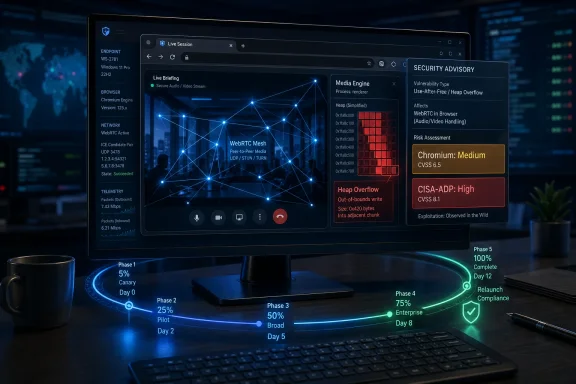 A Medium Bug Lands in a High-Risk Part of the Browser
CVE-2026-7339 is not the loudest item in Google’s late-April Chrome update, which shipped with 30 security fixes and several more eye-catching memory-safety flaws. But the WebRTC location matters. WebRTC is the machinery that lets browsers do real-time audio, video, and peer-to-peer data channels without a plug-in, which means it sits close to network-facing media parsing and complex state transitions.That complexity is why WebRTC bugs tend to make administrators uneasy even when the advisory language is measured. A crafted HTML page is a low-friction delivery vehicle, and the CVSS vector used by CISA-ADP describes a network attack with low complexity, no privileges required, and user interaction required. In ordinary English: the attacker needs the victim to load something, but does not need an account on the machine.
The Chromium severity of “Medium” should not be read as “ignore until the next maintenance window.” Browser security severity is often shaped by exploitability assumptions, sandboxing, mitigations, and whether a bug is known to chain cleanly into code execution or sandbox escape. Enterprise risk, by contrast, is shaped by exposure, fleet size, update latency, and how many Chromium-derived products share the same vulnerable code.
That is why the advisory feels more important than its label. The bug is not known, from the public record, to be exploited in the wild. It is not presented as a zero-day. But it affects a component built for rich, real-time interaction with untrusted web content, and it was fixed in a Chrome release that administrators should already be moving through their deployment rings.
The Version Number Is the Boundary Between Theory and Exposure
For Chrome on Windows and macOS, the fixed Stable channel build is 147.0.7727.137 or 147.0.7727.138, with the CVE description specifically calling out Chrome prior to 147.0.7727.138. Linux moved to 147.0.7727.137 in the same desktop update. The practical instruction for Windows shops is simple: if Chrome reports a version below the fixed 147.0.7727.138 line on a Windows endpoint, treat it as exposed.That sounds pedantic until you remember how many enterprises do not actually know their browser versions with workstation-level confidence. They know what their patch tool intended to push. They know what the software catalog says. They know what the gold image contains. But browsers update fast, users keep machines asleep, VDI pools persist in unexpected ways, and line-of-business packaging sometimes lags behind Google’s release cadence.
Microsoft’s involvement through the Security Update Guide is also significant for WindowsForum readers. This is a Chromium CVE, not a Windows kernel flaw, but Microsoft tracks Chromium vulnerabilities because Edge is Chromium-based and because enterprise defenders often live inside Microsoft’s security ecosystem. When MSRC carries the CVE, it becomes part of the same vulnerability-management bloodstream as Exchange, Office, Windows, and Azure advisories.
That does not mean every Chromium CVE is automatically a Windows emergency. It means Windows administrators must stop treating browser updates as a consumer-app nuisance. Chrome and Edge are application platforms, identity brokers, PDF handlers, video clients, WebAssembly runtimes, password managers, and privileged SSO surfaces, all sitting in front of the user for most of the workday.
Heap Corruption Still Does the Dirty Work
A heap buffer overflow is one of the old names in the memory-corruption catalog, but there is nothing obsolete about it. In broad terms, the program writes more data into a heap-allocated memory region than that region can safely hold. The result can be a crash, corrupted adjacent data, or, under the right conditions, a path toward controlled execution.Modern browsers are not the soft targets they were twenty years ago. Chrome’s sandbox, site isolation, hardened allocators, control-flow defenses, and exploit mitigations all raise the cost of turning a single memory bug into a reliable compromise. That is why many browser CVEs are disclosed with cautious phrasing: “potentially exploit heap corruption” is not the same as “remote code execution observed in the wild.”
But defenders should be careful not to overcorrect. Memory corruption in a browser remains valuable because attackers do not need every bug to be perfect on its own. A renderer bug can become part of a chain. A media-processing bug can be paired with an information leak. A browser compromise can become a credential theft operation even without full device takeover if the attacker lands in the right session context.
WebRTC raises the stakes because it exists to make browsers handle interactive media and network negotiation in real time. That makes it a fertile target surface: codecs, packet timing, device permissions, ICE negotiation, STUN/TURN behavior, and JavaScript-facing APIs all converge in a part of the browser that users encounter through meetings, support portals, collaboration suites, and embedded widgets. Even if CVE-2026-7339 is narrowly scoped, its neighborhood is anything but narrow.
The Crafted Page Is the New Email Attachment
The phrase “crafted HTML page” has become so common in advisories that it risks sounding harmless. It is not. In 2026, a crafted page can arrive as a link in Teams, Slack, Discord, Outlook, a help-desk ticket, a QR code, a compromised vendor portal, a malvertising redirect, or a poisoned search result.The attacker still needs user interaction under the published CVSS vector. That matters, because it separates this class of bug from no-click exploitation. But user interaction on the web is not a strong barrier. Most enterprise users are trained, by daily workflow, to click links to do their jobs.
This is one reason browser CVEs keep compressing the time available for security teams. The attack surface is universal, the exploit delivery model is familiar, and the remediation path often depends on software that is supposed to update itself but may be pinned, deferred, proxied, repackaged, or blocked by policy. A vulnerability can move from advisory to exploit kit faster than a cautious change-control board can convene.
The correct response is not panic. It is to treat browser patching as continuous operations rather than monthly ceremony. Chrome’s own release model assumes frequent incremental updates; enterprise defenses need to be organized around that fact instead of resenting it.
Microsoft’s Edge Angle Makes This a Windows Fleet Problem
The user-facing CVE text names Google Chrome, but the operational question for Windows administrators is broader: what else in the estate consumes the vulnerable Chromium code? Microsoft Edge is the obvious answer. Other Chromium-based browsers, embedded runtimes, Electron applications, kiosk shells, and vendor-bundled browsers complicate the picture further.Edge does not always ship on the same visible version number as Chrome, and Microsoft’s servicing pipeline has its own release timing. That is why security teams should avoid lazy version equivalence. The right question is whether the relevant Chromium fix has landed in the product and channel actually deployed on the endpoint.
For Windows environments, that usually means checking both Chrome and Edge, then checking the management path for each. Chrome may be governed through Google Update policies, enterprise MSI deployment, third-party patch tools, or software inventory agents. Edge may be governed through Edge Update, Windows policy, Intune, Configuration Manager, or a mixture of all of them.
This is where CVE triage becomes less glamorous and more important. A vulnerability-management dashboard that shows “Chrome patched” while Edge Stable, Edge Extended Stable, or a packaged Chromium app remains stale is giving the organization false comfort. The attacker does not care which icon the user clicked.
The CPE Detail Is Not Just Bureaucracy
The NVD record’s affected software configuration, as described in the provided data, adds Google Chrome versions up to but excluding 147.0.7727.138 and associates the product with Windows, Linux, and macOS. That is the sort of detail many readers skip, but it is precisely the metadata that vulnerability scanners and risk platforms depend on.CPEs are imperfect, often late, and sometimes maddeningly broad. Still, they are the glue between a CVE and an asset inventory. If the CPE mapping is absent or inaccurate, scanners may miss affected software, overreport unaffected systems, or leave teams reconciling results by hand.
The “Are we missing a CPE?” prompt in NVD records is a quiet admission that the vulnerability ecosystem still relies on human correction and vendor follow-through. For a Chrome vulnerability, that may sound manageable because Google Chrome is easy to identify. In real estates, the harder cases are portable installs, user-space installs, alternate channels, repackaged enterprise builds, and embedded Chromium components that do not announce themselves neatly.
This is also why CPE-based scanning should not be the only control. Endpoint telemetry, browser management consoles, software inventory, EDR process inspection, and update-service reporting should all agree on the same story. If they do not, the discrepancy is not a reporting annoyance; it is an attack surface hiding in administrative fog.
Severity Labels Are Negotiations, Not Truth
The split between Chromium’s “Medium” and CISA-ADP’s CVSS 3.1 score of 8.8 High is a useful reminder that vulnerability severity is not a physical property. It is a model. Different models emphasize different things.Chromium’s severity process is rooted in browser exploitability, component context, mitigations, and the project’s own classification norms. CVSS, by design, encodes generic characteristics: network reachability, attack complexity, privileges required, user interaction, scope, and confidentiality, integrity, and availability impact. A browser vendor may see a mitigated renderer bug; a CVSS calculator may see a network-delivered memory-corruption issue with potentially high impact.
Both views can be defensible. Neither view is sufficient by itself. For a home user, the answer is to update Chrome and move on. For an enterprise, the answer is to ask how quickly browsers update, how exceptions are handled, which users are exposed to risky web content, and whether telemetry can prove the update landed.
The most dangerous severity label is the one that lets an organization avoid thinking. “Medium” can become an excuse for delay. “High” can become an excuse for noise. The mature response is to map the advisory to actual exposure and then move the patch through a known, measured process.
WebRTC Keeps Expanding the Browser’s Blast Radius
WebRTC started as a way to make the browser a first-class real-time communications client. It succeeded. Video meetings, telehealth portals, remote support sessions, call-center tools, browser-based softphones, online education, and collaboration apps all rely on the idea that the browser can safely handle live media and network negotiation.That success changed the browser’s risk profile. The browser is no longer just rendering pages and running scripts. It is negotiating connections, handling compressed media, talking to cameras and microphones, and sometimes bypassing the old request-response shape of web traffic entirely. Every one of those capabilities is useful; every one of them is also an attack surface.
WebRTC’s security model has improved over the years, but its complexity remains. Media stacks are historically bug-prone because they parse dense, performance-sensitive formats from untrusted sources. Real-time communications code is hard because it has to be fast, interoperable, and tolerant of bad networks. Browser integration is hard because APIs must be exposed to JavaScript without letting hostile pages turn features into weapons.
CVE-2026-7339 should be read in that context. It is one fixed vulnerability in one component. But it is also another data point in the long-running argument that the web platform’s power has outpaced many organizations’ ability to govern it with old desktop-management habits.
The Patch Window Is Now a Control Surface
Google’s advisory says the update rolls out over the coming days and weeks, which is normal for Chrome. Staged rollouts reduce the chance that a bad update breaks everyone at once. They also create a window in which fixed builds exist, attackers can study patches, and not every user has received the update.That window is where enterprise policy matters. Organizations that rely entirely on passive auto-update are accepting Google’s rollout timing plus their own endpoint variability. Organizations that force updates too aggressively may break workflows or trigger user frustration. The art is in building rings that move quickly without pretending every machine is identical.
For most Windows shops, a browser security update should be treated more like endpoint protection content than like a quarterly application upgrade. The default should be rapid deployment, short deferrals, and active verification. Exceptions should expire automatically and require a reason.
The operational test is simple: could the security team identify all Chrome and Edge installs below the fixed line within a few hours, push remediation, and prove convergence by the next business day? If the answer is no, CVE-2026-7339 is not the only problem. It is merely the latest advisory exposing the weakness.
Home Users Still Have the Easiest Job
For individual Chrome users, the guidance is thankfully boring. Open Chrome’s About page, let the browser check for updates, and relaunch when prompted. On Windows, Chrome typically updates through Google Update in the background, but the relaunch is still the moment the fixed code actually takes over.The danger for home users is update theater: assuming that because an update downloaded, the running browser is protected. Long-lived browser sessions are common. So are laptops that sleep instead of rebooting. If the browser is waiting for a relaunch, the user is still running the old code.
Users of Edge, Brave, Vivaldi, Opera, and other Chromium-based browsers should check their own browser’s update status rather than assuming Google’s Chrome release automatically fixed them. Chromium is a shared foundation, not a simultaneous patch guarantee. Each vendor has to integrate, test, and ship.
This is also a good moment to retire the fantasy that disabling WebRTC in the browser is a clean general-purpose mitigation. Some hardened environments may restrict WebRTC for privacy or exposure reasons, but for most users and businesses it breaks real services. Patching is the primary fix.
The Real Audit Starts After Chrome Says It Is Current
The most concrete lessons from CVE-2026-7339 are not exotic. They are the ordinary controls that separate a manageable browser CVE from a week of guesswork. The teams that handle this well will be the ones that can see versions, move updates, and validate coverage across Chromium’s many disguises.- Organizations should verify Chrome on Windows is at 147.0.7727.138 or later, rather than assuming staged rollout has already completed.
- Administrators should separately validate Microsoft Edge and other Chromium-based browsers, because shared Chromium code does not guarantee synchronized vendor releases.
- Vulnerability teams should treat the CISA-ADP 8.8 High score as a useful operational warning even though Chromium labels the issue Medium.
- Asset inventories should be checked for stale, portable, user-installed, or embedded Chromium runtimes that may not appear in standard browser reports.
- Browser relaunch compliance should be measured, because downloaded updates do not protect users until the vulnerable process exits.
- Exceptions to browser security updates should be short-lived, documented, and visible to both endpoint and security operations teams.
The Browser Has Become the Patch Tuesday That Never Ends
CVE-2026-7339 is not a catastrophe, and there is no public basis for treating it as an actively exploited emergency. But it is exactly the kind of vulnerability that defines modern Windows security work: a memory-safety flaw in a cross-platform browser component, disclosed through Google and mirrored into Microsoft’s security ecosystem, remediated by fast-moving application updates rather than a familiar operating-system patch cycle.That shift has consequences. The old mental model put Windows at the center and applications around the edge. The current reality puts the browser at the center of identity, productivity, communications, and untrusted content, with Windows responsible for hosting and governing it. A Chrome WebRTC bug is therefore not merely a Chrome problem; it is a test of whether endpoint management has caught up with how work actually happens.
The forward-looking conclusion is blunt: browser patching is now infrastructure. The organizations that still treat it as desktop housekeeping will keep rediscovering the same pain with each Chromium CVE, while the organizations that instrument, accelerate, and verify browser updates will turn advisories like CVE-2026-7339 into routine noise. The vulnerability will fade from the feed soon enough; the operational lesson should not.
Source: NVD / Chromium Security Update Guide - Microsoft Security Response Center
