

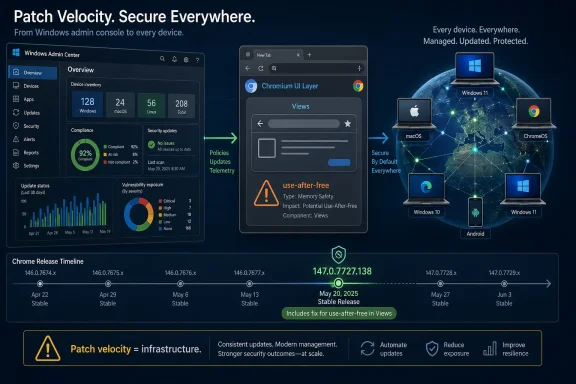
Google and Microsoft catalogued CVE-2026-7334 on April 28, 2026, as a high-severity use-after-free flaw in Chrome’s Views component on macOS, fixed in Chrome 147.0.7727.138 after a crafted HTML page could potentially trigger heap corruption. The narrow wording matters: this is not a Windows-native bug, not yet a public exploit story, and not a reason to panic. But it is another reminder that the modern browser has become the most privileged cross-platform application most users run every day. For Windows admins, the lesson is less “patch Macs” than “treat Chromium patch velocity as infrastructure.”
At first glance, CVE-2026-7334 looks like somebody else’s problem. The vulnerability description calls out Google Chrome on Mac prior to 147.0.7727.138, and the underlying issue sits in Views, Chromium’s UI framework layer rather than the Windows kernel, Edge policy plumbing, or some Microsoft component that would normally command attention here.
That would be too neat. Chromium is not a single browser so much as a software supply chain with a user interface attached. Google Chrome, Microsoft Edge, Brave, Vivaldi, Opera, Electron apps, embedded WebViews, and internal enterprise tools all sit somewhere along the same moving conveyor belt of rendering engines, JavaScript engines, media stacks, graphics paths, and UI abstractions.
CVE-2026-7334 appears to be one of the smaller stones in that conveyor belt, not a headline-grabbing zero-day. Google’s April 28 stable-channel update included 30 security fixes, and this one was one high-severity entry among a cluster of memory-safety issues. Still, small stones jam machinery. The bug’s description is short, but the operational question is larger: how should IT respond when the vulnerability record says “Mac,” the advisory comes from Chrome, and the affected code lives in Chromium?
The answer is not to manufacture drama. It is to understand what the record says, what it does not say, and why browser patching has become a discipline closer to endpoint security than application maintenance.
That phrasing carries several important constraints. “Potentially exploit heap corruption” is not the same thing as a public proof-of-concept, confirmed exploitation in the wild, or a full remote code execution chain. Browser memory-corruption bugs often need additional primitives to become reliable exploits, and modern Chrome has layered mitigations that make the jump from crash to compromise harder than it was a decade ago.
The user-interaction requirement also matters. The CVSS vector attributed by CISA’s ADP enrichment indicates network attack vector, low attack complexity, no privileges required, but user interaction required. In plain English, that means the plausible attack shape is a victim visiting or being sent to malicious web content, not an unauthenticated worm moving laterally across machines without a click or page load.
But “requires user interaction” is a thinner comfort blanket in browser security than it sounds. Browsers exist to load untrusted remote content, and users are trained all day to open links in email, chat, documentation portals, vendor dashboards, identity flows, and SaaS applications. The interaction is not exotic. It is the job.
The tedious repetition of this bug class is the story. Google’s April 28 Chrome update did not list one lonely memory issue; it listed a parade of use-after-free bugs across Canvas, Accessibility, Views, GPU, ANGLE, Animation, Navigation, Media, WebMIDI, Cast, Codecs, WebRTC, Chromoting, WebView, and more. That is not because Chromium’s engineers are uniquely careless. It is because browser code is a brutal mix of performance-sensitive C++, asynchronous events, device integration, cross-platform abstractions, and legacy-compatible behavior exposed to hostile input.
Views is especially interesting because it is not the part of Chrome most users think of when they imagine web exploitation. People think of V8, Blink, WebRTC, image decoders, font parsers, graphics drivers, and media codecs. But the browser interface itself is also code, and code has object lifetimes.
That is why “crafted HTML page” should not be read too narrowly as “just the renderer.” Web content can trigger browser behaviors indirectly: prompts, focus changes, drag-and-drop paths, pop-ups, accessibility interactions, fullscreen transitions, permission surfaces, navigation state, and window management. The clean mental boundary between web page and browser chrome has never been as clean as users assume.
Chrome’s release model complicates this for admins because stable-channel updates roll out over days or weeks. That behavior is good for catching regressions at planet scale, but it is awkward when vulnerability management wants a crisp binary answer: vulnerable or fixed. A machine that has not yet naturally received the update is not necessarily mismanaged, but it is still exposed to the bugs fixed in that release.
For individual users, the practical check is simple: open Chrome’s About page and let the browser update, then relaunch. For managed environments, the real work is in telemetry. Security teams need inventory that can distinguish 147.0.7727.116 from 147.0.7727.138, not a vague “Chrome 147” label that collapses meaningful patch levels into a useless major version.
This is where many vulnerability dashboards become misleading. A scanner may ingest the CVE, attach a CPE, notice Chrome installed, and light up a finding. But without OS context, channel context, exact build numbers, and update status, the alert can be simultaneously technically correct and operationally noisy.
That mismatch is not necessarily scandalous; it is a familiar artifact of how vulnerability records get enriched. CPE matching tries to model affected software in machine-readable form, but platform-specific browser issues often blur the lines. The product is Chrome. The fixed desktop release spans Windows, Mac, and Linux. The vulnerability description narrows the affected exposure to Mac. Automated systems then have to decide whether to alert on all Chrome instances before the fixed build, only Chrome-on-macOS instances, or some hybrid logic.
This is the uncomfortable truth of vulnerability management in 2026: the feed is not the finding. The feed is an input. The finding is what remains after product inventory, platform applicability, exploitability, business exposure, and patch availability are reconciled.
The “Are we missing a CPE?” prompt in the NVD interface has become a kind of accidental poetry for this problem. Everyone is missing something. Vendors publish terse advisories, CNAs submit minimal descriptions, NVD enriches records, CISA ADP adds scoring, scanners ingest the lot, and admins inherit the ambiguity.
For CVE-2026-7334, the conservative operational approach is straightforward. Patch Chrome everywhere to the current stable build, but prioritize validation on macOS endpoints if your risk register is mapping this specific CVE. Do not ignore Windows Chrome just because this one description says Mac; the April 28 release fixed many issues across the desktop channel. Do not file a false enterprise emergency against every Windows workstation solely on the basis of this Mac-specific CVE either.
That distinction matters for WindowsForum readers. Microsoft Edge is not Google Chrome, but it rides the same upstream river. A Chromium vulnerability may or may not affect Edge depending on the component, platform, build, compile-time choices, feature exposure, and whether the affected code exists in Microsoft’s fork at the relevant point.
For a Views issue described in Chrome on Mac, the immediate Microsoft impact may be limited or indirect. But MSRC tracking is still useful because enterprise vulnerability programs often centralize around Microsoft’s guide, especially in Windows-heavy environments. If the record appears there, it enters patch meetings, compliance reports, and ticket queues.
The danger is semantic overreach. “Listed by Microsoft” does not automatically mean “fixed by Windows Update.” For Chromium-family browser issues, Windows Update may be irrelevant unless the browser in question is delivered through Microsoft’s channels and the affected product is actually installed. Edge update policy, Chrome enterprise update policy, and third-party browser management are the levers, not the monthly Windows cumulative update.
That context changes the patching calculus. If this one CVE were the only issue, some organizations might be tempted to defer action because the description is Mac-specific, the bug details remain restricted, and there is no public exploitation claim in the advisory. But the update is not just about this one CVE. It is a bundle of browser hardening delivered through a single version step.
This is the recurring asymmetry of browser security. Attackers get to study public advisories, diff patches, and test older builds. Defenders get a version number and a note that details may remain restricted until most users are updated. The vendor’s silence is not a lack of seriousness; it is part of the defensive strategy. Publishing exploit-relevant detail too early can turn a patched bug into an attack recipe for lagging fleets.
Chrome’s wording about restricted bug access is a reminder that administrators are often patching before they fully understand the bug. That can feel unsatisfying, especially in change-controlled environments. But in browsers, waiting for perfect information is often another way of volunteering users as the control group.
First, the same Chrome build train fixed many vulnerabilities that were not described as Mac-only. A Windows Chrome instance sitting below 147.0.7727.137 is missing the entire April 28 security release, not merely the Mac-specific Views fix. That means a Windows-only fleet still has a patching reason even if CVE-2026-7334 itself is not the strongest justification.
Second, many Windows shops are no longer Windows-only shops. Executives use MacBooks. Developers run macOS. Designers, mobile teams, contractors, and acquired business units often live outside the standard endpoint image. Vulnerability programs that treat “Windows fleet” as synonymous with “enterprise fleet” are now willfully blind.
Third, browser choice has become user choice again in many organizations. Even where Edge is standard, Chrome may be installed for compatibility, testing, Google Workspace workflows, or simple user preference. A Chrome vulnerability cannot be dismissed merely because Edge is the corporate default.
The practical message for Windows-heavy IT is to separate applicability from urgency. If the scanner flags CVE-2026-7334 on Windows endpoints only, tune the finding. If Chrome is behind the April 28 stable release, patch it anyway. If Macs exist anywhere under corporate identity, verify they are at or above 147.0.7727.138.
But CVSS was never meant to answer every operational question. It does not know whether your users run Chrome on Mac. It does not know whether the browser is managed, whether Safe Browsing is enabled, whether exploit mitigations are intact, whether users are local admins, whether EDR has behavioral coverage, or whether the affected endpoint is a kiosk, a developer workstation, or a finance executive’s laptop.
Nor does CVSS fully capture exploit maturity. As of the advisory record presented, NVD had not supplied its own CVSS assessment, and the public Chrome post did not say Google was aware of active exploitation for CVE-2026-7334. That absence matters, but it is not proof of safety. Many browser bugs become more dangerous after patch release because attackers can reverse-engineer fixes.
The right response to an 8.8 browser bug is not theatrical escalation every time. It is disciplined automation. Browsers should update fast enough that each new high-severity CVE does not require a bespoke incident-management ritual.
But for mainstream browsers, immediate full disclosure can be a gift to attackers. Chrome’s user base updates in waves. Some endpoints are offline. Some enterprises pin versions. Some users ignore relaunch prompts. Some embedded Chromium apps lag behind upstream for weeks or months. During that gap, detailed bug reports can function as exploit development notes.
CVE-2026-7334 illustrates the tradeoff. The public knows the component, bug class, affected platform, fixed version, rough exploitation route, and severity. That is enough to patch and triage. It is not enough to write a reliable exploit from the advisory alone.
The industry has settled into an uneasy rhythm: vendors publish minimal advisories, bug details unlock later, and defenders patch first. It is not intellectually satisfying, but it is operationally rational. In browser security, the perfect postmortem usually arrives after the window in which it would have been most dangerous.
For consumers, Chrome’s auto-update model works remarkably well, provided the browser can update and the user relaunches it. For enterprises, every layer of control can become a delay: update rings, test groups, packaging systems, virtual desktop images, gold images, software restriction policies, proxy rules, and change boards. Controls installed to prevent chaos can inadvertently preserve vulnerable code.
This is especially acute for browsers because they face the public web constantly. A database server behind segmented networks and compensating controls can sometimes tolerate a measured patch window. A browser on a traveling laptop cannot be treated the same way. Its attack surface follows the user to hotels, airports, home networks, OAuth prompts, ad networks, and compromised legitimate websites.
The update gap is also where scanner noise metastasizes. If security tooling reports the CVE before desktop management has finished rolling out the patch, teams waste time debating whether the alert is premature. If endpoint tooling cannot see the exact browser build, they waste time chasing ghosts. If users postpone relaunches, the installed files may be patched while the running process remains old.
Mature shops increasingly manage browsers like security agents: continuously updated, closely inventoried, and exempt from slow monthly rhythms. That posture is not convenience. It is threat-model alignment.
The hard part is organizational rather than technical. Application owners often fear browser updates because web apps break. Security teams fear browser stagnation because browsers are attack magnets. Users fear relaunches because they interrupt work. Somewhere in that triangle, the risk gets negotiated, often badly.
CVE-2026-7334 is a useful test case because it is not dramatic enough to force everyone into emergency mode. If your organization can only patch browsers quickly when a zero-day is on the front page, the process is too brittle. High-severity memory-corruption fixes should move through a fast lane by default, even when exploitation is not publicly confirmed.
The target should not be reckless instant updating with no observability. It should be fast staged deployment with rollback capability, compatibility telemetry, and clear relaunch enforcement. Browser patching fails when it is treated as either casual background noise or a five-alarm fire. It is neither. It is routine critical infrastructure maintenance.
That is not a criticism so much as an acknowledgment of reality. Chromium’s scale brings enormous security investment: fuzzing, sanitizers, site isolation, sandboxing, bounty programs, and rapid release engineering. It also concentrates risk. A class of bug discovered upstream can ripple outward through browsers and embedded runtimes.
For Windows users, Edge’s update system is generally integrated and aggressive, but Chrome remains heavily deployed. The worst enterprise posture is to assume Edge is handled by Microsoft, Chrome is handled by Google, Electron is handled by app vendors, and therefore nobody inside IT needs a unified view. Attackers do not care which procurement path delivered the vulnerable code.
The Chromium era demands component thinking. Security teams need to ask which Chromium version is inside the browser, the collaboration app, the helpdesk client, the password manager UI, the meeting-room appliance, and the line-of-business shell. CVE-2026-7334 may be Chrome-on-Mac specific, but the habit it should reinforce is broader: know where your browser engine lives.
But blind closure is risky when the CPE model is broader than the prose. The better workflow is to write a precise exception or detection rule. The finding for CVE-2026-7334 should account for OS, product, version, and channel. Separately, the April 28 Chrome security update should remain a compliance target for all Chrome desktop installations.
That distinction keeps the dashboard honest. You do not want Windows endpoints counted as exposed to a Mac-only Views bug if that is not supported by the vendor description. You also do not want those same Windows endpoints left on an older Chrome build because one CVE in the bundle was not applicable.
Security operations often fails at this level of nuance. Teams are rewarded for reducing counts, not for improving truth. A closed false positive and a remediated real exposure both make the graph go down, but only one improves security. CVE-2026-7334 is a small example of why metrics need narrative review.
For a vulnerability like CVE-2026-7334, the difference between “update available” and “running fixed build” is not academic. The vulnerable code is what is currently executing, not what the disk will contain after a hypothetical restart. Endpoint telemetry should distinguish installed version, running version, and pending relaunch where possible.
Admins should resist the temptation to solve this only with scolding. Good relaunch policy gives users a grace period, warns clearly, and then enforces. Bad policy either never enforces or abruptly kills work in a way that trains users to hate IT. The browser is now a workspace, not just an app launcher, and restart design should respect that.
Still, respect cannot become paralysis. If a high-severity browser memory-corruption fix is available, the endpoint should not remain vulnerable indefinitely because someone has 87 tabs open from last Tuesday. The tab hoard is not a compensating control.
That is exactly why it is useful. Spectacular vulnerabilities create exceptional behavior. Ordinary high-severity browser flaws reveal the real process. They show whether inventory is current, whether update policy is sane, whether platform applicability is understood, whether scanner exceptions are disciplined, and whether users actually relaunch.
The browser has become the front door to identity, SaaS, documents, admin consoles, messaging, finance workflows, AI tools, and internal applications. A memory-corruption bug in that front door does not need a logo to matter. It only needs enough unpatched endpoints and enough users willing to open the web.
Source: NVD / Chromium Security Update Guide - Microsoft Security Response Center
 A Mac-Only Chrome Bug Still Belongs on a Windows Forum
At first glance, CVE-2026-7334 looks like somebody else’s problem. The vulnerability description calls out Google Chrome on Mac prior to 147.0.7727.138, and the underlying issue sits in Views, Chromium’s UI framework layer rather than the Windows kernel, Edge policy plumbing, or some Microsoft component that would normally command attention here.That would be too neat. Chromium is not a single browser so much as a software supply chain with a user interface attached. Google Chrome, Microsoft Edge, Brave, Vivaldi, Opera, Electron apps, embedded WebViews, and internal enterprise tools all sit somewhere along the same moving conveyor belt of rendering engines, JavaScript engines, media stacks, graphics paths, and UI abstractions.
CVE-2026-7334 appears to be one of the smaller stones in that conveyor belt, not a headline-grabbing zero-day. Google’s April 28 stable-channel update included 30 security fixes, and this one was one high-severity entry among a cluster of memory-safety issues. Still, small stones jam machinery. The bug’s description is short, but the operational question is larger: how should IT respond when the vulnerability record says “Mac,” the advisory comes from Chrome, and the affected code lives in Chromium?
The answer is not to manufacture drama. It is to understand what the record says, what it does not say, and why browser patching has become a discipline closer to endpoint security than application maintenance.
The Vulnerability Record Says Less Than People Want It To Say
CVE-2026-7334 is described as a use-after-free vulnerability in Views that affected Google Chrome on macOS before version 147.0.7727.138. A remote attacker could potentially exploit heap corruption through a crafted HTML page, and the Chromium project rated the issue High.That phrasing carries several important constraints. “Potentially exploit heap corruption” is not the same thing as a public proof-of-concept, confirmed exploitation in the wild, or a full remote code execution chain. Browser memory-corruption bugs often need additional primitives to become reliable exploits, and modern Chrome has layered mitigations that make the jump from crash to compromise harder than it was a decade ago.
The user-interaction requirement also matters. The CVSS vector attributed by CISA’s ADP enrichment indicates network attack vector, low attack complexity, no privileges required, but user interaction required. In plain English, that means the plausible attack shape is a victim visiting or being sent to malicious web content, not an unauthenticated worm moving laterally across machines without a click or page load.
But “requires user interaction” is a thinner comfort blanket in browser security than it sounds. Browsers exist to load untrusted remote content, and users are trained all day to open links in email, chat, documentation portals, vendor dashboards, identity flows, and SaaS applications. The interaction is not exotic. It is the job.
Use-After-Free Remains the Browser Bug That Will Not Die
A use-after-free occurs when software continues to use memory after it has been released. In a simple program, that might produce a crash. In a browser, where attacker-controlled content can influence timing, object lifetimes, layout, rendering, UI state, or scripting behavior, the same class of mistake can become a path to memory corruption.The tedious repetition of this bug class is the story. Google’s April 28 Chrome update did not list one lonely memory issue; it listed a parade of use-after-free bugs across Canvas, Accessibility, Views, GPU, ANGLE, Animation, Navigation, Media, WebMIDI, Cast, Codecs, WebRTC, Chromoting, WebView, and more. That is not because Chromium’s engineers are uniquely careless. It is because browser code is a brutal mix of performance-sensitive C++, asynchronous events, device integration, cross-platform abstractions, and legacy-compatible behavior exposed to hostile input.
Views is especially interesting because it is not the part of Chrome most users think of when they imagine web exploitation. People think of V8, Blink, WebRTC, image decoders, font parsers, graphics drivers, and media codecs. But the browser interface itself is also code, and code has object lifetimes.
That is why “crafted HTML page” should not be read too narrowly as “just the renderer.” Web content can trigger browser behaviors indirectly: prompts, focus changes, drag-and-drop paths, pop-ups, accessibility interactions, fullscreen transitions, permission surfaces, navigation state, and window management. The clean mental boundary between web page and browser chrome has never been as clean as users assume.
The Version Number Is the Remediation, Not the Trivia
The fixed Chrome desktop release is 147.0.7727.137/138 for Windows and Mac, and 147.0.7727.137 for Linux. The CVE record specifically names Mac prior to 147.0.7727.138, which makes the final digit matter for Apple fleets.Chrome’s release model complicates this for admins because stable-channel updates roll out over days or weeks. That behavior is good for catching regressions at planet scale, but it is awkward when vulnerability management wants a crisp binary answer: vulnerable or fixed. A machine that has not yet naturally received the update is not necessarily mismanaged, but it is still exposed to the bugs fixed in that release.
For individual users, the practical check is simple: open Chrome’s About page and let the browser update, then relaunch. For managed environments, the real work is in telemetry. Security teams need inventory that can distinguish 147.0.7727.116 from 147.0.7727.138, not a vague “Chrome 147” label that collapses meaningful patch levels into a useless major version.
This is where many vulnerability dashboards become misleading. A scanner may ingest the CVE, attach a CPE, notice Chrome installed, and light up a finding. But without OS context, channel context, exact build numbers, and update status, the alert can be simultaneously technically correct and operationally noisy.
NVD’s CPE Trail Shows Why Vulnerability Feeds Need Human Judgment
The change history in the vulnerability record is revealing. NIST’s initial analysis added a CPE configuration for Google Chrome versions up to but excluding 147.0.7727.138 and paired it with operating-system CPEs for Windows, Linux, and macOS. Yet the description says Google Chrome on Mac.That mismatch is not necessarily scandalous; it is a familiar artifact of how vulnerability records get enriched. CPE matching tries to model affected software in machine-readable form, but platform-specific browser issues often blur the lines. The product is Chrome. The fixed desktop release spans Windows, Mac, and Linux. The vulnerability description narrows the affected exposure to Mac. Automated systems then have to decide whether to alert on all Chrome instances before the fixed build, only Chrome-on-macOS instances, or some hybrid logic.
This is the uncomfortable truth of vulnerability management in 2026: the feed is not the finding. The feed is an input. The finding is what remains after product inventory, platform applicability, exploitability, business exposure, and patch availability are reconciled.
The “Are we missing a CPE?” prompt in the NVD interface has become a kind of accidental poetry for this problem. Everyone is missing something. Vendors publish terse advisories, CNAs submit minimal descriptions, NVD enriches records, CISA ADP adds scoring, scanners ingest the lot, and admins inherit the ambiguity.
For CVE-2026-7334, the conservative operational approach is straightforward. Patch Chrome everywhere to the current stable build, but prioritize validation on macOS endpoints if your risk register is mapping this specific CVE. Do not ignore Windows Chrome just because this one description says Mac; the April 28 release fixed many issues across the desktop channel. Do not file a false enterprise emergency against every Windows workstation solely on the basis of this Mac-specific CVE either.
Microsoft’s Appearance in the Story Is About Ecosystem Hygiene
The user-provided source is Microsoft’s Security Update Guide entry for CVE-2026-7334, which can confuse readers who expect MSRC pages to mean “Microsoft shipped a Windows fix.” In this case, Microsoft is tracking a Chromium vulnerability because Microsoft ships Chromium-based products and participates in the broader browser-security ecosystem.That distinction matters for WindowsForum readers. Microsoft Edge is not Google Chrome, but it rides the same upstream river. A Chromium vulnerability may or may not affect Edge depending on the component, platform, build, compile-time choices, feature exposure, and whether the affected code exists in Microsoft’s fork at the relevant point.
For a Views issue described in Chrome on Mac, the immediate Microsoft impact may be limited or indirect. But MSRC tracking is still useful because enterprise vulnerability programs often centralize around Microsoft’s guide, especially in Windows-heavy environments. If the record appears there, it enters patch meetings, compliance reports, and ticket queues.
The danger is semantic overreach. “Listed by Microsoft” does not automatically mean “fixed by Windows Update.” For Chromium-family browser issues, Windows Update may be irrelevant unless the browser in question is delivered through Microsoft’s channels and the affected product is actually installed. Edge update policy, Chrome enterprise update policy, and third-party browser management are the levers, not the monthly Windows cumulative update.
The April 28 Chrome Release Was Bigger Than One CVE
CVE-2026-7334 sits inside a notably dense Chrome stable update. Google’s post for April 28 lists 30 security fixes, including multiple critical use-after-free vulnerabilities and a broad set of high-severity memory-safety problems across major browser subsystems.That context changes the patching calculus. If this one CVE were the only issue, some organizations might be tempted to defer action because the description is Mac-specific, the bug details remain restricted, and there is no public exploitation claim in the advisory. But the update is not just about this one CVE. It is a bundle of browser hardening delivered through a single version step.
This is the recurring asymmetry of browser security. Attackers get to study public advisories, diff patches, and test older builds. Defenders get a version number and a note that details may remain restricted until most users are updated. The vendor’s silence is not a lack of seriousness; it is part of the defensive strategy. Publishing exploit-relevant detail too early can turn a patched bug into an attack recipe for lagging fleets.
Chrome’s wording about restricted bug access is a reminder that administrators are often patching before they fully understand the bug. That can feel unsatisfying, especially in change-controlled environments. But in browsers, waiting for perfect information is often another way of volunteering users as the control group.
The Mac Clause Should Not Let Windows Admins Relax Too Much
Windows administrators may be tempted to mark CVE-2026-7334 as not applicable and move on. For the narrow CVE, that may be defensible if the environment has no macOS endpoints and the scanner finding is tied only to this record. But as a browser maintenance signal, the update deserves attention across platforms.First, the same Chrome build train fixed many vulnerabilities that were not described as Mac-only. A Windows Chrome instance sitting below 147.0.7727.137 is missing the entire April 28 security release, not merely the Mac-specific Views fix. That means a Windows-only fleet still has a patching reason even if CVE-2026-7334 itself is not the strongest justification.
Second, many Windows shops are no longer Windows-only shops. Executives use MacBooks. Developers run macOS. Designers, mobile teams, contractors, and acquired business units often live outside the standard endpoint image. Vulnerability programs that treat “Windows fleet” as synonymous with “enterprise fleet” are now willfully blind.
Third, browser choice has become user choice again in many organizations. Even where Edge is standard, Chrome may be installed for compatibility, testing, Google Workspace workflows, or simple user preference. A Chrome vulnerability cannot be dismissed merely because Edge is the corporate default.
The practical message for Windows-heavy IT is to separate applicability from urgency. If the scanner flags CVE-2026-7334 on Windows endpoints only, tune the finding. If Chrome is behind the April 28 stable release, patch it anyway. If Macs exist anywhere under corporate identity, verify they are at or above 147.0.7727.138.
CVSS 8.8 Is a Useful Alarm, Not a Complete Risk Model
CISA’s ADP enrichment scored the vulnerability 8.8 High under CVSS 3.1, with high impact to confidentiality, integrity, and availability. That is a serious score, and it is appropriate for a remotely reachable browser memory-corruption issue requiring only user interaction.But CVSS was never meant to answer every operational question. It does not know whether your users run Chrome on Mac. It does not know whether the browser is managed, whether Safe Browsing is enabled, whether exploit mitigations are intact, whether users are local admins, whether EDR has behavioral coverage, or whether the affected endpoint is a kiosk, a developer workstation, or a finance executive’s laptop.
Nor does CVSS fully capture exploit maturity. As of the advisory record presented, NVD had not supplied its own CVSS assessment, and the public Chrome post did not say Google was aware of active exploitation for CVE-2026-7334. That absence matters, but it is not proof of safety. Many browser bugs become more dangerous after patch release because attackers can reverse-engineer fixes.
The right response to an 8.8 browser bug is not theatrical escalation every time. It is disciplined automation. Browsers should update fast enough that each new high-severity CVE does not require a bespoke incident-management ritual.
Restricted Bug Details Are a Feature, Not a Cover-Up
Security researchers and power users often dislike the phrase “access to bug details may be kept restricted.” The instinct is understandable. Openness helps defenders learn, helps researchers validate fixes, and keeps vendors honest.But for mainstream browsers, immediate full disclosure can be a gift to attackers. Chrome’s user base updates in waves. Some endpoints are offline. Some enterprises pin versions. Some users ignore relaunch prompts. Some embedded Chromium apps lag behind upstream for weeks or months. During that gap, detailed bug reports can function as exploit development notes.
CVE-2026-7334 illustrates the tradeoff. The public knows the component, bug class, affected platform, fixed version, rough exploitation route, and severity. That is enough to patch and triage. It is not enough to write a reliable exploit from the advisory alone.
The industry has settled into an uneasy rhythm: vendors publish minimal advisories, bug details unlock later, and defenders patch first. It is not intellectually satisfying, but it is operationally rational. In browser security, the perfect postmortem usually arrives after the window in which it would have been most dangerous.
The Real Exposure Is the Browser Update Gap
The most important number in this story may not be 8.8, 147.0.7727.138, or even CVE-2026-7334. It is the number of days between vendor release and endpoint convergence.For consumers, Chrome’s auto-update model works remarkably well, provided the browser can update and the user relaunches it. For enterprises, every layer of control can become a delay: update rings, test groups, packaging systems, virtual desktop images, gold images, software restriction policies, proxy rules, and change boards. Controls installed to prevent chaos can inadvertently preserve vulnerable code.
This is especially acute for browsers because they face the public web constantly. A database server behind segmented networks and compensating controls can sometimes tolerate a measured patch window. A browser on a traveling laptop cannot be treated the same way. Its attack surface follows the user to hotels, airports, home networks, OAuth prompts, ad networks, and compromised legitimate websites.
The update gap is also where scanner noise metastasizes. If security tooling reports the CVE before desktop management has finished rolling out the patch, teams waste time debating whether the alert is premature. If endpoint tooling cannot see the exact browser build, they waste time chasing ghosts. If users postpone relaunches, the installed files may be patched while the running process remains old.
Mature shops increasingly manage browsers like security agents: continuously updated, closely inventoried, and exempt from slow monthly rhythms. That posture is not convenience. It is threat-model alignment.
Enterprise Policy Can Help, but It Can Also Fossilize Risk
Chrome Enterprise policies and similar management frameworks give administrators control over update cadence, target versions, rollback behavior, extension governance, and relaunch notifications. Those controls are essential in regulated environments, but they are not inherently safe. A policy that pins browsers for compatibility can quietly become a policy that pins vulnerabilities.The hard part is organizational rather than technical. Application owners often fear browser updates because web apps break. Security teams fear browser stagnation because browsers are attack magnets. Users fear relaunches because they interrupt work. Somewhere in that triangle, the risk gets negotiated, often badly.
CVE-2026-7334 is a useful test case because it is not dramatic enough to force everyone into emergency mode. If your organization can only patch browsers quickly when a zero-day is on the front page, the process is too brittle. High-severity memory-corruption fixes should move through a fast lane by default, even when exploitation is not publicly confirmed.
The target should not be reckless instant updating with no observability. It should be fast staged deployment with rollback capability, compatibility telemetry, and clear relaunch enforcement. Browser patching fails when it is treated as either casual background noise or a five-alarm fire. It is neither. It is routine critical infrastructure maintenance.
Edge, Chrome, and the Shared Burden of Chromium
Microsoft’s move to Chromium for Edge solved one class of compatibility problem and inherited another class of ecosystem dependency. The modern Edge is better for web compatibility than the old EdgeHTML line ever was, but it also means Microsoft’s browser-security story is tied to the cadence and architecture of Chromium.That is not a criticism so much as an acknowledgment of reality. Chromium’s scale brings enormous security investment: fuzzing, sanitizers, site isolation, sandboxing, bounty programs, and rapid release engineering. It also concentrates risk. A class of bug discovered upstream can ripple outward through browsers and embedded runtimes.
For Windows users, Edge’s update system is generally integrated and aggressive, but Chrome remains heavily deployed. The worst enterprise posture is to assume Edge is handled by Microsoft, Chrome is handled by Google, Electron is handled by app vendors, and therefore nobody inside IT needs a unified view. Attackers do not care which procurement path delivered the vulnerable code.
The Chromium era demands component thinking. Security teams need to ask which Chromium version is inside the browser, the collaboration app, the helpdesk client, the password manager UI, the meeting-room appliance, and the line-of-business shell. CVE-2026-7334 may be Chrome-on-Mac specific, but the habit it should reinforce is broader: know where your browser engine lives.
The Scanner Finding Needs Triage, Not Blind Closure
A common response to platform-specific CVEs is to suppress them aggressively. That is understandable; false positives burn trust. If a Windows workstation is flagged for a vulnerability explicitly described as Chrome on Mac, the vulnerability-management team will quickly hear about it.But blind closure is risky when the CPE model is broader than the prose. The better workflow is to write a precise exception or detection rule. The finding for CVE-2026-7334 should account for OS, product, version, and channel. Separately, the April 28 Chrome security update should remain a compliance target for all Chrome desktop installations.
That distinction keeps the dashboard honest. You do not want Windows endpoints counted as exposed to a Mac-only Views bug if that is not supported by the vendor description. You also do not want those same Windows endpoints left on an older Chrome build because one CVE in the bundle was not applicable.
Security operations often fails at this level of nuance. Teams are rewarded for reducing counts, not for improving truth. A closed false positive and a remediated real exposure both make the graph go down, but only one improves security. CVE-2026-7334 is a small example of why metrics need narrative review.
User Relaunches Are the Last Mile Nobody Likes
Chrome can download updates quietly, but the running browser must relaunch to complete the transition. That last mile is stubbornly human. Users keep windows open for days. They preserve tabs as memory. They ignore the update indicator. They treat browser restart prompts like printer warnings: background annoyance until something breaks.For a vulnerability like CVE-2026-7334, the difference between “update available” and “running fixed build” is not academic. The vulnerable code is what is currently executing, not what the disk will contain after a hypothetical restart. Endpoint telemetry should distinguish installed version, running version, and pending relaunch where possible.
Admins should resist the temptation to solve this only with scolding. Good relaunch policy gives users a grace period, warns clearly, and then enforces. Bad policy either never enforces or abruptly kills work in a way that trains users to hate IT. The browser is now a workspace, not just an app launcher, and restart design should respect that.
Still, respect cannot become paralysis. If a high-severity browser memory-corruption fix is available, the endpoint should not remain vulnerable indefinitely because someone has 87 tabs open from last Tuesday. The tab hoard is not a compensating control.
The Small CVE That Exposes the Big Process
CVE-2026-7334 will probably not be remembered as one of the defining browser bugs of 2026. It is not currently framed as a zero-day in the public advisory. It does not come with a splashy exploit chain. Its description is sparse, its affected platform is narrow, and its fix arrived inside a larger scheduled stable-channel update.That is exactly why it is useful. Spectacular vulnerabilities create exceptional behavior. Ordinary high-severity browser flaws reveal the real process. They show whether inventory is current, whether update policy is sane, whether platform applicability is understood, whether scanner exceptions are disciplined, and whether users actually relaunch.
The browser has become the front door to identity, SaaS, documents, admin consoles, messaging, finance workflows, AI tools, and internal applications. A memory-corruption bug in that front door does not need a logo to matter. It only needs enough unpatched endpoints and enough users willing to open the web.
The Patch Note Is Short, but the Admin Checklist Is Not
The practical reading of CVE-2026-7334 is compact: Chrome on Mac below 147.0.7727.138 should be updated, and Chrome desktop fleets should absorb the April 28 security release promptly. The wider reading is that Chromium patch management must be boring, fast, and measurable.- Verify that macOS endpoints running Google Chrome are updated to 147.0.7727.138 or later.
- Verify that Windows and Linux Chrome installations have received the April 28 stable-channel security update, even if CVE-2026-7334 itself is treated as Mac-specific.
- Tune vulnerability-management rules so platform-specific CVEs do not inflate Windows exposure counts while still tracking the underlying Chrome build level.
- Confirm that browser update policies do not pin users below current stable security releases without a documented exception and expiry date.
- Measure running browser versions and pending relaunch states, not merely installed package versions.
- Review Chromium-based applications separately, because browser-engine exposure is no longer limited to the browser icon on the desktop.
Source: NVD / Chromium Security Update Guide - Microsoft Security Response Center
