

The Browser Sandbox Is Only as Strong as Its Second Mistake
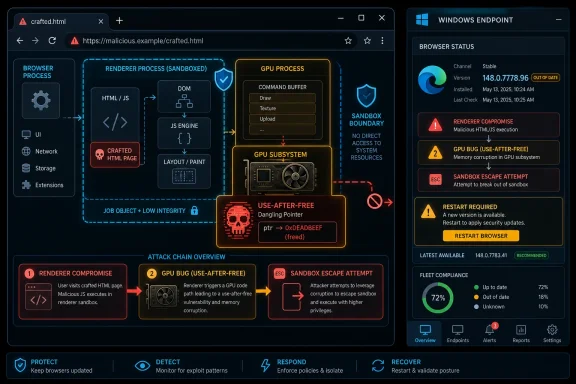
CVE-2026-7985 is not described as the first foothold in an attack. The published description says the attacker must have already compromised the renderer process, which is the part of the browser that handles web content and is deliberately boxed in by the sandbox. That condition matters because it separates this flaw from the classic “visit a page and immediately lose the machine” panic headline.
But it also explains why defenders should not shrug. Modern browser exploitation is often a chain, not a single magic bullet. One bug gets code running in a renderer, and another bug tries to cross the wall into something more privileged. CVE-2026-7985 belongs to that second category: a flaw that may turn a contained compromise into a more dangerous one.
The vulnerable component is the GPU stack, a historically difficult part of browser security because it sits at the intersection of web content, graphics drivers, shared memory, acceleration APIs, and operating-system-specific behavior. Browsers have spent years moving more work out of the renderer sandbox, only to discover that every helper process becomes part of the browser’s real attack surface.
That is why the phrase use after free still makes security teams sit up. It means software continued to use memory after it should have been considered dead. In the right conditions, that can become memory corruption, control-flow manipulation, or a stepping stone to something worse.
“Medium” Does Not Mean “Low Priority”
Chromium labels CVE-2026-7985 as medium severity, while CISA-ADP assigned a CVSS 3.1 base score of 8.3, which lands in the high range. That mismatch is not necessarily a contradiction. It is a reminder that severity systems measure different things and often speak to different audiences.
Chromium’s internal severity reflects how the project assesses the bug in context, including exploit prerequisites and component boundaries. CVSS, by contrast, is a more standardized scoring model that emphasizes impact once the attack conditions are met. A sandbox escape with high confidentiality, integrity, and availability impact can score high even if the attack complexity is also high.
For IT teams, the scoring debate is less useful than the operational fact: this is a browser process-isolation bug fixed in a mainstream stable release. If your estate includes Chrome, Edge, Brave, Vivaldi, Opera, Electron-based software, embedded Chromium runtimes, or application-controlled WebView surfaces, the meaningful question is not whether the advisory used the word “medium.” It is whether the vulnerable code path exists in something your users run every day.
A browser is not just an app anymore. It is an execution environment, an identity broker, a document viewer, a password manager, a SaaS terminal, and in many enterprises, the front door to nearly every critical workflow. That makes “medium” browser bugs disproportionately interesting.
The CPE Question Exposes the Real Asset-Inventory Problem
The NVD change history for CVE-2026-7985 shows a Chrome CPE configuration covering Google Chrome versions before 148.0.7778.96, with platform nodes for Windows, Linux, and macOS. The user-facing prompt — “Are we missing a CPE here?” — is easy to read as a clerical question. In practice, it points to a recurring weakness in vulnerability management: CPEs are not the same thing as exposure.
A CPE entry can tell a scanner that google:chrome before a fixed version is vulnerable. It does not automatically capture every downstream Chromium consumer. Microsoft Edge is Chromium-based, but it has its own product identity, release cadence, update channel, enterprise policy surface, and MSRC tracking. Other Chromium-based browsers may ingest the upstream fix on different schedules.
That gap is why security teams often see a CVE in Chrome and then have to ask several additional questions. Has Edge shipped the corresponding Chromium patch? Has the vendor of a third-party browser rebased to the fixed branch? Does the affected organization use the system Chrome install, a portable browser, a bundled runtime, or an application that silently embeds Chromium? Are VDI images, kiosk systems, and offline golden images actually receiving the update?
CPEs are useful for machine matching, but they are a map with missing roads. They are especially brittle in browser security because the same vulnerable code can travel through multiple products, while the CVE record may begin life attached to the upstream project that fixed it first.
The best answer to “are we missing a CPE?” is therefore both narrow and broad. Narrowly, if the record is intended to represent Google Chrome only, the Chrome CPE before 148.0.7778.96 is the obvious anchor. Broadly, defenders should not wait for perfect CPE coverage before chasing the Chromium lineage across the software they actually deploy.
Edge Makes This a Windows Story Even When the CVE Says Chrome
Microsoft’s MSRC page for CVE-2026-7985 is the clue that Windows admins should care. Edge inherits large portions of Chromium, and Microsoft routinely documents Chromium CVEs when they affect the Chromium-based Edge channel. The fix path may differ from Chrome’s version numbering, but the exposure class is the same: a browser built on the Chromium engine needs the corresponding security update.
This is where WindowsForum readers have an advantage and a burden. They understand that “Chrome vulnerability” is often shorthand for a broader ecosystem issue. But they also live in environments where multiple Chromium instances coexist: Chrome for users who demand it, Edge as the managed default, Teams and Office components with web-rendering dependencies, WebView2 Runtime for line-of-business apps, and developer tools that ship their own browser engines.
The Windows desktop has become a Chromium habitat. That is not inherently bad; Chromium’s security engineering is sophisticated, fast-moving, and heavily scrutinized. But monoculture has consequences. When the upstream project fixes a memory safety bug in a privileged or semi-privileged browser component, patch propagation becomes the defensive race.
For managed Edge deployments, the practical move is to verify Stable, Extended Stable, and any pinned channel policies. Enterprises sometimes slow browser updates for compatibility reasons, then forget that a browser is not a quarterly application. It is hostile-input infrastructure. Every day it renders code from the public internet.
GPU Bugs Keep Reappearing Because Graphics Is a Privilege Boundary in Disguise
The GPU process exists to isolate graphics work from the renderer while still giving web pages high-performance access to modern visual features. That design is necessary. It is also messy. WebGL, WebGPU, accelerated compositing, video decode paths, canvas operations, shared buffers, and driver interactions all create complicated lifetimes for objects that move between processes and threads.
Use-after-free bugs thrive in that complexity. An object is created, referenced, passed around, released, and then unexpectedly touched again. In a simple program, that is already dangerous. In a browser’s GPU architecture, it can become a vulnerability at the boundary between untrusted web content and a more privileged process.
This is why the renderer prerequisite does not make CVE-2026-7985 unimportant. If a separate bug gives an attacker code execution inside the renderer, the sandbox is supposed to keep the blast radius contained. A GPU bug that helps break out of that containment changes the defender’s calculation.
It also explains why browser vendors are conservative about disclosure detail. Google’s Chromium issue tracker frequently restricts bug details until most users have updated. That frustrates researchers and defenders who want to understand exploitability immediately, but it is a rational tradeoff. Publishing a reliable path from memory bug to sandbox escape before update saturation would help attackers more than administrators.
The result is a familiar tension. Security teams must patch without seeing the full exploit recipe. That is uncomfortable, but it is also the normal state of browser defense.
The Crafted HTML Page Is the Oldest Trick Wearing a New Engine
The advisory says exploitation could occur through a crafted HTML page. That sounds almost quaint until you remember what HTML means in 2026. A web page is not a static document; it is an application bundle with script, graphics, media, fonts, storage, network calls, GPU access, and cross-origin policy machinery.
A crafted page can be delivered by phishing, malvertising, compromised legitimate websites, poisoned search results, watering-hole attacks, or links in collaboration tools. In many organizations, the browser is exposed to untrusted content all day long, including by users who never think of themselves as downloading software.
The renderer-compromise prerequisite means CVE-2026-7985 would likely be paired with another vulnerability. That could be another Chrome bug, a JavaScript engine issue, a renderer memory corruption flaw, or some other way to get the attacker’s code into the sandbox first. Once there, a sandbox escape becomes the move from nuisance to serious intrusion.
That is the strategic significance of the bug. It is not necessarily the spear tip; it may be the second stage. Defenders who only prioritize initial access bugs can miss the vulnerabilities that make initial access catastrophic.
This is also why browser zero-day response playbooks should not be limited to vulnerabilities marked “actively exploited.” There is no public indication in the provided record that CVE-2026-7985 is being exploited in the wild. But exploit developers build chains from parts, and a sandbox escape candidate is a useful part.
Version Numbers Are the Only Reliable Language Here
The fixed Chrome version in the record is 148.0.7778.96, with Windows and macOS also seeing 148.0.7778.96 or 148.0.7778.97 depending on channel and rollout. The update began moving through stable channels in early May 2026. That means the mitigation is not theoretical; it is a version check.
For individual users, Chrome’s built-in updater usually handles this quickly, but “usually” is not a control. The check is simple: open the browser’s About page and confirm the installed version is at or above the fixed release. The browser must also be relaunched after update installation, which is the part users most often postpone.
For enterprises, the right dashboard is not just installed version. It is installed version plus pending relaunch plus update policy plus channel. A machine that downloaded the update but has not restarted the browser is not in the same risk state as one actively running the patched build. Browser restarts are the last mile of patching.
Edge requires the same discipline, but with Edge’s own versioning and Microsoft’s release notes. It is not enough to search an endpoint for chrome.exe and declare victory. If Edge is present and used — and on Windows it almost always is — it belongs in the same patch campaign.
The same applies to non-standard browsers and runtimes. Security teams should inventory applications that bundle Chromium or rely on WebView2, especially if those applications render external or semi-trusted content. The closer an embedded browser sits to untrusted input, the more urgently it deserves attention.
The “No NVD Score Yet” State Should Not Freeze Triage
The NVD record says NIST had not yet provided CVSS 4.0 or 3.x scoring at the time reflected in the user’s data, while CISA-ADP supplied a CVSS 3.1 vector. That is normal for fresh CVEs. Enrichment lags disclosure, and vulnerability-management platforms can temporarily show incomplete or inconsistent metadata.
This is where automated prioritization can fail in both directions. Some tools under-prioritize a CVE because the NVD score is missing. Others over-prioritize because any high CVSS score becomes a red alert without context. Neither response is ideal.
The better triage model looks at exploit chain position, affected component, exposure, fix availability, and asset prevalence. CVE-2026-7985 touches a browser GPU component, offers potential sandbox escape, requires a renderer compromise, and has a vendor fix. That places it firmly in the “patch promptly” bucket, even if it does not require the same emergency response as a confirmed in-the-wild zero-day.
There is a subtle point here for mature shops. Missing NVD enrichment should not stop action when the vendor advisory is clear and the fixed version is known. Waiting for a database to finish describing a patchable browser flaw is the wrong kind of process purity.
Browser Patch Management Has Become Endpoint Security
A decade ago, browser patching was often treated as desktop hygiene. Today it is endpoint security, identity security, and cloud security rolled into one. The browser holds session cookies, SSO tokens, password vault access, extension permissions, and the authenticated context for SaaS administration consoles.
A sandbox escape does not automatically mean domain compromise. But it can turn a web content exploit into a local foothold, and a local foothold can become credential theft, persistence, lateral movement, or data access depending on the user’s privileges and the machine’s controls. That is why browser hardening should sit beside EDR and identity policy, not beneath them.
CVE-2026-7985 also highlights the value of browser isolation assumptions. If your defense model assumes the renderer sandbox will contain malicious web content, then sandbox escape bugs are direct attacks on that model. They are not just another line item in a monthly vulnerability report.
This is especially relevant for privileged users. Admin workstations, developer machines, help-desk systems, and finance endpoints should not be browsing the open web in the same relaxed posture as general-purpose desktops. If those machines run outdated browsers, every chained browser exploit becomes a higher-value event.
Patch speed is the baseline. Reducing exposure is the multiplier.
Extensions, Policies, and Relaunches Decide Whether the Patch Actually Lands
Even when the fixed version is available, browser environments are full of drag. Extensions can increase attack surface. Legacy web apps can force update deferrals. Users can keep sessions open for days. Kiosks and shared machines can run stale browser processes long after the updater has done its job.
Administrators should pay particular attention to relaunch enforcement. Chrome and Edge both provide enterprise controls that can notify users, set relaunch windows, and force restarts after updates. Those controls are sometimes unpopular, but they are less disruptive than treating every browser CVE as an incident-response exercise.
Extension governance is another quiet part of the story. A GPU use-after-free is not an extension vulnerability, but extensions shape the browser’s risk profile. Over-permissive extensions, abandoned extensions, and sideloaded tools can weaken the browser environment around the patched engine. A good Chromium patch cycle is a useful moment to review what else has been allowed to live inside the browser.
Policy drift matters too. Organizations that once configured automatic updates may discover exceptions for labs, VDI pools, test rings, executive devices, or app-compat groups. Attackers do not care that a system is stale for a business reason. They care that it is stale.
The Patch Window Is Shorter Than the Approval Meeting
For home users, the advice is blunt: update Chrome and any Chromium-based browser now, then restart it. For IT departments, the advice is only slightly more complicated: verify update rings, force relaunch where appropriate, and check Edge alongside Chrome. The fix is available, and the exploit class is serious enough to justify urgency without panic.
The most concrete actions are the least glamorous ones:
- Confirm that Google Chrome is running version 148.0.7778.96 or later, or the corresponding patched build for the platform and channel in use.
- Verify that Microsoft Edge has received the Chromium security update through its own release channel rather than assuming the Chrome fix covers it.
- Include Chromium-based third-party browsers and embedded runtimes in the exposure review, especially on developer, kiosk, VDI, and privileged-user systems.
- Treat missing or incomplete NVD scoring as an enrichment lag, not as a reason to delay a vendor-confirmed browser security update.
- Require browser relaunches after update installation so endpoints are actually running the patched code instead of merely staging it.
- Review update deferral policies for exceptions that leave small but important groups of machines behind the stable security baseline.
The Lesson Is Not This CVE; It Is the Shape of the Next One
CVE-2026-7985 is a useful case study because it is neither boring nor apocalyptic. It is a medium-labeled Chromium GPU memory safety bug with a high CVSS interpretation, a sandbox-escape angle, a renderer-compromise prerequisite, and a straightforward fixed version. In other words, it is exactly the kind of vulnerability that gets mishandled when organizations rely too heavily on one score, one product name, or one asset inventory field.
The future of browser security will be more of this, not less. More shared engine code. More GPU and AI acceleration in the browser. More WebGPU, media, and isolation complexity. More enterprise workflows that begin and end inside a Chromium surface.
The defensible posture is to stop treating Chrome CVEs as isolated Chrome events. They are signals from the Chromium supply chain, and Windows environments sit deep inside that chain. Patch the named browser, verify the sibling browsers, account for the embedded runtimes, and assume that the next crafted HTML page will arrive before the next change-control meeting has finished.
References
- Security Update Guide - Microsoft Security Response Center NVD / Chromium