

Chromium’s Media Stack Is Once Again the Attack Surface
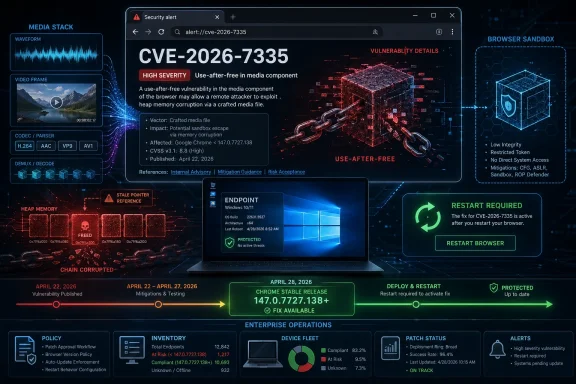
CVE-2026-7335 is described as a use-after-free vulnerability in Chromium media. That phrase sounds clinical, but the underlying failure mode is brutal: software continues using memory after it has been released, opening a path for carefully shaped data to influence what the program does next.
In a browser, that is not an obscure corner case. Media handling is a primary workload. HTML pages routinely trigger audio, video, codecs, GPU acceleration, streaming logic, container parsing, and browser-to-OS integration without the user thinking about any of it. The attack scenario listed for this CVE is equally mundane: a crafted HTML page and user interaction.
That “user interaction required” detail should not lull anyone into complacency. In CVSS terms, it often means the victim must visit a page or click a link, not that the attacker needs a baroque social-engineering campaign. The web’s entire business model is persuading users to load untrusted documents.
The important limitation is that the reported code execution occurs inside a sandbox. That matters. Chromium’s sandbox is a major mitigation boundary, and an attacker who lands inside it may still need a second vulnerability to fully compromise the host. But defenders should not mistake “sandboxed” for “safe.” Code execution in the renderer or a media-adjacent process is still the foothold from which exploit chains are built.
The Patch Was Part of a Much Bigger Security Drop
The April 28 Chrome stable update was not a one-CVE affair. Google’s release moved Windows and macOS to 147.0.7727.137/138 and Linux to 147.0.7727.137, with the usual staged rollout over days and weeks. The release included 30 security fixes, several of them critical or high severity.
That surrounding context matters because CVE-2026-7335 did not land in isolation. The same update fixed use-after-free flaws in Canvas, Accessibility, Views, GPU, ANGLE, Animation, Navigation, WebMIDI, Cast, Codecs, WebView, and WebRTC, along with other memory safety and validation issues. The pattern is impossible to miss: Chromium’s scale gives it an enormous defensive surface, and memory lifetime bugs remain a stubborn tax on that scale.
CVE-2026-7335 was credited to Jungwoo Lee and Wongi Lee, reported on April 7, 2026, and assigned high severity. Google listed the reward as “TBD,” which is common while bounty decisions are still being finalized. Bug details remain restricted, also common until enough users have updated.
That restriction is frustrating for researchers and defenders who want exploit-level understanding, but it is the right default. Publishing the precise trigger before the installed base has moved would be a gift to opportunistic attackers. The public record is enough to prioritize patching without handing out a recipe.
The CVSS Score Says “High,” but the Browser Context Says “Move”
CISA’s ADP scoring gives CVE-2026-7335 a CVSS 3.1 base score of 8.8: network attack vector, low attack complexity, no privileges required, user interaction required, unchanged scope, and high impact to confidentiality, integrity, and availability. NVD had not yet supplied its own full assessment at the time the record was enriched, but the direction of travel is not ambiguous.
CVSS can sometimes flatten browser risk. A vulnerability that requires user interaction and is sandbox-contained can look less dramatic than a wormable server bug. In enterprise reality, however, browsers are exposed to hostile content all day, every day, on machines that often hold credentials, tokens, documents, password managers, session cookies, and privileged cloud access.
That is why browser flaws with “UI:R” can still deserve urgent treatment. The browser is not merely an application on the desktop. It is the application delivery platform, the identity surface, the document viewer, the SaaS client, the meeting room, the file previewer, and the authentication broker.
For Windows environments, the risk calculus is sharper still. Chrome may be the user’s default browser, Edge may be the policy-controlled browser, WebView2 may be embedded in enterprise apps, and Chromium code may appear in third-party products that do not update on Google’s cadence. The vulnerability label says Chrome, but the architectural dependency says Chromium.
Microsoft’s Advisory Makes This a Windows Fleet Problem
The user-facing source here is Microsoft’s Security Response Center entry for CVE-2026-7335. That is not incidental. Microsoft tracks Chromium vulnerabilities because Edge is Chromium-based, and Edge is now deeply woven into Windows management, enterprise identity workflows, and Microsoft 365 usage.
A Chrome CPE does not always tell the whole deployment story. The NVD configuration shown for this CVE lists Google Chrome versions before 147.0.7727.138 across Windows, Linux, and macOS. That is accurate for Chrome, but it does not describe every Chromium-derived product that may need attention, nor does it necessarily express how Microsoft packages, maps, or remediates equivalent Chromium fixes in Edge.
This is where admins should resist the false comfort of vulnerability scanner neatness. A missing or narrow CPE is not proof of irrelevance. It may only mean the vulnerability record is lagging the ecosystem reality, especially for browser code that is vendored, forked, embedded, repackaged, or patched on a different version numbering scheme.
Edge’s versioning is not Chrome’s versioning. A Chromium fix can appear in Edge under a different build line, and Microsoft’s Edge security release notes are the right place to confirm Edge-specific remediation. Treat the MSRC entry as the signal that Microsoft recognizes the issue; treat your browser inventory as the ground truth of exposure.
The CPE Question Is Really an Asset Inventory Question
The prompt asks, in effect, whether we are missing a CPE. The short answer is: possibly, but the larger problem is that CPEs are a poor model for modern browser dependency risk.
CPEs are useful for matching vulnerability records to known product names and versions. They are much less useful when one fast-moving upstream project feeds multiple downstream products, each with different branding, package names, release trains, and update mechanisms. Chromium is the canonical example.
A strict CPE match may catch Google Chrome and miss Chromium builds, ungoogled Chromium packages, Electron-based apps, browser-like shells, embedded WebView stacks, or vendor-customized applications that carry older Chromium components. Conversely, a broad match may flood dashboards with theoretical exposure where the vulnerable component is absent or unreachable.
That is why the practical question is not “does the NVD CPE list every possible downstream?” It is “which installed products in my environment contain the vulnerable Chromium media code path, and have they consumed the fixed upstream change?” The first question belongs to databases. The second belongs to engineering and operations.
Security teams should still report missing CPEs when they find them. Better metadata helps everyone. But no serious enterprise should let CPE coverage define patch scope for Chromium-class vulnerabilities.
Use-After-Free Bugs Keep Surviving the Browser Security Machine
The repetitive nature of this release is striking. “Use after free” appears again and again across the April 28 fix list. That does not mean Chromium security is failing; it means the project is still carrying an immense amount of performance-sensitive code written in memory-unsafe languages and sitting at the boundary between trusted execution and untrusted input.
Modern browsers deploy a formidable stack of mitigations: sandboxing, site isolation, fuzzing, sanitizers, control-flow protections, exploit hardening, and rapid auto-update. Google’s release notes explicitly credit automated tools such as AddressSanitizer, MemorySanitizer, UndefinedBehaviorSanitizer, Control Flow Integrity, libFuzzer, and AFL for finding many security bugs. Those tools are why many defects are caught before stable release.
But the same release notes are also a reminder that tooling does not eliminate entire bug classes overnight. Media pipelines are complicated. They touch codecs, hardware acceleration, buffering, streaming protocols, GPU processes, permission models, and platform APIs. Complexity is the oxygen that memory safety bugs breathe.
The industry’s gradual move toward memory-safe languages is real, but browsers cannot be rewritten by press release. Chromium is a city, not a cabin. Replacing unsafe components without breaking performance, compatibility, DRM, hardware acceleration, accessibility, and web standards is a generational migration.
The Sandbox Buys Time, Not Forgiveness
The phrase “inside a sandbox” is one of the most misunderstood comfort blankets in vulnerability management. It is meaningful because it reduces the blast radius of a successful exploit. It is insufficient because attackers do not stop at the first boundary when the target is worth the effort.
A sandboxed renderer compromise can expose browser-process attack surface, extension interfaces, IPC mechanisms, GPU boundaries, or local data accessible within the compromised context. Even without a full escape, the attacker may be able to manipulate web sessions, steal page data, interact with authenticated services, or stage follow-on attacks depending on the exploit’s capabilities and the process architecture involved.
The right mental model is layered defense. The sandbox is a wall. CVE-2026-7335 is a way into the courtyard. Whether the attacker can reach the keep depends on additional bugs, mitigations, configuration, and target value.
That is why browser patching remains urgent even when individual CVEs do not announce full system compromise. Exploit chains are assembled from parts. A high-severity media flaw can become the first link in a chain that includes a sandbox escape, privilege escalation, credential theft, or cloud session abuse.
The “No Known Exploitation” Gap Should Not Slow Patching
There is no public indication in the provided record that CVE-2026-7335 was exploited in the wild before disclosure. That is useful information, but it should not drive a slow lane.
Browser vulnerabilities have a short half-life once patched. Attackers can diff open-source code, inspect changed components, monitor bug trackers when restrictions lift, and develop proof-of-concept triggers. Even when the original issue details are hidden, the patch itself can eventually become a map.
This is especially true for high-volume consumer and enterprise targets. Chrome and Edge are everywhere. Attackers do not need rare victim conditions when the installed base is measured in hundreds of millions or more. A vulnerability that requires a crafted page is naturally suited to malvertising, compromised websites, phishing, watering holes, and exploit-kit style delivery.
The real operational window is not “before disclosure versus after disclosure.” It is “before broad reverse engineering versus after broad reverse engineering.” Auto-update compresses that window for consumers. Enterprises often widen it with rings, maintenance windows, change freezes, VDI images, and application compatibility testing.
Enterprise Browser Patching Is Still Too Often Treated as Hygiene
The most dangerous browser vulnerabilities are not always the ones that receive the loudest headlines. Zero-days under active exploitation deserve emergency treatment, but high-severity non-zero-days still matter because the browser update pipeline is one of the few places where enterprise patching can be fast by design.
Chrome and Edge both have mature enterprise controls. Admins can set update policies, control channels, stage rollouts, and monitor versions. The hard part is not technical possibility; it is organizational discipline. Too many environments still treat browser patching as background noise until a scanner turns red.
For CVE-2026-7335, the operational target for Chrome is straightforward: get desktop Chrome to 147.0.7727.138 or later on Windows and macOS, and to the fixed Linux build line where applicable. For Edge, confirm Microsoft’s corresponding stable security update rather than assuming Chrome’s exact version number maps across.
There is also a user-experience trap. Browser updates often install silently but do not fully take effect until restart. A fleet dashboard that shows the new version downloaded is not the same as a fleet that has restarted into the patched binary. Long-lived browser sessions are an underrated enterprise exposure.
Admins should measure the thing that matters: running version, not merely available update. If users keep Chrome or Edge open for weeks, the update mechanism may be doing its job while the process that actually handles hostile content remains stale.
The April Release Shows Why Browser Monoculture Is a Double-Edged Sword
Chromium’s dominance gives defenders speed and attackers scale. When Google fixes a bug, the same research, tooling, and engineering investment can benefit Chrome, Edge, and downstream projects. That is the upside of shared infrastructure.
The downside is correlated exposure. A vulnerability in a shared component can matter across multiple browsers and applications. Even when branding differs, the vulnerable parsing logic may be the same family of code. Security teams that inventory by icon rather than engine will miss that connection.
This is not an argument to flee Chromium. Firefox and WebKit have their own vulnerability histories and architectural tradeoffs. It is an argument to treat browser engines as strategic dependencies, not as interchangeable UI choices.
For WindowsForum readers, the practical implication is clear. A Windows endpoint with Chrome, Edge, Teams integrations, WebView2-dependent line-of-business apps, Electron tools, and vendor utilities is not running “a browser.” It is running a web runtime ecosystem.
Vulnerability Databases Are Lagging Indicators, Not Command Centers
NVD, MSRC, CISA enrichment, vendor blogs, and issue trackers each tell part of the story. None of them should be treated as the single operational brain.
NVD is valuable for normalization and scoring, but enrichment can lag. MSRC is authoritative for Microsoft’s view, but Chromium-origin flaws may need cross-checking against Google’s release notes. Google’s Chrome Releases blog gives the upstream fix context, but it does not enumerate every downstream package. Issue trackers may hold the richest technical detail, but access is often restricted until the patch has propagated.
This fragmentation is not a failure so much as the nature of coordinated vulnerability disclosure at web scale. The defender’s job is to join the records quickly enough to act. Waiting for every database to converge is how organizations lose the advantage that rapid browser updates are supposed to provide.
That is also why scanner output should be challenged, not worshiped. If a scanner flags Chrome below 147.0.7727.138, patch it. If it does not flag an embedded Chromium app, still ask whether the vendor has shipped a patched build. If it flags a machine that already updated but has not restarted, fix the process state. The database is a signal; the endpoint is the reality.
The Admin Playbook Is Boring Because It Works
The response to CVE-2026-7335 should not be exotic. Browser security incidents are won with inventory, update enforcement, restart pressure, and verification.
Start with managed Chrome and Edge channels. Confirm stable channel versions, check whether Extended Stable changes your exposure window, and identify devices outside normal update policy. Pay special attention to kiosks, shared workstations, VDI pools, lab machines, developer systems, and servers where browsers are installed “just for troubleshooting.”
Then look beyond the obvious browsers. Electron apps, bundled Chromium runtimes, and vendor-supplied management consoles may not update through Chrome or Edge channels. For those, the question is whether the vendor consumes the fixed Chromium code, not whether Google Chrome itself is current.
Finally, make restarts visible. Browser relaunch deferral is convenient until it becomes a vulnerability persistence mechanism. Enterprises that tolerate weeks-long browser uptime are quietly opting out of one of the strongest parts of the Chromium security model.
This is the unglamorous truth of endpoint defense: the mitigation is often available before the organization is ready to deploy it. Attackers exploit software bugs, but they also exploit maintenance culture.
The Version Number Is the Line in the Sand
For Chrome, the fixed desktop version called out in the CVE record is 147.0.7727.138. Google’s stable release also lists 147.0.7727.137/138 for Windows and macOS and 147.0.7727.137 for Linux, reflecting platform-specific build distribution. The CVE language uses “prior to 147.0.7727.138,” so Windows admins should treat that as the clean compliance threshold for Chrome on Windows.
Do not overinterpret the Linux number difference without checking the platform-specific package source. Browser vendors often publish adjacent build numbers for different operating systems as part of the same security release. What matters is whether the package source has the April 28 security fixes.
For Microsoft Edge, do not chase Chrome’s version string. Edge has its own release train. Use Microsoft’s Edge security release notes, MSRC, enterprise update channels, and device inventory to determine the remediated Edge build in your tenant.
For vulnerability management teams, the reporting language should be precise. “Chrome fixed in 147.0.7727.138 or later” is different from “all Chromium products fixed in 147.0.7727.138.” The first is a Chrome statement. The second is a dangerous simplification.
The April 28 Cluster Is a Warning About Rich Content
CVE-2026-7335 sits among a cluster of flaws in components that make the modern web feel native: Canvas, GPU, WebRTC, Cast, Codecs, Animation, Views, Accessibility, and Media. These are not decorative features. They are the browser’s operating system within the operating system.
Every enterprise web app leans on this stack. Video meetings, dashboards, training portals, remote support tools, conferencing, identity workflows, drag-and-drop document processing, and streaming content all expand the amount of complex parsing done inside the browser. The richer the browser becomes, the more it resembles the old plugin platforms it replaced.
The security industry spent years celebrating the death of Flash and Java applets on the web. That celebration was justified. But the risk did not disappear; it was absorbed into the browser itself, where the update model is better and the codebase is vastly more sophisticated.
CVE-2026-7335 is therefore not a freak event. It is the expected residue of a platform that parses nearly everything and must do so at speed. The browser won because it became universal. Universal platforms become universal targets.
The Practical Read Before the Next Scanner Storm
CVE-2026-7335 does not require panic, but it does require motion. Treat it as a high-priority browser patching event, not as trivia in a vulnerability feed.
- Chrome installations on Windows should be updated to 147.0.7727.138 or later, with verification based on the running browser version after relaunch.
- Edge exposure should be confirmed through Microsoft’s own security release information because Edge does not use Chrome’s exact version numbering.
- Vulnerability scanners may miss downstream Chromium exposure when CPE metadata is incomplete or when products bundle their own Chromium runtime.
- The “inside a sandbox” limitation reduces impact but does not make the flaw safe, especially if attackers can combine it with a second vulnerability.
- Long-lived browser sessions can leave users effectively unpatched even after an update has downloaded.
- Embedded Chromium, Electron applications, WebView-based software, and vendor tools deserve separate inventory and vendor follow-up.
The broader lesson is that browser patching has become infrastructure patching. CVE-2026-7335 is a media bug on paper, but in practice it is a test of whether an organization can see and service the web runtime layer that now sits across nearly every Windows workflow. The defenders who win this round will not be the ones with the prettiest CVE dashboard; they will be the ones who can turn upstream fixes into restarted, verified, patched processes before yesterday’s advisory becomes tomorrow’s exploit kit.
References
- Security Update Guide - Microsoft Security Response Center NVD / Chromium