
 Chrome’s Remote Desktop Plumbing Becomes a Windows Privilege Problem
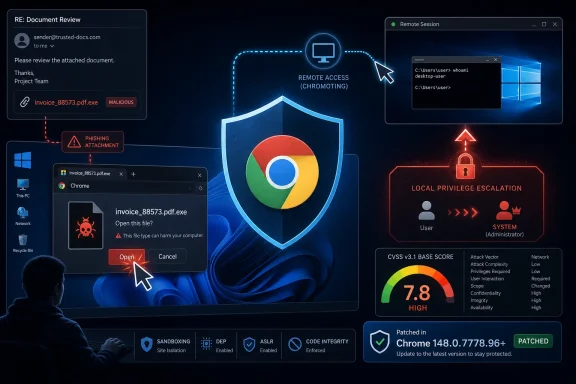
CVE-2026-7994 is, on paper, a medium-severity Chromium bug. That label is easy to misread. “Medium” in Chromium’s taxonomy does not mean “unimportant,” and in this case the vulnerability’s public scoring from CISA-ADP assigns a CVSS 3.1 base score of 7.8, in the high range, because successful exploitation can affect confidentiality, integrity, and availability at the operating-system level.
The description is terse: “inappropriate implementation in Chromoting.” Chromoting is the Chromium project’s remote desktop technology, better known to most users as the foundation under Chrome Remote Desktop. It is the part of the Google stack that turns the browser ecosystem from a document renderer into a remote-access system.
That distinction matters. A browser bug that corrupts a tab is one problem; a browser-adjacent bug that crosses into OS privileges is another. Chrome has spent years sanding down web content risk with sandboxing, site isolation, memory hardening, and increasingly aggressive update cycles. But remote desktop features necessarily sit closer to the host operating system than a normal webpage does.
The public description says the attacker is local, the target is Windows, and the exploitation path involves a malicious file plus user interaction. That is not the same threat model as a drive-by web exploit. It is closer to the everyday mess of endpoint compromise: a downloaded attachment, a help-desk lure, a shared file, a remote-support session, or a user operating inside a machine where Chrome is assumed to be “just the browser.”
The CPE Is Not Missing So Much as Uncomfortable
The user-facing NVD note asks whether a CPE is missing, and the short answer is: the current configuration looks awkward but defensible. NIST’s initial analysis records an affected configuration that combines Google Chrome versions before 148.0.7778.96 with Microsoft Windows. That reflects the vulnerability description: Chrome is the affected application, but only on Windows.
That “AND” relationship is important. A CPE for Chrome alone would overstate the affected surface if the bug is Windows-specific. A CPE for Windows alone would be wrong because the vulnerable code is not a Microsoft OS component. The pairing tells vulnerability scanners and asset systems that risk exists where those two facts meet: Google Chrome before the fixed version, running on Windows.
The discomfort comes from how enterprise vulnerability management tools consume this data. Many scanners, dashboards, and ticketing workflows still treat CPEs as if software identity were a neat one-dimensional label. Modern endpoint risk is messier. Browser components call OS services, remote desktop modules touch permissions and files, and vendor advisories appear simultaneously in Google, NVD, CISA enrichment, Linux distribution trackers, and Microsoft’s update guide.
So, no, this is probably not a missing-CPE situation in the basic sense. It is a reminder that CPEs are a blunt instrument for a world where applications are platforms and platforms are applications. Chrome on Windows is the product at risk; Windows by itself is not the product to patch.
“Local Attacker” Is Not a Comforting Phrase in 2026
Security teams sometimes breathe easier when a CVE says “local attacker.” They should not do that here. Local privilege escalation is the second act of many real intrusions, the move that turns an initial foothold into persistence, credential theft, lateral movement, or full endpoint control.
The public vector says attack vector local, attack complexity low, privileges required none, user interaction required, and scope unchanged. In plain English, that means an attacker does not need existing privileges, but does need the user to do something. The malicious file is the bridge.
That combination is painfully familiar. The hardest part of many attacks is not finding a kernel-grade remote exploit; it is getting one person to open one thing. Once that happens, privilege escalation bugs determine whether the attacker remains trapped in a user context or starts acting with far more authority than the user intended.
The Chrome angle makes this worse, not better. Chrome is everywhere, updates constantly, and often receives less endpoint-hardening scrutiny than remote-access tools with obvious administrative branding. If Chrome Remote Desktop or its underlying components are present, enabled, or simply available in the browser stack, defenders need to think of Chrome not only as a web client but as a participant in the host’s access-control model.
Chrome 148 Is a Security Release Wearing a Feature Release’s Jacket
Chrome 148 was promoted to the stable channel for Windows, macOS, and Linux on May 5, 2026, with Windows and macOS moving to 148.0.7778.96 or 148.0.7778.97 and Linux to 148.0.7778.96. Google said the update would roll out over the coming days and weeks, the usual phrasing for a staggered Chrome deployment. For consumers, that sounds routine. For enterprise administrators, it is the sound of a race.
Reporting around the release notes that Chrome 148 fixes 127 security vulnerabilities, including several critical issues. CVE-2026-7994 is not the headline critical memory-safety bug in that bundle, but it may be the one that matters most to Windows administrators thinking about privilege boundaries rather than browser crashes.
This is the recurring Chrome patching paradox. Google’s rapid release model is one of the security strengths of the browser ecosystem, but its scale also normalizes urgency. Every month brings fixes; some months bring emergency fixes; every fleet develops its own appetite for delay. The result is that Chrome becomes both one of the best-maintained applications on the endpoint and one of the easiest to underestimate because patching it feels perpetual.
The fixed version threshold is simple: Windows systems should be on Chrome 148.0.7778.96 or later, with 148.0.7778.97 also appearing for Windows and Mac in the stable release stream. Extended Stable environments should verify their own channel version rather than assuming the mainstream stable number maps perfectly to their deployment ring.
Microsoft’s Presence Is a Signal, Not Ownership
The MSRC entry may confuse some readers because the vulnerability is not a Microsoft-authored Windows flaw. Microsoft tracks third-party vulnerabilities in its update guide when they affect Microsoft environments, products, or customer security posture. In this case, Windows is the affected operating system named in the CVE description.
That does not mean Windows Update is the remedy. The fix is in Chrome. Administrators should not wait for a Patch Tuesday package, a cumulative update, or a Defender signature to make this go away. The remediation path is browser update management.
Still, Microsoft’s presence is useful. It puts the CVE where Windows administrators already look, and it reinforces the reality that endpoint security is now an ecosystem problem. A Windows machine’s effective security boundary is shaped by Microsoft code, Google code, driver code, EDR code, remote-access code, and whatever productivity plugins the organization has blessed over the years.
The old ownership model — “vendor A bug, vendor A problem” — has become operationally quaint. If the vulnerable thing runs on Windows, is deployed across Windows endpoints, and can escalate privileges on Windows, it is a Windows fleet problem even when the patch comes from Mountain View.
Chromoting Deserves More Scrutiny Than It Usually Gets
Chromoting’s role in Chrome is easy to overlook because Chrome Remote Desktop is not as culturally loud as RDP, TeamViewer, AnyDesk, or enterprise remote monitoring and management platforms. But it occupies a sensitive category: software that mediates remote interaction with a local desktop.
That class of software has become strategically important to attackers. Remote access blends into legitimate administration, works across geographies, and often survives because organizations actually need it. Even when a specific CVE does not describe remote exploitation, bugs in remote-access-adjacent components deserve extra attention because they tend to sit near identity, session control, file handling, service permissions, and system integration.
CVE-2026-7994 does not currently appear to be described as exploited in the wild in the public text available at publication time. That is good news, but it is not permission to drift. Chrome vulnerability details are often restricted until enough users have updated, meaning defenders rarely get a satisfying technical narrative at the moment they most want one.
The right operational posture is therefore boring but strict: patch first, theorize later. If a local attacker can turn a malicious file into OS-level privilege escalation through a browser remote-access component, the absence of public exploit code is not the standard to wait for.
The Enterprise Risk Is in the Gaps Between Rings
Most managed Windows environments do not update Chrome in one motion. They use rings: early adopters, IT validation, pilot groups, broad production, and sometimes a slower extended-stable channel. That discipline is sensible when updates can break line-of-business web apps. It is dangerous when “validation” becomes a euphemism for indefinite deferral.
CVE-2026-7994 is the sort of bug that should shorten the normal runway. It requires user interaction, but phishing and file-based lures are not exotic. It is local, but local privilege escalation is how commodity intrusions become administrator-level incidents. It is medium in Chromium’s severity language, but high in CVSS scoring from CISA-ADP. Those are exactly the mismatched labels that cause patch queues to mis-rank the work.
Admins should also remember that Chrome is not just Chrome. Microsoft Edge, Brave, Vivaldi, Opera, and other Chromium-based browsers draw from the same upstream project, but they do not all ship fixes at the same instant or expose the same feature set in the same way. CVE-2026-7994’s public description names Google Chrome on Windows, so remediation should begin there, but Chromium-family browser inventory remains part of the due diligence.
The more mature question is not “Did Chrome auto-update eventually?” It is “Which Windows endpoints remained below 148.0.7778.96 after the advisory became public, and why?” That is the question that separates patch management from patch hope.
Home Users Get the Same Bug With Fewer Guardrails
For home users, the advice is simpler and less forgiving: open Chrome’s About page and let it update. Chrome’s automatic updater is reliable, but it is not magic. A browser that has been left open for days, a machine that rarely restarts, or a managed policy inherited from some old utility can leave users behind.
The user-interaction requirement also cuts differently at home. Consumers download files constantly, mix work and personal accounts, grant remote help to family members, and often run as local administrators. A malicious file does not need to arrive wearing a skull-and-crossbones icon. It can look like an invoice, a driver, a document converter, a game mod, or a remote-support artifact.
Chrome Remote Desktop users should be especially attentive, not because the public description says remote sessions are the attack path, but because the vulnerable component is Chromoting. If the software exists to provide remote control of a desktop, and a bug in that area enables local elevation, the safe assumption is that the feature deserves patch urgency.
The minimum bar is Chrome 148.0.7778.96 on Windows. Anything older belongs in the “update now” bucket.
The Scanner Finding Is Only the Beginning
Vulnerability scanners will likely flag Chrome installations below 148.0.7778.96 once their plugins and feeds ingest the CVE. That is useful, but scanner output is not the same thing as risk reduction. The hard part is correlating browser version, operating system, channel, user population, remote-access policy, and actual update success.
Some endpoints will report stale versions because Chrome has updated but not relaunched. Others will carry multiple Chrome installs: system-level, user-level, remnants in old profiles, or portable copies. Still others will run in VDI or kiosk-like environments where update persistence behaves differently than on standard laptops.
This is where administrators should resist the false precision of a single dashboard percentage. A fleet that is “94 percent remediated” may still have the exact 6 percent that matters: administrators, developers, finance users, help-desk staff, domain-joined shared machines, or exposed remote workers. Local privilege escalation risk is not evenly distributed.
A good response should verify version telemetry after restart, check for duplicate installations, enforce update policy, and close the loop on machines that do not report. Chrome patching is usually fast. The exceptions are where attackers like to live.
The Real Lesson Is That Browsers Are Endpoint Infrastructure
The browser is no longer an app in the casual sense. It is an identity surface, a document runtime, a password vault, a remote-access broker, a policy endpoint, a certificate consumer, a PDF handler, a media engine, and a software update client. Chrome, Edge, and their peers are now part of the operating environment’s core infrastructure.
That evolution changes how we should read CVEs like this one. A bug in Chromoting is not merely a bug in a feature some users may never consciously launch. It is a bug in the browser’s extended system role, where browser capabilities meet OS privilege and user trust.
Windows administrators understand this instinctively when the vulnerable component is RDP or Print Spooler. They should apply the same instinct when the component ships inside a browser. The packaging is different; the risk class is familiar.
This is also why the CPE discussion matters. Asset inventories that treat browsers as commodity applications miss the architectural truth. Chrome is a managed platform on top of Windows, and it deserves the same patch discipline organizations apply to VPN clients, remote administration tools, and endpoint agents.
The Patch Window Is Where the Story Happens
CVE-2026-7994 has not become famous, and it may never become famous. Most vulnerabilities do not get a logo, a catchy name, or a public exploit demo. They become important only in the gap between disclosure and remediation, when attackers can read the same advisories defenders can.
That window opened publicly on May 6, 2026, when the CVE entered the NVD/MSRC orbit, with Google’s Chrome 148 stable update already announced on May 5. The fix exists. The question is deployment.
For organizations, the practical move is to treat this as a high-priority Chrome-on-Windows update, especially on systems where users handle untrusted files or where Chrome Remote Desktop is enabled. The vulnerability’s medium Chromium severity should not override the operational signal created by OS-level privilege escalation.
For consumers, the practical move is even shorter: update Chrome and restart it. If Chrome says it is managed by an organization and does not update, the organization owns the next step.
The Version Number Is the Control Point
This incident reduces to a handful of concrete checks, and none of them require waiting for a deeper exploit write-up. The public facts are sufficient to act.
- Windows systems running Google Chrome earlier than 148.0.7778.96 should be treated as vulnerable to CVE-2026-7994.
- The vulnerability sits in Chromoting, the Chromium remote desktop technology associated with Chrome Remote Desktop.
- The public attack description requires a local attacker, a malicious file, and user interaction, but successful exploitation can lead to OS-level privilege escalation.
- Microsoft’s advisory presence does not mean Windows Update fixes the bug; Chrome update management is the remediation path.
- The current CPE pairing of Google Chrome with Microsoft Windows reflects a Windows-specific Chrome vulnerability rather than a standalone Windows flaw.
- Enterprise teams should verify actual post-restart Chrome versions instead of assuming automatic updates have completed across the fleet.
CVE-2026-7994 is a small entry in a large Chrome 148 security release, but it captures the direction of endpoint risk: browsers are no longer neatly contained clients, and remote-access components are no longer niche utilities living outside the mainstream software stack. The fix is straightforward, but the lesson is larger. Windows security now depends on treating Chrome as infrastructure, not furniture, and on closing the update gap before a medium-looking browser bug becomes the privilege escalation step in somebody else’s intrusion playbook.
