

Google and Microsoft disclosed CVE-2026-7995 on May 6–7, 2026, an out-of-bounds read in Chromium’s AdFilter component affecting Chrome before 148.0.7778.96 and Edge builds consuming the vulnerable Chromium code, with exploitation possible through a crafted HTML page inside the browser sandbox. The bug is not the loudest vulnerability in the Chrome 148 security train, but it is a useful reminder that browser risk does not always arrive wearing a “critical” badge. For Windows users and enterprise administrators, the practical story is simpler than the taxonomy: if Chrome or Edge is still below the 148.0.7778 line, the browser is behind the threat curve. The interesting part is why a medium-severity Chromium flaw can still generate a high operational priority.
CVE-2026-7995 lands in that awkward middle tier of browser security: serious enough to allow code execution within Chrome’s sandbox, but not described as a full host compromise by itself. Chromium’s own severity rating is Medium, while the CISA ADP CVSS 3.1 score published through vulnerability records assigns it an 8.8 High rating because the attack can be launched remotely, requires no privileges, and can affect confidentiality, integrity, and availability if the user interacts with malicious content.
That mismatch is not necessarily a contradiction. Browser vendors often judge bugs in the context of exploit chains and sandbox boundaries, while CVSS scoring tries to model a more general vulnerability impact. In practice, attackers rarely care whether one bug completes the whole journey; they care whether it moves them one step closer to a working chain.
The phrase “execute arbitrary code inside a sandbox” is doing a lot of work here. It means the attacker’s code is not supposed to immediately own the Windows machine, read arbitrary files, dump credentials, or install malware outside the browser’s confinement. But it also means the attacker may have gained a foothold in one of the most exposed, most privileged-in-practice applications on the desktop.
Modern browsers are built as layered defenses. Rendering, JavaScript, networking, extensions, site isolation, process boundaries, and OS-level mitigations all contribute to the promise that a bad page should not become a bad day. CVE-2026-7995 is a reminder that the first layer of that promise remains attackable, and that the sandbox is not a reason to defer patching so much as the reason users usually survive until patching happens.
A crafted HTML page is the classic delivery vehicle because it weaponizes the browser’s job description. The browser is supposed to fetch arbitrary content, parse it quickly, apply complex rules, and render the result without trusting the source. A memory-safety error in that pipeline does not need a user to download an executable or accept a macro prompt; the web page itself is the lure, container, and trigger.
Out-of-bounds read vulnerabilities are sometimes dismissed as “just reads,” especially compared with out-of-bounds writes or use-after-free bugs. That is a dangerous simplification. Reading memory outside the intended boundary can disclose data, destabilize assumptions, or help shape a later exploit. In some cases, especially in complex native code, an out-of-bounds read can contribute directly to code execution when paired with other primitives or when the read influences control flow.
The public description for CVE-2026-7995 says arbitrary code execution inside the sandbox is possible. That matters more than the weakness label alone. CWE-125 tells us the bug class; the vendor impact statement tells us why defenders should care.
That context matters because CVE-2026-7995 is not an isolated emergency patch in the way browser zero-days sometimes are. It is one item in a large Chromium maintenance wave, with the usual vendor caution that technical details may remain restricted until enough users have updated. For defenders, this is both comforting and frustrating: comforting because the fix is already in a stable build, frustrating because the full exploit mechanics are not publicly visible.
The restricted Chromium issue tracker entry is normal for browser security. Google routinely keeps details locked down when disclosure could help attackers before the update has reached enough endpoints. That creates a temporary asymmetry: defenders know the component, class, affected versions, and fixed version, while attackers may be reverse-engineering the patch to reconstruct the bug.
That race is why “wait and see” is a poor strategy for browser updates. Once a security fix is published, the diff itself becomes a map. Even if the original bug report remains private, a motivated researcher or attacker can compare vulnerable and patched code, narrow the changed logic, and look for ways to trigger the old behavior.
For Windows administrators, this is the part that often gets missed. A Chrome CVE is not only a Google Chrome problem. It can be an Edge problem, a Brave problem, an Opera problem, a Vivaldi problem, and a downstream Chromium package problem depending on how quickly each project integrates and ships the patch.
Microsoft lists Microsoft Edge (Chromium-based) as requiring customer action, with fixed builds in the 148.0.7778.xxx range. That “xxx” matters because Edge’s exact build number may not mirror Chrome’s final digits, even when it contains the relevant Chromium fix. The defensible check is not whether the browser’s string exactly matches Chrome’s Linux build, but whether the vendor channel has shipped a build incorporating Chromium 148.0.7778 with the security update.
This is where browser monoculture cuts both ways. Chromium’s shared codebase gives the web a fast-moving engine with deep security investment, but it also means a flaw in a shared component can ripple across products that many organizations mistakenly inventory as separate risk categories. Chrome and Edge may be different products in procurement language; from a memory-safety perspective, they are often neighbors sharing the same load-bearing wall.
That timing is typical, but it creates noise for automated vulnerability management. Scanners, dashboards, and ticketing systems often ingest CVE data at different stages of maturity. One feed may show “NVD not yet provided,” another may show a high CVSS score, and another may lag on affected platform mappings or fixed package information.
The user-facing question — “Are we missing a CPE here?” — is not trivial. CPEs are the fragile connective tissue between a vulnerability record and the software inventory that determines whether a machine gets flagged. If the CPE mapping is incomplete, a real exposure can disappear from dashboards. If it is too broad, teams drown in false positives and start ignoring browser alerts.
For CVE-2026-7995, the Chrome CPE mapping looks like the core affected product record. Edge’s exposure is documented separately through Microsoft’s advisory rather than necessarily appearing as the same Google Chrome CPE. That distinction matters to scanner interpretation: an organization may need both Chrome detection logic and Edge detection logic to get an accurate picture.
But defenders should not confuse “inside the sandbox” with “safe.” Sandboxed code execution can still crash the browser, manipulate browser state, interact with exposed interfaces, probe memory, or prepare the ground for a second-stage exploit. If the attacker also has a sandbox escape — patched or unpatched, known or unknown — the medium bug can become the first act of a much worse incident.
This is particularly relevant in enterprise environments where browsers are authenticated work hubs. The browser has access to SaaS sessions, identity tokens, internal applications, device-bound credentials, password managers, sync data, and extension APIs. A compromise that begins in a constrained browser context may still be extremely valuable if it can touch the right session or induce the right user action.
The larger lesson is that modern exploitation is compositional. Individual CVEs are the accounting units, not always the attack units. Attackers assemble primitives; defenders patch products.
CVE-2026-7995 does not currently appear to have been described as exploited in the wild in the public vendor text. That is good news, but it is not a reason to relax. Browser vulnerabilities have a short half-life once a patch ships, because attackers can study the update and target laggards.
The right operational priority is not panic; it is velocity. Push Chrome and Edge to current stable builds, verify the installed versions, and pay special attention to systems where browser updates are not automatic. The endpoints most likely to lag are often the endpoints most likely to be forgotten: shared workstations, lab systems, conference-room machines, VDI base images, jump boxes, and application servers where someone installed a browser “just once” for troubleshooting.
The web-facing nature of the bug also changes the risk calculus. A vulnerable browser does not need to expose a listening service. It only needs a user, a link, an embedded page, a malicious ad path, a compromised site, or an internal portal that can be influenced by an attacker. In browser security, the perimeter is every page the user can be persuaded to render.
The MSRC entry for CVE-2026-7995 is a reminder that Edge security is now partly Chromium security. Microsoft can ship its own fixes and mitigations, but when the underlying engine takes a security update, Edge must ingest it and enterprises must deploy it. Windows Update, Edge Update policies, WSUS assumptions, Intune rings, and offline servicing plans all need to reflect that reality.
Admins should also check whether update policies are accidentally suppressing browser security fixes. Group Policy can control Edge update behavior, pin target versions, or slow rollouts for testing. Those controls are useful when they are intentional and reviewed; they are dangerous when inherited from an old troubleshooting exercise and forgotten.
The same applies to Chrome enterprise management. Organizations that disable auto-update to preserve “stability” often end up preserving known vulnerabilities. Browser stability is no longer best achieved by freezing builds; it is achieved by using rings, telemetry, rollback readiness, and fast promotion when security fixes land.
The answer is that severity systems encode different assumptions. Chromium’s security severity is shaped by exploitability, component context, sandboxing, and the project’s internal standards. CVSS is a structured scoring framework that takes inputs such as network attack vector, low attack complexity, no required privileges, user interaction, and high impact ratings. Both can be true, and neither should substitute for asset context.
For a consumer laptop with automatic updates enabled, CVE-2026-7995 may disappear quietly before the user ever hears its name. For an enterprise with thousands of managed Windows endpoints, third-party browsers, locked-down update channels, and sensitive web applications, the same CVE deserves rapid tracking. Severity is not just a property of the bug; it is a property of the bug meeting your environment.
This is why vulnerability management programs that blindly sort by CVSS often make poor decisions. A 9.8 flaw in an unreachable appliance may matter less today than an 8.8 browser flaw on every executive laptop. The browser is not just another app; it is the universal client for work.
Out-of-bounds reads are not glamorous bugs. They do not have the immediate drama of a full sandbox escape or a clean remote code execution chain. Yet they persist because browsers are asked to do something unusually hard: process hostile data at enormous speed while preserving compatibility with decades of web behavior.
The industry’s long-term answer is increasingly memory-safe languages and stronger architectural isolation. But browser engines cannot be rewritten overnight, and even memory-safe components can sit beside unsafe legacy code. The transition will be incremental, uneven, and often invisible to users.
Until then, the patch cadence is the control. Browser security has become a discipline of continuous replacement: replace the vulnerable build, replace stale assumptions, replace static baselines with live inventory. The safest browser is not the one that was hardened last quarter; it is the one that updated this week.
Not every Chromium consumer is affected by every Chromium CVE in the same way. A component may be disabled, compiled differently, unreachable, sandboxed differently, or patched independently. But defenders should resist the comforting assumption that “we do not use Chrome” ends the inquiry.
The risk is especially pronounced in applications that embed a browser engine but do not look like browsers to users or asset tools. Collaboration clients, developer tools, password managers, monitoring consoles, and internal line-of-business apps may bundle Chromium or related rendering technologies. Their update mechanisms vary wildly.
CVE-2026-7995 is specifically documented for Google Chrome and Microsoft Edge, with Ubuntu indicating its chromium-browser packaging path is not affected in the listed releases because Ubuntu’s package has long functioned as a snap installer rather than a conventional maintained Debian-style Chromium package. That kind of packaging nuance is exactly why downstream exposure cannot be inferred from product names alone.
Phishing emails, malicious search ads, compromised legitimate sites, poisoned help-desk links, fake invoice portals, and watering-hole pages are all delivery systems for browser exploits. Even well-trained users browse the web as part of their jobs. The difference between a responsible click and a dangerous one is often invisible until after the browser has parsed the page.
That is why browser hardening should not stop at patching. Enterprise controls such as site isolation policies, extension governance, download restrictions, exploit protection, DNS filtering, safe browsing features, and endpoint detection still matter. They are not substitutes for updates, but they reduce the chance that one missed update becomes an incident.
Extensions deserve special scrutiny. A patched browser with a chaotic extension estate is still a messy security boundary. Since AdFilter-adjacent logic touches the broader world of content classification and page handling, organizations should use this moment to revisit which extensions can inspect or modify pages, which are force-installed, and which have quietly accumulated excessive permissions.
Checking the browser version is simple for an individual user. Chrome and Edge both expose version information through their About pages, and opening those pages typically triggers an update check. The enterprise problem is not how to check one browser; it is how to prove thousands of browsers actually updated.
That proof should come from device management telemetry, software inventory, EDR data, browser management consoles, or configuration reporting. If the only evidence is “auto-update is enabled,” the organization is trusting intent rather than state. Browser update systems are good, but they are not magic.
Administrators should also watch for pending restarts. Browser updates often stage successfully but do not fully take effect until the browser restarts. Users who keep dozens of tabs open for weeks can remain on an old running binary even after the update has downloaded.
That repetition breeds fatigue. A Chrome update with 127 fixes can paradoxically feel less urgent than a single named vulnerability because the scale becomes abstract. CVE-2026-7995 is a useful counterexample: a single medium-rated item, buried in a broader release, still has the shape of a plausible drive-by exploit component.
The fix is cultural as much as technical. Browser updates should be treated as a normal high-tempo security function, not as an interruption to quarterly patch governance. If an organization can push emergency VPN, EDR, or identity-agent updates, it can build a similarly disciplined path for browsers.
This does not mean reckless deployment. It means ringed deployment with a short fuse: canary, pilot, broad rollout, verification, exception tracking. The goal is not to eliminate testing; it is to stop confusing testing with waiting.
Source: NVD / Chromium Security Update Guide - Microsoft Security Response Center
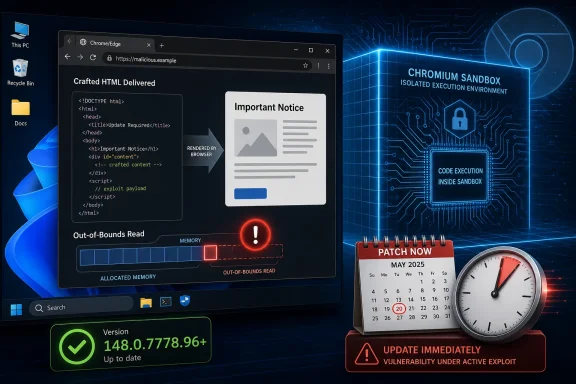 A Medium Chrome Bug Can Still Be a High-Pressure Patch
CVE-2026-7995 lands in that awkward middle tier of browser security: serious enough to allow code execution within Chrome’s sandbox, but not described as a full host compromise by itself. Chromium’s own severity rating is Medium, while the CISA ADP CVSS 3.1 score published through vulnerability records assigns it an 8.8 High rating because the attack can be launched remotely, requires no privileges, and can affect confidentiality, integrity, and availability if the user interacts with malicious content.That mismatch is not necessarily a contradiction. Browser vendors often judge bugs in the context of exploit chains and sandbox boundaries, while CVSS scoring tries to model a more general vulnerability impact. In practice, attackers rarely care whether one bug completes the whole journey; they care whether it moves them one step closer to a working chain.
The phrase “execute arbitrary code inside a sandbox” is doing a lot of work here. It means the attacker’s code is not supposed to immediately own the Windows machine, read arbitrary files, dump credentials, or install malware outside the browser’s confinement. But it also means the attacker may have gained a foothold in one of the most exposed, most privileged-in-practice applications on the desktop.
Modern browsers are built as layered defenses. Rendering, JavaScript, networking, extensions, site isolation, process boundaries, and OS-level mitigations all contribute to the promise that a bad page should not become a bad day. CVE-2026-7995 is a reminder that the first layer of that promise remains attackable, and that the sandbox is not a reason to defer patching so much as the reason users usually survive until patching happens.
AdFilter Is Not Just an Ad Story
The component name, AdFilter, may invite a casual reading: a niche bug in a feature many users barely think about. That is the wrong instinct. In a browser, code paths associated with filtering, parsing, blocking, classifying, or rewriting web content sit directly in front of untrusted input.A crafted HTML page is the classic delivery vehicle because it weaponizes the browser’s job description. The browser is supposed to fetch arbitrary content, parse it quickly, apply complex rules, and render the result without trusting the source. A memory-safety error in that pipeline does not need a user to download an executable or accept a macro prompt; the web page itself is the lure, container, and trigger.
Out-of-bounds read vulnerabilities are sometimes dismissed as “just reads,” especially compared with out-of-bounds writes or use-after-free bugs. That is a dangerous simplification. Reading memory outside the intended boundary can disclose data, destabilize assumptions, or help shape a later exploit. In some cases, especially in complex native code, an out-of-bounds read can contribute directly to code execution when paired with other primitives or when the read influences control flow.
The public description for CVE-2026-7995 says arbitrary code execution inside the sandbox is possible. That matters more than the weakness label alone. CWE-125 tells us the bug class; the vendor impact statement tells us why defenders should care.
Chrome 148 Was Already a Security Release Before This CVE Got Its Own Spotlight
Chrome 148 arrived on the stable desktop channel on May 5, 2026, with builds 148.0.7778.96 for Linux and 148.0.7778.96 or 148.0.7778.97 for Windows and macOS. Google’s release notes framed the update as a broad security and stability release, and reporting on the rollout counted more than 100 security fixes, including several critical issues elsewhere in the browser stack.That context matters because CVE-2026-7995 is not an isolated emergency patch in the way browser zero-days sometimes are. It is one item in a large Chromium maintenance wave, with the usual vendor caution that technical details may remain restricted until enough users have updated. For defenders, this is both comforting and frustrating: comforting because the fix is already in a stable build, frustrating because the full exploit mechanics are not publicly visible.
The restricted Chromium issue tracker entry is normal for browser security. Google routinely keeps details locked down when disclosure could help attackers before the update has reached enough endpoints. That creates a temporary asymmetry: defenders know the component, class, affected versions, and fixed version, while attackers may be reverse-engineering the patch to reconstruct the bug.
That race is why “wait and see” is a poor strategy for browser updates. Once a security fix is published, the diff itself becomes a map. Even if the original bug report remains private, a motivated researcher or attacker can compare vulnerable and patched code, narrow the changed logic, and look for ways to trigger the old behavior.
Edge Inherits the Bug and the Fix
Microsoft’s Security Update Guide entry exists because Edge is built on Chromium. The wording is blunt: Chrome assigned the CVE, Edge consumes Chromium, and the latest Edge release is no longer vulnerable. That is not Microsoft passing the buck; it is the reality of the Chromium ecosystem.For Windows administrators, this is the part that often gets missed. A Chrome CVE is not only a Google Chrome problem. It can be an Edge problem, a Brave problem, an Opera problem, a Vivaldi problem, and a downstream Chromium package problem depending on how quickly each project integrates and ships the patch.
Microsoft lists Microsoft Edge (Chromium-based) as requiring customer action, with fixed builds in the 148.0.7778.xxx range. That “xxx” matters because Edge’s exact build number may not mirror Chrome’s final digits, even when it contains the relevant Chromium fix. The defensible check is not whether the browser’s string exactly matches Chrome’s Linux build, but whether the vendor channel has shipped a build incorporating Chromium 148.0.7778 with the security update.
This is where browser monoculture cuts both ways. Chromium’s shared codebase gives the web a fast-moving engine with deep security investment, but it also means a flaw in a shared component can ripple across products that many organizations mistakenly inventory as separate risk categories. Chrome and Edge may be different products in procurement language; from a memory-safety perspective, they are often neighbors sharing the same load-bearing wall.
The NVD Entry Shows the Vulnerability Plumbing in Real Time
The NVD record for CVE-2026-7995 was still in the middle of enrichment when the public data began circulating. NIST had not yet assigned its own CVSS score, while CISA’s ADP data supplied a CVSS 3.1 base score of 8.8 High. The CPE configuration identified Google Chrome versions before 148.0.7778.96 across Windows, Linux, and macOS.That timing is typical, but it creates noise for automated vulnerability management. Scanners, dashboards, and ticketing systems often ingest CVE data at different stages of maturity. One feed may show “NVD not yet provided,” another may show a high CVSS score, and another may lag on affected platform mappings or fixed package information.
The user-facing question — “Are we missing a CPE here?” — is not trivial. CPEs are the fragile connective tissue between a vulnerability record and the software inventory that determines whether a machine gets flagged. If the CPE mapping is incomplete, a real exposure can disappear from dashboards. If it is too broad, teams drown in false positives and start ignoring browser alerts.
For CVE-2026-7995, the Chrome CPE mapping looks like the core affected product record. Edge’s exposure is documented separately through Microsoft’s advisory rather than necessarily appearing as the same Google Chrome CPE. That distinction matters to scanner interpretation: an organization may need both Chrome detection logic and Edge detection logic to get an accurate picture.
The Sandbox Is a Boundary, Not a Cure
The browser sandbox is one of the great security engineering successes of the modern desktop. It changed the economics of drive-by exploitation by forcing attackers to chain bugs: one vulnerability to gain code execution in a renderer or browser process, another to escape confinement or abuse brokered privileges. That is why Chromium can describe an issue as medium even when the CVSS machinery sees a path to high impact.But defenders should not confuse “inside the sandbox” with “safe.” Sandboxed code execution can still crash the browser, manipulate browser state, interact with exposed interfaces, probe memory, or prepare the ground for a second-stage exploit. If the attacker also has a sandbox escape — patched or unpatched, known or unknown — the medium bug can become the first act of a much worse incident.
This is particularly relevant in enterprise environments where browsers are authenticated work hubs. The browser has access to SaaS sessions, identity tokens, internal applications, device-bound credentials, password managers, sync data, and extension APIs. A compromise that begins in a constrained browser context may still be extremely valuable if it can touch the right session or induce the right user action.
The larger lesson is that modern exploitation is compositional. Individual CVEs are the accounting units, not always the attack units. Attackers assemble primitives; defenders patch products.
The Patch Window Is Smaller Than the Change Calendar
Chrome and Edge both update aggressively, but enterprise reality is slower. Change windows, pilot rings, compatibility testing, kiosk images, VDI pools, and regulated environments all create friction. Browser patching has improved enormously over the past decade, yet the installed base still contains machines that miss several stable releases because they are powered off, pinned, managed incorrectly, or trapped behind process.CVE-2026-7995 does not currently appear to have been described as exploited in the wild in the public vendor text. That is good news, but it is not a reason to relax. Browser vulnerabilities have a short half-life once a patch ships, because attackers can study the update and target laggards.
The right operational priority is not panic; it is velocity. Push Chrome and Edge to current stable builds, verify the installed versions, and pay special attention to systems where browser updates are not automatic. The endpoints most likely to lag are often the endpoints most likely to be forgotten: shared workstations, lab systems, conference-room machines, VDI base images, jump boxes, and application servers where someone installed a browser “just once” for troubleshooting.
The web-facing nature of the bug also changes the risk calculus. A vulnerable browser does not need to expose a listening service. It only needs a user, a link, an embedded page, a malicious ad path, a compromised site, or an internal portal that can be influenced by an attacker. In browser security, the perimeter is every page the user can be persuaded to render.
Windows Shops Should Treat Edge as First-Class Patch Surface
For years, many Windows administrators treated Internet Explorer and then Edge as operating-system furniture rather than application software. Chromium-based Edge made that attitude obsolete. Edge is a fast-moving browser with its own release cadence, security notes, policies, and rollback concerns, even if it ships with Windows and integrates deeply with Microsoft services.The MSRC entry for CVE-2026-7995 is a reminder that Edge security is now partly Chromium security. Microsoft can ship its own fixes and mitigations, but when the underlying engine takes a security update, Edge must ingest it and enterprises must deploy it. Windows Update, Edge Update policies, WSUS assumptions, Intune rings, and offline servicing plans all need to reflect that reality.
Admins should also check whether update policies are accidentally suppressing browser security fixes. Group Policy can control Edge update behavior, pin target versions, or slow rollouts for testing. Those controls are useful when they are intentional and reviewed; they are dangerous when inherited from an old troubleshooting exercise and forgotten.
The same applies to Chrome enterprise management. Organizations that disable auto-update to preserve “stability” often end up preserving known vulnerabilities. Browser stability is no longer best achieved by freezing builds; it is achieved by using rings, telemetry, rollback readiness, and fast promotion when security fixes land.
The CVSS Debate Misses the Browser Reality
A Medium vendor severity beside a High CVSS score looks like an argument waiting to happen. Security teams will ask whether to rank the ticket as medium or high. Compliance teams will ask which SLA applies. Executives will ask why a “medium” browser bug has an urgent patch recommendation attached.The answer is that severity systems encode different assumptions. Chromium’s security severity is shaped by exploitability, component context, sandboxing, and the project’s internal standards. CVSS is a structured scoring framework that takes inputs such as network attack vector, low attack complexity, no required privileges, user interaction, and high impact ratings. Both can be true, and neither should substitute for asset context.
For a consumer laptop with automatic updates enabled, CVE-2026-7995 may disappear quietly before the user ever hears its name. For an enterprise with thousands of managed Windows endpoints, third-party browsers, locked-down update channels, and sensitive web applications, the same CVE deserves rapid tracking. Severity is not just a property of the bug; it is a property of the bug meeting your environment.
This is why vulnerability management programs that blindly sort by CVSS often make poor decisions. A 9.8 flaw in an unreachable appliance may matter less today than an 8.8 browser flaw on every executive laptop. The browser is not just another app; it is the universal client for work.
Memory Safety Keeps Taxing the Web Platform
CVE-2026-7995 is another entry in the long ledger of memory-safety vulnerabilities in native browser code. Chromium has invested heavily in sandboxing, fuzzing, code review, MiraclePtr-style mitigations, site isolation, and hardening work, but the codebase is vast and the web platform keeps expanding. Every new parser, media path, API surface, and optimization layer is another place where untrusted input meets performance-sensitive systems code.Out-of-bounds reads are not glamorous bugs. They do not have the immediate drama of a full sandbox escape or a clean remote code execution chain. Yet they persist because browsers are asked to do something unusually hard: process hostile data at enormous speed while preserving compatibility with decades of web behavior.
The industry’s long-term answer is increasingly memory-safe languages and stronger architectural isolation. But browser engines cannot be rewritten overnight, and even memory-safe components can sit beside unsafe legacy code. The transition will be incremental, uneven, and often invisible to users.
Until then, the patch cadence is the control. Browser security has become a discipline of continuous replacement: replace the vulnerable build, replace stale assumptions, replace static baselines with live inventory. The safest browser is not the one that was hardened last quarter; it is the one that updated this week.
Downstream Chromium Is the Shadow Inventory Problem
Chrome and Edge dominate the conversation because they are the obvious enterprise browsers. But Chromium’s reach extends much further. Electron applications, embedded web views, Linux distribution packages, alternative browsers, kiosk shells, and vendor-managed appliances can all carry Chromium-derived code with their own update timelines.Not every Chromium consumer is affected by every Chromium CVE in the same way. A component may be disabled, compiled differently, unreachable, sandboxed differently, or patched independently. But defenders should resist the comforting assumption that “we do not use Chrome” ends the inquiry.
The risk is especially pronounced in applications that embed a browser engine but do not look like browsers to users or asset tools. Collaboration clients, developer tools, password managers, monitoring consoles, and internal line-of-business apps may bundle Chromium or related rendering technologies. Their update mechanisms vary wildly.
CVE-2026-7995 is specifically documented for Google Chrome and Microsoft Edge, with Ubuntu indicating its chromium-browser packaging path is not affected in the listed releases because Ubuntu’s package has long functioned as a snap installer rather than a conventional maintained Debian-style Chromium package. That kind of packaging nuance is exactly why downstream exposure cannot be inferred from product names alone.
The Practical Attack Surface Is User Attention
The public description requires a crafted HTML page and user interaction. In CVSS language, that often means the user must visit or otherwise render attacker-controlled content. In the real world, attackers have spent decades proving that this is not much of a barrier.Phishing emails, malicious search ads, compromised legitimate sites, poisoned help-desk links, fake invoice portals, and watering-hole pages are all delivery systems for browser exploits. Even well-trained users browse the web as part of their jobs. The difference between a responsible click and a dangerous one is often invisible until after the browser has parsed the page.
That is why browser hardening should not stop at patching. Enterprise controls such as site isolation policies, extension governance, download restrictions, exploit protection, DNS filtering, safe browsing features, and endpoint detection still matter. They are not substitutes for updates, but they reduce the chance that one missed update becomes an incident.
Extensions deserve special scrutiny. A patched browser with a chaotic extension estate is still a messy security boundary. Since AdFilter-adjacent logic touches the broader world of content classification and page handling, organizations should use this moment to revisit which extensions can inspect or modify pages, which are force-installed, and which have quietly accumulated excessive permissions.
The Version Number Is the Only Answer That Counts
For Chrome, the fixed desktop version line is 148.0.7778.96 or later, with Windows and macOS also seeing 148.0.7778.97 in the stable channel. For Edge, Microsoft’s advisory points to the 148.0.7778.xxx build family as the fixed line. Anything older should be treated as needing an update unless the vendor has separately documented a backport.Checking the browser version is simple for an individual user. Chrome and Edge both expose version information through their About pages, and opening those pages typically triggers an update check. The enterprise problem is not how to check one browser; it is how to prove thousands of browsers actually updated.
That proof should come from device management telemetry, software inventory, EDR data, browser management consoles, or configuration reporting. If the only evidence is “auto-update is enabled,” the organization is trusting intent rather than state. Browser update systems are good, but they are not magic.
Administrators should also watch for pending restarts. Browser updates often stage successfully but do not fully take effect until the browser restarts. Users who keep dozens of tabs open for weeks can remain on an old running binary even after the update has downloaded.
The Real Risk Is Treating Browser Patching as Background Noise
The security industry has trained itself to react strongly to branded vulnerabilities, exploited zero-days, and critical remote code execution bugs. Browser patch trains are less theatrical. They arrive frequently, contain many CVEs, and often withhold the technical details that make headlines easy to write.That repetition breeds fatigue. A Chrome update with 127 fixes can paradoxically feel less urgent than a single named vulnerability because the scale becomes abstract. CVE-2026-7995 is a useful counterexample: a single medium-rated item, buried in a broader release, still has the shape of a plausible drive-by exploit component.
The fix is cultural as much as technical. Browser updates should be treated as a normal high-tempo security function, not as an interruption to quarterly patch governance. If an organization can push emergency VPN, EDR, or identity-agent updates, it can build a similarly disciplined path for browsers.
This does not mean reckless deployment. It means ringed deployment with a short fuse: canary, pilot, broad rollout, verification, exception tracking. The goal is not to eliminate testing; it is to stop confusing testing with waiting.
The 148.0.7778 Line Is the Line in the Sand
The concrete action from CVE-2026-7995 is refreshingly unambiguous: get Chromium-based browsers onto fixed builds and verify that the update actually landed. The strategic lesson is broader: shared browser engines create shared security obligations, and Windows environments cannot manage Edge as an afterthought.- Chrome desktop installations should be updated to 148.0.7778.96 or later, with Windows and macOS systems potentially seeing 148.0.7778.97 in the stable channel.
- Microsoft Edge should be updated to a 148.0.7778.xxx build that incorporates the Chromium fix, and administrators should confirm the installed version rather than relying only on update policy.
- CVE-2026-7995 is a Chromium AdFilter out-of-bounds read that can allow arbitrary code execution inside the browser sandbox through a crafted HTML page.
- The Medium Chromium severity and High CVSS score reflect different scoring models, not a reason to ignore the update.
- Vulnerability scanners may need both Chrome and Edge detection logic because Microsoft documents the Edge impact through MSRC while the core CVE was assigned by Chrome.
- Systems outside the normal desktop fleet, including VDI images, kiosks, shared workstations, and embedded Chromium applications, deserve a second look during remediation.
Source: NVD / Chromium Security Update Guide - Microsoft Security Response Center
