

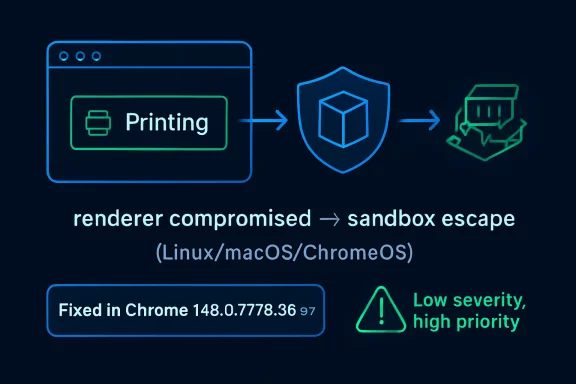
Chrome’s CVE-2026-8001, disclosed May 6, 2026 and fixed in Chrome 148.0.7778.96 for Linux and 148.0.7778.96/97 for Windows and Mac, is a printing-component use-after-free flaw that could help a renderer-compromising attacker escape the browser sandbox on Linux, macOS, and ChromeOS. That is the plain reading; the more useful reading is that “low severity” in Chromium’s taxonomy does not mean “low priority” for administrators. This is a bug about post-compromise leverage, not initial access, and that makes it exactly the kind of flaw that disappears into patch notes while still mattering in real attacks. For WindowsForum readers, the lesson is less about printing and more about the increasingly thin margin between browser hygiene and endpoint compromise.
On paper, CVE-2026-8001 is almost easy to underrate. Chromium rates it low, the bug sits in Printing rather than a glamorous subsystem like V8 or Blink, and the disclosed attack path requires that the attacker has already compromised the renderer process. That prerequisite is doing a lot of work.
Modern Chrome security is built around a simple bargain: web content is dangerous, so it belongs inside a constrained renderer sandbox. If an attacker can trigger memory corruption in the renderer but cannot break out, the blast radius is supposed to stay contained. A sandbox escape changes the equation by turning “the browser tab is compromised” into “the machine may now be in play.”
That is why CVE-2026-8001 deserves attention even if it is not, by itself, a drive-by remote code execution bug. The flaw is a second-stage vulnerability. It is the sort of bug that becomes valuable when paired with another flaw that gets code running in the renderer first.
This is also why severity labels can be misleading for operational security. Chromium’s internal severity is often scoped to exploitability and component context inside its own model. Enterprise patching, however, cares about chains. A low-rated sandbox escape can become high-impact when it is chained with a separate renderer exploit, a malicious document workflow, or a phishing page that lands in the right browser process.
Chrome has spent years absorbing tasks that once belonged to separate desktop applications. Users preview invoices, ship labels, payroll reports, boarding passes, medical forms, tax documents, and internal dashboards inside the browser. Administrators then layer managed print settings, cloud print workflows, kiosk configurations, and PDF handling on top. The result is a surprisingly privileged intersection of web content and platform integration.
Use-after-free bugs thrive in these complicated seams. A use-after-free occurs when software continues to reference memory after it has been released, creating a window where attacker-influenced data may occupy the stale memory location. In a large C++ codebase such as Chromium, these bugs are notoriously subtle because object lifetimes can cross threads, processes, callbacks, and asynchronous UI actions.
The Printing subsystem is exactly the kind of place where lifetime assumptions become brittle. Print preview may require rendering web content, building document metadata, talking to platform-specific print services, and responding to user or script-driven state changes. The attacker does not need printing to be exciting. The attacker only needs printing to be complicated.
But the renderer prerequisite is not a reason to defer patching. Browser exploitation is routinely about chaining primitives: one flaw gets execution in a renderer, another leaks information, another escapes the sandbox, and yet another establishes persistence or moves laterally. Security teams that patch only the first link in that chain are assuming attackers cannot mix and match vulnerabilities faster than defenders can triage them.
The phrase “crafted HTML page” is also worth pausing on. It means the trigger is web-deliverable. The vulnerable component may be Printing, but the attacker’s starting point is still a page, not physical access to a printer or control of a print server. In practice, that keeps the vulnerability inside the highest-volume attack surface in consumer and enterprise computing: the browser.
That distinction matters for ChromeOS especially. ChromeOS relies heavily on the browser security model as the boundary between untrusted web content and the underlying system. A sandbox escape on ChromeOS is therefore not just another desktop app bug; it is a test of the platform’s central promise.
The CISA vector describes a network-deliverable attack requiring user interaction, no privileges, high attack complexity, changed scope, and high impact to confidentiality, integrity, and availability. The high attack complexity reflects the renderer-compromise prerequisite. The changed scope and high impacts reflect what happens if the sandbox escape succeeds. In other words, the score punishes the exploit chain but still recognizes the consequence.
This is the part many vulnerability dashboards flatten into confusion. A security team may see “Chromium severity: Low” in one column and “CVSS: 8.3 High” in another, then spend more time arguing about labels than deploying the fixed build. For browser bugs, that is usually the wrong argument.
Chromium severity is useful to developers and vulnerability researchers. CVSS is useful to asset managers, auditors, and risk teams. Neither label should override the operational reality: if the browser can be coaxed into crossing its sandbox boundary, the update belongs in the fast lane.
That volume matters because it changes the patching conversation. CVE-2026-8001 may be the bug that caught your eye because it appears in MSRC, NVD, or a vulnerability scanner, but Chrome 148 is not merely “the printing fix.” It is a broad browser hardening release.
The public Chrome release note initially pointed to “a number of fixes and improvements” and said security details would be updated shortly. That staggered disclosure pattern is normal for Chrome. Google often restricts bug details until a majority of users have received the fix, reducing the chance that public technical notes become an exploit recipe before the update has propagated.
For administrators, this creates a familiar tension. The patch is available before the full technical story is public. Waiting for perfect information may feel disciplined, but with browsers it can become a liability. The correct response is to validate the update for compatibility quickly, not to wait for exploit write-ups.
There are a few possible reasons a specific CVE may name only certain platforms. The affected code path may be platform-specific, the vulnerable behavior may not reproduce on Windows, or Windows may be covered differently by release engineering and product mapping. Without public bug details, it is irresponsible to overstate Windows exposure for CVE-2026-8001 itself.
But WindowsForum readers do not manage CVEs in isolation. They manage browsers installed across Windows endpoints, macOS developer laptops, Linux workstations, and ChromeOS fleets. They also manage Microsoft Edge, which inherits security fixes from Chromium on its own release schedule. A Chromium vulnerability can therefore enter a Windows environment even when the original Chrome CVE description is not framed as a Windows bug.
This is the operational trap of monoculture by engine rather than by brand. Chrome, Edge, Brave, Vivaldi, Opera, and other Chromium-based browsers do not share identical code in every layer, but they share enough of the core engine that a Chromium security release becomes a signal to inventory every Chromium browser in the estate.
Edge is not Chrome with a different icon, but it is Chromium-based. Microsoft has its own release channels, policy controls, updater behavior, and enterprise servicing expectations. When Google ships a Chromium fix, Microsoft still has to integrate, test, and release the corresponding Edge update. Most of the time that lag is short. In high-security environments, even a short lag becomes a risk window to track.
This is not a criticism of Microsoft so much as a reminder of how browser supply chains work. Chromium centralizes enormous engineering effort, but each downstream browser still has to package and ship. Security teams that treat “Chromium fixed” as equivalent to “all Chromium browsers fixed” are skipping a step.
The right question for Windows administrators is not merely whether Chrome has reached 148.0.7778.96 or later. It is whether every managed Chromium-based browser has received the relevant security update, whether update policies allow it to install promptly, and whether restart enforcement actually closes the loop.
This is where vulnerability management tooling often gets messy. CPE matching is an attempt to encode affected product configurations in a machine-readable way. Browser vulnerabilities complicate that model because the vulnerable application runs on multiple operating systems, and ChromeOS blurs the line between browser and operating system more than a conventional desktop platform does.
The “are we missing a CPE?” prompt in NVD is not a throwaway detail. It is a reminder that automated vulnerability data is assembled, enriched, corrected, and sometimes imperfect. If your scanner flags this CVE against the wrong assets or misses a browser installed outside the expected path, the problem may not be the scanner alone. It may be the mismatch between real software deployment and the tidy abstractions vulnerability feeds require.
That is especially true for Chrome in enterprise environments. Chrome can be installed system-wide or per user, managed or unmanaged, present on golden images or introduced by users, and duplicated across virtual desktops, developer machines, and application packaging systems. CPE data helps, but it is not a substitute for endpoint inventory.
This is where consumer advice and enterprise reality diverge. Telling users to “update Chrome” is not enough in environments where people keep browsers open for weeks, restore sessions automatically, and treat reboot prompts as background noise. The browser has become the workstation’s true shell, and restarting it can feel as disruptive as restarting Windows.
Administrators have policy tools to force relaunches, set notification periods, and control update behavior. The question is how aggressively to use them. For routine feature releases, a softer cadence may be acceptable. For a high-impact browser security batch that includes sandbox-escape potential, the balance should tilt toward enforcement.
The best practice is not theatrical emergency response for every CVE. It is having a browser update policy mature enough that a release like Chrome 148 can move from detection to compliance without a meeting. If a security team has to improvise browser patch governance every time Chromium ships a large update, the process is already behind.
Every added capability creates another place where the sandbox must make correct assumptions. Printing is one of those edge zones because it interacts with platform services while still being reachable from web-driven workflows. A sandbox escape in such a component does not mean the entire architecture has failed. It means the architecture is under constant pressure from the product’s own ambition.
This is the bargain users have accepted, often without noticing. The browser became the operating system’s most important application by taking on more operating-system-like responsibilities. Now browser vendors must secure not only the web engine but also every bridge from web content to local capability.
Memory safety remains the unresolved tax on that ambition. Chromium has invested heavily in mitigations, fuzzing, sandboxing, MiraclePtr-style defenses, and gradual adoption of safer languages where practical. Yet use-after-free bugs keep appearing because the legacy C++ surface is vast and the browser’s object lifecycle is complicated. CVE-2026-8001 is another small entry in that long ledger.
The practical issue is that ChromeOS updates can be gated by device model, channel, policy, and fleet staging. Some organizations intentionally delay updates to avoid breaking testing apps, kiosk workflows, extensions, or classroom tools. That caution is understandable, but sandbox-escape-class fixes are where staging windows need to be measured in hours and days, not weeks.
There is also a communications issue. Users and administrators may hear “printing bug” and assume it matters only if people print. That is not the safest assumption. The advisory describes a crafted HTML page and a compromised renderer process; printing is the vulnerable component, not necessarily a manual office workflow involving a printer icon and a tray of paper.
ChromeOS environments should therefore verify version compliance directly rather than infer safety from auto-update settings. Managed fleets need a clear answer to a simple question: which devices have crossed the fixed version threshold, and which are still waiting?
Once a patch ships, attackers can compare old and new code, inspect commits when they become available, and reconstruct the vulnerability. This is not instant magic, but it is a well-understood workflow. The clock starts when the fix ships, not when a blog post explains the bug.
That asymmetry is why “no known exploitation” should be interpreted carefully. The absence of public exploitation at disclosure time is good news. It is not a warranty. Browser bugs can move from patched to understood to weaponized quickly, especially when they fit into existing exploit-chain patterns.
Security teams should also resist the temptation to rank every Chrome CVE by whether it has a flashy name, logo, or proof-of-concept. The boring bugs are often the ones that matter in chains. A printing use-after-free will not dominate social media, but exploit developers do not require marketing.
A browser may be configured to update automatically and still remain vulnerable because the process has not restarted. A laptop may be asleep, off-network, or stuck behind a broken updater. A virtual desktop image may refresh from an outdated base. A user-installed browser may sit outside management. A kiosk may be pinned to a channel for compatibility reasons.
This is why browser vulnerability response must be measured at the endpoint, not the policy console alone. The relevant state is the running browser version. For Chrome, that means confirming version 148.0.7778.96 or later where applicable, and for Windows and Mac stable builds recognizing the 148.0.7778.96/97 release line. For Edge and other Chromium browsers, it means tracking vendor-specific releases that incorporate the same Chromium fixes.
There is a cultural issue here as well. Many organizations still treat browsers as user applications rather than tier-one attack surface. That distinction collapsed years ago. The browser is now the primary code execution environment exposed to the public internet, and its patch state should be reported with the same seriousness as Windows cumulative updates.
The most concrete response is straightforward: move Chrome to the fixed stable version, verify relaunch, monitor Edge and other Chromium-based browsers for their corresponding updates, and pay special attention to Linux, macOS, and ChromeOS assets named in the CVE. If an environment relies on delayed browser channels, the delay should be justified against a documented security exception rather than absorbed as routine.
For vulnerability management teams, this is also a good moment to audit how CPE-based findings map to real inventory. If the NVD configuration produces confusing results, do not simply suppress the alert. Use it to test whether asset discovery can distinguish installed browser versions, running browser versions, operating-system platforms, and managed browser variants.
For help desks and desktop engineering teams, the message to users should avoid drama while still being firm. A relaunch prompt is not an optional feature nag when the update contains sandbox-escape-class fixes. The browser must restart to finish the security update.
CVE-2026-8001 will probably not be remembered as the defining Chrome vulnerability of the year, and that is exactly why it is useful. It shows how the modern browser fails in increments: a memory lifetime bug in a mundane component, a sandbox boundary that depends on every adjacent subsystem behaving, a patch that arrives before most users understand the risk, and an enterprise process that either verifies reality or trusts automation. The organizations that handle this well will not be the ones with the loudest emergency alert; they will be the ones whose browser fleet quietly, measurably, and quickly moves on.
Source: NVD / Chromium Security Update Guide - Microsoft Security Response Center
 The Low-Severity Label Hides the Real Attack Story
On paper, CVE-2026-8001 is almost easy to underrate. Chromium rates it low, the bug sits in Printing rather than a glamorous subsystem like V8 or Blink, and the disclosed attack path requires that the attacker has already compromised the renderer process. That prerequisite is doing a lot of work.Modern Chrome security is built around a simple bargain: web content is dangerous, so it belongs inside a constrained renderer sandbox. If an attacker can trigger memory corruption in the renderer but cannot break out, the blast radius is supposed to stay contained. A sandbox escape changes the equation by turning “the browser tab is compromised” into “the machine may now be in play.”
That is why CVE-2026-8001 deserves attention even if it is not, by itself, a drive-by remote code execution bug. The flaw is a second-stage vulnerability. It is the sort of bug that becomes valuable when paired with another flaw that gets code running in the renderer first.
This is also why severity labels can be misleading for operational security. Chromium’s internal severity is often scoped to exploitability and component context inside its own model. Enterprise patching, however, cares about chains. A low-rated sandbox escape can become high-impact when it is chained with a separate renderer exploit, a malicious document workflow, or a phishing page that lands in the right browser process.
Printing Is Not a Backwater When the Browser Owns the Workflow
The Printing component sounds mundane because printing sounds mundane. That impression is outdated. Browser printing is not just a path to paper; it is the bridge between web content, preview generation, PDFs, platform dialogs, enterprise print policies, and operating-system services.Chrome has spent years absorbing tasks that once belonged to separate desktop applications. Users preview invoices, ship labels, payroll reports, boarding passes, medical forms, tax documents, and internal dashboards inside the browser. Administrators then layer managed print settings, cloud print workflows, kiosk configurations, and PDF handling on top. The result is a surprisingly privileged intersection of web content and platform integration.
Use-after-free bugs thrive in these complicated seams. A use-after-free occurs when software continues to reference memory after it has been released, creating a window where attacker-influenced data may occupy the stale memory location. In a large C++ codebase such as Chromium, these bugs are notoriously subtle because object lifetimes can cross threads, processes, callbacks, and asynchronous UI actions.
The Printing subsystem is exactly the kind of place where lifetime assumptions become brittle. Print preview may require rendering web content, building document metadata, talking to platform-specific print services, and responding to user or script-driven state changes. The attacker does not need printing to be exciting. The attacker only needs printing to be complicated.
The Renderer Prerequisite Is a Guardrail, Not a Reprieve
The advisory language says a remote attacker who had compromised the renderer process could potentially perform a sandbox escape via a crafted HTML page. That sentence is precise, and it should be read precisely. CVE-2026-8001 is not described as a one-click standalone compromise from a clean browser state.But the renderer prerequisite is not a reason to defer patching. Browser exploitation is routinely about chaining primitives: one flaw gets execution in a renderer, another leaks information, another escapes the sandbox, and yet another establishes persistence or moves laterally. Security teams that patch only the first link in that chain are assuming attackers cannot mix and match vulnerabilities faster than defenders can triage them.
The phrase “crafted HTML page” is also worth pausing on. It means the trigger is web-deliverable. The vulnerable component may be Printing, but the attacker’s starting point is still a page, not physical access to a printer or control of a print server. In practice, that keeps the vulnerability inside the highest-volume attack surface in consumer and enterprise computing: the browser.
That distinction matters for ChromeOS especially. ChromeOS relies heavily on the browser security model as the boundary between untrusted web content and the underlying system. A sandbox escape on ChromeOS is therefore not just another desktop app bug; it is a test of the platform’s central promise.
CISA’s CVSS Score Says What Chromium’s Severity Does Not
The tension in the public record is striking. Chromium labels the issue low severity, while the CISA ADP CVSS 3.1 vector scores it 8.3, or high. Both can be true because they are measuring different things.The CISA vector describes a network-deliverable attack requiring user interaction, no privileges, high attack complexity, changed scope, and high impact to confidentiality, integrity, and availability. The high attack complexity reflects the renderer-compromise prerequisite. The changed scope and high impacts reflect what happens if the sandbox escape succeeds. In other words, the score punishes the exploit chain but still recognizes the consequence.
This is the part many vulnerability dashboards flatten into confusion. A security team may see “Chromium severity: Low” in one column and “CVSS: 8.3 High” in another, then spend more time arguing about labels than deploying the fixed build. For browser bugs, that is usually the wrong argument.
Chromium severity is useful to developers and vulnerability researchers. CVSS is useful to asset managers, auditors, and risk teams. Neither label should override the operational reality: if the browser can be coaxed into crossing its sandbox boundary, the update belongs in the fast lane.
Chrome 148 Is a Bulk Security Release, Not a Single-Bug Patch
CVE-2026-8001 landed as part of Chrome 148’s stable desktop update, not as an isolated emergency fix. Google promoted Chrome 148 to stable on May 5, 2026, with 148.0.7778.96 for Linux and 148.0.7778.96/97 for Windows and Mac. The release included a large batch of security fixes, with reporting around the update putting the total at 127 vulnerabilities.That volume matters because it changes the patching conversation. CVE-2026-8001 may be the bug that caught your eye because it appears in MSRC, NVD, or a vulnerability scanner, but Chrome 148 is not merely “the printing fix.” It is a broad browser hardening release.
The public Chrome release note initially pointed to “a number of fixes and improvements” and said security details would be updated shortly. That staggered disclosure pattern is normal for Chrome. Google often restricts bug details until a majority of users have received the fix, reducing the chance that public technical notes become an exploit recipe before the update has propagated.
For administrators, this creates a familiar tension. The patch is available before the full technical story is public. Waiting for perfect information may feel disciplined, but with browsers it can become a liability. The correct response is to validate the update for compatibility quickly, not to wait for exploit write-ups.
Windows Is Not Listed, But Windows Shops Are Still in the Room
The CVE description names Linux, Mac, and ChromeOS prior to 148.0.7778.96. That does not mean Windows administrators can ignore Chrome 148. The desktop stable release also shipped to Windows, and the broader Chrome 148 security set includes vulnerabilities across the browser.There are a few possible reasons a specific CVE may name only certain platforms. The affected code path may be platform-specific, the vulnerable behavior may not reproduce on Windows, or Windows may be covered differently by release engineering and product mapping. Without public bug details, it is irresponsible to overstate Windows exposure for CVE-2026-8001 itself.
But WindowsForum readers do not manage CVEs in isolation. They manage browsers installed across Windows endpoints, macOS developer laptops, Linux workstations, and ChromeOS fleets. They also manage Microsoft Edge, which inherits security fixes from Chromium on its own release schedule. A Chromium vulnerability can therefore enter a Windows environment even when the original Chrome CVE description is not framed as a Windows bug.
This is the operational trap of monoculture by engine rather than by brand. Chrome, Edge, Brave, Vivaldi, Opera, and other Chromium-based browsers do not share identical code in every layer, but they share enough of the core engine that a Chromium security release becomes a signal to inventory every Chromium browser in the estate.
Edge Turns Chromium Lag Into an Enterprise Question
Microsoft’s own Edge security release notes said on May 6, 2026 that Microsoft was aware of recent Chromium security fixes and was actively working on releasing a security fix. That is an understated sentence with real consequences for enterprise IT.Edge is not Chrome with a different icon, but it is Chromium-based. Microsoft has its own release channels, policy controls, updater behavior, and enterprise servicing expectations. When Google ships a Chromium fix, Microsoft still has to integrate, test, and release the corresponding Edge update. Most of the time that lag is short. In high-security environments, even a short lag becomes a risk window to track.
This is not a criticism of Microsoft so much as a reminder of how browser supply chains work. Chromium centralizes enormous engineering effort, but each downstream browser still has to package and ship. Security teams that treat “Chromium fixed” as equivalent to “all Chromium browsers fixed” are skipping a step.
The right question for Windows administrators is not merely whether Chrome has reached 148.0.7778.96 or later. It is whether every managed Chromium-based browser has received the relevant security update, whether update policies allow it to install promptly, and whether restart enforcement actually closes the loop.
The NVD CPE Oddity Is a Symptom of a Messier Vulnerability Pipeline
The NVD change record for CVE-2026-8001 adds an affected configuration that combines Google Chrome up to but excluding 148.0.7778.96 with operating-system CPEs for ChromeOS, Linux kernel, and macOS. At a glance, that can look odd, especially when the CVE text is about Google Chrome on Linux, Mac, and ChromeOS rather than vulnerabilities in the Linux kernel or macOS themselves.This is where vulnerability management tooling often gets messy. CPE matching is an attempt to encode affected product configurations in a machine-readable way. Browser vulnerabilities complicate that model because the vulnerable application runs on multiple operating systems, and ChromeOS blurs the line between browser and operating system more than a conventional desktop platform does.
The “are we missing a CPE?” prompt in NVD is not a throwaway detail. It is a reminder that automated vulnerability data is assembled, enriched, corrected, and sometimes imperfect. If your scanner flags this CVE against the wrong assets or misses a browser installed outside the expected path, the problem may not be the scanner alone. It may be the mismatch between real software deployment and the tidy abstractions vulnerability feeds require.
That is especially true for Chrome in enterprise environments. Chrome can be installed system-wide or per user, managed or unmanaged, present on golden images or introduced by users, and duplicated across virtual desktops, developer machines, and application packaging systems. CPE data helps, but it is not a substitute for endpoint inventory.
Patch Management Has to Beat the Browser’s Restart Problem
Chrome’s updater is good at downloading updates. The harder problem is getting users to restart the browser. A patched binary sitting on disk does not protect a long-running browser process still executing the old version.This is where consumer advice and enterprise reality diverge. Telling users to “update Chrome” is not enough in environments where people keep browsers open for weeks, restore sessions automatically, and treat reboot prompts as background noise. The browser has become the workstation’s true shell, and restarting it can feel as disruptive as restarting Windows.
Administrators have policy tools to force relaunches, set notification periods, and control update behavior. The question is how aggressively to use them. For routine feature releases, a softer cadence may be acceptable. For a high-impact browser security batch that includes sandbox-escape potential, the balance should tilt toward enforcement.
The best practice is not theatrical emergency response for every CVE. It is having a browser update policy mature enough that a release like Chrome 148 can move from detection to compliance without a meeting. If a security team has to improvise browser patch governance every time Chromium ships a large update, the process is already behind.
Sandboxes Fail at the Edges Where Products Become Platforms
The story of CVE-2026-8001 is really the story of browser complexity. Chrome is not just a renderer, JavaScript engine, address bar, and cookie jar. It is a PDF viewer, password manager, sync client, remote desktop endpoint, WebUSB mediator, printing front end, media stack, AI feature host, enterprise policy consumer, and application runtime.Every added capability creates another place where the sandbox must make correct assumptions. Printing is one of those edge zones because it interacts with platform services while still being reachable from web-driven workflows. A sandbox escape in such a component does not mean the entire architecture has failed. It means the architecture is under constant pressure from the product’s own ambition.
This is the bargain users have accepted, often without noticing. The browser became the operating system’s most important application by taking on more operating-system-like responsibilities. Now browser vendors must secure not only the web engine but also every bridge from web content to local capability.
Memory safety remains the unresolved tax on that ambition. Chromium has invested heavily in mitigations, fuzzing, sandboxing, MiraclePtr-style defenses, and gradual adoption of safer languages where practical. Yet use-after-free bugs keep appearing because the legacy C++ surface is vast and the browser’s object lifecycle is complicated. CVE-2026-8001 is another small entry in that long ledger.
ChromeOS Fleets Should Treat This as a Boundary Event
For schools, kiosks, call centers, and managed ChromeOS fleets, the ChromeOS mention should sharpen attention. ChromeOS is often deployed precisely because it reduces traditional endpoint management overhead. But its security model still depends on timely updates, channel discipline, and reboot completion.The practical issue is that ChromeOS updates can be gated by device model, channel, policy, and fleet staging. Some organizations intentionally delay updates to avoid breaking testing apps, kiosk workflows, extensions, or classroom tools. That caution is understandable, but sandbox-escape-class fixes are where staging windows need to be measured in hours and days, not weeks.
There is also a communications issue. Users and administrators may hear “printing bug” and assume it matters only if people print. That is not the safest assumption. The advisory describes a crafted HTML page and a compromised renderer process; printing is the vulnerable component, not necessarily a manual office workflow involving a printer icon and a tray of paper.
ChromeOS environments should therefore verify version compliance directly rather than infer safety from auto-update settings. Managed fleets need a clear answer to a simple question: which devices have crossed the fixed version threshold, and which are still waiting?
Attackers Read Patch Notes Differently Than Administrators Do
Administrators read a CVE entry to decide whether to patch. Attackers read it to decide whether to reverse-engineer. The most useful public detail in CVE-2026-8001 is the component: Printing. The second most useful detail is the exploit condition: renderer compromise leading to sandbox escape. That is enough to focus attention.Once a patch ships, attackers can compare old and new code, inspect commits when they become available, and reconstruct the vulnerability. This is not instant magic, but it is a well-understood workflow. The clock starts when the fix ships, not when a blog post explains the bug.
That asymmetry is why “no known exploitation” should be interpreted carefully. The absence of public exploitation at disclosure time is good news. It is not a warranty. Browser bugs can move from patched to understood to weaponized quickly, especially when they fit into existing exploit-chain patterns.
Security teams should also resist the temptation to rank every Chrome CVE by whether it has a flashy name, logo, or proof-of-concept. The boring bugs are often the ones that matter in chains. A printing use-after-free will not dominate social media, but exploit developers do not require marketing.
The Real Risk Is the Gap Between Auto-Update and Verified State
Chrome’s greatest security advantage is its update machinery. Chrome’s greatest enterprise weakness is the assumption that update machinery equals compliance. Those are not the same thing.A browser may be configured to update automatically and still remain vulnerable because the process has not restarted. A laptop may be asleep, off-network, or stuck behind a broken updater. A virtual desktop image may refresh from an outdated base. A user-installed browser may sit outside management. A kiosk may be pinned to a channel for compatibility reasons.
This is why browser vulnerability response must be measured at the endpoint, not the policy console alone. The relevant state is the running browser version. For Chrome, that means confirming version 148.0.7778.96 or later where applicable, and for Windows and Mac stable builds recognizing the 148.0.7778.96/97 release line. For Edge and other Chromium browsers, it means tracking vendor-specific releases that incorporate the same Chromium fixes.
There is a cultural issue here as well. Many organizations still treat browsers as user applications rather than tier-one attack surface. That distinction collapsed years ago. The browser is now the primary code execution environment exposed to the public internet, and its patch state should be reported with the same seriousness as Windows cumulative updates.
The Practical Reading of CVE-2026-8001 Is Narrow but Urgent
CVE-2026-8001 does not require panic. It does require speed. The narrow technical description should guide prioritization, but not lull anyone into treating the bug as cosmetic.The most concrete response is straightforward: move Chrome to the fixed stable version, verify relaunch, monitor Edge and other Chromium-based browsers for their corresponding updates, and pay special attention to Linux, macOS, and ChromeOS assets named in the CVE. If an environment relies on delayed browser channels, the delay should be justified against a documented security exception rather than absorbed as routine.
For vulnerability management teams, this is also a good moment to audit how CPE-based findings map to real inventory. If the NVD configuration produces confusing results, do not simply suppress the alert. Use it to test whether asset discovery can distinguish installed browser versions, running browser versions, operating-system platforms, and managed browser variants.
For help desks and desktop engineering teams, the message to users should avoid drama while still being firm. A relaunch prompt is not an optional feature nag when the update contains sandbox-escape-class fixes. The browser must restart to finish the security update.
Chrome 148 Gives Administrators a Small Checklist With Large Stakes
The cleanest way to handle this release is to treat CVE-2026-8001 as the visible tip of a larger Chrome 148 security event. The bug’s printing label is less important than the security boundary it threatens and the release train that fixes it.- Chrome installations on Linux should be updated to 148.0.7778.96 or later, and Windows and Mac systems should be moved onto the 148.0.7778.96/97 stable line or later.
- ChromeOS devices should be checked for fixed-version compliance rather than assumed safe because automatic updates are enabled.
- Microsoft Edge should be tracked separately, because Microsoft acknowledged the Chromium fixes and ships its own security updates on its own schedule.
- Vulnerability scanner results should be validated against actual browser inventory, especially where NVD CPE mappings appear platform-heavy or incomplete.
- Relaunch enforcement should be part of the response, because downloaded browser updates do not protect users until the running process is replaced.
- Security teams should prioritize the bug as a potential exploit-chain component, not dismiss it because Chromium’s own severity label says low.
CVE-2026-8001 will probably not be remembered as the defining Chrome vulnerability of the year, and that is exactly why it is useful. It shows how the modern browser fails in increments: a memory lifetime bug in a mundane component, a sandbox boundary that depends on every adjacent subsystem behaving, a patch that arrives before most users understand the risk, and an enterprise process that either verifies reality or trusts automation. The organizations that handle this well will not be the ones with the loudest emergency alert; they will be the ones whose browser fleet quietly, measurably, and quickly moves on.
Source: NVD / Chromium Security Update Guide - Microsoft Security Response Center
