

Google disclosed CVE-2026-7359 on April 28, 2026, as a high-severity use-after-free flaw in Chrome’s ANGLE graphics layer before version 147.0.7727.138, enabling a renderer-compromising attacker to potentially escape the browser sandbox through a crafted HTML page on desktop platforms. The plain-English version is less tidy but more important: this is not “just another Chrome bug,” because it lives in the messy borderland where web content, GPU acceleration, drivers, and operating-system isolation all meet. For Windows users and enterprise administrators, the lesson is that browser patching is no longer a monthly maintenance chore; it is part of endpoint containment. CVE-2026-7359 is the kind of vulnerability that reminds us why the browser has become the operating system’s most exposed attack surface.
For years, the security story around Chrome was easy to caricature: V8 bugs for JavaScript, Blink bugs for rendering, and the occasional sandbox escape to turn a tab compromise into something more durable. CVE-2026-7359 complicates that familiar map by pointing at ANGLE, the translation layer Chrome uses to make web graphics work consistently across different graphics APIs and driver ecosystems.
ANGLE is not a household name, even among many power users, but it sits in a privileged position in the modern browser. It helps Chrome translate web-facing graphics calls into the language spoken by Direct3D, OpenGL, Vulkan, Metal, and the rest of the accelerated graphics stack. That makes it a performance enabler, a compatibility shim, and, inevitably, a security boundary-adjacent component.
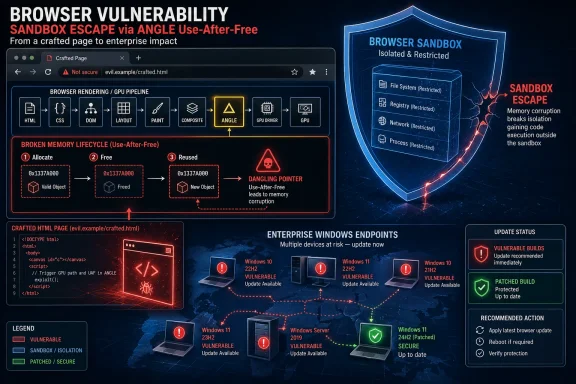
The vulnerability is categorized as a use-after-free, the same broad class of memory-safety defect that has haunted browsers for more than a decade. In practical terms, that means software continues to reference memory after it should have been discarded, creating a window where carefully arranged data can be used in place of what the program expected. Attackers like these bugs because they can convert program confusion into control.
What raises the stakes is the condition described in the CVE: the attacker is assumed to have already compromised the renderer process. That may sound reassuring at first, because it implies a prerequisite. It should not. Browser exploit chains often work exactly this way, with one bug used to gain code execution in a renderer and a second bug used to climb out of the sandbox.
CVE-2026-7359 is interesting because it lives on the wrong side of that bargain. The vulnerability description says a remote attacker who had compromised the renderer process could potentially perform a sandbox escape using a crafted HTML page. That is not a drive-by apocalypse by itself, but it is exactly the second act an exploit chain needs.
The browser industry has spent years teaching users and administrators to think in terms of criticality labels. Critical means panic; high means patch soon; medium means maybe next maintenance window. That taxonomy is useful, but it can understate risk when a “high” vulnerability is the missing link in a chain that starts somewhere else.
The better way to think about this class of bug is not “can it compromise me from a clean start?” but “does it reduce the distance between a browser tab and the rest of the system?” On that metric, sandbox escapes deserve more urgency than their one-word severity label sometimes conveys. They are not always the first punch, but they can be the punch that matters.
That illusion is also where the risk comes from. Graphics code is built for speed, statefulness, and close coordination with hardware. Security engineering prefers narrow interfaces, predictable lifetimes, and aggressively validated input. The modern browser asks the same stack to satisfy both.
On Windows, this matters even more because the graphics path has a long tail of driver diversity. Chrome can update itself quickly, but it still interacts with operating-system graphics layers and vendor drivers that may be updated on very different schedules. A browser-layer fix can close a vulnerability in Chrome’s code, but the surrounding ecosystem remains one of the hardest parts of endpoint security to reason about.
None of this means GPU acceleration is a mistake. Disabling hardware acceleration across a fleet can break workloads, degrade video conferencing, and anger users faster than almost any security tweak. But CVE-2026-7359 is another reminder that acceleration is not free. The cost is complexity, and complexity is where memory bugs breed.
This is where consumer advice and enterprise reality diverge. For a home user, “restart Chrome and check for updates” is usually adequate. For a managed Windows estate, the important question is whether update policy, maintenance windows, application control, virtual desktop images, and third-party browser variants are actually converging on the fixed Chromium build.
Chrome’s update model is fast, but it is not magic. The release notes use the familiar phrase that updates roll out over the coming days or weeks. That staged rollout is sensible for reliability, but it is uncomfortable for security teams staring at a public CVE entry and a high CVSS score.
Enterprises that rely on browser auto-update alone are making a bet that the rollout cadence and user restart behavior will align with their risk tolerance. Sometimes that bet is fine. For a sandbox-escape-class flaw in the dominant browser engine, it deserves verification.
This shared foundation is both a blessing and a trap. The blessing is that Chromium security fixes propagate across an ecosystem with enormous engineering investment behind it. The trap is that administrators can convince themselves they have patched “the browser” when they have only patched one Chromium-based browser on the machine.
A typical Windows endpoint may have Edge installed by default, Chrome installed by user preference, WebView2 embedded in applications, and perhaps another Chromium-derived browser used by a niche team. Vulnerability management systems that report only one browser family can create a false sense of closure. The security boundary is the engine and the exposed component, not the desktop icon.
That does not mean every Chromium browser is affected in exactly the same way at exactly the same time. Vendors ship different builds, enable different features, and carry different patches. But for operational purposes, a high-severity Chromium graphics vulnerability should trigger a hunt across every Chromium-derived runtime in the estate.
Security teams often treat NVD as the canonical place where vulnerability metadata becomes real. When NVD enrichment lags, scanners, dashboards, and patch-prioritization systems can disagree. A vulnerability can be publicly disclosed, patched by the vendor, and still look incomplete in tools that wait for a particular enrichment field to land.
CVE-2026-7359 is a good case study in why mature vulnerability management cannot be a single-feed exercise. The authoritative fix information comes from the vendor release. The CVE description gives the vulnerability shape. CISA enrichment provides a severity estimate. Asset inventory tells you whether you actually run the affected software. None of those alone is enough.
The apparent CPE awkwardness also matters. The NVD configuration shown in the user-provided data ties Google Chrome versions before 147.0.7727.138 with Windows, Linux, and macOS platform CPEs. That is normal for a cross-platform desktop application, but it can look strange to anyone expecting one clean product CPE. Vulnerability metadata is often less elegant than the software it tries to describe.
Chrome has invested heavily in mitigations: sandboxing, site isolation, MiraclePtr-style defenses, fuzzing, sanitizers, control-flow protections, and aggressive bug bounty programs. Those mitigations matter. They are why many memory bugs become crashes instead of compromises, and why attackers need chains rather than one exploit.
But mitigations are not a moral victory; they are risk reducers. The April 28 Chrome release fixed 30 security issues, including several critical and high-severity use-after-free flaws across components such as Canvas, GPU, Accessibility, Views, Animation, Navigation, Media, WebMIDI, Cast, Codecs, WebRTC, WebView, and ANGLE. That breadth tells us something about the size and shape of the problem.
The browser is no longer just a document viewer with scripts. It is a multimedia runtime, graphics engine, application platform, authentication surface, remote work portal, and enterprise data boundary. Memory safety in that environment is not a niche engineering concern. It is one of the central security questions of client computing.
That is why user interaction remains a slippery concept. CVSS marks the attack as requiring user interaction, but the interaction may be no more exotic than visiting a malicious site, opening a poisoned link, or landing on a compromised legitimate page. In phishing-heavy environments, “requires a user to browse” is not much of a barrier.
For attackers, browser vulnerabilities are attractive because the browser is where trust decisions happen at speed. Users click links from email, Teams, Slack, search results, ads, documentation portals, and ticketing systems. Even disciplined users cannot meaningfully inspect the runtime behavior of a page before the browser begins parsing it.
This is also why exploit mitigations outside the browser still matter. DNS filtering, web isolation, email detonation, EDR behavior monitoring, least privilege, and application control are not substitutes for patching, but they can reduce the probability that a user reaches the exploit or that a post-sandbox payload achieves its goal. Defense in depth is a cliché because it keeps being true.
Restart debt is not laziness. It is the natural result of browsers becoming workspaces. A user may have 60 tabs open, multiple SaaS sessions, half-written forms, dashboards, webmail, admin consoles, and web meetings all living inside the same process tree. Asking them to restart the browser is asking them to interrupt the workday.
But attackers do not care that the finance team has quarter-end tabs open. If the fixed build is not running, the endpoint is still in the danger window. This is where policy needs to be explicit rather than aspirational.
Admins should already be using Chrome and Edge policies that notify users, enforce relaunch after a deadline, and give shorter grace periods for security updates than for feature updates. The right number depends on the environment, but “whenever the user gets around to it” is not a security policy. It is hope with a system tray icon.
Managed environments need more evidence. Inventory should show installed versions, running versions, and update status. EDR telemetry should confirm processes have restarted. Software distribution tools should report whether Chrome Enterprise, Edge Stable, and any installed Chromium derivatives have all moved to safe builds.
The distinction between installed and running versions is not pedantic. A machine can have the patched files on disk while an old browser process continues running until the user relaunches. That edge case is common enough to matter when a vulnerability is publicly known and plausibly useful in exploit chains.
Virtual desktops and golden images add another wrinkle. Updating persistent desktops is one problem; updating templates, nonpersistent pools, offline images, and packaged app layers is another. If the master image remains stale, the organization can “fix” endpoints during the day and reintroduce vulnerable builds the next morning.
Google also restricts bug details until most users are updated, and sometimes longer when third-party libraries are involved. That practice frustrates researchers and defenders who want to know exactly how a bug works. It is also the correct default when exploit details could help attackers race the patch rollout.
This leaves administrators with a familiar asymmetry. The vendor knows more than it can say. Attackers may be reverse-engineering the patch. Defenders know enough to act but not enough to satisfy their curiosity. In that environment, waiting for a proof-of-concept before prioritizing a patch is backwards.
A public exploit is not the starting gun; it is the announcement that someone else may already be near the finish line. Browser vulnerabilities with sandbox-escape potential should be prioritized based on exploit utility, not internet theater.
That does not mean waiting for Patch Tuesday. It means the opposite: tracking browser security releases as a parallel critical update stream. The browser is too exposed, too central, and too frequently targeted to be left to passive background updating alone.
For Microsoft-centric shops, Edge has improved the manageability story, especially through Group Policy, Intune, and enterprise update controls. Chrome Enterprise offers similar levers. The problem is not lack of tooling. The problem is that too many organizations still treat browser updates as userland noise until an actively exploited zero-day forces a scramble.
CVE-2026-7359 has not been publicly described as exploited in the wild in the data at hand. That distinction matters. But the absence of known exploitation is not the same thing as low priority, particularly when the bug class, component, and sandbox-escape consequence all point toward exploit-chain value.
A Chrome CPE tied to Windows, Linux, and macOS can identify affected desktop platforms, but it will not necessarily capture every place Chromium technology exists in a Windows environment. It will not tell you whether an Electron application bundles an old runtime. It will not tell you whether a managed browser failed to relaunch. It will not tell you whether a niche Chromium fork has picked up the fix.
This is why asset inventory cannot stop at product names. Security teams need software composition awareness at the endpoint level: browser family, executable path, channel, version, update mechanism, install scope, and whether the running process matches the patched version. That sounds tedious because it is. It is also the difference between patch management and dashboard management.
CVE metadata is the map, not the terrain. The terrain is whatever is installed on actual machines, used by actual users, and exposed to actual web content.
That volume is not evidence that Chrome is uniquely careless. It is evidence that Chrome is enormous, heavily scrutinized, and worth attacking. A browser with billions of users and deep operating-system integration will attract both defensive research and offensive investment.
The release also demonstrates the value of bug bounty economics and internal fuzzing at scale. External researchers reported some of the issues; Google credited internal discoveries for others. Automated tools such as sanitizers and fuzzers continue to find classes of bugs that manual review would miss.
Still, the user-facing result is fatigue. Another browser update. Another list of CVEs. Another advisory saying details are restricted. Another restart prompt. Security teams should resist treating that fatigue as a reason to downgrade urgency. Repetition is exactly what an exposed attack surface looks like when it is being actively maintained.
In Windows environments, the problem often hides in the long tail. A standard user’s Chrome may auto-update under their profile. A machine-wide Chrome Enterprise install may be controlled by policy. Edge may update through its own updater. Portable browsers may sit outside normal inventory. WebView2 may be serviced separately but still deserves visibility.
There is also a communications challenge. Users understand “restart Windows tonight” more readily than “relaunch your browser now.” The browser feels lightweight, so its security boundary feels lightweight. IT needs to make clear that a browser relaunch after a security update is not cosmetic.
The best policies balance firmness with transparency. Give users a visible countdown, preserve tabs where possible, and force relaunch after a defined deadline. Security that relies on surprise restarts breeds resentment; security that never interrupts anyone becomes optional.
That means vulnerability management teams should not wait for monthly reporting cycles to ingest browser CVEs. Desktop engineering should own browser channel policy. Security operations should monitor exploit chatter without using public exploit availability as the only trigger. Help desks should understand why browser relaunch prompts suddenly become mandatory.
For small businesses and home users, the advice is less bureaucratic but just as direct. Do not ignore the relaunch button. Do not assume the browser updated because it usually does. Do not keep a weeks-old session alive indefinitely because the tabs feel too valuable to lose.
Chrome’s security model is strong, but it is strongest when users and administrators let the patched version actually run.
Source: NVD / Chromium Security Update Guide - Microsoft Security Response Center
 Chrome’s Graphics Stack Has Become the New Front Door
For years, the security story around Chrome was easy to caricature: V8 bugs for JavaScript, Blink bugs for rendering, and the occasional sandbox escape to turn a tab compromise into something more durable. CVE-2026-7359 complicates that familiar map by pointing at ANGLE, the translation layer Chrome uses to make web graphics work consistently across different graphics APIs and driver ecosystems.ANGLE is not a household name, even among many power users, but it sits in a privileged position in the modern browser. It helps Chrome translate web-facing graphics calls into the language spoken by Direct3D, OpenGL, Vulkan, Metal, and the rest of the accelerated graphics stack. That makes it a performance enabler, a compatibility shim, and, inevitably, a security boundary-adjacent component.
The vulnerability is categorized as a use-after-free, the same broad class of memory-safety defect that has haunted browsers for more than a decade. In practical terms, that means software continues to reference memory after it should have been discarded, creating a window where carefully arranged data can be used in place of what the program expected. Attackers like these bugs because they can convert program confusion into control.
What raises the stakes is the condition described in the CVE: the attacker is assumed to have already compromised the renderer process. That may sound reassuring at first, because it implies a prerequisite. It should not. Browser exploit chains often work exactly this way, with one bug used to gain code execution in a renderer and a second bug used to climb out of the sandbox.
The Sandbox Is the Product, Not the Feature
Chrome’s sandbox was one of the great security shifts of the browser era. It changed the default assumption from “a browser bug owns the machine” to “a browser bug owns a constrained process.” That architectural move forced attackers to assemble chains rather than rely on single-shot compromise.CVE-2026-7359 is interesting because it lives on the wrong side of that bargain. The vulnerability description says a remote attacker who had compromised the renderer process could potentially perform a sandbox escape using a crafted HTML page. That is not a drive-by apocalypse by itself, but it is exactly the second act an exploit chain needs.
The browser industry has spent years teaching users and administrators to think in terms of criticality labels. Critical means panic; high means patch soon; medium means maybe next maintenance window. That taxonomy is useful, but it can understate risk when a “high” vulnerability is the missing link in a chain that starts somewhere else.
The better way to think about this class of bug is not “can it compromise me from a clean start?” but “does it reduce the distance between a browser tab and the rest of the system?” On that metric, sandbox escapes deserve more urgency than their one-word severity label sometimes conveys. They are not always the first punch, but they can be the punch that matters.
ANGLE Shows Why Web Standards Drag Hardware Into the Fight
The modern web promised portability, but it delivered portability by building increasingly elaborate translation machinery. A web page can ask for advanced graphics behavior, and the browser must turn that request into calls that work across hardware vendors, driver versions, operating systems, and security models. ANGLE is one of the components that makes this illusion function.That illusion is also where the risk comes from. Graphics code is built for speed, statefulness, and close coordination with hardware. Security engineering prefers narrow interfaces, predictable lifetimes, and aggressively validated input. The modern browser asks the same stack to satisfy both.
On Windows, this matters even more because the graphics path has a long tail of driver diversity. Chrome can update itself quickly, but it still interacts with operating-system graphics layers and vendor drivers that may be updated on very different schedules. A browser-layer fix can close a vulnerability in Chrome’s code, but the surrounding ecosystem remains one of the hardest parts of endpoint security to reason about.
None of this means GPU acceleration is a mistake. Disabling hardware acceleration across a fleet can break workloads, degrade video conferencing, and anger users faster than almost any security tweak. But CVE-2026-7359 is another reminder that acceleration is not free. The cost is complexity, and complexity is where memory bugs breed.
The Version Number Is the Boundary Between Theory and Exposure
Google’s April 28 stable-channel update moved Chrome to 147.0.7727.137 or 147.0.7727.138 on Windows and macOS, and 147.0.7727.137 on Linux. The CVE text identifies Chrome prior to 147.0.7727.138 as affected, which makes that build number the practical line administrators should care about on platforms where it applies.This is where consumer advice and enterprise reality diverge. For a home user, “restart Chrome and check for updates” is usually adequate. For a managed Windows estate, the important question is whether update policy, maintenance windows, application control, virtual desktop images, and third-party browser variants are actually converging on the fixed Chromium build.
Chrome’s update model is fast, but it is not magic. The release notes use the familiar phrase that updates roll out over the coming days or weeks. That staged rollout is sensible for reliability, but it is uncomfortable for security teams staring at a public CVE entry and a high CVSS score.
Enterprises that rely on browser auto-update alone are making a bet that the rollout cadence and user restart behavior will align with their risk tolerance. Sometimes that bet is fine. For a sandbox-escape-class flaw in the dominant browser engine, it deserves verification.
Microsoft Edge Inherits the Chromium Clock
The user-supplied MSRC link is a useful reminder that this is not only a Google Chrome story. Microsoft Edge is built on Chromium, and Microsoft tracks Chromium-originated vulnerabilities through its own Security Update Guide. For Windows administrators, that makes Edge part of the same patch conversation even when the branding says Microsoft rather than Google.This shared foundation is both a blessing and a trap. The blessing is that Chromium security fixes propagate across an ecosystem with enormous engineering investment behind it. The trap is that administrators can convince themselves they have patched “the browser” when they have only patched one Chromium-based browser on the machine.
A typical Windows endpoint may have Edge installed by default, Chrome installed by user preference, WebView2 embedded in applications, and perhaps another Chromium-derived browser used by a niche team. Vulnerability management systems that report only one browser family can create a false sense of closure. The security boundary is the engine and the exposed component, not the desktop icon.
That does not mean every Chromium browser is affected in exactly the same way at exactly the same time. Vendors ship different builds, enable different features, and carry different patches. But for operational purposes, a high-severity Chromium graphics vulnerability should trigger a hunt across every Chromium-derived runtime in the estate.
NVD’s Late Scoring Is a Feature and a Frustration
The NVD entry for CVE-2026-7359 initially showed no NIST CVSS score, while CISA’s ADP enrichment supplied a CVSS 3.1 score of 8.8 high with network attack vector, low attack complexity, no privileges required, user interaction required, and high impact to confidentiality, integrity, and availability. That split is not unusual, but it is operationally awkward.Security teams often treat NVD as the canonical place where vulnerability metadata becomes real. When NVD enrichment lags, scanners, dashboards, and patch-prioritization systems can disagree. A vulnerability can be publicly disclosed, patched by the vendor, and still look incomplete in tools that wait for a particular enrichment field to land.
CVE-2026-7359 is a good case study in why mature vulnerability management cannot be a single-feed exercise. The authoritative fix information comes from the vendor release. The CVE description gives the vulnerability shape. CISA enrichment provides a severity estimate. Asset inventory tells you whether you actually run the affected software. None of those alone is enough.
The apparent CPE awkwardness also matters. The NVD configuration shown in the user-provided data ties Google Chrome versions before 147.0.7727.138 with Windows, Linux, and macOS platform CPEs. That is normal for a cross-platform desktop application, but it can look strange to anyone expecting one clean product CPE. Vulnerability metadata is often less elegant than the software it tries to describe.
Use-After-Free Bugs Refuse to Die Because C++ Refuses to Leave
Every few years, the browser world declares victory over a class of memory corruption, and every few years the CVE stream keeps flowing. Use-after-free bugs persist because large parts of browser engines and their supporting stacks remain written in languages where object lifetime is a contract programmers must honor perfectly. C++ gives performance and control; attackers wait for the invoice.Chrome has invested heavily in mitigations: sandboxing, site isolation, MiraclePtr-style defenses, fuzzing, sanitizers, control-flow protections, and aggressive bug bounty programs. Those mitigations matter. They are why many memory bugs become crashes instead of compromises, and why attackers need chains rather than one exploit.
But mitigations are not a moral victory; they are risk reducers. The April 28 Chrome release fixed 30 security issues, including several critical and high-severity use-after-free flaws across components such as Canvas, GPU, Accessibility, Views, Animation, Navigation, Media, WebMIDI, Cast, Codecs, WebRTC, WebView, and ANGLE. That breadth tells us something about the size and shape of the problem.
The browser is no longer just a document viewer with scripts. It is a multimedia runtime, graphics engine, application platform, authentication surface, remote work portal, and enterprise data boundary. Memory safety in that environment is not a niche engineering concern. It is one of the central security questions of client computing.
The Crafted HTML Page Is the Oldest Trick in the Newest Stack
The phrase “crafted HTML page” can sound quaint, almost like a relic from the early web. In 2026, it is anything but. A crafted page can exercise JavaScript, WebAssembly, GPU APIs, media parsers, codecs, accessibility pathways, font engines, clipboard surfaces, and device-adjacent browser features that would have seemed absurdly powerful in the browser’s earlier eras.That is why user interaction remains a slippery concept. CVSS marks the attack as requiring user interaction, but the interaction may be no more exotic than visiting a malicious site, opening a poisoned link, or landing on a compromised legitimate page. In phishing-heavy environments, “requires a user to browse” is not much of a barrier.
For attackers, browser vulnerabilities are attractive because the browser is where trust decisions happen at speed. Users click links from email, Teams, Slack, search results, ads, documentation portals, and ticketing systems. Even disciplined users cannot meaningfully inspect the runtime behavior of a page before the browser begins parsing it.
This is also why exploit mitigations outside the browser still matter. DNS filtering, web isolation, email detonation, EDR behavior monitoring, least privilege, and application control are not substitutes for patching, but they can reduce the probability that a user reaches the exploit or that a post-sandbox payload achieves its goal. Defense in depth is a cliché because it keeps being true.
The Enterprise Problem Is Restart Debt
Modern browsers are good at downloading updates and less good at forcing the human moment when the patched binary actually replaces the running one. In Chrome and Edge, the gap between “update available” and “browser relaunched” can be the difference between protected and exposed. In enterprises, that gap becomes restart debt.Restart debt is not laziness. It is the natural result of browsers becoming workspaces. A user may have 60 tabs open, multiple SaaS sessions, half-written forms, dashboards, webmail, admin consoles, and web meetings all living inside the same process tree. Asking them to restart the browser is asking them to interrupt the workday.
But attackers do not care that the finance team has quarter-end tabs open. If the fixed build is not running, the endpoint is still in the danger window. This is where policy needs to be explicit rather than aspirational.
Admins should already be using Chrome and Edge policies that notify users, enforce relaunch after a deadline, and give shorter grace periods for security updates than for feature updates. The right number depends on the environment, but “whenever the user gets around to it” is not a security policy. It is hope with a system tray icon.
Consumer Chrome and Managed Chrome Live in Different Realities
For individual users, the right move is simple: open the browser’s About page, let it fetch the update, and relaunch. If the browser reports a version at or beyond the fixed channel for the platform, the user has done the meaningful thing. The consumer security model assumes speed and simplicity.Managed environments need more evidence. Inventory should show installed versions, running versions, and update status. EDR telemetry should confirm processes have restarted. Software distribution tools should report whether Chrome Enterprise, Edge Stable, and any installed Chromium derivatives have all moved to safe builds.
The distinction between installed and running versions is not pedantic. A machine can have the patched files on disk while an old browser process continues running until the user relaunches. That edge case is common enough to matter when a vulnerability is publicly known and plausibly useful in exploit chains.
Virtual desktops and golden images add another wrinkle. Updating persistent desktops is one problem; updating templates, nonpersistent pools, offline images, and packaged app layers is another. If the master image remains stale, the organization can “fix” endpoints during the day and reintroduce vulnerable builds the next morning.
Security Advisories Are Written for Lawyers, Not Defenders
The terse language of CVE-2026-7359 is accurate, but it does not tell a defender what the day should feel like. “Use after free in ANGLE” is a technical classification. “A remote attacker who had compromised the renderer process” is a precondition. “Potentially perform a sandbox escape” is the consequence. The words are precise, but the risk sits between them.Google also restricts bug details until most users are updated, and sometimes longer when third-party libraries are involved. That practice frustrates researchers and defenders who want to know exactly how a bug works. It is also the correct default when exploit details could help attackers race the patch rollout.
This leaves administrators with a familiar asymmetry. The vendor knows more than it can say. Attackers may be reverse-engineering the patch. Defenders know enough to act but not enough to satisfy their curiosity. In that environment, waiting for a proof-of-concept before prioritizing a patch is backwards.
A public exploit is not the starting gun; it is the announcement that someone else may already be near the finish line. Browser vulnerabilities with sandbox-escape potential should be prioritized based on exploit utility, not internet theater.
Windows Users Should Treat Browser Patching Like OS Patching
WindowsForum readers already know the rhythms of Patch Tuesday, cumulative updates, servicing stack updates, preview releases, and the occasional driver mess. Browser patching often sits outside that mental model because Chrome and Edge update on their own cadence. CVE-2026-7359 argues for bringing browser updates into the same operational discipline.That does not mean waiting for Patch Tuesday. It means the opposite: tracking browser security releases as a parallel critical update stream. The browser is too exposed, too central, and too frequently targeted to be left to passive background updating alone.
For Microsoft-centric shops, Edge has improved the manageability story, especially through Group Policy, Intune, and enterprise update controls. Chrome Enterprise offers similar levers. The problem is not lack of tooling. The problem is that too many organizations still treat browser updates as userland noise until an actively exploited zero-day forces a scramble.
CVE-2026-7359 has not been publicly described as exploited in the wild in the data at hand. That distinction matters. But the absence of known exploitation is not the same thing as low priority, particularly when the bug class, component, and sandbox-escape consequence all point toward exploit-chain value.
The CPE Confusion Is a Symptom of a Bigger Inventory Problem
The user’s note asks whether a CPE is missing, and the answer is: maybe not in the simple sense, but the question exposes a bigger issue. CPEs are useful for vulnerability databases, but they are a rough grammar for describing modern software. Chromium-based browsers, embedded runtimes, cross-platform components, and vendor-specific release channels do not always fit cleanly.A Chrome CPE tied to Windows, Linux, and macOS can identify affected desktop platforms, but it will not necessarily capture every place Chromium technology exists in a Windows environment. It will not tell you whether an Electron application bundles an old runtime. It will not tell you whether a managed browser failed to relaunch. It will not tell you whether a niche Chromium fork has picked up the fix.
This is why asset inventory cannot stop at product names. Security teams need software composition awareness at the endpoint level: browser family, executable path, channel, version, update mechanism, install scope, and whether the running process matches the patched version. That sounds tedious because it is. It is also the difference between patch management and dashboard management.
CVE metadata is the map, not the terrain. The terrain is whatever is installed on actual machines, used by actual users, and exposed to actual web content.
The April 28 Chrome Drop Was Bigger Than One CVE
CVE-2026-7359 deserves attention, but it arrived as part of a much larger Chrome security update. Google’s April 28 stable release listed 30 security fixes, including four critical issues and a long run of high-severity flaws. Several were use-after-free bugs, and several touched graphics, media, communication, or rendering-adjacent subsystems.That volume is not evidence that Chrome is uniquely careless. It is evidence that Chrome is enormous, heavily scrutinized, and worth attacking. A browser with billions of users and deep operating-system integration will attract both defensive research and offensive investment.
The release also demonstrates the value of bug bounty economics and internal fuzzing at scale. External researchers reported some of the issues; Google credited internal discoveries for others. Automated tools such as sanitizers and fuzzers continue to find classes of bugs that manual review would miss.
Still, the user-facing result is fatigue. Another browser update. Another list of CVEs. Another advisory saying details are restricted. Another restart prompt. Security teams should resist treating that fatigue as a reason to downgrade urgency. Repetition is exactly what an exposed attack surface looks like when it is being actively maintained.
The Practical Test Is Whether the Old Process Is Gone
The right remediation target is not merely “Chrome has updated.” It is “the vulnerable build is no longer running anywhere we care about.” That means checking the process state, not just the package state. It means looking for stale sessions on RDS hosts, VDI pools, developer workstations, kiosks, lab machines, and unmanaged laptops that occasionally touch corporate resources.In Windows environments, the problem often hides in the long tail. A standard user’s Chrome may auto-update under their profile. A machine-wide Chrome Enterprise install may be controlled by policy. Edge may update through its own updater. Portable browsers may sit outside normal inventory. WebView2 may be serviced separately but still deserves visibility.
There is also a communications challenge. Users understand “restart Windows tonight” more readily than “relaunch your browser now.” The browser feels lightweight, so its security boundary feels lightweight. IT needs to make clear that a browser relaunch after a security update is not cosmetic.
The best policies balance firmness with transparency. Give users a visible countdown, preserve tabs where possible, and force relaunch after a defined deadline. Security that relies on surprise restarts breeds resentment; security that never interrupts anyone becomes optional.
The Patch Is Small; the Habit Is the Hard Part
The immediate fix for CVE-2026-7359 is straightforward: update Chrome to the fixed stable build or later, and ensure Microsoft Edge and other Chromium-based browsers receive their corresponding vendor updates. The broader fix is harder because it asks organizations to treat browsers as first-tier infrastructure.That means vulnerability management teams should not wait for monthly reporting cycles to ingest browser CVEs. Desktop engineering should own browser channel policy. Security operations should monitor exploit chatter without using public exploit availability as the only trigger. Help desks should understand why browser relaunch prompts suddenly become mandatory.
For small businesses and home users, the advice is less bureaucratic but just as direct. Do not ignore the relaunch button. Do not assume the browser updated because it usually does. Do not keep a weeks-old session alive indefinitely because the tabs feel too valuable to lose.
Chrome’s security model is strong, but it is strongest when users and administrators let the patched version actually run.
The April 28 Fix Draws a Line Through Every Chromium Desktop
The narrow story is one ANGLE use-after-free. The useful story is the operating discipline it demands: find the Chromium browsers, confirm the fixed build, force the relaunch, and do not confuse vendor metadata with endpoint reality.- Chrome users should be on version 147.0.7727.138 or later where that fixed build applies, with the browser fully relaunched after updating.
- The vulnerability is most dangerous as part of an exploit chain because it can help an attacker move from a compromised renderer toward a sandbox escape.
- Windows administrators should check both Chrome and Edge, along with any other Chromium-derived browsers or runtimes present in the environment.
- NVD scoring gaps should not delay action when the vendor has shipped a fix and the vulnerability has sandbox-escape implications.
- Inventory should distinguish between installed browser versions and running browser processes, because stale sessions can preserve exposure after files are patched.
- Browser relaunch enforcement should be treated as a security control, not a user convenience setting.
Source: NVD / Chromium Security Update Guide - Microsoft Security Response Center
