

CVE-2026-8206 is a critical privilege-escalation flaw in the Kirki WordPress plugin, affecting versions 6.0.0 through 6.0.6, fixed in 6.0.7, and reported by BleepingComputer on June 2, 2026 as already being exploited to hijack administrator accounts. Site owners should update Kirki immediately, then review administrator users, recent password-reset activity, and any theme or framework bundles that may have pulled Kirki in quietly. The immediate story is a patch; the larger one is that WordPress risk is increasingly hiding in the dependencies that themes bring along for the ride.
The practical advice comes first because this is not a theoretical bug. If a WordPress site is running Kirki 6.0.0 through 6.0.6, it should be treated as exposed until upgraded to Kirki 6.0.7 or later. The flaw is severe because it can be used to take over any user account, including administrator accounts, through a password-reset edge case.
For most site owners, the first stop is the WordPress admin dashboard. Go to the plugins screen, check whether Kirki is installed and active, and update it if the version is earlier than 6.0.7. If Kirki is bundled or required by a theme rather than installed as an obvious standalone plugin, the next stop is the theme vendor’s update channel, because the vulnerable code may be riding inside a design stack rather than presenting itself as a familiar security-sensitive plugin.
After updating, administrators should not assume the job is done. A site that was vulnerable during active exploitation deserves a quick compromise check: look for unexpected admin accounts, recent password reset events, unfamiliar email addresses on existing accounts, new plugins or theme files, and unexplained content changes. If anything looks off, rotate administrator passwords, invalidate active sessions where possible, and review server-side logs before cleaning too aggressively.
That is the uncomfortable part of this incident. A patch closes the known hole, but it does not prove nobody walked through it yesterday.
CVE-2026-8206 shows why that distinction has become dangerous. According to the disclosed facts, the flaw is a critical privilege-escalation bug that can be used to take over any user account, including administrators. It affects Kirki versions 6.0.0 through 6.0.6 and was fixed in 6.0.7.
Wordfence’s disclosure says the bug was introduced in Kirki’s 6.0.0 major release and affects nearly 40 percent of the plugin’s userbase. That detail matters because it frames the incident not as some forgotten ancient version sitting untouched for years, but as a regression in a relatively recent major branch. The risky population is not only the negligent long tail; it includes sites that may have upgraded into the problem.
This is the kind of vulnerability that punishes the way WordPress is actually operated. Many site owners have learned to watch the big-name plugins: forms, membership systems, SEO suites, page builders, caching layers, and ecommerce add-ons. Far fewer maintain a live inventory of theme frameworks, customization libraries, bundled dependencies, and helper components that arrived because a theme needed them.
That gap between what administrators track and what attackers can exploit is where Kirki becomes bigger than Kirki.
CVE-2026-8206 is described as a privilege-escalation flaw that enables account takeover. That is a different kind of pain from a cross-site scripting bug that requires a victim click, or an information disclosure issue that leaks data but leaves control intact. Account takeover collapses the distinction between outsider and administrator.
Once an attacker controls a WordPress administrator account, the site is no longer merely vulnerable; it is governed by the attacker. They may add users, install or modify plugins, alter themes, inject redirects, stage malware, change SEO content, or use the site as a foothold into a broader hosting environment. On poorly isolated shared hosting, the consequences can extend beyond the single WordPress install.
The WordPress ecosystem has seen plenty of critical plugin bugs, but administrator takeover remains one of the clearest red lines. It bypasses the comforting idea that “we can just patch and move on,” because an attacker who became an admin before the patch may have created persistence somewhere else. The exploit path may be closed, while the compromise lives on.
That is why the post-patch audit matters. Updating from 6.0.6 to 6.0.7 is necessary, but the more important operational question is whether the vulnerable interval overlapped with exploitation against your site.
Kirki sits squarely in that murkier middle. It is a plugin, but its practical role is often tied to themes and customization. A site owner may not have installed it because they wanted “Kirki”; they may have installed a theme that recommended it, required it, or made it feel like part of the theme’s baseline.
That changes the psychology of patching. A contact-form plugin is easy to understand as active application code that receives user input. A customization framework can feel inert after the site is built, like scaffolding left in place. Attackers do not care whether a component feels boring. They care whether it runs code and exposes reachable behavior.
The same pattern applies to managed WordPress stacks and cloud-hosted deployments. WindowsForum readers have followed WordPress moving through Azure hosting changes, enterprise hosting arrangements, and developer tooling shifts. Those platform decisions matter, but they do not erase the old WordPress truth: the application layer remains a living supply chain.
A site can be hosted on hardened infrastructure and still be undone by a vulnerable dependency in the CMS layer. That is not an argument against managed hosting or cloud platforms. It is an argument against confusing infrastructure maturity with application inventory.
That does not mean administrators should avoid major releases. Running stale software is its own risk, and deferring updates indefinitely is how old vulnerabilities become permanent exposure. But major releases deserve a different testing model from routine maintenance patches, especially when they affect authentication, account management, file handling, or permissions.
The WordPress ecosystem often treats plugin updates as a binary choice between “update immediately” and “wait until someone else finds the bugs.” That is too crude for professional operators. A better approach is to classify updates by security sensitivity and dependency depth. If a component interacts with account recovery, user roles, REST endpoints, file operations, or admin actions, it belongs in the higher-risk lane.
Kirki’s 6.0.0-to-6.0.6 window is a reminder that new code can be more dangerous than old code in the short term. The industry’s reflexive message of “keep everything updated” remains broadly correct, but it is incomplete. The more mature version is: keep everything updated, know what changed, and test the workflows that would be catastrophic if broken.
For small site owners, that may sound like enterprise process creeping into a blog stack. But WordPress powers business storefronts, membership portals, documentation sites, campaign pages, and lead-generation properties. If the site creates revenue or reputation risk, dependency updates are not housekeeping. They are change management.
For defenders, active exploitation changes the priority from “schedule an update” to “contain a possible incident.” That does not mean every site running Kirki 6.0.0 through 6.0.6 has been compromised. It means the safe default is to assume scanning and attack attempts are happening fast enough that normal weekly maintenance may be too slow.
This is especially true for agencies and freelancers managing many small WordPress sites. Their risk is not one forgotten blog; it is the repeated dependency across a portfolio. If the same theme stack or base build includes vulnerable Kirki versions on dozens of client sites, a single overlooked component becomes a fleet problem.
The most dangerous sites are not always the most prominent ones. Attackers often value neglected WordPress installations precisely because they are useful infrastructure: redirectors, phishing hosts, malware droppers, spam platforms, and SEO abuse nodes. A low-traffic brochure site with admin takeover may be more attractive than it looks.
The WindowsForum angle here is practical rather than parochial. Many readers run WordPress somewhere: a lab site, a client landing page, a documentation portal, a side business, or a company intranet adjacent to Microsoft infrastructure. The fact that the CMS is “not the Windows server” does not make it irrelevant to the Windows administrator. It is still an identity, patching, logging, and incident-response problem.
Plugin inventory sounds simple until themes, must-use plugins, managed hosting controls, and composer-style workflows enter the picture. Some WordPress sites are maintained through the dashboard. Others are deployed through Git. Some vendors bundle dependencies. Some agencies freeze plugin versions to avoid layout regressions. Some owners inherit sites with no documentation and a dozen overlapping admin accounts.
In that environment, “update Kirki” is the easy sentence and the hard task. It requires knowing whether Kirki is present, how it got there, who owns the update path, whether the theme depends on a specific version, and whether updating breaks the customizer experience. The attacker only has to find the vulnerable code path. The defender has to understand the stack.
This is where WordPress differs from more centralized software ecosystems. There is no single vendor relationship that guarantees every dependency is visible, supported, and tested in your exact configuration. The ecosystem’s strength is flexibility; its security weakness is the same flexibility expressed as ambiguity.
WindowsForum has covered WordPress in contexts ranging from Azure hosting to enterprise platform disputes and structured-data plugins. The recurring theme is that WordPress is no longer merely “a blogging tool” living off to the side. It is part of business infrastructure, and business infrastructure needs a bill of materials.
The first post-update check should be user inventory. Every administrator account should have an identifiable owner, an expected email address, and a reason to exist. Dormant accounts should be removed or demoted, especially if they belong to former contractors, old agencies, or generic shared logins.
The second check should be change history. WordPress itself does not always provide the complete audit trail administrators wish it did, but hosting logs, security-plugin logs, file modification times, and backup diffs can still tell a story. Recent changes around the time exploitation was reported deserve scrutiny, particularly if they involve authentication, admin users, plugins, themes, or redirects.
The third check is persistence. If an attacker gained administrator access, the vulnerable Kirki version may have been only the doorway. The payload could be elsewhere: a modified theme template, an unfamiliar plugin, a web shell, a new scheduled task through WordPress cron, or a hidden redirect. Site owners who lack the time or confidence to inspect that properly should restore from a known-clean backup and then patch before reopening the site.
This is where security plugins can help but should not be treated as magic. Wordfence and similar tools can provide detection, firewalling, and visibility, and WindowsForum users have discussed Wordfence in the broader context of rescuing neglected WordPress sites. But any tool’s usefulness depends on deployment timing, configuration, and whether the attacker already obtained admin-level control.
That creates a governance problem. Procurement, risk review, and update responsibility often attach to visible products. Hidden dependencies fall between the cracks, even when they run privileged code inside the same WordPress environment. Kirki’s bug is a case study in how that invisible layer can become the attack path.
For agencies, this should prompt a review of starter themes and standard builds. If Kirki is part of the default stack, the agency needs to know where, why, and which versions are deployed. The same applies to any dependency that appears across many client sites because it was convenient once and then became institutional muscle memory.
For enterprises, the right question is not merely “Do we run WordPress?” It is “Who owns the WordPress dependency map?” Marketing may own content, IT may own hosting, security may own scanning, and an outside vendor may own theme development. CVE-2026-8206 falls exactly into the seams between those groups.
That seam is where the next incident will live if organizations do not close it.
The modern WordPress site is a supply chain. A theme may depend on a framework. A framework may expose admin-side or front-end behaviors. A plugin may rely on libraries. A managed host may add must-use plugins. A performance tool may rewrite assets. A marketing tool may inject scripts. Each layer expands the site’s behavior beyond what a casual administrator sees.
CVE-2026-8206 is especially revealing because it involves a component associated with themes and customization rather than an obvious authentication plugin. It turns the aesthetic layer into an identity risk. That is the kind of inversion defenders need to internalize.
Security teams have spent years applying software bill-of-materials thinking to enterprise applications, containers, and open-source libraries. WordPress needs a practical version of the same discipline, not because every small site can operate like a Fortune 500 software shop, but because attackers already treat WordPress components as a mapped ecosystem.
The minimum viable version is not complicated. Keep a list of active plugins, theme-required plugins, must-use plugins, custom code, theme vendors, update owners, and backup locations. That list should be reviewed whenever a theme changes, a major plugin version lands, or a contractor hands off a site.
WindowsForum’s own WordPress coverage has often intersected with Microsoft infrastructure, from Azure hosting changes to enterprise WordPress deployments in specific regions. Those stories matter because hosting architecture shapes performance, compliance, and operational control. But CVE-2026-8206 is a reminder that a well-hosted vulnerable application is still a vulnerable application.
A cloud platform can make patching easier, backups cleaner, logging richer, and isolation stronger. It cannot automatically know whether a theme dependency introduced a password-reset account-takeover bug unless the platform or site owner is specifically tracking that software. The shared-responsibility model is not just a cloud cliché; it is the boundary where many WordPress incidents begin.
For IT pros, the actionable move is to fold WordPress into the same operational habits used elsewhere. Track versions. Monitor advisories. Stage updates. Keep backups. Review admin accounts. Maintain logs. Know who owns remediation when a vulnerability moves from advisory to exploitation.
The amateur era of “it is just a WordPress site” has been over for a while. Kirki is another reminder that some organizations still behave as though it is not.
If the site is maintained through the WordPress dashboard, check the installed plugin version and run the update from the admin interface. If updates are managed through a host, agency, Git deployment, or theme vendor, escalate the issue through that channel and ask specifically whether Kirki versions 6.0.0 through 6.0.6 are present anywhere in the stack. Do not accept “the theme is up to date” as a substitute for confirming the vulnerable component version.
If a site cannot be updated immediately because of compatibility concerns, it should be treated as a live risk. Administrators should consider temporarily restricting access, increasing monitoring, placing compensating controls in front of the site if available, and prioritizing a tested update. Delaying because the site “looks fine” is not a strategy when exploitation has already been reported.
The hardest cases will be abandoned themes and vendor-locked builds. If a theme depends on vulnerable Kirki versions and has no clear update path, the long-term answer may be replacing the theme rather than waiting for a rescue patch. That is painful, but so is rebuilding a compromised site under pressure.
This is also a good time to review internal linking between WordPress operations and broader IT governance. If your organization has asset management for laptops, servers, Azure resources, and Microsoft 365 tenants, but not for public WordPress properties, that is a mismatch. Public web applications are assets, whether they sit in a marketing budget or an IT budget.
The same goes for admin accounts. WordPress sites accumulate privileged users over time: developers, SEO consultants, agencies, editors, emergency break-glass accounts, and old employees. A vulnerability that can take over administrator accounts makes that sprawl more dangerous because each account becomes a valuable target and a possible persistence point.
Backups are the final boring thing that suddenly matters. A clean, recent backup turns a compromise from an existential event into a recovery exercise. A backup that has never been tested is closer to a superstition than a control.
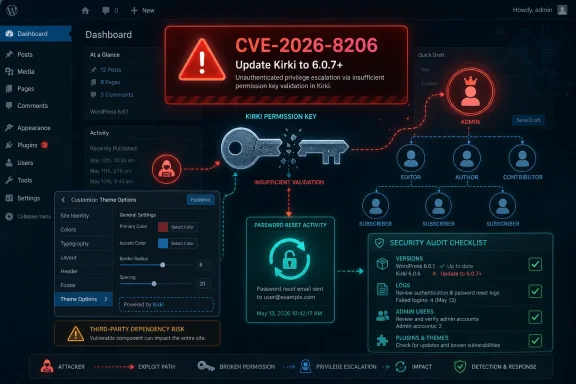 The Patch Is Simple, the Exposure Is Not
The practical advice comes first because this is not a theoretical bug. If a WordPress site is running Kirki 6.0.0 through 6.0.6, it should be treated as exposed until upgraded to Kirki 6.0.7 or later. The flaw is severe because it can be used to take over any user account, including administrator accounts, through a password-reset edge case.For most site owners, the first stop is the WordPress admin dashboard. Go to the plugins screen, check whether Kirki is installed and active, and update it if the version is earlier than 6.0.7. If Kirki is bundled or required by a theme rather than installed as an obvious standalone plugin, the next stop is the theme vendor’s update channel, because the vulnerable code may be riding inside a design stack rather than presenting itself as a familiar security-sensitive plugin.
After updating, administrators should not assume the job is done. A site that was vulnerable during active exploitation deserves a quick compromise check: look for unexpected admin accounts, recent password reset events, unfamiliar email addresses on existing accounts, new plugins or theme files, and unexplained content changes. If anything looks off, rotate administrator passwords, invalidate active sessions where possible, and review server-side logs before cleaning too aggressively.
That is the uncomfortable part of this incident. A patch closes the known hole, but it does not prove nobody walked through it yesterday.
Kirki Turns a Theme Convenience Layer Into an Account-Takeover Path
Kirki is not the sort of component many casual WordPress operators think about when they picture their attack surface. It is associated with theme customization and developer convenience, the plumbing that helps themes expose controls and options without each theme author reinventing the same interface. That makes it easy to mentally file Kirki under design infrastructure rather than security boundary.CVE-2026-8206 shows why that distinction has become dangerous. According to the disclosed facts, the flaw is a critical privilege-escalation bug that can be used to take over any user account, including administrators. It affects Kirki versions 6.0.0 through 6.0.6 and was fixed in 6.0.7.
Wordfence’s disclosure says the bug was introduced in Kirki’s 6.0.0 major release and affects nearly 40 percent of the plugin’s userbase. That detail matters because it frames the incident not as some forgotten ancient version sitting untouched for years, but as a regression in a relatively recent major branch. The risky population is not only the negligent long tail; it includes sites that may have upgraded into the problem.
This is the kind of vulnerability that punishes the way WordPress is actually operated. Many site owners have learned to watch the big-name plugins: forms, membership systems, SEO suites, page builders, caching layers, and ecommerce add-ons. Far fewer maintain a live inventory of theme frameworks, customization libraries, bundled dependencies, and helper components that arrived because a theme needed them.
That gap between what administrators track and what attackers can exploit is where Kirki becomes bigger than Kirki.
The Password-Reset Edge Case Is the Real Blast Radius
The phrase password-reset edge case sounds small, almost clerical. In security terms, however, account recovery is one of the most sensitive workflows in any web application. It is the place where a system deliberately creates a route back into an account without the normal password, which means small mistakes can become identity failures.CVE-2026-8206 is described as a privilege-escalation flaw that enables account takeover. That is a different kind of pain from a cross-site scripting bug that requires a victim click, or an information disclosure issue that leaks data but leaves control intact. Account takeover collapses the distinction between outsider and administrator.
Once an attacker controls a WordPress administrator account, the site is no longer merely vulnerable; it is governed by the attacker. They may add users, install or modify plugins, alter themes, inject redirects, stage malware, change SEO content, or use the site as a foothold into a broader hosting environment. On poorly isolated shared hosting, the consequences can extend beyond the single WordPress install.
The WordPress ecosystem has seen plenty of critical plugin bugs, but administrator takeover remains one of the clearest red lines. It bypasses the comforting idea that “we can just patch and move on,” because an attacker who became an admin before the patch may have created persistence somewhere else. The exploit path may be closed, while the compromise lives on.
That is why the post-patch audit matters. Updating from 6.0.6 to 6.0.7 is necessary, but the more important operational question is whether the vulnerable interval overlapped with exploitation against your site.
Theme Dependencies Are Becoming the Blind Spot Attackers Need
WordPress security advice has historically centered on core, plugins, and passwords. That made sense for a long time because the plugin directory is where much of the risk was visible. But modern WordPress sites are composites of theme frameworks, builders, helper libraries, cloud integrations, analytics tags, and vendor-controlled update channels.Kirki sits squarely in that murkier middle. It is a plugin, but its practical role is often tied to themes and customization. A site owner may not have installed it because they wanted “Kirki”; they may have installed a theme that recommended it, required it, or made it feel like part of the theme’s baseline.
That changes the psychology of patching. A contact-form plugin is easy to understand as active application code that receives user input. A customization framework can feel inert after the site is built, like scaffolding left in place. Attackers do not care whether a component feels boring. They care whether it runs code and exposes reachable behavior.
The same pattern applies to managed WordPress stacks and cloud-hosted deployments. WindowsForum readers have followed WordPress moving through Azure hosting changes, enterprise hosting arrangements, and developer tooling shifts. Those platform decisions matter, but they do not erase the old WordPress truth: the application layer remains a living supply chain.
A site can be hosted on hardened infrastructure and still be undone by a vulnerable dependency in the CMS layer. That is not an argument against managed hosting or cloud platforms. It is an argument against confusing infrastructure maturity with application inventory.
Major Releases Deserve Security Suspicion, Not Just Feature Testing
One of the sharper facts in this case is that Wordfence says the bug was introduced in Kirki 6.0.0. Major releases are supposed to bring architectural cleanup, new capabilities, and future-proofing. They also tend to touch code paths that had previously been stable.That does not mean administrators should avoid major releases. Running stale software is its own risk, and deferring updates indefinitely is how old vulnerabilities become permanent exposure. But major releases deserve a different testing model from routine maintenance patches, especially when they affect authentication, account management, file handling, or permissions.
The WordPress ecosystem often treats plugin updates as a binary choice between “update immediately” and “wait until someone else finds the bugs.” That is too crude for professional operators. A better approach is to classify updates by security sensitivity and dependency depth. If a component interacts with account recovery, user roles, REST endpoints, file operations, or admin actions, it belongs in the higher-risk lane.
Kirki’s 6.0.0-to-6.0.6 window is a reminder that new code can be more dangerous than old code in the short term. The industry’s reflexive message of “keep everything updated” remains broadly correct, but it is incomplete. The more mature version is: keep everything updated, know what changed, and test the workflows that would be catastrophic if broken.
For small site owners, that may sound like enterprise process creeping into a blog stack. But WordPress powers business storefronts, membership portals, documentation sites, campaign pages, and lead-generation properties. If the site creates revenue or reputation risk, dependency updates are not housekeeping. They are change management.
The Exploitation Timeline Leaves Little Room for Casual Patching
BleepingComputer reported active exploitation on June 2, 2026. That timing compresses the response window for administrators because this is not merely a vulnerability announcement waiting for proof-of-concept code to circulate. The line between disclosure and opportunistic exploitation has already been crossed.For defenders, active exploitation changes the priority from “schedule an update” to “contain a possible incident.” That does not mean every site running Kirki 6.0.0 through 6.0.6 has been compromised. It means the safe default is to assume scanning and attack attempts are happening fast enough that normal weekly maintenance may be too slow.
This is especially true for agencies and freelancers managing many small WordPress sites. Their risk is not one forgotten blog; it is the repeated dependency across a portfolio. If the same theme stack or base build includes vulnerable Kirki versions on dozens of client sites, a single overlooked component becomes a fleet problem.
The most dangerous sites are not always the most prominent ones. Attackers often value neglected WordPress installations precisely because they are useful infrastructure: redirectors, phishing hosts, malware droppers, spam platforms, and SEO abuse nodes. A low-traffic brochure site with admin takeover may be more attractive than it looks.
The WindowsForum angle here is practical rather than parochial. Many readers run WordPress somewhere: a lab site, a client landing page, a documentation portal, a side business, or a company intranet adjacent to Microsoft infrastructure. The fact that the CMS is “not the Windows server” does not make it irrelevant to the Windows administrator. It is still an identity, patching, logging, and incident-response problem.
The Inventory Problem Is Now the Security Problem
The phrase “nearly 40 percent of the plugin’s userbase” should make administrators pause. It suggests a large vulnerable slice inside the Kirki population, but it also points to a deeper inventory issue: many affected site owners may not realize they are part of that population at all.Plugin inventory sounds simple until themes, must-use plugins, managed hosting controls, and composer-style workflows enter the picture. Some WordPress sites are maintained through the dashboard. Others are deployed through Git. Some vendors bundle dependencies. Some agencies freeze plugin versions to avoid layout regressions. Some owners inherit sites with no documentation and a dozen overlapping admin accounts.
In that environment, “update Kirki” is the easy sentence and the hard task. It requires knowing whether Kirki is present, how it got there, who owns the update path, whether the theme depends on a specific version, and whether updating breaks the customizer experience. The attacker only has to find the vulnerable code path. The defender has to understand the stack.
This is where WordPress differs from more centralized software ecosystems. There is no single vendor relationship that guarantees every dependency is visible, supported, and tested in your exact configuration. The ecosystem’s strength is flexibility; its security weakness is the same flexibility expressed as ambiguity.
WindowsForum has covered WordPress in contexts ranging from Azure hosting to enterprise platform disputes and structured-data plugins. The recurring theme is that WordPress is no longer merely “a blogging tool” living off to the side. It is part of business infrastructure, and business infrastructure needs a bill of materials.
Admin Takeover Makes Cleanup a Forensics Problem
Once a vulnerability can hijack administrator accounts, cleanup must move beyond version checking. The reason is straightforward: administrator access lets an attacker change the system in ways that survive the original exploit. They can create new users, change existing users, install malicious plugins, modify theme files, or plant code in places that look like ordinary customization.The first post-update check should be user inventory. Every administrator account should have an identifiable owner, an expected email address, and a reason to exist. Dormant accounts should be removed or demoted, especially if they belong to former contractors, old agencies, or generic shared logins.
The second check should be change history. WordPress itself does not always provide the complete audit trail administrators wish it did, but hosting logs, security-plugin logs, file modification times, and backup diffs can still tell a story. Recent changes around the time exploitation was reported deserve scrutiny, particularly if they involve authentication, admin users, plugins, themes, or redirects.
The third check is persistence. If an attacker gained administrator access, the vulnerable Kirki version may have been only the doorway. The payload could be elsewhere: a modified theme template, an unfamiliar plugin, a web shell, a new scheduled task through WordPress cron, or a hidden redirect. Site owners who lack the time or confidence to inspect that properly should restore from a known-clean backup and then patch before reopening the site.
This is where security plugins can help but should not be treated as magic. Wordfence and similar tools can provide detection, firewalling, and visibility, and WindowsForum users have discussed Wordfence in the broader context of rescuing neglected WordPress sites. But any tool’s usefulness depends on deployment timing, configuration, and whether the attacker already obtained admin-level control.
The Dependency Nobody Bought Can Still Own the Site
The uncomfortable lesson for business owners is that risk is not limited to the products they consciously selected. A site owner may remember buying a theme, hiring a designer, and installing a handful of marquee plugins. They may not remember the auxiliary framework that made the theme’s customizer panels work.That creates a governance problem. Procurement, risk review, and update responsibility often attach to visible products. Hidden dependencies fall between the cracks, even when they run privileged code inside the same WordPress environment. Kirki’s bug is a case study in how that invisible layer can become the attack path.
For agencies, this should prompt a review of starter themes and standard builds. If Kirki is part of the default stack, the agency needs to know where, why, and which versions are deployed. The same applies to any dependency that appears across many client sites because it was convenient once and then became institutional muscle memory.
For enterprises, the right question is not merely “Do we run WordPress?” It is “Who owns the WordPress dependency map?” Marketing may own content, IT may own hosting, security may own scanning, and an outside vendor may own theme development. CVE-2026-8206 falls exactly into the seams between those groups.
That seam is where the next incident will live if organizations do not close it.
WordPress Security Has Become Supply-Chain Security in Disguise
There was a time when WordPress hardening advice could be reduced to a familiar checklist: update core, use strong passwords, avoid sketchy plugins, install a security plugin, and keep backups. Those things still matter. They are no longer enough.The modern WordPress site is a supply chain. A theme may depend on a framework. A framework may expose admin-side or front-end behaviors. A plugin may rely on libraries. A managed host may add must-use plugins. A performance tool may rewrite assets. A marketing tool may inject scripts. Each layer expands the site’s behavior beyond what a casual administrator sees.
CVE-2026-8206 is especially revealing because it involves a component associated with themes and customization rather than an obvious authentication plugin. It turns the aesthetic layer into an identity risk. That is the kind of inversion defenders need to internalize.
Security teams have spent years applying software bill-of-materials thinking to enterprise applications, containers, and open-source libraries. WordPress needs a practical version of the same discipline, not because every small site can operate like a Fortune 500 software shop, but because attackers already treat WordPress components as a mapped ecosystem.
The minimum viable version is not complicated. Keep a list of active plugins, theme-required plugins, must-use plugins, custom code, theme vendors, update owners, and backup locations. That list should be reviewed whenever a theme changes, a major plugin version lands, or a contractor hands off a site.
The Cloud Does Not Absorb Application Neglect
It is tempting to believe that moving WordPress onto a better platform solves most of this. Azure App Service, managed WordPress providers, containerized deployments, CDN protection, and web application firewalls can all improve resilience. They can also create a false sense that the application itself has become someone else’s problem.WindowsForum’s own WordPress coverage has often intersected with Microsoft infrastructure, from Azure hosting changes to enterprise WordPress deployments in specific regions. Those stories matter because hosting architecture shapes performance, compliance, and operational control. But CVE-2026-8206 is a reminder that a well-hosted vulnerable application is still a vulnerable application.
A cloud platform can make patching easier, backups cleaner, logging richer, and isolation stronger. It cannot automatically know whether a theme dependency introduced a password-reset account-takeover bug unless the platform or site owner is specifically tracking that software. The shared-responsibility model is not just a cloud cliché; it is the boundary where many WordPress incidents begin.
For IT pros, the actionable move is to fold WordPress into the same operational habits used elsewhere. Track versions. Monitor advisories. Stage updates. Keep backups. Review admin accounts. Maintain logs. Know who owns remediation when a vulnerability moves from advisory to exploitation.
The amateur era of “it is just a WordPress site” has been over for a while. Kirki is another reminder that some organizations still behave as though it is not.
The Kirki Response Playbook Starts With Version 6.0.7
The concrete response to CVE-2026-8206 is not glamorous, but it is urgent. Administrators need to identify vulnerable Kirki versions, update to 6.0.7 or later, and then look for signs that administrator access was abused before the update. The fact pattern is narrow enough to act on even while deeper technical analysis continues.If the site is maintained through the WordPress dashboard, check the installed plugin version and run the update from the admin interface. If updates are managed through a host, agency, Git deployment, or theme vendor, escalate the issue through that channel and ask specifically whether Kirki versions 6.0.0 through 6.0.6 are present anywhere in the stack. Do not accept “the theme is up to date” as a substitute for confirming the vulnerable component version.
If a site cannot be updated immediately because of compatibility concerns, it should be treated as a live risk. Administrators should consider temporarily restricting access, increasing monitoring, placing compensating controls in front of the site if available, and prioritizing a tested update. Delaying because the site “looks fine” is not a strategy when exploitation has already been reported.
The hardest cases will be abandoned themes and vendor-locked builds. If a theme depends on vulnerable Kirki versions and has no clear update path, the long-term answer may be replacing the theme rather than waiting for a rescue patch. That is painful, but so is rebuilding a compromised site under pressure.
This Is the Moment to Audit the Boring Stuff
The lesson from Kirki is not that every WordPress site is doomed or that every theme framework is suspect. The lesson is that boring dependencies deserve the same security attention as famous plugins. Attackers do not rank components by brand awareness; they rank them by reachability, exploitability, and payoff.This is also a good time to review internal linking between WordPress operations and broader IT governance. If your organization has asset management for laptops, servers, Azure resources, and Microsoft 365 tenants, but not for public WordPress properties, that is a mismatch. Public web applications are assets, whether they sit in a marketing budget or an IT budget.
The same goes for admin accounts. WordPress sites accumulate privileged users over time: developers, SEO consultants, agencies, editors, emergency break-glass accounts, and old employees. A vulnerability that can take over administrator accounts makes that sprawl more dangerous because each account becomes a valuable target and a possible persistence point.
Backups are the final boring thing that suddenly matters. A clean, recent backup turns a compromise from an existential event into a recovery exercise. A backup that has never been tested is closer to a superstition than a control.
The Near-Term Kirki Checklist for Site Owners
The facts available now are enough for a focused response, even if some exploit mechanics remain best left to security researchers and defenders. Treat CVE-2026-8206 as an active account-takeover risk, not as a routine maintenance notice, and prioritize sites where WordPress administrators overlap with business-critical publishing, ecommerce, or customer data workflows.- Confirm whether Kirki is installed directly, required by a theme, or bundled into a managed WordPress build.
- Update Kirki from versions 6.0.0 through 6.0.6 to version 6.0.7 or later as soon as possible.
- Review all administrator accounts for unfamiliar users, unexpected email changes, dormant accounts, and contractor access that should no longer exist.
- Check recent password-reset activity, plugin installations, theme modifications, redirects, and file changes around the period before and after June 2, 2026.
- Treat any unexplained administrator-level change as a potential compromise and restore from a known-clean backup if the site cannot be confidently cleaned.
- Add theme frameworks and required helper plugins to the site’s regular vulnerability-monitoring and patch-management inventory.
References
- Primary source: techradar.com
WP Maps Pro plugin flaw to create admin accounts on WordPress sites saw 3,600 attempts in a single day | TechRadar
Thousands of attacks were seen in a single daywww.techradar.com - Independent coverage: bleepingcomputer.com
Critical Kirki flaw exploited to hijack WordPress admin accounts
Hackers are exploiting a critical privilege escalation vulnerability (CVE-2026-8206) in the Kirki plugin for WordPress to take over any user account, including those belonging to administrators.www.bleepingcomputer.com - Independent coverage: managed-wp.com
Kirki Privilege Escalation Vulnerability Advisory | CVE20268206 | 2026-06-01 - Managed-WP.™
Urgent Kirki CVE-2026-8206 security advisory; update to 6.0.7 and harden WordPress.managed-wp.com - Independent coverage: seguridadenwordpress.com
Kirki vulnerable: escalación de privilegios sin login - Seguridad en Wordpress
Kirki 6.0.6 y anteriores tienen una falla crítica que permite escalar privilegios sin autenticación. El parche está en la versión 6.0.7. seguridadenwordpress.com
- Independent coverage: reddit.com

Reddit - Please wait for verification
www.reddit.com
- Independent coverage: threataft.com
WordPress Plugin RCE & Account Takeover Under Attack | ThreatAft
Three critical WordPress plugin vulnerabilities are under active exploitation or have public PoCs: Burst Statistics auth bypass (9.8 CVSS), Avada Builder…threataft.com
- Independent coverage: wp-firewall.com
Kirki Arbitrary File Download Vulnerability//Published on 2026-05-21//CVE-2026-8073 - WP-Firewall
Urgent Kirki CVE-2026-8073 fix: update to 6.0.7 and implement WAF protectionswp-firewall.com
