

Rockwell Automation has patched CVE-2026-9292, a stored cross-site scripting vulnerability affecting FactoryTalk DataMosaix Private Cloud version 8.02 and earlier. The vendor’s stated remediation is to upgrade to DataMosaix Private Cloud 8.03 or later. The flaw requires an authenticated, high-privilege user with access to Workflows configuration, but its stored nature means malicious script could later run in the browsers of other users who open affected content.
Use this checklist to organize the response. The upgrade is the confirmed remediation; the access review is a temporary exposure-reduction measure while the upgrade is planned and deployed.
That absence of reported exploitation is useful context, not a reason to postpone remediation. The vendor has identified a corrected release, and the affected condition involves stored script that can execute in later users’ browsers.
The advisory describes the direct consequence clearly: malicious JavaScript can execute when other users access the affected page. The resulting impact may include account takeover, credential theft, or redirection to a malicious website.
This is not described as unauthenticated remote code execution. Nor does the supplied advisory establish direct control of industrial devices or connected operational technology assets. Those distinctions should inform prioritization, but they do not change the upgrade requirement for affected versions.
The key operational concern is the persistence of saved content. Once a user with the required privileges stores malicious script in the vulnerable configuration area, later visitors to the affected content may trigger it in their own browser sessions. That makes the permissions assigned to Workflow editors immediately relevant while affected deployments remain in service.
WindowsForum’s risk-model assumption is that the practical impact will vary by local deployment: a browser session with limited application permissions may present a different exposure than a session used by an administrator with broader access. Similarly, an environment where only a small, controlled group can edit Workflows may have a different temporary risk profile than one where those permissions are widely distributed. These are local assessment questions, not findings about every DataMosaix installation.
The CVSS 3.1 vector is
The CVSS 4.0 vector is
Both ratings are relevant because they describe the same vulnerability through different frameworks: exploitation requires elevated authenticated access, but successful stored script execution can have substantial confidentiality and integrity consequences for users of the vulnerable application.
Local controls can still be useful when an upgrade requires planning or approval. For example, reducing unnecessary Workflow editing rights can lower the number of accounts able to introduce content into the affected configuration area. Reviewing high-privilege role assignments can also help organizations confirm that access remains appropriate for current responsibilities. These are local risk-management decisions, not a replacement for remediation.
Likewise, an upgrade addresses the known vulnerable behavior, but it does not by itself establish whether suspicious content was previously stored or viewed. If there is a reason to suspect misuse, the appropriate response is to use the organization’s established incident-response, evidence-preservation, and application-review processes.
The checklist at the start of this article is intended to keep those responsibilities connected. The application owner should know which instances exist and which versions they run. The change owner should have a specific upgrade plan. The identity or application administration team should review temporary Workflow-editor access. The test or operations team should verify that the upgraded application still supports expected workflows and integrations.
WindowsForum’s risk-model assumption is that organizations may need to coordinate upgrades with local maintenance, application, identity, and operational requirements. That assumption does not alter the vendor’s recommendation or imply that upgrades can be left open-ended. The objective is to use those processes to complete remediation reliably.
A practical post-upgrade validation should include locally appropriate checks such as:
That is why the interim question is not simply whether the application is internet-facing or whether an anonymous visitor can reach a particular interface. The advisory’s stated exploit condition begins with an authenticated, high-privilege user who can access Workflows configuration. Until the corrected version is deployed, organizations should know who has that ability and whether each assignment remains necessary.
A narrowly scoped temporary review can be more useful than a broad, disruptive permissions exercise. The goal is to identify users or roles that can create or modify Workflow configuration, confirm that access is still needed, and remove or reduce rights that are no longer appropriate where doing so will not interfere with required operations.
This is not a claim that every privileged DataMosaix account is compromised or improperly assigned. It is a targeted response to the exploit prerequisite described by the advisory. The review should be proportionate to the environment and should not delay the upgrade.
Security teams can also consider whether administrator browser sessions deserve additional care during the remediation window, especially when users view content created or modified by others. The supplied advisory does not prescribe browser controls, but the stored-XSS condition makes the browser session the relevant point of impact once malicious content is rendered.
Where local records exist, teams may choose to review recent Workflow modifications for unexplained changes, unusual content, or activity that does not align with approved change records. Any such review should use available local application audit history, identity records, administrative logs, browser-security telemetry, and change-management documentation as appropriate.
The purpose of this review is not to manufacture indicators that the advisory does not provide. It is to help organizations answer local questions:
The available material does not establish a complete vendor-publication or disclosure chronology. For operational purposes, the more important dates are the dates on which each local deployment is identified, assigned for remediation, upgraded, and validated.
A vulnerable deployment remains relevant until it is moved to the corrected release and the result is confirmed through the organization’s normal processes.
That combination should guide the response.
Organizations do not need to assume that every affected deployment has been compromised. They also should not overstate the issue as unauthenticated remote code execution or direct industrial-device control. At the same time, the high-privilege requirement should not become a reason to defer action. A stored browser-side payload can affect users who later access the saved content.
The practical response is therefore disciplined:
Decision box
WindowsForum operational insight: This is not an anonymous-device-control flaw. Before version 8.03 or later is deployed, the immediate exposure-management question is which accounts can edit Workflows and which users may later view that content.
- Affected if: DataMosaix Private Cloud 8.02 or earlier
- Fix: Upgrade to 8.03 or later
- Exploit prerequisite: Authenticated high-privilege user with Workflows access
- Known exploitation: No known public exploitation reported to CISA in the supplied advisory material
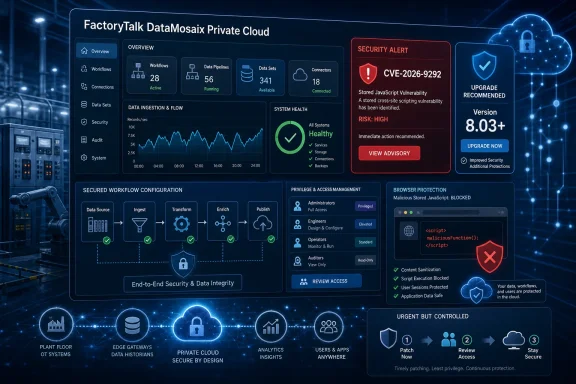 Priority Response Checklist
Use this checklist to organize the response. The upgrade is the confirmed remediation; the access review is a temporary exposure-reduction measure while the upgrade is planned and deployed.| Priority | Owner | Action | Validation outcome |
|---|---|---|---|
| 1 | DataMosaix application owner / asset-management team | Identify all FactoryTalk DataMosaix Private Cloud instances and determine whether they run version 8.02 or earlier. | Each known instance has an assigned owner and recorded version status. |
| 2 | Application owner / change-management owner | Assign ownership for the upgrade, obtain required approvals, and schedule deployment of DataMosaix Private Cloud 8.03 or later. | A documented remediation plan, maintenance window, and accountable owner exist for every affected instance. |
| 3 | DataMosaix administrator / identity owner | Temporarily review Workflow-editor access and high-privilege roles. Reduce unnecessary Workflow creation or modification rights where local operations permit. | Workflow editing is limited to users who currently require it until remediation is complete. |
| 4 | Upgrade owner / application test team | Test and deploy the vendor-corrected version through the organization’s normal change process. | The affected instance is running DataMosaix Private Cloud 8.03 or later. |
| 5 | Application owner / security team | Validate normal post-upgrade operation, including expected Workflow functions, authentication, authorization, and relevant integrations. Document the result. | Functional validation is recorded and any exceptions or follow-up work are assigned. |
| 6 | Security operations / incident-response team, if warranted | Review suspicious or unexplained recent Workflow changes using locally available logs, change records, and incident procedures. | Findings are handled through established local investigation and escalation processes. |
The advisory identifies the issue as CWE-79, improper neutralization of input during web page generation. Rockwell reported the vulnerability to CISA, and the supplied advisory material states that CISA had no knowledge of public exploitation specifically targeting this flaw.Limitation
The supplied advisory does not provide an exact DataMosaix UI path or command for checking the installed version; use your organization’s DataMosaix administration and asset-management process.
That absence of reported exploitation is useful context, not a reason to postpone remediation. The vendor has identified a corrected release, and the affected condition involves stored script that can execute in later users’ browsers.
A High-Privilege Requirement Does Not Remove the Need to Patch
CVE-2026-9292 affects user-supplied input in the Workflows configuration of FactoryTalk DataMosaix Private Cloud. According to the advisory, improper input neutralization can allow a high-privilege authenticated attacker to inject script that is stored by the application and later rendered in another user’s browser.The advisory describes the direct consequence clearly: malicious JavaScript can execute when other users access the affected page. The resulting impact may include account takeover, credential theft, or redirection to a malicious website.
This is not described as unauthenticated remote code execution. Nor does the supplied advisory establish direct control of industrial devices or connected operational technology assets. Those distinctions should inform prioritization, but they do not change the upgrade requirement for affected versions.
The key operational concern is the persistence of saved content. Once a user with the required privileges stores malicious script in the vulnerable configuration area, later visitors to the affected content may trigger it in their own browser sessions. That makes the permissions assigned to Workflow editors immediately relevant while affected deployments remain in service.
WindowsForum’s risk-model assumption is that the practical impact will vary by local deployment: a browser session with limited application permissions may present a different exposure than a session used by an administrator with broader access. Similarly, an environment where only a small, controlled group can edit Workflows may have a different temporary risk profile than one where those permissions are widely distributed. These are local assessment questions, not findings about every DataMosaix installation.
Severity Scores: Different Frameworks, Similar Operational Message
The advisory assigns CVE-2026-9292 a CVSS 3.1 base score of 6.1, rated Medium, and a CVSS 4.0 score of 8.4, rated High.| Scoring framework | Base score | Severity | Operational reading |
|---|---|---|---|
| CVSS 3.1 | 6.1 | Medium | Network-reachable flaw with low attack complexity, but requiring high privileges and user interaction |
| CVSS 4.0 | 8.4 | High | High confidentiality and integrity consequences in the vulnerable application context, despite the privileged-user prerequisite |
| WindowsForum assessment | — | Patch promptly | Stored script may execute in the browsers of later visitors after malicious Workflow input is saved |
CVSS:3.1/AV:N/AC:L/PR:H/UI:R/S:U/C:H/I:H/A:N.The CVSS 4.0 vector is
CVSS:4.0/AV:N/AC:L/AT:N/PR:H/UI:P/VC:H/VI:H/VA:N/SC:N/SI:N/SA:N.Both ratings are relevant because they describe the same vulnerability through different frameworks: exploitation requires elevated authenticated access, but successful stored script execution can have substantial confidentiality and integrity consequences for users of the vulnerable application.
What the Advisory Does Not Provide
The confirmed vendor remediation is to upgrade affected systems to DataMosaix Private Cloud 8.03 or later. Organizations should avoid presenting local access reviews, log reviews, or temporary permission restrictions as equivalent to the product fix.What the advisory does not provide
- An exact DataMosaix user-interface path or command for checking installed versions.
- A vendor-provided workaround that substitutes for upgrading to DataMosaix Private Cloud 8.03 or later.
- Exact instructions for identifying, disabling, reviewing, or cleaning up Workflow entries.
- Product-specific forensic indicators such as known malicious Workflow names, script strings, log event IDs, browser artifacts, hashes, or detection queries.
- Evidence of an active campaign, a confirmed compromise pattern, or universal impact beyond the affected versions and exploit conditions described.
Local controls can still be useful when an upgrade requires planning or approval. For example, reducing unnecessary Workflow editing rights can lower the number of accounts able to introduce content into the affected configuration area. Reviewing high-privilege role assignments can also help organizations confirm that access remains appropriate for current responsibilities. These are local risk-management decisions, not a replacement for remediation.
Likewise, an upgrade addresses the known vulnerable behavior, but it does not by itself establish whether suspicious content was previously stored or viewed. If there is a reason to suspect misuse, the appropriate response is to use the organization’s established incident-response, evidence-preservation, and application-review processes.
The Patch Is Clear; Validation Still Requires Ownership
The remediation task is straightforward in principle: identify affected DataMosaix Private Cloud deployments and move them to version 8.03 or later. In practice, the work still needs clear ownership because version inventory, upgrade approval, dependency checks, maintenance scheduling, and post-change validation may involve different teams.The checklist at the start of this article is intended to keep those responsibilities connected. The application owner should know which instances exist and which versions they run. The change owner should have a specific upgrade plan. The identity or application administration team should review temporary Workflow-editor access. The test or operations team should verify that the upgraded application still supports expected workflows and integrations.
WindowsForum’s risk-model assumption is that organizations may need to coordinate upgrades with local maintenance, application, identity, and operational requirements. That assumption does not alter the vendor’s recommendation or imply that upgrades can be left open-ended. The objective is to use those processes to complete remediation reliably.
A practical post-upgrade validation should include locally appropriate checks such as:
- Confirming the installed version through the organization’s normal administration or asset-management process.
- Confirming that authorized users can still access the application as intended.
- Checking that expected Workflow functions remain available.
- Verifying normal authentication and authorization behavior.
- Recording the change, validation result, and any exceptions requiring follow-up.
Why Workflow Permissions Matter Before Remediation
The central product-specific detail in CVE-2026-9292 is the Workflows configuration. The advisory states that a high-privilege authenticated user can save malicious script that later executes when other users access the affected page.That is why the interim question is not simply whether the application is internet-facing or whether an anonymous visitor can reach a particular interface. The advisory’s stated exploit condition begins with an authenticated, high-privilege user who can access Workflows configuration. Until the corrected version is deployed, organizations should know who has that ability and whether each assignment remains necessary.
A narrowly scoped temporary review can be more useful than a broad, disruptive permissions exercise. The goal is to identify users or roles that can create or modify Workflow configuration, confirm that access is still needed, and remove or reduce rights that are no longer appropriate where doing so will not interfere with required operations.
This is not a claim that every privileged DataMosaix account is compromised or improperly assigned. It is a targeted response to the exploit prerequisite described by the advisory. The review should be proportionate to the environment and should not delay the upgrade.
Security teams can also consider whether administrator browser sessions deserve additional care during the remediation window, especially when users view content created or modified by others. The supplied advisory does not prescribe browser controls, but the stored-XSS condition makes the browser session the relevant point of impact once malicious content is rendered.
Investigation and Change Review
Because the supplied advisory does not include forensic indicators or cleanup instructions, organizations should be careful not to imply that there is a universal detection method for CVE-2026-9292.Where local records exist, teams may choose to review recent Workflow modifications for unexplained changes, unusual content, or activity that does not align with approved change records. Any such review should use available local application audit history, identity records, administrative logs, browser-security telemetry, and change-management documentation as appropriate.
The purpose of this review is not to manufacture indicators that the advisory does not provide. It is to help organizations answer local questions:
- Which users recently modified Workflow configuration?
- Were those changes approved and expected?
- Is the content consistent with normal operational use?
- Did any unusual authentication, privilege, or administrative activity occur around the same time?
- Is escalation to an incident-response process warranted?
Disclosure and Response Timeline
| Event | Confirmed detail |
|---|---|
| Vulnerability identification | Rockwell Automation reported the issue to CISA. |
| Public advisory status | The supplied material identifies a Rockwell Automation advisory that CISA republished. |
| Remediation | Rockwell identifies DataMosaix Private Cloud 8.03 or later as the corrected version. |
| Exploitation status | No known public exploitation was reported to CISA in the supplied advisory material. |
A vulnerable deployment remains relevant until it is moved to the corrected release and the result is confirmed through the organization’s normal processes.
What Should Change Before the Next Maintenance Window
CVE-2026-9292 should be handled as a targeted patching task with a focused access-review component. The vendor remediation is specific: upgrade affected FactoryTalk DataMosaix Private Cloud instances to version 8.03 or later. The exploit condition is equally specific: an authenticated, high-privilege user needs access to Workflows configuration.That combination should guide the response.
Organizations do not need to assume that every affected deployment has been compromised. They also should not overstate the issue as unauthenticated remote code execution or direct industrial-device control. At the same time, the high-privilege requirement should not become a reason to defer action. A stored browser-side payload can affect users who later access the saved content.
The practical response is therefore disciplined:
- Establish version exposure and assign an owner for every affected instance.
- Plan and deploy the vendor-corrected release, DataMosaix Private Cloud 8.03 or later.
- Review Workflow editing rights as a temporary, locally managed measure until remediation is complete.
- Validate the installed version and expected application behavior after the upgrade.
- Use established local incident procedures if suspicious Workflow activity or related administrative activity is identified.
References
- Primary source: CISA
Published: 2026-07-16T12:00:00+00:00

Rockwell Automation FactoryTalk DataMosaix | CISA
www.cisa.gov
- Related coverage: rockwellautomation.com
