

Dave Plummer — the engineer who built Windows’ Task Manager — has published a blunt diagnostic of why people hate Windows 11 and a compact, practical prescription for how Microsoft can repair trust and usability in the OS. His central thesis is simple and sharp: Windows 11 increasingly behaves like an advertising and suggestion engine for Microsoft’s own services, and that erosion of control is what turns reasonable annoyance into outright resentment. The fixes he proposes are focused, achievable, and aimed squarely at power users: a distinct “Windows Expert” (or “Pro”) mode that removes nudges and suggestions, unifies settings, makes modern developer tools first-class defaults, and gives users a clear privacy and telemetry ledger. Those ideas are both a challenge to Microsoft’s current product incentives and a roadmap for restoring confidence among the people who keep Windows glued to the desktop world.
Dave Plummer is not an anonymous critic. He’s the veteran Microsoft engineer who created the Windows Task Manager and worked on multiple system components across the NT-era Windows stack. That inside credibility — someone who “painted a few coats” of Windows in the 1990s — makes his observations carry weight beyond the usual punditry. Plummer frames his critique as coming from affection: Windows can be great, but recent design directions have made the platform feel less like a personal tool and more like a sales channel. His recent video, framed as “Windows ‘SUCKS’: How I’d Fix It,” is a straightforward tour through the UX and policy decisions that bother advanced users. He points to recurring themes: “mitten mode” (an environment designed for newcomers that over-constrains experienced users), split and scattered settings, online search by default, suggestion pipelines that push Microsoft apps, and the discomfort about telemetry and surprise updates. Plummer’s remedy is a unified — and user-controlled — alternate mode that flips those behaviors off for professionals, leaving a deterministic, no-nudge environment for people who want their machine to behave predictably.
If Windows continues to feel like a sales channel more than a platform, those influencers will recommend alternatives, deploy workarounds, or endorse lock-in to other ecosystems — a slow but meaningful erosion of the platform’s centrality. Restoring trust is therefore not a mere PR move; it’s a strategic choice about Windows’ future role as a general-purpose, user-respecting operating system. Plummer’s point is not that the OS must be “purist”; it’s that there must be a clearly documented contract between the operator and the operator’s machine.
The core tension is cultural and economic. Microsoft must choose between short-term engagement metrics and a longer-term product proposition that centers trust and predictability. The technical cost of Plummer’s proposals is modest compared with the potential long-term benefit: reduced frustration, improved retention among core users, and fewer costly support incidents. If Microsoft embraces a true Expert mode, it would be a statement: the company values users’ attention and control more than immediate click-throughs.
Plummer’s argument is a reminder that system design is an implicit contract. When that contract is honored, users invest their time and advocacy; when it’s violated, they vote with their trust. Windows’ future depends less on the polish of transitions or AI features than on that basic contract between the operator and the device. The technical fixes exist. The remaining work is political and organizational — and the choice will define how millions of people experience their PCs for years to come.
Conclusion
Rebuilding trust in Windows 11 is a solvable engineering and product-design challenge. Dave Plummer’s “Windows Expert” mode is a pragmatic blueprint that prioritizes user control, transparency, and predictability. It preserves the approachable defaults for newcomers while returning a sense of ownership to experienced users. The changes he proposes — disabling suggestion pipelines in an explicit mode, unifying settings, defaulting to modern developer tools, and publishing a privacy ledger — are mostly configuration and UX work. The real decision isn’t technical: it’s whether Microsoft values long-term trust over short-term promotional metrics. The answer will shape whether Windows remains a platform people feel they own, or a product that just happens to run on their hardware.
Source: XDA The creator of Task Manager explains why people hate Windows 11, and how Microsoft can fix it
 Background / Overview
Dave Plummer is not an anonymous critic. He’s the veteran Microsoft engineer who created the Windows Task Manager and worked on multiple system components across the NT-era Windows stack. That inside credibility — someone who “painted a few coats” of Windows in the 1990s — makes his observations carry weight beyond the usual punditry. Plummer frames his critique as coming from affection: Windows can be great, but recent design directions have made the platform feel less like a personal tool and more like a sales channel. His recent video, framed as “Windows ‘SUCKS’: How I’d Fix It,” is a straightforward tour through the UX and policy decisions that bother advanced users. He points to recurring themes: “mitten mode” (an environment designed for newcomers that over-constrains experienced users), split and scattered settings, online search by default, suggestion pipelines that push Microsoft apps, and the discomfort about telemetry and surprise updates. Plummer’s remedy is a unified — and user-controlled — alternate mode that flips those behaviors off for professionals, leaving a deterministic, no-nudge environment for people who want their machine to behave predictably. Why Windows 11 rubs people the wrong way
1) The OS as a sales channel: ads, suggestions, and sponsored tiles
One of Plummer’s most quoted complaints is that Windows 11 increasingly feels like “ad space” — the OS pushes Microsoft’s apps and partner promotions into places users expect to be private, like the Start menu and Recommended section. This isn’t a philosophical concern; it’s a daily friction point. Multiple outlets and how-to guides document Microsoft’s ongoing experiments and the presence of suggested apps and promoted entries that can appear in Start, Search highlights, and other UI surfaces. For many users that pattern reads as coercive: a machine that advertises at you is not the same as a machine that serves you.- The mechanics: suggested apps, “occasionally show suggestions in Start,” and promoted entries are controlled by toggles — but they often appear by default and can be non-intuitive to disable.
- Effect on trust: displaying sponsored or promoted content in your Start menu places a measurable “price” on attention in a place users long considered private.
- The feel: repeated nudges to “switch” a browser or install a Microsoft app after a user explicitly chose otherwise comes across as disrespectful rather than helpful.
2) “Mitten mode” — smoothing the on-ramp by neutering power
Plummer describes a product design decision repeated over decades: make Windows safe, chatty, and forgiving for newcomers — but in the process “round off sharp corners” power users need. He dubs this “mitten mode”: an environment that protects new users but also hides the levers and exposes repetitive guidance that professionals don’t want. The result is a one-size-fits-most posture that doesn’t scale to the breadth of Windows’ audience. It trades advanced control for perceived safety.3) Fragmented settings and hidden control surfaces
Windows continues to suffer from deep UI fragmentation: some controls live in Settings, some in Control Panel, others in legacy MMC consoles, Group Policy, or registry keys. Plummer’s point is functional: hunting for a setting is a productivity tax and a design failure. Power users and IT professionals expect a single authoritative control plane — or at least an explicit, integrated path to advanced settings — not scavenger hunts across UIs. That inconsistency increases frustration and reduces the platform’s predictability.4) Defaults that ignore power-user choices: console and package management
Small things matter. Plummer calls out the Windows console experience and the inertia behind defaults: the Windows Terminal and winget (Windows Package Manager) are modern tools that should be the default shell and package manager for professionals. When core developer tools are second-class or awkward to access, the OS signals that the platform’s priorities aren’t aligned with those who maintain and extend it. Making developer tooling discoverable, on PATH, and first-class is a relatively low-cost, high-impact change.5) Privacy, telemetry, and the need for radical transparency
Telemetry is necessary for maintaining a secure, stable OS across an enormous hardware and driver matrix. Microsoft’s documentation describes “required” diagnostic data and an optional “full” diagnostic level — and provides a Diagnostic Data Viewer and a privacy dashboard. But Plummer argues that collection itself isn’t the primary gripe: it’s the opacity and sense of lost control. His proposed remedy is a “privacy ledger” — a continuous, human-readable, always-available log of outbound telemetry — which would reduce suspicion and allow users to audit what leaves their PC. Microsoft already publishes diagnostic categories and tooling, but Plummer wants a higher bar for everyday visibility and control.6) Surprise and forced updates
Windows Update is complex: security demands frequent patches, but surprise reboots and sudden feature pushes break workflows. Users and admins have reported experiences where updates appear to push aggressively or even install unexpected builds. Whether because of a botched rollout or aggressive deployment heuristics, the result is loss of control and a sense that the machine can be commandeered remotely without clear consent. Those incidents amplify distrust and make users feel the OS is running on Microsoft’s schedule, not theirs.Plummer’s prescription: what “Windows Expert” mode would look like
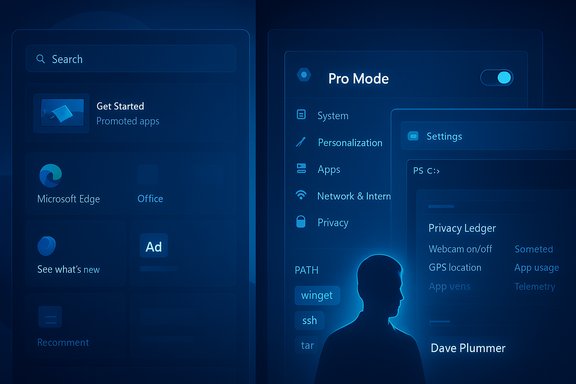
Plummer’s central proposal is blunt and pragmatic: ship an explicit, enforceable “Windows Expert” or “Pro” mode that dramatically flips the OS behavior for advanced users. He frames it as both an engineering and product decision: a single switch that alters defaults and silences suggestion pipelines while preserving the approachable out-of-the-box experience for newcomers.Core elements of Expert/Pro mode
- A single switch or installer-time toggle to disable suggestions, sponsored app promotions, and default online search in local search operations.
- Unify Settings and Control Panel into an authoritative settings hub (or a clear mapping), eliminating scattered control surfaces.
- Default to Windows Terminal as the console and put winget, ssh, and tar on PATH so shells, scripts, and automation work without friction.
- Provide a privacy ledger: a real-time, human-readable log of outbound telemetry and the option to disable non-essential telemetry.
- Replace surprise update behavior with a choreographed, user-respectful cadence: scheduled maintenance windows, clearer plain-language update notes, and easy one-click rollback for problematic patches.
Why this is both easy and hard
- Easy: from an engineering perspective, many of these defaults are already switchable per machine or per group policy. Turning off suggestion surfaces, changing default shell behavior, and exposing winget are configuration changes.
- Hard: the harder part is product incentives and organizational alignment. Some internal dashboards, telemetry metrics, and business teams measure click-through, activation, and engagement tied to those suggestion pipelines. Turning those off trades short-term engagement metrics for longer-term trust. Plummer frames this as a cultural and organizational choice: do you value immediate engagement or long-term platform trust?
What Microsoft already provides — and where the gaps are
Microsoft’s public documentation explains diagnostic categories, provides the Diagnostic Data Viewer, and offers privacy controls through Settings and the Microsoft Privacy Dashboard. Those are real steps toward transparency. But the problem Plummer highlights is usability and discoverability: privacy features exist, yet they are buried or explained in legal/technical language that isn’t friendly in the moment when users need reassurance. A privacy ledger or single-pane telemetry view would be a meaningful UX addition built on existing backend telemetry capabilities. On the advertising and suggestions front, Windows already exposes toggles to control “Show suggestions in Start” and other discovery features. However, these toggles are often off the default path for non-technical users and — crucially — the presence of promoted content before a user actively turns it off is the root complaint. The engineering changes Plummer asks for are technically feasible; the choice to flip defaults is a policy decision.Critical analysis: strengths and realistic barriers
Strengths of Plummer’s plan
- Focused, high-impact defaults: Giving professionals an explicit mode is an elegant way to manage complexity without alienating newcomers.
- Small engineering surface, large user ROI: Many changes are default flips or configuration surfaces that won’t require rewriting core OS components.
- Restores a social contract: Trust is a long-term asset. Reducing user-facing ads and increasing telemetry transparency would directly improve user sentiment and reduce churn among advanced customers.
- Clear, testable metrics: Microsoft could A/B a Pro mode adoption, measure reduced support tickets and churn, and correlate with professional satisfaction surveys.
Implementation barriers and unanswered questions
- Business incentives: Several Microsoft teams rely on engagement and cross-promotion metrics. An across-the-board “Pro” toggle would reduce those signals and could face internal resistance.
- Revenue and ecosystem effects: Promoted apps and suggestions help surface store apps and partner offerings. Turning them off might reduce traffic that benefits third parties or internal business units.
- Defining “expert” legally and operationally: What permissions, telemetry, or features should an Expert mode change? The boundary conditions matter. For example, enterprise-managed devices already permit granular controls; Plummer’s suggestion is aimed at individual power users, not managed corporate fleets. Clear delineation is required.
- Security implications: Some “nudges” are there to protect users (e.g., prompts to update or install security features). A Pro mode must balance freedom with safety, perhaps by requiring explicit acknowledgment of risk for certain disabled protections.
Risks Microsoft must consider
- If Pro mode becomes a paid tier (as Plummer wryly notes could be proposed), it risks transforming the concept into a paywall for user ownership — a move that might enrage communities and developers.
- Half-implemented toggles would simply duplicate current confusion. To be effective, the Expert mode must be single-switch simple and well-documented.
- Aggressive rollback or deferral of updates could leave users exposed if not paired with robust tooling and warnings. Crafting a secure but flexible update UX is non-trivial.
A practical rollout plan (how Microsoft could do this without drama)
- Early-adopter toggle in Insider builds: ship an explicit “Pro Mode (Expert)” toggle in Windows Insider channels for power-user feedback.
- Make changes reversible and auditable: toggles should log the switch event and show a one-page “what changes” summary with a one-click revert.
- Bake the privacy ledger into Settings: a readable timeline of outgoing telemetry, with details and a single-click “pause optional telemetry” action.
- Reframe metrics internally: prioritize long-term retention and NPS among professional users over short-term CTRs from promotions.
- Educate and empower: add a short onboarding video for Pro Mode explaining trade-offs and how to restore defaults.
Why this matters beyond “power users”
For many observers the fight over defaults, suggestions, and telemetry might look niche. It is not. The desktop remains central to software development, creative work, scientific computing, and enterprise continuity. Power users — system admins, developers, and IT pros — are the people who keep millions of users productive. They also set norms: when power users advise a less-experienced family member, their recommendations ripple.If Windows continues to feel like a sales channel more than a platform, those influencers will recommend alternatives, deploy workarounds, or endorse lock-in to other ecosystems — a slow but meaningful erosion of the platform’s centrality. Restoring trust is therefore not a mere PR move; it’s a strategic choice about Windows’ future role as a general-purpose, user-respecting operating system. Plummer’s point is not that the OS must be “purist”; it’s that there must be a clearly documented contract between the operator and the operator’s machine.
Practical changes readers can make today
While Microsoft decides whether to ship a Pro mode, several practical steps let users reduce the most egregious annoyances now:- Disable Start menu suggestions and promoted content in Settings > Personalization > Start. This removes “occasionally show suggestions in Start” and similar toggles.
- Use Group Policy or the registry to turn off “Microsoft consumer experiences” on Pro/Enterprise machines to suppress many upsell features.
- Make Windows Terminal the default console for developer workflows and add winget/ssh to PATH via environment variables for immediate script compatibility.
- Use the Diagnostic Data Viewer and Microsoft Privacy Dashboard to review outbound telemetry and adjust diagnostic settings under Settings > Privacy & security > Diagnostics & feedback.
- For update control, use the “active hours” and advanced pause options to avoid surprise reboots, with the caveat that long pause windows increase security risk.
Final assessment: trust beats click-through
Dave Plummer’s critique lands because it’s both specific and credible. He doesn’t demand that Microsoft abandon telemetry or commerce; he asks for clearer signals, respect for user choice, and a mode where power users aren’t constantly second-guessed. Those are eminently reasonable requests that map to concrete engineering changes: defaults, toggles, a privacy ledger, and a single authoritative control plane.The core tension is cultural and economic. Microsoft must choose between short-term engagement metrics and a longer-term product proposition that centers trust and predictability. The technical cost of Plummer’s proposals is modest compared with the potential long-term benefit: reduced frustration, improved retention among core users, and fewer costly support incidents. If Microsoft embraces a true Expert mode, it would be a statement: the company values users’ attention and control more than immediate click-throughs.
Plummer’s argument is a reminder that system design is an implicit contract. When that contract is honored, users invest their time and advocacy; when it’s violated, they vote with their trust. Windows’ future depends less on the polish of transitions or AI features than on that basic contract between the operator and the device. The technical fixes exist. The remaining work is political and organizational — and the choice will define how millions of people experience their PCs for years to come.
Conclusion
Rebuilding trust in Windows 11 is a solvable engineering and product-design challenge. Dave Plummer’s “Windows Expert” mode is a pragmatic blueprint that prioritizes user control, transparency, and predictability. It preserves the approachable defaults for newcomers while returning a sense of ownership to experienced users. The changes he proposes — disabling suggestion pipelines in an explicit mode, unifying settings, defaulting to modern developer tools, and publishing a privacy ledger — are mostly configuration and UX work. The real decision isn’t technical: it’s whether Microsoft values long-term trust over short-term promotional metrics. The answer will shape whether Windows remains a platform people feel they own, or a product that just happens to run on their hardware.
Source: XDA The creator of Task Manager explains why people hate Windows 11, and how Microsoft can fix it
