

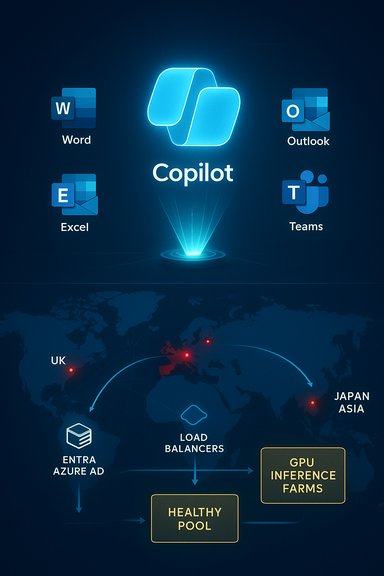
Microsoft’s Copilot was not experiencing a documented, global outage on December 19, 2025 — but the service had seen multiple, regionally concentrated incidents in the preceding ten days that left parts of Europe, the United Kingdom, and Asia intermittently degraded, and those events explain why communities and help desks kept asking “Is Copilot down?” on December 19.
Background
Microsoft Copilot is now a distributed, multi-surface AI assistant embedded across the Microsoft 365 stack — appearing as Copilot Chat, in-app assistants inside Word, Excel, Outlook, PowerPoint and Teams, and as a standalone Copilot web and mobile app. Its architecture stitches client front-ends, global edge/load‑balancers, identity and entitlement controls, orchestration microservices, and GPU-backed model inference endpoints into a single delivery chain. A failure or bottleneck in any of these layers commonly appears to end users as “Copilot is down,” even if the underlying storage or identity services remain reachable.That architectural complexity has consequences. Organisations increasingly treat Copilot as business‑critical infrastructure — used for meeting summaries, draft generation, spreadsheet analysis and Copilot-driven automations — so any interruption has an outsized operational ripple. The incidents in December 2025 made that dependency visible and prompted fresh guidance for IT teams on resilience and escalation.
What happened in December 2025 — concise timeline
December 9, 2025 — Incident CP1193544 (UK / Europe)
- Microsoft opened an incident logged as CP1193544 on December 9 and advised tenant administrators that users in the United Kingdom and parts of Europe might be unable to access Copilot or could experience degraded features. Public messaging and independent outage monitors showed a sharp spike of user reports concentrated in the UK.
- Microsoft’s early operational message attributed the visible disruption to an unexpected increase in request traffic that stressed regional autoscaling; engineers performed manual capacity increases, adjusted load‑balancer rules and monitored stabilization. Those mitigation steps produced progressive recovery in affected environments.
- User-facing symptoms during CP1193544 included generic fallback replies (“Sorry, I wasn’t able to respond to that”), indefinite “loading” or “Coming soon” screens, truncated or slow chat completions, and failure of Copilot-driven file actions while base storage (OneDrive/SharePoint) remained reachable — a pattern pointing to a processing/control‑plane bottleneck rather than storage loss.
December 16–18, 2025 — regional follow-ups and Japan incident
- Community monitors and some media outlets picked up additional spikes in complaint volume on December 16 that suggested localized or tenant-scoped degradations. These reports did not match the scale of the December 9 incident but added to user concern. Independent tracking showed smaller complaint counts focused on specific geographies.
- On December 18 Microsoft posted a separate incident under identifier MO1198797 affecting parts of Asia, chiefly Japan (and reports from China), where a traffic‑routing problem caused a portion of Japan‑serving infrastructure to become unhealthy. Engineers rebalanced traffic across healthy pools and reported restoration within a few hours. Regional outlets and Microsoft status messaging documented the mitigation and recovery window.
December 19, 2025 — the practical reality
- By December 19 there was no single, fresh Microsoft incident marked as a global Copilot outage equivalent to CP1193544 or MO1198797 in widespread public trackers; instead the conversation on community forums reflected a combination of: (a) residual tenant-specific effects from recent incidents, (b) short-lived client-side or eligibility/entitlement issues, and (c) routine helpdesk noise amplified by recent high‑profile outages. Administrators were still being advised to check tenant-level messages in the Microsoft 365 Admin Center as the canonical signal for any active impact.
Why Copilot “looks” like a single service when it isn’t
Copilot’s delivery chain couples many subsystems — and that coupling explains the traditional user perception of a single service failure.- Edge/API gateways and CDN points of presence terminate TLS, enforce traffic policies and route requests. Routing failures or policy misconfigurations at this layer can funnel traffic to unhealthy pools and create regional impact.
- Identity/control plane (Microsoft Entra/Azure AD) issues tokens and enforces entitlements; failures or timeouts here block requests before they ever reach inference hosts.
- Orchestration and file‑processing microservices assemble context, mediate file actions and queue requests for inference. If these microservices pause or fall behind, user requests time out or return fallback messages.
- Inference/model endpoints (Azure model services / Azure OpenAI endpoints) require warm pools of accelerator-backed instances to meet interactive latency goals; autoscaling warm pools takes time and can be outpaced by a sudden surge. Microsoft’s December 9 message explicitly cited autoscaling pressure as a proximate contributor.
Verified facts and cross‑checks
- Microsoft publicly recorded incident CP1193544 (December 9) and later MO1198797 (December 18) in its service health mechanism. Microsoft’s messages for these incidents referenced traffic routing and autoscaling pressure as contributing factors; independent outage trackers and regional administrators mirrored those alerts.
- Multiple independent observers (outage trackers and regional IT status pages such as NHSmail) logged spikes in complaint volumes coincident with the Microsoft incident windows and reproduced Microsoft’s high‑level explanation (unexpected traffic surge / routing fault + manual mitigations). Those mirrors are useful early signals but do not substitute for tenant‑level messages in the Microsoft 365 Admin Center, which remain the canonical source of truth for administrators.
- Microsoft’s public updates did not publish seat‑level user counts or detailed warm‑pool metrics; those internal telemetry particulars remain proprietary and were flagged as unverified in public reconstructions. Any precise claims about absolute user counts or internal autoscaler thresholds should be treated as provisional unless Microsoft’s post‑incident review (PIR) publishes them.
Practical impact: who felt it and what broke
- Enterprise teams that had embedded Copilot into critical workflows — meeting summarisation, automated document conversion, first‑line support triage — saw immediate pain during incident windows because Copilot’s actions are often synchronous parts of those workflows. When Copilot failed, those automated steps stalled and manual workarounds were needed.
- For many end users the visible symptoms were simple and uniform: a Copilot pane that didn’t appear, a repeated fallback message (“Sorry, I wasn’t able to respond to that”), or a Copilot action that timed out when asked to summarise or edit a file. Backing storage and email often remained available, which is a clue that the processing/control plane was the locus of failure.
- The scale of the December 9 event was regionally concentrated (UK/EU); the December 18 event primarily affected Japan and nearby regions. Global availability outside these pockets was broadly reported as intact; nevertheless, residual or tenant‑specific degradations sometimes persisted.
What administrators and heavy users should do now
Below are practical, prioritized steps for IT teams to reduce disruption and accelerate troubleshooting.- Check the Microsoft 365 Admin Center first
- The Admin Center posts tenant‑scoped incident entries and Microsoft incident IDs (for example, CP1193544 or MO1198797). Use those IDs to correlate tenant telemetry to Microsoft updates.
- Confirm local scope and simulate representative workflows
- Test Copilot features from a clean profile and another account in the same tenant. Distinguish between tenant-wide, region-wide, and per-user effects.
- Validate identity and entitlement flows
- Verify Microsoft Entra/Azure AD token issuance, and confirm that license/eligibility checks for Copilot are functioning; some incidents have surfaced when portal or license verification flows regressed, producing apparent availability problems for end users.
- Use fallbacks and mitigation playbooks
- Maintain manual fallback procedures for critical workflows (meeting minutes capture, manual draft templates) and document how to route work when Copilot is unavailable.
- Escalate with evidence
- Open a support case with Microsoft and include tenant logs, timestamps, and any correlation to the Microsoft incident ID. Ask for a PIR if the incident meets your SLA or business‑impact threshold.
- Consider architectural resiliency
- Where Copilot is mission‑critical, consider hybrid or layered fallbacks: local macro templates, cached summaries, or alternative tools for critical automations until vendor SLAs and operational maturity match your needs.
Strengths in Microsoft’s handling — what worked
- Transparent incident IDs: Publishing incident codes (for example CP1193544, MO1198797) and updating the Microsoft 365 status feed allowed administrators to correlate tenant symptoms to vendor diagnostics and mitigations quickly. That visibility speeds triage and reduces noise in enterprise support channels.
- Rapid operational mitigations: In both the UK/EU and Japan incidents engineers applied manual capacity scaling and traffic rebalancing as immediate mitigations. Those pragmatic steps restored availability for many tenants relatively quickly, demonstrating effective runbook execution under pressure.
- Proactive communication to administrators: Microsoft pointed administrators to the Admin Center and posted rolling updates, which is the correct operational model for enterprise cloud services where tenant‑level impact varies.
Risks, weaknesses and what needs attention
- Autoscaling fragility: Interactive LLM workloads depend on warm pools and pre-warmed inference hosts. Sudden traffic surges can outpace autoscalers and produce a temporary capacity gap; repeated incidents suggest autoscaling thresholds, warm-pool sizing or prediction logic may need tightening.
- Load balancing and routing policy risk: Policy changes that alter traffic distribution can concentrate load on a subset of infrastructure and create asymmetric failure modes. The December 9 incident included a referenced policy change that was reverted during remediation; such changes need stronger validation and progressive rollouts.
- Overreliance without contractual clarity: As organisations treat Copilot as core productivity infrastructure, procurement should demand clarity around operational SLAs, PIR timelines, and contractual remedies for repeated or prolonged incidents. Public incident IDs are a start, but enterprises will push for more quantitative commitments.
- Lack of public technical granularity: Microsoft’s external updates correctly described high‑level causes (traffic surge, routing fault) but did not publish low-level telemetry such as warm‑pool metrics, internal thresholds, or exact seat counts. Those details are important for customers to fully understand systemic risk and to measure vendor remediation adequacy; their absence leaves room for speculation. Treat precise numeric claims about internal telemetry as unverified until Microsoft publishes a PIR.
Recommended longer‑term operational controls for organisations
- Demand richer observability: Ask vendors for control‑plane telemetry signals (queue depth, warm pool saturation, regional imbalance metrics) via the admin console or an agreed telemetry feed.
- Canary traffic and routing changes: Insist on progressive canarying for traffic‑balancing and edge routing policy updates, plus automated rollback triggers when error rates or queue depths exceed safe thresholds.
- Graceful client fallbacks: Build Copilot clients and integrations to degrade gracefully — return partial results, queue jobs for later, or fall back to cached content — rather than a single cryptic fallback that confuses end users.
- Contractual and procurement hygiene: Include PIR delivery commitments, incident transparency SLAs, and quantifiable remedies where Copilot is a business‑critical dependency.
- Hybridization where necessary: For the highest‑value workflows, evaluate hybrid approaches (local inference for specific agent tasks, cached artifacts, or third‑party orthogonal processors) that reduce single‑vendor single‑point‑of‑failure risk.
A short checklist for end users who think Copilot is down right now
- Refresh and retry: simple client refreshes often surface whether the problem is transient.
- Test alternative surfaces: try Copilot web, desktop Office and Teams — different surfaces route requests differently and can reveal whether the failure is front‑end specific.
- Check your tenant admin center: administrators should look for incident IDs and tenant‑scoped messages before escalating.
- Capture evidence: note timestamps, error text, and any reproducible steps for helpdesk escalation.
- Use manual fallbacks: keep a short manual process to produce meeting notes and drafts when Copilot is unavailable; this materially reduces operational risk during an outage window.
Final analysis — is Copilot down on December 19, 2025?
The measured answer is: No global Copilot outage was declared on December 19, 2025, but the service had experienced multiple regional incidents in the preceding ten days that produced real, tangible impacts for affected users and tenants — and those events explain elevated community anxiety on December 19. Microsoft recorded CP1193544 (Dec 9, UK/EU) and MO1198797 (Dec 18, Japan) as the primary incident identifiers and used manual scaling and traffic rebalancing to restore availability in the impacted environments. Independent outage trackers and regional status pages corroborated those events, although Microsoft did not publish seat‑level metrics or exhaustive internal telemetry publicly. Administrators should continue to use the Microsoft 365 Admin Center as the canonical status source and prepare operational fallbacks for Copilot‑dependent workflows while contractual and SRE improvements are pursued.Closing takeaways for IT leaders
- Treat Copilot as infrastructure, not an optional convenience. Operational dependencies should be explicit in runbooks, staffing and procurement documents.
- Push for operational observability and contractual clarity: incident IDs, PIRs, warm‑pool metrics and rollback guarantees matter.
- Implement graceful fallbacks and hybrid options for mission‑critical automations so a regional routing or autoscaling event doesn’t stop essential work.
Source: DesignTAXI Community https://community.designtaxi.com/topic/21228-is-microsoft-copilot-down-december-19-2025/
