

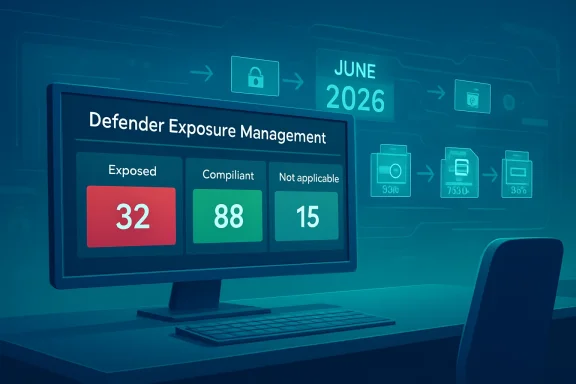
Microsoft’s new Secure Boot 2023 certificate assessment in Microsoft Defender arrives at a critical moment for Windows administrators: the original Secure Boot certificates issued in 2011 begin expiring in June 2026, with the transition stretching into the months that follow. The new Defender recommendation gives security teams a fleet-wide view of which devices already trust the newer Windows UEFI CA 2023 certificate chain, which remain exposed, and which are not applicable because Secure Boot is disabled or unsupported. For enterprises, this turns a low-level firmware and boot-chain migration into a measurable security posture workflow before the deadline becomes an operational scramble.
Secure Boot has been part of the modern Windows security foundation since the Windows 8 era, when UEFI firmware began replacing legacy BIOS across mainstream PCs. Its purpose is simple but powerful: before Windows loads, firmware checks whether boot components are signed by trusted certificates. If that chain of trust is broken, tampered bootloaders and unauthorized pre-operating-system code can be blocked before they gain control.
That early boot layer matters because malware that runs before the operating system can hide beneath normal endpoint defenses. Traditional antivirus, EDR sensors, identity controls, and network inspection all assume the operating system has reached a trustworthy state. Secure Boot helps establish that state by validating the boot manager, firmware drivers, option ROMs, and related components before higher-level protections take over.
The challenge now is lifecycle management. The Microsoft-provided Secure Boot certificates from 2011 are reaching the end of their planned lifespan, and the ecosystem must transition to 2023 certificate authorities that can sign future boot components and policy updates. Devices that fail to move forward may continue to start, but they risk entering a degraded security state where new mitigations for boot-level threats cannot be received or enforced as intended.
The new Defender assessment is therefore not just another dashboard tile. It is a recognition that the hardest part of this migration is visibility. Administrators need to know which machines are ready, which are still trusting older certificates without the new trust path, and which assets require infrastructure teams rather than security analysts to take action.
The recommendation identifies devices that have not completed the Secure Boot 2023 transition and presents them in a format security teams already use. That means exposed device counts, filtering, export workflows, and remediation guidance can become part of normal vulnerability management routines. The practical win is not only detection; it is operational alignment.
The new recommendation helps organizations answer several basic but previously difficult questions:
An exposed device is one that still trusts older Secure Boot certificates without sufficient trust for the newer certificate path. A compliant device has completed the expected transition and relies on the 2023 certificates and a properly signed boot manager. A not applicable device is generally one where Secure Boot is disabled, unsupported, or otherwise outside the assessment’s active remediation path.
That abstraction should not prevent technical validation, but it reduces friction for decision-makers. A CISO does not need to read UEFI variable output to understand that a thousand exposed laptops in a regulated business unit represent risk. Similarly, an endpoint engineering lead can use the exported device list to create a remediation wave without building a new inventory system from scratch.
Key triage questions include:
The allowed signature database, commonly called DB, contains certificates and hashes that firmware trusts during boot. The forbidden signature database, or DBX, contains revoked or blocked signatures that should not be trusted. This structure lets the platform allow known-good components while rejecting components associated with compromise or unacceptable risk.
That separation is not just bureaucratic housekeeping. It reflects lessons learned from years of Secure Boot operation, where one broad trust path could cover a wide range of bootloaders, drivers, and firmware-adjacent components. More granular trust can reduce unnecessary exposure while still supporting legitimate hardware and software scenarios.
The transition typically involves several moving parts:
That distinction matters for enterprise communication. If leaders hear “certificate expiration” and assume immediate outages, they may overreact. If they hear “devices will still boot” and assume no risk, they may underreact. The accurate framing is that unprepared devices can gradually fall behind at the most privileged stage of system startup.
This creates a long-tail risk problem. Attackers do not need every device to be vulnerable; they need a subset of high-value or poorly maintained systems where persistence below the operating system is possible. Over time, certificate lag becomes another form of configuration debt.
The risk profile includes:
That division of labor can slow progress unless the organization assigns clear ownership early. The new assessment can serve as the common source of truth, but it should feed an agreed remediation plan rather than sit as another unresolved recommendation in the portal.
A sensible sequence looks like this:
Small businesses often sit in the awkward middle. They may not have Defender for Endpoint, Intune, Configuration Manager, or dedicated firmware management, but they still rely on Windows PCs for financial records, customer data, point-of-sale systems, and remote work. For those environments, the Windows Security app’s certificate status enhancements can provide a more accessible local signal.
For consumers, the best advice is straightforward:
The same is true for Windows 365 Cloud PCs, Azure Virtual Desktop, and custom image pipelines. If a golden image or gallery image is not updated correctly, newly provisioned systems can inherit outdated Secure Boot readiness. In virtualized environments, the platform boundary shifts from physical firmware to virtual firmware, but the trust-chain requirement does not disappear.
Administrators should review:
Microsoft’s newer signing approach separates some UEFI application and option ROM paths, which should improve control but may require vendors to adjust submission and distribution practices. During the transition period, partners may need to ship or select binaries based on whether a device trusts the 2011 or 2023 certificate path. That adds complexity, but it also reduces the risk of relying on broad, aging trust anchors indefinitely.
For Windows OEMs, the transition is a support test. Vendors that provide clear firmware updates, device model guidance, and enterprise tooling will earn trust from IT buyers. Vendors that leave customers guessing may see their older fleets flagged in Defender reports and procurement reviews.
Important ecosystem questions include:
Because the recommendation lives in the Defender exposure workflow, organizations can align it with existing governance processes. That includes risk acceptance, exception tracking, regulatory reporting, cyber insurance evidence, and board-level security metrics. Secure Boot readiness becomes a control with observable status rather than a background platform assumption.
Governance teams should define:
Microsoft will also need to keep improving documentation, reporting, and user-facing status signals as the deadline approaches. The Windows Security app enhancements help consumers and smaller organizations, while Defender and Intune workflows help larger estates. The best outcome is a layered visibility model where local users, help desks, endpoint engineers, and security leaders all see a consistent picture.
Key milestones to monitor include:
Source: Microsoft - Message Center Assess Secure Boot status with Microsoft Defender | Microsoft Community Hub
 Background
Secure Boot has been part of the modern Windows security foundation since the Windows 8 era, when UEFI firmware began replacing legacy BIOS across mainstream PCs. Its purpose is simple but powerful: before Windows loads, firmware checks whether boot components are signed by trusted certificates. If that chain of trust is broken, tampered bootloaders and unauthorized pre-operating-system code can be blocked before they gain control.That early boot layer matters because malware that runs before the operating system can hide beneath normal endpoint defenses. Traditional antivirus, EDR sensors, identity controls, and network inspection all assume the operating system has reached a trustworthy state. Secure Boot helps establish that state by validating the boot manager, firmware drivers, option ROMs, and related components before higher-level protections take over.
The challenge now is lifecycle management. The Microsoft-provided Secure Boot certificates from 2011 are reaching the end of their planned lifespan, and the ecosystem must transition to 2023 certificate authorities that can sign future boot components and policy updates. Devices that fail to move forward may continue to start, but they risk entering a degraded security state where new mitigations for boot-level threats cannot be received or enforced as intended.
Why this is not a normal patch cycle
Most Windows updates operate above the firmware trust boundary, but Secure Boot certificate servicing reaches into UEFI variables such as the allowed signature database and key exchange structures. That makes the transition more sensitive than a routine cumulative update. It must account for firmware behavior, OEM implementation differences, operating system support, boot manager replacement, and rollback planning.The new Defender assessment is therefore not just another dashboard tile. It is a recognition that the hardest part of this migration is visibility. Administrators need to know which machines are ready, which are still trusting older certificates without the new trust path, and which assets require infrastructure teams rather than security analysts to take action.
Defender Brings Secure Boot Readiness Into Exposure Management
Microsoft is placing the new assessment inside the Defender portal under Exposure Management, specifically within recommendations for device misconfigurations. That placement is significant because it reframes Secure Boot readiness as a measurable exposure issue, not merely a firmware maintenance task. Security operations teams can now track the certificate transition alongside other configuration weaknesses that affect organizational risk.The recommendation identifies devices that have not completed the Secure Boot 2023 transition and presents them in a format security teams already use. That means exposed device counts, filtering, export workflows, and remediation guidance can become part of normal vulnerability management routines. The practical win is not only detection; it is operational alignment.
From firmware inventory to security posture
Historically, Secure Boot state was often checked with local tools, PowerShell, configuration management scripts, or OEM inventory data. Those methods remain useful, but they can produce fragmented visibility in large estates. Defender’s assessment gives teams a centralized view that can be discussed in the same meetings where endpoint exposure, patch compliance, and high-value asset protection are already reviewed.The new recommendation helps organizations answer several basic but previously difficult questions:
- Which devices still lack trust for the 2023 Secure Boot certificates?
- Which systems have successfully moved to the newer boot manager and certificate path?
- Which machines are outside scope because Secure Boot is disabled or unsupported?
- Which business units, platforms, or device groups require the most urgent remediation?
- Which remediation work should be handed to endpoint engineering, firmware teams, or platform owners?
The Three Device States That Matter
The Defender assessment sorts devices into three broad categories: exposed, compliant, and not applicable. That taxonomy is intentionally simple because administrators need to move quickly from discovery to remediation. In a mixed fleet, simplicity is a feature.An exposed device is one that still trusts older Secure Boot certificates without sufficient trust for the newer certificate path. A compliant device has completed the expected transition and relies on the 2023 certificates and a properly signed boot manager. A not applicable device is generally one where Secure Boot is disabled, unsupported, or otherwise outside the assessment’s active remediation path.
Why categorization beats raw telemetry
Raw Secure Boot telemetry can be difficult to interpret because several components are involved. The allowed database, key exchange key, boot manager signature, firmware state, and servicing status can all tell slightly different parts of the story. Defender’s recommendation converts those signals into a posture status that security teams can prioritize.That abstraction should not prevent technical validation, but it reduces friction for decision-makers. A CISO does not need to read UEFI variable output to understand that a thousand exposed laptops in a regulated business unit represent risk. Similarly, an endpoint engineering lead can use the exported device list to create a remediation wave without building a new inventory system from scratch.
Key triage questions include:
- Are exposed devices concentrated in specific hardware models?
- Are they running older firmware or unsupported operating system builds?
- Are they servers, kiosks, shared workstations, or executive laptops?
- Are they remote devices that have missed firmware updates?
- Are they cloud-managed endpoints, co-managed devices, or unmanaged stragglers?
The Technical Chain Behind the Recommendation
Secure Boot depends on a chain of trust stored and enforced by UEFI firmware. At the top is the Platform Key, typically controlled by the OEM or a delegated authority. Beneath that sits the Key Exchange Key, which authorizes updates to the Secure Boot databases.The allowed signature database, commonly called DB, contains certificates and hashes that firmware trusts during boot. The forbidden signature database, or DBX, contains revoked or blocked signatures that should not be trusted. This structure lets the platform allow known-good components while rejecting components associated with compromise or unacceptable risk.
The 2011-to-2023 certificate shift
The expiring certificates include Microsoft’s older key exchange and production signing authorities used across Windows and the broader UEFI ecosystem. The new certificates include replacements for Windows boot components, third-party UEFI applications, and option ROM signing. Microsoft has also separated some signing paths to give finer-grained control over what a device trusts.That separation is not just bureaucratic housekeeping. It reflects lessons learned from years of Secure Boot operation, where one broad trust path could cover a wide range of bootloaders, drivers, and firmware-adjacent components. More granular trust can reduce unnecessary exposure while still supporting legitimate hardware and software scenarios.
The transition typically involves several moving parts:
- Adding Windows UEFI CA 2023 to the Secure Boot allowed database.
- Adding updated certificates for third-party UEFI applications where applicable.
- Adding updated option ROM trust where the device previously required it.
- Applying the newer Microsoft KEK 2023 path where supported.
- Replacing the boot manager with one signed by the newer Windows certificate authority.
Why the Deadline Changes the Risk Equation
The June 2026 deadline is not best understood as a cliff where every outdated PC suddenly stops booting. Microsoft has been careful to indicate that many systems will continue to start. The more important issue is that devices stuck on the older trust chain may be unable to receive future Secure Boot and boot manager protections.That distinction matters for enterprise communication. If leaders hear “certificate expiration” and assume immediate outages, they may overreact. If they hear “devices will still boot” and assume no risk, they may underreact. The accurate framing is that unprepared devices can gradually fall behind at the most privileged stage of system startup.
Boot security is cumulative
Boot-level defense is an evolving control. When new vulnerabilities are discovered, the ecosystem may need updated boot components, revocation policies, or signing changes. A device that cannot trust new signing authorities may miss those mitigations, leaving it dependent on yesterday’s assumptions about boot-chain safety.This creates a long-tail risk problem. Attackers do not need every device to be vulnerable; they need a subset of high-value or poorly maintained systems where persistence below the operating system is possible. Over time, certificate lag becomes another form of configuration debt.
The risk profile includes:
- Reduced ability to adopt new Secure Boot policy updates.
- Lower confidence that boot components can be refreshed securely.
- Greater exposure to pre-OS persistence techniques.
- More complicated incident response if firmware or boot tampering is suspected.
- Potential compliance gaps where Secure Boot readiness is treated as a control requirement.
Enterprise Remediation Requires Cross-Team Coordination
The Defender recommendation gives security teams visibility, but remediation usually belongs to a broader set of owners. Endpoint management teams may handle Windows policy and update rings. Infrastructure teams may own firmware deployment. Desktop engineering may manage model certification, while server teams may have separate maintenance windows.That division of labor can slow progress unless the organization assigns clear ownership early. The new assessment can serve as the common source of truth, but it should feed an agreed remediation plan rather than sit as another unresolved recommendation in the portal.
A practical rollout sequence
Organizations should avoid treating every exposed device the same. A phased rollout reduces the chance of firmware surprises and gives teams time to validate boot behavior, BitLocker recovery handling, and remote support processes. The most mature approach is to combine risk-based prioritization with hardware model testing.A sensible sequence looks like this:
- Inventory all exposed, compliant, and not applicable devices in Defender.
- Segment devices by operating system, hardware model, firmware version, ownership group, and business criticality.
- Pilot the update on representative devices before broad deployment.
- Coordinate firmware, Windows update, reboot, and BitLocker recovery readiness.
- Validate certificate status after update completion using Defender and targeted technical checks.
- Escalate unsupported or failed devices to OEM, infrastructure, or lifecycle replacement owners.
Consumer Devices and Small Businesses Are Not Exempt
The Defender recommendation is aimed at managed environments, but the underlying certificate transition affects consumer and small business devices too. Many home and small office PCs will receive updates automatically through Windows Update, especially if they are running supported Windows versions and have firmware that already supports the new certificate path. Still, automatic does not mean universal.Small businesses often sit in the awkward middle. They may not have Defender for Endpoint, Intune, Configuration Manager, or dedicated firmware management, but they still rely on Windows PCs for financial records, customer data, point-of-sale systems, and remote work. For those environments, the Windows Security app’s certificate status enhancements can provide a more accessible local signal.
The support gap for older hardware
Older PCs are the hardest category. Some devices manufactured after Secure Boot became common may still rely on firmware that does not cleanly support the newer certificate transition. Others may require OEM BIOS or UEFI updates that users have not installed because firmware updates are perceived as risky, inconvenient, or invisible.For consumers, the best advice is straightforward:
- Keep Windows Update enabled and current.
- Install firmware updates from the PC manufacturer when offered through trusted channels.
- Check the Windows Security app for Secure Boot certificate status where available.
- Avoid disabling Secure Boot unless there is a specific and understood reason.
- Replace unsupported systems that can no longer meet baseline security expectations.
Servers, Cloud PCs, and Virtual Desktops Need Special Attention
Server environments require a different operational mindset because downtime windows are tighter and ownership is more specialized. Windows Server systems with Secure Boot enabled may need manual initiation or carefully staged certificate updates depending on deployment model, firmware state, and virtualization platform. That makes early planning essential.The same is true for Windows 365 Cloud PCs, Azure Virtual Desktop, and custom image pipelines. If a golden image or gallery image is not updated correctly, newly provisioned systems can inherit outdated Secure Boot readiness. In virtualized environments, the platform boundary shifts from physical firmware to virtual firmware, but the trust-chain requirement does not disappear.
Image hygiene becomes a security control
For cloud-managed Windows estates, image maintenance is often the real control point. Updating individual Cloud PCs helps, but ensuring that source images, templates, and provisioning workflows are aligned prevents the same exposure from being recreated repeatedly. That is especially important for organizations that frequently reimage, reprovision, or scale virtual desktop pools.Administrators should review:
- Custom images used for Windows 365 or Azure Virtual Desktop provisioning.
- Virtual machine generation and Secure Boot support settings.
- Trusted Launch and virtualization security configurations.
- Autopatch or Intune reporting coverage.
- Server maintenance windows and rollback procedures.
- Firmware dependencies on physical hosts where applicable.
OEMs, Drivers, and the Wider Ecosystem
Secure Boot is not a Microsoft-only story. OEMs, independent hardware vendors, option ROM developers, Linux distributions, recovery tool vendors, and enterprise deployment teams all interact with the UEFI trust ecosystem. The 2023 certificate transition therefore has competitive and operational implications beyond Windows itself.Microsoft’s newer signing approach separates some UEFI application and option ROM paths, which should improve control but may require vendors to adjust submission and distribution practices. During the transition period, partners may need to ship or select binaries based on whether a device trusts the 2011 or 2023 certificate path. That adds complexity, but it also reduces the risk of relying on broad, aging trust anchors indefinitely.
Competitive implications
Apple controls the hardware, firmware, and operating system stack more tightly, which simplifies some lifecycle transitions but limits openness. Linux vendors and open-source communities depend heavily on the broader UEFI signing ecosystem, especially for distributions that support Secure Boot on commodity PCs. Microsoft’s handling of this transition will therefore influence perceptions of whether Secure Boot remains a useful cross-platform standard or becomes another painful compatibility boundary.For Windows OEMs, the transition is a support test. Vendors that provide clear firmware updates, device model guidance, and enterprise tooling will earn trust from IT buyers. Vendors that leave customers guessing may see their older fleets flagged in Defender reports and procurement reviews.
Important ecosystem questions include:
- Which OEM models receive firmware updates that support the 2023 certificates?
- How will recovery media, deployment media, and bootable tools be updated?
- Will third-party security and encryption tools boot cleanly under the new trust path?
- How will Linux dual-boot and enterprise Linux deployment scenarios be documented?
- Which devices are better replaced than remediated?
Defender’s Role in Governance and Compliance
The most important feature of the new assessment may be its ability to create evidence. Security leaders need more than assurance that updates are “probably happening.” They need device lists, exportable data, remediation status, trend reporting, and the ability to prove that high-value assets are being prioritized.Because the recommendation lives in the Defender exposure workflow, organizations can align it with existing governance processes. That includes risk acceptance, exception tracking, regulatory reporting, cyber insurance evidence, and board-level security metrics. Secure Boot readiness becomes a control with observable status rather than a background platform assumption.
Turning readiness into an auditable process
A mature program should treat this recommendation as part of continuous control monitoring. Devices can drift, firmware can fail, images can lag, and exceptions can multiply. A one-time cleanup before June 2026 is useful, but ongoing monitoring is better.Governance teams should define:
- What percentage of critical assets must be compliant by each milestone.
- How long an exposed device can remain unresolved.
- Who approves exceptions for unsupported hardware.
- What evidence is required before a device is marked remediated.
- When a device should be retired rather than carried as risk.
- How Secure Boot readiness maps to broader endpoint compliance policy.
Strengths and Opportunities
The new Defender recommendation gives Microsoft customers a timely way to convert Secure Boot certificate uncertainty into action. Its biggest strength is that it meets security teams where they already work, while still pointing remediation owners toward the technical steps required to complete the transition.- Centralized visibility reduces dependence on scattered scripts, spreadsheets, and OEM portals.
- Risk-based prioritization helps teams focus first on high-value assets and sensitive environments.
- Exportable device data makes handoffs easier between security, infrastructure, and endpoint teams.
- Clear categorization separates exposed, compliant, and not applicable devices for faster triage.
- Workflow alignment lets Secure Boot readiness become part of established exposure management routines.
- Deadline awareness helps organizations act before June 2026 rather than after support pressure spikes.
- Improved auditability gives leaders evidence that boot-chain trust is being actively maintained.
Risks and Concerns
The assessment is a major step forward, but it does not eliminate the complexity of the underlying migration. Secure Boot certificate updates touch firmware, operating system servicing, boot manager replacement, hardware support, and organizational ownership boundaries. Those are exactly the areas where large enterprises tend to accumulate exceptions.- False confidence may arise if teams assume Windows Update alone will complete every device transition.
- Firmware fragmentation can leave specific models or regions behind despite broad remediation efforts.
- BitLocker recovery events may increase if boot-chain changes are poorly staged or communicated.
- Unsupported hardware may create difficult replacement decisions close to the deadline.
- Virtual image drift can reintroduce exposure even after individual devices are remediated.
- Operational silos may delay action if security teams identify risk but platform teams own the fix.
- User disruption is possible when firmware updates, reboots, or failed servicing collide with business hours.
What to Watch Next
The next phase will be defined by execution, not announcement. Organizations should watch how quickly Defender’s exposed device counts fall after remediation begins, which hardware models account for repeated failures, and whether firmware vendors provide clear guidance for older but still widely deployed systems. The long tail will matter more than the easy wins.Microsoft will also need to keep improving documentation, reporting, and user-facing status signals as the deadline approaches. The Windows Security app enhancements help consumers and smaller organizations, while Defender and Intune workflows help larger estates. The best outcome is a layered visibility model where local users, help desks, endpoint engineers, and security leaders all see a consistent picture.
Key milestones to monitor include:
- Availability and reliability of OEM firmware updates for older commercial models.
- Defender recommendation accuracy across Windows client, server, and virtualized environments.
- Completion rates for high-value assets before the June 2026 deadline.
- Updates to recovery media, deployment media, and third-party boot tools.
- Post-transition guidance for devices that remain unable to support the newer trust chain.
Source: Microsoft - Message Center Assess Secure Boot status with Microsoft Defender | Microsoft Community Hub
