

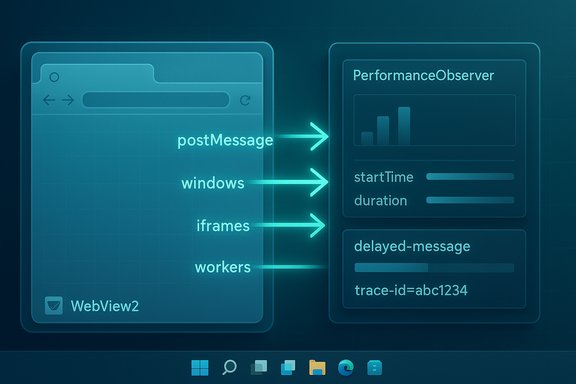
Microsoft’s browser team has quietly proposed a focused, practical tool to help developers diagnose one of the trickiest performance problems in modern web apps — delayed cross-context messaging — at the same time Windows 11 continues to lean on WebView2 to deliver more web-driven UI surfaces inside the shell.
Background / Overview
Microsoft has increasingly adopted a pragmatic hybrid approach to Windows UI: native frameworks where tight integration and shaving milliseconds matter, and web technologies where rapid iteration and code reuse win. The WebView2 runtime — the Chromium-based embeddable web control that powers Microsoft Edge content inside apps — is now a foundation piece for many first‑party experiences and third‑party apps on Windows 11. The Evergreen WebView2 runtime is preinstalled on eligible Windows 11 devices, creating a shared, continuously updated web platform across apps and shell surfaces. That shift has practical consequences. Embedding a full web platform into shell surfaces or productivity clients reduces engineering duplication and simplifies feature parity across platforms, but it also brings the multi‑process, DOM/JS memory footprint and the same behavioral quirks developers face in web browsers. Early hands‑on previews that rendered system flyouts and Agenda-style surfaces with WebView2 showed predictable spikes in renderer/utility processes and increased memory usage while active — behavior testers and community analysts explicitly observed WebView2 child processes appear under ShellExperienceHost when an Agenda flyout was shown.Against that backdrop, Microsoft published a proposal — the Delayed Message Timing API — intended as a diagnostic Performance API that exposes where time is being lost when web code uses postMessage to communicate between windows, iframes, MessageChannel ports, and workers. The aim is not to magically speed up apps at runtime, but to give teams reliable, measurable evidence of where delays occur so they can change architecture or code.
The Delayed Message Timing API — what it is and what it reports
A diagnostics API, not a runtime optimization
Microsoft frames the Delayed Message Timing API as a developer diagnostic: it surfaces per‑message Performance entries (entryType "delayed-message") that capture the lifecycle of a cross-context message from send to processing. That data is designed to be consumed by PerformanceObserver and correlated across sender and receiver contexts to build a round‑trip picture of delays.Key fields (the API’s measurement surface)
The proposal lists a concise set of timing and attribution properties that map directly to the likely causes of delay:- startTime / duration — entry timeline data for the measurement.
- sentTime — when the message was enqueued for delivery.
- processingStart / processingEnd — when the receiver began and finished handling the message.
- blockedDuration — time the message spent waiting in the receiver’s task queue before being processed (the core “was it queued?” indicator).
- taskCount / scriptTaskCount / totalScriptDuration — counts and durations that indicate whether many short tasks or a few long script tasks were the bottleneck.
- serialization / deserialization — time spent converting data structures for transfer and reconstructing them on the other side (relevant when large objects or heavy structured cloning are involved).
- scripts — an array of PerformanceScriptTiming entries attributing which script executions contributed to the delay, plus invoker/receiver script metadata for cross‑context correlation.
Why postMessage can become a performance hazard
postMessage is indispensable in complex web apps. It’s how the main window talks to iframes and workers, how message channels enable multiplexed flows, and how multi‑window architectures stay loosely coupled. But that convenience hides three systemic causes of delay that the new API targets.1) Receiver thread saturation (blockedDuration)
If the receiving context is executing a long synchronous task (rendering, heavy JS, synchronous I/O, or blocking polyfills), incoming messages simply queue. The message cannot be processed until the event loop returns to the message task, and that queue waiting time is precisely what blockedDuration measures. Without a diagnostic API, teams often see symptoms — UI that appears but is unresponsive — but lack metrics to prove the message was stuck in a queue rather than lost or slow on the network.2) Task queue congestion (taskCount / scriptTaskCount)
Even when individual tasks are short, an accumulation of many small tasks can produce the same effect as one long task. The API’s taskCount and scriptTaskCount offer a way to detect congestion: a high taskCount indicates the queue had many pending items when the message arrived, making the delay a scheduling/throughput issue rather than a single blocking script. This matters in SPAs, heavy UIs, or apps that funnel a lot of events through the main thread.3) Serialization/deserialization overhead
postMessage uses the structured clone algorithm to serialize complex objects for transfer between contexts. For large objects, deep structures, or non‑transferable types, that serialization (and the matching deserialization) runs synchronously and can be costly. The Delayed Message Timing API exposes these durations so teams can decide whether to reduce message payloads, use transferable objects (zero‑copy where supported), or restructure communication patterns. MDN’s documentation on transferable objects and the structured clone algorithm explains the developer trade‑offs for avoiding heavy copy costs.What this means for WebView2-based experiences on Windows 11
WebView2 apps are in scope — but the API is universal
The proposal applies to the web platform generally: any page or embedded webview that implements the Performance API extension can generate delayed-message entries. That explicitly includes WebView2‑hosted UIs inside Windows 11, because those embed the same Microsoft Edge (Chromium) engine and share the platform’s Performance APIs. Microsoft’s blog makes this clear: the feature is designed to assist complex web apps regardless of whether they are hosted in a browser tab, a native WebView2 control, or an Electron wrapper.Why Outlook, shell flyouts and other Microsoft clients may benefit
Microsoft engineers call out Outlook and other complex, multi‑context apps as drivers for the proposal. New Outlook and other hybrid clients often use multiple frames, service workers, and web views to compose a rich client — which is precisely the architecture where postMessage is heavily used and where subtle queuing issues can make UI feel “stuck.” Microsoft appears to be using the API in diagnostic builds of Outlook to identify cross‑context bottlenecks and determine concrete optimizations. For customers who experience slow flyout launches or lag when clicking a notification and opening an embedded web UI, the API’s measurements could inform fixes.The trade‑offs remain unchanged: instrumentation, not a magic patch
It’s important to be explicit: this API does not change the runtime semantics of postMessage, nor does it change serialization internals. It makes visible what previously required guesswork. That visibility is valuable — instrumented evidence lets teams choose the least invasive path (e.g., batching messages, using transferables, offloading heavy work to a worker) — but it doesn’t by itself lower CPU or memory usage. The platform trade‑offs of embedding Chromium-based runtimes into a shell surface (extra processes, renderer memory, update vectors) still stand and should be managed by product teams and administrators.Developer playbook: measure, analyze, and fix
The Delayed Message Timing API gives developers a structured routing for detection. Use this checklist and the code samples below as a starting point.1) Observe first, then hypothesize
- Wire a PerformanceObserver for entryType "delayed-message" and capture buffered entries during problematic flows. The API example in the proposal shows exactly this pattern.
- Correlate entries from sender and receiver contexts using trace IDs and timestamps to build a complete round‑trip view.
- Create a PerformanceObserver and observe { type: 'delayed-message', buffered: true }.
- Log, export, or send the entries to telemetry for post‑mortem analysis.
2) Interpret the measurement
- High blockedDuration → receiving context was busy; inspect long synchronous tasks or UI reflows.
- High taskCount with low script durations → queue saturation from many short tasks; investigate event fan‑out, redundant listeners or frequent timers.
- High serialization/deserialization → message payloads are too large or of non‑transferable types; consider transferables or alternate exchange protocols.
3) Tactical mitigations
- Use transferable objects (ArrayBuffer, MessagePort, ImageBitmap) to avoid expensive structured-clone copies where zero‑copy semantics are available. MDN docs explain transferable semantics and trade‑offs.
- Batch messages: combine frequent small messages into one aggregated message where ordering and latency allow.
- Chunk large payloads and stream them via SharedArrayBuffer/transferables or a shared worker to avoid huge synchronous serialization spikes.
- Move heavy work to Web Workers so the main thread is free to handle message events promptly.
- Reduce main‑thread synchronous work by breaking long tasks into requestIdleCallback / setTimeout slices or scheduling micro‑tasks more carefully.
- Use MessageChannel/ports instead of top‑level postMessage in scenarios where explicit channel semantics reduce overhead.
4) Platform and telemetry
- Ship instrumentation into beta/insider builds so the app can collect real device traces for representative workloads.
- For enterprise apps, aggregate delayed-message metrics across a fleet and correlate with hardware characteristics (core count, background load, WebView2 runtime linkage) to identify device classes most affected.
Enterprise and user considerations
Update surface and manageability
WebView2 introduces a shared runtime that can be managed as Evergreen (auto‑updated) or Fixed Version (bundled). On Windows 11 the Evergreen runtime is preinstalled and updated through the Edge pipeline, which simplifies security updates but also centralizes the update surface admins must track. This matters because a single WebView2 runtime regression could affect many in‑house apps and shell surfaces simultaneously. Enterprises should continue to treat WebView2 as a first‑class runtime dependency in imaging and patch plans.Privacy, telemetry and Copilot integration
Some Windows shell surfaces that rely on web content also integrate cloud services (for example, Copilot hooks in an Agenda view). Administrators and privacy teams need clarity on how telemetry or message instrumentation is collected, whether it crosses tenant boundaries, and how DLP/Purview policies treat data surfaced by web UI inside shell flyouts. The community advice is to validate tenant-level controls and DLP coverage during preview testing before broad rollout.User experience trade‑offs
Embedding web content into the shell can make iteration and feature parity smoother across platforms, but it also changes the “feel” of UI elements. Fonts, scrolling, animation timing and subtle layout differences can produce a perceived loss of native polish for users who value consistent shell aesthetics. Performance insight (from the new API) can help bridge that gap by guiding optimizations for reduced queueing and faster event processing, but teams must still invest in style and accessibility alignment.Risks, unknowns, and verification notes
- The Delayed Message Timing API is explicitly a proposal and remains in early developer‑preview/explainer stages. Microsoft is soliciting feedback on the design and semantics, and the API could evolve before standardization or broad implementation. Treat current fields and example data as provisional.
- Windows Latest and community reporting noted that Microsoft’s engineers and product teams appear to be using this approach to diagnose Outlook performance, and that a GitHub listing or explainer was spotted. While the Microsoft Edge developer blog points to an explainer and a place for feedback (MSEdgeExplainers / repo issues), the precise GitHub link referenced in secondary reports could not be independently located at time of writing. That specific detail should be treated as unverified until the repository URL or issue number is confirmed by Microsoft or located in the MSEdgeExplainers repository. The blog and proposal remain the authoritative source for the API’s design.
- Instrumentation adds telemetry and data collection vectors that product and privacy teams must review. Any telemetry tied to message traces, source URLs or function names should be handled with appropriate retention, anonymization and user/tenant opt‑in where required.
Quick operational checklist for Windows developers and admins
- Install the latest WebView2 SDK and test your app with the Evergreen runtime; ensure your distribution plan accounts for preinstalled runtimes on Windows 11.
- When users report “stuck” or sluggish UI, capture delayed-message Performance entries (if available) and aggregate traces to identify systematic patterns.
- If blockedDuration is high, prioritize reducing main‑thread synchronous work or offload to workers. If serialization costs dominate, use transferables or redesign message payloads.
- For enterprise fleets, create a small telemetry pilot that collects anonymized delayed-message metrics across representative hardware to measure impact before broad rollout.
Conclusion
The Delayed Message Timing API is a targeted, practical response to a persistent class of performance problems in modern, multi‑context web applications. By measuring where messages are queued, how many tasks are ahead of them, and how much time serialization costs, the API aims to replace guesswork with data — and data, in turn, enables effective engineering trade‑offs: batching, transferables, workers, or architectural simplification.For Windows 11, where WebView2 is increasingly prominent inside the shell and in first‑party apps like Outlook, this kind of instrumentation is particularly relevant: it gives teams a way to diagnose why a hybrid web UI appears to "hang" even when content has rendered. That visibility will not erase the platform trade‑offs of embedding a Chromium‑based runtime into the shell — extra processes, memory footprints and update surfaces remain — but it does give developers and product teams the practical tools they need to make web‑driven experiences feel as responsive as users expect.
Microsoft’s own Edge blog provides the specification and usage patterns for the proposal, while early coverage and community testing show the context and concerns driving adoption in Windows UI surfaces. Developers should experiment with the new Performance entries as they appear, pair them with existing observability tooling, and use the measurements to choose the simplest, least disruptive optimizations that deliver perceptible responsiveness improvements for users.
Source: Windows Latest Microsoft wants to make "complex web apps" faster, as Windows 11 embraces WebView2
