

Windows 11’s next wave of visible changes is being shaped not by fresh native controls but by a quiet, strategic shift toward embedding the web inside the OS — and that single decision has implications both subtle and profound for everyday users, administrators, developers, and gamers. Neowin’s recent coverage highlights two threads of this story: Microsoft’s growing reliance on WebView2 to render system surfaces such as the Notification Center’s returning Agenda view, and the company’s roadmap for a noticeably better PC gaming experience in 2026 driven by platform and runtime advances. The move toward WebView2 promises faster feature parity and a simpler engineering story for Microsoft, but it also raises practical concerns around memory, visual fidelity, update surfaces, and manageability. At the same time, gaming improvements — from DirectStorage evolution to Xbox app and Full Screen Experience refinements — promise real wins for load times, streaming, and handheld gaming on Windows 11, provided hardware and drivers keep pace. Both stories are part of the same platform trade‑off: centralize and accelerate feature delivery via shared web runtimes, or keep the OS’s visible surfaces strictly native to preserve predictability, performance, and tight system integration. Neowin’s reporting draws a clear line between the company’s engineering choices and the user experience that follows.
Windows has always balanced native, compiled components against higher‑level, cross‑platform layers. Over the last decade that balance has tilted: web standards and powerful browser engines now make it practical to reuse the same UI across Windows, macOS, and Linux. Microsoft’s WebView2 — an embeddable runtime based on Microsoft Edge (Chromium) — is central to that strategy. WebView2 lets teams ship HTML/CSS/JS UIs inside Windows apps while benefiting from a continuously updated browser runtime. That architectural pattern dramatically reduces the engineering cost of maintaining multiple codebases, and it’s already visible in a long list of apps and system features. Microsoft’s official documentation confirms WebView2 uses the same multi‑process browser model as Edge, with a browser process, renderer processes, a GPU process and helpers; those processes are tied to a user data folder and can be shared across apps that opt into the same environment. Over the same period, Microsoft has invested in a set of gaming technologies meant to modernize PC gaming: DirectStorage to reduce load times and shift decompression work to GPUs, Auto HDR for visual upgrades, the Xbox app’s ongoing consolidation of libraries (including Steam integration for PC), and device‑level refinements such as the Xbox Full Screen Experience for handheld Windows devices. These platform investments are designed to reduce friction — faster load times, fewer background overheads, and a more consistent cross‑store discovery experience. The DirectX team’s blogs and Xbox Wire updates provide the technical context and roadmaps for these advances.
That design yields clear strengths:
The net result is a pragmatic, hybrid Windows: faster iteration and closer integration with Microsoft’s cloud and web services, offset by new complexity for performance‑sensitive workloads and enterprise management. Users who prize the newest features and tighter cross‑device parity will benefit; power users and IT teams should treat these changes as a prompt to re‑test performance, update management policies, and prepare for a slightly different Windows than the one many of us grew up tuning and optimizing. The system is changing — deliberately — and that change will bring measurable advantages and real trade‑offs in equal measure.
Source: Neowin https://www.neowin.net/news/webview2-is-the-future-of-an-important-windows-11-component/
Source: Neowin https://www.neowin.net/news/microsoft-gaming-on-windows-11-is-going-to-get-so-much-better-in-2026/
 Background
Windows has always balanced native, compiled components against higher‑level, cross‑platform layers. Over the last decade that balance has tilted: web standards and powerful browser engines now make it practical to reuse the same UI across Windows, macOS, and Linux. Microsoft’s WebView2 — an embeddable runtime based on Microsoft Edge (Chromium) — is central to that strategy. WebView2 lets teams ship HTML/CSS/JS UIs inside Windows apps while benefiting from a continuously updated browser runtime. That architectural pattern dramatically reduces the engineering cost of maintaining multiple codebases, and it’s already visible in a long list of apps and system features. Microsoft’s official documentation confirms WebView2 uses the same multi‑process browser model as Edge, with a browser process, renderer processes, a GPU process and helpers; those processes are tied to a user data folder and can be shared across apps that opt into the same environment. Over the same period, Microsoft has invested in a set of gaming technologies meant to modernize PC gaming: DirectStorage to reduce load times and shift decompression work to GPUs, Auto HDR for visual upgrades, the Xbox app’s ongoing consolidation of libraries (including Steam integration for PC), and device‑level refinements such as the Xbox Full Screen Experience for handheld Windows devices. These platform investments are designed to reduce friction — faster load times, fewer background overheads, and a more consistent cross‑store discovery experience. The DirectX team’s blogs and Xbox Wire updates provide the technical context and roadmaps for these advances. WebView2: what Microsoft is doing and why it matters
The news in a nutshell
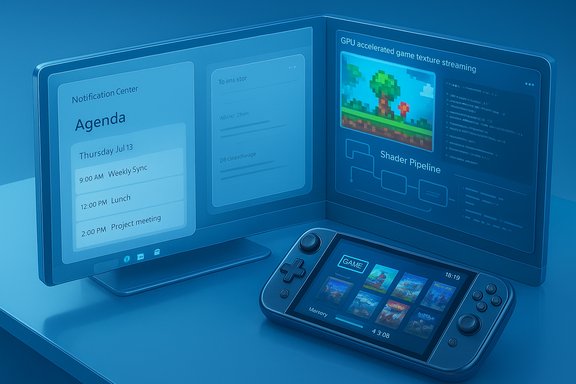
Microsoft recently previewed an Agenda view for the Windows 11 Notification Center — a feature long missed since Windows 10 — and elected to render it as a WebView2‑hosted surface rather than a traditional native shell control. Reports and hand‑on tests showed the Agenda flyout spawns WebView2 processes and causes a visible rise in the Windows Shell Experience Host’s resource use when opened. The implementation also exposes the Agenda view to Microsoft 365 Copilot integration and quick actions such as “Join meeting” or “Open in Outlook.” Neowin’s coverage and community previews make clear this is an intentional choice: web content inside the shell enables faster iteration and centralizes Copilot hooks, at the cost of a different execution model and runtime dependencies.Technical mechanics: the WebView2 process model
- Multi‑process architecture: WebView2 inherits Chromium’s process architecture: a main browser process plus renderer processes, a GPU process, and helper processes (audio, network, utility). The runtime starts a process group for each user data folder and can create additional renderer processes for different origins or heavy in‑page components. Microsoft’s documentation explains these details and precisely why process counts and memory footprints can increase when an embedded web surface is introduced into a normally native UI flow.
- State and memory: Modern single‑page applications (SPAs) typically keep significant in‑memory state (DOM trees, JS heaps, image/video buffers, service worker caches). When that same SPA is embedded inside a WebView2 instance — as with an Outlook/Calendar agenda or a full web app — those state footprints move into the WebView2 runtime’s renderer processes. That translates into a measurable increase in resident memory compared with a tightly optimized native control.
- Update and telemetry surface: WebView2’s distribution model (evergreen runtime vs. fixed version) decouples web runtime updates from Windows servicing. That’s a deliberate benefit — the runtime gets security and feature updates without waiting for a full OS release — but it also creates an additional update vector administrators must consider. WebView2‑hosted surfaces will inherit whatever telemetry behavior that web bundle contains unless Microsoft explicitly restricts it at the shell level.
Immediate user impacts
- Performance and resource use: Early hands‑on tests of WebView2‑hosted features show real differences: opening the Agenda flyout starts WebView2 processes and increases the shell’s memory and CPU usage during active rendering. Observers reported the Shell Experience Host’s memory jumping noticeably while the Agenda was visible, and WebView2 processes typically enter a suspended state when the flyout closes to reduce steady‑state load. WebView2’s end‑user FAQ and Microsoft’s docs both confirm that heavier embedded content will consume more memory and CPU, and that’s primarily content‑driven rather than an inherent flaw in WebView2 itself.
- Visual and behavioral fidelity: Web‑rendered UI often looks and behaves slightly differently from native WinUI components (font rendering, spacing, animation timing). That can make shell surfaces feel less integrated or polished to users who are sensitive to the Windows design language. For features intended to be glanceable and tightly integrated (like an agenda in the taskbar flyout), the perception of “webby” behavior matters.
- Notifications and background behavior: Native apps can leverage Windows notification channels and background task lifecycles predictably. WebView2 relies on service workers and the WebView2 notification bridge; in certain conditions this yields weaker or slower notification semantics than a native implementation.
Why Microsoft chose this path
- Faster iteration and reuse: Rendering Agenda with WebView2 lets the same web components be reused across Outlook, web portals, and other Microsoft 365 surfaces. It simplifies Copilot integration and keeps web‑driven features on a single maintenance path.
- Security/isolation benefits: Chromium’s process model increases isolation between web content and the host, reducing some classes of exploit risk. WebView2’s runtime updates also deliver timely security fixes.
- Developer economics: For Microsoft and many ISVs, shipping a single web codebase across platforms is vastly cheaper than maintaining separate native tooling and UX flows.
Risks and trade‑offs (practical checklist)
- Increased memory and CPU spikes for flyouts and shell surfaces during rendering; test on low‑end and battery‑sensitive hardware.
- Visual inconsistency that may erode the perception of polish in core UI surfaces.
- Update management complexity for IT: WebView2 runtime updates and app updates become separate levers to manage.
- Potential privacy/telemetry surface if the embedded web app brings new data‑collection endpoints into the shell.
What developers and administrators should do now
- Audit where WebView2 appears: Inventory apps and shell surfaces that now use WebView2 (Agenda, Copilot surfaces, third‑party wrappers) and note which rely on evergreen runtime vs. fixed distributions.
- Test resource profiles: Measure memory and CPU during opening, idle, and heavy‑use scenarios on representative hardware, with and without other WebView2 hosts active.
- Plan update channels: Decide if evergreen WebView2 is acceptable enterprise‑wide or whether you must bundle a fixed runtime for critical systems.
- Validate notifications and background tasks: Especially for productivity apps that must deliver timely toasts and meet corporate SLAs.
- Design fallbacks: Provide native fallback or simplified content when system power or battery saver modes are active.
Gaming on Windows 11: why 2026 looks better (and where limits remain)
The short version
Microsoft is positioning Windows 11 to be significantly friendlier to modern PC gaming in 2026 through a mix of OS‑level features, runtime APIs, and Xbox ecosystem improvements. Key pillars include continued DirectStorage evolution (GPU decompression), refinements to the Xbox PC experience (a unified game library, Steam integration, and expanded Xbox Full Screen Experience), and improved cloud‑streaming ergonomics. These are real, measurable wins for load times, discoverability, and handheld play — but they are conditional on driver support, NVMe storage, and developer adoption.DirectStorage: the foundational performance win
- Why it matters: DirectStorage reduces CPU overhead and, crucially, enables GPU‑accelerated decompression of game assets. That allows games to stream high‑fidelity textures and assets with far less CPU bottleneck, reducing load times and enabling more detailed worlds without excessive pop‑in. Microsoft’s DirectX team documented DirectStorage’s availability and the 1.1/1.2 steps that introduce GPU decompression (GDeflate), tooling, and examples for developers to adopt.
- Real‑world prerequisites: To see the best gains you need an NVMe SSD and a GPU supporting modern DirectX 12 shader models; driver support from NVIDIA, AMD, and Intel is essential. Microsoft and GPU partners are shipping driver updates in tandem with DirectStorage improvements so that games and engines can adopt GPU decompression in the coming months and years.
Xbox app, Full Screen Experience, and the Windows handheld story
- Unified libraries and storefront integration: Microsoft has been consolidating PC library experiences so the Xbox app aggregates titles from Xbox, Game Pass, Steam, and other launchers. This reduces friction for players who use multiple storefronts. The Xbox PC app’s new Home and library features are rolling out to Insiders and handhelds.
- Xbox Full Screen Experience (FSE): For handheld Windows devices (ROG Ally family, Legion Go, etc., Microsoft introduced an Xbox‑centered full‑screen shell that can reduce background services and reclaim system memory — Microsoft has presented FSE as a way to free up near‑term resources (Microsoft claims up to ~2GB reclaimed on some configurations) and provide a console‑like, controller‑first launcher for Game Pass and installed games. Windows Central and other outlets have measured or reported on these changes and Microsoft’s staged rollout.
- Cloud gaming improvements: Xbox Cloud Gaming is expanding regionally and adding higher resolution options (select titles now support up to 1440p streaming quality for Game Pass Ultimate subscribers), along with more provider integrations, which improves the streaming front end for players who rely on cloud play.
What this means for players in 2026
- Faster load times and richer worlds for titles that adopt DirectStorage and GPU decompression, particularly open‑world and texture‑heavy games.
- Cleaner handheld experience on Windows 11 devices using the Xbox FSE, with better memory headroom and fewer desktop interruptions for controller‑first play.
- More flexible discovery and launch flows via the Xbox app’s library aggregation (Steam integration and storefront consolidation).
- Better cloud streaming controls with selectable resolutions and broader device support.
Remaining constraints and risks
- Hardware and driver dependencies: The full DirectStorage benefits require NVMe drives, compatible GPUs, and up‑to‑date drivers. Not all machines will see identical gains.
- Developer adoption curve: Engines and games must integrate updated DirectStorage flows and asset pipelines to benefit from GPU decompression. That takes time — expect a gradual cadence as major engines expose primitives and studios ship optimized builds.
- Windows overhead vs. native console: Even with FSE and optimizations, Windows is a general‑purpose OS. Some handheld Linux/SteamOS deployments continue to show advantages in raw efficiency on identical hardware, especially for ultra‑constrained battery runtimes.
- Fragmentation for handhelds: OEM shells, driver variants, and diverse hardware mean results will vary significantly between an ROG Ally X and a lower‑end Windows handheld.
Cross‑cutting analysis: the platform trade‑off
Both stories — WebView2 proliferating into the shell and the push to make Windows 11 a better gaming platform — are symptoms of a single strategic direction: centralize core functionality into shared, faster‑moving runtimes (Edge/WebView2 for UI, DirectStorage and DirectX for game IO), then iterate quickly on features and services.That design yields clear strengths:
- Faster feature parity and rollout: Web surfaces and web‑led UI let Microsoft and first‑party teams ship new behaviors (Copilot actions, Agenda features) without a full OS release cycle.
- Security and uptime: Shared runtimes allow centralized patching for security issues in the web engine or graphics stack.
- Developer efficiency: Less duplicated engineering between web and native front ends.
- Performance costs on constrained devices: WebView2 and Chromium‑style processes increase the system process count and the transient memory footprint. For thin clients or older laptops, that will be noticeable; for developers of battery‑sensitive devices this is material.
- Perceived loss of native polish: Users and power users expect a certain look, feel, and responsiveness from shell elements. Web‑rendered surfaces can feel different, and that difference is meaningful in a user interface that’s supposed to be glanceable and deeply integrated.
- Management complexity for IT: Each new runtime is an additional piece to patch, audit, and control in enterprise images.
Practical recommendations (summary)
- For end users: monitor Insider previews before wide adoption; expect Agenda and Copilot hooks to appear via WebView2 sooner rather than later. If you run older hardware or care about battery life, test the impact and consider delaying upgrades until you can confirm resource behavior on your device.
- For IT administrators: plan for WebView2 runtime management policies, audit which apps rely on the evergreen runtime, and include WebView2 in your patch and compliance checks. Test the Agenda and other WebView2 shell features on representative fleet hardware before broad rollout.
- For developers: treat WebView2 processes as first‑class citizens. Handle process failure events, test drag‑and‑drop and composition interactions thoroughly, and profile memory and GPU usage for embedded web content. Microsoft’s WebView2 documentation includes process‑related events and best practices you should implement.
- For gamers and game developers: pursue DirectStorage adoption and prepare asset pipelines for GPU decompression (GDeflate). Update driver and SDK dependencies as vendors release compatible drivers. For players on handhelds, test the Full Screen Experience and compare battery/runtime tradeoffs against native handheld alternatives.
Conclusion
Microsoft’s twin bets — embedding more web content into the Windows shell via WebView2 and pushing a more game‑friendly Windows 11 ecosystem through DirectStorage, Xbox app refinements, and handheld optimizations — are coherent and powerful. They promise faster feature delivery, stronger developer reuse, and meaningful gaming improvements in 2026. But they are not frictionless. The decision to move core UI surfaces from native code to WebView2 changes the platform’s operational model: more processes, a different update surface, and occasionally a “webby” texture to once‑native interactions. Likewise, gaming wins are conditional on hardware and driver readiness, and developer adoption timelines will stagger user gains.The net result is a pragmatic, hybrid Windows: faster iteration and closer integration with Microsoft’s cloud and web services, offset by new complexity for performance‑sensitive workloads and enterprise management. Users who prize the newest features and tighter cross‑device parity will benefit; power users and IT teams should treat these changes as a prompt to re‑test performance, update management policies, and prepare for a slightly different Windows than the one many of us grew up tuning and optimizing. The system is changing — deliberately — and that change will bring measurable advantages and real trade‑offs in equal measure.
Source: Neowin https://www.neowin.net/news/webview2-is-the-future-of-an-important-windows-11-component/
Source: Neowin https://www.neowin.net/news/microsoft-gaming-on-windows-11-is-going-to-get-so-much-better-in-2026/
