

Dell’s new 14-inch convertible has arrived at an opportune moment: the Dell 14 Plus 2‑in‑1 is surfacing as a practical, well‑priced Copilot+ convertible that could legitimately climb to the top of Canada’s hybrid laptop segment — but the claim that it will become a “top seller” needs to be treated as early-market optimism rather than established fact.
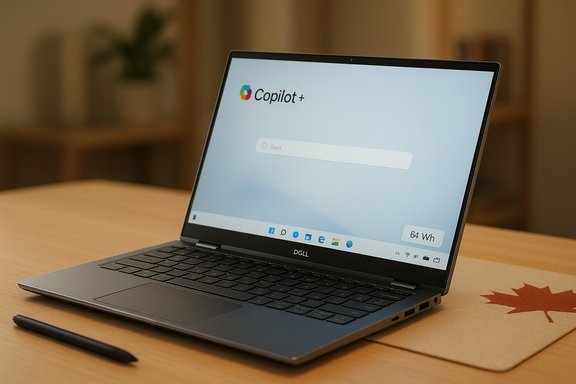
The Dell 14 Plus 2‑in‑1 is a mid‑range convertible from Dell’s newly simplified product family designed to deliver balanced performance, extended battery life, and built‑in support for Windows’ Copilot+ AI experiences. It ships in multiple configurations that use either Intel Core Ultra (Lunar Lake / 200V series) or AMD Ryzen AI 300 series silicon, paired with LPDDR5X memory and NVMe SSD storage. Dell positions the model as a “Copilot+ PC,” meaning certain SKUs qualify for on‑device AI acceleration to power features such as improved Studio Effects, Recall‑style features, and local model inference where appropriate. The selling point in markets like Canada is straightforward: hybrid work and digital learning mean buyers want a machine that’s light enough to carry between home and office, converts smoothly into tablet or tent modes for presentations and content consumption, and provides enough on‑device smarts to make video calls, note taking, and quick content edits smoother. Dell’s strategy blends that practicality with forward‑looking features — a Copilot key on the keyboard, options for Intel or AMD NPUs, Wi‑Fi 7, and a 64 WHr battery — and prices the base units to compete directly with HP and Lenovo alternatives.
Key market drivers in Canada:
Source: techsputit.com Dell 14 Plus 2 in 1 may become a top seller in Canada’s hybrid category – Tech Sputit
 Background / Overview
The Dell 14 Plus 2‑in‑1 is a mid‑range convertible from Dell’s newly simplified product family designed to deliver balanced performance, extended battery life, and built‑in support for Windows’ Copilot+ AI experiences. It ships in multiple configurations that use either Intel Core Ultra (Lunar Lake / 200V series) or AMD Ryzen AI 300 series silicon, paired with LPDDR5X memory and NVMe SSD storage. Dell positions the model as a “Copilot+ PC,” meaning certain SKUs qualify for on‑device AI acceleration to power features such as improved Studio Effects, Recall‑style features, and local model inference where appropriate. The selling point in markets like Canada is straightforward: hybrid work and digital learning mean buyers want a machine that’s light enough to carry between home and office, converts smoothly into tablet or tent modes for presentations and content consumption, and provides enough on‑device smarts to make video calls, note taking, and quick content edits smoother. Dell’s strategy blends that practicality with forward‑looking features — a Copilot key on the keyboard, options for Intel or AMD NPUs, Wi‑Fi 7, and a 64 WHr battery — and prices the base units to compete directly with HP and Lenovo alternatives. What the Dell 14 Plus 2‑in‑1 actually offers
Core hardware and configuration flexibility
- Processors: Configurations are available with AMD Ryzen AI 5/7 300 series and Intel Core Ultra 200V family processors; higher‑end SKUs can go up to an Intel Core Ultra 9 in certain regions. These chips include on‑package NPUs intended to accelerate local AI features.
- Memory and storage: Typical configurations use LPDDR5X memory (16 GB common in many SKUs, up to 32 GB in some regions) and PCIe NVMe SSDs (512 GB and 1 TB options). Be aware that memory is often soldered, so pick the RAM you’ll need at purchase.
- Display: The laptop uses a 14.0‑inch 16:10 2K (1920×1200) WVA touchscreen at ~300 nits. This is a pragmatic choice focused on battery longevity and cost rather than premium color fidelity. If you prioritize brightness or color accuracy, consider stepping up to Dell Premium models or an external monitor.
- Battery and charging: A 64 WHr integrated battery is paired with 65 W USB‑C charging, and Dell’s balance of efficient silicon plus a mid‑brightness display delivers multi‑session battery life that independent reviewers measured in the 10–15 hour range depending on workload. Expect real‑world variance: heavy workloads reduce that figure significantly.
- Connectivity and I/O: Many SKUs include Wi‑Fi 7 and Bluetooth 5.4, plus a practical port mix: USB‑C with DisplayPort and power delivery, USB‑A, HDMI (varies from HDMI 1.4 up to HDMI 2.1 depending on SKU/region), and in some high‑tier SKUs Thunderbolt 4. This is a noteworthy advantage over ultra‑thin designs that sacrifice ports.
- Build and input: The chassis uses aluminum for the lid/base with plastic bezels and palm‑rest. The hinge supports 360‑degree conversion to tent and tablet modes, and Dell includes an active pen support, though the pen is not always bundled. A Copilot key is present on many board layouts, reflecting Dell’s Copilot+ marketing.
Software and AI integration
Dell ships many configurations as Copilot+ PCs, meaning qualifying NPUs and memory/storage minima are present so that certain Windows AI experiences can run locally or use a hybrid local/cloud model. These features — Automatic Super Resolution, enhanced Windows Studio Effects, and locally accelerated inferencing for tasks like summarization and webcam adjustments — depend heavily on Microsoft’s ongoing Copilot+ rollouts and third‑party app support. That means hardware readiness doesn’t automatically translate to daily usefulness for every buyer right away.Why Canada is a favorable market — and why pundits expect strong sales
Canada’s hybrid‑work footprint, student population, and public‑sector procurement patterns form a favorable demand base for convertible laptops priced in the midrange. The Dell 14 Plus 2‑in‑1 targets precisely this sweet spot: a metal chassis that looks professional, tablet flexibility for classrooms or presentations, and mid‑market pricing that can be attractive during seasonal promotions. Early market commentary — including regional retail listings and editorial early‑looks — highlights Canada as a high‑potential region for the 14 Plus, where buyers value battery life, webcam quality, and manageable price points.Key market drivers in Canada:
- Institutional purchasing (schools and small businesses) favors devices that are manageable, repairable, and easy for IT to standardize.
- Consumers and students often prioritize battery life, webcam quality, and tactile inputs like pen support more than film‑grade displays.
- Pricing sensitivity in the midrange means a strong value proposition — and frequent sales — can move units quickly. Dell’s regional SKUs and targeted pricing make the 14 Plus competitive.
Critical analysis — strengths, risks, and real purchase considerations
Strengths (what Dell got right)
- Balanced hardware for real‑world tasks. The choice of current AMD Ryzen AI and Intel Core Ultra chips gives the 14 Plus competitive daily productivity performance without the thermal compromises of ultra‑thin gaming notebooks. Battery life and thermals are tuned to prolonged office and mixed use.
- Copilot+ readiness without flagship pricing. Dell’s positioning as a Copilot+ PC puts AI acceleration into a machine you can buy without paying flagship premiums — a practical path to future features for mainstream users. This is meaningful for buyers who want on‑device assistive features but don’t need a workstation.
- Port selection and repairability cues. The inclusion of HDMI, USB‑A, and at least one USB‑C with power and DisplayPort — plus Thunderbolt on higher SKUs — makes this a flexible field laptop for presentations and docking without an adapter bag full of dongles. Dell’s fleet/IT friendliness is a plus for institutional buyers.
- Price-to-feature balance. Starting and promotional pricing puts the 14 Plus in direct competition with HP’s Spectre x360 and Lenovo’s Yoga series, often undercutting them on price while delivering key hybrid features. Tech press and retailer pages point to strong value at launch price points.
Risks and tradeoffs (what buyers must watch)
- Display quality is deliberately modest. The 300‑nit, 2K WVA panel is serviceable but not a creative‑grade screen. On a convertible — where you’ll use the panel in tablet mode and for drawing — this is a bigger trade‑off compared to clamshell devices. If you need bright outdoors visibility or wide color for photo/video work, the 14 Plus may disappoint.
- NPUs are necessary but not sufficient. On‑device NPU figures (TOPS) are useful marketing metrics, but the real value depends on Microsoft’s Copilot+ rollout and app‑level integration. Many Copilot+ features roll out over time and may require specific OS and app versions; buying solely for NPU TOPS is speculative unless specific workflows are guaranteed.
- Soldered RAM and limited upgradeability. Like many modern ultrabooks, LPDDR5X is often soldered. If you plan to keep the machine for several years, choose an appropriate RAM configuration at purchase. This reduces long‑term flexibility.
- Wi‑Fi 7 is forward‑looking, not immediate. Wi‑Fi 7 support is relevant only if your environment includes compatible routers; for most home and office setups today, Wi‑Fi 6E or high‑end Wi‑Fi 6 will be the practical limiter. Treat Wi‑Fi 7 as a longevity bonus rather than an immediate benefit.
Real purchase checklist — a practical buyer’s guide
- Decide whether a convertible is essential: pick a clamshell if you prioritize display and audio fidelity.
- Choose the CPU family that matches your workload: Intel Core Ultra for slightly higher single‑thread headroom in some SKUs, AMD Ryzen AI for strong efficiency and competitive integrated graphics.
- Pick RAM at purchase (16 GB is the recommended minimum for multitasking; 32 GB if you expect heavy workloads or long device life).
- Confirm the display spec for the SKU sold in your country (some regions see different ports and CPU options).
- Check for Copilot+ qualification if on‑device Windows AI features are important to you.
- Watch for sales — Dell often discounts Plus SKUs aggressively, improving value significantly.
Regional availability, pricing, and promotional dynamics
Dell lists the 14 Plus 2‑in‑1 on its regional storefronts with differing SKUs and starting prices depending on region. In the U.S., configurations with AMD Ryzen AI chips start at competitive price points and higher Intel Core Ultra SKUs push the price up accordingly. UK, Canadian, and Australian configurations sometimes swap ports, maximum memory caps, and base CPUs — a common OEM practice. Pay attention to the local Dell product page to verify the exact SKU you plan to buy. Promotions matter: midrange Dell models are frequently discounted, and that’s often when these machines hit their best value proposition. In Canada, retailer-specific promotions, student discounts, and education program pricing can make the Dell 14 Plus significantly more attractive compared to competitors. However, if you need the best display or audio, premium competitors sometimes justify their higher cost.The broader market context: how competitors line up
- HP Spectre x360: favors premium materials and often higher‑end OLED displays; great for creators but typically costs more and trades some battery life.
- Lenovo Yoga series: often emphasizes light weight and a comfortable keyboard with balanced specs at competitive prices.
- Microsoft Surface line: surface devices push tablet ergonomics and pen experiences hard, but sometimes lag on port selection and raw value for money. Independent reviews note tradeoffs between pen ergonomics and battery/thermal performance.
What to watch next — three concrete indicators of whether the 14 Plus will dominate Canada’s hybrid segment
- Retail sell‑through data and channel reports: watch major Canadian retailers and Dell’s Canada storefront for inventory velocity and sell‑out events. Early sellouts in education channels would be a strong sign. (This is a measurable metric that will confirm or refute “top seller” status.
- Corporate and education procurement awards: if school districts or provincial procurement frameworks begin listing the 14 Plus at scale, institutional adoption will follow and volume will rise.
- Copilot+ adoption curve: as Microsoft rolls more Copilot+ features and third‑party apps optimize for on‑device NPUs, the practical value of the Dell’s AI features will increase — influencing corporate refresh cycles and consumer preferences.
Final verdict — who should buy the Dell 14 Plus 2‑in‑1?
The Dell 14 Plus 2‑in‑1 is a pragmatic, well‑balanced convertible that will appeal to a broad slice of Canadian buyers: students, hybrid professionals, and IT buyers procuring standardized devices for fleets. Its strengths are sensible hardware configurations, extended battery life, practical I/O, and future‑proofing for on‑device AI features. It’s competitively priced and frequently finds its best value during promotions. Buy this if:- You want a convertible with good battery life and solid daily performance.
- You value flexible ports and enterprise manageability.
- You want a Copilot+‑ready machine now without flagship pricing.
- You need a color‑accurate, very bright display for professional photo/video grading.
- You require high‑end GPU performance for sustained rendering or gaming.
- You want maximum upgradeability or modular memory expansion over the device lifespan.
Conclusion
The Dell 14 Plus 2‑in‑1 lands at a sweet spot for Canada’s hybrid market: thin and light enough for daily carry, flexible enough for tablet and tent modes, and priced to win volume if promotions align. Dell’s Copilot+ marketing and on‑device AI readiness give it a timely advantage — but the practical value of NPUs still depends on Microsoft’s ongoing feature rollouts and real‑world app support. Early signals and regional commentary show strong interest and favorable positioning, yet claims that it will become a definitive top seller in Canada should be considered provisional until channel and sales data confirm the projection. For buyers seeking a pragmatic, future‑aware convertible today, the 14 Plus is one of the most sensible choices on the market.Source: techsputit.com Dell 14 Plus 2 in 1 may become a top seller in Canada’s hybrid category – Tech Sputit
