

Dell is now selling the Dell Pro 5 Wired Fingerprint ESS Mouse MS526C, a $45 USB mouse with a Windows Hello Enhanced Sign-in Security-compatible fingerprint reader, arriving months after Microsoft expanded Windows 11 support for external ESS biometric peripherals in February 2026. That makes it a small accessory with outsized meaning: the Windows biometric story is finally moving beyond the laptop lid. For years, Windows Hello has been easiest to use on premium notebooks and hardest to standardize on desktops, shared workstations, and docked setups. Dell’s mouse is the first sign that Microsoft’s stricter biometric security model may become something users can actually buy.
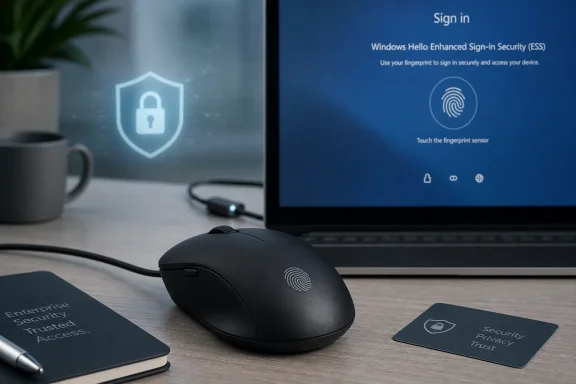
The Dell Pro 5 Wired Fingerprint ESS Mouse MS526C is not trying to be a flashy peripheral. It is a black, symmetrical, wired office mouse with adjustable DPI up to 6000, quiet clicks, and a fingerprint sensor built into the shell. Its real pitch is not ergonomics or gaming-grade precision; it is that the fingerprint reader is compatible with Windows Hello Enhanced Sign-in Security, or ESS.
That distinction matters because Windows Hello compatibility has long been a swamp of almost-compatible hardware. Many external fingerprint readers and infrared cameras worked with Windows Hello in ordinary configurations, only to run into trouble on systems where ESS was enabled. Microsoft’s newer security posture raised the bar, but the accessory market did not immediately follow.
Dell’s listing frames the mouse as built for “a new class of Copilot+ PCs,” which is both revealing and slightly misleading. Copilot+ PCs require ESS, but ESS itself is not exclusive to them. Many business-class Windows 11 machines can use it, and Microsoft’s February 2026 update made external ESS-compatible biometric peripherals a much more realistic option.
That puts Dell’s mouse in an unusual position. It is a mundane corporate accessory that also happens to be a hardware answer to one of Windows 11’s more annoying security trade-offs: how to keep stronger sign-in protection without forcing every desktop user back to a PIN or password.
For notebook users, that was mostly invisible. If the hardware shipped with a supported fingerprint reader or IR camera, Windows Hello either worked or it did not. For desktop users, docked laptop users, and IT departments standardizing workspaces, the experience was far messier.
The problem was not simply that external biometric peripherals were rare. It was that the buyer could not safely assume that “Windows Hello compatible” meant “compatible with the most secure Windows Hello configuration.” In the ESS era, that gap became more important. A peripheral that worked yesterday could be the reason an administrator had to weaken a security setting tomorrow.
Dell’s MS526C is interesting because it suggests OEMs are finally responding to the new baseline. It is not just another mouse with a sensor glued onto it. It is being marketed around ESS from the start, which means Dell expects buyers to care about the difference between ordinary Hello and enhanced Hello.
Desktops never fit that story as neatly. A tower under a desk does not have a camera in the right place. A mini PC mounted behind a display may have no biometric hardware at all. A docked laptop might be closed, making its built-in sensor inconvenient or unreachable. The result is that Windows Hello, one of Microsoft’s best user-facing security features, has often felt oddly laptop-centric.
That is a strategic problem for Microsoft. The company wants Windows Hello to be the foundation for passwordless sign-in, passkeys, enterprise authentication, and AI-era local data protection. But if the hardware experience breaks down the moment a user plugs into a monitor and keyboard, the security model becomes conditional.
A fingerprint mouse is not the only answer, and it may not be the best answer for everyone. But it is a practical one. The mouse is already where the user’s hand is. Unlike an external webcam, it does not require careful placement. Unlike a tiny USB fingerprint dongle, it is less likely to be forgotten, blocked by a dock, or treated as an odd appendage.
That practicality is why this accessory matters more than its price tag suggests. Microsoft can write the platform rules, but users live in the physical world. Dell is selling a physical-world answer.
Microsoft has been pushing Windows authentication toward stronger hardware-backed boundaries. ESS is part of that effort, using virtualization-based security and more restrictive handling of biometric data to make sign-in harder to tamper with. In that context, the old consumer peripheral playbook — cheap sensors, generic drivers, wireless convenience, and vague compatibility claims — is not enough.
A wired USB mouse is boring, but boring is useful in enterprise security. It gives IT departments a simpler topology to reason about. It avoids battery maintenance. It reduces wireless pairing variables. It is easier to inventory, deploy, and replace.
That does not mean wired is automatically more secure in every implementation. The details still depend on the sensor, firmware, driver model, and Windows integration. But from a product-positioning standpoint, Dell’s choice is telling. The company is not selling this as a lifestyle gadget; it is selling it as a workplace authentication device that happens to move a cursor.
That is where ESS becomes more than a sign-in setting. It is part of the architecture Microsoft wants around modern Windows PCs: Pluton or TPM-backed credentials, virtualization-based security, Windows Hello, passkeys, secured-core concepts, and device-bound authentication. The user sees a fingerprint prompt. The platform sees a chain of trust.
The awkward part is that the marketing can get ahead of the reality. Dell’s listing implies a close relationship between ESS and Copilot+ PCs, and while Copilot+ systems require ESS, ESS is broader than that category. This matters because buyers may wrongly assume the mouse is only useful on Copilot+ hardware, or conversely, that buying the mouse magically gives any Windows 11 PC the same security posture as a new AI PC.
The truth is more conditional. The host PC must support the relevant Windows Hello ESS requirements, Windows must be updated, and the organization’s policies must allow the configuration. The mouse is a necessary piece for some setups, not a universal security wand.
Still, the Copilot+ tie-in shows where Microsoft and its partners are headed. AI features are becoming the consumer-friendly justification for a stricter Windows hardware baseline. ESS-compatible peripherals are one of the ways that baseline becomes livable outside the laptop market.
That is especially relevant in environments with shared desks, hot-desking, call centers, labs, reception areas, medical workstations, and docked executive setups. These are precisely the places where passwordless authentication is attractive but built-in biometrics are least reliable as a deployment assumption. A standardized ESS-compatible mouse could be easier to procure and support than a mix of webcams, laptop sensors, and legacy fingerprint readers.
There is also a help-desk angle. Users do not always understand why an external fingerprint reader stopped working after a hardware refresh or security-policy change. They only know that the convenient sign-in method disappeared. If accessories begin carrying clear ESS compatibility, administrators can make cleaner purchasing decisions and write clearer support guidance.
The catch is lifecycle management. A mouse is a wear item. It gets dropped, borrowed, swapped, and lost. Treating it as part of the authentication path means asset management practices may need to become more serious than they are for ordinary office mice. The device may be inexpensive, but the support model is not trivial if it becomes part of a passwordless rollout.
ESS made that gap more visible. Microsoft strengthened the platform, but the external hardware ecosystem lagged behind. That is a familiar Windows story: the OS gains a security feature, OEM laptops adopt it first, enterprises ask for standardization, and accessories arrive only when there is enough purchasing pressure to justify a niche SKU.
Dell has an advantage here because it sells the whole stack. It sells business PCs, docks, monitors, keyboards, mice, warranties, deployment services, and enterprise procurement workflows. A Dell-branded ESS mouse is therefore not just a peripheral; it is a catalog item that can be attached to a desktop order, bundled into a fleet refresh, and justified in the same procurement language as the PC itself.
That is why this is more important coming from Dell than from an obscure accessory vendor. The mouse may be ordinary, but the channel is not. If Dell can make ESS-compatible biometric accessories boringly available, HP, Lenovo, Logitech, Kensington, and others will have a reason to follow.
The trust problem is that users often assume the fingerprint itself is being “sent” somewhere. Windows Hello is designed around local biometric matching and protected credential use, not uploading raw fingerprints to every service. But that distinction is poorly understood, and every new biometric device reopens the same privacy conversation.
ESS helps Microsoft’s case because it emphasizes stronger isolation and a more controlled path for biometric authentication. But the messaging still matters. A fingerprint mouse in a workplace is physically visible in a way that a laptop power-button sensor is not. Employees may reasonably ask what the mouse stores, what the PC stores, what the company can see, and what happens when the device is replaced.
Those are not edge-case concerns. They are adoption concerns. Passwordless systems succeed when users believe they are both safer and less annoying. If the device looks like surveillance, even if it is not, the rollout becomes harder.
Dell and Microsoft therefore need clarity as much as compatibility. “Windows Hello ESS-compatible” means something to IT pros. It does not mean much to the average employee asked to put a finger on a company-issued mouse.
A $45 accessory can plausibly be added to a new desktop bundle, assigned to users who need external biometrics, or stocked by a help desk. It is cheap enough to test without a committee and visible enough to justify if it prevents sign-in friction. For small businesses, it may be the simplest way to add Windows Hello fingerprint sign-in to a compatible Windows 11 desktop without buying a new monitor or camera.
The price also sets expectations. This is not a luxury mouse. It has three buttons and an office-first design. Users who want ergonomic sculpting, wireless freedom, or multi-device pairing will not find that here. Dell appears to be prioritizing authentication reliability over peripheral ambition.
That is the right trade-off for the first serious ESS fingerprint mouse. The market does not need a statement piece yet. It needs proof that external ESS biometrics can be ordinary.
Microsoft’s own guidance has long warned that third-party biometric peripherals may not work when Enhanced Sign-in Security is enabled unless they specifically support it. That is the gap this mouse is meant to close. But “meant to” and “will in every fleet” are different claims.
Administrators should treat the MS526C like any other authentication component: validate it on the actual Windows builds, device models, security baselines, and identity workflows in use. Test enrollment, lock-screen sign-in, Windows Hello for Business, passkey creation, remote support scenarios, and replacement procedures. The boring tests are the ones that prevent a promising accessory from becoming a ticket generator.
Consumers should be equally careful, though with lower stakes. If the PC does not support ESS, the mouse may still be useful as a Windows Hello fingerprint device depending on configuration, but the ESS pitch is not the same thing as universal biometric support. The product is most compelling when paired with a modern Windows 11 system that can take advantage of the stronger security path.
This one says Microsoft’s stronger sign-in model is moving out of the sealed laptop and into the broader desk setup. It says Copilot+ security requirements are beginning to influence accessories. It says OEMs think there is a market for peripherals that satisfy Windows’ newer trust assumptions rather than merely working around them.
That is a healthy development. Security features that only work in ideal hardware configurations tend to become either premium conveniences or administrative headaches. The broader Windows market needs the opposite: strong defaults that survive messy desks, mixed fleets, docks, external monitors, and the ordinary sprawl of PC ownership.
Dell’s mouse does not solve that whole problem. But it gives the ecosystem a concrete starting point.
 Dell Turns a Humble Mouse Into a Security Boundary
The Dell Pro 5 Wired Fingerprint ESS Mouse MS526C is not trying to be a flashy peripheral. It is a black, symmetrical, wired office mouse with adjustable DPI up to 6000, quiet clicks, and a fingerprint sensor built into the shell. Its real pitch is not ergonomics or gaming-grade precision; it is that the fingerprint reader is compatible with Windows Hello Enhanced Sign-in Security, or ESS.That distinction matters because Windows Hello compatibility has long been a swamp of almost-compatible hardware. Many external fingerprint readers and infrared cameras worked with Windows Hello in ordinary configurations, only to run into trouble on systems where ESS was enabled. Microsoft’s newer security posture raised the bar, but the accessory market did not immediately follow.
Dell’s listing frames the mouse as built for “a new class of Copilot+ PCs,” which is both revealing and slightly misleading. Copilot+ PCs require ESS, but ESS itself is not exclusive to them. Many business-class Windows 11 machines can use it, and Microsoft’s February 2026 update made external ESS-compatible biometric peripherals a much more realistic option.
That puts Dell’s mouse in an unusual position. It is a mundane corporate accessory that also happens to be a hardware answer to one of Windows 11’s more annoying security trade-offs: how to keep stronger sign-in protection without forcing every desktop user back to a PIN or password.
The February Update Quietly Changed the Peripheral Market
Microsoft’s February 2026 Patch Tuesday updates did more than deliver the usual security fixes and quality improvements. They expanded Windows Hello ESS support so compatible external fingerprint readers could participate in the stronger sign-in model. Before that, ESS was closely associated with built-in biometric hardware, especially on laptops where the camera, fingerprint reader, TPM, firmware, and driver stack could be treated as a more controlled chain.For notebook users, that was mostly invisible. If the hardware shipped with a supported fingerprint reader or IR camera, Windows Hello either worked or it did not. For desktop users, docked laptop users, and IT departments standardizing workspaces, the experience was far messier.
The problem was not simply that external biometric peripherals were rare. It was that the buyer could not safely assume that “Windows Hello compatible” meant “compatible with the most secure Windows Hello configuration.” In the ESS era, that gap became more important. A peripheral that worked yesterday could be the reason an administrator had to weaken a security setting tomorrow.
Dell’s MS526C is interesting because it suggests OEMs are finally responding to the new baseline. It is not just another mouse with a sensor glued onto it. It is being marketed around ESS from the start, which means Dell expects buyers to care about the difference between ordinary Hello and enhanced Hello.
Windows Hello Needed a Desktop Story
Windows Hello has always made the most sense when the biometric sensor is already part of the machine. Open a laptop, look at the camera, touch the power button, and sign in. The convenience is obvious enough that users do not need to understand WebAuthn, TPMs, or credential isolation to appreciate it.Desktops never fit that story as neatly. A tower under a desk does not have a camera in the right place. A mini PC mounted behind a display may have no biometric hardware at all. A docked laptop might be closed, making its built-in sensor inconvenient or unreachable. The result is that Windows Hello, one of Microsoft’s best user-facing security features, has often felt oddly laptop-centric.
That is a strategic problem for Microsoft. The company wants Windows Hello to be the foundation for passwordless sign-in, passkeys, enterprise authentication, and AI-era local data protection. But if the hardware experience breaks down the moment a user plugs into a monitor and keyboard, the security model becomes conditional.
A fingerprint mouse is not the only answer, and it may not be the best answer for everyone. But it is a practical one. The mouse is already where the user’s hand is. Unlike an external webcam, it does not require careful placement. Unlike a tiny USB fingerprint dongle, it is less likely to be forgotten, blocked by a dock, or treated as an odd appendage.
That practicality is why this accessory matters more than its price tag suggests. Microsoft can write the platform rules, but users live in the physical world. Dell is selling a physical-world answer.
The Wire Is Probably the Point
The MS526C is wired, and that is likely not an accident. A wireless fingerprint mouse would be more convenient on a clean desk, but convenience is not the design center of ESS. Enhanced Sign-in Security exists to reduce the attack surface around biometric authentication, and the path between sensor, system, firmware, and Windows matters.Microsoft has been pushing Windows authentication toward stronger hardware-backed boundaries. ESS is part of that effort, using virtualization-based security and more restrictive handling of biometric data to make sign-in harder to tamper with. In that context, the old consumer peripheral playbook — cheap sensors, generic drivers, wireless convenience, and vague compatibility claims — is not enough.
A wired USB mouse is boring, but boring is useful in enterprise security. It gives IT departments a simpler topology to reason about. It avoids battery maintenance. It reduces wireless pairing variables. It is easier to inventory, deploy, and replace.
That does not mean wired is automatically more secure in every implementation. The details still depend on the sensor, firmware, driver model, and Windows integration. But from a product-positioning standpoint, Dell’s choice is telling. The company is not selling this as a lifestyle gadget; it is selling it as a workplace authentication device that happens to move a cursor.
Copilot+ Branding Pulls Security Into the AI Era
Dell’s product language leans into Copilot+ PCs and “advanced AI features,” and that framing is not random. Microsoft has tied several new Windows experiences to stronger local security assumptions, especially as more sensitive data is indexed, summarized, recalled, or processed on-device. If the PC is going to remember more, infer more, and automate more, Microsoft needs users and administrators to trust the lock on the front door.That is where ESS becomes more than a sign-in setting. It is part of the architecture Microsoft wants around modern Windows PCs: Pluton or TPM-backed credentials, virtualization-based security, Windows Hello, passkeys, secured-core concepts, and device-bound authentication. The user sees a fingerprint prompt. The platform sees a chain of trust.
The awkward part is that the marketing can get ahead of the reality. Dell’s listing implies a close relationship between ESS and Copilot+ PCs, and while Copilot+ systems require ESS, ESS is broader than that category. This matters because buyers may wrongly assume the mouse is only useful on Copilot+ hardware, or conversely, that buying the mouse magically gives any Windows 11 PC the same security posture as a new AI PC.
The truth is more conditional. The host PC must support the relevant Windows Hello ESS requirements, Windows must be updated, and the organization’s policies must allow the configuration. The mouse is a necessary piece for some setups, not a universal security wand.
Still, the Copilot+ tie-in shows where Microsoft and its partners are headed. AI features are becoming the consumer-friendly justification for a stricter Windows hardware baseline. ESS-compatible peripherals are one of the ways that baseline becomes livable outside the laptop market.
IT Departments Finally Get a Cleaner Compromise
For sysadmins, the important question is not whether a fingerprint mouse is cool. It is whether the device reduces exceptions. Security policy fails in the real world when enough users have workflows that do not fit the standard configuration. External biometric support under ESS gives administrators a better chance of keeping the stronger setting enabled without making desktop users miserable.That is especially relevant in environments with shared desks, hot-desking, call centers, labs, reception areas, medical workstations, and docked executive setups. These are precisely the places where passwordless authentication is attractive but built-in biometrics are least reliable as a deployment assumption. A standardized ESS-compatible mouse could be easier to procure and support than a mix of webcams, laptop sensors, and legacy fingerprint readers.
There is also a help-desk angle. Users do not always understand why an external fingerprint reader stopped working after a hardware refresh or security-policy change. They only know that the convenient sign-in method disappeared. If accessories begin carrying clear ESS compatibility, administrators can make cleaner purchasing decisions and write clearer support guidance.
The catch is lifecycle management. A mouse is a wear item. It gets dropped, borrowed, swapped, and lost. Treating it as part of the authentication path means asset management practices may need to become more serious than they are for ordinary office mice. The device may be inexpensive, but the support model is not trivial if it becomes part of a passwordless rollout.
The Accessory Market Has Been the Missing Layer
One reason this Dell mouse feels notable is that Windows Hello peripherals have never become as common as they should have. External IR cameras exist, but many are expensive, bulky, or aimed at conferencing first and authentication second. Fingerprint dongles exist, but compatibility claims can be confusing, and the category has not achieved the plug-and-trust simplicity of a YubiKey or a corporate smart card.ESS made that gap more visible. Microsoft strengthened the platform, but the external hardware ecosystem lagged behind. That is a familiar Windows story: the OS gains a security feature, OEM laptops adopt it first, enterprises ask for standardization, and accessories arrive only when there is enough purchasing pressure to justify a niche SKU.
Dell has an advantage here because it sells the whole stack. It sells business PCs, docks, monitors, keyboards, mice, warranties, deployment services, and enterprise procurement workflows. A Dell-branded ESS mouse is therefore not just a peripheral; it is a catalog item that can be attached to a desktop order, bundled into a fleet refresh, and justified in the same procurement language as the PC itself.
That is why this is more important coming from Dell than from an obscure accessory vendor. The mouse may be ordinary, but the channel is not. If Dell can make ESS-compatible biometric accessories boringly available, HP, Lenovo, Logitech, Kensington, and others will have a reason to follow.
Stronger Sign-In Still Depends on User Trust
Biometrics always carry a strange dual identity in Windows. They are marketed as convenience features, but they are deployed as security features. Users like fingerprints because they are fast. Administrators like them because they can reduce password exposure and support phishing-resistant authentication flows.The trust problem is that users often assume the fingerprint itself is being “sent” somewhere. Windows Hello is designed around local biometric matching and protected credential use, not uploading raw fingerprints to every service. But that distinction is poorly understood, and every new biometric device reopens the same privacy conversation.
ESS helps Microsoft’s case because it emphasizes stronger isolation and a more controlled path for biometric authentication. But the messaging still matters. A fingerprint mouse in a workplace is physically visible in a way that a laptop power-button sensor is not. Employees may reasonably ask what the mouse stores, what the PC stores, what the company can see, and what happens when the device is replaced.
Those are not edge-case concerns. They are adoption concerns. Passwordless systems succeed when users believe they are both safer and less annoying. If the device looks like surveillance, even if it is not, the rollout becomes harder.
Dell and Microsoft therefore need clarity as much as compatibility. “Windows Hello ESS-compatible” means something to IT pros. It does not mean much to the average employee asked to put a finger on a company-issued mouse.
The Price Makes It a Real Deployment Candidate
At $45, Dell’s mouse sits in a useful middle ground. It is more expensive than a commodity wired mouse, but it is not priced like a specialized security token or premium webcam. That matters because enterprise security hardware often dies in budgeting before it reaches the desk.A $45 accessory can plausibly be added to a new desktop bundle, assigned to users who need external biometrics, or stocked by a help desk. It is cheap enough to test without a committee and visible enough to justify if it prevents sign-in friction. For small businesses, it may be the simplest way to add Windows Hello fingerprint sign-in to a compatible Windows 11 desktop without buying a new monitor or camera.
The price also sets expectations. This is not a luxury mouse. It has three buttons and an office-first design. Users who want ergonomic sculpting, wireless freedom, or multi-device pairing will not find that here. Dell appears to be prioritizing authentication reliability over peripheral ambition.
That is the right trade-off for the first serious ESS fingerprint mouse. The market does not need a statement piece yet. It needs proof that external ESS biometrics can be ordinary.
The Compatibility Fine Print Will Decide the Reception
The biggest risk for Dell’s MS526C is not the sensor, the cable, or the shape. It is the phrase “compatible with Windows Hello” colliding with the messy reality of Windows hardware states. ESS depends on OS version, device capabilities, firmware configuration, drivers, and policy. If buyers expect the mouse to work on every Windows 11 PC exactly the same way, some will be disappointed.Microsoft’s own guidance has long warned that third-party biometric peripherals may not work when Enhanced Sign-in Security is enabled unless they specifically support it. That is the gap this mouse is meant to close. But “meant to” and “will in every fleet” are different claims.
Administrators should treat the MS526C like any other authentication component: validate it on the actual Windows builds, device models, security baselines, and identity workflows in use. Test enrollment, lock-screen sign-in, Windows Hello for Business, passkey creation, remote support scenarios, and replacement procedures. The boring tests are the ones that prevent a promising accessory from becoming a ticket generator.
Consumers should be equally careful, though with lower stakes. If the PC does not support ESS, the mouse may still be useful as a Windows Hello fingerprint device depending on configuration, but the ESS pitch is not the same thing as universal biometric support. The product is most compelling when paired with a modern Windows 11 system that can take advantage of the stronger security path.
The Mouse Is a Small Product With a Platform-Sized Message
The Dell Pro 5 Wired Fingerprint ESS Mouse is not going to redefine pointing devices. It is unlikely to inspire unboxing culture, and nobody will confuse it with a flagship productivity mouse. But in the Windows ecosystem, small hardware products often reveal where the platform is really going.This one says Microsoft’s stronger sign-in model is moving out of the sealed laptop and into the broader desk setup. It says Copilot+ security requirements are beginning to influence accessories. It says OEMs think there is a market for peripherals that satisfy Windows’ newer trust assumptions rather than merely working around them.
That is a healthy development. Security features that only work in ideal hardware configurations tend to become either premium conveniences or administrative headaches. The broader Windows market needs the opposite: strong defaults that survive messy desks, mixed fleets, docks, external monitors, and the ordinary sprawl of PC ownership.
Dell’s mouse does not solve that whole problem. But it gives the ecosystem a concrete starting point.
The Desk Just Became Part of the Windows Trust Chain
The practical lesson is that Windows Hello ESS is no longer just a spec-sheet item buried inside new PCs. It is becoming something buyers will encounter in accessory catalogs, deployment plans, and support scripts. Dell’s mouse is the kind of product that makes a platform change visible.- Dell’s MS526C is a $45 wired mouse with an integrated fingerprint reader designed for Windows Hello Enhanced Sign-in Security.
- Microsoft’s February 2026 Windows 11 updates expanded support for external ESS-compatible biometric peripherals, making products like this newly relevant.
- ESS is required on Copilot+ PCs, but it is not limited to Copilot+ hardware.
- The wired design appears aligned with enterprise reliability and security expectations, even if some users would prefer wireless convenience.
- IT departments should test the mouse against their actual Windows builds, security policies, Windows Hello for Business configuration, and replacement workflows before broad deployment.
- The larger significance is not the mouse itself, but the arrival of an external biometric accessory explicitly built for Windows’ stricter sign-in model.
References
- Primary source: thurrott.com
Published: Thu, 04 Jun 2026 17:34:38 GMT
Dell Sells a Windows Hello ESS-Compatible Mouse - Thurrott.com
Back in February, Microsoft added support for external Windows Hello ESS-compatible fingerprint readers to Windows 11.www.thurrott.com - Related coverage: dell.com
Dell Pro 5 Wired Fingerprint ESS Mouse - MS526C | Dell USA
Shop the Dell Pro 5 Wired Fingerprint ESS Mouse MS526C and experience the secure, one-touch, password-free authentication. View more at Dell.com.www.dell.com - Official source: support.microsoft.com
Using third-party fingerprint readers and cameras with Windows Hello | Microsoft Support
Using third-party fingerprint readers and cameras with Windows Hellosupport.microsoft.com - Official source: microsoft.com
Windows Hello for Security | Microsoft Windows
Explore Windows 11 security with Windows Hello. Get instant access to your Windows devices using a PIN, facial recognition, or fingerprint with Windows Hello.www.microsoft.com
- Official source: learn.microsoft.com
Windows Hello Enhanced Sign-in Security | Microsoft Learn
Windows Hello Enhanced Sign-in Security provides your organization an additional level of security using biometrics or PIN.learn.microsoft.com - Related coverage: windowslatest.com
I tested Windows 11 February 2026 Updates: Everything new, improved, and fixed
Windows 11 February 2026 update adds Cross-Device Resume, MIDI upgrades, security fixes, and major bug fixes for 24H2 and 25H2. www.windowslatest.com
- Related coverage: gizmochina.com
Forgot Passwords: Dell’s Latest Mouse Unlocks Your PC - Gizmochina
Dell launches MS526C wired mouse with fingerprint login, 6000 DPI, and new Pro 7 keyboard combos for office productivity and security. www.gizmochina.com
- Related coverage: windowsforum.com
Windows Hello ESS Now Supports External Peripherals in Feb 2026 Update | Windows Forum
Microsoft has quietly closed one of the more frustrating security gaps in Windows authentication: starting with the February 10, 2026 cumulative update (OS...windowsforum.com - Related coverage: shi.com
Dell Pro 5 MS526C - Mouse | Overview, Specs, Details | SHI
Buy Dell Pro 5 MS526C - Mouse at SHI. See detailed specifications and benefit from expert support. Shop IT hardware and software products with SHI now!www.shi.com
- Related coverage: windowscentral.com
Windows 11’s February Insider update adds new features | Windows Central
February closes with a wave of changes, and here's all you need to know.www.windowscentral.com - Related coverage: delltechnologies.com
Print
Dell OptiPlex 3030 All-in-One Touch desktop computer with KM632 wireless keyboard and mouse (Burgundy). relativesize image with windows screenfillwww.delltechnologies.com
- Related coverage: techradar.com
Microsoft is introducing Entra passkeys to Windows – so tough luck if your device is jailbroken, as your credentials will soon be gone forever | TechRadar
Microsoft is making signing in easier and more securewww.techradar.com
