

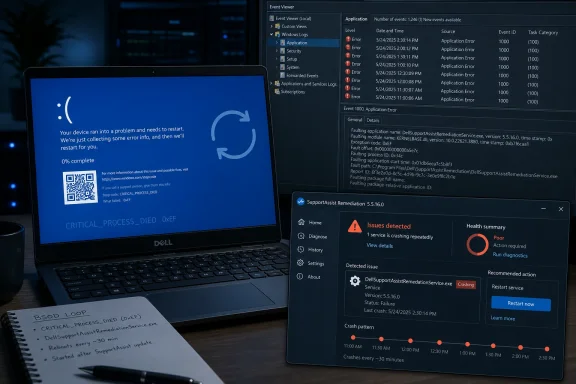
Dell’s SupportAssist Remediation 5.5.16.0 update, released April 30, is reportedly causing repeated Windows blue screens and reboot loops on several Dell laptops, with users tracing CRITICAL_PROCESS_DIED crashes to DellSupportAssistRemedationService.exe and stopping the failures by disabling or removing the component. That is the plain problem; the larger one is more uncomfortable for Dell. A recovery service designed to make PCs more resilient has become, at least for some owners, the most reliable way to make them unusable. For Windows users and administrators, the episode is another reminder that OEM “help” software can sit close enough to the operating system to behave like infrastructure, while being governed with the transparency of bundled convenienceware.
SupportAssist is not some obscure enthusiast utility a user installed from a forum link at midnight. It is part of Dell’s own support ecosystem, preloaded or encouraged across a wide range of consumer and business machines, and it is meant to diagnose problems, automate fixes, help with driver updates, and provide a path toward OS recovery when Windows gets into trouble. In theory, this is exactly the kind of vendor software that should reduce support burden.
The reports now circulating from Dell’s own community forum invert that promise. Users say affected machines are crashing roughly every half hour, sometimes entering a maddening cycle of restart, partial recovery, normal use, and another blue screen. The common thread in those reports is not a bad Windows cumulative update, a graphics driver, or failing RAM, but the Dell SupportAssist Remediation service itself.
That distinction matters because Windows blue screens are often treated as operating-system failures by default. When a machine crashes, users blame Microsoft, administrators blame the last patch, and vendors blame the messy combinations of drivers, firmware, peripherals, security tools, and user behavior that define real PCs. Here, the emerging evidence points more narrowly at Dell’s own remediation stack, and that changes the story from “Windows instability” to “vendor support software destabilizing Windows.”
There is still caution to apply. Dell had not, according to the available reporting, publicly acknowledged the issue or published a formal fix at the time this article was written. The affected population is therefore hard to measure, and the current picture is assembled from user reports, crash dump analysis, and corroborating coverage rather than a vendor advisory. But for administrators, the absence of a vendor bulletin does not make a fleet of rebooting laptops any less real.
Several Dell forum users reportedly examined minidumps with WinDbg and landed on the same faulting process: DellSupportAssistRemedationService.exe, located under Dell’s SARemediation agent directory. That path is not incidental. It places the failure inside the SupportAssist Remediation package, the very component intended to help Windows recover from serious trouble.
The affected machines named so far include at least Dell’s XPS 15 9530 and Dell Pro Plus 14, with another report involving a Precision 3571. Separate discussion has also mentioned Dell Pro 16 Plus systems. This does not prove every model with the update is vulnerable, nor does it prove the bug behaves identically across all configurations. But it does show the issue is not obviously confined to one consumer laptop image or one unlucky owner’s corrupted install.
The timing is equally important. The SupportAssist Remediation 5.5.16.0 update and accompanying OS Recovery Plugin update reportedly arrived on April 30, and the new wave of complaints followed after installation. When users removed the remediation components or disabled the service, the repeated crashes stopped. In PC troubleshooting, that is not a mathematical proof, but it is the kind of before-and-after evidence that makes administrators stop chasing ghosts.
The irony is sharp because SupportAssist Remediation operates in the category of software users are least likely to suspect. People expect games, VPNs, display drivers, overclocking tools, and antivirus engines to misbehave. They do not expect the vendor’s built-in recovery service to create a timed blue-screen loop.
That is why the user reports are so credible in practical terms. They describe a pattern administrators have seen many times before: a privileged background service wakes up, does something it believes is routine, encounters a bad state, and trips a failure path severe enough to bring the machine down. The details may differ, but the shape is familiar.
The problem is that a recovery service should be engineered as if failure is inevitable. If it cannot reach Dell, it should back off. If a plugin is corrupted, it should quarantine itself. If a scheduled remediation task fails, it should log the failure and stop repeating the dangerous action. The one thing it should not do is participate in a system-level crash loop.
This is where Dell’s support stack becomes a design story rather than merely a bug story. OEM support suites have grown from lightweight information panels into sprawling systems of services, plugins, update engines, telemetry collectors, recovery agents, inventory tools, and privilege-bound helpers. Each individual piece may have a reasonable product justification. Together, they create a hidden platform inside the platform.
Windows itself has spent years hardening how drivers, services, and protected processes behave because the operating system knows that background infrastructure can be more dangerous than foreground apps. OEM tools sometimes occupy an awkward middle ground. They are trusted because the vendor installed them, privileged because support tasks need access, and ignored because users rarely open them unless something has already gone wrong.
The more aggressive workaround is to uninstall SupportAssist Remediation and the Dell SupportAssist OS Recovery Plugin for Dell Update entirely. Some users have gone further and removed broader SupportAssist components, then relied on Dell Update or Dell Command Update for driver and firmware maintenance instead. For many administrators, that latter path will feel less like a workaround and more like a policy they should have adopted sooner.
There is a tradeoff. Removing remediation tooling may reduce access to Dell’s guided recovery features, and ordinary home users may not want to dismantle anything related to repair or warranty support. But a machine that blue screens every half hour is not being protected by its recovery stack. It is being held hostage by it.
The conservative approach for a single affected PC is to disable only the remediation service first, verify stability, and then decide whether to uninstall. For a managed fleet, the calculus is different. If the version is present across many machines, administrators need inventory, detection, and a repeatable remediation script, not one-off clicking through Programs and Features.
That is where Dell’s silence, if it persists, becomes operationally expensive. A vendor advisory could confirm affected versions, models, installation channels, and safe rollback steps. Without it, IT teams must decide whether to proactively disable a Dell service across machines that might never crash, or wait until users discover the issue the hard way in the middle of work.
The current crash reports are not the same as a remote-code-execution bug. A blue-screen loop is availability damage, not necessarily a confidentiality or integrity failure. But from a user’s point of view, the difference can feel academic. If the laptop cannot stay running, the trusted support stack has failed its first duty.
There are also earlier reports of DellSupportAssistRemedationService.exe crashes, including a January 2023 Dell community thread describing the service faulting under Windows and users asking whether uninstalling SupportAssist would affect recovery options. That older thread does not prove the new 5.5.16.0 issue has the same root cause. It does, however, show that this executable has been a recurring character in Dell stability complaints.
The pattern is familiar across the PC industry. OEMs bundle software to differentiate support, collect device health signals, deliver updates, and reduce call-center costs. Enthusiasts call it bloatware; vendors call it customer experience. The truth is more complicated: some of it is useful, some of it is redundant, and some of it becomes dangerous precisely because nobody treats it as a first-class part of the system.
The Windows ecosystem has long tolerated this bargain. Microsoft provides the base OS, OEMs add drivers and support layers, security vendors add monitoring, enterprises add agents, and users add everything else. When it works, the modularity is a strength. When it fails, the PC becomes an argument among invisible services.
That matters for blame, but not for user experience. The blue screen is still a Windows blue screen. The recovery environment is still Windows. The stop code is still a Windows stop code. The Dell service may be the culprit, but the user sees the operating system falling over.
This is one of Microsoft’s enduring platform problems. Windows must allow OEMs and management vendors to perform deep maintenance tasks, because corporate PCs depend on that extensibility. At the same time, every privileged third-party service can become a reliability hazard that makes Windows look worse than it is. The platform gets the blame for the ecosystem it enables.
Microsoft has tried to constrain this over the years through driver signing, kernel-mode hardening, Windows Update driver policies, protected processes, and greater separation between user-mode applications and the OS core. But OEM recovery and update tooling often sits near the boundary where system health, firmware, drivers, and support automation meet. That is exactly where small defects can have outsized consequences.
For administrators, the lesson is not that Windows is innocent and Dell is uniquely guilty. The lesson is that the modern PC is a supply chain of always-on code. If a service is privileged, persistent, auto-updated, and installed across a fleet, it deserves the same scrutiny as an endpoint protection agent or VPN client. The logo on the box should not lower the standard.
Dell is hardly alone here. Major PC vendors ship support assistants, health checkers, update managers, warranty utilities, telemetry services, and recovery plugins. Some are helpful, especially for home users who would otherwise never update firmware or run hardware diagnostics. But these tools often duplicate capabilities available through Windows Update, Microsoft’s recovery tools, vendor websites, or enterprise management platforms.
The redundancy is not harmless. Every extra agent introduces an update channel, a service account context, a scheduled task, a logging path, and a potential failure mode. The fact that a utility is dormant in the Start menu does not mean its background components are dormant. SupportAssist Remediation’s role as a background recovery service is exactly why it can affect systems even when the user is not actively running Dell’s support app.
Enterprises have understood this for years, which is why many standard operating environment builds strip OEM images and redeploy clean Windows with a curated driver and firmware workflow. Smaller businesses and individual power users often live with the factory image because it is convenient. Incidents like this make the convenience look more expensive.
The hard part is that there is no universal rule. Removing all vendor tooling can create its own problems, especially on laptops where firmware, power management, docking behavior, thermal tuning, and BIOS updates are tightly coupled to the manufacturer’s ecosystem. But leaving everything installed because it came from the factory is not a policy. It is an act of faith.
A patch alone would not answer the more important trust question. Users need to know why a remediation service was able to create a repeated crash loop and why the update was not caught before release. That does not require Dell to disclose proprietary internals, but it does require a better public posture than letting forum users reverse-engineer the failure through dump files.
The minimum acceptable response should include a safe-mode path, a command-line service-disable path, and an uninstall path that works for nontechnical users. It should clarify whether disabling SupportAssist Remediation affects preboot SupportAssist OS Recovery, Dell Update, Dell Command Update, warranty diagnostics, or automatic driver delivery. The current community-discovered workarounds are useful, but they are not a substitute for vendor-owned guidance.
Dell should also revisit update rollout strategy for components like this. A recovery agent is not the same as a tray app. Updates to privileged, auto-starting remediation services should be staged, monitored, and kill-switchable. If crash telemetry spikes after release, the vendor should be able to stop propagation quickly and notify users before the support forum becomes the incident response team.
The cruelest part of this incident is that Dell probably built SupportAssist Remediation to reduce exactly this kind of support pain. But when recovery software fails, it fails with a special kind of reputational damage. Nobody remembers the quiet days when it helped. Everybody remembers the week it rebooted their laptop every 30 minutes.
On a single PC, the path is simple enough: check installed apps for Dell SupportAssist Remediation and the Dell SupportAssist OS Recovery Plugin, inspect services for Dell SupportAssist Remediation, and look for crash dumps naming DellSupportAssistRemedationService.exe. If the machine is already unstable, booting into Safe Mode may be necessary before disabling or removing the component.
In a business environment, this belongs in endpoint management. Intune, Configuration Manager, PowerShell inventory scripts, RMM tools, or other management platforms can detect the installed product version and service state. Administrators should resist the temptation to troubleshoot each laptop manually unless the fleet is tiny.
The more strategic move is to decide which Dell utilities are actually part of the organization’s supported baseline. Dell Command Update is often a better fit for managed driver and firmware workflows than consumer-oriented SupportAssist features. For users who need guided warranty diagnostics, SupportAssist may still have a role, but that role should be explicit.
There is also a communications piece. If users are seeing blue screens every half hour, they need a concise explanation that the issue appears tied to Dell support software rather than their files, their behavior, or Windows itself. That can prevent unnecessary factory resets, hardware returns, and time wasted chasing unrelated fixes.
For home users, this incident is a good reason to review what came preloaded on the machine and what still runs in the background. For administrators, it is a prompt to formalize OEM utility policy rather than inherit it. For Dell, it is a reminder that the trust granted to factory-installed software is not permanent.
Source: Tom's Hardware Dell SupportAssist update is crashing PCs with constant blue screens and reboot loops — the boot service built for system recovery is the culprit of unending instability
 Dell’s Safety Net Has Become the Tripwire
SupportAssist is not some obscure enthusiast utility a user installed from a forum link at midnight. It is part of Dell’s own support ecosystem, preloaded or encouraged across a wide range of consumer and business machines, and it is meant to diagnose problems, automate fixes, help with driver updates, and provide a path toward OS recovery when Windows gets into trouble. In theory, this is exactly the kind of vendor software that should reduce support burden.The reports now circulating from Dell’s own community forum invert that promise. Users say affected machines are crashing roughly every half hour, sometimes entering a maddening cycle of restart, partial recovery, normal use, and another blue screen. The common thread in those reports is not a bad Windows cumulative update, a graphics driver, or failing RAM, but the Dell SupportAssist Remediation service itself.
That distinction matters because Windows blue screens are often treated as operating-system failures by default. When a machine crashes, users blame Microsoft, administrators blame the last patch, and vendors blame the messy combinations of drivers, firmware, peripherals, security tools, and user behavior that define real PCs. Here, the emerging evidence points more narrowly at Dell’s own remediation stack, and that changes the story from “Windows instability” to “vendor support software destabilizing Windows.”
There is still caution to apply. Dell had not, according to the available reporting, publicly acknowledged the issue or published a formal fix at the time this article was written. The affected population is therefore hard to measure, and the current picture is assembled from user reports, crash dump analysis, and corroborating coverage rather than a vendor advisory. But for administrators, the absence of a vendor bulletin does not make a fleet of rebooting laptops any less real.
The Crash Dumps Tell a More Damning Story Than the Blue Screen
The most useful detail in the reports is the bugcheck code: 0xEF, CRITICAL_PROCESS_DIED. That Windows stop code is blunt. It means a process considered essential to system operation died unexpectedly, and Windows decided it could no longer continue safely. It is not a polite application crash; it is the operating system pulling the emergency brake.Several Dell forum users reportedly examined minidumps with WinDbg and landed on the same faulting process: DellSupportAssistRemedationService.exe, located under Dell’s SARemediation agent directory. That path is not incidental. It places the failure inside the SupportAssist Remediation package, the very component intended to help Windows recover from serious trouble.
The affected machines named so far include at least Dell’s XPS 15 9530 and Dell Pro Plus 14, with another report involving a Precision 3571. Separate discussion has also mentioned Dell Pro 16 Plus systems. This does not prove every model with the update is vulnerable, nor does it prove the bug behaves identically across all configurations. But it does show the issue is not obviously confined to one consumer laptop image or one unlucky owner’s corrupted install.
The timing is equally important. The SupportAssist Remediation 5.5.16.0 update and accompanying OS Recovery Plugin update reportedly arrived on April 30, and the new wave of complaints followed after installation. When users removed the remediation components or disabled the service, the repeated crashes stopped. In PC troubleshooting, that is not a mathematical proof, but it is the kind of before-and-after evidence that makes administrators stop chasing ghosts.
The irony is sharp because SupportAssist Remediation operates in the category of software users are least likely to suspect. People expect games, VPNs, display drivers, overclocking tools, and antivirus engines to misbehave. They do not expect the vendor’s built-in recovery service to create a timed blue-screen loop.
The Half-Hour Failure Pattern Is a Gift to IT, and an Indictment of the Design
A crash every 30 to 40 minutes is both infuriating and diagnostically useful. Random blue screens can take days to isolate because every suspected cause remains plausible. A repeatable interval narrows the search to scheduled tasks, watchdog loops, telemetry cycles, service timers, update checks, maintenance jobs, and other periodic background behavior.That is why the user reports are so credible in practical terms. They describe a pattern administrators have seen many times before: a privileged background service wakes up, does something it believes is routine, encounters a bad state, and trips a failure path severe enough to bring the machine down. The details may differ, but the shape is familiar.
The problem is that a recovery service should be engineered as if failure is inevitable. If it cannot reach Dell, it should back off. If a plugin is corrupted, it should quarantine itself. If a scheduled remediation task fails, it should log the failure and stop repeating the dangerous action. The one thing it should not do is participate in a system-level crash loop.
This is where Dell’s support stack becomes a design story rather than merely a bug story. OEM support suites have grown from lightweight information panels into sprawling systems of services, plugins, update engines, telemetry collectors, recovery agents, inventory tools, and privilege-bound helpers. Each individual piece may have a reasonable product justification. Together, they create a hidden platform inside the platform.
Windows itself has spent years hardening how drivers, services, and protected processes behave because the operating system knows that background infrastructure can be more dangerous than foreground apps. OEM tools sometimes occupy an awkward middle ground. They are trusted because the vendor installed them, privileged because support tasks need access, and ignored because users rarely open them unless something has already gone wrong.
The Workarounds Are Simple, Which Makes the Failure Harder to Excuse
The immediate mitigation reported by affected users is straightforward: disable the Dell SupportAssist Remediation service from an elevated command prompt and restart the PC. The command circulating in the Dell thread uses Windows’ built-in service controller to set “Dell SupportAssist Remediation” to disabled. That leaves the rest of Dell’s tooling in place while preventing the remediation service from starting.The more aggressive workaround is to uninstall SupportAssist Remediation and the Dell SupportAssist OS Recovery Plugin for Dell Update entirely. Some users have gone further and removed broader SupportAssist components, then relied on Dell Update or Dell Command Update for driver and firmware maintenance instead. For many administrators, that latter path will feel less like a workaround and more like a policy they should have adopted sooner.
There is a tradeoff. Removing remediation tooling may reduce access to Dell’s guided recovery features, and ordinary home users may not want to dismantle anything related to repair or warranty support. But a machine that blue screens every half hour is not being protected by its recovery stack. It is being held hostage by it.
The conservative approach for a single affected PC is to disable only the remediation service first, verify stability, and then decide whether to uninstall. For a managed fleet, the calculus is different. If the version is present across many machines, administrators need inventory, detection, and a repeatable remediation script, not one-off clicking through Programs and Features.
That is where Dell’s silence, if it persists, becomes operationally expensive. A vendor advisory could confirm affected versions, models, installation channels, and safe rollback steps. Without it, IT teams must decide whether to proactively disable a Dell service across machines that might never crash, or wait until users discover the issue the hard way in the middle of work.
This Is Not the First Time SupportAssist Has Made Admins Nervous
SupportAssist has carried baggage for years. The most memorable episodes have been security-related, including vulnerabilities that allowed attackers to abuse Dell’s support software and its elevated privileges. Those incidents were patched, but they left behind a structural concern: vendor support tools often need deep access, and deep access magnifies every mistake.The current crash reports are not the same as a remote-code-execution bug. A blue-screen loop is availability damage, not necessarily a confidentiality or integrity failure. But from a user’s point of view, the difference can feel academic. If the laptop cannot stay running, the trusted support stack has failed its first duty.
There are also earlier reports of DellSupportAssistRemedationService.exe crashes, including a January 2023 Dell community thread describing the service faulting under Windows and users asking whether uninstalling SupportAssist would affect recovery options. That older thread does not prove the new 5.5.16.0 issue has the same root cause. It does, however, show that this executable has been a recurring character in Dell stability complaints.
The pattern is familiar across the PC industry. OEMs bundle software to differentiate support, collect device health signals, deliver updates, and reduce call-center costs. Enthusiasts call it bloatware; vendors call it customer experience. The truth is more complicated: some of it is useful, some of it is redundant, and some of it becomes dangerous precisely because nobody treats it as a first-class part of the system.
The Windows ecosystem has long tolerated this bargain. Microsoft provides the base OS, OEMs add drivers and support layers, security vendors add monitoring, enterprises add agents, and users add everything else. When it works, the modularity is a strength. When it fails, the PC becomes an argument among invisible services.
Microsoft Is Not the Culprit, But Windows Still Owns the Blast Radius
One reason this story will resonate is that Windows users have recently been conditioned to suspect updates first. Blue screens after Patch Tuesday, recovery loops after firmware updates, and driver regressions after cumulative updates all feed the perception that Windows instability begins in Redmond. In this case, the reports point elsewhere.That matters for blame, but not for user experience. The blue screen is still a Windows blue screen. The recovery environment is still Windows. The stop code is still a Windows stop code. The Dell service may be the culprit, but the user sees the operating system falling over.
This is one of Microsoft’s enduring platform problems. Windows must allow OEMs and management vendors to perform deep maintenance tasks, because corporate PCs depend on that extensibility. At the same time, every privileged third-party service can become a reliability hazard that makes Windows look worse than it is. The platform gets the blame for the ecosystem it enables.
Microsoft has tried to constrain this over the years through driver signing, kernel-mode hardening, Windows Update driver policies, protected processes, and greater separation between user-mode applications and the OS core. But OEM recovery and update tooling often sits near the boundary where system health, firmware, drivers, and support automation meet. That is exactly where small defects can have outsized consequences.
For administrators, the lesson is not that Windows is innocent and Dell is uniquely guilty. The lesson is that the modern PC is a supply chain of always-on code. If a service is privileged, persistent, auto-updated, and installed across a fleet, it deserves the same scrutiny as an endpoint protection agent or VPN client. The logo on the box should not lower the standard.
Preinstalled Does Not Mean Low Risk
The word preinstalled does a lot of psychological work. It suggests officialness, compatibility, and safety. It also means the user may never have made an affirmative choice to run the software in the first place.Dell is hardly alone here. Major PC vendors ship support assistants, health checkers, update managers, warranty utilities, telemetry services, and recovery plugins. Some are helpful, especially for home users who would otherwise never update firmware or run hardware diagnostics. But these tools often duplicate capabilities available through Windows Update, Microsoft’s recovery tools, vendor websites, or enterprise management platforms.
The redundancy is not harmless. Every extra agent introduces an update channel, a service account context, a scheduled task, a logging path, and a potential failure mode. The fact that a utility is dormant in the Start menu does not mean its background components are dormant. SupportAssist Remediation’s role as a background recovery service is exactly why it can affect systems even when the user is not actively running Dell’s support app.
Enterprises have understood this for years, which is why many standard operating environment builds strip OEM images and redeploy clean Windows with a curated driver and firmware workflow. Smaller businesses and individual power users often live with the factory image because it is convenient. Incidents like this make the convenience look more expensive.
The hard part is that there is no universal rule. Removing all vendor tooling can create its own problems, especially on laptops where firmware, power management, docking behavior, thermal tuning, and BIOS updates are tightly coupled to the manufacturer’s ecosystem. But leaving everything installed because it came from the factory is not a policy. It is an act of faith.
Dell Needs More Than a Patch
If the reports are accurate, Dell’s immediate job is obvious: acknowledge the issue, pull or replace the bad update, publish affected versions, and provide clear instructions for users stuck in reboot loops. The company should also explain whether the problem is isolated to SupportAssist Remediation 5.5.16.0, the OS Recovery Plugin, an interaction with specific BIOS versions, or a narrower combination of hardware and software.A patch alone would not answer the more important trust question. Users need to know why a remediation service was able to create a repeated crash loop and why the update was not caught before release. That does not require Dell to disclose proprietary internals, but it does require a better public posture than letting forum users reverse-engineer the failure through dump files.
The minimum acceptable response should include a safe-mode path, a command-line service-disable path, and an uninstall path that works for nontechnical users. It should clarify whether disabling SupportAssist Remediation affects preboot SupportAssist OS Recovery, Dell Update, Dell Command Update, warranty diagnostics, or automatic driver delivery. The current community-discovered workarounds are useful, but they are not a substitute for vendor-owned guidance.
Dell should also revisit update rollout strategy for components like this. A recovery agent is not the same as a tray app. Updates to privileged, auto-starting remediation services should be staged, monitored, and kill-switchable. If crash telemetry spikes after release, the vendor should be able to stop propagation quickly and notify users before the support forum becomes the incident response team.
The cruelest part of this incident is that Dell probably built SupportAssist Remediation to reduce exactly this kind of support pain. But when recovery software fails, it fails with a special kind of reputational damage. Nobody remembers the quiet days when it helped. Everybody remembers the week it rebooted their laptop every 30 minutes.
The Practical Response Starts With Inventory
For WindowsForum readers managing Dell systems, the immediate priority is not philosophical. It is knowing whether SupportAssist Remediation 5.5.16.0 is present and whether machines are showing CRITICAL_PROCESS_DIED crashes. Event Viewer, Reliability Monitor, Windows Error Reporting, and minidump analysis can all help identify the pattern.On a single PC, the path is simple enough: check installed apps for Dell SupportAssist Remediation and the Dell SupportAssist OS Recovery Plugin, inspect services for Dell SupportAssist Remediation, and look for crash dumps naming DellSupportAssistRemedationService.exe. If the machine is already unstable, booting into Safe Mode may be necessary before disabling or removing the component.
In a business environment, this belongs in endpoint management. Intune, Configuration Manager, PowerShell inventory scripts, RMM tools, or other management platforms can detect the installed product version and service state. Administrators should resist the temptation to troubleshoot each laptop manually unless the fleet is tiny.
The more strategic move is to decide which Dell utilities are actually part of the organization’s supported baseline. Dell Command Update is often a better fit for managed driver and firmware workflows than consumer-oriented SupportAssist features. For users who need guided warranty diagnostics, SupportAssist may still have a role, but that role should be explicit.
There is also a communications piece. If users are seeing blue screens every half hour, they need a concise explanation that the issue appears tied to Dell support software rather than their files, their behavior, or Windows itself. That can prevent unnecessary factory resets, hardware returns, and time wasted chasing unrelated fixes.
The Support Tool Lesson Dell Just Taught the Windows World
The narrow fix is to disable or remove the offending Dell remediation component until Dell provides something better. The broader lesson is that support software should be treated as operational infrastructure, not decorative OEM garnish. If it can update itself, run as a service, touch recovery workflows, and crash the operating system, it belongs in the risk register.For home users, this incident is a good reason to review what came preloaded on the machine and what still runs in the background. For administrators, it is a prompt to formalize OEM utility policy rather than inherit it. For Dell, it is a reminder that the trust granted to factory-installed software is not permanent.
- Affected users are reporting repeated Windows blue screens and reboot loops after Dell SupportAssist Remediation 5.5.16.0 and its related OS Recovery Plugin update.
- Crash dump analysis shared by users points to DellSupportAssistRemedationService.exe and the Windows 0xEF CRITICAL_PROCESS_DIED bugcheck.
- Disabling the Dell SupportAssist Remediation service has reportedly stopped the crashes while preserving more of Dell’s broader tooling.
- Uninstalling SupportAssist Remediation and the Dell SupportAssist OS Recovery Plugin has also reportedly stopped the crash loop for affected users.
- Dell had not publicly posted a definitive acknowledgement or fix at the time of writing, leaving users and administrators to rely on community-discovered mitigations.
- The episode strengthens the case for treating OEM support agents like any other privileged, auto-updating endpoint software.
Source: Tom's Hardware Dell SupportAssist update is crashing PCs with constant blue screens and reboot loops — the boot service built for system recovery is the culprit of unending instability
