

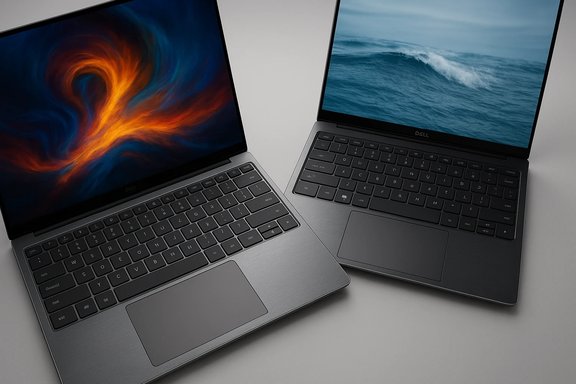
Dell has quietly but unmistakably bowed to a chorus of criticism and brought the XPS name back into its premium laptop lineup — this time with a full redesign that pairs a more conventional, user-friendly input layout with modern AI-ready silicon and a renewed focus on build quality and battery life. The new XPS 14 and XPS 16 position Dell to compete again in the high-end Windows 11 ultraportable space, promising CNC-machined aluminum chassis, Corning Gorilla Glass surfaces, Intel Core Ultra processors with on‑package NPUs, a tactile Copilot key, and display panels that scale refresh rates down to 1Hz for battery savings. Early hands-on reports and product pages confirm the broad strokes of that comeback — but a close read of the specifications and early coverage also reveals trade-offs and unresolved questions buyers should weigh before upgrading.
Buyers should view these new XPS laptops as well‑executed premium machines with modern AI readiness, not as instant, transformative experiences. The hardware is promising; the ecosystem and software that unlock the NPU’s full potential will determine whether XPS’s rebirth is merely a course correction or the start of a sustained renaissance in the premium Windows laptop market. For anyone considering an upgrade, the most important step is SKU‑level due diligence: confirm display, RAM, and GPU choices, test the webcam and keyboard feel, and wait for in‑depth reviews if your workflow depends on sustained GPU or CPU performance.
Source: Daily Express The Dell XPS returns with upgrades that put it firmly back on the Windows 11 map
 Background
Why XPS mattered — and why Dell lost some of its way
For many Windows users, XPS stood for a near‑universal combination of thin‑and‑light portability, top‑tier displays, and premium materials. When Dell shifted to generic naming tiers last year, the move sparked pushback from reviewers and long‑time customers who felt the company had traded brand heritage for marketing taxonomy. The new announcement is an explicit course correction: executives acknowledged being “off‑course,” and the revived XPS badge is now printed on the lid as a symbolic reset. Early reporting and internal forum coverage track that rebrand controversy and the public reaction that likely drove Dell’s reversal.What’s new at a glance
- Models: XPS 13 (refresh due later), XPS 14, XPS 16 (new mainstays).
- Materials: CNC‑machined aluminium plus Gorilla Glass surfaces for the palm rest and select panels.
- Silicon: Intel Core Ultra family (Panther Lake / Series 3 in early SKUs) with integrated NPUs for on‑device AI acceleration.
- Inputs: a return to physical function keys on the 14/16 models, a seamless glass touchpad with haptic feedback, and a dedicated Copilot key.
- Displays: FHD+ IPS and tandem OLED options with variable refresh rates (1Hz to 120Hz).
- Battery and portability: claims of improved endurance plus the thinnest XPS measurements on OLED SKUs.
Design and build: familiar XPS DNA, dialed for practicality
Materials and finish
Dell’s refresh returns to CNC‑machined aluminium and Corning Gorilla Glass for high‑touch areas. The aesthetic is intentionally restrained — tone‑on‑tone Graphite and Platinum finishes — but the emphasis is on tactile durability as much as looks. Early product pages show the palm rest uses Gorilla Glass 3, and some OLED variants use Gorilla Glass Victus on the lid, reflecting a mix of glass hardness and scratch resistance choices across SKUs. These are substantive upgrades for users who carry laptops in backpacks or work on uneven surfaces.Trackpad and keyboard
One of the sharpest changes is ergonomics: Dell reintroduced a row of physical function keys on the XPS 14 and 16 and kept the seamless glass touchpad but added subtle glass etching lines to make its edges visible and reduce wandering finger errors. The touchpad uses haptic feedback rather than a mechanical click, which preserves the clean, uninterrupted aesthetic while improving usability. Larger keycaps and improved key stability were highlighted as deliberate fixes to earlier XPS complaints about accidental presses and spongy key feel.Displays, webcam, and audio
Panel technology: tandem OLED and low‑Hz efficiency
Dell equips the new XPS 14 and XPS 16 with InfinityEdge panels and multiple display options: FHD+ IPS, higher‑res QHD/2K, and tandem OLED configurations that combine brightness and efficiency. Notably, the panels are variable‑refresh capable down to 1Hz, allowing static content to consume far less power. That feature is important for real‑world battery life and is one reason Dell touts notable endurance gains. Reviewers confirmed tandem OLED options and the 1Hz capability during hands‑on coverage.Webcam claims and scrutiny
Dell has upgraded the webcam to a higher‑resolution module compared with many prior XPS models. Multiple reports reference a reworked 4K‑capable camera, and some outlets describe an 8MP sensor in the spec mix. One piece of coverage claims the sensor is the “narrowest 8MP snapper” Dell has put into a laptop — language that sounds like marketing shorthand more than an objective engineering metric. That specific superlative (the “narrowest 8MP”) is not readily verifiable across Dell’s historical parts list and should be treated cautiously until exact sensor model numbers and optical dimensions are published. Buyers who depend on webcam fidelity for professional conferencing should test the camera in person or watch detailed sample footage from reviewers.Audio
Dell stresses a quad‑speaker configuration with Dolby Atmos and MaxxAudio tuning. That’s a strong inclusion for near‑field media and video‑call clarity, and hands‑on impressions indicate respectable volume and a fuller midrange than older XPS designs. Still, speaker claims are often productized, and independent audio measurements are useful if speakers are a purchase driver.Performance and AI: Intel Core Ultra and on‑device inference
Core Ultra and the NPU story
The headline silicon across many SKUs is Intel Core Ultra (Panther Lake / Series 3 mentions in early coverage). Core Ultra brings a hybrid CPU architecture plus an on‑package neural processing unit (NPU) that’s intended to accelerate inference tasks without routing data to the cloud. Dell markets this as the foundation for “AI‑enabled features” and Copilot experiences on Windows 11 — for example, faster local image edits in Lightroom or real‑time webcam improvements using the NPU rather than the CPU/GPU. Independent coverage and Dell’s own materials corroborate that NPUs are present and that OEMs will leverage them for Copilot+ features.Real‑world advantages (and limits)
- Benefits:
- Improved energy efficiency for AI workloads when the NPU can handle low‑power inference.
- Lower latency for on‑device features (e.g., transcription, webcam framing, image upscaling).
- Potentially better battery life if tasks shift off the CPU/GPU.
- Caveats:
- AI acceleration value is app and ecosystem dependent. Software must be updated to use the NPU; raw hardware presence alone doesn’t guarantee user benefits.
- Benchmarks for Core Ultra SKUs vary widely depending on thermal design and power limits Dell sets per SKU. Expect meaningful differences among entry vs. top SKUs.
Graphics and discrete GPU options
Configurations differ by size: the XPS 14 and 16 have options ranging from integrated graphics up to discrete Nvidia GeForce RTX cards on some high‑end units. This means the XPS 16 can be a capable content‑creation laptop when configured with an RTX part, while the XPS 14 focuses more on efficiency and integrated performance in many SKUs. Buyers should check listed GPU SKUs for target workflows like GPU‑accelerated rendering or machine learning.Portability, thermals, and battery
Weight and thickness: reading the fine print
Dell claims the new XPS 14 and 16 are among its thinnest designs to date, with early coverage noting OLED configurations can reach about 14.62 mm. However, official product pages and retailer spec sheets list model heights closer to 18.0 mm for certain SKUs — a discrepancy that likely reflects different measurement methods (thinnest‑edge thickness vs. maximum chassis height including rubber feet and hinge bulge) or different configurations (OLED vs. IPS). That means the “as thin as 14.62 mm” figure is plausible in a best‑case OLED spec but buyers should inspect the exact SKU spec sheet before assuming an ultra‑thin profile. Presenting both numbers avoids misleading comparisons.Battery claims and real usage
Dell points to larger cells and efficiency gains (variable refresh displays + NPUs) as reasons for improved battery life. Independent early tests and Dell’s spec pages show better runtime in lightweight tasks, but heavy workloads (video editing, gaming) will still favor plugged‑in operation. Expect real‑world battery life to depend strongly on display choice (OLED vs IPS), brightness, and whether discrete GPUs are installed.Thermals
Dell reengineered fans and heat‑pipe arrangements for thinner packaging. Hands‑on coverage suggests quieter fans and sustained performance improvements compared with prior XPS designs, but thermals are always a trade‑off: skewing thin reduces the thermal headroom available for sustained high wattage. For sustained creative workloads, buyers who prioritize long render/job runs may find larger chassis or Pro Max style devices more appropriate.Ports, expandability, and serviceability
- The XPS 14 and 16 generally include:
- 3x Thunderbolt 4 (or equivalent USB‑C with TB)
- MicroSD card reader on some SKUs
- 3.5 mm headset jack
- RAM is largely soldered on many premium thin designs; Dell’s approach continues to favor soldered LPDDR5X in thin SKUs, which improves density and power but prevents post‑purchase RAM upgrades.
- Some forum reporting and product descriptions indicate Dell has considered modular repairability in other lines, but the XPS 14/16 remain thin‑focused designs where component replacement is limited. If expandability and long‑term upgradability are priorities, consider this trade‑off carefully.
Pricing, availability, and SKUs
Dell and early hands‑on coverage list starting prices in the premium band: early launch pricing reported around $1,649.99 for the XPS 14 and $1,849.99 for the XPS 16 for entry configurations, with broader configurations rolling out in the months following the initial launch window. Some SKUs will ship with Linux (Ubuntu) options in certain regions later in the year. Availability timing is region and SKU dependent; Dell’s listings and major outlets indicate staged rollouts starting with select configurations and broader inventory arriving later.Strengths — what Dell got right
- Brand clarity and optics: Returning the XPS name and placing it visibly on the lid closes a PR loop and restores recognizable premium identity.
- Materials and build: CNC aluminium and Gorilla Glass surfaces bring competing MacBook‑class solidity to Windows buyers.
- Practical input improvements: Physical function keys and trackpad etchings are pragmatic fixes for earlier XPS usability complaints.
- AI‑ready hardware: On‑package NPUs in Core Ultra processors position Dell to leverage on‑device Copilot features as Microsoft and ISVs adopt them.
- Variable refresh and efficiency: 1Hz capability on displays is a tangible tech win for battery life when paired with intelligent drivers and OS support.
Risks, trade‑offs, and things to watch
- Feature carpeting vs. real software benefit: Hardware NPUs mean little without software that actively uses them. Copilot+ features are promising but will be incremental as app support and Microsoft rollout mature.
- Soldered RAM: Many premium laptops still solder RAM; choose RAM capacity at purchase because upgrades will likely be impossible later.
- Conflicting spec claims: Public-facing measurements (e.g., 14.62 mm vs. 18.0 mm) and marketing superlatives (e.g., “narrowest 8MP snapper”) require careful SKU‑level verification. Treat such claims cautiously until you can compare official dimensional tables and component model numbers.
- Price premium: XPS has always been premium‑priced; the refreshed models continue that trend and will face stiff competition from similarly sized MacBooks and rival Windows ultrabooks.
- Privacy implications: On‑device AI and higher‑resolution webcams enhance functionality but also warrant scrutiny of data collection, local processing defaults, and how features call home. Buyers should review privacy settings for Copilot and camera processing.
Practical buying guidance
- Decide which display matters most:
- Choose OLED if you need top color fidelity and the thinnest configurations; expect higher cost and, in some cases, the smallest chassis height measurements.
- Choose FHD+/IPS for better battery life and lower price.
- Buy the RAM you need now if the SKU uses LPDDR5X soldered memory.
- Prioritize discrete GPU SKUs only if your workflow depends on CUDA/RT cores; otherwise integrated Arc solutions and the NPU may be more power‑efficient.
- Test the webcam and Copilot features in‑store or through trusted reviews if conferencing, privacy, or AI features are important to your workflow.
- Compare thermal tests from independent reviewers for the exact SKU you plan to purchase — thin designs vary significantly with power limits and cooling choices.
Conclusion
Dell’s restored XPS line is a clear attempt to reclaim the premium Windows laptop crown with a sensible mix of fixes and future‑looking hardware. The company listened: physical keys return, the trackpad has been made more visible and usable, premium materials are back, and on‑device AI acceleration is baked into the silicon roadmap. Early impressions and Dell’s specifications show genuine progress in design, battery efficiency, and ergonomics — but the headline AI promises and some marketing superlatives still need the test of time and software adoption.Buyers should view these new XPS laptops as well‑executed premium machines with modern AI readiness, not as instant, transformative experiences. The hardware is promising; the ecosystem and software that unlock the NPU’s full potential will determine whether XPS’s rebirth is merely a course correction or the start of a sustained renaissance in the premium Windows laptop market. For anyone considering an upgrade, the most important step is SKU‑level due diligence: confirm display, RAM, and GPU choices, test the webcam and keyboard feel, and wait for in‑depth reviews if your workflow depends on sustained GPU or CPU performance.
Source: Daily Express The Dell XPS returns with upgrades that put it firmly back on the Windows 11 map
