

Microsoft’s message to designers is simple: treat Copilot as an ideation partner, not a replacement for craft. That shift—from blank-canvas anxiety to conversational collaboration—is the core promise behind the “Designing with Copilot” guidance, and it has immediate practical implications for anyone building visual identities, posters, social campaigns, or brand assets. Copilot can generate mood boards, suggest color palettes and typography pairings, and even draft on-brand copy, but the real value comes from how designers structure prompts, iterate on AI output, and guard against legal, ethical, and security pitfalls. This feature examines practical prompt recipes, tested workflow patterns, governance considerations for IT teams, and the trade-offs every studio should weigh before making Copilot a daily tool.
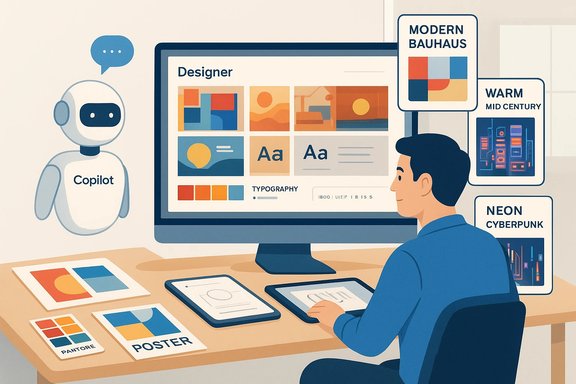
Microsoft positions Copilot as an assistant that sits inside Microsoft 365 and the Designer app, able to generate images, mockups, and text and to integrate results into Word, PowerPoint, and other productivity tools. For designers this means AI-driven mood boards and rapid visual exploration can be produced directly from a textual brief, then refined in conventional design tools.
This integration model is purposeful: Copilot and Designer are designed to accelerate early-stage ideation—thumbnail directions, color explorations, and headline variants—while leaving final creative judgment and technical polish to human designers. The product messaging emphasizes iterative use (generate, refine, import to Photoshop/Illustrator) and warns that features and availability may vary by region and subscription tier.
At the same time, the broader industry context matters. Regulators, internal safety teams, and legal bodies have scrutinized generative image tools for harmful outputs, for potential copyright issues, and for data privacy questions. Those concerns are relevant to every design team that plans to use AI-generated art for commercial work.
However, the tool’s benefits come with responsibilities. Designers must keep human judgment in the loop, verify legal and accessibility constraints, and avoid close imitations of living artists. IT and legal teams must set guardrails—tenant isolation, DLP, audit logging, and documented processes—to reduce data exposure and contractual risk. And every organization should assume the AI landscape and rules will continue evolving: update policies, maintain prompt libraries, and treat AI outputs as collaborative drafts, not finished works.
AI prompts for designers are powerful when engineered well and governed carefully. With the right combination of prompt craft, tool integration, and policy discipline, Copilot becomes an efficient co-pilot to human creativity—fast at producing options, but reliant on expert designers to choose, refine, and declare what is truly original.
Source: Microsoft AI Prompts: Designing with Copilot | Microsoft Copilot
 Background
Microsoft positions Copilot as an assistant that sits inside Microsoft 365 and the Designer app, able to generate images, mockups, and text and to integrate results into Word, PowerPoint, and other productivity tools. For designers this means AI-driven mood boards and rapid visual exploration can be produced directly from a textual brief, then refined in conventional design tools.This integration model is purposeful: Copilot and Designer are designed to accelerate early-stage ideation—thumbnail directions, color explorations, and headline variants—while leaving final creative judgment and technical polish to human designers. The product messaging emphasizes iterative use (generate, refine, import to Photoshop/Illustrator) and warns that features and availability may vary by region and subscription tier.
At the same time, the broader industry context matters. Regulators, internal safety teams, and legal bodies have scrutinized generative image tools for harmful outputs, for potential copyright issues, and for data privacy questions. Those concerns are relevant to every design team that plans to use AI-generated art for commercial work.
How Copilot helps designers: practical value and tasks
Copilot maps to three practical phases of creative work: discover, draft, and deliver.- Discover — Rapid exploration of visual directions to overcome the blank-canvas problem.
- Generate mood boards that fuse reference images, color swatches, textures, and lighting directions.
- Produce multiple distinct visual styles (e.g., “modern Bauhaus”, “warm mid-century”, “neon cyberpunk”) for early stakeholder feedback.
- Draft — Create concrete assets and copy variations to test combinations.
- Produce quick poster thumbnails, mock social posts, and hero images based on short creative briefs.
- Suggest typography pairings and generate headline/body copy in specified tones.
- Deliver — Prepare AI outputs for production and reuse.
- Export or import AI-generated art into Photoshop, Illustrator, or presentation slides for typographic and layout refinement.
- Use Copilot to synthesize client feedback into action items and version notes to maintain a clean audit trail.
From prompt to polished poster: a practical workflow
- Define your role and objective up front.
- Start prompts with a role and a clear goal: “You are a senior graphic designer creating a concert poster for an indie jazz trio aimed at 18–30-year-olds. Provide three distinct visual directions.”
- Include essential context: audience, usage, constraints.
- Specify channel (print A2, Instagram 1080×1080, billboard), target audience, brand tone, and any mandatory copy.
- Layer style references and technical specs.
- Add preferred art references, palettes, and composition rules: “Minimal negative space, bold headline at top, secondary text block no smaller than 18pt.”
- Generate, critique, iterate.
- Ask Copilot for 4–6 variations, then request focused changes: “Make version 2 higher contrast and swap teal for mustard; avoid photographic elements.”
- Refine in a design tool.
- Export your favorite thumbnail into Illustrator/Photoshop (or Designer/PowerPoint), add grid alignment, precise typographic hierarchy, and finalize export-ready assets.
Prompt engineering for designers: practical principles
Effective prompts are brief but structured. Below are tested tactics designers should use routinely.- Lead with the most important constraint first.
- If brand tone, target format, or safety concerns matter most, put them at the start of the prompt. The AI tends to weight early information more heavily.
- Use role-based framing.
- “You are an art director specializing in minimalist tech branding” steers voice and aesthetic more reliably than generic phrasing.
- Prefer progressive specificity.
- Start coarse (“Generate three poster concepts for…”), then refine into nuts-and-bolts prompts (“Now produce the color hex codes, font suggestions, and three short headline options for the preferred variant”).
- Use negative prompts intentionally.
- Tell the model what to avoid: “No celebrity likenesses, avoid photorealistic faces, do not reference existing trademarks.”
- Apply emphasis and repetition for priority.
- Repeat critical constraints or use phrasing like “Most important: …” to minimize misinterpretation.
- Ask for implementation-ready details.
- Ask Copilot to return exact hex values, font-family names (Google Fonts preferred), color contrast ratios, and layout margins so designers don’t spend time reverse-engineering images.
- Build reusable prompt templates.
- Treat your best prompts like components in a design system: a “mood-board” template, a “poster draft” template, and a “brand exploration” template can be reused and customized.
WIRE+FRAME: a designer-friendly prompt framework
Adapting a structured brief for AI reduces guesswork. One practical frame many designers are using contains these elements:- Who & What (role and deliverable)
- Input Context (audience, constraints, mood)
- Reference Voice or Style (brand or artist references, but avoid infringement)
- Expected Output (file sizes, assets list, color codes)
- Flow (step-by-step, e.g., ideate → refine → export)
- Ask for Clarification (invite the AI to confirm ambiguous points)
- Iterate (request multiple variations and a critique loop)
Copilot prompt cookbook: sample prompts for designers
Below are ready-to-use templates that scale from rough ideation to asset production.- Mood board (rapid exploration)
- Prompt: “You are a visual designer. Create a mood board for a 'modern artisanal coffee shop' targeting 25–40-year-old urban professionals. Deliver: 6 thumbnail images, a 5-color palette (hex), suggested textures (e.g., raw oak, matte ceramic), two typography pairings (headline + body, with Google Fonts names), and three keywords describing the vibe.”
- Poster concept (visual + copy)
- Prompt: “You are an art director. Generate three A2 poster concepts for an outdoor jazz festival with a vintage Americana vibe. For each concept provide: a short visual description, a color swatch set with hex codes, headline and subhead copy variants (tone: nostalgic, playful), and layout notes for placing sponsor logos. Avoid photographic faces and any resemblance to public figures.”
- Logo ideation (branding)
- Prompt: “You are a brand designer. Propose three logo concepts for a sustainable coffee brand named ‘Root & Pour’. Style: minimalist, earthy tones. Provide: short rationale for each concept, a color palette (3 hex colors), suggested font pairings, and a sample tagline.”
- Typography pairing (system)
- Prompt: “Suggest five headline-plus-body typography pairings for a tech fintech startup targeting Gen Z. For each pairing list font names, recommended weights, ideal line-height, and an example 8-word headline rendered in the suggested fonts.”
- Social post copy + visual prompt
- Prompt: “Produce three Instagram carousel outlines (5 slides each) for a product launch. Each outline should include: slide-by-slide copy (short, punchy), suggested imagery prompt for Copilot Designer, and call-to-action phrasing.”
Integrating AI output into production tools
AI-generated visuals are rarely the final deliverable. Successful integration requires a short hand-off process.- Export options: Use the Designer app’s export to PNG/SVG or copy visuals into PowerPoint/Word for immediate mockups.
- Vector polish: For logos or icons, re-create or trace AI-generated shapes in Illustrator to produce scalable, editable vectors.
- Photo editing: Use Photoshop to correct skin tones, remove artifacts, and ensure CMYK/print-ready color profiles when preparing for physical printing.
- Design systems: Treat AI outputs as exploratory assets, then implement chosen elements (color, type, grid) into your design system rather than embedding raw AI imagery into every touchpoint.
Legal, ethical, and safety considerations
Designers must navigate several evolving risks when using generative AI.- Copyright and registration: Current guidance from copyright authorities treats purely AI-generated works (where expressive elements were created predominantly by a machine) as lacking the human authorship required for standard copyright protection. Works that incorporate AI material alongside substantial human creative contributions may still be protected, but creators are advised to disclose AI-generated portions when registering works.
- Style imitation: Prompts that ask “in the style of [living artist]” are legally and ethically fraught. Avoid close imitations of identifiable artists; instead, reference broader movements (e.g., “neo-impressionist palette” or “mid-century geometric sensibility”).
- Harmful outputs and safety gaps: Generative image engines have produced biased or harmful imagery in some cases. Internal safety reports and whistleblower accounts show that content filters are imperfect. Teams should always inspect outputs for inappropriate depictions, stereotypes, or unintended political content.
- Trademarks and likenesses: Prompts that include brand names or public figures can produce images that infringe trademarks or create false endorsements. Use negative prompts and legal review when producing marketing materials involving other brands or people.
- Commercial usage rights: Not all AI image tools grant the same commercial rights. Verify licensing terms for the specific AI feature you use and obtain clear, written confirmation if the work will be used commercially.
Data privacy and enterprise governance (what IT teams should know)
For enterprise customers, Copilot’s integration into Microsoft 365 is accompanied by explicit governance controls, but those controls have important nuances.- Tenant isolation: Copilot for Microsoft 365 is designed to process content inside the customer’s tenant boundary, honoring file permissions and not exposing content to other tenants.
- Training data commitments: Microsoft’s enterprise contracts and product guidance state that customer content and Copilot interactions are not used to train the foundation models that power Copilot, and are treated as customer data under contractual protections.
- Audit and retention: Admins can configure logging, retention, and DLP policies. Use sensitivity labels, Purview policies, and conditional access to control what can be fed into Copilot.
- Personal vs. enterprise accounts: When employees use personal Copilot subscriptions on company devices or accounts, data governance becomes more complex. IT should set clear policies to restrict personal Copilot access to work files or block multi-account mixing.
- Require enterprise Copilot usage for confidential workflows and block personal accounts from processing sensitive documents.
- Configure DLP rules that prevent the inclusion of PHI, payment data, or legal secrets in Copilot prompts.
- Maintain an AI use policy that requires designers to tag deliverables containing AI-generated elements and to keep prompt records for audits.
- Train staff on safe prompt practices and escalation channels for harmful outputs.
Governance checklist for design teams
- Define acceptable use: What types of projects may use AI? Which must not?
- Mandate human sign-off: All AI-sourced imagery used in public or commercial work must pass a human QC checklist.
- Keep prompt logs: Save prompts and model outputs as part of project documentation for traceability.
- Verify licensing: Confirm image assets and fonts created via AI are cleared for commercial use.
- Maintain accessibility: Ensure AI-generated visuals meet accessibility standards (contrast ratios, legible type sizes).
- Conduct periodic safety audits: Review a sample of AI outputs to identify systemic issues.
Risks, mitigations, and practical warnings
- Overreliance on AI aesthetics: Mitigation—reserve AI for ideation and keep expert designers responsible for final composition and semantic meaning.
- Hallucinations in copy: Mitigation—fact-check all factual claims; use Copilot’s outputs for tone and structure rather than factual authority.
- Reputational risk from harmful outputs: Mitigation—implement a human review gate, especially for public-facing campaigns.
- Legal exposure from undisclosed AI use: Mitigation—document human creative contributions and disclose AI use where required (e.g., copyright registration).
Conclusion: practical verdict for designers and IT
Copilot changes the early stages of design by converting a blank page into a collaborative conversation with an always-on creative assistant. For designers, it accelerates ideation—mood boards, color palettes, typography pairings, and copy variants appear in minutes rather than hours. When used with structured prompts (role framing, explicit constraints, iterative checkpoints) and integrated into a disciplined workflow (export, polish, legal review), Copilot can expand creative bandwidth and reduce friction between creative and copy teams.However, the tool’s benefits come with responsibilities. Designers must keep human judgment in the loop, verify legal and accessibility constraints, and avoid close imitations of living artists. IT and legal teams must set guardrails—tenant isolation, DLP, audit logging, and documented processes—to reduce data exposure and contractual risk. And every organization should assume the AI landscape and rules will continue evolving: update policies, maintain prompt libraries, and treat AI outputs as collaborative drafts, not finished works.
AI prompts for designers are powerful when engineered well and governed carefully. With the right combination of prompt craft, tool integration, and policy discipline, Copilot becomes an efficient co-pilot to human creativity—fast at producing options, but reliant on expert designers to choose, refine, and declare what is truly original.
Source: Microsoft AI Prompts: Designing with Copilot | Microsoft Copilot
