

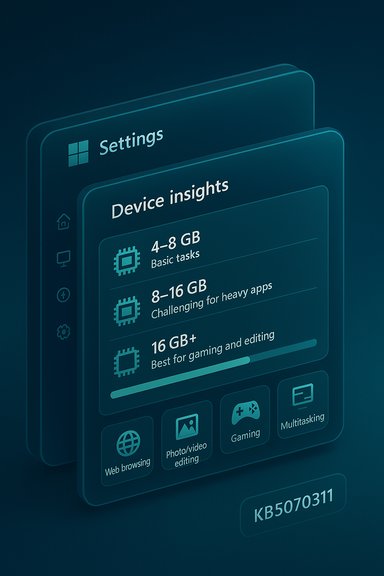
Microsoft’s latest Windows 11 preview update has quietly reframed a long-standing reality: the official minimum memory requirement for Windows 11 (4 GB) is no longer a realistic yardstick for people who want to game, edit photos or video, or run other demanding applications without constant performance compromises. The December preview package (KB5070311) expands the Settings app’s “About” page into a new Device Insights card that explicitly tells users what Windows’ engineers consider practical RAM ranges — and that message is blunt: machines with 4–8 GB of RAM are suited to basic tasks only, while running modern games or creative apps on 8 GB or less “will be challenging.”
Microsoft shipped KB5070311 as a non‑security preview cumulative that updates Windows 11 builds in the 26100/26200 family and also brings a handful of visual and UX refinements. The package is a Release Preview / optional update, and it includes both visible UI changes and new diagnostic/help guidance surfaced inside Settings. The update’s official notes document several known issues, while the rollout also enabled the renamed FAQ section — now presented as Device Insights — that provides plain‑language guidance about what a given device can reasonably do. The bottom line from Microsoft’s on‑device guidance is straightforward: 4 GB is the minimum needed to run Windows 11, but Microsoft’s descriptive guidance now tells users that 4–8 GB is appropriate only for basic activities like browsing, email and light document work. Tasks that rely on sustained memory — modern gaming, photo/video editing, and complex multitasking — are described as challenging on systems in that memory band. That explicit wording is new and notable because it moves Microsoft’s guidance closer to real‑world expectations.
Consider these practical takeaways from the reviewer consensus:
That said, important caveats remain:
Source: Technetbook Microsoft Confirms 8GB RAM Insufficient for Advanced Windows 11 Tasks like Gaming and Editing
 Background / Overview
Microsoft shipped KB5070311 as a non‑security preview cumulative that updates Windows 11 builds in the 26100/26200 family and also brings a handful of visual and UX refinements. The package is a Release Preview / optional update, and it includes both visible UI changes and new diagnostic/help guidance surfaced inside Settings. The update’s official notes document several known issues, while the rollout also enabled the renamed FAQ section — now presented as Device Insights — that provides plain‑language guidance about what a given device can reasonably do. The bottom line from Microsoft’s on‑device guidance is straightforward: 4 GB is the minimum needed to run Windows 11, but Microsoft’s descriptive guidance now tells users that 4–8 GB is appropriate only for basic activities like browsing, email and light document work. Tasks that rely on sustained memory — modern gaming, photo/video editing, and complex multitasking — are described as challenging on systems in that memory band. That explicit wording is new and notable because it moves Microsoft’s guidance closer to real‑world expectations. What KB5070311 changed in Settings: Device Insights explained
Microsoft redesigned the Settings → System → About area to surface a small “device card” and a renamed FAQ called Device Insights. This is not an AI judgement; the descriptions are hardcoded explanatory strings that match specific hardware ranges and intended usage profiles. The goal is to give casual users a readable assessment of their PC’s capabilities without diving into technical telemetry. For example, the card presents different textual guidance depending on whether your system reports 4–8 GB, 8–16 GB, or 16 GB and above. Key behaviors and changes in KB5070311 include:- A visible Device Card on the Settings home page linking to the new About/Device Insights section.
- Copy/move/delete dialogs and several File Explorer dialogs being migrated to dark mode (with a known visual regression reported and acknowledged by Microsoft).
- The Device Insights strings that characterize hardware ranges and give plain‑English guidance about expected capabilities (e.g., “basic tasks” vs. “demanding apps”).
Read the wording literally: what Microsoft actually says about 8 GB
Microsoft’s descriptive text for the 4–8 GB range states that such machines will handle basic tasks like web browsing, document editing and e‑mail, and that running more demanding apps such as photo/video editing or gaming will be challenging with 8 GB or less. That phrasing stops short of creating a hard requirement — it is guidance rather than a new system requirement — but it is the company’s own plain‑language assessment of practical capability. Two levels of verification are relevant here:- The company’s official minimum system requirement for Windows 11 remains 4 GB, as published on Microsoft’s System Requirements / Windows 11 specifications pages. That technical minimum has not changed.
- The practical guidance inside Settings — now exposed by KB5070311 — tells users that 8 GB is only adequate for basic use, and that heavier workloads will be problematic. That is Microsoft’s user‑facing assessment, and it aligns with independent reviewer consensus.
Why 8 GB falls short in practice
There are three technical reasons 8 GB is becoming an uncomfortable baseline for Windows 11 power use:- Modern browsers and web apps are memory‑hungry. Each tab and extension can spawn separate processes and allocate significant working sets; a single browser session with many tabs routinely occupies multiple gigabytes of RAM. Combined with background collaboration apps (Teams, Slack), cloud sync clients and system services, available free memory can be exhausted quickly on 8 GB systems.
- Creative workflows rely on large caches and application memory. Photo and video editing tools use RAM for frame caches, undo buffers, and preview thumbnails; their working sets expand rapidly with image resolutions and timeline complexity. GPU offload helps, but many editing tasks still require a large CPU/RAM working set to avoid heavy paging to storage.
- On‑device AI and background services increase base memory pressure. New Windows features and vendor tools that perform local AI inference (noise suppression, Copilot‑style helpers, local model caching) are useful, but they consume RAM or require NPUs and driver support; those capabilities are being gate‑enabled on Copilot+ hardware in the same KB family of updates. That means modern Windows experiences increasingly expect headroom beyond a minimal 4–8 GB footprint.
Cross‑checks and the reviewer consensus: 16 GB as the practical baseline
Independent reviewers, buyer guides and IT analysts have coalesced around 16 GB as the practical baseline for Windows devices in 2025. That recommendation is not Microsoft policy; it is the community’s response to real‑world application demands and longer device lifecycles. Multiple independent assessments show the same pattern: 4 GB is the install minimum, 8 GB will work for light users, but 16 GB provides meaningful headroom for multitasking, gaming, and content creation.Consider these practical takeaways from the reviewer consensus:
- 8 GB: Acceptable for light browsing, email, low‑to‑moderate document work; will begin to show paging or lag under heavier multi‑app scenarios.
- 16 GB: Comfortable for most users, including gamers running titles at reasonable settings and creators doing 1080p or lighter 4K editing.
- 32 GB or more: Recommended for pro content creation, heavy multi‑app streaming (games + encoder + chat + capture), large VM workloads and high‑resolution (8K/large timeline) video editing.
Gaming and editing: concrete impacts of limited RAM
For gamers and video creators the symptoms of insufficient RAM are familiar and measurable:- Increased pagefile usage (swap) which raises frame time variance and leads to stutters and higher 1% lows in games.
- Longer load and scrub times in editors, slower export times if caches cannot fit in RAM, and higher I/O activity that taxes SSDs.
- App crashes or forced reductions in texture resolution when the system cannot keep working sets resident. This is especially visible in modded or heavily textured games that allocate many GBs of combined system and GPU memory.
OEMs, end‑users and the market: what this means for device makers and buyers
The market response over recent years has been to push mainstream Windows SKUs toward 16 GB as the default configuration for midrange and premium models. That trend has two drivers: user expectations (buyers want devices that remain competent for 3+ years) and new Windows features that lean on additional memory and sometimes dedicated hardware (NPUs). Many OEM lines now list 16 GB as a configuration option or base on higher‑end models, while entry models still ship with 8 GB. For buyers, the affordability of 16 GB on new devices makes it the pragmatic choice for longevity.That said, important caveats remain:
- Some ultraportable laptops still solder RAM to the motherboard and limit upgradeability, so buyers should verify whether a machine’s RAM can be increased later.
- Battery life and thermal constraints mean that more RAM is not free — denser configurations can have slight power and cost implications on mobile platforms.
Practical steps: what users should do right now
If your device reports 4–8 GB of RAM and you want a better experience, follow this prioritized checklist:- Confirm the facts: open Settings → System → About to read Device Insights and your system card. This will show the message strings enabled by KB5070311.
- Evaluate upgradeability: check whether your laptop or desktop has a user‑accessible RAM slot (or slots). If yes, plan an upgrade to at least 16 GB; dual‑channel kits are recommended for best memory bandwidth.
- Reduce background memory pressure: close unused browser tabs, disable non‑critical startup apps, and suspend heavy background sync agents when performing demanding tasks.
- Use storage wisely: ensure your system drive is an SSD with ample free space to support a responsive pagefile when paging occurs. Faster NVMe drives reduce pagefile pain but do not replace physical RAM.
- For gamers/creators: prioritize 16 GB as a minimum; for streaming + gaming or serious editing, target 32 GB. Verify your GPU has adequate VRAM for the workloads you expect (4 GB+ for many modern titles; higher for ultra settings).
Risks, trade‑offs and the limits of Device Insights
Device Insights is a helpful guide, but it’s not a guarantee. A few caveats to keep in mind:- The Settings guidance is intentionally general and uses soft phrasing ("challenging") — it does not create a formal change to Windows system requirements. Rely on it for expectations, but perform real‑world testing for critical workflows.
- Some claims in community summaries — for example, blanket statements like “no devices ship with less than 8 GB” — are not universally verifiable. Laptop SKUs vary globally and entry models with 4–8 GB continue to exist, particularly in budget segments and some education devices. Treat broad market claims with caution.
- Upgrading RAM is straightforward for desktops and some laptops, but many thin-and-light devices solder memory. Before buying, confirm upgradability if future‑proofing is a priority.
Verdict: what this means for Windows users in plain terms
Microsoft’s Device Insights in KB5070311 does two things: it acknowledges an everyday truth that many power users already know, and it helps steer mainstream users toward configurations that will produce fewer headaches over the device lifecycle. The official system requirement remains 4 GB, but the company’s own in‑OS guidance now recommends treating 8 GB as an entry‑level option for basic use and considering 16 GB as the sensible baseline for a comfortable, future‑proof Windows 11 experience. This aligns Microsoft’s messaging with independent reviewer consensus and with purchasers’ practical expectations. For buyers, the takeaway is simple: if you plan to game, edit video or run many apps at once, budget for 16 GB or more. For IT managers, the Device Insights strings are another reason to validate fleet configurations and plan upgrades where necessary. The KB is a prompt to modernize expectations — not a sudden change to the technical minimums.Conclusion
Windows 11’s KB5070311 preview update does not rewrite Microsoft’s minimum system requirements, but it does place a clear, user‑facing line in the sand about what the company expects modern devices to handle comfortably. The message is frank and useful: 4 GB remains a technical minimum, 8 GB will get you through basic tasks, and 16 GB+ is the practical baseline for serious multitasking, gaming, and creative work. Users should interpret Device Insights as guidance to match device capability with intended use, and take concrete steps — from managing background apps to upgrading hardware where possible — to ensure a responsive and reliable Windows experience.Source: Technetbook Microsoft Confirms 8GB RAM Insufficient for Advanced Windows 11 Tasks like Gaming and Editing
