

Since Windows 10 version 1809, Microsoft has made “Quick removal” the default policy for USB flash drives and many external storage devices, meaning Windows generally no longer relies on delayed write caching that requires the old Safely Remove Hardware ritual before unplugging. That does not make the eject button useless. It means the danger moved from a blanket rule to a narrower set of real-world edge cases. The myth was never that storage corruption is impossible; the myth is that every USB stick is a ticking time bomb unless ceremonially dismissed by the taskbar.
For years, Windows trained users to treat removable storage like a live grenade. Copy your file, wait for the progress bar, click the tiny tray icon, choose the right drive, wait for permission, and only then pull the plug. Anyone who skipped the sequence was assumed to be gambling with corrupted documents, mangled file systems, or a drive that would mysteriously vanish the next time it was inserted.
That fear had a real technical basis. Operating systems cache writes because storage is slow compared with memory, and batching disk operations can make the whole machine feel faster. The problem is obvious: if data has been accepted by Windows but not yet committed to the device, unplugging the device can strand that data in RAM.
The change Microsoft made in Windows 10 version 1809 was therefore not cosmetic. By making Quick removal the default, Windows shifted the normal behavior for removable drives toward immediate readiness for disconnect. In plain English, the operating system prioritizes safer surprise removal over peak write performance.
That is the part many casual explanations get right. The part they often flatten is the tradeoff. Quick removal reduces one class of risk by disabling Windows-side write caching for the device, but it does not magically suspend physics, application behavior, controller firmware, or user impatience.
That made sense when USB flash drives were slower, external hard drives were more common than portable SSDs, and users regularly moved large files through a storage stack optimized around throughput. The operating system’s job was to smooth out performance, even if that meant it needed a formal goodbye before the device disappeared.
The taskbar eject button was never a superstition. It was a synchronization mechanism. It told Windows, “Stop treating this device as available, flush the work you have queued, and make sure nobody is still holding a file open.”
What changed is the default assumption. Quick removal tells Windows to manage the device so it can be removed without that explicit flush process in ordinary circumstances. That is why the old blanket warning now overstates the risk for most home users copying a document to a thumb drive on a modern Windows 10 or Windows 11 PC.
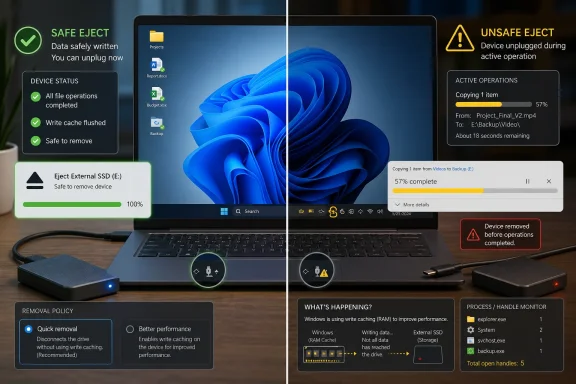
If a file copy is still running, the danger is obvious. If a backup program is still writing, a portable app is still running from the drive, an archive tool is still extracting, or a photo editor has a file open, unplugging the device can still break things. Quick removal does not convert an active write into an atomic miracle.
There is also a more subtle distinction between Windows saying it is done and the device being truly idle. USB flash drives and external SSDs have their own controllers, firmware, flash translation layers, and sometimes internal caches. A cheap promotional thumb drive and a high-end portable SSD do not behave identically just because both appear as removable storage in Explorer.
That is why the smartest version of the modern rule is not “never eject.” It is “you usually do not need to eject if you are sure nothing is using the drive.” The difference is small enough for casual users to miss, and large enough for IT pros to care about.
That toggle matters more than the average user realizes. If you or a vendor utility changed a drive to Better performance, the old warning applies again. If you enable write caching on the device to squeeze more throughput out of an external SSD, the eject button is no longer just a polite tradition.
This is especially relevant for people who use external storage as working storage rather than shuttle storage. Editing video directly from a portable SSD, running virtual machines from a USB drive, maintaining large photo libraries externally, or using an external disk for backups all make the device more likely to have open handles and pending operations.
The consumer myth says the eject button is either mandatory or obsolete. The Windows reality is more conditional. The safe-removal requirement depends on policy, workload, and whether anything is still touching the volume.
Windows itself can be only one actor in the chain. Security software may scan new files. Explorer may build thumbnails. A media player may keep a file handle alive after playback. A shell extension may misbehave. A backup client may be quietly updating metadata after the visible copy operation ends.
That is why safe removal still has value even under Quick removal. When Windows refuses to eject a drive because it is “in use,” it is not being nostalgic. It is telling you that some process still has a relationship with the device.
The frustration is that Windows has historically been poor at naming the culprit in a friendly way. Administrators can use tools like Resource Monitor, Process Explorer, or handle-tracking utilities to find the process. Ordinary users are left closing windows and hoping the drive eventually agrees to leave.
That apparent contradiction is not really a contradiction. It is the difference between a default storage policy and a conservative support recommendation. A support page has to cover old systems, changed settings, active transfers, unusual devices, and users who do not know which policy their drive is using.
From a help-desk perspective, “eject it first” remains beautifully simple. It is one instruction that is almost always safe, rarely harmful, and easy to communicate. From a technical perspective, telling every modern Windows user that they must eject every idle USB stick every time is outdated.
This is where the BGR-style claim that the fear has become a myth lands close to the truth but needs sharper edges. The fear of casual unplugging on modern Windows is often exaggerated. The fear of unplugging during activity, under Better performance, or with sensitive external workloads is still rational.
That last clause is worth underlining. Windows stores the policy per external device, and the setting can persist when the device is reconnected to the same computer port. This is not necessarily a single universal switch that follows every drive everywhere in a perfectly obvious way.
For enthusiasts, that means the answer is inspectable. Disk Management exposes the device policy through the drive’s properties, usually under a Policies tab or through the hardware properties path. If Quick removal is selected, the system is configured for surprise removal. If Better performance is selected, safe removal should be treated as mandatory.
For managed environments, the calculation is broader. USB storage may be restricted, audited, encrypted, blocked by policy, or treated as a data-loss-prevention problem rather than a convenience feature. In those environments, the question is not just whether a drive can be unplugged safely. It is whether the drive should have been used at all.
Quick removal helps with the specific timing problem of Windows caching writes invisibly after the user thinks a copy is done. It does not help if the user interrupts the copy itself. It does not help if an application is still saving. It does not help if the drive’s firmware is in the middle of housekeeping and the device was built to the lowest possible cost.
File systems also matter. exFAT, NTFS, and FAT32 differ in resilience, metadata behavior, and repair options. Journaling can reduce the odds of catastrophic file-system damage, but it is not a substitute for completed writes. A half-written file is still a half-written file, even if the volume structure survives.
The best modern habit is therefore observational rather than ritualistic. Watch for activity. Wait for transfer completion. Close files opened from the drive. Give large writes a few seconds to settle. If the drive contains something valuable, ejecting remains a cheap final check.
If you click eject and Windows says the device is safe to remove, you have a clean signal. If Windows says the device is in use, you have learned something important before you pull the plug. The ritual becomes less about flushing a cache and more about interrogating the system state.
That matters for external drives used for backups, installers, recovery images, and system administration. A sysadmin carrying a USB SSD full of deployment tools does not want to discover corruption at the worst possible moment. A user moving family photos does not care that the probability of damage was low if the unlucky case lands on them.
There is also a behavioral advantage. The eject command forces a pause. In consumer computing, pauses are underrated. Many storage disasters happen because the interface made a complex system feel instantaneous.
This is why “you do not need to eject anymore” is both technically defensible and practically incomplete. The safer formulation is: modern Windows usually does not require ejection for idle removable drives under Quick removal, but ejection is still a useful confirmation step when the data matters.
Creators, developers, and power users may notice the difference in certain workloads. Moving a few documents is not the same as dumping hundreds of gigabytes of video footage or building software on an external workspace. In those cases, Windows-side caching and device-level behavior can affect perceived performance.
But the moment you tune for performance, you accept more responsibility. Better performance is not just a speed setting; it is a contract. Windows may hold writes in a way that makes safe removal part of the workflow again.
That is the old bargain returning through a side door. You can have convenience, or you can chase speed. If you choose speed, do not pretend the convenience warning was debunked for your configuration.
A fake-capacity drive may appear to copy files successfully until it wraps writes over existing data. A failing flash drive may corrupt files regardless of whether the user clicked eject. A cable or hub problem may disconnect the device in the middle of a write without giving Windows any chance to help.
This is not an argument for paranoia. It is an argument for separating myths. The myth that modern Windows always requires safe removal is outdated. The myth that USB storage is inherently trustworthy is just as dangerous.
For important data, the old rule still applies in another form: do not treat a single removable device as a backup. A safely ejected corrupted drive is still corrupted. A perfectly removed lost USB stick is still lost.
Source: bgr.com This Common USB Stick Fear Has Been A Myth For Years - Here's Why - BGR
 Microsoft Quietly Retired a Ritual, Not a Risk
For years, Windows trained users to treat removable storage like a live grenade. Copy your file, wait for the progress bar, click the tiny tray icon, choose the right drive, wait for permission, and only then pull the plug. Anyone who skipped the sequence was assumed to be gambling with corrupted documents, mangled file systems, or a drive that would mysteriously vanish the next time it was inserted.That fear had a real technical basis. Operating systems cache writes because storage is slow compared with memory, and batching disk operations can make the whole machine feel faster. The problem is obvious: if data has been accepted by Windows but not yet committed to the device, unplugging the device can strand that data in RAM.
The change Microsoft made in Windows 10 version 1809 was therefore not cosmetic. By making Quick removal the default, Windows shifted the normal behavior for removable drives toward immediate readiness for disconnect. In plain English, the operating system prioritizes safer surprise removal over peak write performance.
That is the part many casual explanations get right. The part they often flatten is the tradeoff. Quick removal reduces one class of risk by disabling Windows-side write caching for the device, but it does not magically suspend physics, application behavior, controller firmware, or user impatience.
The Old Warning Was Built for a Different Default
The classic advice came from an era when Windows favored Better performance for external storage. Under that model, Windows could cache write operations bound for the external drive. The Safely Remove Hardware command forced the system to finish pending work and release the device cleanly.That made sense when USB flash drives were slower, external hard drives were more common than portable SSDs, and users regularly moved large files through a storage stack optimized around throughput. The operating system’s job was to smooth out performance, even if that meant it needed a formal goodbye before the device disappeared.
The taskbar eject button was never a superstition. It was a synchronization mechanism. It told Windows, “Stop treating this device as available, flush the work you have queued, and make sure nobody is still holding a file open.”
What changed is the default assumption. Quick removal tells Windows to manage the device so it can be removed without that explicit flush process in ordinary circumstances. That is why the old blanket warning now overstates the risk for most home users copying a document to a thumb drive on a modern Windows 10 or Windows 11 PC.
Quick Removal Is a Policy Choice, Not a Force Field
The important phrase is “ordinary circumstances.” Quick removal does not mean “pull it whenever you feel like it.” It means Windows is not deliberately holding disk write operations in its own cache for later delivery to that removable device.If a file copy is still running, the danger is obvious. If a backup program is still writing, a portable app is still running from the drive, an archive tool is still extracting, or a photo editor has a file open, unplugging the device can still break things. Quick removal does not convert an active write into an atomic miracle.
There is also a more subtle distinction between Windows saying it is done and the device being truly idle. USB flash drives and external SSDs have their own controllers, firmware, flash translation layers, and sometimes internal caches. A cheap promotional thumb drive and a high-end portable SSD do not behave identically just because both appear as removable storage in Explorer.
That is why the smartest version of the modern rule is not “never eject.” It is “you usually do not need to eject if you are sure nothing is using the drive.” The difference is small enough for casual users to miss, and large enough for IT pros to care about.
The Performance Toggle Is Where the Old Rule Still Lives
Windows still exposes two broad policies for external storage: Quick removal and Better performance. Quick removal keeps the device in a state that supports unplugging without using Safely Remove Hardware, at the cost of giving up some caching-driven performance. Better performance allows Windows to cache write operations to the external device, but it brings back the requirement to use safe removal.That toggle matters more than the average user realizes. If you or a vendor utility changed a drive to Better performance, the old warning applies again. If you enable write caching on the device to squeeze more throughput out of an external SSD, the eject button is no longer just a polite tradition.
This is especially relevant for people who use external storage as working storage rather than shuttle storage. Editing video directly from a portable SSD, running virtual machines from a USB drive, maintaining large photo libraries externally, or using an external disk for backups all make the device more likely to have open handles and pending operations.
The consumer myth says the eject button is either mandatory or obsolete. The Windows reality is more conditional. The safe-removal requirement depends on policy, workload, and whether anything is still touching the volume.
The Progress Bar Was Never a Full Truth Machine
One reason this topic refuses to die is that users trust the copy dialog too much. A completed progress bar is strong evidence that the operation you initiated has finished. It is not a universal certificate that every program, indexer, antivirus scanner, thumbnail generator, cloud sync client, or backup agent is done with the drive.Windows itself can be only one actor in the chain. Security software may scan new files. Explorer may build thumbnails. A media player may keep a file handle alive after playback. A shell extension may misbehave. A backup client may be quietly updating metadata after the visible copy operation ends.
That is why safe removal still has value even under Quick removal. When Windows refuses to eject a drive because it is “in use,” it is not being nostalgic. It is telling you that some process still has a relationship with the device.
The frustration is that Windows has historically been poor at naming the culprit in a friendly way. Administrators can use tools like Resource Monitor, Process Explorer, or handle-tracking utilities to find the process. Ordinary users are left closing windows and hoping the drive eventually agrees to leave.
Microsoft’s Messaging Is Technically Correct and Socially Confusing
Microsoft’s position is not as simple as “yank it out.” The company’s documentation says Quick removal keeps the device ready to remove without using Safely Remove Hardware, while Better performance requires the safe-removal process. At the same time, Microsoft’s general support guidance still tells users to safely remove hardware to avoid data loss.That apparent contradiction is not really a contradiction. It is the difference between a default storage policy and a conservative support recommendation. A support page has to cover old systems, changed settings, active transfers, unusual devices, and users who do not know which policy their drive is using.
From a help-desk perspective, “eject it first” remains beautifully simple. It is one instruction that is almost always safe, rarely harmful, and easy to communicate. From a technical perspective, telling every modern Windows user that they must eject every idle USB stick every time is outdated.
This is where the BGR-style claim that the fear has become a myth lands close to the truth but needs sharper edges. The fear of casual unplugging on modern Windows is often exaggerated. The fear of unplugging during activity, under Better performance, or with sensitive external workloads is still rational.
Windows 11 Inherits the New Normal
Although the original change arrived with Windows 10 version 1809 in late 2018, the practical effect now extends into the Windows 11 era. Most users on supported Windows builds are living under the Quick removal default unless something has changed for that specific device and port.That last clause is worth underlining. Windows stores the policy per external device, and the setting can persist when the device is reconnected to the same computer port. This is not necessarily a single universal switch that follows every drive everywhere in a perfectly obvious way.
For enthusiasts, that means the answer is inspectable. Disk Management exposes the device policy through the drive’s properties, usually under a Policies tab or through the hardware properties path. If Quick removal is selected, the system is configured for surprise removal. If Better performance is selected, safe removal should be treated as mandatory.
For managed environments, the calculation is broader. USB storage may be restricted, audited, encrypted, blocked by policy, or treated as a data-loss-prevention problem rather than a convenience feature. In those environments, the question is not just whether a drive can be unplugged safely. It is whether the drive should have been used at all.
The Real Data-Loss Story Is Human Timing
Most corruption stories blamed on “not ejecting” are really timing stories. Someone pulls a drive while a write is active. Someone assumes a large transfer finished because one window disappeared. Someone removes a backup disk during verification. Someone uses a flaky hub, a loose USB-C cable, or a drive that browns out under load.Quick removal helps with the specific timing problem of Windows caching writes invisibly after the user thinks a copy is done. It does not help if the user interrupts the copy itself. It does not help if an application is still saving. It does not help if the drive’s firmware is in the middle of housekeeping and the device was built to the lowest possible cost.
File systems also matter. exFAT, NTFS, and FAT32 differ in resilience, metadata behavior, and repair options. Journaling can reduce the odds of catastrophic file-system damage, but it is not a substitute for completed writes. A half-written file is still a half-written file, even if the volume structure survives.
The best modern habit is therefore observational rather than ritualistic. Watch for activity. Wait for transfer completion. Close files opened from the drive. Give large writes a few seconds to settle. If the drive contains something valuable, ejecting remains a cheap final check.
The Eject Button Became a Diagnostic Tool
The most underrated reason to keep using Safely Remove Hardware is not because Windows always needs it. It is because it tells you when your assumption is wrong.If you click eject and Windows says the device is safe to remove, you have a clean signal. If Windows says the device is in use, you have learned something important before you pull the plug. The ritual becomes less about flushing a cache and more about interrogating the system state.
That matters for external drives used for backups, installers, recovery images, and system administration. A sysadmin carrying a USB SSD full of deployment tools does not want to discover corruption at the worst possible moment. A user moving family photos does not care that the probability of damage was low if the unlucky case lands on them.
There is also a behavioral advantage. The eject command forces a pause. In consumer computing, pauses are underrated. Many storage disasters happen because the interface made a complex system feel instantaneous.
This is why “you do not need to eject anymore” is both technically defensible and practically incomplete. The safer formulation is: modern Windows usually does not require ejection for idle removable drives under Quick removal, but ejection is still a useful confirmation step when the data matters.
External SSDs Made the Tradeoff More Interesting
The rise of fast USB 3.x and USB4 external SSDs complicates the story. When removable storage was mostly slow thumb drives, giving up write caching was not always a dramatic sacrifice. With modern portable SSDs capable of sustained high throughput, the Better performance policy can look more attractive.Creators, developers, and power users may notice the difference in certain workloads. Moving a few documents is not the same as dumping hundreds of gigabytes of video footage or building software on an external workspace. In those cases, Windows-side caching and device-level behavior can affect perceived performance.
But the moment you tune for performance, you accept more responsibility. Better performance is not just a speed setting; it is a contract. Windows may hold writes in a way that makes safe removal part of the workflow again.
That is the old bargain returning through a side door. You can have convenience, or you can chase speed. If you choose speed, do not pretend the convenience warning was debunked for your configuration.
Cheap Drives Still Deserve Suspicion
There is another reason blanket reassurance can be dangerous: the USB storage market is a swamp. Counterfeit capacity drives, bargain-bin controllers, unreliable flash, and no-name devices still circulate widely. Windows can choose a sensible removal policy, but it cannot turn bad hardware into good hardware.A fake-capacity drive may appear to copy files successfully until it wraps writes over existing data. A failing flash drive may corrupt files regardless of whether the user clicked eject. A cable or hub problem may disconnect the device in the middle of a write without giving Windows any chance to help.
This is not an argument for paranoia. It is an argument for separating myths. The myth that modern Windows always requires safe removal is outdated. The myth that USB storage is inherently trustworthy is just as dangerous.
For important data, the old rule still applies in another form: do not treat a single removable device as a backup. A safely ejected corrupted drive is still corrupted. A perfectly removed lost USB stick is still lost.
The USB Myth Collapses Into a Smaller, Smarter Rule
The useful conclusion is not dramatic enough for social media, but it is the one Windows users should actually internalize.- Windows 10 version 1809 changed the default removal policy for external storage to Quick removal, and Windows generally no longer depends on delayed write caching for those devices by default.
- You can usually unplug an idle USB flash drive or external drive without using Safely Remove Hardware, provided no copy, save, backup, scan, or application activity is still using it.
- You should still eject the drive if it is configured for Better performance, because that policy allows Windows to cache writes and requires safe removal.
- You should still use safe removal for valuable data, external SSD workloads, backup drives, recovery media, or any situation where a failed write would be more than a minor annoyance.
- You should not unplug a device during an active transfer simply because Quick removal exists; the policy reduces hidden caching risk, not visible interruption risk.
- You should treat the eject command as a useful status check rather than a mandatory superstition, especially when Windows might know about open files that you have forgotten.
Source: bgr.com This Common USB Stick Fear Has Been A Myth For Years - Here's Why - BGR
