DuoWOA Publishes Windows 10 Andromeda Firmware for Surface Duo 1st Gen

  • Thread Author
The long‑lost Windows 10 “Andromeda” firmware for the first‑generation Surface Duo has finally been published by the community‑run DuoWOA effort, opening a rare window into Microsoft’s aborted Windows‑based dual‑screen vision and giving enthusiasts the ability to boot a near‑original Andromeda build on the Duo hardware for the first time in the wild. The release includes UEFI images, platform support files and a guided installation flow, but it is emphatically a work‑in‑progress: critical hardware subsystems remain offline, cellular and sensor stacks are not yet integrated, sleep and brightness controls are broken, and devices run hot under load — conditions the maintainers and early testers both flag as expected and potentially hazardous if attempted without careful preparation.

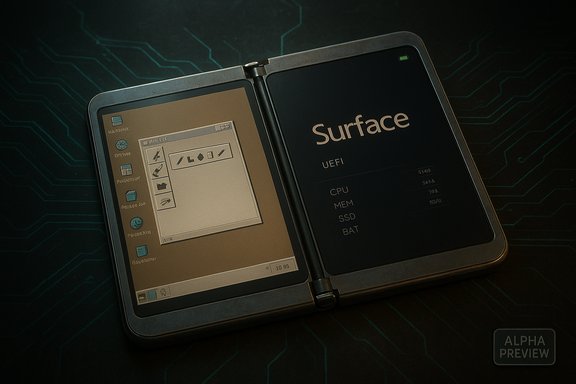
A futuristic dual-screen Surface device open to a retro Windows 95 desktop.Background​

What was Andromeda?​

Andromeda was Microsoft’s experimental Windows variant tailored for a pocketable, dual‑screen device — the idea that later morphed into the Surface Duo hardware. Built as a modular, Windows Core OS‑based environment with strong pen and ink integration, Andromeda represented a long‑standing internal attempt to bridge phone and PC experiences. The project was shelved before commercial launch, and Microsoft pivoted to Android for the Duo’s retail release. Decades of leaks, prototype images and video captures have fed a persistent narrative: Andromeda existed as runnable builds inside Microsoft, but the company ultimately chose the lower‑risk path of shipping Android for app parity and time‑to‑market.

Why this release matters​

For collectors, historians, and device hackers, a public Andromeda firmware package is more than nostalgia: it’s an opportunity to study a canceled OS at scale on the hardware it was designed for. The DuoWOA release—hosted under the WOA‑Project umbrella and surfaced through the project’s SurfaceDuo release channels—provides UEFI images and driver bundles intended to boot Andromeda‑era Windows on the Surface Duo (1st gen). That means the community can test, iterate and potentially resurrect missing drivers, but it also places the responsibility squarely on users and modders: this is alpha‑grade firmware that may brick devices, disable official OTA updates, and expose modem/firmware incompatibilities.

Overview of the DuoWOA release​

What the package contains​

According to the WOA‑Project release notes, the published artifacts include:
  • UEFI images and backup flash packages for the Surface Duo 1st Gen, including options for dual‑boot and fast‑boot testing.
  • Driver bundles and ACPI table updates designed to work with the Project Mu UEFI build tailored for the Duo.
  • “FD” files (flash descriptors) intended for advanced users who want to craft their own dual‑boot images.
  • Clear warnings that these images target specific Microsoft OTA firmware/bootloader versions (notably the 2022.902.48 Microsoft OTA for Duo 1) and that flashing to other firmware versions may render touch or boot behavior unusable.

What works today​

The release is presented as a preview build. On functioning installs users report:
  • The device can successfully boot the Andromeda‑era Windows image and reach a usable desktop UI.
  • Basic input and display rendering operate — the unique dual‑screen layout and many UI elements appear as intended.
  • Community members have been able to run many userland apps and experiment with the shell and inking flows that were central to Andromeda’s design.

What does not work (and why it matters)​

Both the DuoWOA notes and independent reporting flag key limitations:
  • Sensors and cellular data: Accelerometer, gyroscope, magnetometer and the integrated modem stacks are not yet adapted to the Windows drivers included in the package, meaning many modern phone capabilities — location, motion gestures, and mobile connectivity — are offline.
  • Sleep mode and brightness control: Power management paths and panel backlight control are incomplete, so the device cannot reliably suspend or adjust display brightness. This impacts battery safety and usability.
  • Elevated temperatures: Running an OS that lacks optimized power profiles and driver‑level thermal controls results in higher operating temperatures under load — a normal but dangerous behavior for extended use.
These gaps are not trivial: modem integration typically involves proprietary baseband firmware and carrier certification, and power management requires tight interaction between UEFI, ACPI, the SoC vendor drivers and the OS scheduler. Restoring these pieces is nontrivial and may require reverse‑engineering proprietary blobs or adapting Android‑side binaries that are not designed for Windows.

Verifying the facts: cross‑checks and technical validation​

To meet a high bar of verification, the most important claims were cross‑referenced across public channels:
  • The DuoWOA/WOA‑Project publishes the Andromeda platform assets and UEFI images in its SurfaceDuo repositories and release pages — those artifacts and release notes are visible on GitHub. The release index clearly lists UEFI and dual‑boot packages and warns about firmware compatibility.
  • Independent reporting from multiple outlets (Dataconomy, IT之家 / IT Home, and mainstream coverage recalling Andromeda’s history) corroborates the release and echoes the project’s caveats about missing sensors, cellular, and power management features. These outlets reproduce or summarize the DuoWOA notes and provide additional context about what enthusiasts should expect.
  • The Surface Duo hardware specifications — dual 5.6‑inch 1800×1350 AMOLED panels, Snapdragon 855 SoC, 6GB RAM, 128/256GB storage and a 3,577 mAh battery — were confirmed using Microsoft’s product documentation and major hardware outlets, which establishes the platform constraints developers face when adapting drivers and thermal policies.
Where details were ambiguous or absent (for example, the exact Andromeda build number included or the precise contents of proprietary modem firmware), those claims have been flagged and treated as unverified until community maintainers publish finer grain logs or the contained blobs are documented. The WOA‑Project release notes themselves caution that parts of the package are preview quality and that further adaptation will be necessary.

Technical analysis: why running Andromeda on Duo 1 is hard​

Boot chain and UEFI​

The DuoWOA effort is built on Project Mu — Microsoft’s open‑sourced platform for UEFI development. Replacing or augmenting the Duo’s firmware to support Windows requires a UEFI implementation that correctly exposes ACPI tables, TPM/secure boot flows (when applicable), and platform‑specific memory maps. The WOA release includes Project Mu‑based UEFI images, but pairing them with the correct Android OTA bootloader and firmware revision is mandatory; mismatches are frequent causes of bricked devices or broken touch.

Drivers, ACPI and power management​

Windows on ARM requires drivers (kernel and user mode) for every major SoC block — from the GPU and display controllers to modem, audio, and battery. The Duo’s Snapdragon 855 platform was engineered with Android driver stacks and firmware blobs; porting involves either creating Windows drivers from scratch or adapting Linux/Android drivers through translation layers. Even when display rendering works, panel backlight control and system sleep require working ACPI methods and battery drivers, which are often proprietary. That is why brightness and suspend are among the first features to fail in an early port.

Modem and cellular​

Cellular modems on phones often run separate baseband firmware with tightly coupled HALs exposed to the OS through vendor‑specific interfaces. Those interfaces are rarely publicly documented. Without a compatible Windows modem driver and an accompanying firmware handshake, the device cannot present a cellular network interface to the OS — leaving the Duo effectively Wi‑Fi only under Andromeda. Carrier certification (for voice, SMS, and data) would be required to restore full cellular functionality.

Thermal and battery implications​

OS‑level power policies determine CPU core scheduling, per‑cluster power gating, GPU frequency scaling and display energy states. Android vendor stacks include aggressive power‑management optimizations tailored for the Duo’s dual‑panel, thin chassis. A Windows port lacking this tuning sustains higher clock frequencies and reduced idle behavior, resulting in elevated temperatures and faster battery discharge. Users should assume battery drain and heat levels will be worse than Android until driver teams deliver platform‑specific power profiles.

Practical considerations and risks for would‑be experimenters​

  • Backups are mandatory. The GitHub release repeatedly warns that flashing custom boot images will prevent OTAs and may require using official recovery packages to return to stock Android. Back up boot partitions and firmware before experimenting.
  • Firmware and bootloader versions must match. The dual‑boot images target specific Microsoft OTA firmware (for Duo 1, notably 2022.902.48). Flashing to a different firmware or a device variant can brick hardware or leave touch input unusable. Verify your device’s OTA version before attempting any install.
  • Expect missing features and regressions. Sensors, cellular, brightness and sleep were called out by the project as currently non‑functional. Elevated device temperatures are typical while the port lacks optimized power management. Use caution: thermal stress can exacerbate hardware failures.
  • Warranty and carrier support: Modifying firmware voids support and warranty terms in many regions and may violate carrier terms for devices that are locked or registered on networks. Proceed with the assumption that manufacturer support is no longer available.
  • Security implications: Community builds do not receive the same security vetting, sandboxing or attestation as official firmware. Sensitive functions like mobile network authentication and secure enclave access may be compromised or unusable. Treat installs as experimental lab work rather than daily drivers.

High‑level walkthrough: what the installation process looks like (summary)​

The DuoWOA release supplies guides and staged files; the public instructions are aimed at experienced tinkerers and require command‑line tooling. The following is a high‑level, non‑exhaustive sequence of actions described by the project — it is not a step‑by‑step tutorial and bypasses low‑level commands on purpose to avoid mistakes:
  • Confirm your Surface Duo variant and the current Microsoft OTA firmware version. If it does not match the release’s compatibility table (e.g., 2022.902.48 for Duo 1st Gen), update or follow the project’s FD guide to craft a custom image.
  • Back up device partitions (boot, vbmeta, EFS, etc. and obtain a full stock recovery image. This is the safety net if you need to return to Android.
  • Use the provided “fastboot” images to test‑boot the UEFI without permanently flashing. The DuoWOA package includes a fast‑boot image intended for temporary boot testing.
  • If the test boot works, follow the Dual‑Boot guide to flash the dual‑boot image, understanding this will break future Android OTAs unless you reflash the original boot image.
  • Install the driver bundle indicated for the release version and test core functionality. Expect to iterate: missing drivers must be replaced or patched, and ACPI/thermal tweaks will be ongoing work.
The project includes numerous caveats and developer‑level notes. Anyone attempting this should read the GitHub release and guides thoroughly before proceeding.

What this means for the community and the future of Windows on phones​

The DuoWOA release is a reminder that the intersection of ambitious OS design and mobile realities remains a difficult engineering problem. Andromeda’s resurrection on Duo hardware is symbolic: it proves parts of Microsoft’s shelved vision were functional and that the company likely abandoned it for pragmatic reasons — fragmentation, app ecosystem risk and the enormous integration work for modem/carrier support. Community ports like DuoWOA are valuable for preservation, experimentation and technical archaeology, but they do not automatically translate into a commercially viable or carrier‑certified platform. From a practical standpoint, the release could catalyze:
  • Continued driver work from volunteers to bring sensors, power management and modem integration into a usable state.
  • Academic and historical analysis of Andromeda’s UX concepts — particularly its pen‑forward journal ideas — which could influence future Microsoft or third‑party designs.
  • New risk models for small‑scale device projects: community ports can demonstrate proof‑of‑concepts for vendors, but they also highlight the long tail of firmware, certification and silicon support required to ship mass‑market devices.

Critical assessment: strengths, limitations, and unverified claims​

Strengths​

  • Preservation and transparency: Making the firmware publicly available provides engineers and historians with a concrete artifact for study. The project’s inclusion of UEFI, drivers and guides reflects a methodical approach to platform porting.
  • Community coordination: Hosting under the WOA‑Project and providing detailed release notes, compatibility matrices and recovery guidance reduces accidental bricking and centralizes efforts.

Limitations and risks​

  • Incomplete hardware support: Missing modem, sensor and power drivers make the builds unsuitable for everyday use. Those gaps involve proprietary components that are difficult to reimplement.
  • Safety and reliability: Elevated thermal output and the possibility of bricking devices are immediate concerns. Without vendor cooperation, some problems may be intractable.
  • Legal and licensing ambiguity: The release includes no carrier certifications or manufacturer warranty, and may surface proprietary blobs whose redistribution could carry legal implications. This is an area where the public documentation is either silent or ambiguous; it should be treated as unverified until the maintainers publish precise licensing details.

Unverified claims to watch​

  • Specific Andromeda build numbers and their provenance (exact Microsoft internal build IDs) were not fully reproducible in public logs and may require additional disclosure from maintainers or Microsoft to be independently verified. Treat detailed build provenance as tentative until the project provides cryptographic hashes and explicit provenance notes.

Conclusion​

The DuoWOA publication of Andromeda firmware for the first‑generation Surface Duo is a rare and meaningful milestone in device preservation and community engineering. It brings a discontinued Microsoft vision back to life on the hardware that inspired it, but it is emphatically an alpha‑grade achievement: useful for research and tinkering, but not for daily use. The path from a bootable Andromeda thumbnail to a secure, carrier‑certified phone is long, requiring modem integration, driver rewrites, thermal and power optimization and, perhaps, vendor cooperation. For now, the release gives enthusiasts and engineers a starting point — a living artifact to study and improve — while underscoring the hard realities that forced Microsoft to pivot to Android in the first place.

Source: Dataconomy Long-lost Windows 10 Andromeda firmware surfaces for first-gen Duo
 

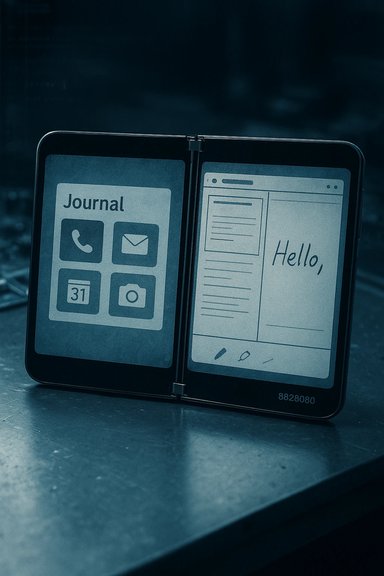
Microsoft’s shelved mobile Windows experiment has resurfaced in a form anyone with a first‑generation Surface Duo and a healthy tolerance for risk can test: an early Andromeda OS build—identified in community packages as “Windows 8828080”—has been packaged and made runnable on the original Surface Duo by community porters, giving the public a rare, hands‑on look at what Windows might have become on pocket devices.

A dual-screen device shows a Journal app on the left and a 'Hello,' note on the right.Background​

Microsoft’s internal project known as Andromeda was an ambitious attempt to reconceive Windows for small, pen‑and‑journal‑style mobile hardware. Work on the concept accelerated during the Windows Core OS and Windows 10X era, but the effort was shelved around 2018 and the dual‑screen Surface hardware that remained from that work was ultimately released running Android as the Surface Duo family. The freshly released community artifacts trace directly to that abandoned lineage.
The community release that surfaced in late December 2025 is not an official Microsoft distribution. Instead, it is a packaged leaked build that developer and Windows tinkerer Gustave Monce adapted and published along with guided install instructions and a flashable image (FFU) for the Surface Duo (1st Gen). The port is explicitly a preview, and the maintainers and reporters emphasize that it is far from a daily‑driver OS.

Overview of the public build​

What the package is​

  • The published artifacts include a bootable UEFI image, FFU flash images, driver bundles and ACPI/UEFI patches intended to make the Andromeda-era shell run on Surface Duo hardware.
  • The release is distributed by community projects working under the WOA/DuoWOA umbrella and was packaged by independent developers who have a history of porting Windows variants to mobile Surface devices.
  • The platform identifier used in packages and instructions is often shown as Windows 8828080, a placeholder tag preserved from internal build artifacts.

What runs and what doesn’t​

The build boots and surfaces the original Andromeda UI concepts—journal‑style home screens, Live Tile–like Start behaviors, dual‑screen window placement and inking flows—so it is a functional museum piece rather than a consumer OS. Core display rendering, dual‑panel layout and many shell gestures are demonstrably present.
Crucially, multiple independent checks and the maintainers’ own notes show that several deep subsystems are missing or nonfunctional:
  • Cellular modem stacks, location and many sensors (accelerometer, gyroscope, magnetometer) are not integrated. This means no reliable mobile data, voice, SMS or motion‑based behavior.
  • Power management and panel backlight control are incomplete; sleep, brightness and thermal/power policies are not production quality. Raised device temperatures and rapid battery drain under load have been reported.
  • Touch, multi‑touch and some input paths may be degraded depending on the flashed image and firmware match; external input devices (USB or Bluetooth) are often used by testers.
These gaps are not cosmetic: modem and power integration require vendor firmware, proprietary baseband interfaces and certified carrier workflows that community ports cannot easily replicate. That engineering boundary explains why Microsoft pivoted to Android for shipping Duo devices in the first place.

Who made it runnable (and why it matters)​

Gustave Monce—an active developer in the Surface Duo modding scene—packaged the leaked Andromeda build and published a guided installation flow on GitHub, making the images accessible to the wider enthusiast community. Monce has released screenshots and short demos showing the Start menu, Live Tiles, and the shell running across the Duo’s dual displays. The WOA‑Project / DuoWOA community hosts the underlying UEFI and driver work that makes these experiments possible. These groups maintain repositories with Project Mu UEFI builds, ACPI table updates and driver bundles targeted at Surface family hardware. That communal infrastructure is the only practical way to revive an internal OS image and try it on the hardware it was originally designed for. Why this matters:
  • It converts screenshots and rumors into a running artifact that researchers, UX designers and engineers can examine.
  • It demonstrates which parts of the original vision were technically implemented and which parts were blocked by integration realities (modems, certification, power tuning).
  • It serves as a living study of why building a new mobile platform at scale—hardware vendors, carriers and app ecosystems included—is strategically and technically expensive.

Installation reality: what the community packages require​

The community repositories and release notes are explicit: these images are targeted to the first‑generation Surface Duo and to specific Microsoft OTA/bootloader versions (for example, builds target firmware version 2022.902.48 for many Duo 1 images). Flashing to unmatched firmware or different device variants can brick the device or render touch unusable. Backups are mandatory. A high‑level, non‑exhaustive view of the flow (not a how‑to):
  • Confirm you own a Surface Duo 1 and check the device’s OTA/bootloader version against the release compatibility table.
  • Back up all critical partitions (boot, vbmeta, EFS, userdata) and obtain a stock recovery image to allow reversion to Android.
  • Use the provided fast‑boot option to test‑boot the UEFI/Andromeda image before any permanent flashing; this lets you see whether core graphics and input initialize.
  • If test boots succeed and you accept the risks, follow the dual‑boot flashing guide to install a persistent image, understanding that OTAs will likely fail and warranty/support will be void.
The maintainers repeatedly caution that this is experimental work intended for technically proficient tinkerers and preservationists; it is not for casual users.

Technical analysis: why many features are missing​

Modem and carrier stacks​

Smartphone modems run proprietary baseband firmware and require vendor HALs plus carrier certification. Community ports typically need vendor collaboration or carefully reverse‑engineered drivers to restore voice, SMS and mobile data. The Andromeda build lacks integrated modem support—and even if a driver appears, carrier certification remains a major gate. That combination is the primary barrier to turning the build into a real phone.

Power, thermal and display management​

Modern Android images from OEMs include aggressive power management and panel tuning that are often baked into vendor drivers. A Windows port missing these pieces runs hot and does not sleep predictably. Early testers report elevated temperatures and accelerated battery drain—expected when the OS cannot apply vendor‑specific power gating. This is not merely a polish problem; it affects device safety and longevity.

Sensors and input​

Sensor stacks—accelerometer, gyroscope, magnetometer, proximity—are integral to motion gestures, auto‑rotation, and many apps. Without working drivers or integrated HALs, those features are offline. Touch input and multi‑touch behavior may also be degraded, forcing some testers to use external input methods.

Signed firmware and attestation​

Modern phones rely on signing and attestation for secure boot, enclave functions and modem authentication. Community images bypass vendor signing; even if they boot, they may break attestation or protected features. That reduces trustworthiness for banking, DRM and some enterprise features.

Legal, security and warranty implications​

  • Redistribution and licensing: The provenance and redistribution rights for some firmware blobs in community packages are ambiguous. Until maintainers list explicit licensing for included binaries, redistributors and users should assume legal uncertainty.
  • Warranty/Support: Flashing these images will typically void manufacturer warranties and exclude devices from official OTA updates. Carriers may refuse service on heavily modified devices.
  • Security: Community firmware lacks the vetting pipeline of official releases and may expose sensitive subsystems or reduce the effectiveness of secure boot and attestation. Treat any device flashed with such images as an experimental testbed, not a secure daily driver.
Where provenance is uncertain, caution is warranted: the exact chain‑of‑custody for leaked Andromeda binaries has not been fully documented in public artifacts, and some claims about internal build IDs remain unverified. Those points should be treated as tentative until maintainers publish cryptographic hashes and provenance metadata.

What the Andromeda revival tells us about Microsoft’s strategy​

Andromeda’s resurrection is both a design artifact and a strategic mirror. It shows that Microsoft explored a radically different mobile UX—pen‑forward, journal‑centric, optimized for dual displays—and that parts of that vision were implemented to the point of being bootable. At the same time, the missing integration layers reveal why Microsoft chose Android for shipping the Surface Duo: the cost and complexity of vendor/firmware/carrier integration, the app ecosystem considerations, and certification burdens were decisive.
From a product perspective:
  • The Surface Duo line never achieved mainstream success and both models have reached the end of servicing windows: the Surface Duo (1st gen) reached its end of support in September 2023, and Surface Duo 2’s final updates were distributed around October 2024—factors that reduced Microsoft’s incentive to invest further in a bespoke mobile OS.
  • Leadership and organizational shifts—such as the departure of senior Surface executives—compounded the strategic challenge of sustaining a separate mobile OS effort. The community port is therefore both an engineering curiosity and a historical footnote.

For preservationists and hobbyists: why this matters​

  • Historical preservation: The Andromeda images are primary artifacts for historians and UX researchers who want to study design decisions and implementation choices that never reached consumers. They provide a working reference for what the UX looked like in situ.
  • Community engineering value: The WOA‑Project and DuoWOA work demonstrates how open collaboration can extend device lifecycles, recover abandoned artifactual software, and produce drivers and documentation that otherwise would be lost. Those efforts create technical knowledge valuable beyond the immediate devices.
  • Practical limits: While the artifacts invite driver work and creative reverse engineering, the heavy lifting—modem integration, carrier certification, vendor cooperation—remains impractical for fully replacing Android on a daily device. Community projects can make meaningful inroads, but not easily reach the bar required for a shipping phone.

Strengths and potential risks — a quick assessment​

Strengths​

  • UX proof of concept: Andromeda’s journal home, Live Tile heritage and pen emphasis show an innovative, coherent approach to pocket computing.
  • Preservation and research value: The port moves conversations from “what if” to empirical testing and analysis.
  • Community momentum: The WOA/DuoWOA ecosystem provides the technical scaffolding (UEFI, ACPI, driver projects) necessary to continue evolving the build.

Risks and weaknesses​

  • Hardware integration gaps: Missing modem, sensor and power drivers are fundamental and not trivial to fix.
  • Thermal and battery safety: Elevated heat and poor power profiles risk hardware stress and unsafe battery behavior if used extensively.
  • Legal and provenance ambiguity: The unclear licensing of some redistributable binaries risks legal exposure.
  • No carrier/certification path: Without vendor cooperation, the build is unlikely to achieve commercial parity with Android devices.

Practical guidance (for technically experienced readers only)​

  • Always fully back up your device and collect a stock recovery image before testing community firmware.
  • Use the fast‑boot test option provided by the project to confirm whether the UEFI/Andromeda image boots on your device before deciding to flash permanently.
  • Match firmware/OTAs exactly to the compatibility table in the release notes (images often target Microsoft OTA versions such as 2022.902.48 for Duo 1). Flashing to unmatched versions risks bricking.
  • Treat any install as experimental lab work. Do not rely on a device running these images for communications, secure transactions, or production tasks.

What to watch next​

  • Will the maintainers publish detailed provenance (cryptographic hashes, chain‑of‑custody) for the leaked Andromeda blobs? That would reduce ambiguity around legality and trust.
  • Will driver work close the largest gaps (modem and power management), or will those remain blocked by proprietary firmware barriers? Real progress here would shift the experiment from demonstration to capability.
  • Will Microsoft respond publicly to the community distribution or leave the artifact as a public research object? A formal response—either clarifying licensing or offering archival access—would change how maintainers classify their release.

Conclusion​

The community‑packaged Andromeda build for the Surface Duo is a rare, tangible glimpse into a Microsoft mobile OS that never reached customers. It crystallizes both the creative ambition behind a pen‑and‑dual‑screen Windows and the pragmatic roadblocks—modem firmware, power management, carrier certification—that made Android the safer commercial choice for the Surface Duo line. For historians, UX designers and device hackers it is a treasure trove; for anyone hoping for a ready‑to‑use Windows phone replacement, the practical reality remains unchanged: fundamental integration and certification work stand between a bootable artifact and a viable, everyday mobile platform. The Andromeda resurrection is therefore both an exciting technical archaeology and a sober reminder: visionary OS design is necessary but not sufficient; shipping a phone at scale is an orchestration of silicon, firmware, carriers and ecosystem that community devotion alone cannot easily replicate.

Source: Heise Online Microsoft's Andromeda OS: Windows for the Surface Duo can be tried out
 

Back
Top